remote control HONDA HRV 2022 Owner's Manual
[x] Cancel search | Manufacturer: HONDA, Model Year: 2022, Model line: HRV, Model: HONDA HRV 2022Pages: 641, PDF Size: 21.37 MB
Page 173 of 641
Continued171
uuOperating the Switches Around the Steering Wheel uENGINE START/STOP Button
Controls
If you leave the vehicle for 30 to 60 minutes with the transmission in (P and the
power mode in ACCESSORY, the vehicle automa tically goes into the mode similar to
VEHICLE OFF (LOCK) to avoid draining the battery.
When in this mode:
The steering wheel does not lock.
You cannot lock or unlock doors with the remote transmitter or the keyless access
system.
Press the ENGINE START/STOP button to switch the mode to VEHICLE OFF (LOCK).
2Changing the Power Mode P. 170
■Automatic Power Off1Changing the Power Mode
If the power mode does not change from VEHICLE
OFF to ACCESSORY, press the ENGINE START/STOP
button while moving the st eering wheel left and
right. The steering wheel will unlock, allowing the
mode to change.
Canadian models
Canadian models
All models
22 HR-V HDMC-31T7A6600.book 171 ページ 2021年4月12日 月曜日 午前10時50分
Page 174 of 641
uuOperating the Switches Around the Steering Wheel uENGINE START/STOP Button
172
Controls
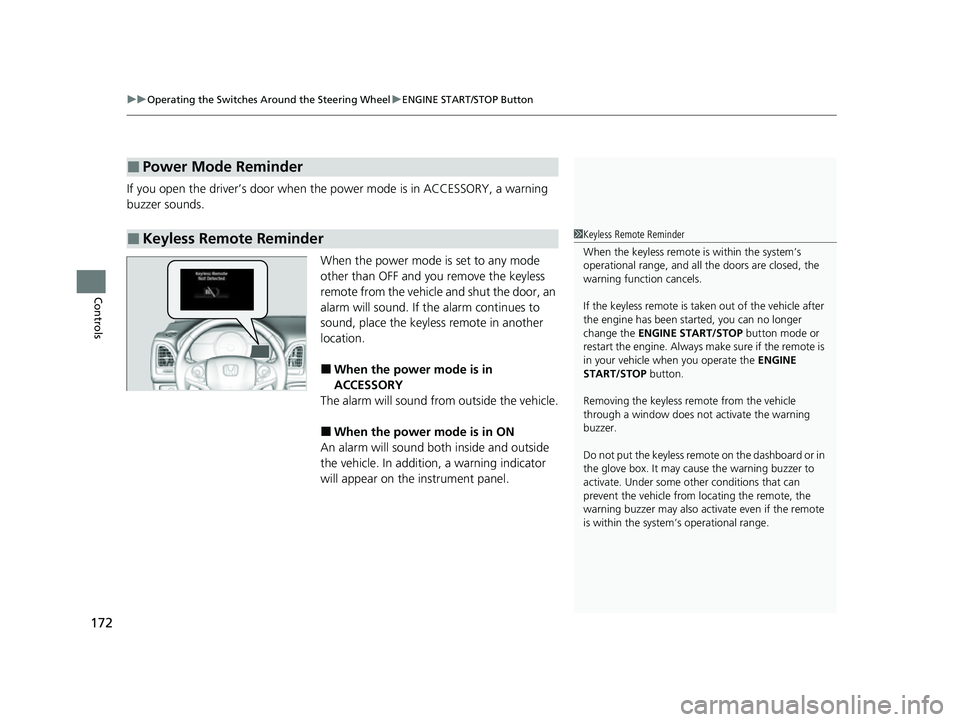
If you open the driver’s door when th e power mode is in ACCESSORY, a warning
buzzer sounds.
When the power mode is set to any mode
other than OFF and you remove the keyless
remote from the vehicle and shut the door, an
alarm will sound. If th e alarm continues to
sound, place the keyless remote in another
location.
■When the power mode is in
ACCESSORY
The alarm will sound from outside the vehicle.
■When the power mode is in ON
An alarm will sound both inside and outside
the vehicle. In addition, a warning indicator
will appear on the instrument panel.
■Power Mode Reminder
■Keyless Remote Reminder1 Keyless Remote Reminder
When the keyless remote is within the system’s
operational range, and all the doors are closed, the
warning function cancels.
If the keyless remote is taken out of the vehicle after
the engine has been st arted, you can no longer
change the ENGINE START/STOP button mode or
restart the engine. Always make sure if the remote is
in your vehicle when you operate the ENGINE
START/STOP button.
Removing the keyless remote from the vehicle
through a window does not activate the warning
buzzer.
Do not put the keyless remo te on the dashboard or in
the glove box. It may cause the warning buzzer to
activate. Under some ot her conditions that can
prevent the vehicle from locating the remote, the
warning buzzer may also activate even if the remote
is within the system’s operational range.
22 HR-V HDMC-31T7A6600.book 172 ページ 2021年4月12日 月曜日 午前10時50分
Page 179 of 641
177
uuOperating the Switches Around the Steering Wheel uLight Switches
Controls
The headlights automatically come on when the wipers are used several times within
a number of certain intervals with the headlight switch in AUTO.
The headlights automatically go off a few minutes later if the wipers are stopped.
The headlights, all other exterior lights, a nd the instrument panel lights turn off 15
seconds after you remove the key or set the power mode to VEHICLE OFF (LOCK),
take the remote with you, and close the driver’s door.
If you turn the igniti on switch to LOCK
(0*1 with the headlight switch on, but do
not open the door, the lights tu rn off after 10 minutes (3 minutes, if the switch is in
the AUTO
* position).
The lights turn on again when you unlock or open the driver’s door. If you unlock
the door, but do not open it within 15 seconds, the lights go off. If you open the
driver’s door, you will hear a lights on reminder chime.
*1: Models with the keyless access system have an ENGINE START/STOP button instead of an
ignition switch.
■Headlight Integration with Wipers*
■Automatic Lighting Off Feature
1 Automatic Operation (aut omatic lighting control)*
You can adjust the auto li ght sensitivity as follow:
2 Customized Features P. 127
SettingThe exterior lights come on
when the ambient light is at
Max
High
Mid
Low
Min
U.S. models
Bright
Dark
1 Headlight Integration with Wipers*
This feature activates while the headlights are off in
AUTO .
The instrument panel br ightness does not change
when the headlights come on.
At dark ambient light levels, the automatic lighting
control feature turns on the headlights, regardless of
the number of wiper sweeps.
1 Automatic Lighting Off Feature
You can change the headlight auto off timer setting.
2 Customized Features P. 127
Models with multi-information display
* Not available on all models
22 HR-V HDMC-31T7A6600.book 177 ページ 2021年4月12日 月曜日 午前10時50分
Page 233 of 641
231
Features
This chapter describes how to operate technology features.
Audio System
About Your Audio System .................... 232
USB Port(s) ........................................... 233
Audio System Theft Protection ............. 234
Audio Remote Controls ........................ 235
Audio System Basic Operation ............. 238
Audio/Information Screen .................... 239
Adjusting the Sound ............................ 243
Display Setup ....................................... 244
Playing AM/FM Radio ........................... 245
Playing a CD ........................................ 247
Playing an iPod..................................... 250
Playing a USB Flash Drive...................... 253
Playing Bluetooth ® Audio ..................... 256
Models with color audio system
Audio System Basic Operation ............ 259
Audio/Information Screen .................... 260
Adjusting the Sound ............................ 275
Display Setup ....................................... 276
Voice Control Operation ...................... 278
Playing AM/FM Radio........................... 282
Playing SiriusXM ® Radio
*..................... 286
Playing an iPod .................................... 294
Song By Voice
TM (SBV).......................... 297
Playing Pandora® ................................. 301
Playing a USB Flash Drive ..................... 303
Playing Bluetooth ® Audio..................... 306
HondaLink® ......................................... 308
Models with display audio systemWi-Fi Connection.................................. 31R
Siri Eyes Free........................................M 31T
Apple CarPlay ......................................M 31U
Android Auto ......................................M 32O
Audio Error Messages ........................... 327
General Information on the Audio System..... 333
Customized Features............................. 349
Customized Features ............................. 356
HomeLink ® Universal Transceiver
*....... 371
Bluetooth ® HandsFreeLink ®.................. 374
Bluetooth ® HandsFreeLink ®.................. 397
Models with color audio system
Models with display audio system
Models with color audio system
Models with display audio system
* Not available on all models
22 HR-V HDMC-31T7A6600.book 231 ページ 2021年4月12日 月曜日 午前10時50分
Page 234 of 641
232
Features
Audio System
About Your Audio System
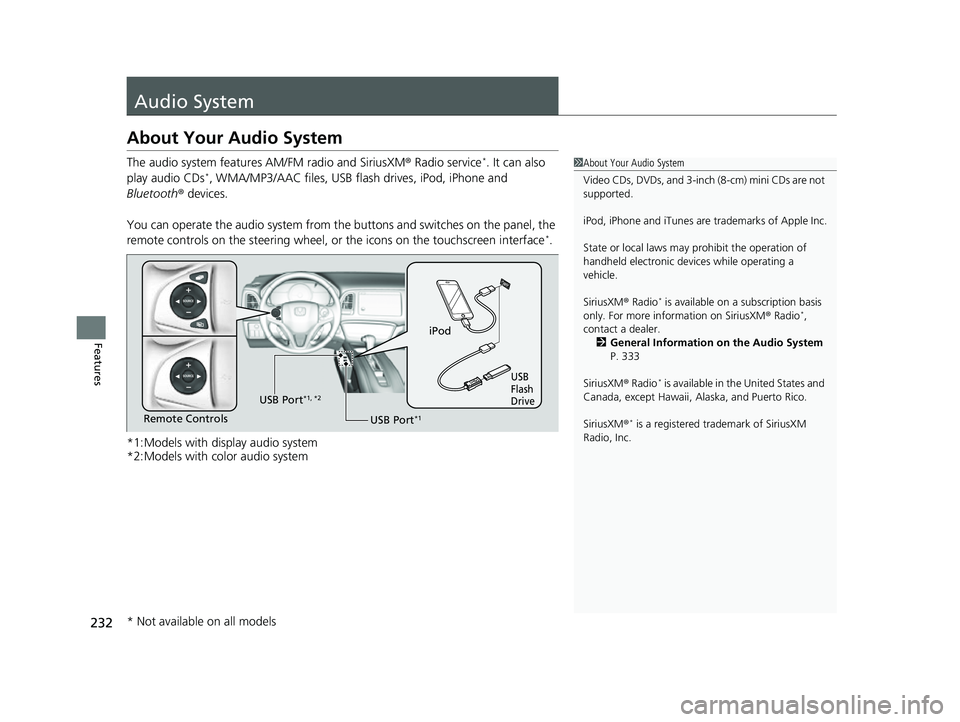
The audio system features AM/FM radio and SiriusXM ® Radio service*. It can also
play audio CDs*, WMA/MP3/AAC files, USB flas h drives, iPod, iPhone and
Bluetooth ® devices.
You can operate the audio system from the buttons and switches on the panel, the
remote controls on the steering wheel, or the icons on the touchscreen interface
*.
*1:Models with display audio system
*2:Models with color audio system
1 About Your Audio System
Video CDs, DVDs, and 3-inch (8-cm) mini CDs are not
supported.
iPod, iPhone and iTunes are trademarks of Apple Inc.
State or local laws may prohibit the operation of
handheld electronic devi ces while operating a
vehicle.
SiriusXM ® Radio
* is available on a subscription basis
only. For more information on SiriusXM ® Radio*,
contact a dealer.
2 General Information on the Audio System
P. 333
SiriusXM ® Radio
* is available in the United States and
Canada, except Ha waii, Alaska, and Puerto Rico.
SiriusXM ®
* is a registered tra demark of SiriusXM
Radio, Inc.
iPod
USB
Flash
Drive
USB Port*1Remote Controls USB Port
*1, *2
* Not available on all models
22 HR-V HDMC-31T7A6600.book 232 ページ 2021年4月12日 月曜日 午前10時50分
Page 237 of 641
235
uuAudio System uAudio Remote Controls
Continued
Features
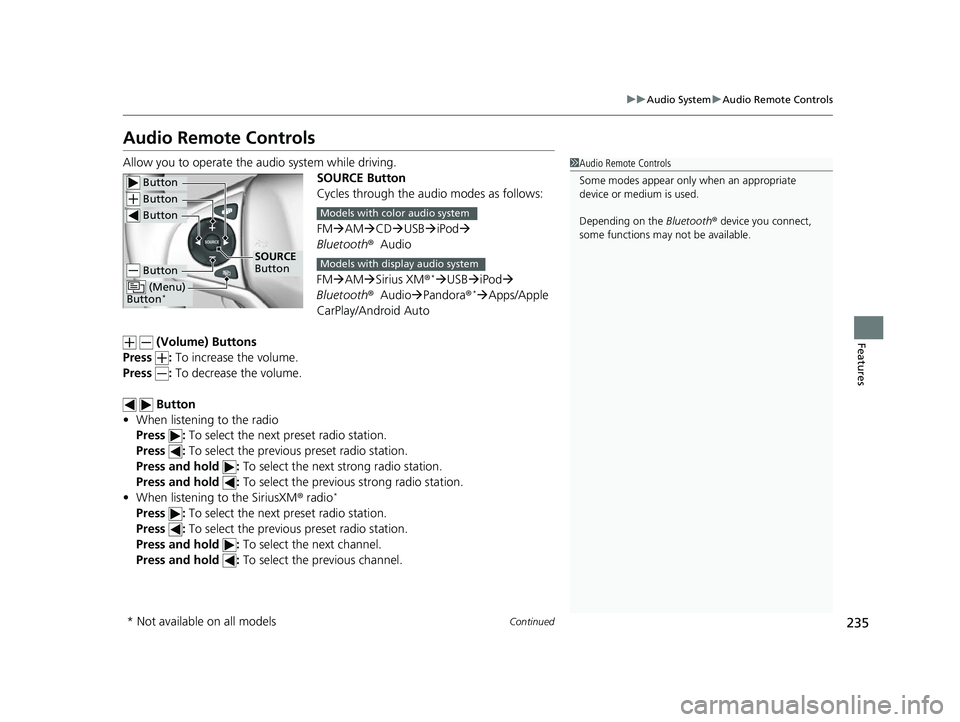
Audio Remote Controls
Allow you to operate the au dio system while driving.
SOURCE Button
Cycles through the audio modes as follows:
FMAM CD USB iPod
Bluetooth ®Audio
FM AM Sirius XM®
*USB iPod
Bluetooth ®Audio Pandora®* Apps/Apple
CarPlay/Android Auto
(Volume) Buttons
Press : To increase the volume.
Press : To decrease the volume.
Button
• When listening to the radio
Press : To select the next preset radio station.
Press : To select the previous preset radio station.
Press and hold : To select the next strong radio station.
Press and hold : To select the previous strong radio station.
• When listening to the SiriusXM ® radio
*
Press : To select the next preset radio station.
Press : To select the previous preset radio station.
Press and hold : To select the next channel.
Press and hold : To select the previous channel.
1Audio Remote Controls
Some modes appear only when an appropriate
device or medium is used.
Depending on the Bluetooth® device you connect,
some functions may not be available.
Button
Button
Button
Button
(Menu)
Button*
SOURCE
Button
Models with color audio system
Models with display audio system
* Not available on all models
22 HR-V HDMC-31T7A6600.book 235 ページ 2021年4月12日 月曜日 午前10時50分
Page 238 of 641
236
uuAudio System uAudio Remote Controls
Features
• When listening to a CD*, iPod, USB flash drive, or Bluetooth® Audio
Press : To skip to the next song.
Press : To go back to the beginning of the current or previous song.
• When listening to a CD
* or USB flash drive
Press and hold : To skip to the next folder.
Press and hold : To go back to the previous folder.
• When listening to a Bluetooth® Audio
Press and hold : To go to the group up.
*1
Press and hold : To go to the group down.*1
•When listening to Internet radio*
Press : To skip to the next song.
Press and hold : To select the next station.
Press and hold : To select the previous station.
*1: Available on specific phones only.
* Not available on all models
22 HR-V HDMC-31T7A6600.book 236 ページ 2021年4月12日 月曜日 午前10時50分
Page 239 of 641
237
uuAudio System uAudio Remote Controls
Features
Steering Wheel (Menu) Button
• When listening to the radio
Press : To display the menu items. You can select Scan, Save Preset , or
Seek.
• When listening to the SiriusXM ® radio
*
Press : To display the menu items. You can select Scan, Save Preset ,
Channel , or Category.
• When listening to a USB flash drive
Press : To display the menu items. You can select Scan, Repeat , or Random .
• When listening to an iPod
Press : To display the menu items. You can select Repeat or Shuffle .
• When listening to a Bluetooth® Audio
Press : To display the menu items. You can select Pause or Play .
• When listening to a Pandora ®
*
Press : To display the menu items. You can select Bookmark, or Play/Pause.
1Audio Remote Controls
The button is available only when the audio
mode is FM, AM, USB, iPod, Pandora®
*, or
Bluetooth ® Audio.
Models with display audio system
* Not available on all models
22 HR-V HDMC-31T7A6600.book 237 ページ 2021年4月12日 月曜日 午前10時50分
Page 240 of 641
238
Features
Audio System Basic Operation
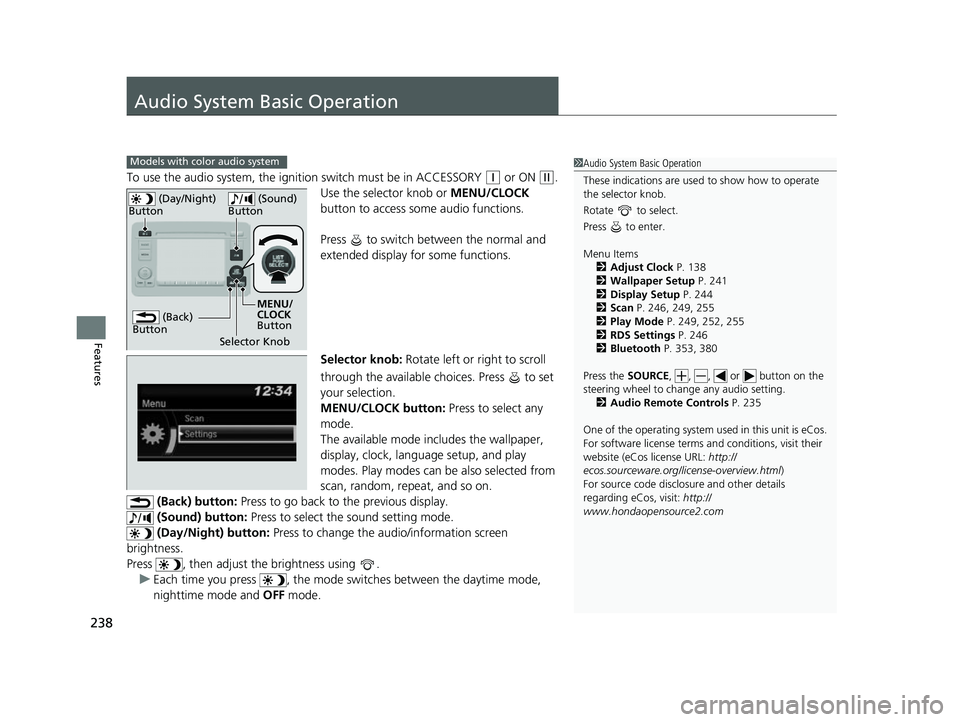
To use the audio system, the ignition switch must be in ACCESSORY (q or ON (w.
Use the selector knob or MENU/CLOCK
button to access some audio functions.
Press to switch between the normal and
extended display fo r some functions.
Selector knob: Rotate left or right to scroll
through the available choices. Press to set
your selection.
MENU/CLOCK button: Press to select any
mode.
The available mode includes the wallpaper,
display, clock, langu age setup, and play
modes. Play modes can be also selected from
scan, random, rep eat, and so on.
(Back) button: Press to go back to the previous display.
(Sound) button: Press to select the sound setting mode.
(Day/Night) button: Press to change the audio/information screen
brightness.
Press , then adjust th e brightness using .
u Each time you press , the mode switches between the daytime mode,
nighttime mode and OFF mode.
Models with color audio system1Audio System Basic Operation
These indications are used to show how to operate
the selector knob.
Rotate to select.
Press to enter.
Menu Items 2 Adjust Clock P. 138
2 Wallpaper Setup P. 241
2 Display Setup P. 244
2 Scan P. 246, 249, 255
2 Play Mode P. 249, 252, 255
2 RDS Settings P. 246
2 Bluetooth P. 353, 380
Press the SOURCE, , , or button on the
steering wheel to cha nge any audio setting.
2 Audio Remote Controls P. 235
One of the operating system us ed in this unit is eCos.
For software license terms and conditions, visit their
website (eCos license URL: http://
ecos.sourceware.org/li cense-overview.html)
For source code disclo sure and other details
regarding eCos, visit: http://
www.hondaopensource2.com
(Back)
Button
Selector Knob MENU/
CLOCK
Button
(Day/Night)
Button
(Sound)
Button
22 HR-V HDMC-31T7A6600.book 238 ページ 2021年4月12日 月曜日 午前10時50分
Page 248 of 641
uuAudio System Basic Operation uPlaying AM/FM Radio
246
Features
Provides text data information related to your selected RDS capable FM station.
■To find an RDS station from Station List
1. Press while listening to an FM station.
2. Rotate to select the station, then press .
■Update List
Updates your available station list at any time.
1. Press while listening to an FM station.
2. Rotate to select Update List, then press .
■Radio text
Displays the radio text informat ion of the selected RDS station.
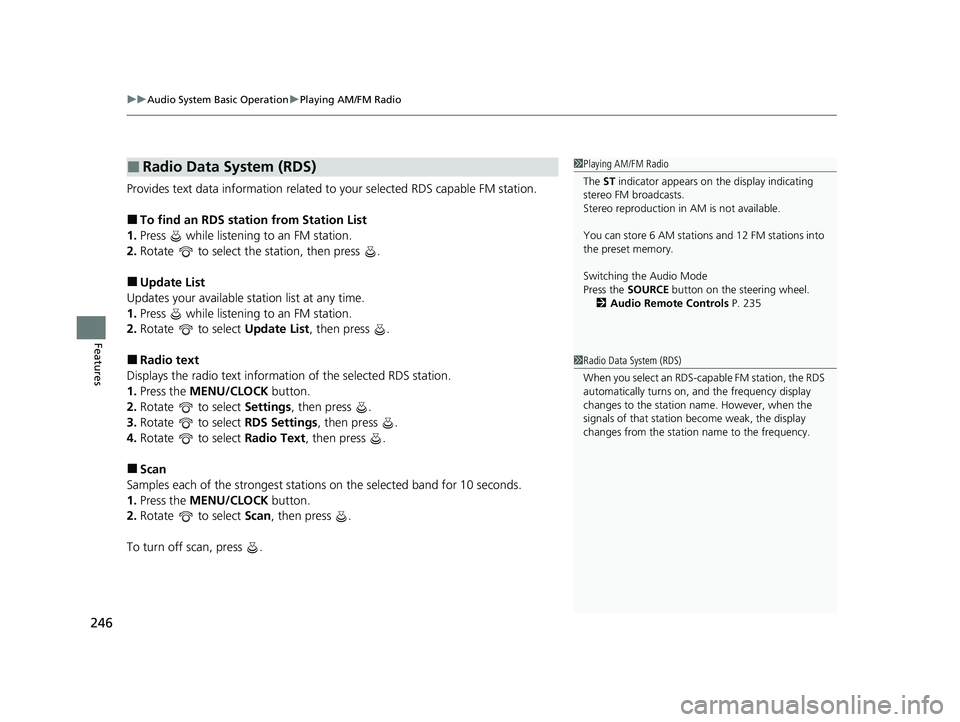
1. Press the MENU/CLOCK button.
2. Rotate to select Settings, then press .
3. Rotate to select RDS Settings, then press .
4. Rotate to select Radio Text, then press .
■Scan
Samples each of the strongest stations on the selected band for 10 seconds.
1. Press the MENU/CLOCK button.
2. Rotate to select Scan, then press .
To turn off scan, press .
■Radio Data System (RDS)1 Playing AM/FM Radio
The ST indicator appears on the display indicating
stereo FM broadcasts.
Stereo reproduction in AM is not available.
You can store 6 AM stations and 12 FM stations into
the preset memory.
Switching the Audio Mode
Press the SOURCE button on the steering wheel.
2 Audio Remote Controls P. 235
1Radio Data System (RDS)
When you select an RDS-capable FM station, the RDS
automatically turns on, and the frequency display
changes to the station name. However, when the
signals of that station become weak, the display
changes from the statio n name to the frequency.
22 HR-V HDMC-31T7A6600.book 246 ページ 2021年4月12日 月曜日 午前10時50分