warning HONDA HRV 2022 Owner's Manual
[x] Cancel search | Manufacturer: HONDA, Model Year: 2022, Model line: HRV, Model: HONDA HRV 2022Pages: 641, PDF Size: 21.37 MB
Page 97 of 641
95
uuIndicators u
Continued
Instrument Panel
*1:Models with the keyless access system have an ENGINE START/STOP button instead of an ignition switch.
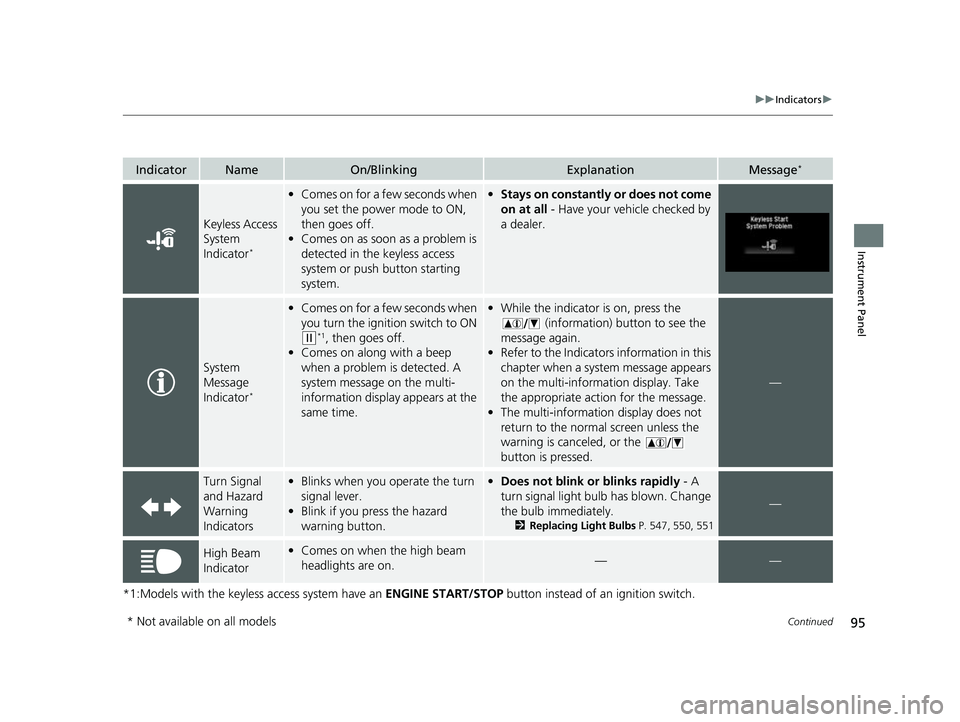
IndicatorNameOn/BlinkingExplanationMessage*
Keyless Access
System
Indicator
*
•Comes on for a few seconds when
you set the power mode to ON,
then goes off.
• Comes on as soon as a problem is
detected in the keyless access
system or push button starting
system.•Stays on constantly or does not come
on at all - Have your vehicle checked by
a dealer.
System
Message
Indicator
*
• Comes on for a few seconds when
you turn the ignition switch to ON
(w*1, then goes off.
• Comes on along with a beep
when a problem is detected. A
system message on the multi-
information display appears at the
same time.
•While the indicator is on, press the
(information) button to see the
message again.
• Refer to the Indicators information in this
chapter when a system message appears
on the multi-information display. Take
the appropriate action for the message.
• The multi-information display does not
return to the normal screen unless the
warning is canceled, or the
button is pressed.
—
Turn Signal
and Hazard
Warning
Indicators•Blinks when you operate the turn
signal lever.
• Blink if you press the hazard
warning button.•Does not blink or blinks rapidly - A
turn signal light bulb has blown. Change
the bulb immediately.
2 Replacing Light Bulbs P. 547, 550, 551
—
High Beam
Indicator•Comes on when the high beam
headlights are on.——
* Not available on all models
22 HR-V HDMC-31T7A6600.book 95 ページ 2021年4月12日 月曜日 午前10時50分
Page 105 of 641
103
uuIndicators uInformation Display Warning and Information Messages*
Instrument Panel
Information Display Warning and Information Messages*
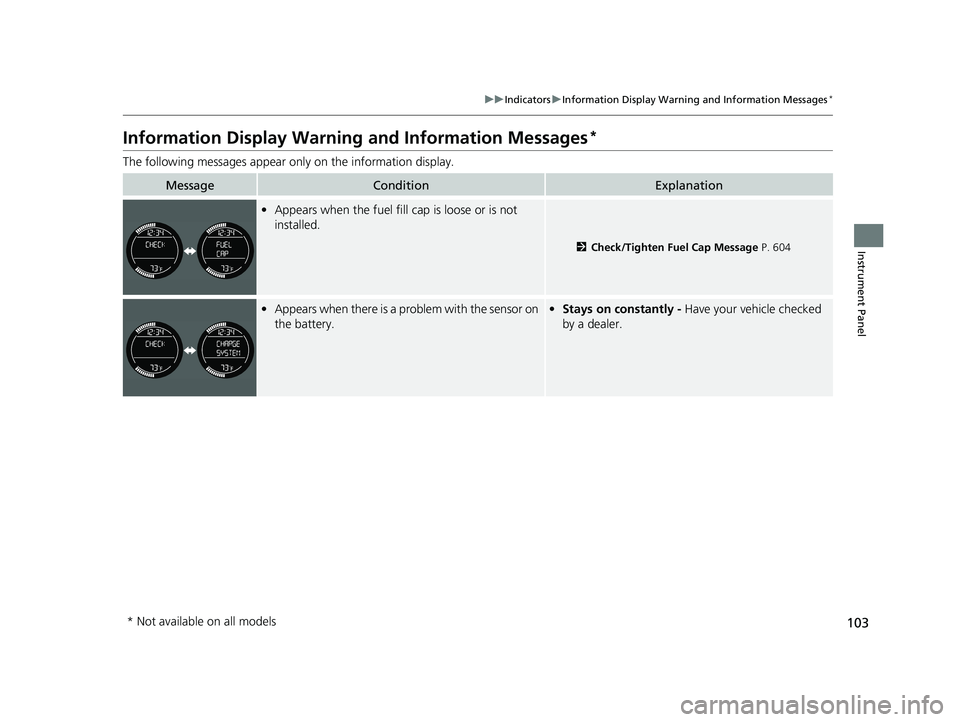
The following messages appear on ly on the information display.
MessageConditionExplanation
•Appears when the fuel fill cap is loose or is not
installed.
2 Check/Tighten Fuel Cap Message P. 604
•Appears when there is a problem with the sensor on
the battery.• Stays on constantly - Have your vehicle checked
by a dealer.
* Not available on all models
22 HR-V HDMC-31T7A6600.book 103 ページ 2021年4月12日 月曜日 午前10時50分
Page 115 of 641
113
uuIndicators uMulti-Information Display Warn ing and Information Messages*
Continued
Instrument Panel
MessageConditionExplanation
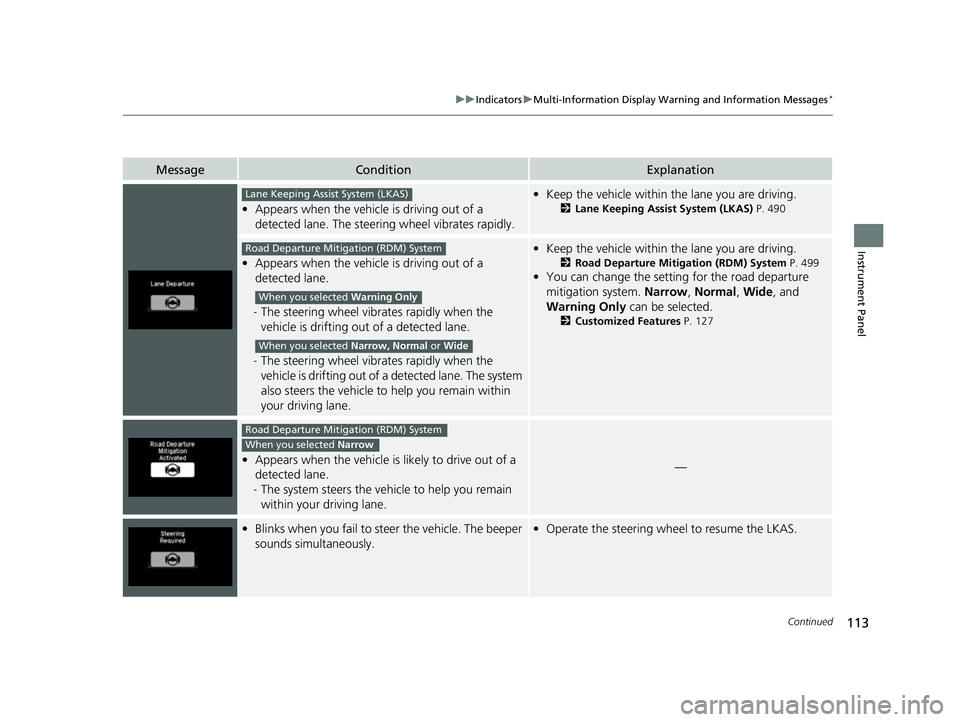
•Appears when the vehicle is driving out of a
detected lane. The steering wheel vibrates rapidly.
• Keep the vehicle within the lane you are driving.
2Lane Keeping Assist System (LKAS) P. 490
•Appears when the vehicle is driving out of a
detected lane.
- The steering wheel vibrates rapidly when the
vehicle is drifting out of a detected lane.
- The steering wheel vibrates rapidly when the
vehicle is drifting out of a detected lane. The system
also steers the vehicle to help you remain within
your driving lane.
• Keep the vehicle within the lane you are driving.
2Road Departure Mitigation (RDM) System P. 499
•You can change the setting for the road departure
mitigation system. Narrow, Normal, Wide, and
Warning Only can be selected.
2Customized Features P. 127
•Appears when the vehicle is likely to drive out of a
detected lane.
- The system steers the vehi cle to help you remain
within your driving lane.—
• Blinks when you fail to steer the vehicle. The beeper
sounds simultaneously.• Operate the steering wheel to resume the LKAS.
Lane Keeping Assist System (LKAS)
Road Departure Mitigation (RDM) System
When you selected Warning Only
When you selected Narrow, Normal or Wide
Road Departure Mitigation (RDM) System
When you selected Narrow
22 HR-V HDMC-31T7A6600.book 113 ページ 2021年4月12日 月曜日 午前10時50分
Page 124 of 641
122
uuGauges and Displays uMulti-Information Display*
Instrument Panel
Multi-Information Display*
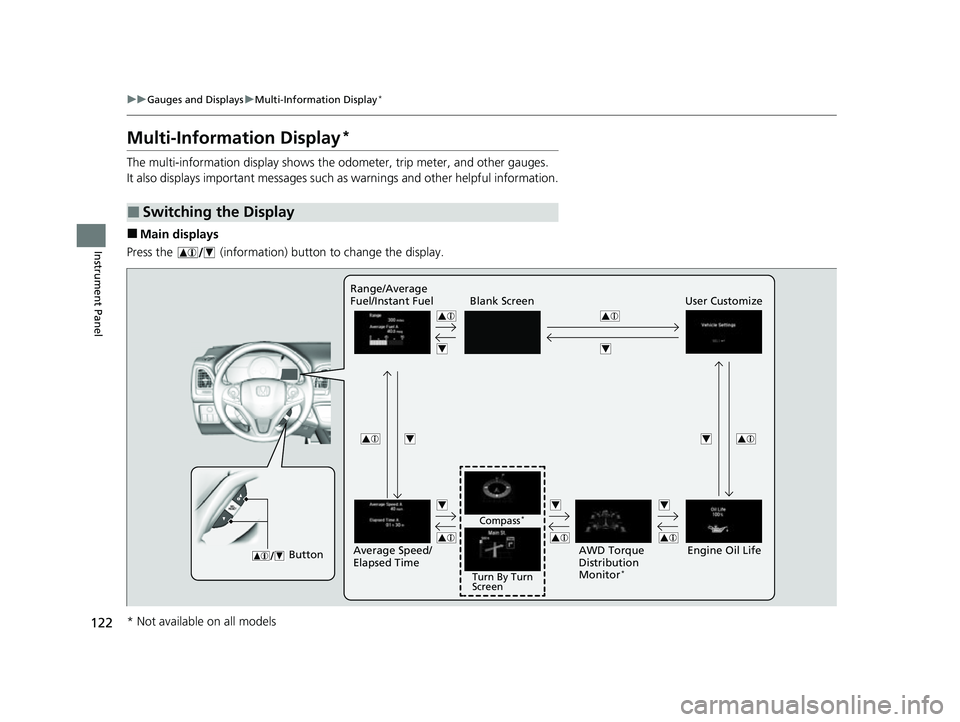
The multi-information display shows the od ometer, trip meter, and other gauges.
It also displays important messages such as warnings and other helpful information.
■Main displays
Press the (information) button to change the display.
■Switching the Display
Blank Screen User Customize
Button
Engine Oil Life
Range/Average
Fuel/Instant Fuel
Turn By Turn
Screen
Compass
*
Average Speed/
Elapsed Time
AWD Torque
Distribution
Monitor
*
* Not available on all models
22 HR-V HDMC-31T7A6600.book 122 ページ 2021年4月12日 月曜日 午前10時50分
Page 126 of 641
uuGauges and Displays uMulti-Information Display*
124
Instrument Panel
Shows the total number of miles (U.S.) or ki lometers (Canada) that your vehicle has
accumulated.
Shows the total number of miles (U.S.) or kilometers (Canada) driven since the last
reset. Meters A and B can be used to measure two separate trips.
■Resetting a trip meter
To reset a trip meter, display it, then press and hold the SEL/RESET button. The trip
meter is reset to 0.0.
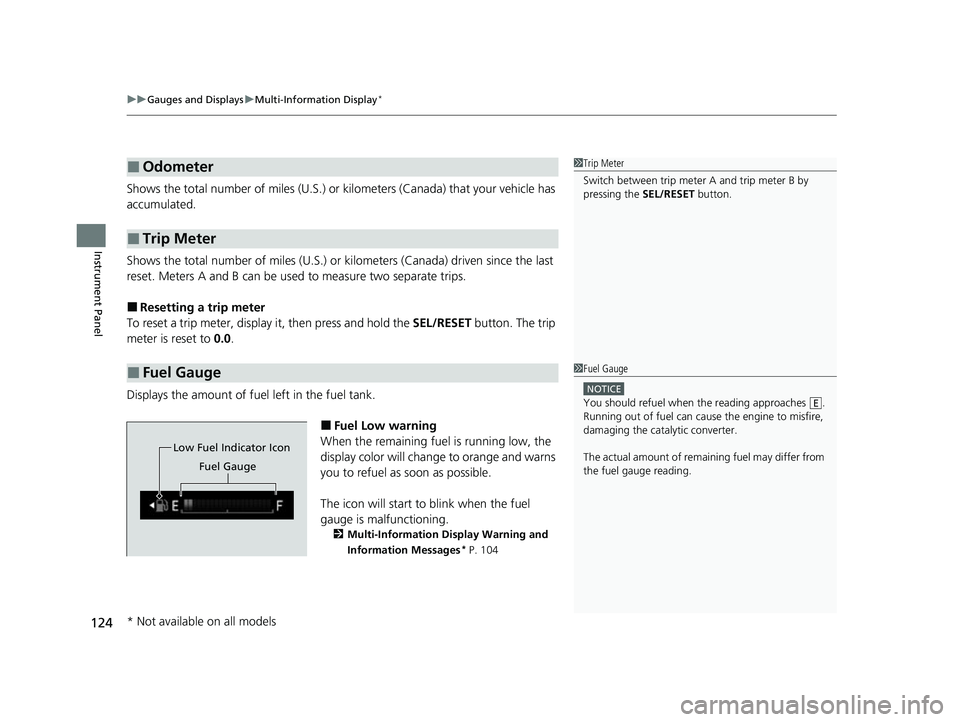
Displays the amount of fuel left in the fuel tank.
■Fuel Low warning
When the remaining fuel is running low, the
display color will change to orange and warns
you to refuel as soon as possible.
The icon will start to blink when the fuel
gauge is malfunctioning.
2 Multi-Information Display Warning and
Information Messages* P. 104
■Odometer
■Trip Meter
■Fuel Gauge
1Trip Meter
Switch between trip meter A and trip meter B by
pressing the SEL/RESET button.
1Fuel Gauge
NOTICE
You should refuel when the reading approaches .
Running out of fuel can cause the engine to misfire,
damaging the cata lytic converter.
The actual amount of remain ing fuel may differ from
the fuel gauge reading.E
Low Fuel Indicator Icon
Fuel Gauge
* Not available on all models
22 HR-V HDMC-31T7A6600.book 124 ページ 2021年4月12日 月曜日 午前10時50分
Page 130 of 641
128
uuGauges and Displays uMulti-Information Display*
Instrument Panel
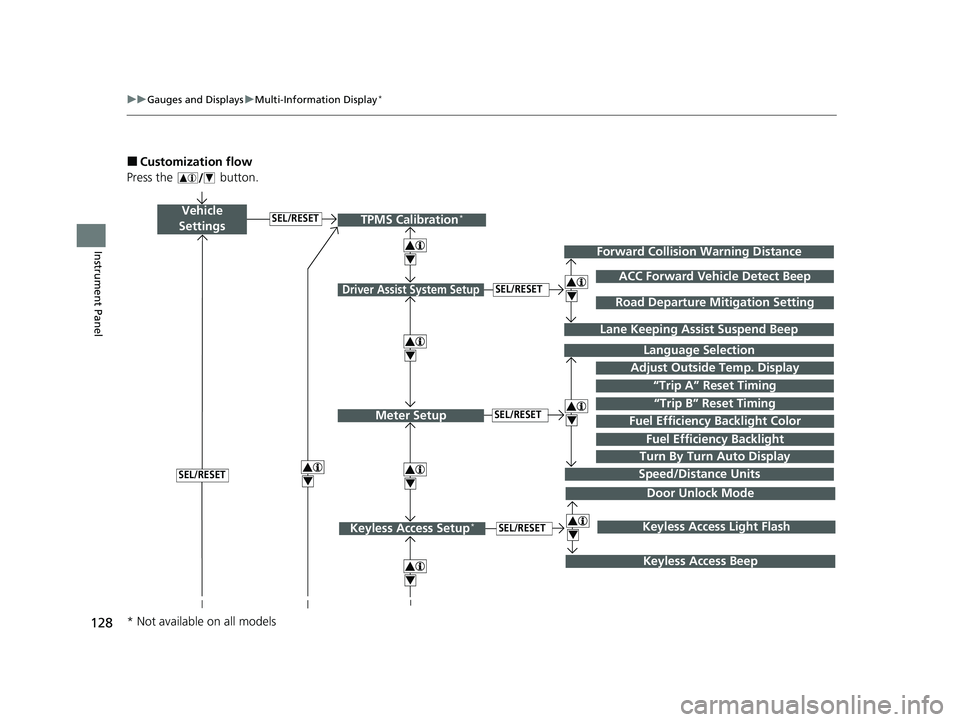
■Customization flow
Press the button.
Vehicle
Settings
Adjust Outside Temp. Display
Language Selection
Driver Assist System Setup
Meter Setup“Trip B” Reset TimingSEL/RESET
SEL/RESET
“Trip A” Reset Timing
4
ACC Forward Vehicle Detect Beep
Lane Keeping Assist Suspend Beep
4
SEL/RESET
Forward Collision Warning Distance
4
SEL/RESET
Speed/Distance Units
Road Departure Mitigation Setting
Fuel Efficien cy Backlight
Turn By Turn Auto Display
TPMS Calibration*
4
Fuel Efficiency Backlight Color
4
4
Door Unlock Mode
Keyless Access Setup*SEL/RESET
Keyless Access Beep
4Keyless Access Light Flash
4
* Not available on all models
22 HR-V HDMC-31T7A6600.book 128 ページ 2021年4月12日 月曜日 午前10時50分
Page 132 of 641
130
uuGauges and Displays uMulti-Information Display*
Instrument Panel
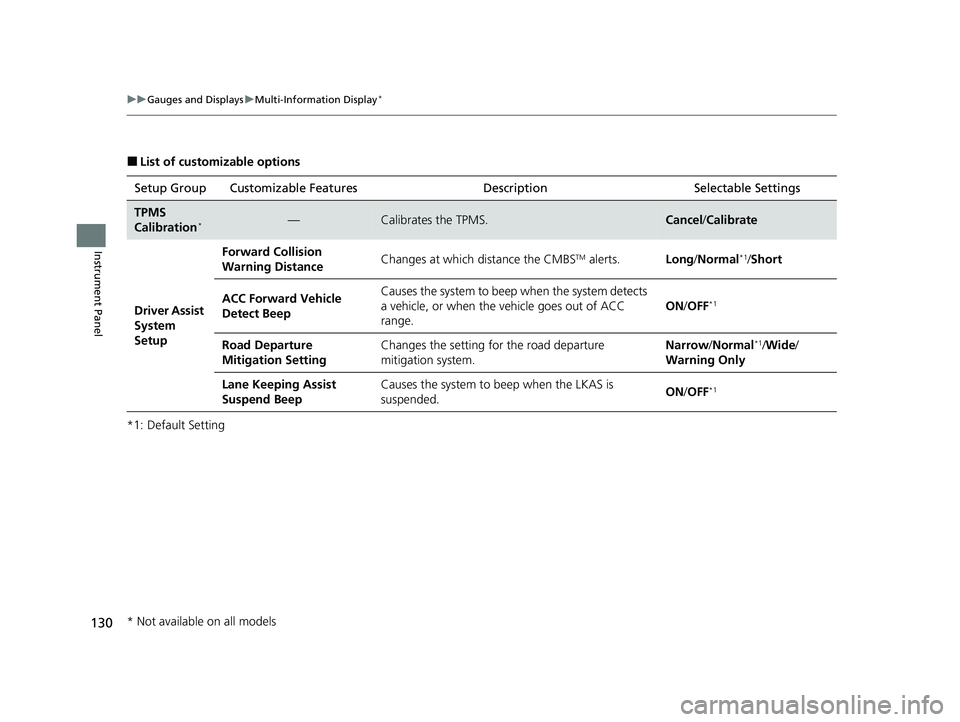
■List of customizable options
*1: Default Setting Setup Group Customizable Features
DescriptionSelectable Settings
TPMS
Calibration*—Calibrates the TPMS.Cancel/Calibrate
Driver Assist
System
Setup Forward Collision
Warning Distance
Changes at which distance the CMBS
TM alerts.
Long/Normal*1/Short
ACC Forward Vehicle
Detect Beep Causes the system to beep
when the system detects
a vehicle, or when the vehicle goes out of ACC
range. ON
/OFF
*1
Road Departure
Mitigation Setting Changes the setting for the road departure
mitigation system. Narrow
/Normal*1/Wide /
Warning Only
Lane Keeping Assist
Suspend Beep Causes the system to beep when the LKAS is
suspended.
ON
/OFF
*1
* Not available on all models
22 HR-V HDMC-31T7A6600.book 130 ページ 2021年4月12日 月曜日 午前10時50分
Page 149 of 641
Continued147
uuLocking and Unlocking the Doors uLocking/Unlocking the Doors from the Outside
Controls
To temporarily deactivate the function:
1. Set the power mode to OFF.
2. Open the driv er’s door.
3. Using the master door lock switch, operate
the lock as follows:
Lock Unlock Lock Unlock.
u The beeper sounds and the function is
deactivated.
To restore the function:
• Set the power mode to ON.
• Lock the vehicl e without using the auto lock
function
• With the keyless remote on you, move out
of the auto lock function operation range.
• Open any door.1Locking the doors and tailg ate (Walk away auto lock®)
The auto lock function does not operate when any of
the following conditions are met.
•The keyless remote is inside the vehicle.
•A door, tailgate or th e hood is not closed.•The power mode is set to any mode other than
OFF.
•The keyless remote is not located within a radius of
about 5 feet (1.5 m) from the vehicle when you get
out of the vehicle and cl ose the doors and tailgate.
Auto lock function operation stop beeper
After the auto lock function has been activated, the
auto lock operation stop beeper sounds for
approximately two seconds in the following cases.
•The keyless remote is put inside the vehicle through
a window.
•You are located too close to the vehicle.
•The keyless remote is put inside the tailgate.
If the warning beeper sounds, check that you are
carrying the keyless remote. Then, open/close a door
and confirm the auto lock activation beeper sounds
once.
22 HR-V HDMC-31T7A6600.book 147 ページ 2021年4月12日 月曜日 午前10時50分
Page 162 of 641
160
Controls
Tailgate
Precautions for Opening/Closing the Tailgate
Always make sure individuals and objects are clear of the tailgate before opening or
closing it.
•Open the tailgate all the way.
u If it is not fully opened, the tailgate may begin to close under its own weight.
• Be careful when it is windy. The wind may cause the tailgate to close.
Keep the tailgate closed while driving to:
u Avoid possible damage.
u Prevent exhaust gas from leaking into the vehicle.
2 Carbon Monoxide Gas P. 81
1Precautions for Opening/Closing the Tailgate
Be careful not to hit your head on the tailgate or to
put your hands between th e tailgate and the cargo
area when closing the tailgate.
When you are storing or picking up luggage from the
cargo area while the engine is idling, do not stand in
front of the exhaust pipe. You may get burned.
Do not allow any passenger in the cargo space. They
may get hurt during hard braking, a sudden
acceleration, or a crash.
3WARNING
Anyone caught in the path of a tailgate
that is being opened or closed can be
seriously injured.
Make sure that all people are clear of the
tailgate before opening or closing it.
22 HR-V HDMC-31T7A6600.book 160 ページ 2021年4月12日 月曜日 午前10時50分
Page 168 of 641
166
Controls
Opening and Closing the Windows
Opening/Closing the Power Windows
The power windows can be opened and closed when the ignition switch is in ON
(w*1, using the switches on the doors. The driver’s side switches can be used to
open and close all of the windows.
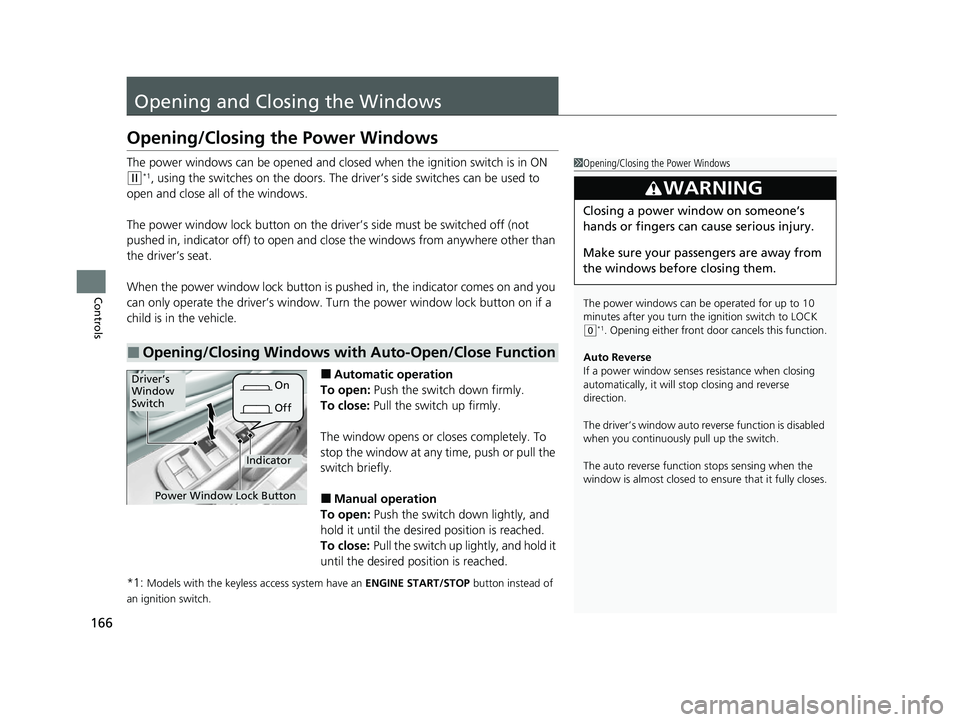
The power window lock button on the driver’s side must be switched off (not
pushed in, indicator off) to open and close the windows from anywhere other than
the driver’s seat.
When the power window lock button is pu shed in, the indicator comes on and you
can only operate the driver’s window. Turn the power window lock button on if a
child is in the vehicle.
■Automatic operation
To open: Push the switch down firmly.
To close: Pull the switch up firmly.
The window opens or cl oses completely. To
stop the window at any time, push or pull the
switch briefly.
■Manual operation
To open: Push the switch down lightly, and
hold it until the desired position is reached.
To close: Pull the switch up lightly, and hold it
until the desired position is reached.
*1:
Models with the keyless access system have an ENGINE START/STOP button instead of
an ignition switch.
■Opening/Closing Windows with Auto-Open/Close Function
1 Opening/Closing the Power Windows
The power windows can be operated for up to 10
minutes after you turn the ignition switch to LOCK
( 0*1. Opening either front door cancels this function.
Auto Reverse
If a power window senses resistance when closing
automatically, it will stop closing and reverse
direction.
The driver’s window auto re verse function is disabled
when you continuously pull up the switch.
The auto reverse function stops sensing when the
window is almost closed to en sure that it fully closes.
3WARNING
Closing a power window on someone’s
hands or fingers can cause serious injury.
Make sure your passengers are away from
the windows before closing them.
Power Window Lock Button
Driver’s
Window
Switch
OffOn
Indicator
22 HR-V HDMC-31T7A6600.book 166 ページ 2021年4月12日 月曜日 午前10時50分