ignition HONDA HRV 2022 Repair Manual
[x] Cancel search | Manufacturer: HONDA, Model Year: 2022, Model line: HRV, Model: HONDA HRV 2022Pages: 641, PDF Size: 21.37 MB
Page 213 of 641
Continued211
uuInterior Lights/Interior Convenience Items uInterior Convenience Items
Controls
The accessory power socket can be used wh en the ignition switch is in ACCESSORY
(q or ON (w*1.
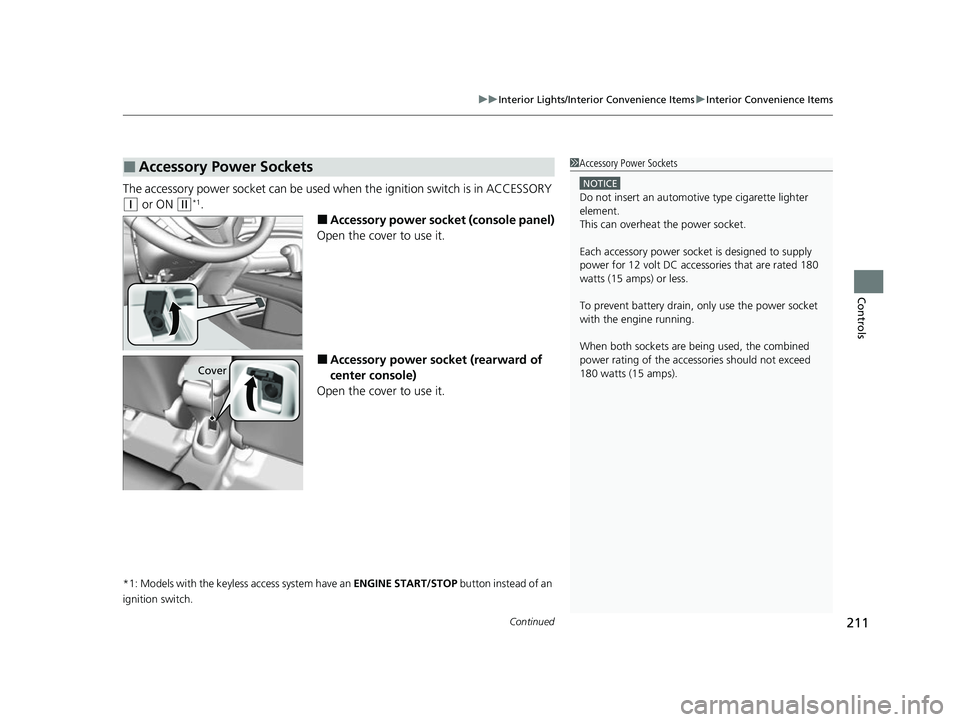
■Accessory power socket (console panel)
Open the cover to use it.
■Accessory power socket (rearward of
center console)
Open the cover to use it.
*1: Models with the keyless access system have an ENGINE START/STOP button instead of an
ignition switch.
■Accessory Power Sockets1 Accessory Power Sockets
NOTICE
Do not insert an automotive type cigarette lighter
element.
This can overheat the power socket.
Each accessory power soc ket is designed to supply
power for 12 volt DC access ories that are rated 180
watts (15 amps) or less.
To prevent battery drain, only use the power socket
with the engine running.
When both sockets are being used, the combined
power rating of the accesso ries should not exceed
180 watts (15 amps).
Cover
22 HR-V HDMC-31T7A6600.book 211 ページ 2021年4月12日 月曜日 午前10時50分
Page 217 of 641
215
uuInterior Lights/Interior Convenience Items uInterior Convenience Items
Controls
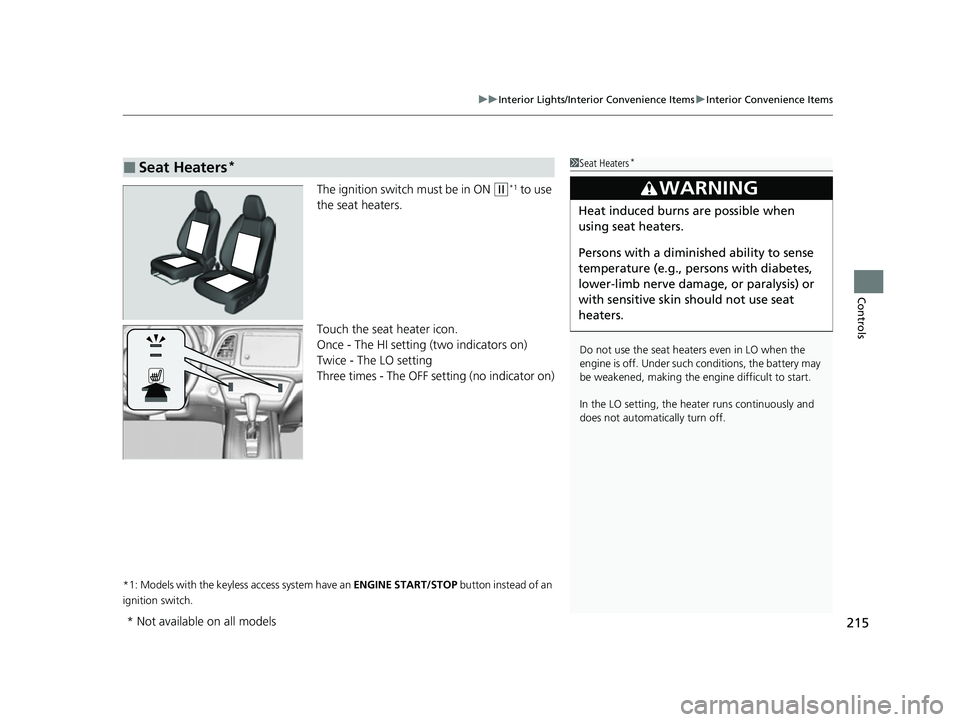
The ignition switch must be in ON (w*1 to use
the seat heaters.
Touch the seat heater icon.
Once - The HI setting (two indicators on)
Twice - The LO setting
Three times - The OFF setting (no indicator on)
*1: Models with the keyless access system have an ENGINE START/STOP button instead of an
ignition switch.
■Seat Heaters*1 Seat Heaters*
Do not use the seat heaters even in LO when the
engine is off. Under such conditions, the battery may
be weakened, making the engine difficult to start.
In the LO setting, the heater runs continuously and
does not automatically turn off.
3WARNING
Heat induced burns are possible when
using seat heaters.
Persons with a diminished ability to sense
temperature (e.g., persons with diabetes,
lower-limb nerve damage, or paralysis) or
with sensitive skin should not use seat
heaters.
* Not available on all models
22 HR-V HDMC-31T7A6600.book 215 ページ 2021年4月12日 月曜日 午前10時50分
Page 227 of 641
Continued225
uuClimate Control System*uUsing Automatic Climate Control
Controls
You hear the beep when operating the climate control system on the touch screen.
This can be turned on and off.
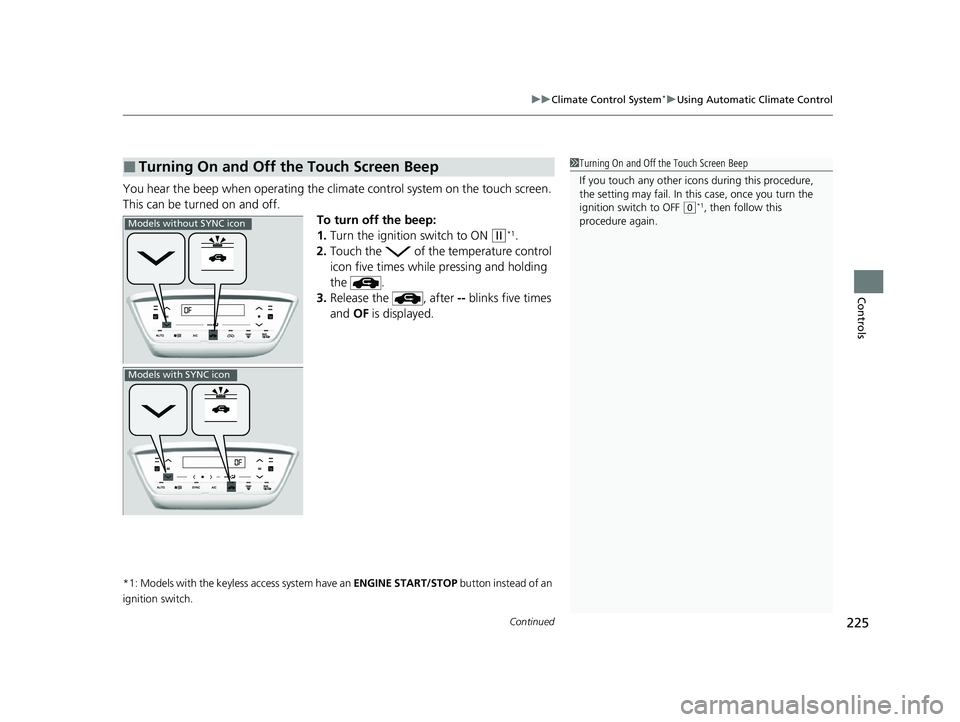
To turn off the beep:
1.Turn the ignition switch to ON
(w*1.
2. Touch the of the temperature control
icon five times while pressing and holding
the .
3. Release the , after -- blinks five times
and OF is displayed.
*1: Models with the keyless access system have an ENGINE START/STOP button instead of an
ignition switch.
■Turning On and Off the Touch Screen Beep1 Turning On and Off the Touch Screen Beep
If you touch any other icon s during this procedure,
the setting may fail. In this case, once you turn the
ignition switch to OFF
( 0*1, then follow this
procedure again.
Models without SYNC icon
Models with SYNC icon
22 HR-V HDMC-31T7A6600.book 225 ページ 2021年4月12日 月曜日 午前10時50分
Page 228 of 641
226
uuClimate Control System*uUsing Automatic Climate Control
Controls
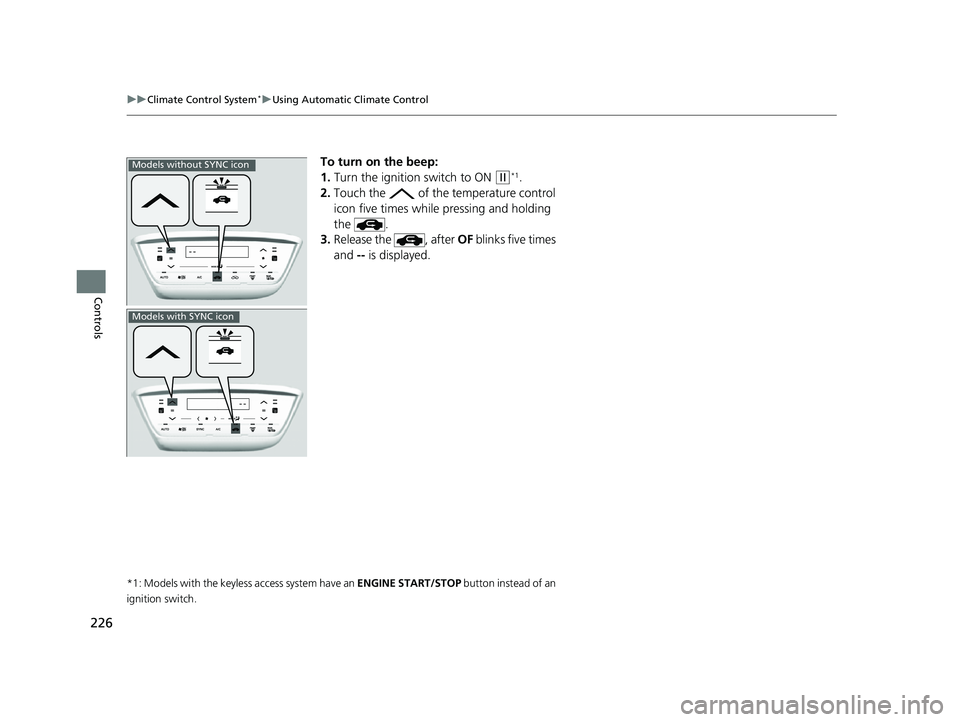
To turn on the beep:
1. Turn the ignition switch to ON
(w*1.
2. Touch the of the temperature control
icon five times while pressing and holding
the .
3. Release the , after OF blinks five times
and -- is displayed.
*1: Models with the keyless access system have an ENGINE START/STOP button instead of an
ignition switch.
Models without SYNC icon
Models with SYNC icon
22 HR-V HDMC-31T7A6600.book 226 ページ 2021年4月12日 月曜日 午前10時50分
Page 229 of 641
Continued227
uuClimate Control System*uUsing Automatic Climate Control
Controls
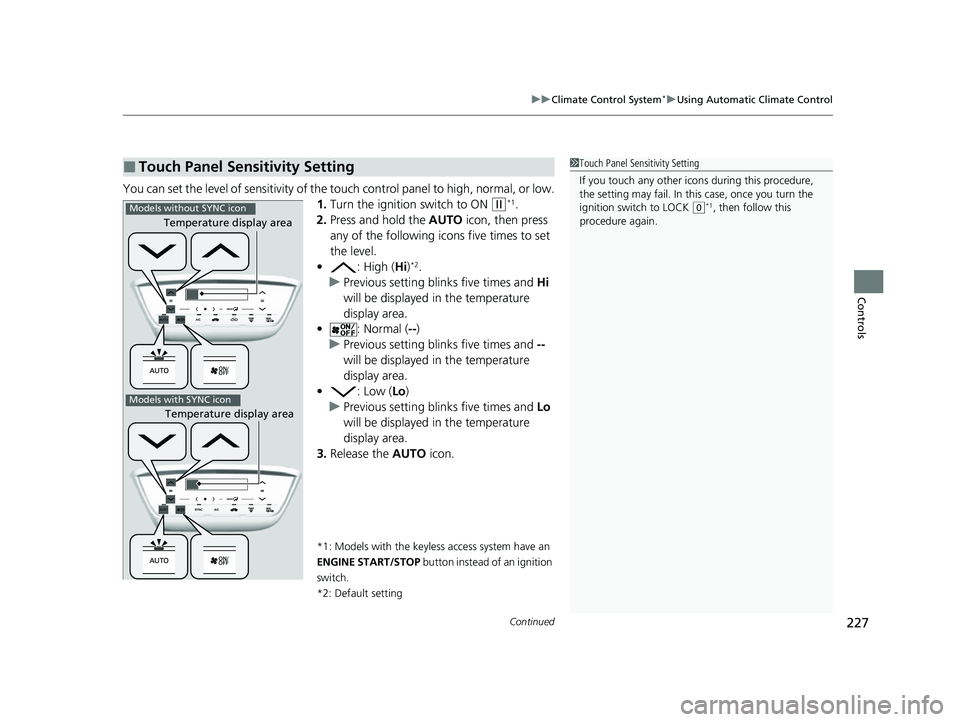
You can set the level of sensitivity of the touch control panel to high, normal, or low.
1. Turn the ignition switch to ON
(w*1.
2. Press and hold the AUTO icon, then press
any of the following ic ons five times to set
the level.
• : High (Hi)
*2.
u Previous setting blinks five times and Hi
will be displayed in the temperature
display area.
• : Normal ( --)
u Previous setting blinks five times and --
will be displayed in the temperature
display area.
• : Low (Lo)
u Previous setting blinks five times and Lo
will be displayed in the temperature
display area.
3. Release the AUTO icon.
*1: Models with the keyless access system have an
ENGINE START/STOP button instead of an ignition
switch.
*2: Default setting
■Touch Panel Sensitivity Setting1 Touch Panel Sensitivity Setting
If you touch any other icon s during this procedure,
the setting may fail. In this case, once you turn the
ignition switch to LOCK
( 0*1, then follow this
procedure again.
Temperature display area
Temperature display area
Models without SYNC icon
Models with SYNC icon
22 HR-V HDMC-31T7A6600.book 227 ページ 2021年4月12日 月曜日 午前10時50分
Page 236 of 641
234
uuAudio System uAudio System Theft Protection
Features
Audio System Theft Protection
The audio system is disabled when it is disconnected from the power source, such as
when the battery is disconnected or goes dead. In certain conditions, the system
may display a code entry screen. If this occurs, reactivate the audio system.
■Reactivating the audio system
1. Turn the ignition switch to ON
(w*1.
2. Turn on the audio system.
3. Press and hold the audio system power button for more than two seconds.
u The audio system is reac tivated when the audio co ntrol unit establishes a
connection with the vehicle control unit. If the control unit fails to recognize
the audio unit, you must go to a dealer and have the audio unit checked.
*1: Models with the keyless access system have an ENGINE START/STOP button instead of an
ignition switch.
22 HR-V HDMC-31T7A6600.book 234 ページ 2021年4月12日 月曜日 午前10時50分
Page 240 of 641
238
Features
Audio System Basic Operation
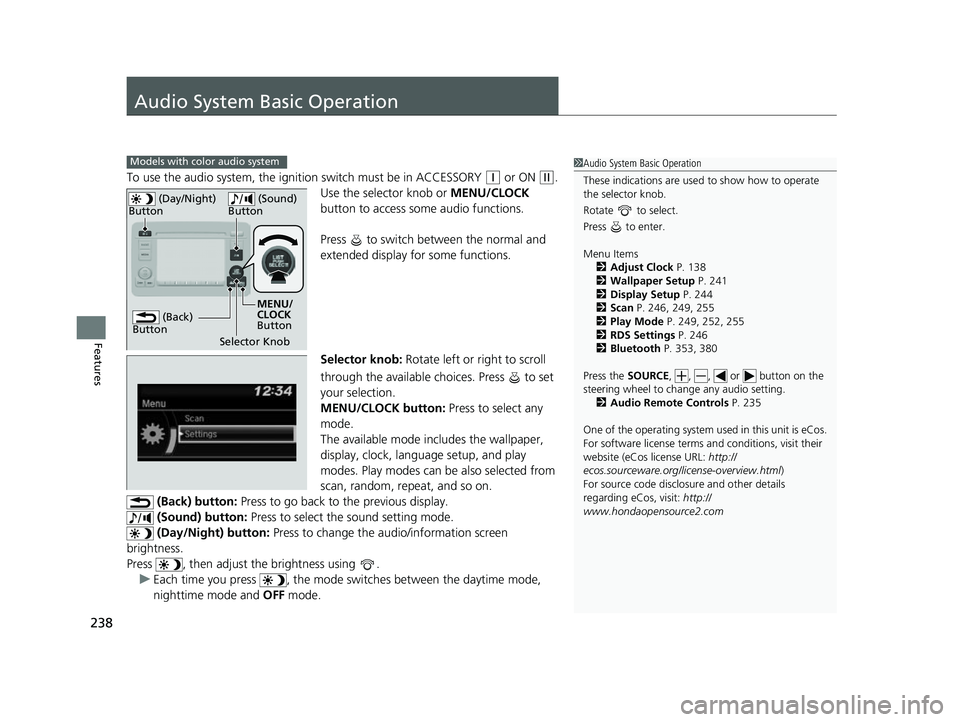
To use the audio system, the ignition switch must be in ACCESSORY (q or ON (w.
Use the selector knob or MENU/CLOCK
button to access some audio functions.
Press to switch between the normal and
extended display fo r some functions.
Selector knob: Rotate left or right to scroll
through the available choices. Press to set
your selection.
MENU/CLOCK button: Press to select any
mode.
The available mode includes the wallpaper,
display, clock, langu age setup, and play
modes. Play modes can be also selected from
scan, random, rep eat, and so on.
(Back) button: Press to go back to the previous display.
(Sound) button: Press to select the sound setting mode.
(Day/Night) button: Press to change the audio/information screen
brightness.
Press , then adjust th e brightness using .
u Each time you press , the mode switches between the daytime mode,
nighttime mode and OFF mode.
Models with color audio system1Audio System Basic Operation
These indications are used to show how to operate
the selector knob.
Rotate to select.
Press to enter.
Menu Items 2 Adjust Clock P. 138
2 Wallpaper Setup P. 241
2 Display Setup P. 244
2 Scan P. 246, 249, 255
2 Play Mode P. 249, 252, 255
2 RDS Settings P. 246
2 Bluetooth P. 353, 380
Press the SOURCE, , , or button on the
steering wheel to cha nge any audio setting.
2 Audio Remote Controls P. 235
One of the operating system us ed in this unit is eCos.
For software license terms and conditions, visit their
website (eCos license URL: http://
ecos.sourceware.org/li cense-overview.html)
For source code disclo sure and other details
regarding eCos, visit: http://
www.hondaopensource2.com
(Back)
Button
Selector Knob MENU/
CLOCK
Button
(Day/Night)
Button
(Sound)
Button
22 HR-V HDMC-31T7A6600.book 238 ページ 2021年4月12日 月曜日 午前10時50分
Page 261 of 641
259
Features
Audio System Basic Operation
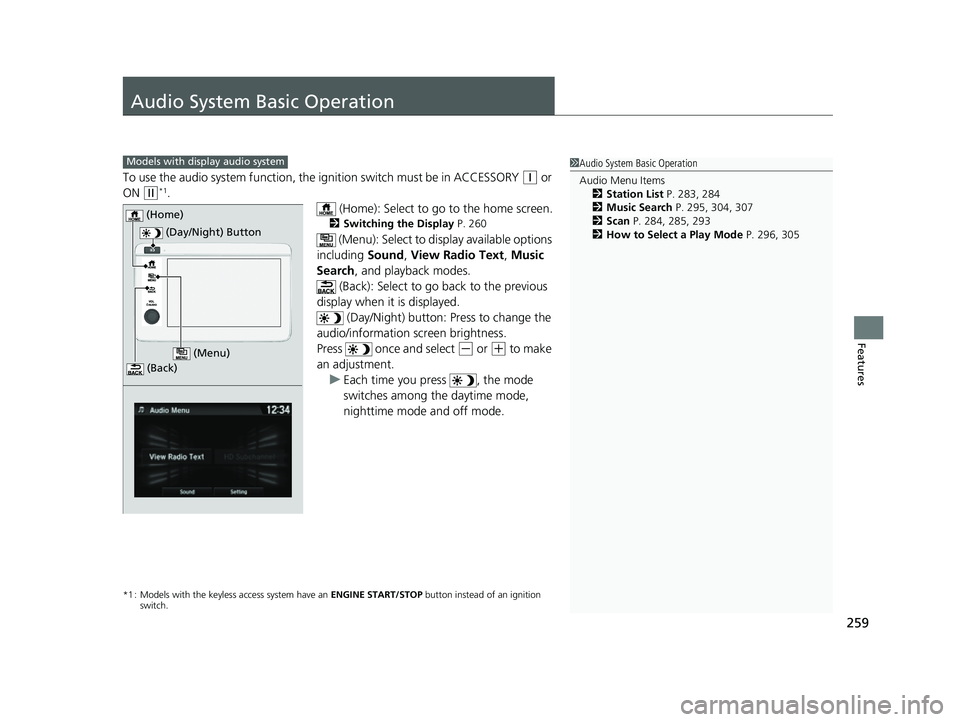
To use the audio system function, the ignition swit ch must be in ACCESSORY (q or
ON
(w*1.
(Home): Select to go to the home screen.
2Switching the Display P. 260
(Menu): Select to display available options
including Sound, View Radio Text , Music
Search , and playback modes.
(Back): Select to go back to the previous
display when it is displayed. (Day/Night) button: Press to change the
audio/information screen brightness.
Press once and select
(- or (+ to make
an adjustment. u Each time you press , the mode
switches among the daytime mode,
nighttime mode and off mode.
*1 : Models with the keyless access system have an ENGINE START/STOP button instead of an ignition
switch.
1 Audio System Basic Operation
Audio Menu Items
2 Station List P. 283, 284
2 Music Search P. 295, 304, 307
2 Scan P. 284, 285, 293
2 How to Select a Play Mode P. 296, 305Models with display audio system
(Day/Night) Button
(Home)
(Menu)
(Back)
22 HR-V HDMC-31T7A6600.book 259 ページ 2021年4月12日 月曜日 午前10時50分
Page 351 of 641
349Continued
Features
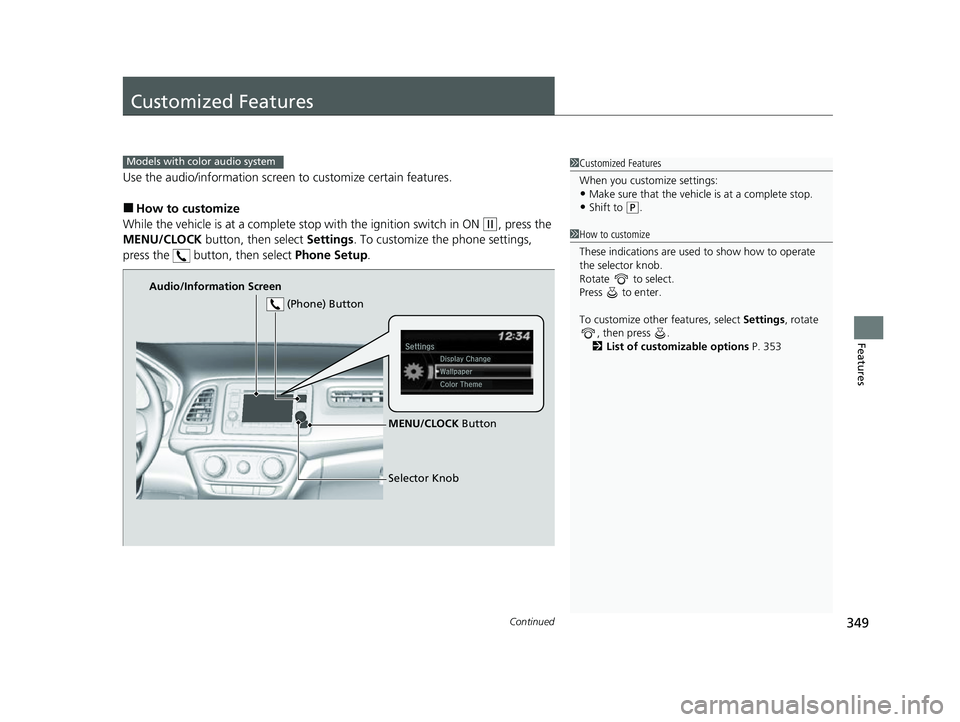
Customized Features
Use the audio/information screen to customize certain features.
■How to customize
While the vehicle is at a complete st op with the ignition switch in ON
(w, press the
MENU/CLOCK button, then select Settings. To customize the phone settings,
press the button, then select Phone Setup.
1Customized Features
When you customize settings:
•Make sure that the vehicle is at a complete stop.
•Shift to (P.
Models with color audio system
1 How to customize
These indications are used to show how to operate
the selector knob.
Rotate to select.
Press to enter.
To customize other features, select Settings, rotate
, then press .
2 List of customizable options P. 353
Audio/Information Screen
MENU/CLOCK Button
Selector Knob
(Phone) Button
22 HR-V HDMC-31T7A6600.book 349 ページ 2021年4月12日 月曜日 午前10時50分
Page 358 of 641
356
Features
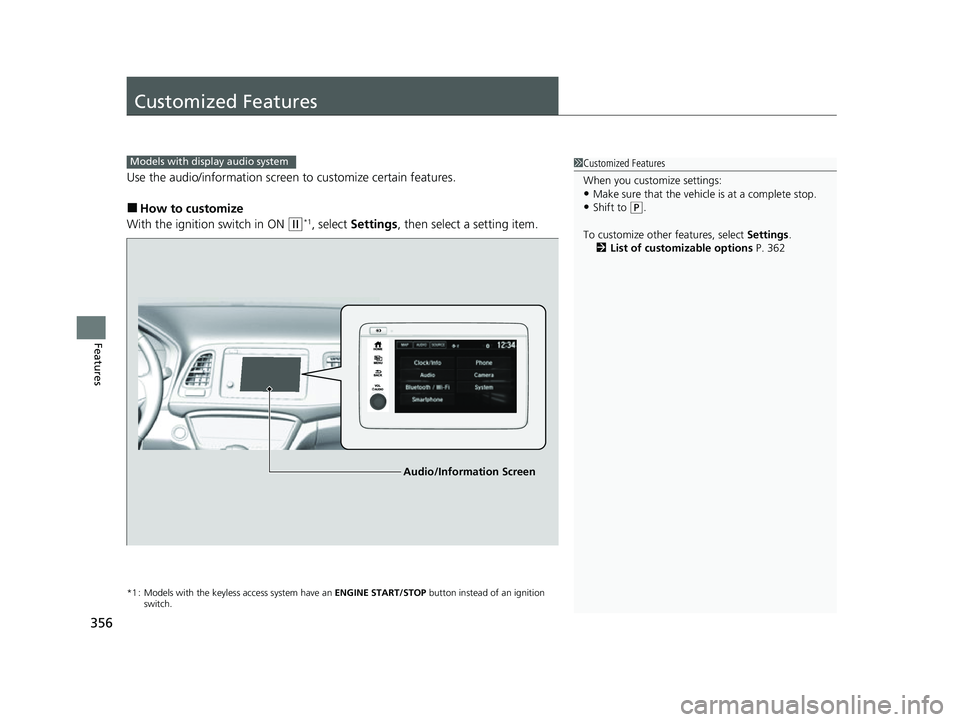
Customized Features
Use the audio/information screen to customize certain features.
■How to customize
With the ignition switch in ON
(w*1, select Settings , then select a setting item.
*1 : Models with the keyless access system have an ENGINE START/STOP button instead of an ignition
switch.
1 Customized Features
When you customize settings:
•Make sure that the vehicle is at a complete stop.
•Shift to (P.
To customize other features, select Settings.
2 List of customizable options P. 362
Models with display audio system
Audio/Information Screen
22 HR-V HDMC-31T7A6600.book 356 ページ 2021年4月12日 月曜日 午前10時50分