battery HONDA HRV 2023 User Guide
[x] Cancel search | Manufacturer: HONDA, Model Year: 2023, Model line: HRV, Model: HONDA HRV 2023Pages: 664, PDF Size: 20.2 MB
Page 139 of 664
137
uuLocking and Unlocking the Doors uKey
Controls
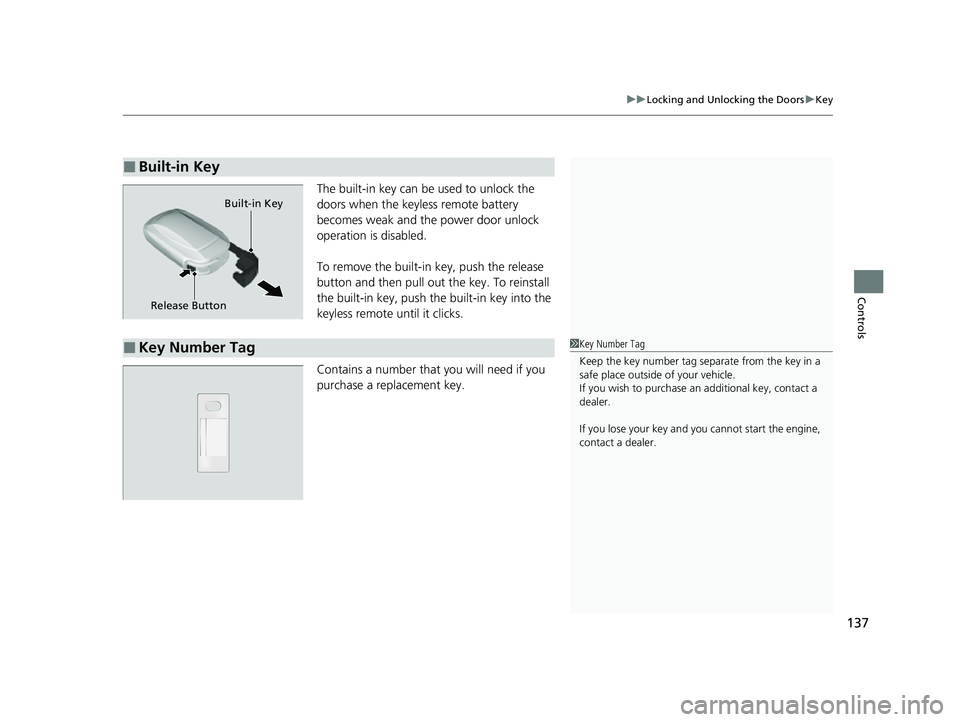
The built-in key can be used to unlock the
doors when the keyles s remote battery
becomes weak and the power door unlock
operation is disabled.
To remove the built-in key, push the release
button and then pull out the key. To reinstall
the built-in key, push the built-in key into the
keyless remote until it clicks.
Contains a number that you will need if you
purchase a replacement key.
■Built-in Key
Release Button Built-in Key
■Key Number Tag1
Key Number Tag
Keep the key number tag separate from the key in a
safe place outside of your vehicle.
If you wish to purchase an additional key, contact a
dealer.
If you lose your key and you cannot start the engine,
contact a dealer.
23 HR-V-313V06000_01.book 137 ページ 2022年4月4日 月曜日 午前10時49分
Page 140 of 664
138
uuLocking and Unlocking the Doors uLow Keyless Remote Signal Strength
Controls
Low Keyless Remote Signal Strength
The vehicle transmits radio waves to locate the keyless remote to start the engine,
lock and unlock* all the doors and the fuel fill door, and open the tailgate.
In the following cases, starting the engine, locking/unlocking
* the doors/fuel fill
door, or opening the tailgate may be inhibited or operation may be unstable:
• Strong radio waves are being tra nsmitted by nearby equipment.
• You are carrying the keyless remote together with telecommunications
equipment, laptop computers, ce ll phones, or wireless devices.
• A metallic object is touching or covering the keyless remote.
1Low Keyless Remote Signal Strength
Communication between the keyless remote and the
vehicle consumes the ke yless remote’s battery.
Battery life is about two years, but this varies
depending on re gularity of use.
The battery is consumed whenever the keyless
remote is receivi ng strong radio wave s. Avoid placing
it near electrical appliances such as televisions and
personal computers.
* Not available on all models
23 HR-V-313V06000_01.book 138 ページ 2022年4月4日 月曜日 午前10時49分
Page 147 of 664
Continued145
uuLocking and Unlocking the Doors uLocking/Unlocking the Doors from the Outside
Controls
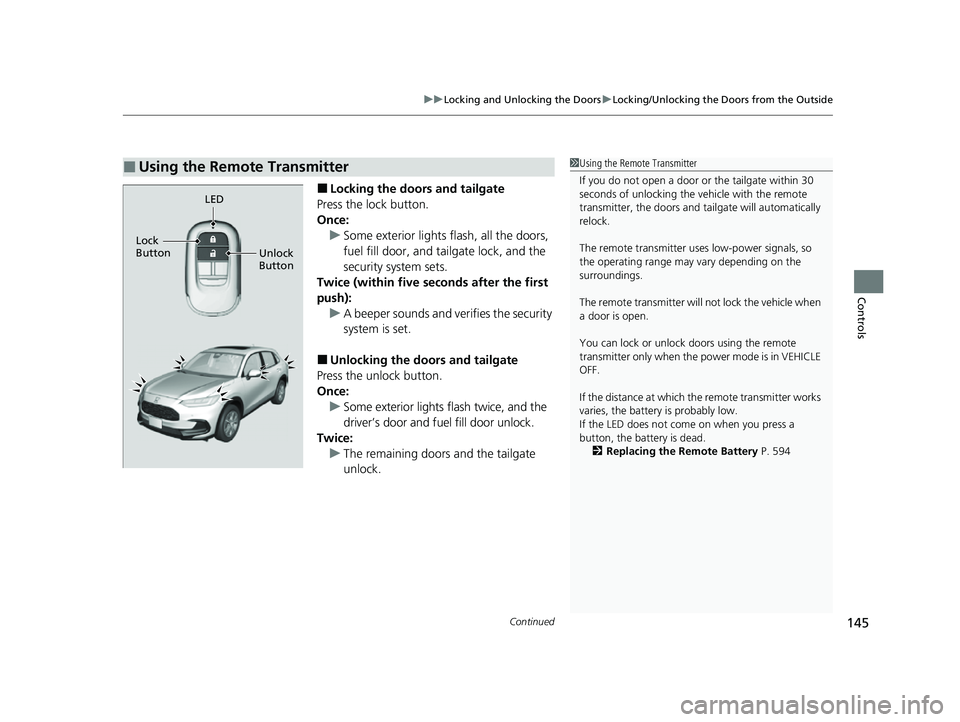
■Locking the doors and tailgate
Press the lock button.
Once: u Some exterior lights flash, all the doors,
fuel fill door, and tailgate lock, and the
security system sets.
Twice (within five se conds after the first
push): u A beeper sounds and verifies the security
system is set.
■Unlocking the doors and tailgate
Press the unlock button.
Once:
u Some exterior lights flash twice, and the
driver’s door and fuel fill door unlock.
Twice: u The remaining doors and the tailgate
unlock.
■Using the Remote Transmitter1Using the Remote Transmitter
If you do not open a door or the tailgate within 30
seconds of unlocking the vehicle with the remote
transmitter, the doors and ta ilgate will automatically
relock.
The remote transmitter us es low-power signals, so
the operating range may vary depending on the
surroundings.
The remote transmitter will not lock the vehicle when
a door is open.
You can lock or unlock doors using the remote
transmitter only when the power mode is in VEHICLE
OFF.
If the distance at which the remote transmitter works
varies, the batter y is probably low.
If the LED does not come on when you press a
button, the battery is dead. 2 Replacing the Remote Battery P. 594
LED
Unlock
Button
Lock
Button
23 HR-V-313V06000_01.book 145 ページ 2022年4月4日 月曜日 午前10時49分
Page 158 of 664
156
Controls
Security System
Immobilizer System
This system prevents a key that has not been pre-registered from starting the
engine.
Pay attention to the follo wing when pressing the ENGINE START/STOP button:
• Do not allow objects that emit strong radio waves near the ENGINE START/
STOP button.
• Make sure the key is not covered by or touching a metal object.
• Do not bring a key from another vehi cle’s immobilizer system near the ENGINE
START/STOP button.
• Do not put the key near magnetic items. El ectronic device, such as televisions and
audio systems emit strong magnetic fields. Note that even a key chain can
become magnetic.
Security System Alarm
The security system alarm activates when the tailgate, hood or doors are forcibly
opened. The alarm does not activate if the tailgate or doors are opened with the key,
remote transmitter or keyless access system
*.
However, the alarm activates if a door is opened with the key and then the
transmission is taken out of
(P or the hood is opened before the power mode is in
ON.
■When the security sy stem alarm activates
The horn sounds intermittently, and some exterior lights flash.
1 Immobilizer System
NOTICE
Leaving the key in the vehicl e can result in theft or
accidental movement of the vehicle.
Always take the key with you whenever you leave the
vehicle unattendedM
Do not alter the system or add other devices to itM
Doing so may damage the system and make your
vehicle inoperableM
Apply and hold the brake pedal before turning the
vehicle on the first time after the battery has been
disconnectedM
Canadian models
1 Security System Alarm
Do not alter the system or add other devices to it.
Doing so may damage the system and make your
vehicle inoperable.
The security system alarm continues for a maximum
of two minutes until the security system alarm
deactivates.
* Not available on all models
23 HR-V-313V06000_01.book 156 ページ 2022年4月4日 月曜日 午前10時49分
Page 159 of 664
Continued157
uuSecurity System uSecurity System Alarm
Controls
■To deactivate the security system alarm
Unlock the vehicle using the key, the remo te transmitter or keyless access system*,
or set the power mode to ON. The system, along with the horn and flashing lights,
is deactivated.
■Setting the security system alarm
The security system alarm automatically sets when the following conditions have
been met:
• The power mode is set to VEHICLE OFF.
• The hood is closed.
• All doors and the tailgate are locked from outside with the remote transmitter or
keyless access system
*.
■When the security system alarm sets
The security system alarm in dicator in the instrument panel blinks and the blinking
interval changes after about 15 seconds.
■To cancel the security system alarm
The security system alarm is canceled when the vehicle is unlocked using the remote
transmitter or keyle ss access system
*, or when the power mode is set to ON. The
security system alarm indicato r goes off at the same time.
1Security System Alarm
Do not set the security system alarm when someone
is in the vehicle or a window is open. The system can
accidentally activate when:
•Unlocking the door with the lock tab.•Opening the hood with the hood release handle.
•Taking the transmission out of ( P.
If the battery goes dead after you have set the
security system alarm, the security alarm may activate
once the battery is re charged or replaced.
If this occurs, deactivate the security system alarm by
unlocking a door using the ke y, remote transmitter,
or keyless access system
*.
* Not available on all models
23 HR-V-313V06000_01.book 157 ページ 2022年4月4日 月曜日 午前10時49分
Page 166 of 664
164
uuOperating the Switches Around the Steering Wheel uENGINE START/STOP Button
Controls
If you leave the vehicle for 30 to 60 minutes with the transmission in (P and the
power mode in ACCESSORY, the vehicle auto matically goes into the mode similar to
VEHICLE OFF (LOCK) to avoid draining the battery.
If you open the driver’s door when the power mode is set to ACCESSORY, a warning
beep sound.
■Automatic Power Off
■Power Mode Reminder
23 HR-V-313V06000_01.book 164 ページ 2022年4月4日 月曜日 午前10時49分
Page 168 of 664
166
uuOperating the Switches Around the Steering Wheel uLights
Controls
Lights
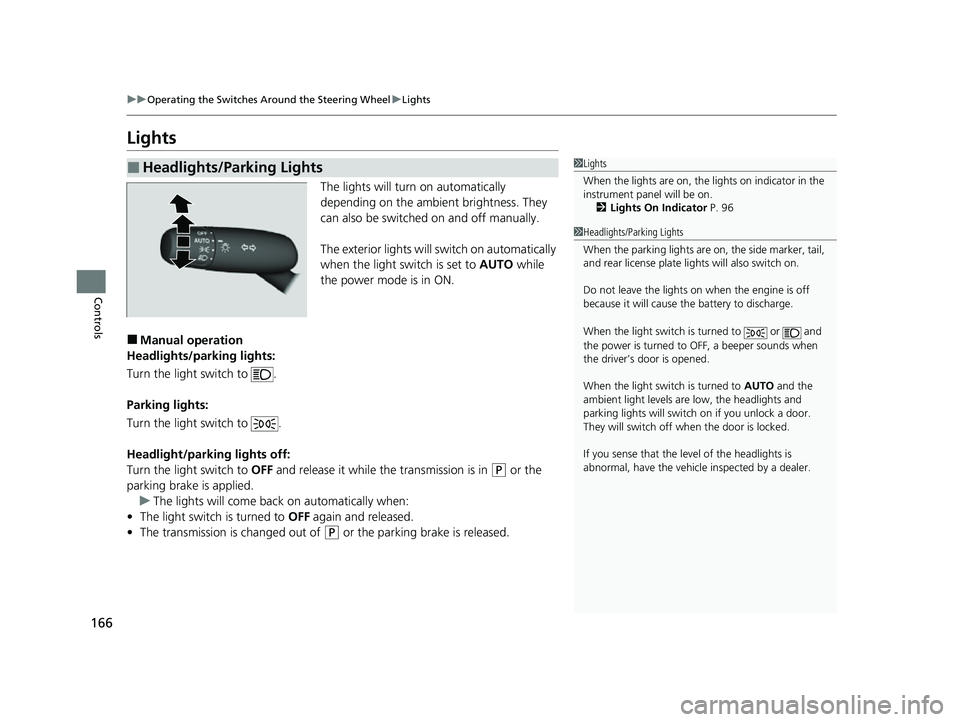
The lights will turn on automatically
depending on the ambient brightness. They
can also be switched on and off manually.
The exterior lights will switch on automatically
when the light switch is set to AUTO while
the power mode is in ON.
■Manual operation
Headlights/parking lights:
Turn the light switch to .
Parking lights:
Turn the light switch to .
Headlight/parking lights off:
Turn the light switch to OFF and release it while the transmission is in
(P or the
parking brake is applied. u The lights will come back on automatically when:
• The light switch is turned to OFF again and released.
• The transmission is changed out of
(P or the parking brake is released.
■Headlights/Parking Lights1Lights
When the lights are on, the lights on indicator in the
instrument pane l will be on.
2 Lights On Indicator P. 96
1Headlights/Parking Lights
When the parking lights are on, the side marker, tail,
and rear license plate li ghts will also switch on.
Do not leave the lights on when the engine is off
because it will cause the battery to discharge.
When the light switch is turned to or and
the power is turned to OFF, a beeper sounds when
the driver’s door is opened.
When the light switch is turned to AUTO and the
ambient light levels are low, the headlights and
parking lights will switch on if you unlock a door.
They will switch off when the door is locked.
If you sense that the le vel of the headlights is
abnormal, have the vehicl e inspected by a dealer.
23 HR-V-313V06000_01.book 166 ページ 2022年4月4日 月曜日 午前10時49分
Page 178 of 664
176
uuOperating the Switches Around the Steering Wheel uRear Defogger/Heated Door Mirror* Button
Controls
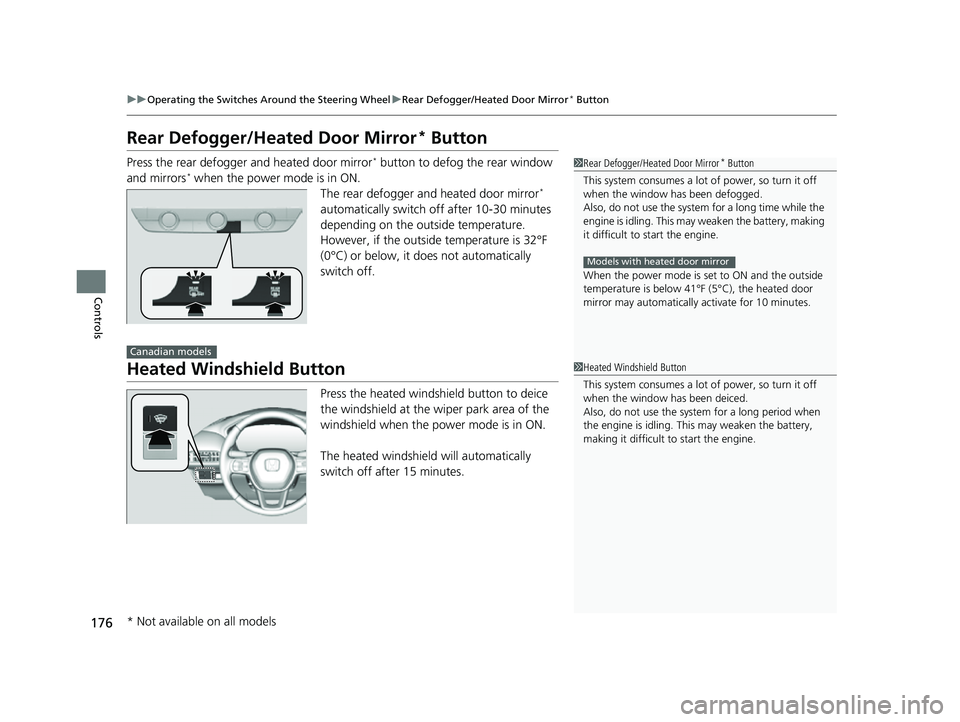
Rear Defogger/Heated Door Mirror* Button
Press the rear defogger and heated door mirror* button to defog the rear window
and mirrors* when the power mode is in ON. The rear defogger and heated door mirror*
automatically switch off after 10-30 minutes
depending on the outside temperature.
However, if the outside temperature is 32°F
(0°C) or below, it does not automatically
switch off.
Heated Windshield Button
Press the heated windshield button to deice
the windshield at the wiper park area of the
windshield when the power mode is in ON.
The heated windshield will automatically
switch off after 15 minutes.
1 Rear Defogger/Heated Door Mirror* Button
This system consumes a lot of power, so turn it off
when the window has been defogged.
Also, do not use the system for a long time while the
engine is idling. This may weaken the battery, making
it difficult to start the engine.
When the power mode is se t to ON and the outside
temperature is below 41°F (5°C), the heated door
mirror may automatically activate for 10 minutes.
Models with heated door mirror
Canadian models
1 Heated Windshield Button
This system consumes a lot of power, so turn it off
when the window has been deiced.
Also, do not use the system for a long period when
the engine is idling. This may weaken the battery,
making it difficult to start the engine.
* Not available on all models
23 HR-V-313V06000_01.book 176 ページ 2022年4月4日 月曜日 午前10時49分
Page 198 of 664
196
uuInterior Convenience Items uOther Interior Convenience Items
Controls
Other Interior Convenience Items
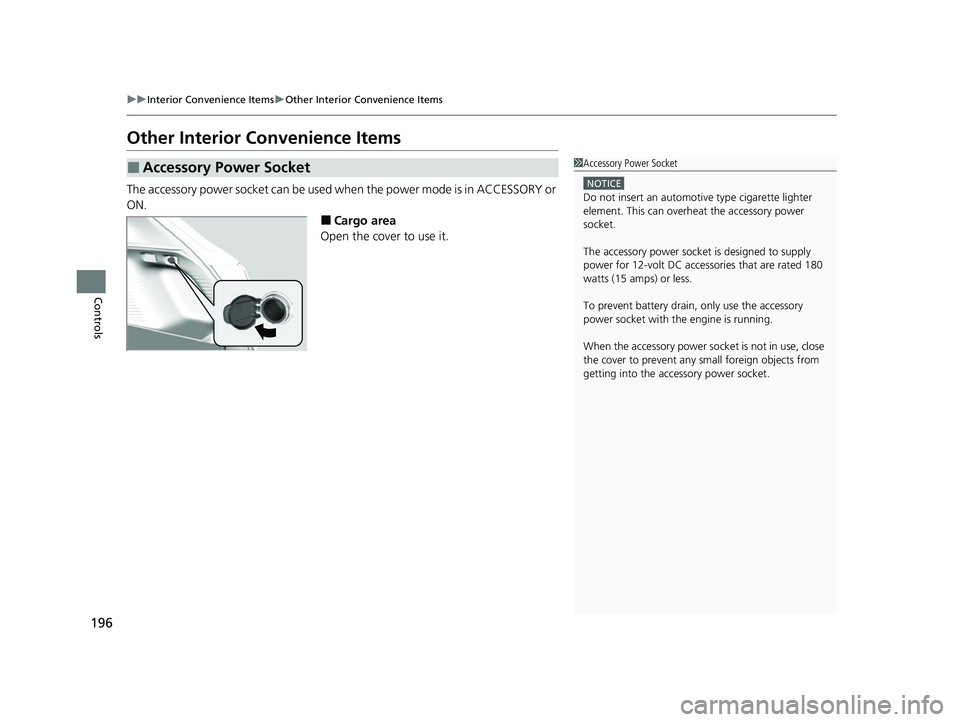
The accessory power socket can be used when the power mode is in ACCESSORY or
ON.
■Cargo area
Open the cover to use it.
■Accessory Power Socket1 Accessory Power Socket
NOTICE
Do not insert an automotive type cigarette lighter
element. This can overheat the accessory power
socket.
The accessory power socket is designed to supply
power for 12-volt DC accessories that are rated 180
watts (15 amps) or less.
To prevent battery drain, only use the accessory
power socket with th e engine is running.
When the accessory power soc ket is not in use, close
the cover to prevent any small foreign objects from
getting into the accessory power socket.
23 HR-V-313V06000_01.book 196 ページ 2022年4月4日 月曜日 午前10時49分
Page 200 of 664
uuInterior Convenience Items uOther Interior Convenience Items
198
Controls
■When charging does not start
Perform one of the solution s in the following table.
IndicatorCauseSolution
Green
&
AmberBlinking
simulta- neously
There is an obstacle(s) between
the charging area and the
device.Remove the
obstacle(s).
The device is not within the
charging area. Pick up and reset the
device to the center of
the charging area
where is located.
The temperature of the wireless
charger pad increases. Temporarily suspend
charging the device.
Wait for the
temperature to drop
and attempt to charge
the device again.
AmberBlinkingThe wireless charger is faulty.Contact a dealer for
repairs.
1
Wireless Charger*
This system consumes a lot of power. Do not use the
system for a long time when the engine is not
running. This may weaken the battery, making it
difficult to start the engine.
When using the wireless charger, check the user’s manual
that came with the compatible device you want to charge.
3CAUTION
Metal objects between the charge pad
and the device to be charged will get
hot and can burn you.
• Always remove foreign objects from
the charge pad before charging the
device.
• Be sure the surface is clear of dust and
other debris before charging.
• Do not spill liquids (i. e. water, drinks,
etc.) on the charger and the device.
• Do not use oil, grease, alcohol,
benzine or thinner for cleaning the
charge pad.
• Do not cover the system with towels,
clothing, or other objects while
charging etc.
• Avoid spraying aerosols which may
come in contact with the charge pad
surface.
* Not available on all models
23 HR-V-313V06000_01.book 198 ページ 2022年4月4日 月曜日 午前10時49分