hood HONDA HRV 2023 User Guide
[x] Cancel search | Manufacturer: HONDA, Model Year: 2023, Model line: HRV, Model: HONDA HRV 2023Pages: 664, PDF Size: 20.2 MB
Page 158 of 664
156
Controls
Security System
Immobilizer System
This system prevents a key that has not been pre-registered from starting the
engine.
Pay attention to the follo wing when pressing the ENGINE START/STOP button:
• Do not allow objects that emit strong radio waves near the ENGINE START/
STOP button.
• Make sure the key is not covered by or touching a metal object.
• Do not bring a key from another vehi cle’s immobilizer system near the ENGINE
START/STOP button.
• Do not put the key near magnetic items. El ectronic device, such as televisions and
audio systems emit strong magnetic fields. Note that even a key chain can
become magnetic.
Security System Alarm
The security system alarm activates when the tailgate, hood or doors are forcibly
opened. The alarm does not activate if the tailgate or doors are opened with the key,
remote transmitter or keyless access system
*.
However, the alarm activates if a door is opened with the key and then the
transmission is taken out of
(P or the hood is opened before the power mode is in
ON.
■When the security sy stem alarm activates
The horn sounds intermittently, and some exterior lights flash.
1 Immobilizer System
NOTICE
Leaving the key in the vehicl e can result in theft or
accidental movement of the vehicle.
Always take the key with you whenever you leave the
vehicle unattendedM
Do not alter the system or add other devices to itM
Doing so may damage the system and make your
vehicle inoperableM
Apply and hold the brake pedal before turning the
vehicle on the first time after the battery has been
disconnectedM
Canadian models
1 Security System Alarm
Do not alter the system or add other devices to it.
Doing so may damage the system and make your
vehicle inoperable.
The security system alarm continues for a maximum
of two minutes until the security system alarm
deactivates.
* Not available on all models
23 HR-V-313V06000_01.book 156 ページ 2022年4月4日 月曜日 午前10時49分
Page 159 of 664
Continued157
uuSecurity System uSecurity System Alarm
Controls
■To deactivate the security system alarm
Unlock the vehicle using the key, the remo te transmitter or keyless access system*,
or set the power mode to ON. The system, along with the horn and flashing lights,
is deactivated.
■Setting the security system alarm
The security system alarm automatically sets when the following conditions have
been met:
• The power mode is set to VEHICLE OFF.
• The hood is closed.
• All doors and the tailgate are locked from outside with the remote transmitter or
keyless access system
*.
■When the security system alarm sets
The security system alarm in dicator in the instrument panel blinks and the blinking
interval changes after about 15 seconds.
■To cancel the security system alarm
The security system alarm is canceled when the vehicle is unlocked using the remote
transmitter or keyle ss access system
*, or when the power mode is set to ON. The
security system alarm indicato r goes off at the same time.
1Security System Alarm
Do not set the security system alarm when someone
is in the vehicle or a window is open. The system can
accidentally activate when:
•Unlocking the door with the lock tab.•Opening the hood with the hood release handle.
•Taking the transmission out of ( P.
If the battery goes dead after you have set the
security system alarm, the security alarm may activate
once the battery is re charged or replaced.
If this occurs, deactivate the security system alarm by
unlocking a door using the ke y, remote transmitter,
or keyless access system
*.
* Not available on all models
23 HR-V-313V06000_01.book 157 ページ 2022年4月4日 月曜日 午前10時49分
Page 188 of 664
186
uuSeats uHead Restraints
Controls
Head Restraints
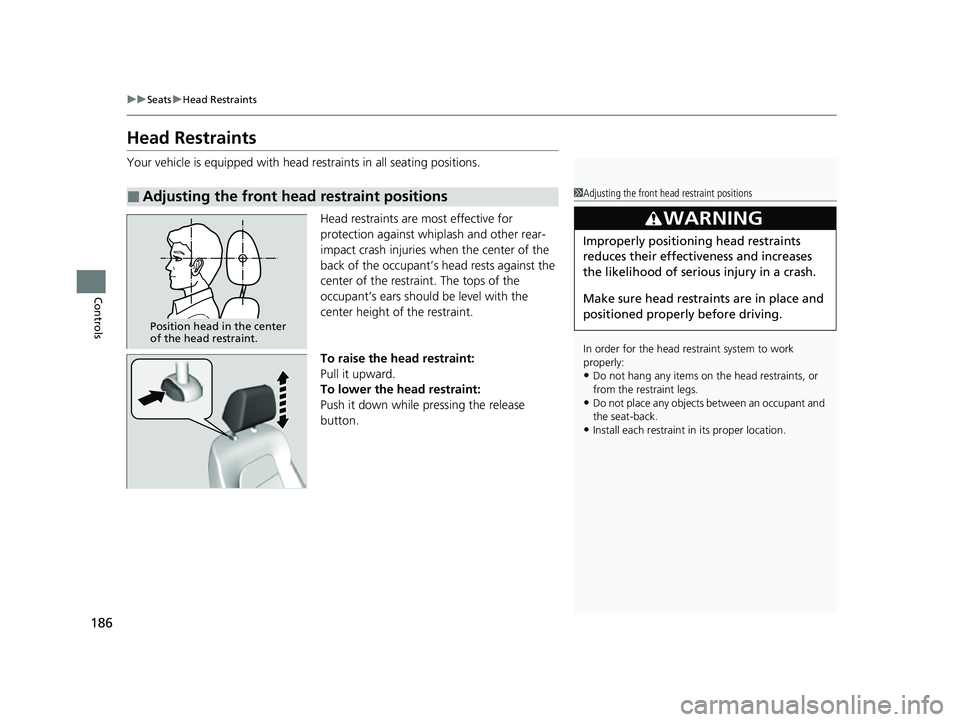
Your vehicle is equipped with head restraints in all seating positions.
Head restraints are most effective for
protection against whiplash and other rear-
impact crash injuries when the center of the
back of the occupant’s head rests against the
center of the restraint. The tops of the
occupant’s ears should be level with the
center height of the restraint.
To raise the head restraint:
Pull it upward.
To lower the head restraint:
Push it down while pressing the release
button.
■Adjusting the front head restraint positions1Adjusting the front head restraint positions
In order for the head restraint system to work
properly:
•Do not hang any items on the head restraints, or
from the restraint legs.
•Do not place any objects between an occupant and
the seat-back.
•Install each restraint in its proper location.
3WARNING
Improperly positioning head restraints
reduces their effectiveness and increases
the likelihood of serious injury in a crash.
Make sure head restraints are in place and
positioned properly before driving.
Position head in the center
of the head restraint.
23 HR-V-313V06000_01.book 186 ページ 2022年4月4日 月曜日 午前10時49分
Page 412 of 664
410
Driving
Before Driving
Driving Preparation
Check the following items before you start driving.
• Make sure there are no obstructions on the windows, door mirrors, exterior
lights, or other parts of the vehicle.
u Remove any frost, snow, or ice.
u Remove any snow on the roof, as this can slip down and obstruct your field of
vision while driving. If frozen solid , remove ice once it has softened.
u When removing ice from around the wheels, be sure not to damage the wheel
or wheel components.
• Make sure the hood is securely closed.
u If the hood opens while driving, your front view will be blocked.
• Make sure the tires are in good condition.
u Check air pressures, and check for damage and excessive wear.
2Checking and Maintaining Tires P. 581
•Make sure there are no people or ob jects behind or around the vehicle.
u There are blind spots from the inside.
■Exterior Checks1Exterior Checks
NOTICE
When doors are frozen s hut, use warm water around
the door edges to melt any ice. Do not try to force
them open, as this can damage the rubber trim
around the doors. When done, wipe dry to avoid
further freezing.
Do not pour warm water into the key cylinder.
You will be unable to insert the key if the water
freezes in the hole.
Heat from the engine and exhaust can ignite
flammable material s left under the hood, causing a
fire. If you've parked y our vehicle for an extended
period, inspect and remove any debris that may have
collected, such as dried grass and leaves that have
fallen or have been carried in for use as a nest by a
small animal. Also, check under the hood for leftover
flammable materials after you or someone else has
performed maintenance on your vehicle.
23 HR-V-313V06000_01.book 410 ページ 2022年4月4日 月曜日 午前10時49分
Page 419 of 664
417
uuOff-Highway Driving Guidelines uAvoiding Trouble
Driving
Avoiding Trouble
• Check Out Your Vehicle before you leave the pavement and make sure that all
scheduled maintenance has been completed. Pay special attention to the
condition of the tires, and check the tire pressures.
• Remember the route you choose presents limi ts (too steep or bumpy), you have
limits (driving skill and comfort), and your ve hicle has limits (traction, stability, and
power). Failing to recognize these limits will likely put you and your passengers in
a hazardous situation.
• Accelerating and Braking should be done slowly and gradually. Trying to start
or stop too fast can cause a loss of traction and you could lose control.
• Avoiding Obstacles and Debris in the road reduces the likelihood of a rollover
or damage to your suspension or other components.
• Driving on Slopes increases your risk of a rollover , particularly if you attempt to
drive across a slope that is too steep. Goin g straight up or down a slope is usually
the safest. If you can’t clearly see all cond itions or obstacles on a slope, walk it
before you drive it. If there is any doubt whether you can safely pass, don’t try it.
Find another route. If you get stuck when climbing, do not try to turn around.
Back down slowly following the same route you took up the hill.
• Crossing a Stream - Avoid driving through deep wa ter. If you encounter water
in your route (a small stream or large pu ddle, for example), evaluate it carefully
before going ahead. Make sure it is shallow, flowing slowly, and has firm ground
underneath. If you are not sure of the depth or the ground, turn around and find
another route. Driving through deep water can also damage your vehicle. The
water can get into the transmission and di fferential, diluting the lubricant and
causing an eventual failure. It can also wash the grease out of the wheel bearings.
• If You Get Stuck , carefully go in the direction that you think will get you
unstuck. Do not spin the tires as this will only make things worse and could
damage the transmission. If you are unable to free yourself, your vehicle will need
to be towed. Front and rear tow hooks are provided for this purpose.
23 HR-V-313V06000_01.book 417 ページ 2022年4月4日 月曜日 午前10時49分
Page 423 of 664
Continued421
uuWhen Driving uStarting the Engine
Driving
When started remotely, the engine automati cally shuts off after 10 minutes of idling
and/or the brake pedal and ENGINE START/STOP button have not been pressed
simultaneously.
To extend the run time for another 10 mi nutes during the first run, press the
button, then press an d hold the button.
u Some exterior lights flash six times if a 10-minute extension request was
transmitted successfully.1 Remote Engine Start*
The engine may not start by the remote engine start
if:
•You have disabled a remo te engine start setting
using the driver information interface* or audio/
information screen*.
2 Settings* P. 123
2 Customized Features P. 345
•The power mode is not in VEHICLE OFF.
•The transmission is in a position other than (P.•The hood is open, or any door or the tailgate is
unlocked.
•You have already used the remote twice to start
the engine.
•Another registered keyless remote is in the vehicle.
•There is any antenna failure.•The door is unlocked with the built-in key.
•The engine oil pressure is low.
•The engine coolant temper ature is extremely high.
•The security system alarm is not set.
* Not available on all models
23 HR-V-313V06000_01.book 421 ページ 2022年4月4日 月曜日 午前10時49分
Page 424 of 664
uuWhen Driving uStarting the Engine
422
Driving
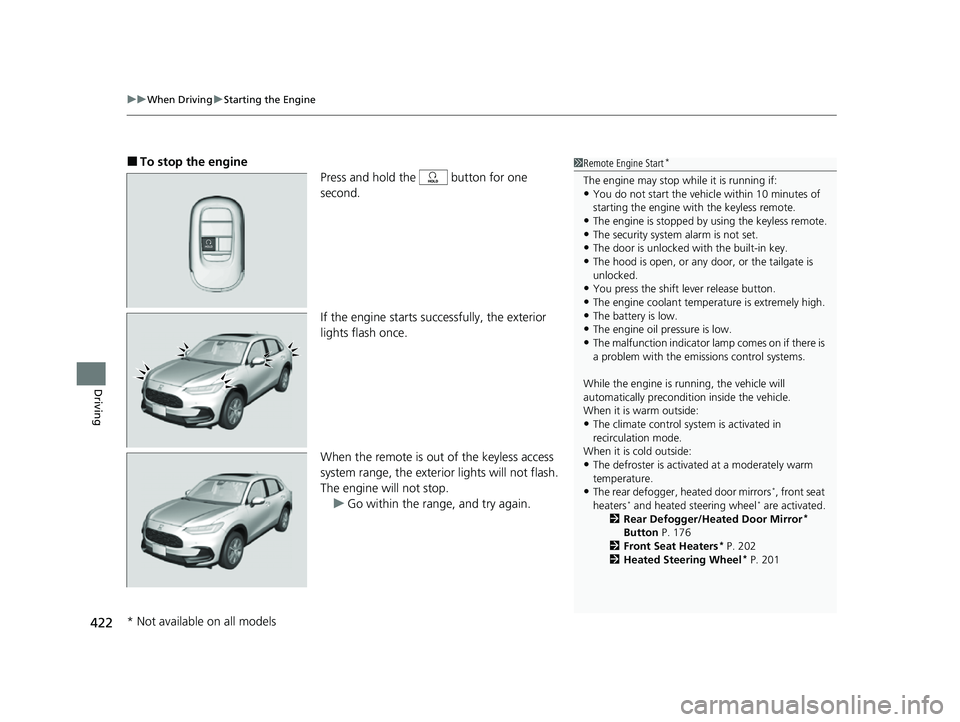
■To stop the engine
Press and hold the button for one
second.
If the engine starts successfully, the exterior
lights flash once.
When the remote is out of the keyless access
system range, the exterior lights will not flash.
The engine will not stop. u Go within the rang e, and try again.1Remote Engine Start*
The engine may stop whil e it is running if:•You do not start the vehicl e within 10 minutes of
starting the engine with the keyless remote.
•The engine is stopped by using the keyless remote.•The security system alarm is not set.
•The door is unlocked with the built-in key.
•The hood is open, or any door, or the tailgate is
unlocked.
•You press the shift lever release button.
•The engine coolant temper ature is extremely high.•The battery is low.
•The engine oil pressure is low.
•The malfunction indicator la mp comes on if there is
a problem with the emissions control systems.
While the engine is running, the vehicle will
automatically preconditi on inside the vehicle.
When it is warm outside:
•The climate control system is activated in
recirculation mode.
When it is cold outside:
•The defroster is activated at a moderately warm
temperature.
•The rear defogger, heated door mirrors*, front seat
heaters* and heated steering wheel* are activated.
2 Rear Defogger/Heated Door Mirror*
Button P. 176
2 Front Seat Heaters
* P. 202
2 Heated Steering Wheel* P. 201
* Not available on all models
23 HR-V-313V06000_01.book 422 ページ 2022年4月4日 月曜日 午前10時49分
Page 522 of 664
uuHonda Sensing ®u Traffic Sign Recognition System
520
Driving
1Traffic Sign Recognition System
To help reduce the likel ihood that high interior
temperatures will cause the camera’s sensing system
to shut off, when parking, find a shady area or face
the front of the vehicle away from the sun. If you use
a reflective sun shade, do not allow it to cover the
camera housing.
Covering the camera can concentrate heat on it.
If your vehicle exceeds the detected speed limit, an
icon representing the speed limit sign for the current
area will blink in the display. 2 Settings
* P. 123
2 Customized Features P. 345
The system’s ability to accurately notify the driver of
the speed limit is depend ent on certain conditions
such as the units displayed on the traffic sign as well
as the speed and direction of travel of the vehicle. In
some cases, the system may display false warnings or
other inaccurate information. 2 Traffic Sign Recognition System Conditions
and Limitations P. 521
The unit for speed limits (mph or km/h) varies from
country to country. Just after entering a country
whose unit differs to the one of the country from
which you came, Traffic Sign Recognition System
may not work correctly. 2 Settings
* P. 123
2 Speed/Distance Units P. 122
2 Customized Features P. 345
* Not available on all models
23 HR-V-313V06000_01.book 520 ページ 2022年4月4日 月曜日 午前10時49分
Page 527 of 664
525
uuHonda Sensing ®u Front Wide View Camera
Continued
Driving
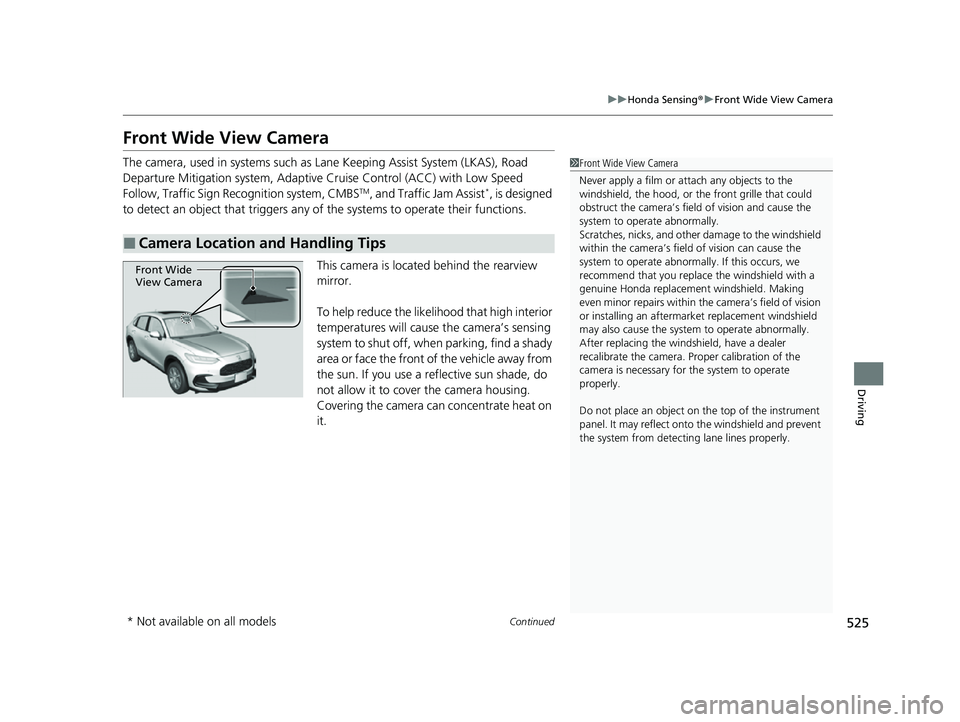
Front Wide View Camera
The camera, used in systems such as Lane Keeping Assist System (LKAS), Road
Departure Mitigation system, Adaptive Cruise Control (ACC) with Low Speed
Follow, Traffic Sign Recognition system, CMBS
TM, and Traffic Jam Assist*, is designed
to detect an object that triggers any of the systems to operate their functions.
This camera is located behind the rearview
mirror.
To help reduce the likelihood that high interior
temperatures will cause the camera’s sensing
system to shut off, when parking, find a shady
area or face the front of the vehicle away from
the sun. If you use a reflective sun shade, do
not allow it to cover the camera housing.
Covering the camera can concentrate heat on
it.
■Camera Location and Handling Tips
1 Front Wide View Camera
Never apply a film or attach any objects to the
windshield, the hood, or th e front grille that could
obstruct the camera’s fiel d of vision and cause the
system to operate abnormally.
Scratches, nicks, and othe r damage to the windshield
within the camera’s fiel d of vision can cause the
system to operate abnormall y. If this occurs, we
recommend that you replac e the windshield with a
genuine Honda replacem ent windshield. Making
even minor repairs within th e camera’s field of vision
or installing an aftermarket replacement windshield
may also cause the system to operate abnormally.
After replacing the winds hield, have a dealer
recalibrate the camera. Pr oper calibration of the
camera is necessary for the system to operate
properly.
Do not place an object on the top of the instrument
panel. It may reflect onto the windshield and prevent
the system from detecting lane lines properly.
Front Wide
View Camera
* Not available on all models
23 HR-V-313V06000_01.book 525 ページ 2022年4月4日 月曜日 午前10時49分
Page 553 of 664
551
Maintenance
This chapter discusses basic maintenance.
Before Performing MaintenanceInspection and Maintenance ............ 552
Safety When Performing Maintenance .... 553
Parts and Fluids Used in Maintenance Service ........................................... 554
Maintenance Minder
TM..................... 555
Maintenance Under the Hood
Maintenance Items Un der the Hood .... 563
Opening the Hood ........................... 564
Recommended Engine Oil ................ 565
Oil Check ......................................... 566
Adding Engine Oil ............................ 567
Changing the Engine Oil and Oil Filter ..... 568
Engine Coolant ................................ 570
Transmission Fluid ............................ 572
Brake Fluid ....................................... 573
Refilling Window Washer Fluid......... 574
Replacing Light Bulbs ....................... 575
Checking and Maintaining Wiper Blades.... 577Checking and Maintaining Tires
Checking Tires ................................. 581
Tire and Loading Information Label .. 583
Tire Labeling .................................... 583
DOT Tire Quality Grading (U.S. Vehicles).. 585Wear Indicators................................ 587 Tire Service Life ................................ 587
Tire and Wheel Replacement ........... 588
Tire Rotation .................................... 589
Winter Tires ..................................... 590
Battery ............................................... 592
Remote Transmitter Care
Replacing the Remote Battery .......... 594
Climate Control System Maintenance .. 595
Cleaning
Interior Care .................................... 596
Exterior Care.................................... 598
Accessories and Modifications ........ 601
23 HR-V-313V06000_01.book 551 ページ 2022年4月4日 月曜日 午前10時49分