buttons HONDA HRV 2023 Owner's Manual
[x] Cancel search | Manufacturer: HONDA, Model Year: 2023, Model line: HRV, Model: HONDA HRV 2023Pages: 664, PDF Size: 20.2 MB
Page 289 of 664
287
uuAudio System Basic Operation uPlaying a USB Flash Drive
Continued
Features
Playing a USB Flash Drive
Your audio system reads and plays sound files on a USB flash drive in either MP3,
WMA, AAC*1, FLAC, or WAV format.
Connect your USB flash drive to the USB port, then select the USB mode.
2 USB Ports P. 213
*1:Only AAC format files recorded with iTunes are playable on this unit.
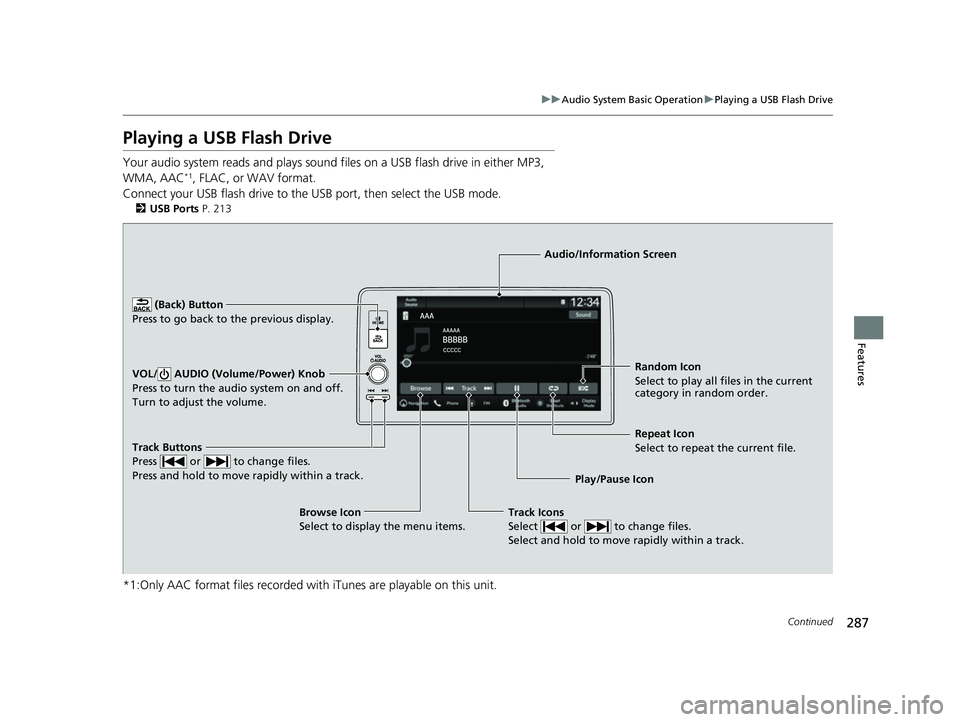
Track Buttons
Press or to change files.
Press and hold to move rapidly within a track.
Random Icon
Select to play all files in the current
category in random order.
Audio/Information Screen
Play/Pause Icon
(Back) Bu
tt
on
Press to go bac
k to the previous display.
VOL/ AUDIO (Volume/Power) Knob
Press to turn the audio system on and off.
Turn to adjust the volume.
Track Icons
Select or to change files.
Select and hold to move rapidly within a track.
Repeat Icon
Select to repeat the current file.
Browse Icon
Select to display the menu items.
23 HR-V-313V06000_01.book 287 ページ 2022年4月4日 月曜日 午前10時49分
Page 371 of 664

369Continued
Features
Bluetooth® HandsFreeLink ®
Bluetooth® HandsFreeLink ® (HFL) allows you to place and receive phone calls using
your vehicle’s audio system, without handling your cell phone.
Using HFL
■HFL Buttons
1 Bluetooth ® HandsFreeLink ®
Place your phone where y ou can get good reception.
To use HFL, you need a Bluetooth-compatible cell
phone. For a list of compatible phones, pairing
procedures, and special feature capabilities:
•U.S.: Visit automobiles.honda.com/handsfreelink/ ,
or call 1-888-528-7876.
•Canada: For more info rmation on smartphone
compatibility, call 1-855-490-7351.
Voice control tips
•Aim the vents away from the ceiling and close the
windows, as noise coming from them may interfere
with the microphone.
•If the microphone picks up vo ices other than yours,
the command may be misinterpreted.
State or local laws may pr ohibit the operation of
handheld electronic devices while operating a vehicle.
Up to 20 favorite contacts ca n be stored. If there is no
entry in the system, the pop-up notification appears
on the screen. 2 Favorite Contacts P. 382
Up to 20 call histories can be stored. If there is no call
history, Call History is disabled.
Models with 7-in. Color Touchscreen
Selector Knob
Left Selector Wheel PHONE Button
VOL
(
+/VOL (-
(Volume) Switch
23 HR-V-313V06000_01.book 369 ページ 2022年4月4日 月曜日 午前10時49分
Page 391 of 664
389Continued
Features
Bluetooth® HandsFreeLink ®
Bluetooth® HandsFreeLink ® (HFL) allows you to place and receive phone calls using
your vehicle’s audio system, without handling your cell phone.
Using HFL
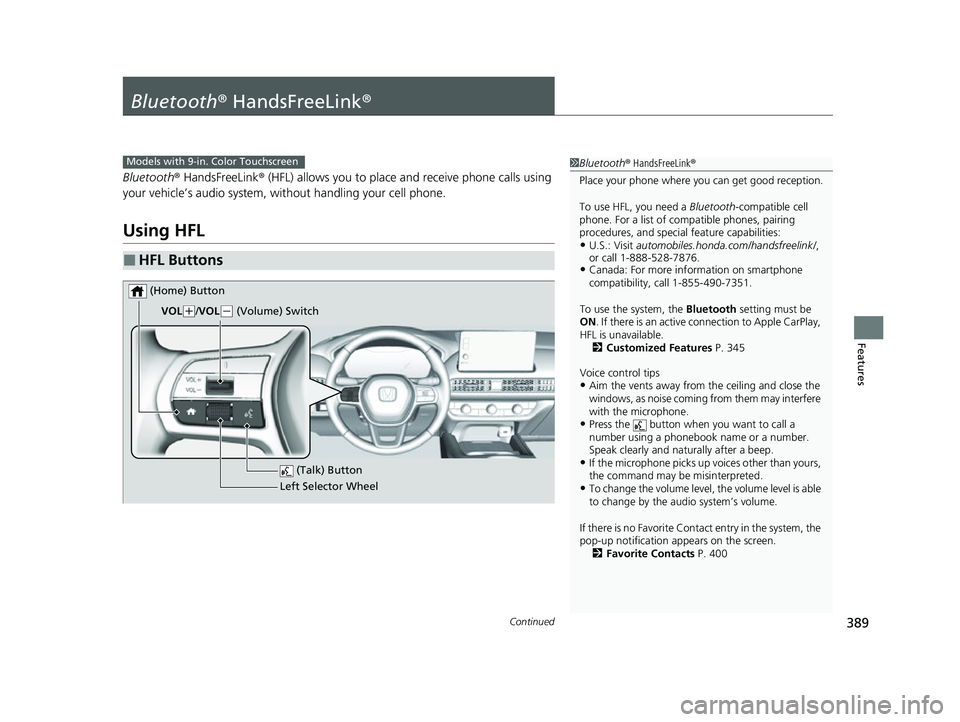
■HFL Buttons
1 Bluetooth ® HandsFreeLink ®
Place your phone where y ou can get good reception.
To use HFL, you need a Bluetooth-compatible cell
phone. For a list of compatible phones, pairing
procedures, and special feature capabilities:
•U.S.: Visit automobiles.honda.com/handsfreelink/ ,
or call 1-888-528-7876.
•Canada: For more info rmation on smartphone
compatibility, call 1-855-490-7351.
To use the system, the Bluetooth setting must be
ON . If there is an active c onnection to Apple CarPlay,
HFL is unavailable. 2 Customized Features P. 345
Voice control tips
•Aim the vents away from the ceiling and close the
windows, as noise coming from them may interfere
with the microphone.
•Press the button when you want to call a
number using a phonebook name or a number.
Speak clearly and naturally after a beep.
•If the microphone picks up vo ices other than yours,
the command may be misinterpreted.
•To change the volume level, the volume level is able
to change by the audio system’s volume.
If there is no Favorite Contact entry in the system, the
pop-up notification appears on the screen. 2 Favorite Contacts P. 400
Models with 9-in. Color Touchscreen
(Talk) Button
Left Selector Wheel
VOL
(
+/VOL(- (Volume) Switch
(Home) Button
23 HR-V-313V06000_01.book 389 ページ 2022年4月4日 月曜日 午前10時49分
Page 506 of 664
uuHonda Sensing ®u Traffic Jam Assist*
504
Driving
Traffic Jam Assist is activated when all of the following conditions exist:
• LKAS is activated.
• The lane in which you are driving has dete ctable lane markers on both sides, and
your vehicle is in the center of the lane.
• The vehicle is traveling between about 0 and 45 mph (0 and 72 km/h).
• You are driving on a straight or slightly curved road.
• The driver is gripping the steering wheel.
• The shift position is in
(D, (S or (L.
Do not use Traffic Jam Assist in any of the following situations:
• You are traveling on a ro ad with sharp curves.
u The system may not allow your vehicle to respond in a manner best suited for
the road conditions.
• You are entering a toll booth, interchange, service area, or parking area.
• You are driving in adverse weat her (rain, fog, snow, etc.).
• The surface of the road is slippery; for ex ample, it is icy or covered with snow.
u The tires may slip, causing you to lose control of the vehicle.
■Traffic Jam Assist Activation1Traffic Jam Assist Activation
Refer to the following pa ge for proper handling of
the Lane Keeping Assist System (LKAS):
2 Lane Keeping Assist System (LKAS) P. 491
Refer to the following page for steering buttons and
displays: 2 Operation Switches for the Adaptive
Cruise Control (ACC) with Low Speed
Follow/Lane Keeping Assist System
(LKAS)/Traffic Jam Assist
* P. 451
* Not available on all models
23 HR-V-313V06000_01.book 504 ページ 2022年4月4日 月曜日 午前10時49分
Page 596 of 664
594
Maintenance
Remote Transmitter Care
Replacing the Remote Battery
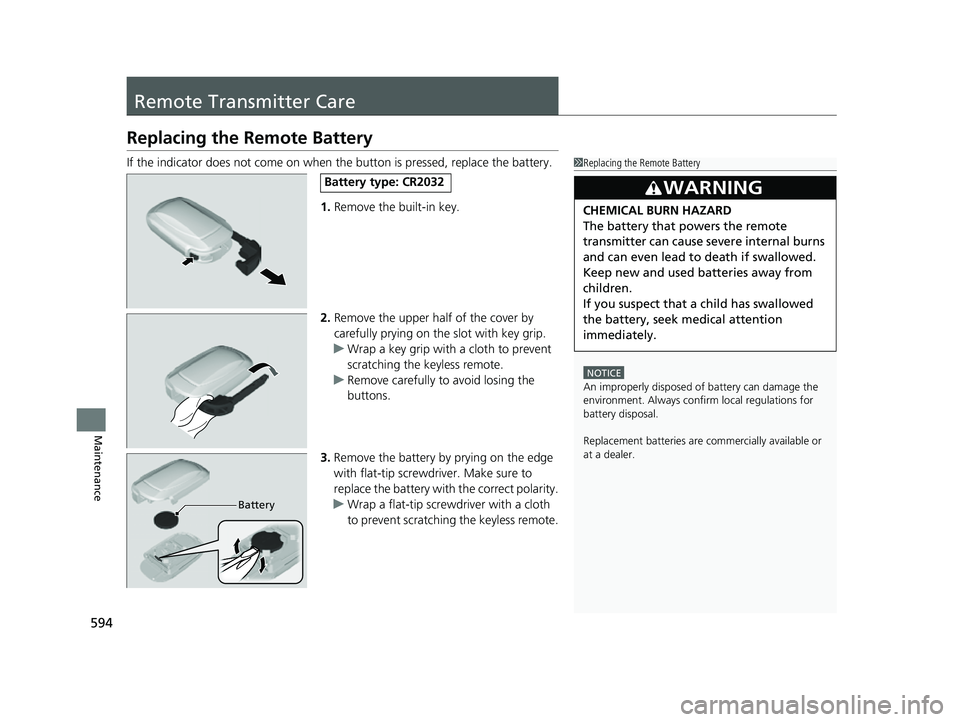
If the indicator does not come on when the button is pressed, replace the battery.1.Remove the built-in key.
2. Remove the upper half of the cover by
carefully prying on the slot with key grip.
u Wrap a key grip with a cloth to prevent
scratching the keyless remote.
u Remove carefully to avoid losing the
buttons.
3. Remove the battery by prying on the edge
with flat-tip screwdri ver. Make sure to
replace the battery with the correct polarity.
u Wrap a flat-tip screwdriver with a cloth
to prevent scratching the keyless remote.1Replacing the Remote Battery
NOTICE
An improperly disposed of battery can damage the
environment. Always conf irm local regulations for
battery disposalM
Replacement batteries are commercially available or
at a dealer.
3WARNING
CHEMICAL BURN HAZARD
The battery that powers the remote
transmitter can cause severe internal burns
and can even lead to death if swallowed.
Keep new and used batteries away from
children.
If you suspect that a child has swallowed
the battery, seek medical attention
immediately.
Battery type: CR2032
Battery
23 HR-V-313V06000_01.book 594 ページ 2022年4月4日 月曜日 午前10時49分
Page 616 of 664
614
uuEngine Does Not Start uIf the Keyless Remote Battery is Weak
Handling the Unexpected
If the Keyless Remote Battery is Weak
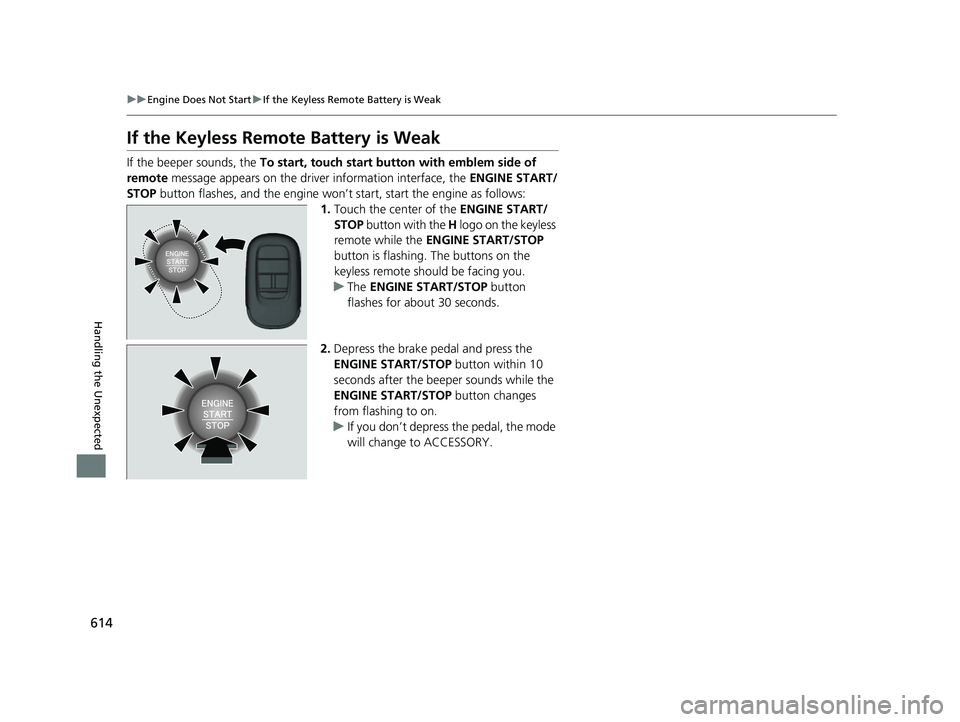
If the beeper sounds, the To start, touch start butto n with emblem side of
remote message appears on the driver information interface, the ENGINE START/
STOP button flashes, and the engine won’t start, start the engine as follows:
1.Touch the center of the ENGINE START/
STOP button with the H logo on the keyless
remote while the ENGINE START/STOP
button is flashing. The buttons on the
keyless remote should be facing you.
u The ENGINE START/STOP button
flashes for about 30 seconds.
2. Depress the brake pedal and press the
ENGINE START/STOP button within 10
seconds after the beeper sounds while the
ENGINE START/STOP button changes
from flashing to on.
u If you don’t depress the pedal, the mode
will change to ACCESSORY.
23 HR-V-313V06000_01.book 614 ページ 2022年4月4日 月曜日 午前10時49分
Page 658 of 664
656
Index
Fuel...................................................... 25, 547
Average Fuel Economy............................. 110
Economy ................................................. 550
Gauge ..................................................... 104
Instant Fuel Economy ............................... 110
Low Fuel Indicator (Amber) ........................ 92
Range ...................................................... 110
Recommendation .................................... 547
Refueling ........................................... 25, 547
Fuel Economy ............................................ 550
Fuel Fill Cap ................................................. 25
Fuel Fill Door ....................................... 25, 548
Unable to Unlock ..................................... 635
Fuses .......................................................... 628
Inspecting and Changing ......................... 632
Locations ......................................... 628, 630
G
Gasoline (Fuel) Average Fuel Economy............................. 110
Economy ................................................. 550
Gauge ..................................................... 104
Information ............................................. 547
Instant Fuel Economy ............................... 110
Low Fuel Indicator (Amber) ........................ 92
Refueling ................................................. 547
Gauges ....................................................... 104
Glass (care) ........................................ 597, 599
Glove Box .................................................. 192
H
Handling the Unexpected ........................ 603
HandsFreeLink ® (HFL) ....................... 369, 389
Automatic Import of Ce llular Phonebook and
Call History .................................... 381, 399
Automatic Transferring.................... 379, 398
Favorite Contacts ............................ 382, 400
HFL Buttons..................................... 369, 389
HFL Menus ...................................... 372, 392
HFL Status Display ........................... 371, 391
In Case of Emergency .............................. 406
Limitations for Manual Operation .... 371, 391
Making a Call .................................. 384, 402
Options During a Call ...................... 388, 405
Phone Setup.................................... 374, 394
Receiving a Call ............................... 387, 404
Ringtone ......................................... 379, 398
Hazard Warning Button .............................. 8
HD Radio
TM................................................ 270
Head Restraints ........................................ 186
Headlights ................................................. 166
Aiming .................................................... 575
Auto High-Beam ..................................... 171
Dimming ................................................. 166
Operating................................................ 166
Heated Steering Wheel ............................ 201
Heated Windshield ................................... 176
Heaters (Front Seat) ................................. 202
HFL (HandsFreeLink ®)....................... 369, 389
High Beam Indicator .................................. 96
Hill Descent Control System ..................... 432Hill Descent Control System Indicator
...... 98
Hill Start Assist System ............................. 423
Honda App License Agreement .............. 318
Honda Sensing ®................................ 26, 449
HondaLink ®............................................ 293
I
Identification Numbers
Engine and Transmission ......................... 642
Vehicle Identification............................... 642
If the Battery Is Dead ............................... 617
Immobilizer System .................................. 156
Indicator ................................................... 97
Important Handling Information .............. 36
Indicators .................................................... 86
Adaptive Cruise Control (ACC) with Low Speed Follow (Amber) ............................. 99
Adaptive Cruise Control (ACC) with Low Speed Follow (White/Green) .................... 99
Anti-lock Brake System (ABS) .................... 93
Auto High-Beam ....................................... 96
Automatic Brake Hold ....................... 90, 532
Automatic Brake Hold System ........... 90, 532
Charging System............................... 91, 623
Cruise Mode (White/Green) ...................... 99
ECON Mode ..................................... 98, 429
Electric Power Steering (EPS) System ............................................ 93, 625
Engine oil pressure low Warning ............. 622
High Beam ................................................ 96
23 HR-V-313V06000_01.book 656 ページ 2022年4月4日 月曜日 午前10時49分