engine vin HONDA HRV 2023 Repair Manual
[x] Cancel search | Manufacturer: HONDA, Model Year: 2023, Model line: HRV, Model: HONDA HRV 2023Pages: 664, PDF Size: 20.2 MB
Page 576 of 664
574
uuMaintenance Under the Hood uRefilling Window Washer Fluid
Maintenance
Refilling Window Washer Fluid
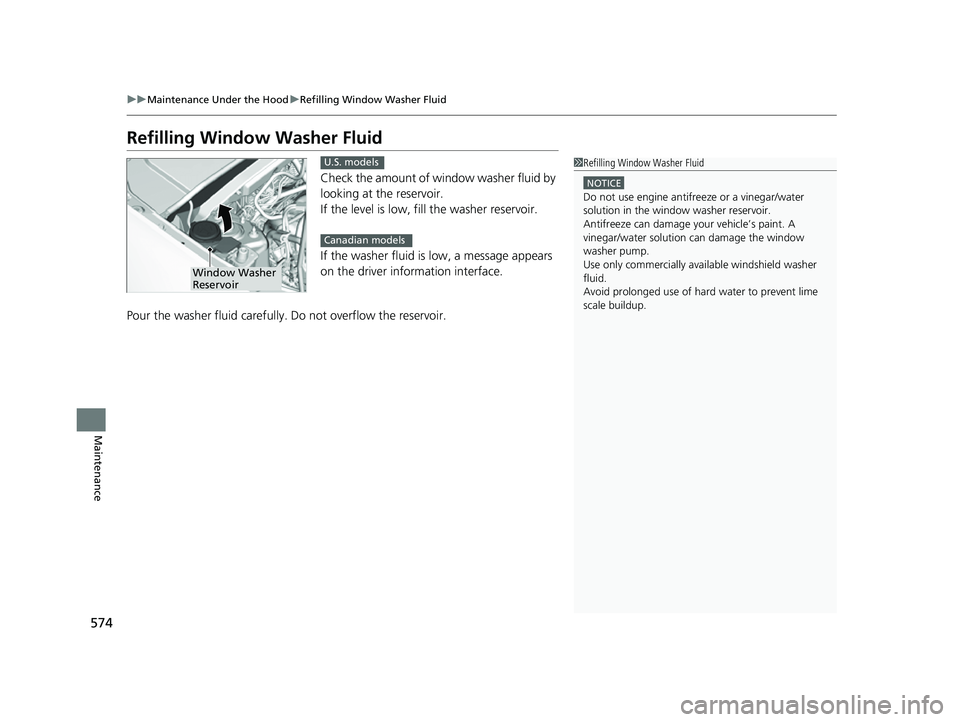
Check the amount of window washer fluid by
looking at the reservoir.
If the level is low, fill the washer reservoir.
If the washer fluid is low, a message appears
on the driver information interface.
Pour the washer fluid carefully. Do not overflow the reservoir.
1 Refilling Window Washer Fluid
NOTICE
Do not use engine antifreeze or a vinegar/water
solution in the window washer reservoir.
Antifreeze can damage y our vehicle
Page 600 of 664
598
uuCleaning uExterior Care
Maintenance
Exterior Care
Dust off the vehicle body after you drive.
Regularly inspect your vehi cle for scratches on painted surfaces. A scratch on a
painted surface can result in body rust. If you find a scratch, promptly repair it.
Wash the vehicle regularly. Wash more frequently when driving in the following
conditions:
• If driving on roads with road salt.
• If driving in coastal areas.
• If tar, soot, bird droppings, insects, or tree sap are stuck to painted surfaces.
• Make sure to follow the instructions indicated on the automated car wash.
• Fold in the door mirrors.
• Keep sufficient distance between the cleaning nozzl e and the vehicle body.
• Take particular care around the windows. St anding too close may cause water to
enter the vehicle interior.
• Do not spray high pressure water directly into the engine compartment. Instead,
use low pressure water and a mild detergent.
• Do not spray water directly onto the ca mera or the area around it. Water may
enter the lens and cause the camera to malfunction.
■Washing the Vehicle
■Using an Automated Car Wash
■Using High Pressure Cleaners
1 Washing the Vehicle
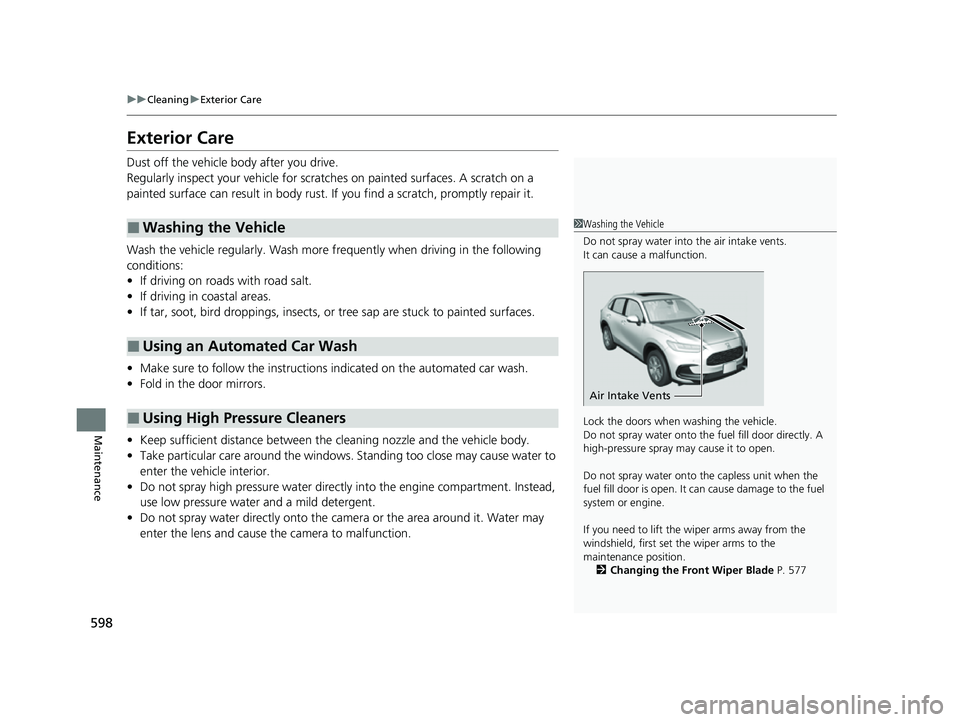
Do not spray water into the air intake vents.
It can cause a malfunction.
Lock the doors when washing the vehicle.
Do not spray water onto the fuel fill door directly. A
high-pressure spray ma y cause it to open.
Do not spray water onto the capless unit when the
fuel fill door is open. It ca n cause damage to the fuel
system or engine.
If you need to lift the wiper arms away from the
windshield, first set the wiper arms to the
maintenance position. 2 Changing the Front Wiper Blade P. 577
Air Intake Vents
23 HR-V-313V06000_01.book 598 ページ 2022年4月4日 月曜日 午前10時49分
Page 618 of 664
616
uuEngine Does Not StartuEmergency Engine Stop
Handling the Unexpected
Emergency Engine Stop
The ENGINE START/STOP button may be used to stop the engine due to an
emergency situation even while driving. If you must stop the engine, do either of the
following operations:
• Press and hold the ENGINE START/STOP button for about two seconds.
• Firmly press the ENGINE START/STOP button three times.
The steering wheel will not lock. However, because turning off the engine disables
the power assist the engine provides to the steering and braking systems, it will
require significantly more physical effort an d time to steer and slow the vehicle. Use
both feet on the brake pedal to slow down the vehicle and stop immediately in a
safe place.
The power mode is in ACCESSORY when the engine is stopped.
To change the mode to VEHICLE OFF, put the transmission into
(P after the vehicle
comes to a complete stop.
1 Emergency Engine Stop
Do not press the ENGINE START/STOP button while
driving unless it is absolute ly necessary for the engine
to be turned off.
If you press the ENGINE START/STOP button while
driving, the beeper sounds.
23 HR-V-313V06000_01.book 616 ページ 2022年4月4日 月曜日 午前10時49分
Page 623 of 664
621
uuOverheating uHow to Handle Overheating
Handling the Unexpected
■Next thing to do
1.Check that the cooling fan is operating and
stop the engine once Engine temperature
too hot. Do not drive. Allow engine to
cool. on the driver information interface
disappears.
u If the cooling fan is not operating,
immediately stop the engine.
2. Once the engine has cooled down, inspect
the coolant level and check the cooling
system components for leaks.
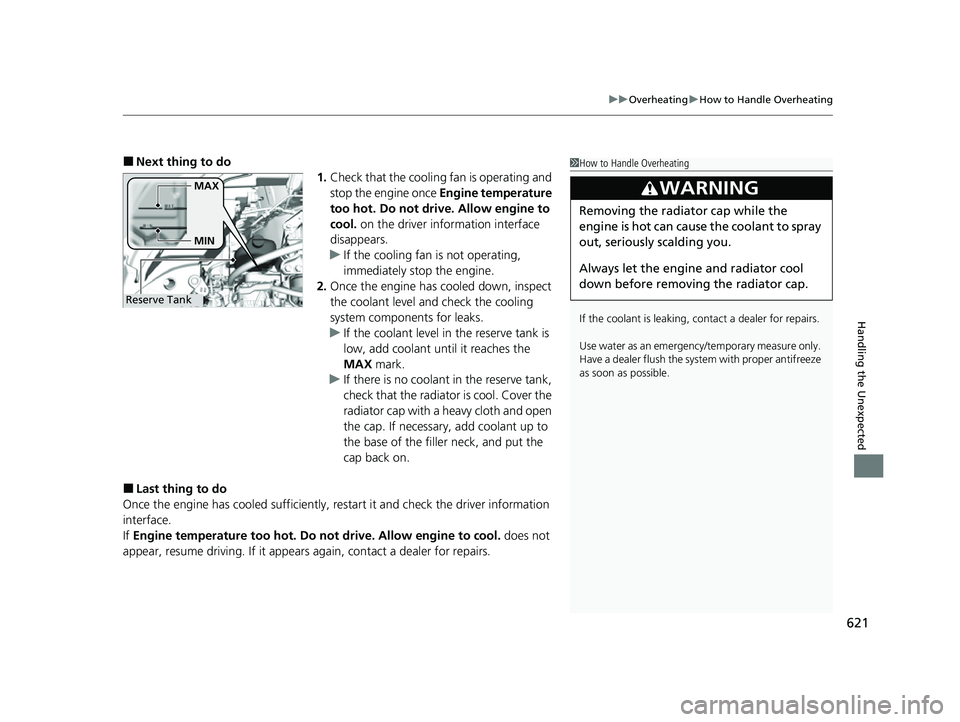
u If the coolant level in the reserve tank is
low, add coolant until it reaches the
MAX mark.
u If there is no coolant in the reserve tank,
check that the radiator is cool. Cover the
radiator cap with a heavy cloth and open
the cap. If necessary, add coolant up to
the base of the filler neck, and put the
cap back on.
■Last thing to do
Once the engine has cooled sufficiently, restart it and check the driver information
interface.
If Engine temperature too hot. Do not drive. Allow engine to cool. does not
appear, resume driving. If it appear s again, contact a dealer for repairs.
1How to Handle Overheating
If the coolant is leaking, contact a dealer for repairs.
Use water as an emergency/temporary measure only.
Have a dealer flush the system with proper antifreeze
as soon as possible.
3WARNING
Removing the radiator cap while the
engine is hot can cause the coolant to spray
out, seriously scalding you.
Always let the engine and radiator cool
down before removing the radiator cap.
Reserve TankMAX
MIN
23 HR-V-313V06000_01.book 621 ページ 2022年4月4日 月曜日 午前10時49分
Page 624 of 664
622
Handling the Unexpected
Indicator, Coming On/Blinking
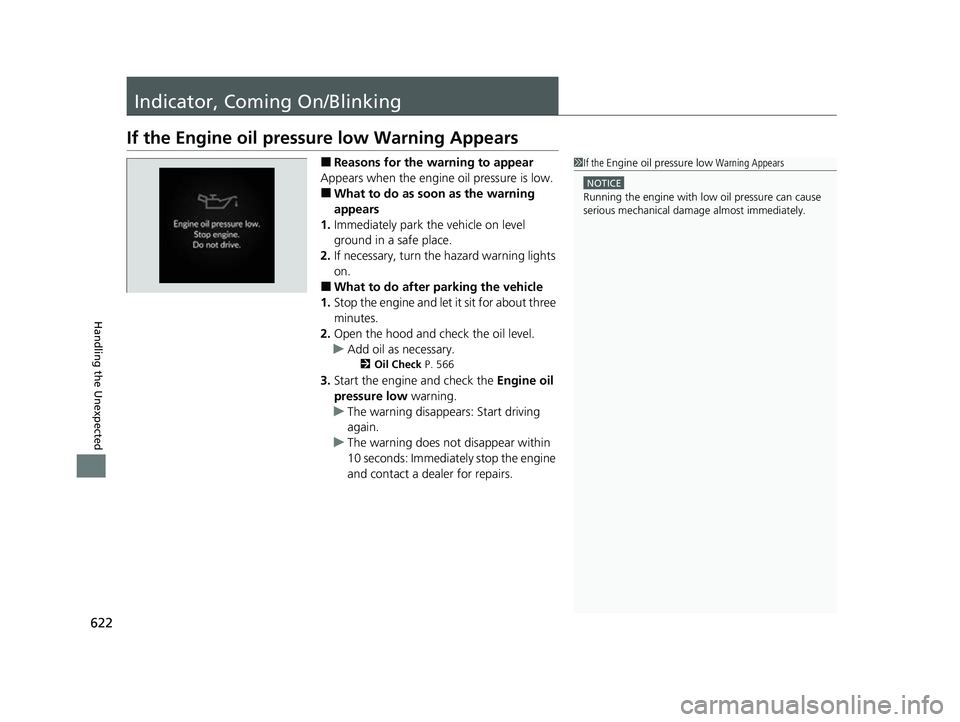
If the Engine oil pressure low Warning Appears
■Reasons for the warning to appear
Appears when the engine oil pressure is low.
■What to do as soon as the warning
appears
1. Immediately park the vehicle on level
ground in a safe place.
2. If necessary, turn the hazard warning lights
on.
■What to do after parking the vehicle
1. Stop the engine and let it sit for about three
minutes.
2. Open the hood and check the oil level.
u Add oil as necessary.
2 Oil Check P. 566
3.Start the engine and check the Engine oil
pressure low warning.
u The warning disappears: Start driving
again.
u The warning does not disappear within
10 seconds: Immediately stop the engine
and contact a dealer for repairs.
1If the Engine oil pressure low Warning Appears
NOTICE
Running the engine with low oil pressure can cause
serious mechanical damage almost immediatelyM
23 HR-V-313V06000_01.book 622 ページ 2022年4月4日 月曜日 午前10時49分
Page 626 of 664
624
uuIndicator, Coming On/BlinkinguIf the Brake System Indicator (Red) Comes On or Blinks
Handling the Unexpected
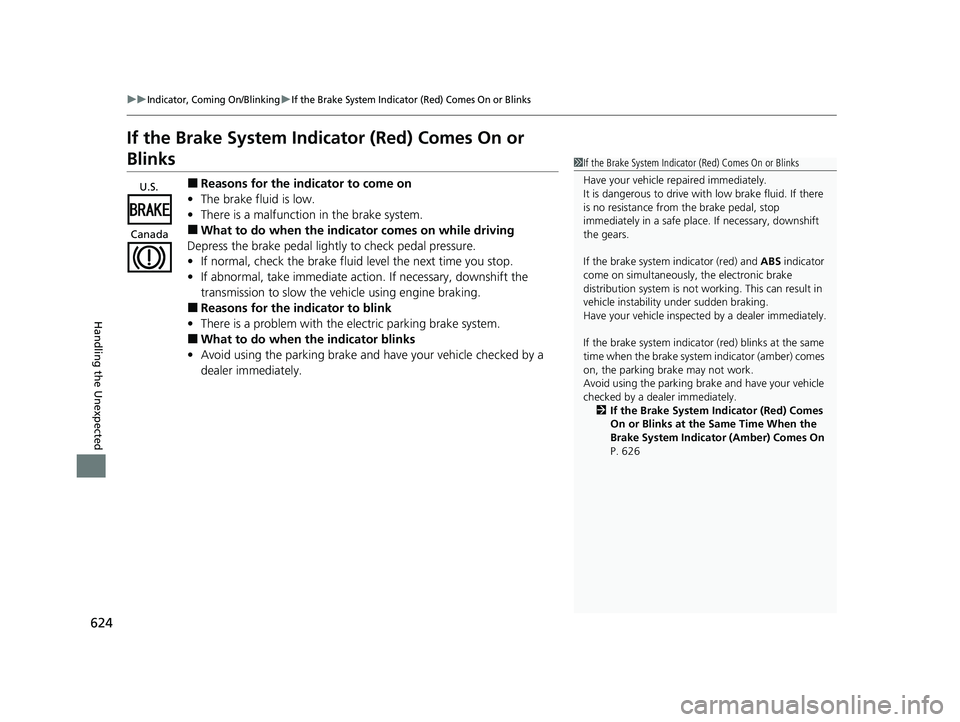
If the Brake System Indicator (Red) Comes On or
Blinks
■Reasons for the indicator to come on
• The brake fluid is low.
• There is a malfunction in the brake system.
■What to do when the indicator comes on while driving
Depress the brake pedal lightly to check pedal pressure.
• If normal, check the brake fluid level the next time you stop.
• If abnormal, take immediate action. If necessary, downshift the
transmission to slow the vehicle using engine braking.
■Reasons for the in dicator to blink
• There is a problem with the electric parking brake system.
■What to do when the indicator blinks
• Avoid using the parking brake and ha ve your vehicle checked by a
dealer immediately.
1 If the Brake System Indicator (Red) Comes On or Blinks
Have your vehicle re paired immediately.
It is dangerous to drive with low brake fluid. If there
is no resistance from the brake pedal, stop
immediately in a safe plac e. If necessary, downshift
the gears.
If the brake system indicator (red) and ABS indicator
come on simultaneously , the electronic brake
distribution system is not wo rking. This can result in
vehicle instability under sudden braking.
Have your vehicle inspecte d by a dealer immediately.
If the brake system indicator (red) blinks at the same
time when the brake system indicator (amber) comes
on, the parking br ake may not work.
Avoid using the parking brak e and have your vehicle
checked by a dealer immediately.
2 If the Brake System Indicator (Red) Comes
On or Blinks at the Same Time When the
Brake System Indicator (Amber) Comes On
P. 626
U.S.
Canada
23 HR-V-313V06000_01.book 624 ページ 2022年4月4日 月曜日 午前10時49分
Page 641 of 664
639
Information
This chapter includes your vehicle’s specifications, locations of identification numbers, and other
information required by regulation.
Specifications .................................... 640
Identification Numbers Vehicle Identification Number (VIN), Engine Number, and Transmission
Number ......................................... 642
Devices that Emit Radio Waves ....... 643
Reporting Safety Defects ................. 644Emissions Testing
Testing of Readiness Codes.............. 645
Warranty Coverages ........................ 647
Authorized Manuals ......................... 650
Customer Service Information ......... 651
Open Source License Meter Open Source License ............. 652
23 HR-V-313V06000_01.book 639 ページ 2022年4月4日 月曜日 午前10時49分
Page 644 of 664
642
Information
Identification Numbers
Vehicle Identification Number (VIN), Engine Number,
and Transmission Number
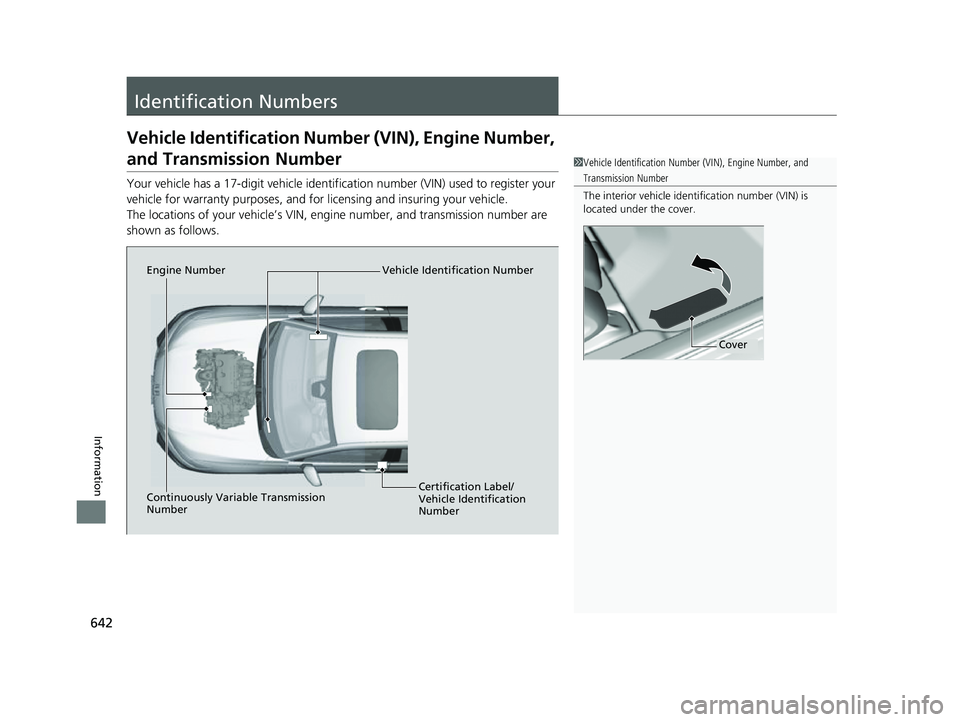
Your vehicle has a 17-digit vehicle identifi cation number (VIN) used to register your
vehicle for warranty purposes, and for licensing and insuring your vehicle.
The locations of your vehicle’s VIN, engine number, and transmission number are
shown as follows.
1 Vehicle Identification Number (VIN), Engine Number, and
Transmission Number
The interior vehicle identification number (VIN) is
located under the cover.
Cover
Vehicle Identification Number
Engine Number
Certification Label/
Vehicle Identification
Number
Continuously Variable Transmission
Number
23 HR-V-313V06000_01.book 642 ページ 2022年4月4日 月曜日 午前10時49分
Page 647 of 664
645Continued
Information
Emissions Testing
Testing of Readiness Codes
Your vehicle has readiness code as part of the onboard self diagnostic system. Some
states use these codes for testing to ve rify whether your vehicle’s emissions
components are working properly.
The codes may not be read properly if testing is performed just after the battery has
gone dead or been disconnected.
To check if they are set, set the power mo de to ON, without starting the engine. The
malfunction indicator lamp will come on for several seconds. If it then goes off, the
readiness codes are set. If it blinks fi ve times, the readiness codes are not set.
If you are required to have your vehicle te sted before the readiness codes are ready,
prepare the vehicle for retest ing by doing the following:
1. Fill the gas tank to approximately 3/4 full.
2. Park the vehicle and leave the engine off for 6 hours or more.
3. Make sure the ambient temperature is between 40°F and 95°F (4°C and 35°C).
4. Start the engine without touching the ac celerator pedal, and let it idle for 20
seconds.
5. Keep the vehicle in
(P. Increase the engine speed to 2,000 rpm, and hold it there
for about three minutes.
6. Let the engine idle with your foot off the accelerator for 20 seconds.
1Testing of Readiness Codes
The readiness codes are erased when the battery is
disconnected, and set again onl y after several days of
driving under a variety of conditions.
If a testing facility determines that the readiness
codes are not set, you may be requested to return at
a later date to complete the test.
If the testing facility determines the readiness codes
are still not set, see a dealer.
23 HR-V-313V06000_01.book 645 ページ 2022年4月4日 月曜日 午前10時49分
Page 648 of 664
646
uuEmissions Testing uTesting of Readiness Codes
Information
7. Select a nearby, lightly traveled major hi ghway where you can maintain a speed
of 50 to 60 mph (80 to 97 km/h) for at least 20 minutes. Drive on the highway in
(D. Do not use cruise control. When tra ffic allows, drive for 90 seconds without
moving the accelerator pedal. (Vehicle spee d may vary slightly; this is okay.) If you
cannot do this for a continuous 90 seconds because of traffic conditions, drive for
at least 30 seconds, then repeat it two mo re times (for a total of 90 seconds).
8. Drive in city or suburban traffic for at le ast 10 minutes. When traffic conditions
allow, let the vehicle coast for several se conds without using the accelerator pedal
or the brake pedal.
9. Park the vehicle and leave the engine off for 30 minutes.
23 HR-V-313V06000_01.book 646 ページ 2022年4月4日 月曜日 午前10時49分