light HONDA HRV 2023 Repair Manual
[x] Cancel search | Manufacturer: HONDA, Model Year: 2023, Model line: HRV, Model: HONDA HRV 2023Pages: 664, PDF Size: 20.2 MB
Page 343 of 664

341
uuCustomized Features u
Continued
Features
■List of customizable options
Press the MENU button.
*1:Default Setting
Customizable FeaturesDescriptionSelectable Settings
Sound Settings
Bass / TrebleAdjusts the settings of the audio speakers’
sound.
2 Adjusting the Sound P. 220
—Balance / Fader
Speed Volume
Compensation
Bluetooth Settings Connect New Device
Pairs a new phone to HFL.
2
Phone Setup P. 374—
Change Device Connects a paired phone.
2
Phone Setup P. 374—
Priority Device Sets a device as the priority device. ON
*1/OFF
Disconnect All Device Disconnects a paired phone from HFL. —
Delete Device Deletes a paired phone. —
Clock Settings
Automatic Time
Selects ON to have the GPS automatically
adjust the clock. Select OFF to cancel this
function.
ON*1/ OFF
Daylight Saving TimeSets the clock to update based on daylight
savings time.ON /OFF*1
Set TimeAdjusts time.
2 Adjusting the Clock P. 134—
Time ZoneChanges the time zone manually.
Smartphone Settings Apple CarPlay
Sets up the Apple CarPlay connection.
—
Android Auto Sets up the Android Auto connection.
RDS SettingsRDS InformationSelects whether the RDS information comes
on.ON*1/OFF
23 HR-V-313V06000_01.book 341 ページ 2022年4月4日 月曜日 午前10時49分
Page 348 of 664
346
uuCustomized Features u
Features
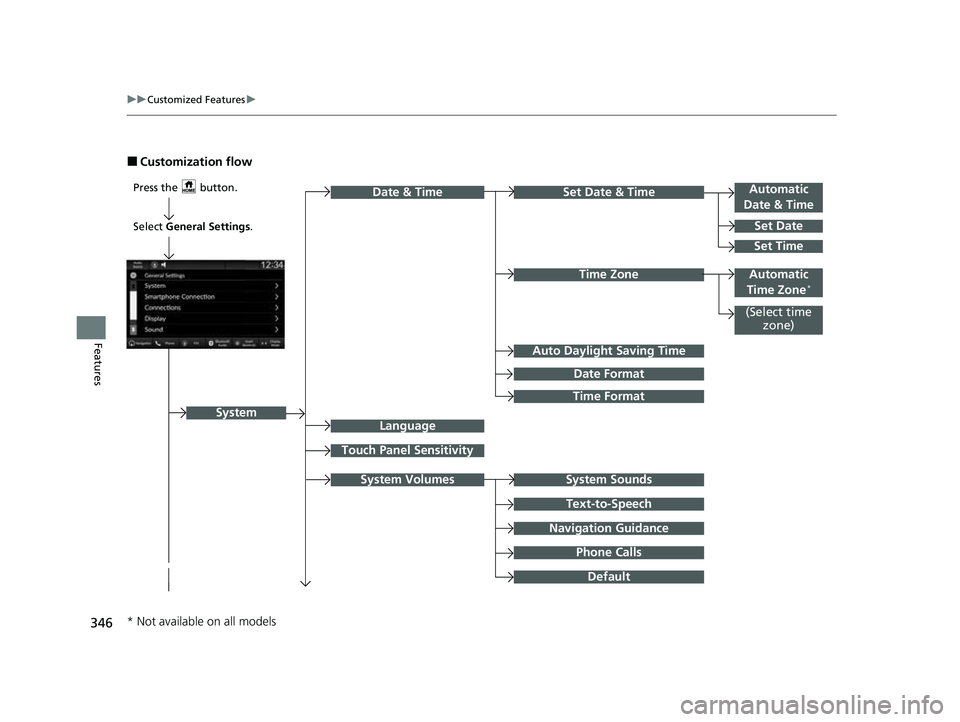
■Customization flow
Press the button.Automatic
Date & Time
Set Date
Touch Panel Sensitivity
Set Date & Time
Time Zone
System Sounds
Date & Time
System
Auto Daylight Saving Time
Date Format
Time Format
Text-to-Speech
Navigation Guidance
Phone Calls
Set Time
(Select time
zone)
System Volumes
Language
Default
Select General Settings .
Automatic
Time Zone*
* Not available on all models
23 HR-V-313V06000_01.book 346 ページ 2022年4月4日 月曜日 午前10時49分
Page 352 of 664
350
uuCustomized Features u
Features
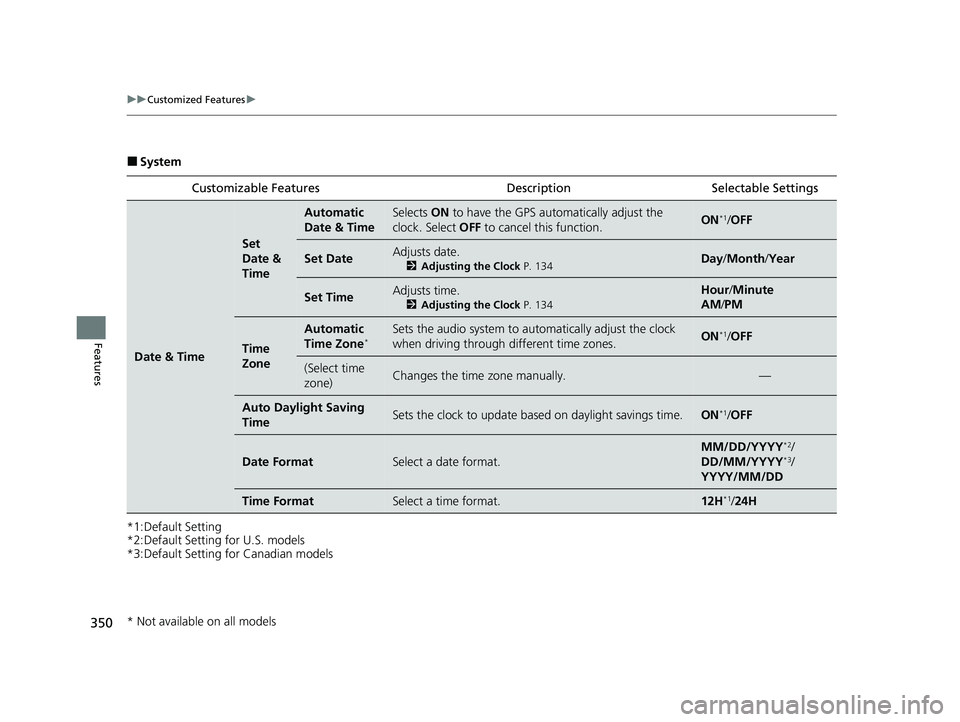
■System
*1:Default Setting
*2:Default Setting for U.S. models
*3:Default Setting for Canadian models Customizable Features Descri
ption Selectable Settings
Date & Time
Set
Date &
Time
Automatic
Date & TimeSelects ON to have the GPS automatically adjust the
clock. Select OFF to cancel this function.ON*1/OFF
Set DateAdjusts date.
2 Adjusting the Clock P. 134Day/Month /Year
Set TimeAdjusts time.
2 Adjusting the Clock P. 134
Hour/Minute
AM /PM
Time
Zone
Automatic
Time Zone*Sets the audio system to automatically adjust the clock
when driving through different time zones.ON*1/OFF
(Select time
zone)Changes the time zone manually.—
Auto Daylight Saving
TimeSets the clock to update based on daylight savings time.ON*1/OFF
Date FormatSelect a date format.
MM/DD/YYYY*2/
DD/MM/YYYY*3/
YYYY/MM/DD
Time FormatSelect a time format.12H*1/ 24H
* Not available on all models
23 HR-V-313V06000_01.book 350 ページ 2022年4月4日 月曜日 午前10時49分
Page 361 of 664
359
uuCustomized Features u
Continued
Features
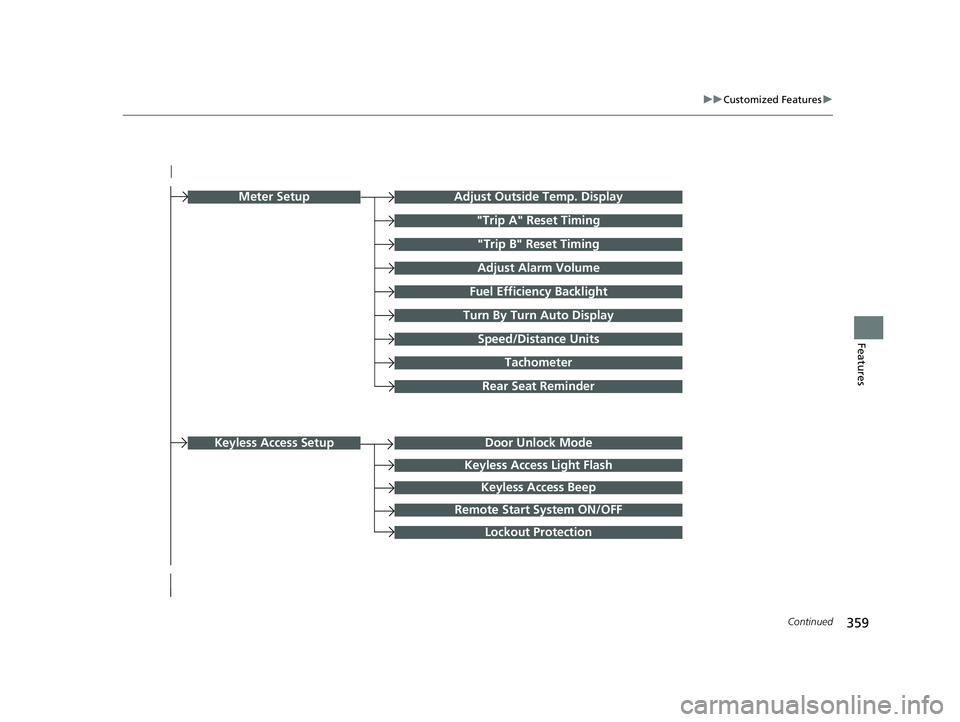
Turn By Turn Auto Display
Speed/Distance Units
Keyless Access Light Flash
Rear Seat Reminder
Door Unlock Mode
Keyless Access Beep
Remote Start System ON/OFF
Lockout Protection
Keyless Access Setup
Meter SetupAdjust Outside Temp. Display
"Trip A" Reset Timing
"Trip B" Reset Timing
Adjust Alarm Volume
Fuel Efficiency Backlight
Tachometer
23 HR-V-313V06000_01.book 359 ページ 2022年4月4日 月曜日 午前10時49分
Page 362 of 664
360
uuCustomized Features u
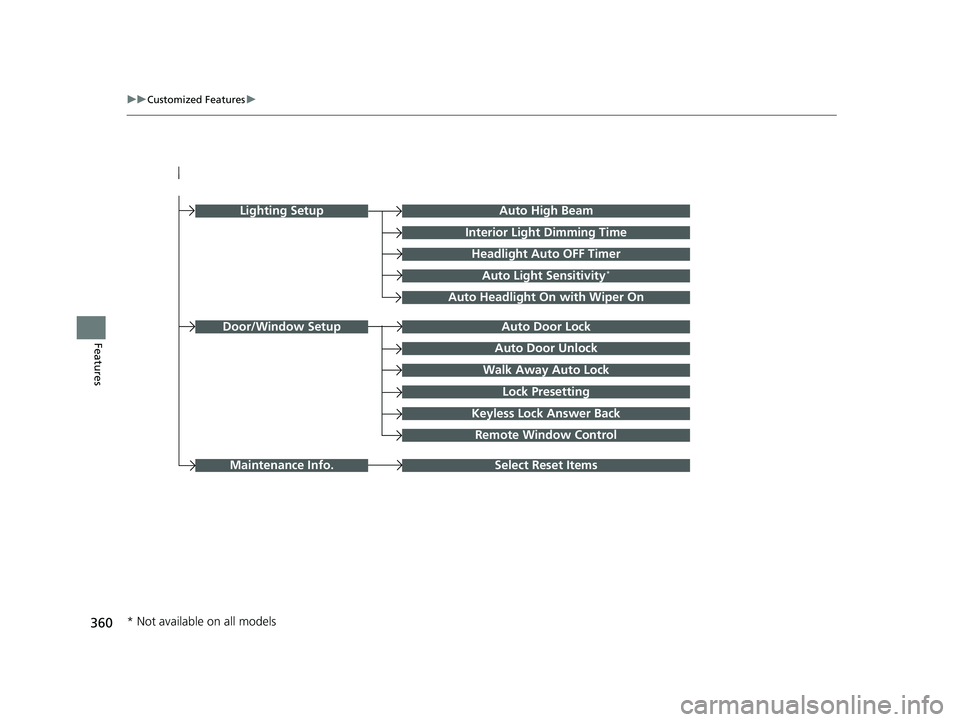
FeaturesAuto Door Unlock
Auto Door Lock
Walk Away Auto Lock
Lock Presetting
Keyless Lock Answer Back
Door/Window Setup
Lighting SetupAuto High Beam
Interior Light Dimming Time
Headlight Auto OFF Timer
Auto Light Sensitivity*
Auto Headlight On with Wiper On
Remote Window Control
Select Reset ItemsMaintenance Info.
* Not available on all models
23 HR-V-313V06000_01.book 360 ページ 2022年4月4日 月曜日 午前10時49分
Page 365 of 664

363
uuCustomized Features u
Continued
Features
■Meter Setup
*1:Default Setting
Customizable Features Description Selectable Settings
Adjust Outside Temp.
DisplaySelects to adjust outside temperature reading by a few degrees.2Outside Temperature P. 105
-5°F ~ ±0°F*1 ~ +5°F (U.S.)
-3°C ~ ±0°C*1 ~ +3°C (Canada)
"Trip A" Reset Timing Selects the timing
to reset Trip A.
2Range/Fuel/Trip Meter P. 109
2 Speed/Time/Trip Meter P. 111When Fully Refueled/IGN OFF /
Manually Reset*1
"Trip B" Reset TimingSelects the timing to reset Trip B.
2 Range/Fuel/Trip Meter P. 109
2 Speed/Time/Trip Meter P. 111When Fully Refueled/IGN OFF /
Manually Reset*1
Adjust Alarm Volume Changes volume level of all system warnings, door opening
warning and indicator. High
/Mid*1/Low
Fuel Efficien cy BacklightTurns the ambient meter feature on and off.ON*1/OFF
Turn By Turn Auto Display Turns on/off the pop-up warning in
the turn-by-turn navigation
in the driver information interface.
2 Turn-by-Turn Directions P. 113ON*1/OFF
Speed/Distance UnitsSelects the trip computer units.
2 Speed/Distance Units P. 122
km/h · km/mph · miles*1 (U.S.)
km/h · km*1/ mph · miles (Canada)
Tachometer Selects whether the tachometer
come on the driver information
interface. ON
*1/
OFF
Rear Seat ReminderTurns the Rear Seat Reminder feature on and off.ON*1/OFF
23 HR-V-313V06000_01.book 363 ページ 2022年4月4日 月曜日 午前10時49分
Page 366 of 664

364
uuCustomized Features u
Features
■Keyless Access Setup
*1:Default Setting
Customizable Features Description Selectable Settings
Door Unlock ModeChanges which doors unlock when you grab the driver’s door
handle.Driver Door Only*1/All
Doors
Keyless Access Light Flash Causes some exterior lights to flash when you unlock/lock the
doors. ON
*1/
OFF
Keyless Access BeepCauses the beeper to sound when you unlock/lock the doors.ON*1/OFF
Remote Start System ON/
OFF Turns the remote engine start feature on and off.
ON
*1/OFF
Lockout ProtectionChanges the settings for the lockout protection function.ON*1/OFF
23 HR-V-313V06000_01.book 364 ページ 2022年4月4日 月曜日 午前10時49分
Page 367 of 664

365
uuCustomized Features u
Continued
Features
■Lighting Setup
*1:Default Setting
Customizable Features Description Selectable Settings
Auto High BeamTurns on/off auto high beam function.ON*1/OFF
Interior Ligh t Dimming Time Selects the length of time the interior lights stay on after doors are
closed.
2
Interior Lights P. 189
60sec/30sec*1/ 15sec
Headlight Auto OFF Timer
Selects the length of time the exterior lights stay on after you close
the driver's door.
2 Automatic Lighting Off Feature P. 169
60sec/30sec /15sec*1/0sec
Auto Light Sensitivity
*Changes the timing for th e headlights to come on. Min/Low/Mid*1/High /Max
Auto Headligh t On with
Wiper OnSelects On/Off headlight function and wiper operation when the
headlight is in AUTO setting.
2Headlight Integration with Wipers P. 169
ON*1/OFF
* Not available on all models
23 HR-V-313V06000_01.book 365 ページ 2022年4月4日 月曜日 午前10時49分
Page 368 of 664

366
uuCustomized Features u
Features
■Door/Window Setup
*1:Default Setting
Customizable Features Description Selectable Settings
Auto Door LockChanges the setting for the automatic locking feature.OFF/With Vehicle Speed*1/
Shift From P
Auto Door Unlock Changes the setting for when the doors unlock automatically. OFF
/All Doors When
Driver’s Door Opens
*1/ All
Doors When Shifted to
Park/ All Doors With IGN
OFF
Walk Away Auto LockChanges the settings for the auto lock function when you walk
away from the vehicle.ON /OFF*1
Lock Presetting Changes the settings for the Lock Presetting function. ON*1/OFF
Keyless Lock Answer Back
Turns on/off flash of exterior light s when doors are locked/unlocked
by the keyless remote.
2 Using the Remote Transmitter P. 155
ON*1/OFF
Remote Window Control Turns the remote window control on and off. ON
*1/OFF
23 HR-V-313V06000_01.book 366 ページ 2022年4月4日 月曜日 午前10時49分
Page 412 of 664
410
Driving
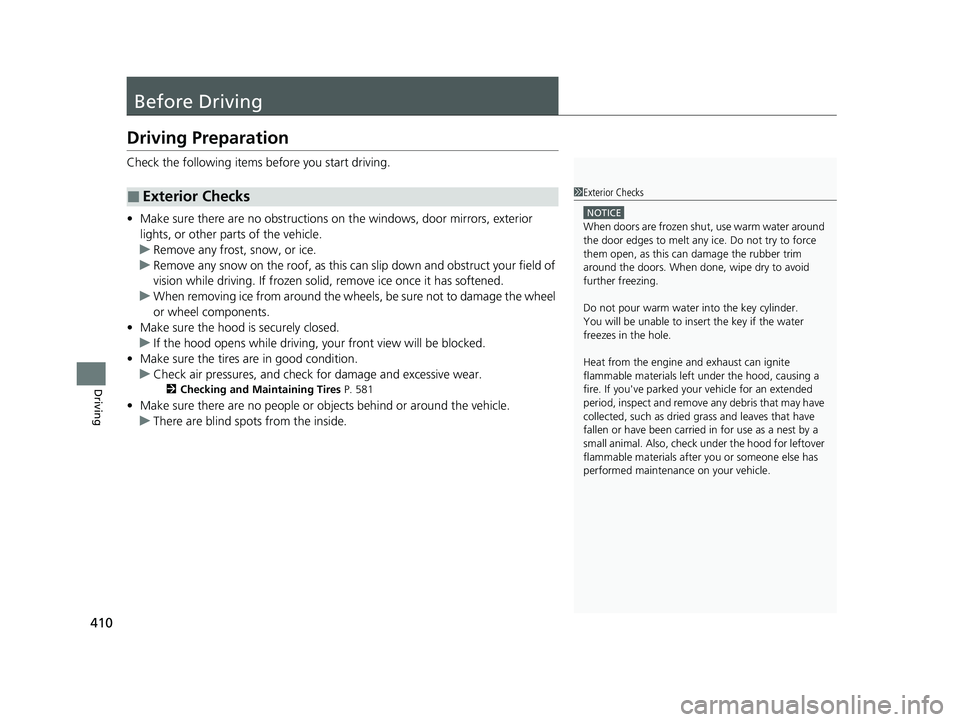
Before Driving
Driving Preparation
Check the following items before you start driving.
• Make sure there are no obstructions on the windows, door mirrors, exterior
lights, or other parts of the vehicle.
u Remove any frost, snow, or ice.
u Remove any snow on the roof, as this can slip down and obstruct your field of
vision while driving. If frozen solid , remove ice once it has softened.
u When removing ice from around the wheels, be sure not to damage the wheel
or wheel components.
• Make sure the hood is securely closed.
u If the hood opens while driving, your front view will be blocked.
• Make sure the tires are in good condition.
u Check air pressures, and check for damage and excessive wear.
2Checking and Maintaining Tires P. 581
•Make sure there are no people or ob jects behind or around the vehicle.
u There are blind spots from the inside.
■Exterior Checks1Exterior Checks
NOTICE
When doors are frozen s hut, use warm water around
the door edges to melt any ice. Do not try to force
them open, as this can damage the rubber trim
around the doors. When done, wipe dry to avoid
further freezing.
Do not pour warm water into the key cylinder.
You will be unable to insert the key if the water
freezes in the hole.
Heat from the engine and exhaust can ignite
flammable material s left under the hood, causing a
fire. If you've parked y our vehicle for an extended
period, inspect and remove any debris that may have
collected, such as dried grass and leaves that have
fallen or have been carried in for use as a nest by a
small animal. Also, check under the hood for leftover
flammable materials after you or someone else has
performed maintenance on your vehicle.
23 HR-V-313V06000_01.book 410 ページ 2022年4月4日 月曜日 午前10時49分