lights HONDA HRV 2023 Repair Manual
[x] Cancel search | Manufacturer: HONDA, Model Year: 2023, Model line: HRV, Model: HONDA HRV 2023Pages: 664, PDF Size: 20.2 MB
Page 577 of 664
575
Maintenance
Replacing Light Bulbs
Headlights
Headlights are LED type. Have an authorized Honda dealer inspect and replace the
light assembly.
Front Turn Signal/Parking, Daytime Running and
Front Side Marker Lights
Front turn signal/parking, daytime running a nd front side marker lights are LED type.
Have an authorized Honda dealer in spect and replace the light assembly.
Side Turn Signal/Emergency Indicator Lights*
Door mirror side turn lights are LED type. Have an authorized Honda dealer inspect
and replace the light assembly.
1 Headlights
The headlight aim is set by the factory, and does not
need to be adjusted. Howeve r, if you regularly carry
heavy items in the cargo area, have the aiming
readjusted at a dealer or by a qualified technician.
* Not available on all models
23 HR-V-313V06000_01.book 575 ページ 2022年4月4日 月曜日 午前10時49分
Page 578 of 664
576
uuReplacing Light Bulbs uBrake Lights, Taillights, Rear Turn Signa l Lights, and Rear Side Marker Lights
Maintenance
Brake Lights, Taillights, Rear Turn Signal Lights, and
Rear Side Marker Lights
Brake lights, taillights, rear turn signal lights, and rear side marker lights are LED
type. Have an authorized Honda dealer inspect and replace the light assembly.
Back-Up Lights and Taillights
Back-up lights and taillights are LED type. Ha ve an authorized Honda dealer inspect
and replace the light assembly.
Rear License Plate Light
Rear license plate light is LED type. Have an authorized Honda dealer inspect and
replace the light assembly.
High-Mount Brake Light
High-mount brake light is LED type. Have an authorized Honda dealer inspect and
replace the light assembly.
23 HR-V-313V06000_01.book 576 ページ 2022年4月4日 月曜日 午前10時49分
Page 602 of 664
600
uuCleaning uExterior Care
Maintenance
The inside lenses of exterior lights (head lights, brake lights etc.) may fog temporarily
if you have driven in the rain, or after the vehicle has been run through a car wash.
Dew condensation also may build up inside the lenses when there is a significant
enough difference between the ambient and inside lens temperatures (similar to
vehicle windows fogging up in rainy conditions). These conditions are natural
processes, not structural design problems in the exterior lights.
Lens design characteristics may result in mo isture developing on the light lens frame
surfaces. This also is not a malfunction.
However, if you see large amounts of wa ter accumulation, or large water drops
building up inside the lenses, have your vehicle inspected by a dealer.
■Fogged Exterior Light Lenses
23 HR-V-313V06000_01.book 600 ページ 2022年4月4日 月曜日 午前10時49分
Page 607 of 664
605Continued
Handling the Unexpected
If a Tire Goes Flat
Changing a Flat Tire
If a tire goes flat while driving, grasp the steering wheel firmly, and brake gradually
to reduce speed. Then, stop in a safe plac e. Replace the flat tire with a compact
spare tire. Go to a dealer as soon as possib le to have the full-size tire repaired or
replaced.
1. Park the vehicle on firm, level, non-slip pery surface and apply the parking brake.
2. Put the transmission into
(P.
3. Turn on the hazard warning lights an d set the power mode to VEHICLE OFF.
1Changing a Flat Tire
Follow compact spare precautions:
Periodically check the tire pressure of the compact
spare. It should be set to the specified pressure.
Specified Pressure: 60 psi (420 kPa, 4.2 kgf/cm
2)
When driving with the compact spare tire, keep the
vehicle speed under 50 mph (80 km/h). Replace with
a full-size tire as soon as possible.
The compact spare tire and wheel in your vehicle are
specifically for this model. Do not use them with
another vehicle. Do not us e another type of compact
spare tire or wheel with your vehicle.
Do not mount tire chains on a compact spare tire.
If a chain-mounted front tire goes flat, remove one of
the full-size rear tires and replace it with the compact
spare tire. Remove the flat front tire and replace it
with the full-size tire that was removed from the rear.
Mount the tire chains on the front tire.
23 HR-V-313V06000_01.book 605 ページ 2022年4月4日 月曜日 午前10時49分
Page 619 of 664
617Continued
Handling the Unexpected
If the Battery Is Dead
Jump Starting Procedure
Turn off the power to electric devices, such as audio and lights. Turn off the engine,
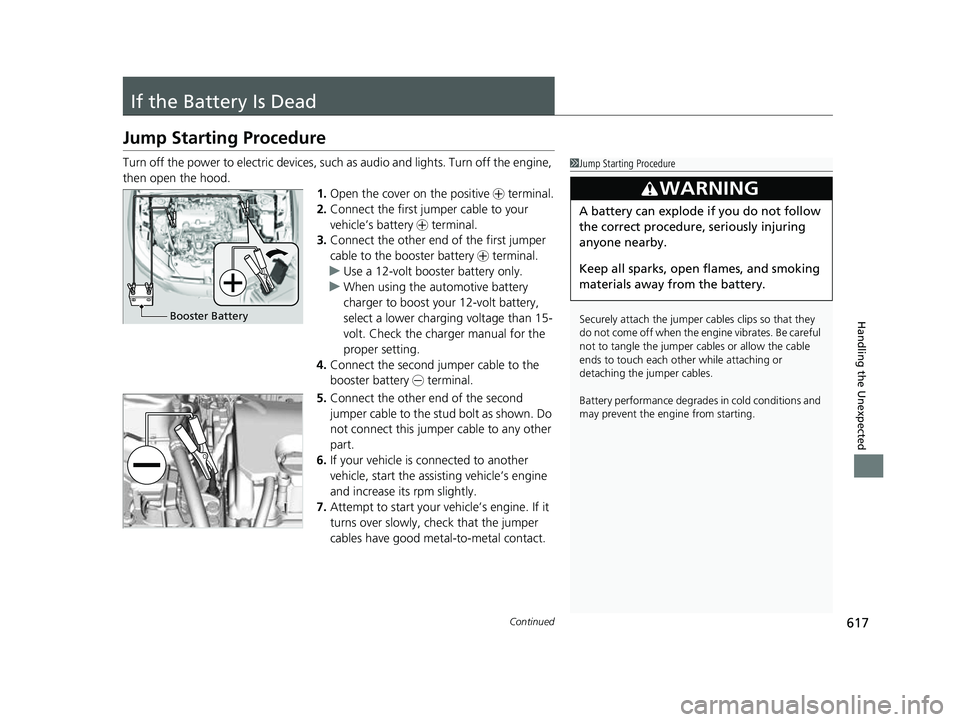
then open the hood. 1.Open the cover on the positive + terminal.
2. Connect the first jumper cable to your
vehicle’s battery + terminal.
3. Connect the other end of the first jumper
cable to the booster battery + terminal.
u Use a 12-volt booster battery only.
u When using the automotive battery
charger to boost your 12-volt battery,
select a lower charging voltage than 15-
volt. Check the charger manual for the
proper setting.
4. Connect the second jumper cable to the
booster battery - terminal.
5. Connect the other end of the second
jumper cable to the stud bolt as shown. Do
not connect this jumper cable to any other
part.
6. If your vehicle is connected to another
vehicle, start the assisting vehicle’s engine
and increase its rpm slightly.
7. Attempt to start your ve hicle’s engine. If it
turns over slowly, check that the jumper
cables have good metal-to-metal contact.1 Jump Starting Procedure
Securely attach the jumper cables clips so that they
do not come off when the e ngine vibrates. Be careful
not to tangle the jumper cables or allow the cable
ends to touch each other while attaching or
detaching the jumper cables.
Battery performance degrades in cold conditions and
may prevent the engi ne from starting.
3WARNING
A battery can explode if you do not follow
the correct procedure, seriously injuring
anyone nearby.
Keep all sparks, open flames, and smoking
materials away from the battery.
Booster Battery
23 HR-V-313V06000_01.book 617 ページ 2022年4月4日 月曜日 午前10時49分
Page 622 of 664
620
Handling the Unexpected
Overheating
How to Handle Overheating
Overheating symptoms are as follows:
•Engine temperature too hot. Do no t drive. Allow engine to cool. appears
on the driver information interface.
• Steam or spray comes out of the engine compartment.
■First thing to do
1. Immediately park the vehicle in a safe place.
2. Turn off all accessories and turn on the hazard warning lights.
u No steam or spray present: Keep the engine running and open the hood.
u Steam or spray is present: Turn off the engine and wait until it subsides.
Then, open the hood.
1 How to Handle Overheating
NOTICE
Continuing to drive with Engine temperature too
hot. Do not drive. Allow engine to cool. on the
driver information interfac e may damage the engine.
3WARNING
Steam and spray from an overheated
engine can seriously scald you.
Do not open the hood if steam is coming
out.
23 HR-V-313V06000_01.book 620 ページ 2022年4月4日 月曜日 午前10時49分
Page 624 of 664
622
Handling the Unexpected
Indicator, Coming On/Blinking
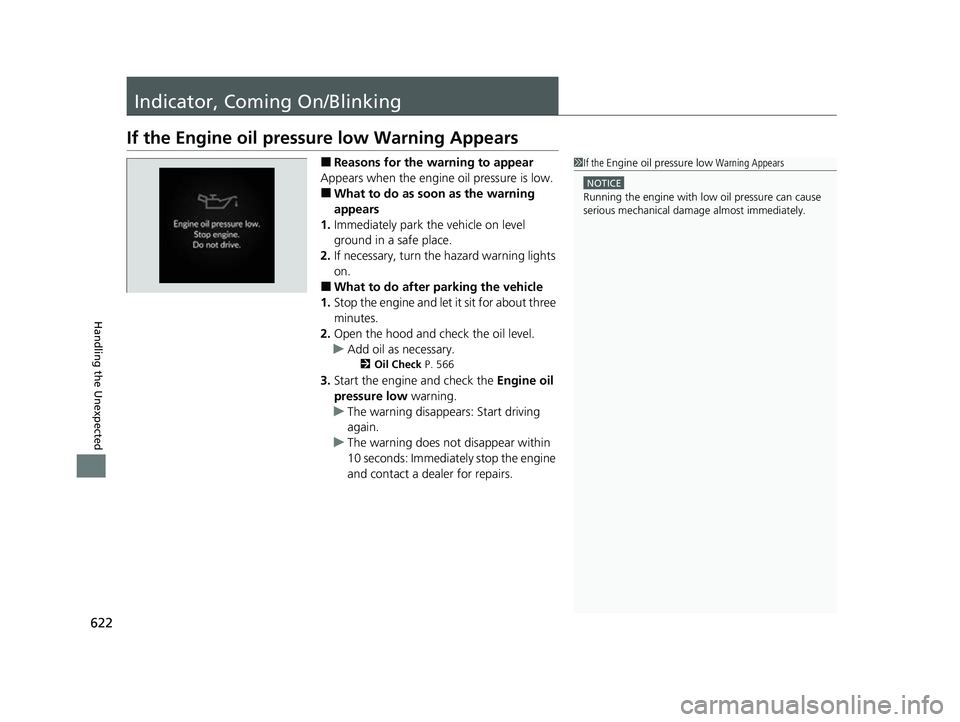
If the Engine oil pressure low Warning Appears
■Reasons for the warning to appear
Appears when the engine oil pressure is low.
■What to do as soon as the warning
appears
1. Immediately park the vehicle on level
ground in a safe place.
2. If necessary, turn the hazard warning lights
on.
■What to do after parking the vehicle
1. Stop the engine and let it sit for about three
minutes.
2. Open the hood and check the oil level.
u Add oil as necessary.
2 Oil Check P. 566
3.Start the engine and check the Engine oil
pressure low warning.
u The warning disappears: Start driving
again.
u The warning does not disappear within
10 seconds: Immediately stop the engine
and contact a dealer for repairs.
1If the Engine oil pressure low Warning Appears
NOTICE
Running the engine with low oil pressure can cause
serious mechanical damage almost immediatelyM
23 HR-V-313V06000_01.book 622 ページ 2022年4月4日 月曜日 午前10時49分
Page 634 of 664
632
uuFusesuInspecting and Changing Fuses
Handling the Unexpected
Inspecting and Changing Fuses
1.Set the power mode to VEHICLE OFF. Turn
headlights and all accessories off.
2. Remove the fuse box cover.
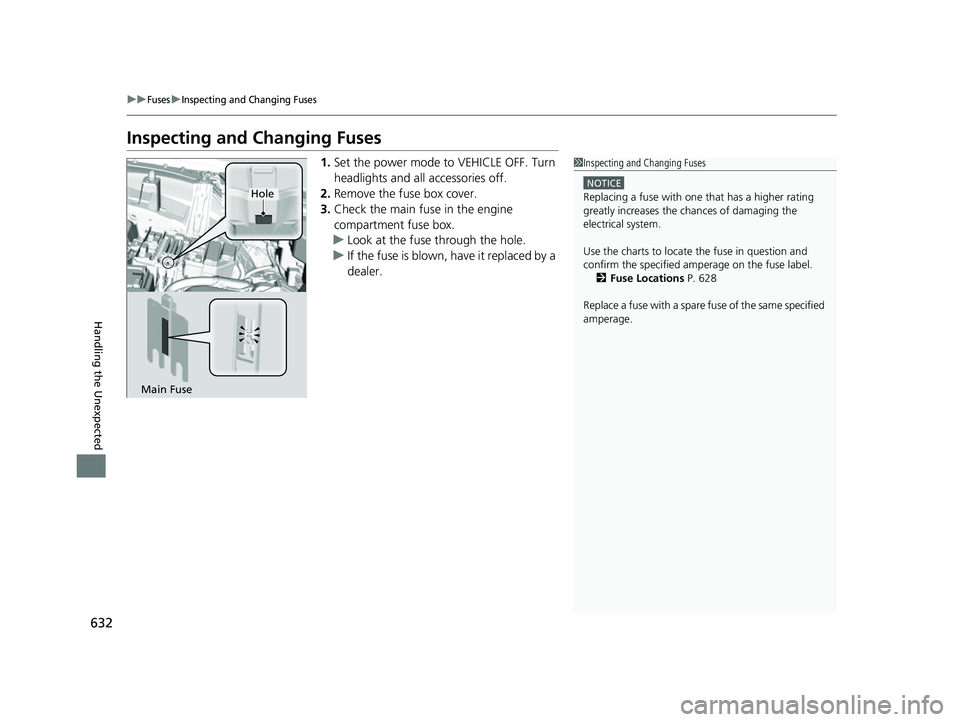
3. Check the main fuse in the engine
compartment fuse box.
u Look at the fuse through the hole.
u If the fuse is blown, have it replaced by a
dealer.1Inspecting and Changing Fuses
NOTICE
Replacing a fuse with on e that has a higher rating
greatly increases the chances of damaging the
electrical system.
Use the charts to locate the fuse in question and
confirm the specified amperage on the fuse labelM 2 Fuse Locations P. 628
Replace a fuse with a spare fuse of the same specified
amperage.Hole
Main Fuse
23 HR-V-313V06000_01.book 632 ページ 2022年4月4日 月曜日 午前10時49分
Page 642 of 664
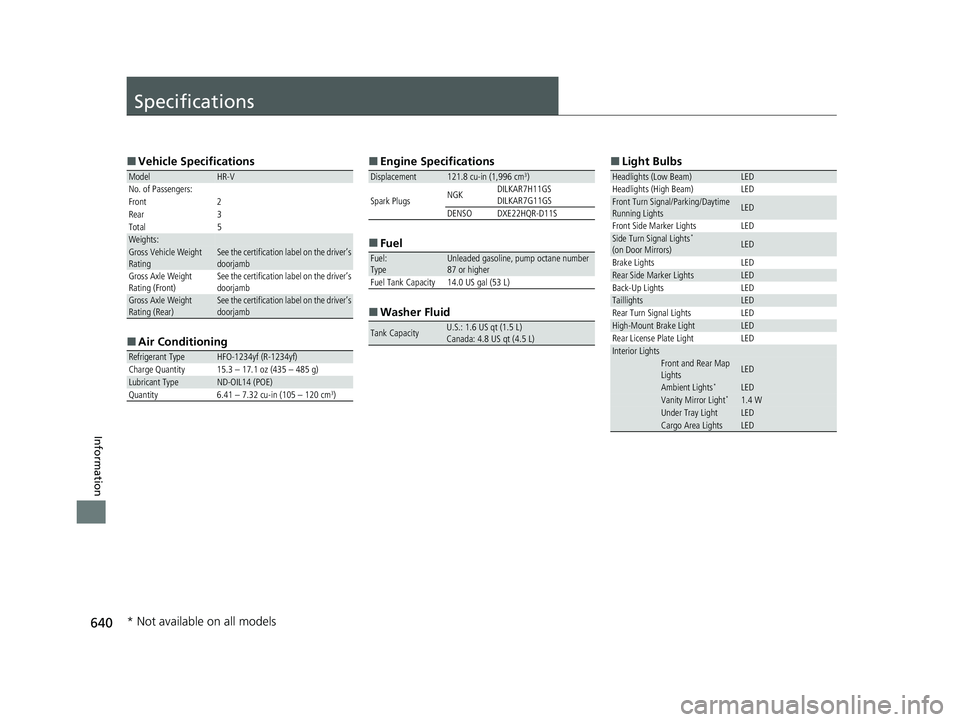
640
Information
Specifications
■Vehicle Specifications
■ Air Conditioning
ModelHR-V
No. of Passengers:
Front 2
Rear 3
Total 5
Weights:Gross Vehicle Weight
RatingSee the certification label on the driver’s
doorjamb
Gross Axle Weight
Rating (Front)See the certification label on the driver’s
doorjamb
Gross Axle Weight
Rating (Rear)See the certification label on the driver’s
doorjamb
Refrigerant TypeHFO-1234yf (R-1234yf)
Charge Quantity 15.3 – 17.1 oz (435 – 485 g)
Lubricant TypeND-OIL14 (POE)
Quantity 6.41 – 7.32 cu-in (105 – 120 cm3)
■ Engine Specifications
■ Fuel
■ Washer Fluid
Displacement121.8 cu-in (1,996 cm3)
Spark Plugs NGK
DILKAR7H11GS
DILKAR7G11GS
DENSODXE22HQR-D11S
Fuel:
TypeUnleaded gasoline, pump octane number
87 or higher
Fuel Tank Capacity 14.0 US gal (53 L)
Tank CapacityU.S.: 1.6 US qt (1.5 L)
Canada: 4.8 US qt (4.5 L)
■ Light Bulbs
Headlights (Low Beam)LED
Headlights (High Beam) LED
Front Turn Signal/Parking/Daytime
Running LightsLED
Front Side Marker Lights LED
Side Turn Signal Lights*
(on Door Mirrors)LED
Brake Lights LED
Rear Side Marker LightsLED
Back-Up Lights LED
TaillightsLED
Rear Turn Signal Lights LED
High-Mount Brake LightLED
Rear License Plate Light LED
Interior LightsFront and Rear Map
LightsLED
Ambient Lights*LEDVanity Mirror Light*1.4 WUnder Tray LightLEDCargo Area LightsLED
* Not available on all models
23 HR-V-313V06000_01.book 640 ページ 2022年4月4日 月曜日 午前10時49分
Page 655 of 664
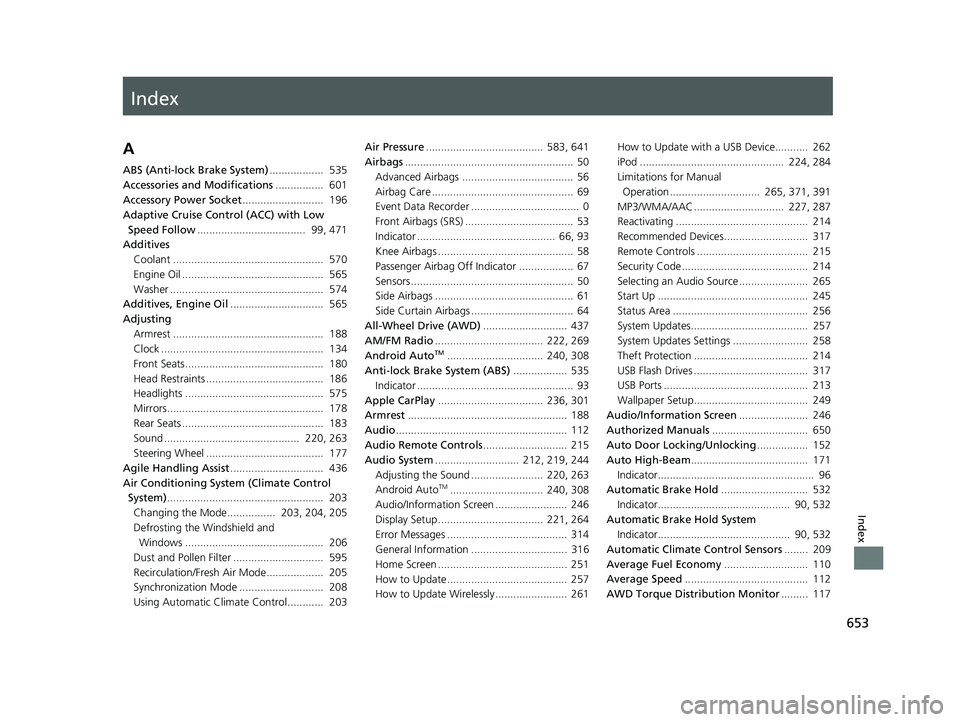
Index
653
Index
Index
A
ABS (Anti-lock Brake System).................. 535
Accessories and Modifications ................ 601
Accessory Power Socket ........................... 196
Adaptive Cruise Control (ACC) with Low
Speed Follow .................................... 99, 471
Additives Coolant .................................................. 570
Engine Oil ............................................... 565
Washer ................................................... 574
Additives, Engine Oil ............................... 565
Adjusting Armrest .................................................. 188
Clock ...................................................... 134
Front Seats.............................................. 180
Head Restraints ....................................... 186
Headlights .............................................. 575
Mirrors.................................................... 178
Rear Seats ............................................... 183
Sound ............................................. 220, 263
Steering Wheel ....................................... 177
Agile Handling Assist ............................... 436
Air Conditioning System (Climate Control System) .................................................... 203
Changing the Mode................ 203, 204, 205
Defrosting the Windshield and Windows .............................................. 206
Dust and Pollen Filter .............................. 595
Recirculation/Fresh Air Mode................... 205
Synchronization Mode ............................ 208
Using Automatic Climate Control............ 203 Air Pressure
....................................... 583, 641
Airbags ........................................................ 50
Advanced Airbags ..................................... 56
Airbag Care ............................................... 69
Event Data Recorder .................................... 0
Front Airbags (SRS) .................................... 53
Indicator .............................................. 66, 93
Knee Airbags ............................................. 58
Passenger Airbag Off Indicator .................. 67
Sensors ...................................................... 50
Side Airbags .............................................. 61
Side Curtain Airbags .................................. 64
All-Wheel Drive (AWD) ............................ 437
AM/FM Radio .................................... 222, 269
Android Auto
TM................................ 240, 308
Anti-lock Brake System (ABS) .................. 535
Indicator .................................................... 93
Apple CarPlay ................................... 236, 301
Armrest ..................................................... 188
Audio ......................................................... 112
Audio Remote Controls ............................ 215
Audio System ............................ 212, 219, 244
Adjusting the Sound ........................ 220, 263
Android Auto
TM............................... 240, 308
Audio/Information Screen ........................ 246
Display Setup ................................... 221, 264
Error Messages ........................................ 314
General Information ................................ 316
Home Screen ........................................... 251
How to Update ........................................ 257
How to Update Wirelessly ........................ 261 How to Update with a USB Device........... 262
iPod ................................................ 224, 284
Limitations for Manual
Operation .............................. 265, 371, 391
MP3/WMA/AAC .............................. 227, 287
Reactivating ............................................ 214
Recommended Devices............................ 317
Remote Controls ..................................... 215
Security Code .......................................... 214
Selecting an Audio Source ....................... 265
Start Up .................................................. 245
Status Area ............................................. 256
System Updates....................................... 257
System Updates Settings ......................... 258
Theft Protection ...................................... 214
USB Flash Drives ...................................... 317
USB Ports ................................................ 213
Wallpaper Setup...................................... 249
Audio/Information Screen ....................... 246
Authorized Manuals ................................ 650
Auto Door Locking/Unlocking ................. 152
Auto High-Beam ....................................... 171
Indicator.................................................... 96
Automatic Brake Hold ............................. 532
Indicator............................................ 90, 532
Automatic Brake Hold System Indicator............................................ 90, 532
Automatic Climate Control Sensors ........ 209
Average Fuel Economy ............................ 110
Average Speed ......................................... 112
AWD Torque Distribution Monitor ......... 117
23 HR-V-313V06000_01.book 653 ページ 2022年4月4日 月曜日 午前10時49分