wipers HONDA INSIGHT 2020 (in English) User Guide
[x] Cancel search | Manufacturer: HONDA, Model Year: 2020, Model line: INSIGHT, Model: HONDA INSIGHT 2020Pages: 675, PDF Size: 36.95 MB
Page 384 of 675
382
uuCustomized Features u
Features
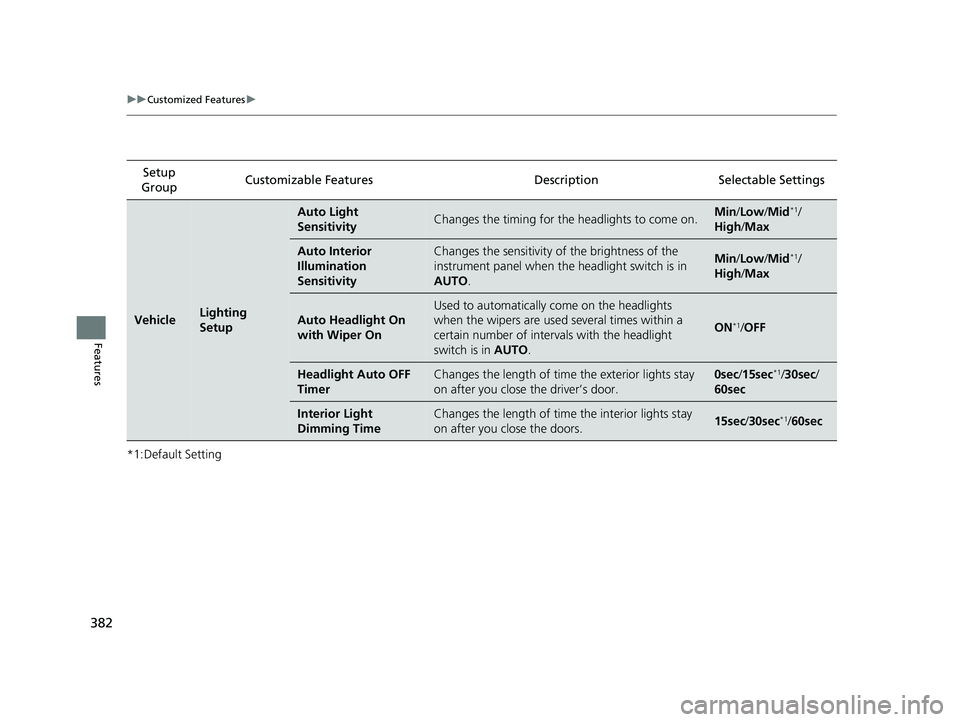
*1:Default SettingSetup
Group Customizable Features Description Selectable Settings
VehicleLighting
Setup
Auto Light
SensitivityChanges the timing for the
headlights to come on.Min/Low/Mid*1/
High /Max
Auto Interior
Illumination
SensitivityChanges the sensitivity of the brightness of the
instrument panel when the headlight switch is in
AUTO .Min/Low/Mid*1/
High /Max
Auto Headlight On
with Wiper On
Used to automatically come on the headlights
when the wipers are used several times within a
certain number of interv als with the headlight
switch is in AUTO.
ON*1/OFF
Headlight Auto OFF
TimerChanges the length of time the exterior lights stay
on after you close the driver’s door.0sec /15sec*1/ 30sec /
60sec
Interior Light
Dimming TimeChanges the length of time the interior lights stay
on after you close the doors.15sec /30sec*1/60sec
20 INSIGHT-31TXM6100.book 382 ページ 2019年4月24日 水曜日 午後2時2分
Page 514 of 675
uuHonda Sensing ®u Lane Keeping Assist System (LKAS)
512
Driving
The system can be used when the following conditions are met.
• The lane in which you are driving has dete ctable lane markers on both sides, and
your vehicle is in the center of the lane.
• The vehicle is traveling between about 45 and 90 mph (72 and 145 km/h).
• You are driving on a straight or slightly curved road.
• The turn signals are off.
• The brake pedal is not depressed.
• The wipers are not in continuous operation.
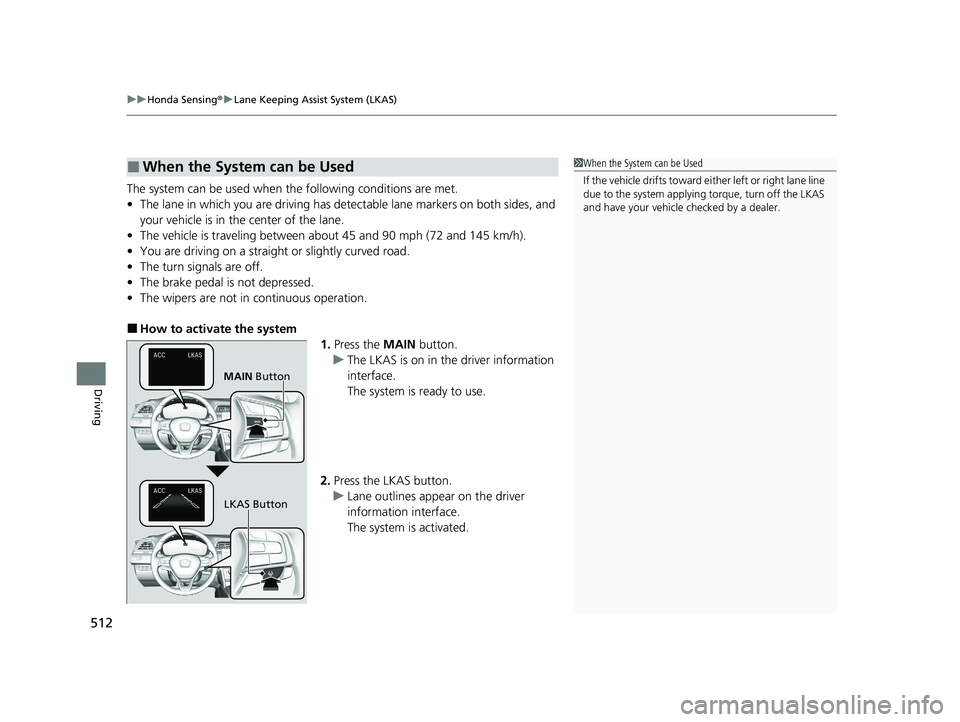
■How to activate the system
1.Press the MAIN button.
u The LKAS is on in the driver information
interface.
The system is ready to use.
2. Press the LKAS button.
u Lane outlines appear on the driver
information interface.
The system is activated.
■When the System can be Used1When the System can be Used
If the vehicle drifts toward ei t h e r l ef t o r r ight lane line
due to the system applying torque, turn off the LKAS
and have your vehicle checked by a dealer.
MAIN Button
LKAS Button
20 INSIGHT-31TXM6100.book 512 ページ 2019年4月24日 水曜日 午後2時2分
Page 516 of 675
514
uuHonda Sensing ®u Lane Keeping Assist System (LKAS)
Driving
■The system operation is suspended if
you:
• The wipers are set to HI.
u Turning the wipers off resumes the
LKAS.
• Set the wiper switch to AUTO and the
wipers operate at high speed.
u The LKAS resumes when the wipers stop
or operate at low speed.
• Decrease the vehicle speed to about 40 mph
(64 km/h) or less.
u Increasing the vehicle speed to about
45 mph (72 km/h) or more resumes the
LKAS.
• Depress the brake pedal.
u The LKAS resumes and starts detecting
the lane lines again once you release the
brake pedal.
■The LKAS may automatically be suspended when:
• The system fails to detect lane lines.
• The steering wheel is quickly turned.
• You fail to steer the vehicle.
• Driving through a sharp curve.
• Driving at a speed in excess of approximately 90 mph (145 km/h).
Once these conditions no longer exis t, the LKAS automatically resumes.
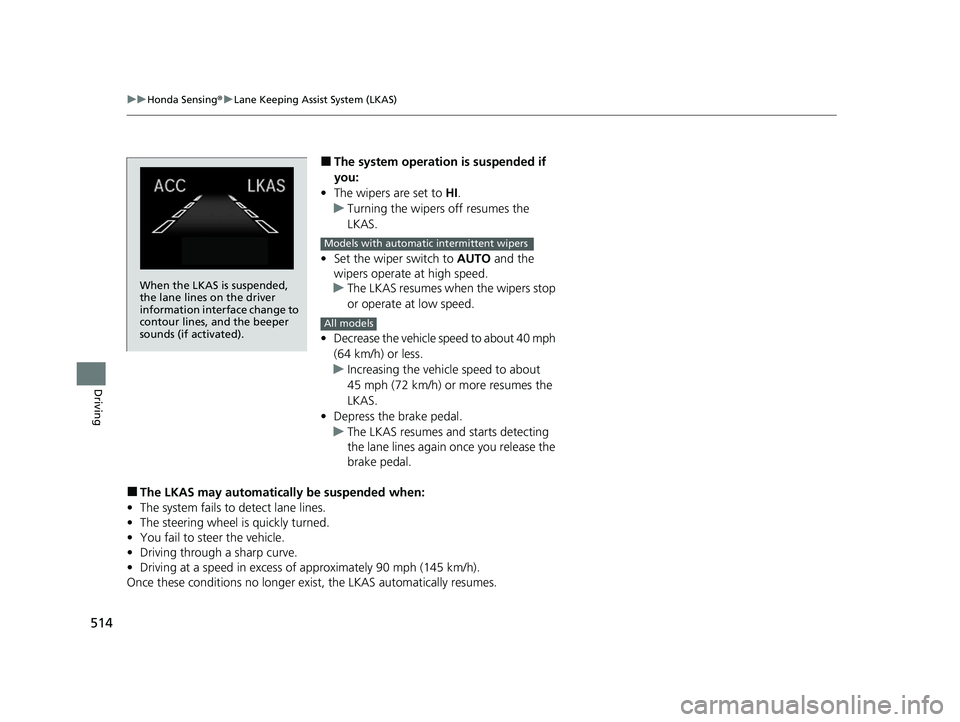
When the LKAS is suspended,
the lane lines on the driver
information interface change to
contour lines, and the beeper
sounds (if activated).
Models with automatic intermittent wipers
All models
20 INSIGHT-31TXM6100.book 514 ページ 2019年4月24日 水曜日 午後2時2分
Page 521 of 675
Continued519
uuHonda Sensing ®u Road Departure Mitigation (RDM) System
Driving
The system becomes ready to start sear ching for lane markings when all the
following conditions are met:
• The vehicle is traveling between about 45 and 90 mph (72 and 145 km/h).
• The vehicle is on a straight or slightly curved road.
• The turn signals are off.
• The brake pedal is not depressed.
• The wipers are not in continuous operation.
• The vehicle is not accelera ting or braking, and the steering wheel is not being
turned.
• The system makes a determination that th e driver is not actively accelerating,
braking or steering.
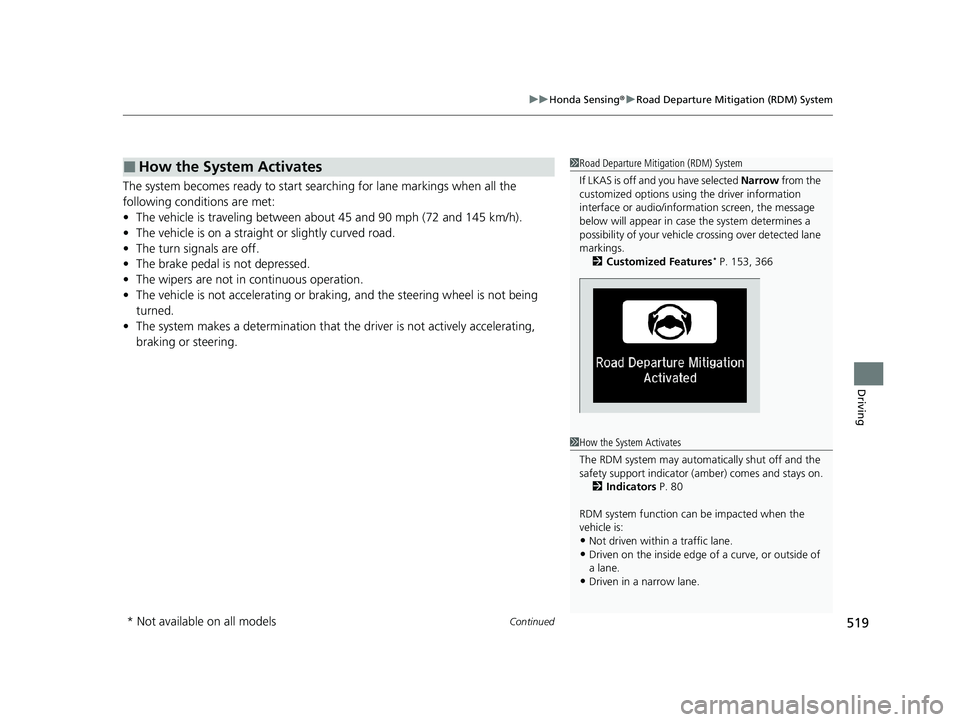
■How the System Activates1 Road Departure Mitigation (RDM) System
If LKAS is off and you have selected Narrow from the
customized options using the driver information
interface or audio/inform ation screen, the message
below will appear in case the system determines a
possibility of your vehicle crossing ov er detected lane
markings. 2 Customized Features
* P. 153, 366
1How the System Activates
The RDM system may automa tically shut off and the
safety support indicator (a mber) comes and stays on.
2 Indicators P. 80
RDM system function can be impacted when the
vehicle is:
•Not driven within a traffic lane.•Driven on the inside edge of a curve, or outside of
a lane.
•Driven in a narrow lane.
* Not available on all models
20 INSIGHT-31TXM6100.book 519 ページ 2019年4月24日 水曜日 午後2時2分
Page 565 of 675
563
uuMaintenance Under the Hood uOpening the Hood
Maintenance
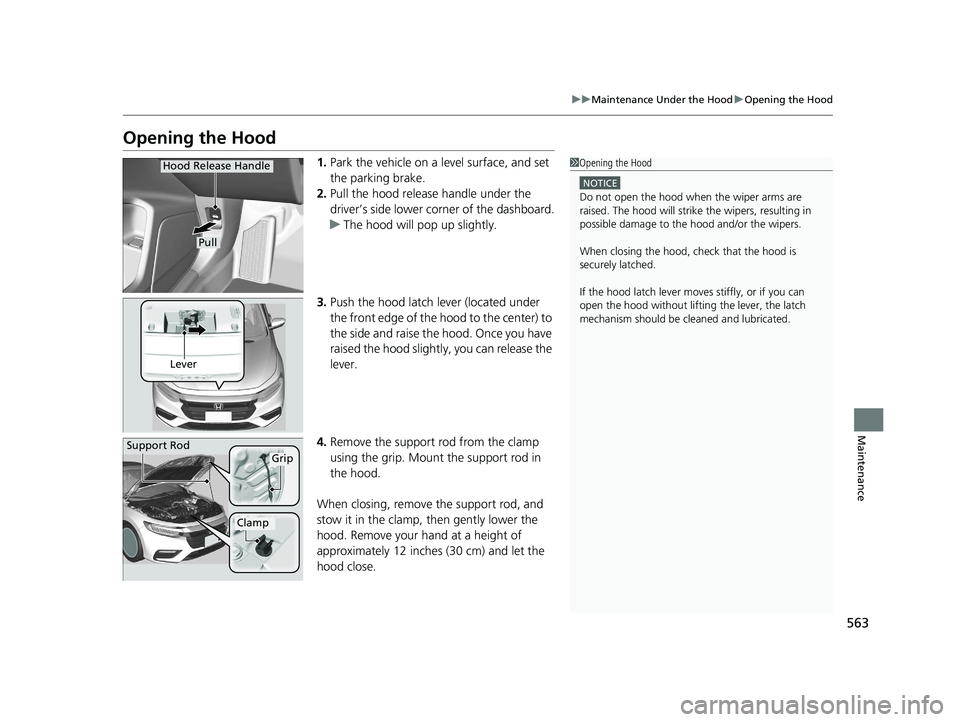
Opening the Hood
1. Park the vehicle on a level surface, and set
the parking brake.
2. Pull the hood release handle under the
driver’s side lower corner of the dashboard.
u The hood will pop up slightly.
3. Push the hood latch lever (located under
the front edge of the hood to the center) to
the side and raise the hood. Once you have
raised the hood slightly, you can release the
lever.
4. Remove the support rod from the clamp
using the grip. Mount the support rod in
the hood.
When closing, remove the support rod, and
stow it in the clamp, then gently lower the
hood. Remove your hand at a height of
approximately 12 inches (30 cm) and let the
hood close.1 Opening the Hood
NOTICE
Do not open the hood when the wiper arms are
raised. The hood will strike the wipers, resulting in
possible damage to the hood and/or the wipers.
When closing the hood, check that the hood is
securely latched.
If the hood latch lever moves stiffly, or if you can
open the hood without lifti ng the lever, the latch
mechanism should be cl eaned and lubricated.
Hood Release Handle
Pull
Lever
Support RodGrip
Clamp
20 INSIGHT-31TXM6100.book 563 ページ 2019年4月24日 水曜日 午後2時2分
Page 599 of 675
597
uuCleaning uExterior Care
Continued
Maintenance
Exterior Care
Dust off the vehicle body after you drive. Regularly inspect your vehicle for scratches
on painted surfaces. A scratch on a painted surface can result in body rust. If you
find a scratch, promptly repair it.
Wash the vehicle regularly. Wash more frequently when driving in the following
conditions:
• If driving on roads with road salt.
• If driving in coastal areas.
• If tar, soot, bird droppings, insects, or tree sap are stuck to painted surfaces.
• Make sure to follow the instructions indicated on the automated car wash.
• Fold in the door mirrors.
• For models equipped with automatic inte rmittent wipers, turn the wipers off.
• Keep sufficient distance between the cleaning nozzle and the vehicle body.
• Take particular care around the windows. Standing too close may cause water to
enter the vehicle interior.
• Do not spray high pressure water directly into the engine compartment. Instead,
use low pressure water and a mild detergent.
■Washing the Vehicle
■Using an Automated Car Wash
■Using High Pressure Cleaners
1 Washing the Vehicle
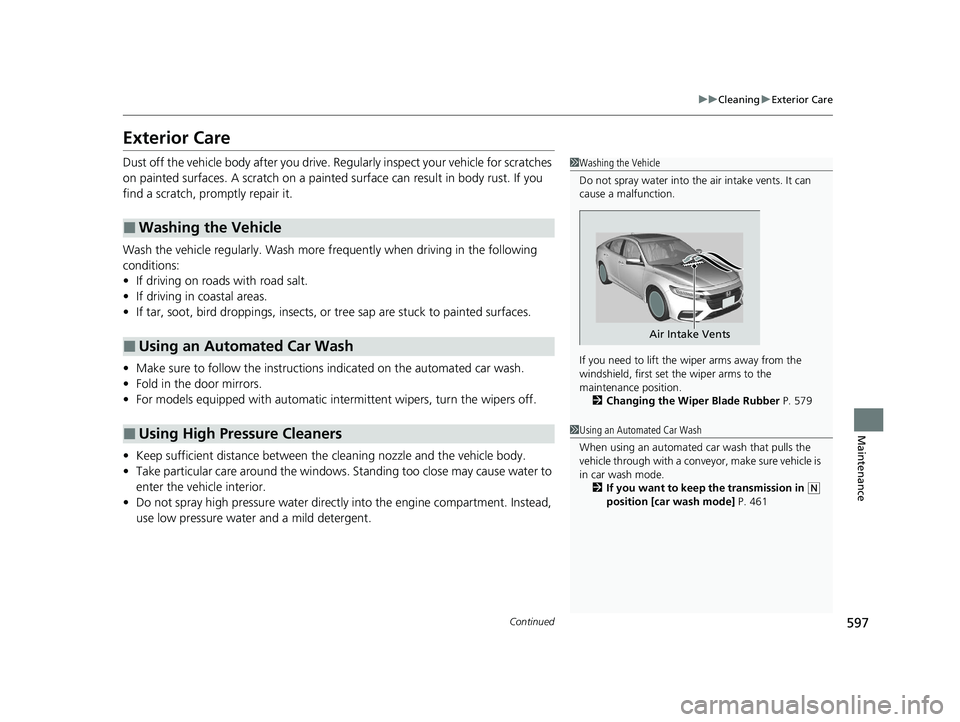
Do not spray water into the air intake vents. It can
cause a malfunction.
If you need to lift the wiper arms away from the
windshield, first set the wiper arms to the
maintenance position. 2 Changing the Wiper Blade Rubber P. 579
Air Intake Vents
1Using an Automated Car Wash
When using an automated car wash that pulls the
vehicle through with a convey or, make sure vehicle is
in car wash mode.
2 If you want to keep the transmission in
(N
position [car wash mode] P. 461
20 INSIGHT-31TXM6100.book 597 ページ 2019年4月24日 水曜日 午後2時2分
Page 666 of 675
664
Index
Automatic Brake Hold.............................. 537
Indicator ............................................ 84, 537
Automatic Brake Hold System Indicator ............................................ 84, 537
Automatic Intermittent Wipers ............... 201
Automatic Lighting .................................. 194
Average Fuel Economy ............................. 136
Average Fuel Economy Records ............... 149
Average Speed .......................................... 138
B
Belts (Seat).................................................. 44
Beverage Holders ...................................... 219
Bluetooth ® Audio ............................. 258, 311
Bluetooth ® HandsFreeLink ®........... 389, 414
Booster Seats (For Children) ....................... 76
Brake System ............................................. 532
Anti-lock Brake System (ABS) ................... 540
Automatic Brake Hold.............................. 537
Brake Assist System ................................. 541
Fluid ........................................................ 573
Foot Brake ............................................... 536
Indicator .............................. 81, 82, 636, 637
Parking Brake .......................................... 532
Brightness Control (Instrument Panel) .... 203
Bulb Replacement ..................................... 575
Back-Up Light .......................................... 577
Brake and Rear Side Marker Lights ........... 576
Fog Lights ................................................ 575 Front Turn Signal, Parking/Daytime
Running and Front Side Marker Lights ... 575
Headlights ............................................... 575
High-Mount Brake Light .......................... 578
Rear License Plate Lights .......................... 578
Rear Turn Signal Light ............................. 576
Side Turn Signal/Emergency Indicator Lights .................................................... 575
Taillights.................................................. 577
Bulb Specifications ................................... 652C
Carbon Monoxide Gas ............................... 77
Carrying Cargo ................................. 443, 445
Certification Label .................................... 654
Changing Bulbs ........................................ 575
Charging System Indicator ................. 88, 634
Child Safety ................................................. 64
Childproof Door Locks............................. 178
Emergency Trunk Opener ........................ 182
Child Seat .................................................... 64
Booster Seats ............................................ 76
Child Seat for Infants................................. 66
Child Seat for Small Children ..................... 67
Installing a Child Seat with a Lap/Shoulder Seat Belt .................................................. 71
Larger Children ......................................... 75
Rear-facing Child Seat ............................... 66
Selecting a Child Seat ................................ 68
Using a Tether ........................................... 73 Childproof Door Locks
............................. 178
Cleaning the Exterior ............................... 597
Cleaning the Interior ............................... 595
Climate Control System ........................... 225
Changing the Mode................................ 225
Defrosting the Windshield and Windows .............................................. 228
Dust and Pollen Filter .............................. 594
Recirculation and Fresh Air Mode ............ 227
Sensors ................................................... 231
Synchronized Mode ................................ 230
Using Automatic Climate Control............ 225
Clock ......................................................... 164
CMBSTM (Collision Mitigation Braking
SystemTM) ................................................ 483
Coat Hooks ............................................... 222
Collision Mitigation Braking System
TM
(CMBSTM) ................................................. 483
Compact Spare Tire .......................... 605, 653
Console Compartment ............................. 218
Controls .................................................... 163
Coolant (Engine) ...................................... 569
Adding to the Radiator ........................... 570
Adding to the Reserve Tank .................... 569
Overheating ............................................ 631
Cooling System ......................................... 569
Adding to the Radiator ........................... 570
Adding to the Reserve Tank .................... 569
Overheating ............................................ 631
Creeping ................................................... 456
Cup Holders .............................................. 219
20 INSIGHT-31TXM6100.book 664 ページ 2019年4月24日 水曜日 午後2時2分
Page 673 of 675
671
Index
VSA® (Vehicle Stability Assist) ®.............. 469
W
Wallpaper ......................................... 244, 269
Warning and Info rmation Messages ...... 102
Warning Indicator On/Blinking ............... 633
Warning Labels .......................................... 78
Warnings .................................................. 140
Warranties (Warranty Manual provided
separately) .............................................. 658
Watts ........................................................ 652
WAV .......................................................... 255
Wear Indicators (Tire) .............................. 587
Wheel Nut Wrench (Jack Handle) ........... 608
Wi-Fi Connection ..................................... 322
Window Washers ..................................... 200
Adding/Refilling Fluid .............................. 574
Switch .................................................... 200
Windows (Opening and Closing) ............ 186
Windshield
Cleaning ......................................... 595, 598
Defrosting/Defogging ............................. 228
Washer Fluid ........................................... 574
Wiper Blades........................................... 579
Wipers and Washers ............................... 200
Winter Tires
Snow Tires .............................................. 590
Tire Chains.............................................. 590
Wipers and Washers ................................ 200
Automatic Intermittent Wipers ................ 201 Checking and Replacing Wiper Blades ..... 579
WMA ................................................. 255, 308
Worn Tires ................................................. 582
20 INSIGHT-31TXM6100.book 671 ページ 2019年4月24日 水曜日 午後2時2分