lights HONDA INSIGHT 2020 Owner's Manual (in English)
[x] Cancel search | Manufacturer: HONDA, Model Year: 2020, Model line: INSIGHT, Model: HONDA INSIGHT 2020Pages: 675, PDF Size: 36.95 MB
Page 5 of 675
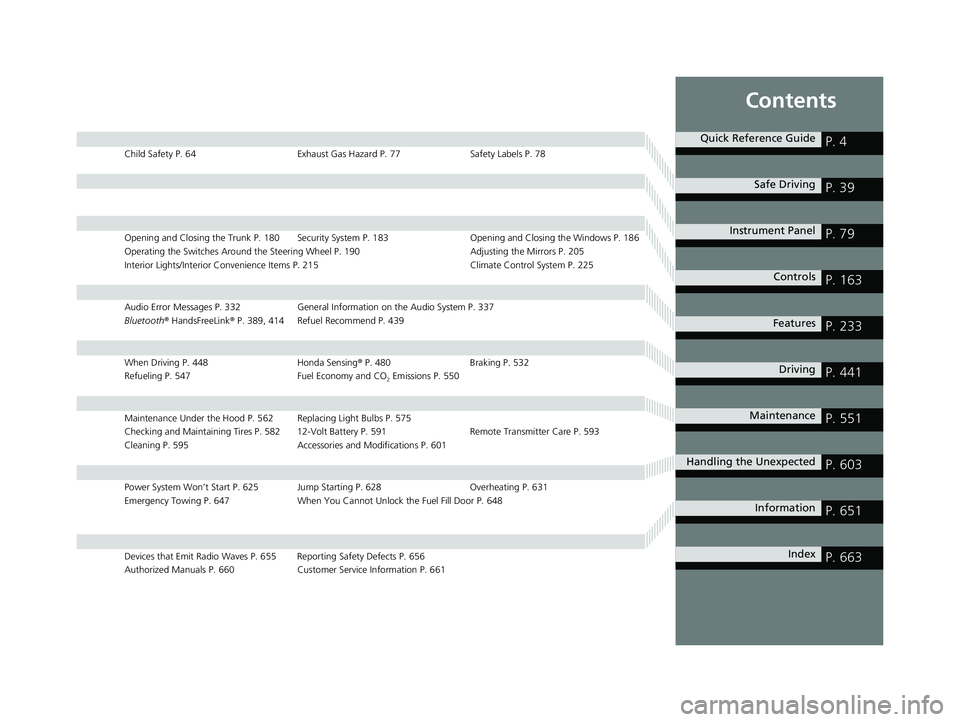
Contents
Child Safety P. 64Exhaust Gas Hazard P. 77Safety Labels P. 78
Opening and Closing the Trunk P. 180 Security System P. 183 Opening and Closing the Windows P. 186
Operating the Switches Around the Steering Wheel P. 190 Adjusting the Mirrors P. 205
Interior Lights/Interior Convenience It ems P. 215 Climate Control System P. 225
Audio Error Messages P. 332General Information on the Audio System P. 337
Bluetooth ® HandsFreeLink ® P. 389, 414 Refuel Recommend P. 439
When Driving P. 448 Honda Sensing® P. 480 Braking P. 532
Refueling P. 547 Fuel Economy and CO
2 Emissions P. 550
Maintenance Under the Hood P. 562 Replacing Light Bulbs P. 575
Checking and Maintaining Tires P. 582 12-Volt Battery P. 591 Remote Transmitter Care P. 593
Cleaning P. 595 Accessories and Modifications P. 601
Power System Won’t Start P. 625 Jump Starting P. 628 Overheating P. 631
Emergency Towing P. 647 When You Cannot Unlock the Fuel Fill Door P. 648
Devices that Emit Radio Waves P. 655 Reporting Safety Defects P. 656
Authorized Manuals P. 660 Customer Service Information P. 661
Quick Reference GuideP. 4
Safe DrivingP. 39
Instrument PanelP. 79
ControlsP. 163
FeaturesP. 233
DrivingP. 441
MaintenanceP. 551
Handling the UnexpectedP. 603
InformationP. 651
IndexP. 663
20 INSIGHT-31TXM6100.book 3 ページ 2019年4月24日 水曜日 午後2時2分
Page 7 of 675
5
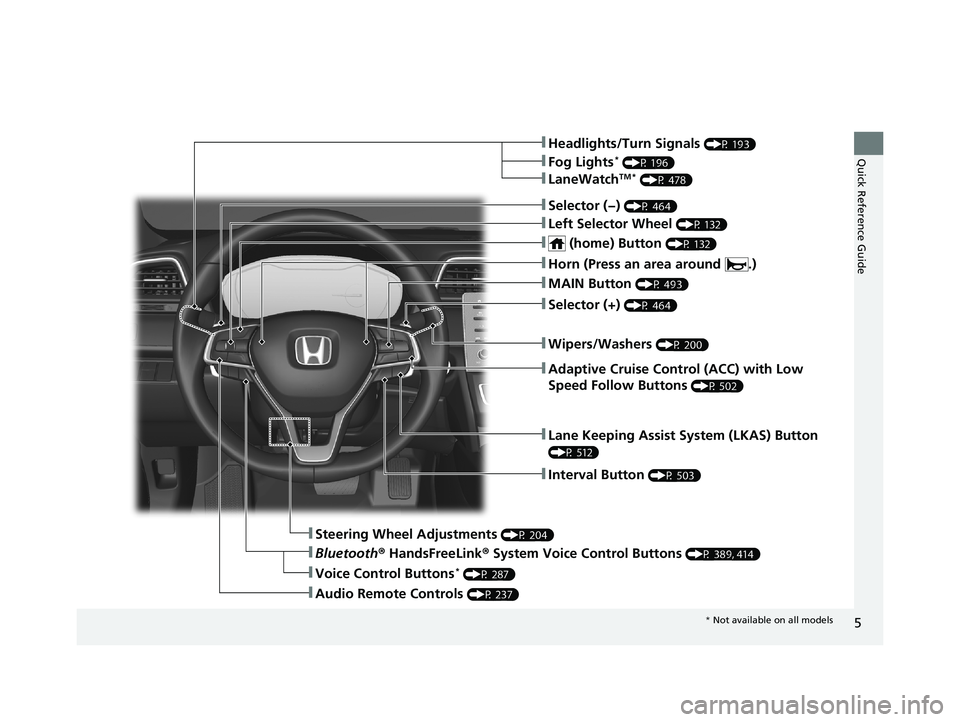
Quick Reference Guide❚Headlights/Turn Signals (P 193)
❚Fog Lights* (P 196)
❚LaneWatchTM * (P 478)
❚Lane Keeping Assist System (LKAS) Button
(P 512)
❚Interval Button (P 503)
❚Steering Wheel Adjustments (P 204)
❚Bluetooth® HandsFreeLink ® System Voice Control Buttons (P 389, 414)
❚Audio Remote Controls (P 237)
❚Voice Control Buttons* (P 287)
❚Selector (−) (P 464)
❚Left Selector Wheel (P 132)
❚ (home) Button (P 132)
❚MAIN Button (P 493)
❚Adaptive Cruise Control (ACC) with Low
Speed Follow Buttons
(P 502)
❚Wipers/Washers (P 200)
❚Selector (+) (P 464)
❚Horn (Press an area around .)
* Not available on all models
20 INSIGHT-31TXM6100.book 5 ページ 2019年4月24日 水曜日 午後2時2分
Page 9 of 675
7
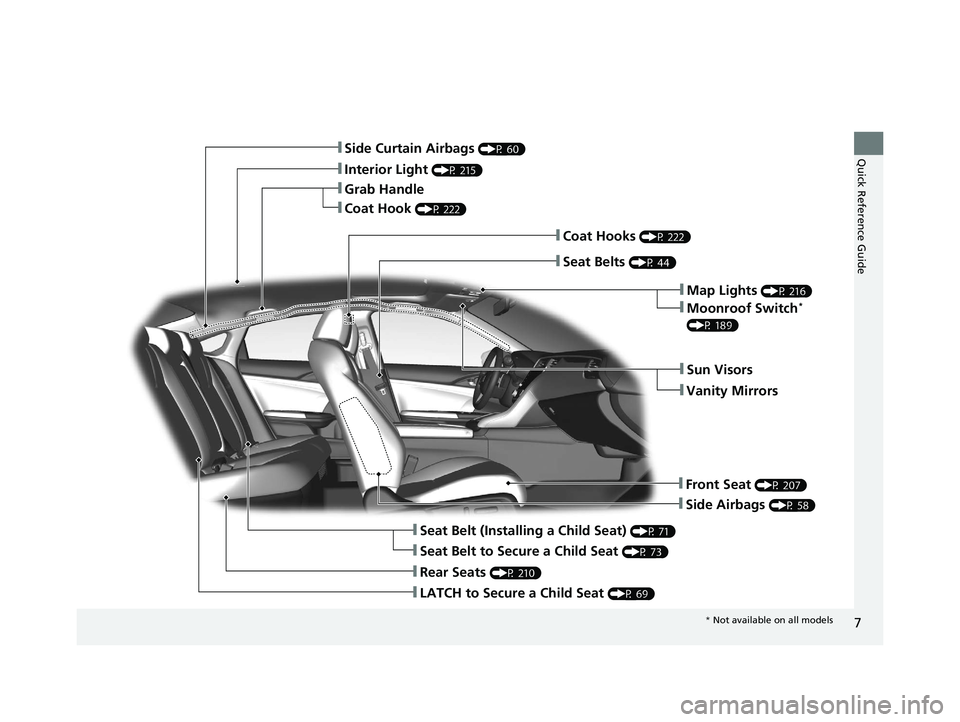
Quick Reference Guide❚Side Curtain Airbags (P 60)
❚Interior Light (P 215)
❚Grab Handle
❚Coat Hook (P 222)
❚Side Airbags (P 58)
❚Seat Belt (Installing a Child Seat) (P 71)
❚Seat Belt to Secure a Child Seat (P 73)
❚LATCH to Secure a Child Seat (P 69)
❚Rear Seats (P 210)
❚Seat Belts (P 44)
❚Coat Hooks (P 222)
❚Sun Visors
❚Vanity Mirrors
❚Front Seat (P 207)
❚Map Lights (P 216)
❚Moonroof Switch*
(P 189)
* Not available on all models
20 INSIGHT-31TXM6100.book 7 ページ 2019年4月24日 水曜日 午後2時2分
Page 10 of 675
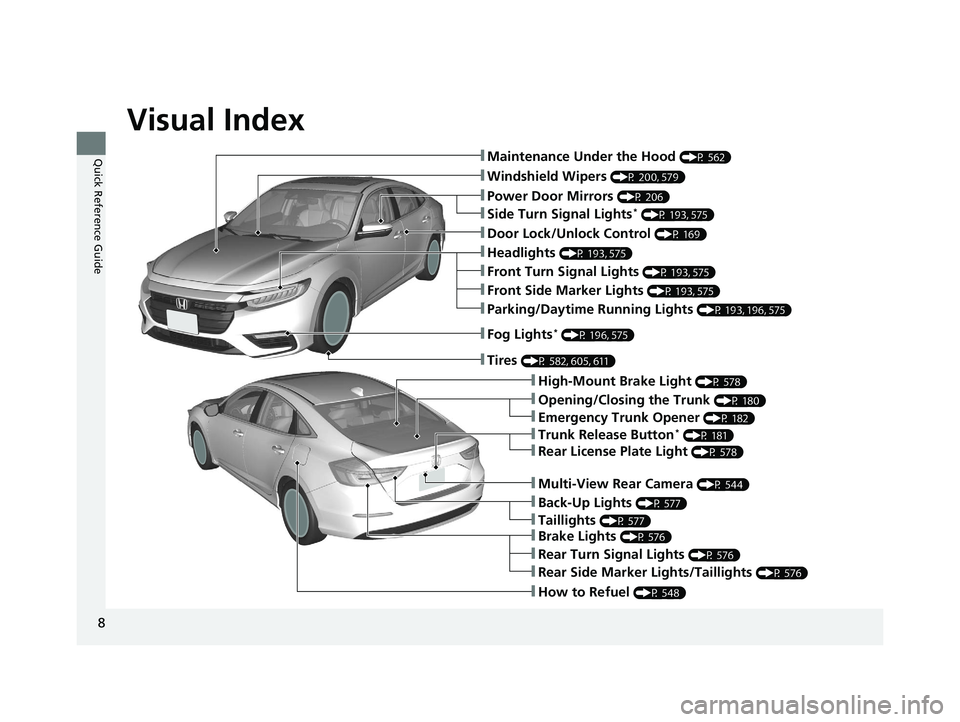
Visual Index
8
Quick Reference Guide❚Maintenance Under the Hood (P 562)
❚Windshield Wipers (P 200, 579)
❚Door Lock/Unlock Control (P 169)
❚Power Door Mirrors (P 206)
❚Headlights (P 193, 575)
❚High-Mount Brake Light (P 578)
❚Emergency Trunk Opener (P 182)
❚Opening/Closing the Trunk (P 180)
❚Parking/Daytime Running Lights (P 193, 196, 575)
❚Fog Lights* (P 196, 575)
❚Trunk Release Button* (P 181)
❚Brake Lights (P 576)
❚Rear Side Marker Lights/Taillights (P 576)
❚Rear Turn Signal Lights (P 576)
❚Back-Up Lights (P 577)
❚How to Refuel (P 548)
❚Tires (P 582, 605, 611)
❚Taillights (P 577)
❚Multi-View Rear Camera (P 544)
❚Rear License Plate Light (P 578)
❚Front Turn Signal Lights (P 193, 575)
❚Front Side Marker Lights (P 193, 575)
❚Side Turn Signal Lights* (P 193, 575)
20 INSIGHT-31TXM6100.book 8 ページ 2019年4月24日 水曜日 午後2時2分
Page 11 of 675
9
Quick Reference Guide
SPORT HYBRID i-MMD (intelligent Multi Mode
Drive)
Your SPORT HYBRID i-MMD vehicle uses both an electric motor and a gasoline engine as propulsion sources, with the electric motor
receiving electricity from an internal High Voltage battery or internal generator. The High Voltage battery can be charged from the
generator driven by the engine or regenerative braking.
When driving, your vehicle is propelled exclusively by the electric motor, exclusively by the gasoline engine, or by a combination of the two.
The system selects which propulsion source is most appropriate and automatically switches to it. Under certain circumstances, pressing the
EV button can manually enable EV (driven only on electricity) mode.
●Energy efficiency
As with a gasoline-powered vehicle, hybrid vehicle fuel efficien cy and driving range is most impacted by your driving style. Aggressive
acceleration and high-speed driving can easily trigger the system to switch the propulsion source to the gasoline-powered engin e.
In addition, heavy climate control system use negatively affects vehicle range and efficiency. Either of these use patterns will more quickly
reduce the High Voltage battery's state of charge.
●Battery types
There are two types of batteries used in this vehicle; a standard 12-volt battery that powers the airbags, the interior and exterior lights, and
other standard 12-volt systems; and a high voltage battery that is used to power the propulsion motor and recharge the 12-volt battery.
* Not available on all models
20 INSIGHT-31TXM6100.book 9 ページ 2019年4月24日 水曜日 午後2時2分
Page 23 of 675
21
Quick Reference Guide
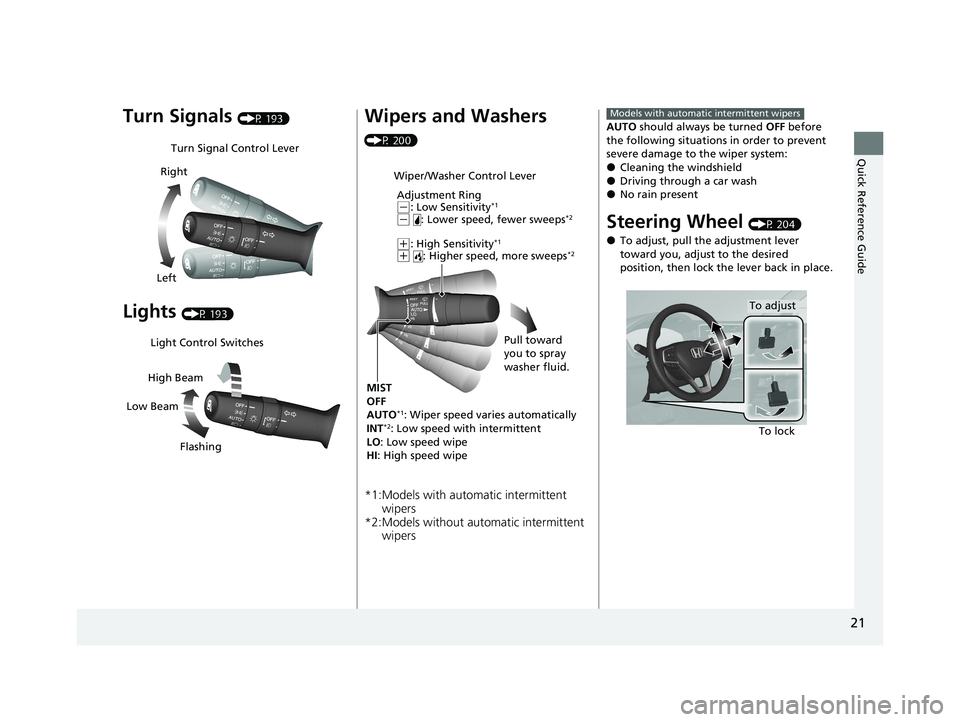
Turn Signals (P 193)
Lights (P 193)
Turn Signal Control Lever
Right
Left
Light Control Switches
Low Beam High Beam
Flashing
Wipers and Washers
(P 200)
*1:Models with automatic intermittent wipers
*2:Models without auto matic intermittent
wipers
Wiper/Washer Control Lever
Adjustment Ring
(-: Low Sensitivity*1
(- : Lower speed, fewer sweeps*2
(+: High Sensitivity*1
(+ : Higher speed, more sweeps*2
MIST
OFF
AUTO
*1: Wiper speed varies automatically
INT*2: Low speed with intermittent
LO : Low speed wipe
HI : High speed wipe Pull toward
you to spray
washer fluid.
AUTO
should always be turned OFF before
the following situations in order to prevent
severe damage to the wiper system:
●Cleaning the windshield●Driving through a car wash●No rain present
Steering Wheel (P 204)
●To adjust, pull the adjustment lever
toward you, adjust to the desired
position, then lock the lever back in place.
Models with automatic intermittent wipers
To lock
To adjust
20 INSIGHT-31TXM6100.book 21 ページ 2019年4月24日 水曜日 午後2時2分
Page 35 of 675
33
Quick Reference Guide
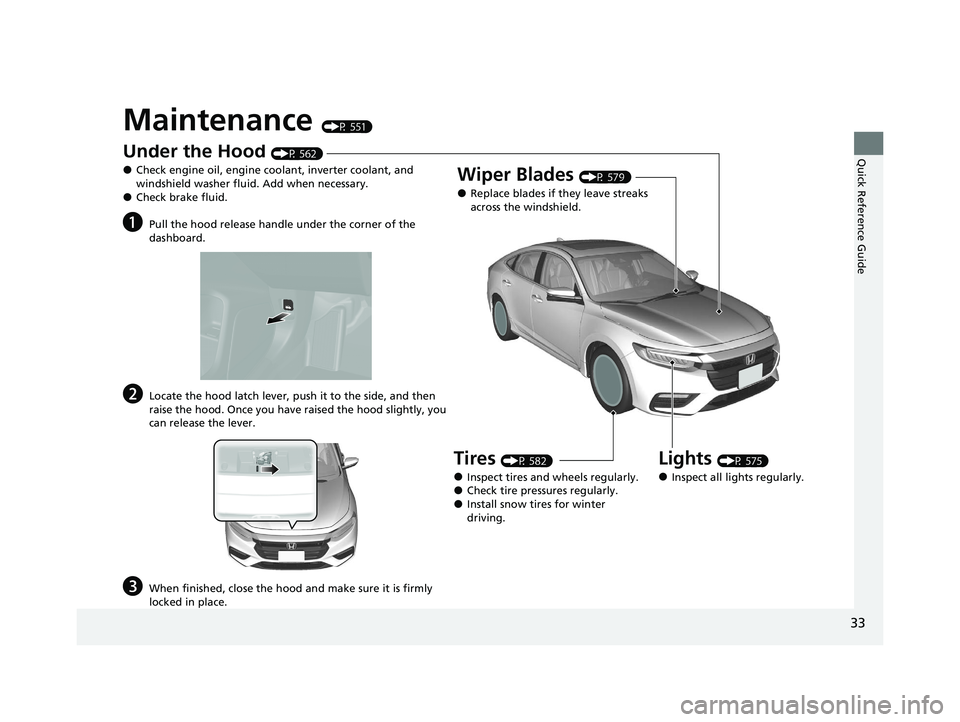
Maintenance (P 551)
Under the Hood (P 562)
●Check engine oil, engine coolant, inverter coolant, and
windshield washer fluid. Add when necessary.
●Check brake fluid.
aPull the hood release handle under the corner of the
dashboard.
bLocate the hood latch lever, push it to the side, and then
raise the hood. Once you have raised the hood slightly, you
can release the lever.
cWhen finished, close the hood and make sure it is firmly
locked in place.
Lights (P 575)
●Inspect all lights regularly.
Wiper Blades (P 579)
●Replace blades if they leave streaks
across the windshield.
Tires (P 582)
●Inspect tires and wheels regularly.●Check tire pressures regularly.●Install snow tires for winter
driving.
20 INSIGHT-31TXM6100.book 33 ページ 2019年4月24日 水曜日 午後2時2分
Page 37 of 675
35
Quick Reference Guide
What to Do If
Why does the brake pedal
pulsate slightly when
applying the brakes?This can occur when the ABS activates and does not indicate a
problem. Apply firm, steady pressure on the brake pedal. Never
pump the brake pedal.
2Anti-lock Brake System (ABS) (P540)
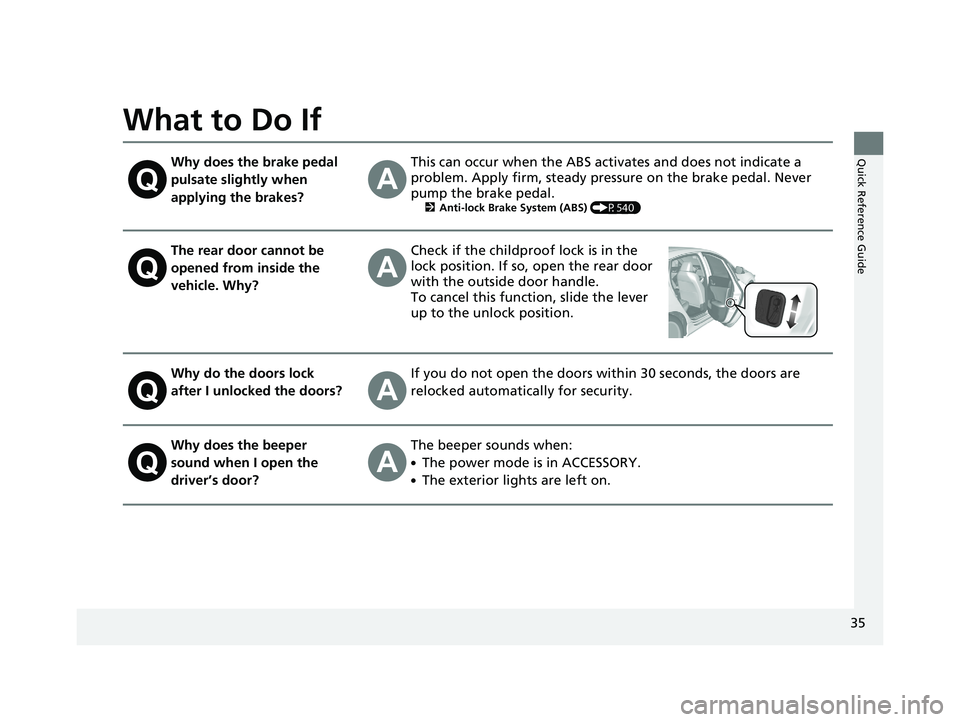
The rear door cannot be
opened from inside the
vehicle. Why?Check if the childproof lock is in the
lock position. If so, open the rear door
with the outside door handle.
To cancel this function, slide the lever
up to the unlock position.
Why do the doors lock
after I unlocked the doors?If you do not open the doors within 30 seconds, the doors are
relocked automatically for security.
Why does the beeper
sound when I open the
driver’s door?The beeper sounds when:
●The power mode is in ACCESSORY.
●The exterior lights are left on.
20 INSIGHT-31TXM6100.book 35 ページ 2019年4月24日 水曜日 午後2時2分
Page 82 of 675
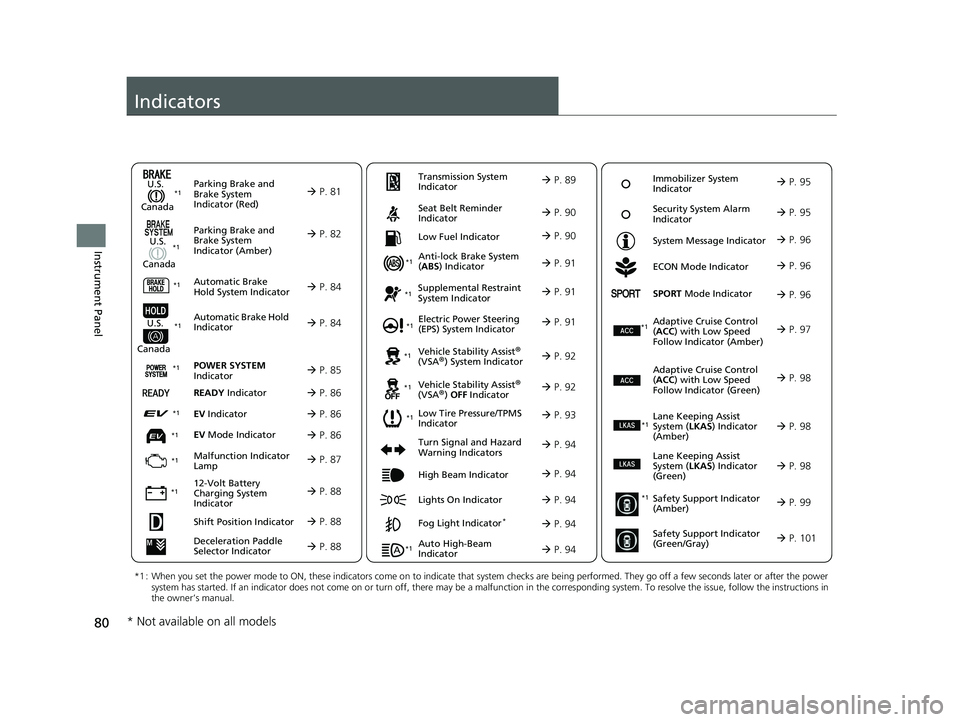
80
Instrument Panel
Indicators
Deceleration Paddle
Selector Indicator P. 88
Parking Brake and
Brake System
Indicator (Red)
Parking Brake and
Brake System
Indicator (Amber)
U.S.
Canada
U.S.
Canada Automatic Brake
Hold System Indicator
Automatic Brake Hold
IndicatorU.S.
Canada
*1 : When you set the power mode to ON, these indicators come on to indicate that system checks are being performed. They go off a few seconds later or after the power
system has started. If an indicator does not come on or turn off, there may be a malfunction in the corresponding system. To re solve the issue, follow the instructions in
the owner’s manual.
P. 81*1
Malfunction Indicator
Lamp
12-Volt Battery
Charging System
Indicator
Anti-lock Brake System
(ABS ) Indicator
Seat Belt Reminder
Indicator
Low Fuel Indicator
Vehicle Stability Assist®
(VSA®) System Indicator
Vehicle Stability Assist
®
(VSA®) OFF Indicator
Supplemental Restraint
System Indicator
Auto High-Beam
Indicator
Low Tire Pressure/TPMS
Indicator Electric Power Steering
(EPS) System Indicator
Turn Signal and Hazard
Warning Indicators
Lights On Indicator High Beam Indicator
Fog Light Indicator*
ECON Mode Indicator
System Message Indicator
SPORT
Mode Indicator
Adaptive Cruise Control
( ACC ) with Low Speed
Follow Indicator (Amber)
Lane Keeping Assist
System ( LKAS) Indicator
(Amber)
Safety Support Indicator
(Amber)
Safety Support Indicator
(Green/Gray)
P. 82
P. 84
P. 84
P. 87
P. 88*1
*1
*1 *1
P. 93
*1
*1
Shift Position Indicator P. 88
Transmission System
Indicator P. 89
P. 90
P. 90
P. 91
P. 91
P. 94
P. 92
*1
*1 *1
P. 92
*1 P. 91
P. 94
P. 97
*1
P. 94
P. 94
P. 96
P. 94
Immobilizer System
Indicator P. 95
Security System Alarm
Indicator P. 95
P. 96
P. 96
P. 98
P. 99
P. 101
*1
Adaptive Cruise Control
(ACC ) with Low Speed
Follow Indicator (Green) P. 98
*1
Lane Keeping Assist
System ( LKAS) Indicator
(Green) P. 98
*1
POWER SYSTEM
Indicator P. 85*1
READY Indicator P. 86
EV Indicator P. 86*1
EV Mode Indicator P. 86*1
*1
* Not available on all models
20 INSIGHT-31TXM6100.book 80 ページ 2019年4月24日 水曜日 午後2時2分
Page 96 of 675
94
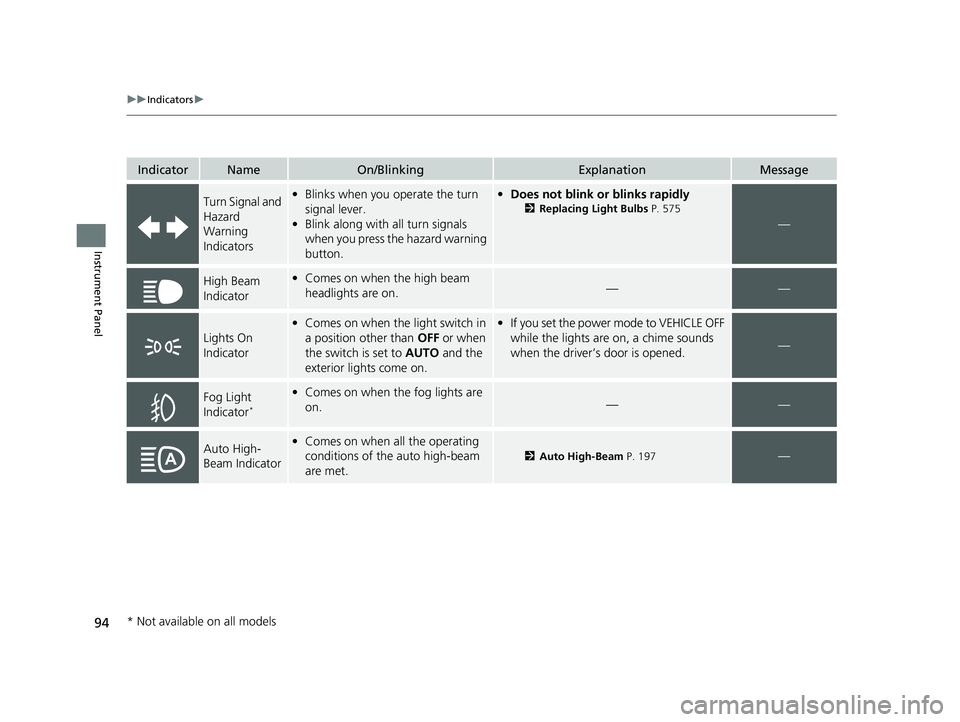
uuIndicators u
Instrument Panel
IndicatorNameOn/BlinkingExplanationMessage
Turn Signal and
Hazard
Warning
Indicators•Blinks when you operate the turn
signal lever.
• Blink along with all turn signals
when you press the hazard warning
button.• Does not blink or blinks rapidly
2 Replacing Light Bulbs P. 575
—
High Beam
Indicator•Comes on when the high beam
headlights are on.——
Lights On
Indicator
•Comes on when the light switch in
a position other than OFF or when
the switch is set to AUTO and the
exterior lights come on.• If you set the power mode to VEHICLE OFF
while the lights are on, a chime sounds
when the driver’s door is opened.
—
Fog Light
Indicator*
•Comes on when the fog lights are
on.——
Auto High-
Beam Indicator•Comes on when all the operating
conditions of the auto high-beam
are met.
2 Auto High-Beam P. 197—
* Not available on all models
20 INSIGHT-31TXM6100.book 94 ページ 2019年4月24日 水曜日 午後2時2分