brake light HONDA INSIGHT 2021 Owner's Manual (in English)
[x] Cancel search | Manufacturer: HONDA, Model Year: 2021, Model line: INSIGHT, Model: HONDA INSIGHT 2021Pages: 687, PDF Size: 37.14 MB
Page 12 of 687
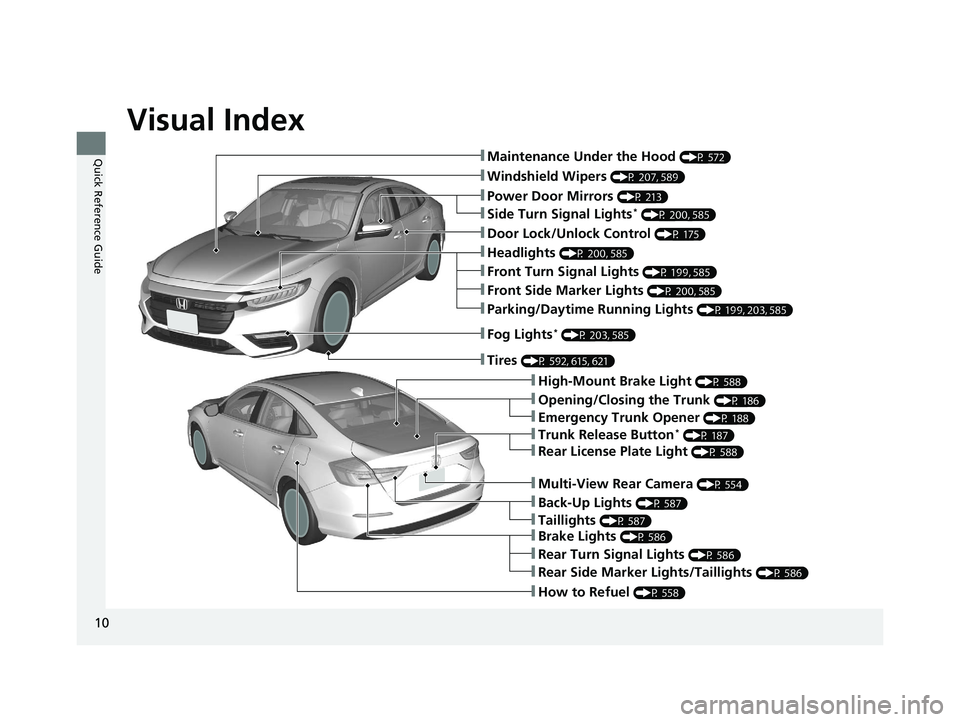
Visual Index
10
Quick Reference Guide❚Maintenance Under the Hood (P 572)
❚Windshield Wipers (P 207, 589)
❚Door Lock/Unlock Control (P 175)
❚Power Door Mirrors (P 213)
❚Headlights (P 200, 585)
❚High-Mount Brake Light (P 588)
❚Emergency Trunk Opener (P 188)
❚Opening/Closing the Trunk (P 186)
❚Parking/Daytime Running Lights (P 199, 203, 585)
❚Fog Lights* (P 203, 585)
❚Trunk Release Button* (P 187)
❚Brake Lights (P 586)
❚Rear Side Marker Lights/Taillights (P 586)
❚Rear Turn Signal Lights (P 586)
❚Back-Up Lights (P 587)
❚How to Refuel (P 558)
❚Tires (P 592, 615, 621)
❚Taillights (P 587)
❚Multi-View Rear Camera (P 554)
❚Rear License Plate Light (P 588)
❚Front Turn Signal Lights (P 199, 585)
❚Front Side Marker Lights (P 200, 585)
❚Side Turn Signal Lights* (P 200, 585)
21 INSIGHT-31TXM6200.book 10 ページ 2020年2月5日 水曜日 午前10時0分
Page 37 of 687
35
Quick Reference Guide
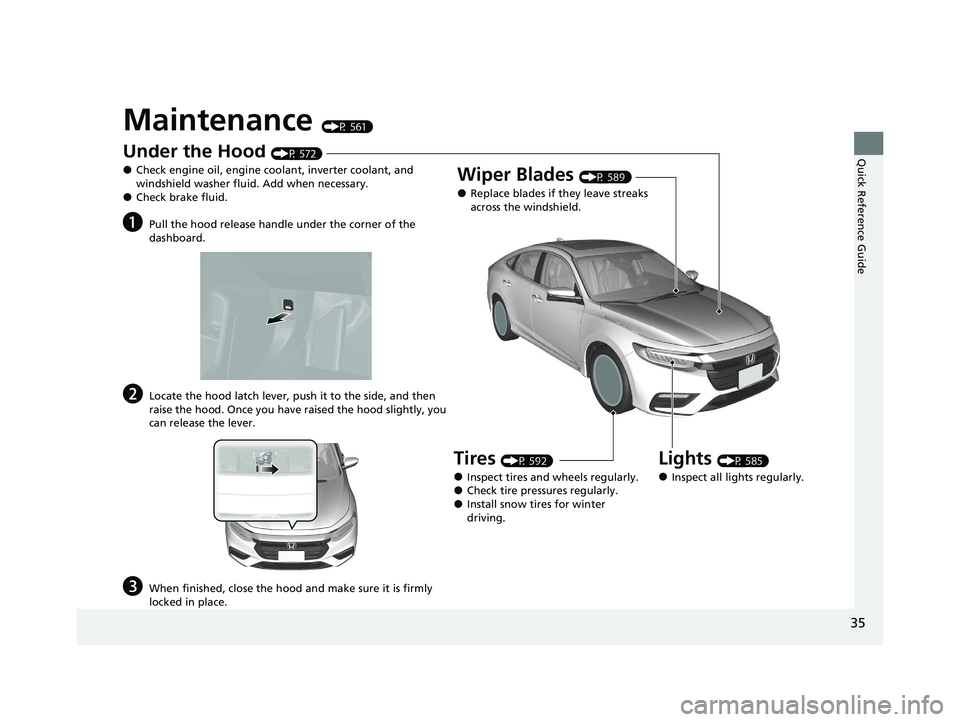
Maintenance (P 561)
Under the Hood (P 572)
●Check engine oil, engine coolant, inverter coolant, and
windshield washer fluid. Add when necessary.
●Check brake fluid.
aPull the hood release handle under the corner of the
dashboard.
bLocate the hood latch lever, push it to the side, and then
raise the hood. Once you have raised the hood slightly, you
can release the lever.
cWhen finished, close the hood and make sure it is firmly
locked in place.
Lights (P 585)
●Inspect all lights regularly.
Wiper Blades (P 589)
●Replace blades if they leave streaks
across the windshield.
Tires (P 592)
●Inspect tires and wheels regularly.●Check tire pressures regularly.●Install snow tires for winter
driving.
21 INSIGHT-31TXM6200.book 35 ページ 2020年2月5日 水曜日 午前10時0分
Page 39 of 687

37
Quick Reference Guide
What to Do If
Why does the brake pedal
pulsate slightly when
applying the brakes?This can occur when the ABS activates and does not indicate a
problem. Apply firm, steady pressure on the brake pedal. Never
pump the brake pedal.
2Anti-lock Brake System (ABS) (P547)
The rear door cannot be
opened from inside the
vehicle. Why?Check if the childproof lock is in the
lock position. If so, open the rear door
with the outside door handle.
To cancel this function, slide the lever
up to the unlock position.
Why do the doors lock
after I unlocked the doors?If you do not open the doors within 30 seconds, the doors are
relocked automatically for security.
Why does the beeper
sound when I open the
driver’s door?The beeper sounds when:
●The power mode is in ACCESSORY.
●The exterior lights are left on.
21 INSIGHT-31TXM6200.book 37 ページ 2020年2月5日 水曜日 午前10時0分
Page 86 of 687
84
Instrument Panel
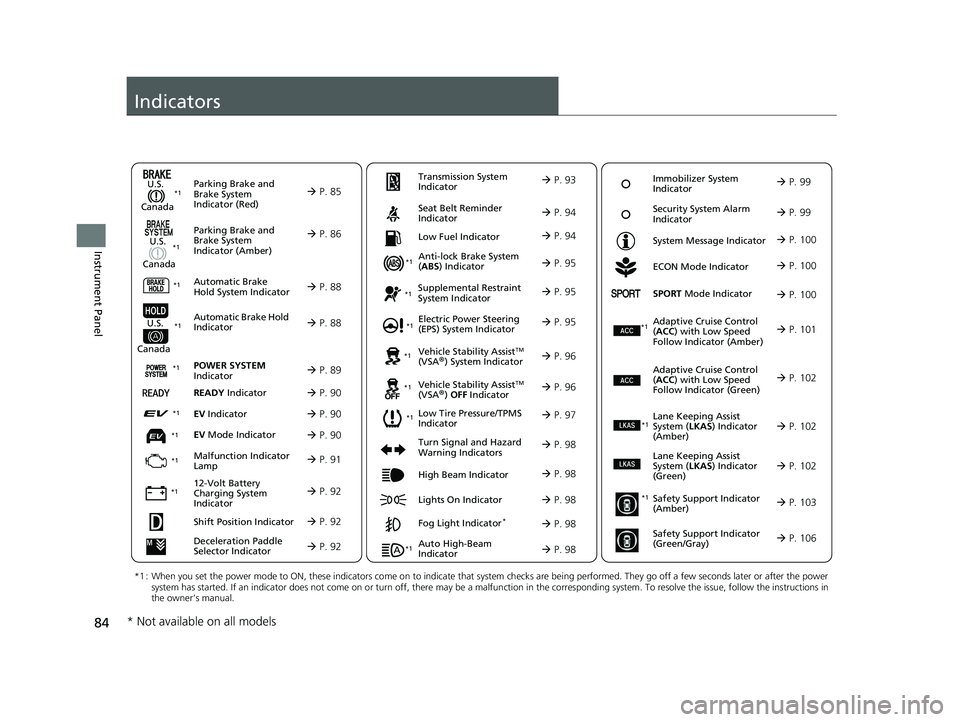
Indicators
Deceleration Paddle
Selector Indicator P. 92
Parking Brake and
Brake System
Indicator (Red)
Parking Brake and
Brake System
Indicator (Amber)
U.S.
Canada
U.S.
Canada Automatic Brake
Hold System Indicator
Automatic Brake Hold
IndicatorU.S.
Canada
*1 : When you set the power mode to ON, these indicators come on to indicate that system checks are being performed. They go off a few seconds later or after the power
system has started. If an indicator does not come on or turn off, there may be a malfunction in the corresponding system. To re solve the issue, follow the instructions in
the owner’s manual.
P. 85*1
Malfunction Indicator
Lamp
12-Volt Battery
Charging System
Indicator
Anti-lock Brake System
(ABS ) Indicator
Seat Belt Reminder
Indicator
Low Fuel Indicator
Vehicle Stability AssistTM
(VSA®) System Indicator
Vehicle Stability Assist
TM
(VSA®) OFF Indicator
Supplemental Restraint
System Indicator
Auto High-Beam
Indicator
Low Tire Pressure/TPMS
Indicator Electric Power Steering
(EPS) System Indicator
Turn Signal and Hazard
Warning Indicators
Lights On Indicator High Beam Indicator
Fog Light Indicator*
ECON Mode Indicator
System Message Indicator
SPORT
Mode Indicator
Adaptive Cruise Control
( ACC ) with Low Speed
Follow Indicator (Amber)
Lane Keeping Assist
System ( LKAS) Indicator
(Amber)
Safety Support Indicator
(Amber)
Safety Support Indicator
(Green/Gray)
P. 86
P. 88
P. 88
P. 91
P. 92*1
*1
*1 *1
P. 97
*1
*1
Shift Position Indicator P. 92
Transmission System
Indicator P. 93
P. 94
P. 94
P. 95
P. 95
P. 98
P. 96
*1
*1 *1
P. 96
*1 P. 95
P. 98
P. 101
*1
P. 98
P. 98
P. 100
P. 98
Immobilizer System
Indicator P. 99
Security System Alarm
Indicator P. 99
P. 100
P. 100
P. 102
P. 103
P. 106
*1
Adaptive Cruise Control
(ACC ) with Low Speed
Follow Indicator (Green) P. 102
*1
Lane Keeping Assist
System ( LKAS) Indicator
(Green) P. 102
*1
POWER SYSTEM
Indicator P. 89*1
READY Indicator P. 90
EV Indicator P. 90*1
EV Mode Indicator P. 90*1
*1
* Not available on all models
21 INSIGHT-31TXM6200.book 84 ページ 2020年2月5日 水曜日 午前10時0分
Page 125 of 687
123
uuIndicators uDriver Information Interface Wa rning and Information Messages
Continued
Instrument Panel
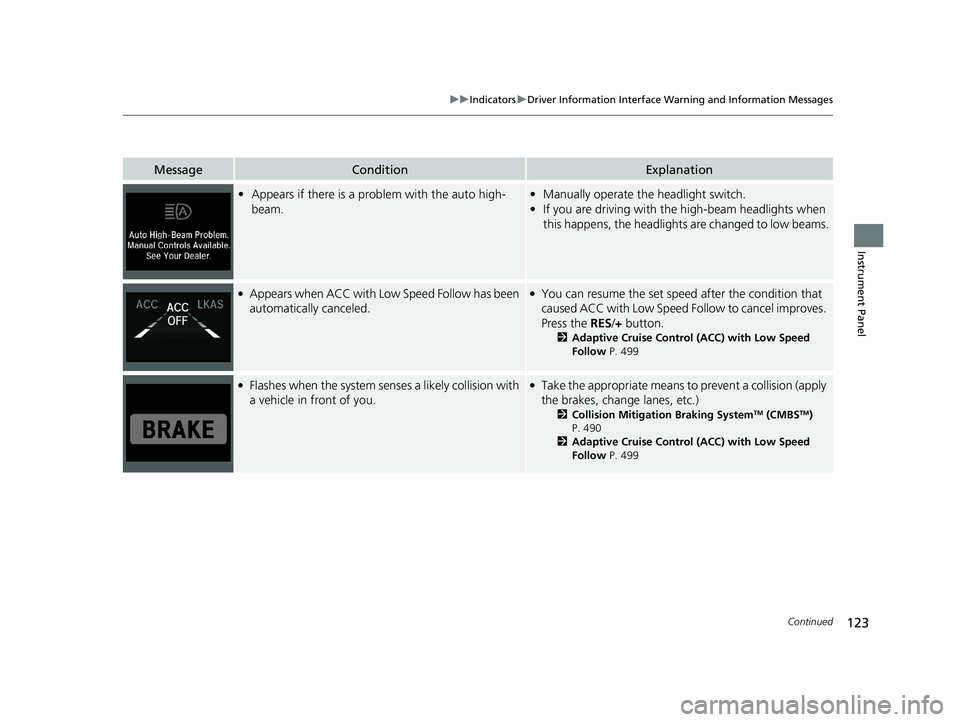
MessageConditionExplanation
•Appears if there is a prob lem with the auto high-
beam.• Manually operate the headlight switch.
• If you are driving with th e high-beam headlights when
this happens, the headlights are changed to low beams.
●Appears when ACC with Lo w Speed Follow has been
automatically canceled.●You can resume the set speed after the condition that
caused ACC with Low Speed Fo llow to cancel improves.
Press the RES/+ button.
2 Adaptive Cruise Control (ACC) with Low Speed
Follow P. 499
●Flashes when the system senses a likely collision with
a vehicle in front of you.●Take the appropriate means to prevent a collision (apply
the brakes, change lanes, etc.)
2Collision Mitigation Braking SystemTM (CMBSTM)
P. 490
2 Adaptive Cruise Control (ACC) with Low Speed
Follow P. 499
21 INSIGHT-31TXM6200.book 123 ページ 2020年2月5日 水曜日 午前10時0分
Page 158 of 687
156
uuGauges and Driver Information Interface uDriver Information Interface
Instrument Panel
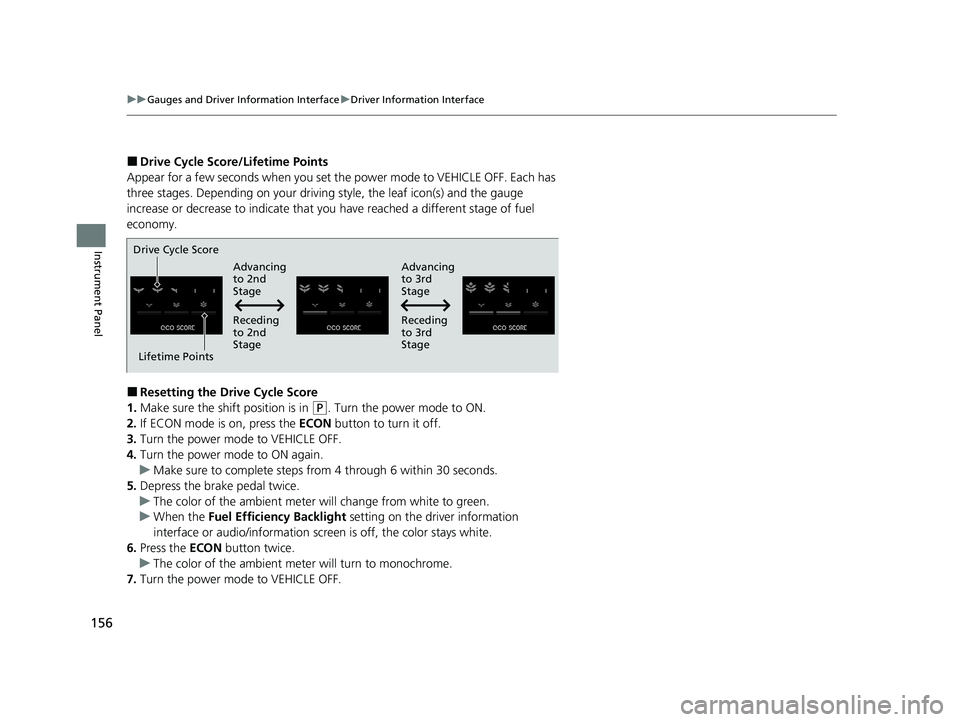
■Drive Cycle Score/Lifetime Points
Appear for a few seconds when you set th e power mode to VEHICLE OFF. Each has
three stages. Depending on your driving style, the leaf icon(s) and the gauge
increase or decrease to indicate that you have reached a different stage of fuel
economy.
■Resetting the Drive Cycle Score
1. Make sure the shift position is in
(P. Turn the power mode to ON.
2. If ECON mode is on, press the ECON button to turn it off.
3. Turn the power mode to VEHICLE OFF.
4. Turn the power mode to ON again.
u Make sure to complete steps from 4 through 6 within 30 seconds.
5. Depress the brake pedal twice.
u The color of the ambient meter wi ll change from white to green.
u When the Fuel Efficiency Backlight setting on the driver information
interface or audio/information scr een is off, the color stays white.
6. Press the ECON button twice.
u The color of the ambient mete r will turn to monochrome.
7. Turn the power mode to VEHICLE OFF.
Drive Cycle Score
Lifetime Points Advancing
to 2nd
Stage
Advancing
to 3rd
Stage
Receding
to 3rd
Stage
Receding
to 2nd
Stage
21 INSIGHT-31TXM6200.book 156 ページ 2020年2月5日 水曜日 午前10時0分
Page 202 of 687
200
uuOperating the Switches Around the Steering Wheel uLight Switches
Controls
Light Switches
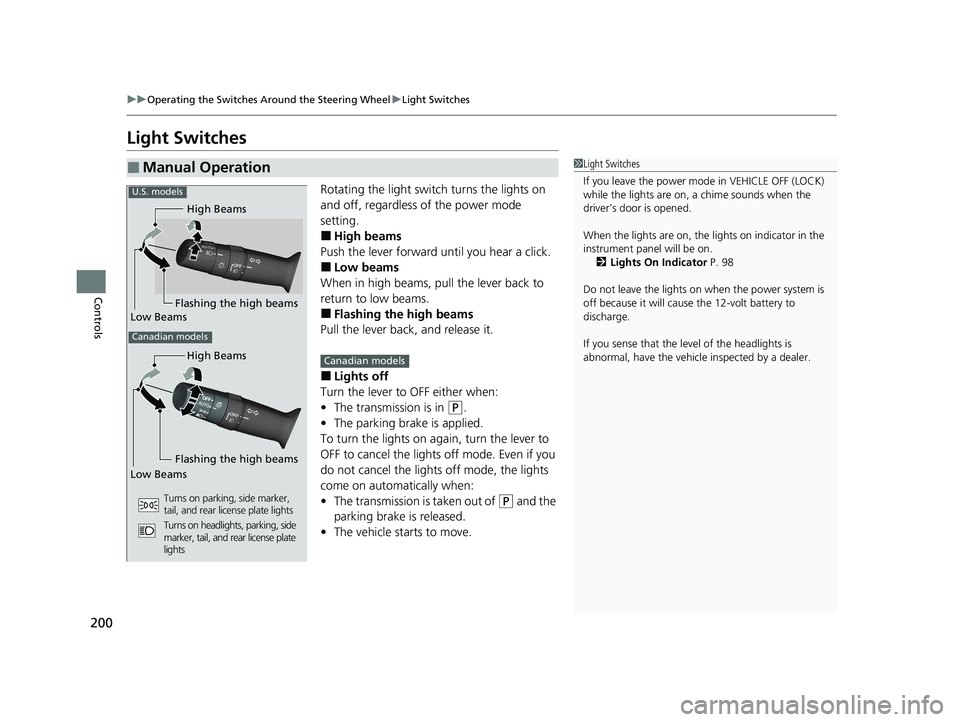
Rotating the light switch turns the lights on
and off, regardless of the power mode
setting.
■High beams
Push the lever forward until you hear a click.
■Low beams
When in high beams, pull the lever back to
return to low beams.
■Flashing the high beams
Pull the lever back, and release it.
■Lights off
Turn the lever to OFF either when:
• The transmission is in
(P.
• The parking brake is applied.
To turn the lights on ag ain, turn the lever to
OFF to cancel the lights off mode. Even if you
do not cancel the lights off mode, the lights
come on automatically when:
• The transmission is taken out of
(P and the
parking brake is released.
• The vehicle starts to move.
■Manual Operation1Light Switches
If you leave the power mode in VEHICLE OFF (LOCK)
while the lights are on, a chime sounds when the
driver’s door is opened.
When the lights are on, the lights on indicator in the
instrument pane l will be on.
2 Lights On Indicator P. 98
Do not leave the lights on when the power system is
off because it will caus e the 12-volt battery to
discharge.
If you sense that the le vel of the headlights is
abnormal, have the vehicl e inspected by a dealer.
High Beams
Flashing the high beams
Low Beams
Turns on parking, side marker,
tail, and rear license plate lights
Turns on headlights, parking, side
marker, tail, and rear license plate
lights
High Beams
Canadian models
Low Beams Flashing the high beams
U.S. models
Canadian models
21 INSIGHT-31TXM6200.book 200 ページ 2020年2月5日 水曜日 午前10時0分
Page 205 of 687
203
uuOperating the Switches Around the Steering Wheel uFog Lights*
Controls
Fog Lights*
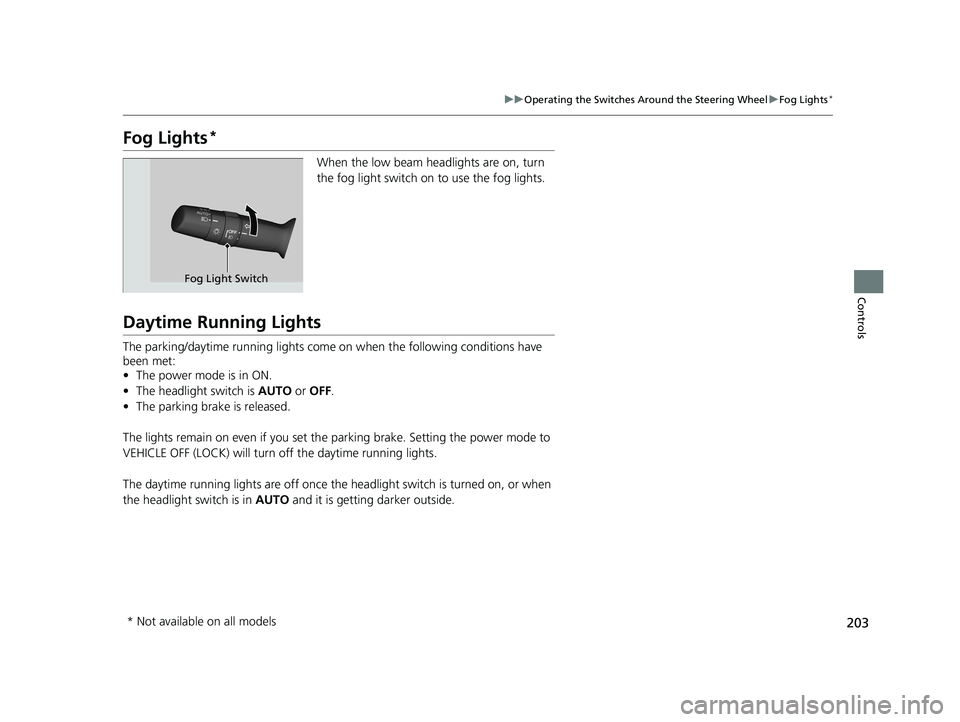
When the low beam headlights are on, turn
the fog light switch on to use the fog lights.
Daytime Running Lights
The parking/daytime running lights come on when the following conditions have
been met:
• The power mode is in ON.
• The headlight switch is AUTO or OFF .
• The parking brake is released.
The lights remain on even if you set th e parking brake. Setting the power mode to
VEHICLE OFF (LOCK) will turn off the daytime running lights.
The daytime running lights are off once the h eadlight switch is turned on, or when
the headlight switch is in AUTO and it is getting darker outside.
Fog Light Switch
* Not available on all models
21 INSIGHT-31TXM6200.book 203 ページ 2020年2月5日 水曜日 午前10時0分
Page 451 of 687
Continued449
uuBefore Driving uDriving Preparation
Driving
• Store or secure all items on board properly.
u Carrying too much cargo, or improperly storing it, can affect your vehicle’s
handling, stability, sto pping distance, and tires, and make it unsafe.
2Maximum Load Limit P. 451
•Do not pile items higher than the seat height.
u They can block your view and may be thrown forward in the event of sudden
braking.
• Do not place anything in the front seat footwells. Make sure to secure the floor
mat.
u An object or unsecured floor mat can in terfere with your brake and accelerator
pedal operation while driving.
• If you have any animals on board, do not let them move around in the vehicle.
u They may interfere with driv ing and a crash could occur.
• Securely close and lock all doors and the trunk.
2 Locking/Unlocking the Doors from the Inside P. 182
•Adjust your seating position properly.
u Adjust the head restraint, too.
2Adjusting the Seats P. 214
2 Adjusting the Front Head Restraint Positions P. 219
•Adjust the mirrors and steering wheel properly.
u Adjust them while sitting in the proper driving position.
2 Adjusting the Mirrors P. 212
2 Adjusting the Steering Wheel P. 211
■Interior Checks1Interior Checks
The headlight aim is set by the factory, and does not
need to be adjusted. Howeve r, if you regularly carry
heavy items in the trunk, have the aiming readjusted
at a dealer or by a qualified technician.
21 INSIGHT-31TXM6200.book 449 ページ 2020年2月5日 水曜日 午前10時0分
Page 456 of 687
454
Driving
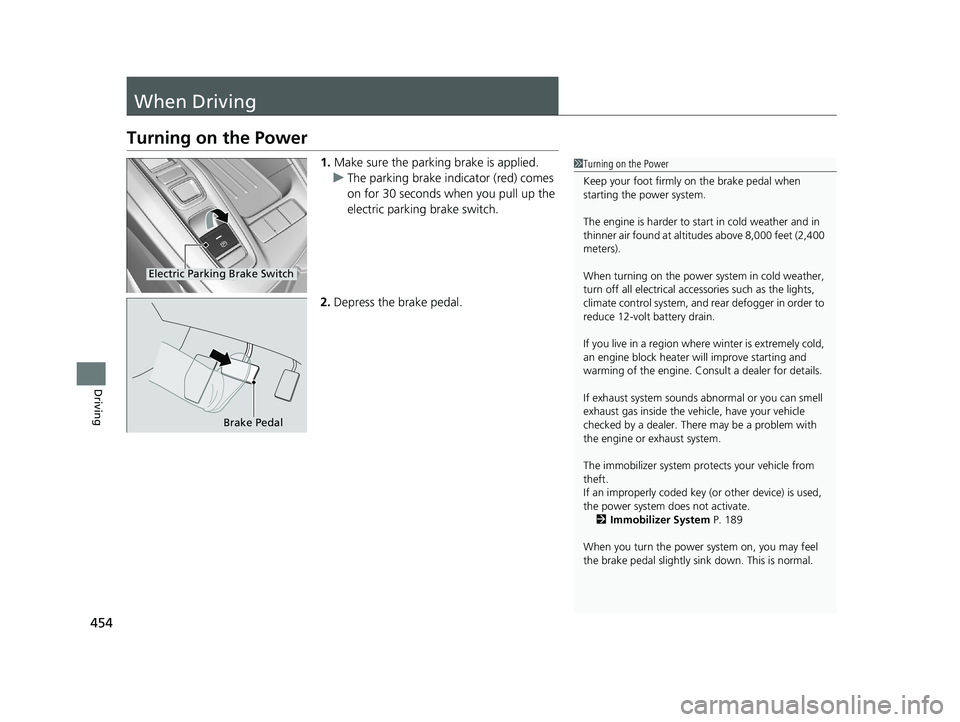
When Driving
Turning on the Power
1.Make sure the parking brake is applied.
u The parking brake indicator (red) comes
on for 30 seconds when you pull up the
electric parking brake switch.
2. Depress the brake pedal.1Turning on the Power
Keep your foot firmly on the brake pedal when
starting the power system.
The engine is harder to st art in cold weather and in
thinner air found at altit udes above 8,000 feet (2,400
meters).
When turning on the power system in cold weather,
turn off all electrical accessories such as the lights,
climate control system, and rear defogger in order to
reduce 12-volt battery drain.
If you live in a region where winter is extremely cold,
an engine block heater will improve starting and
warming of the engine. Cons ult a dealer for details.
If exhaust system sounds abnormal or you can smell
exhaust gas inside the vehi cle, have your vehicle
checked by a dealer. There may be a problem with
the engine or exhaust system.
The immobilizer system pr otects your vehicle from
theft.
If an improperly c oded key (or other device) is used,
the power system does not activate. 2 Immobilizer System P. 189
When you turn the power system on, you may feel
the brake pedal slightly sink down. This is normal.
Electric Parking Brake Switch
Brake Pedal
21 INSIGHT-31TXM6200.book 454 ページ 2020年2月5日 水曜日 午前10時0分