wheel HONDA INSIGHT 2022 Owners Manual
[x] Cancel search | Manufacturer: HONDA, Model Year: 2022, Model line: INSIGHT, Model: HONDA INSIGHT 2022Pages: 609, PDF Size: 18.48 MB
Page 544 of 609
543
uuIf a Tire Goes Flat uChanging a Flat Tire
Continued
Handling the Unexpected
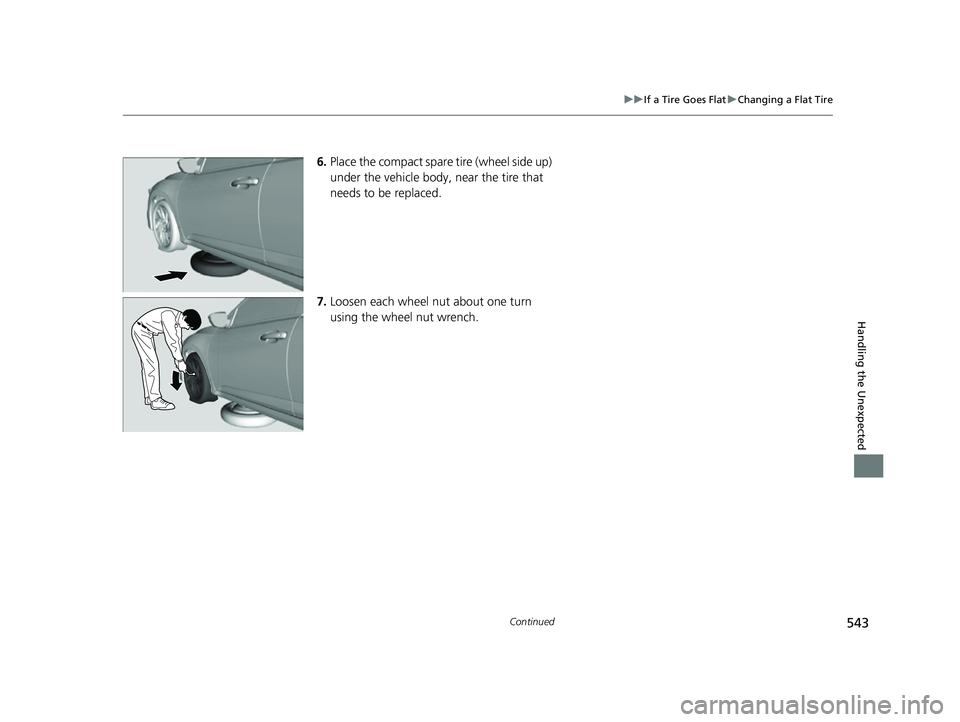
6. Place the compact spare tire (wheel side up)
under the vehicle body, near the tire that
needs to be replaced.
7. Loosen each wheel nut about one turn
using the wheel nut wrench.
22 INSIGHT HMIN-31TXM6300.book 543 ページ 2021年2月24日 水曜日 午後3時45分
Page 545 of 609
uuIf a Tire Goes Flat uChanging a Flat Tire
544
Handling the Unexpected
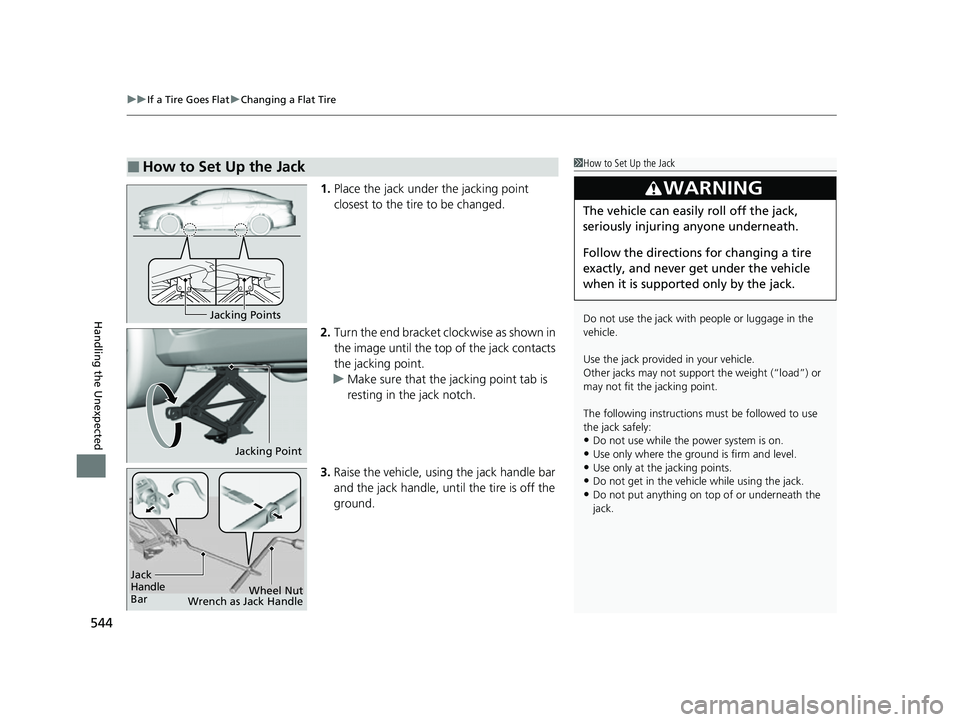
1. Place the jack under the jacking point
closest to the tire to be changed.
2. Turn the end bracket cl ockwise as shown in
the image until the top of the jack contacts
the jacking point.
u Make sure that the jacking point tab is
resting in the jack notch.
3. Raise the vehicle, using the jack handle bar
and the jack handle, until the tire is off the
ground.
■How to Set Up the Jack1How to Set Up the Jack
Do not use the jack with people or luggage in the
vehicle.
Use the jack provided in your vehicle.
Other jacks may not support the weight (“load”) or
may not fit the jacking point.
The following instructions must be followed to use
the jack safely:
•Do not use while the power system is on.
•Use only where the ground is firm and level.
•Use only at the jacking points.•Do not get in the vehicl e while using the jack.
•Do not put anything on top of or underneath the
jack.
3WARNING
The vehicle can easily roll off the jack,
seriously injuring anyone underneath.
Follow the directions for changing a tire
exactly, and never get under the vehicle
when it is supported only by the jack.
Jacking Points
Jacking Point
Jack
Handle
Bar Wheel Nut
Wrench as Jack Handle
22 INSIGHT HMIN-31TXM6300.book 544 ページ 2021年2月24日 水曜日 午後3時45分
Page 546 of 609
Continued545
uuIf a Tire Goes Flat uChanging a Flat Tire
Handling the Unexpected
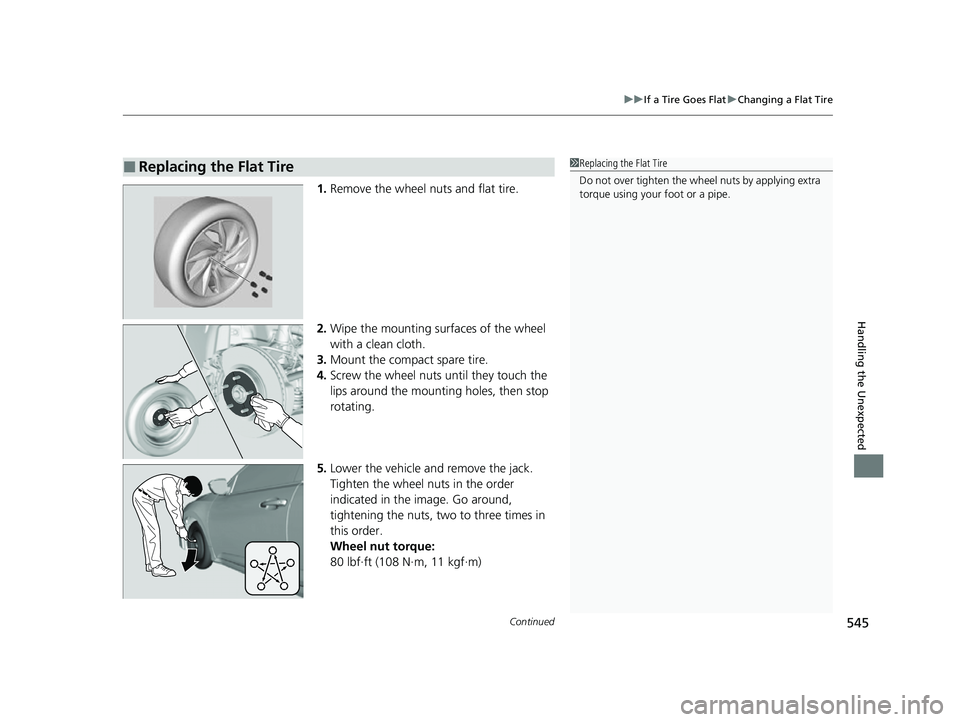
1. Remove the wheel nuts and flat tire.
2. Wipe the mounting surfaces of the wheel
with a clean cloth.
3. Mount the compact spare tire.
4. Screw the wheel nuts until they touch the
lips around the mounti ng holes, then stop
rotating.
5. Lower the vehicle and remove the jack.
Tighten the wheel nuts in the order
indicated in the image. Go around,
tightening the nuts, two to three times in
this order.
Wheel nut torque:
80 lbf∙ft (108 N∙m, 11 kgf∙m)
■Replacing the Flat Tire1Replacing the Flat Tire
Do not over tighten the wheel nuts by applying extra
torque using your foot or a pipe.
22 INSIGHT HMIN-31TXM6300.book 545 ページ 2021年2月24日 水曜日 午後3時45分
Page 547 of 609
uuIf a Tire Goes Flat uChanging a Flat Tire
546
Handling the Unexpected
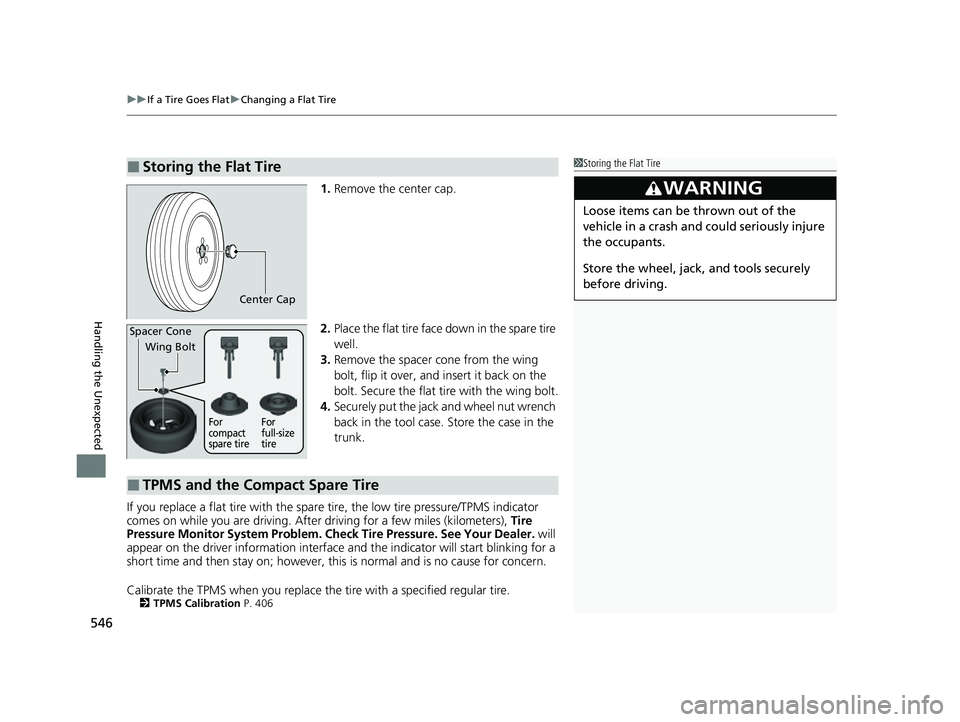
1. Remove the center cap.
2. Place the flat tire face down in the spare tire
well.
3. Remove the spacer cone from the wing
bolt, flip it over, and insert it back on the
bolt. Secure the flat tire with the wing bolt.
4. Securely put the jack and wheel nut wrench
back in the tool case. Store the case in the
trunk.
If you replace a flat tire with the spare tire, the low tire pressure/TPMS indicator
comes on while you are driving. Afte r driving for a few miles (kilometers), Tire
Pressure Monitor System Problem. Ch eck Tire Pressure. See Your Dealer. will
appear on the driver information interface and the indicator will start blinking for a
short time and then stay on; however, this is normal and is no cause for concern.
Calibrate the TPMS when you replace the tire with a specified regular tire.
2TPMS Calibration P. 406
■Storing the Flat Tire1Storing the Flat Tire
3WARNING
Loose items can be thrown out of the
vehicle in a crash and could seriously injure
the occupants.
Store the wheel, jack, and tools securely
before driving.
Center Cap
Spacer Cone
Wing Bolt
For
compact
spare tire For
full-size
tire
■TPMS and the Compact Spare Tire
22 INSIGHT HMIN-31TXM6300.book 546 ページ 2021年2月24日 水曜日 午後3時45分
Page 548 of 609
547
uuIf a Tire Goes Flat uTemporarily Repairing a Flat Tire
Continued
Handling the Unexpected
Temporarily Repairing a Flat Tire
If the tire has a large cut or is otherwise severely damaged, you will need to have the
vehicle towed. If the tire only has a small puncture, from a nail for instance, you can
use the temporary tire repair kit so that you can drive to the nearest service station
for a more permanent repair.
If a tire goes flat while driving, grasp the steering wheel firmly, and brake gradually
to reduce speed. Then, stop in a safe place.
1. Park the vehicle on a firm, level, and n on-slippery surface, and apply the parking
brake.
2. Put the transmission into
(P.
3. Turn on the hazard warning lights an d set the power mode to VEHICLE OFF
(LOCK).
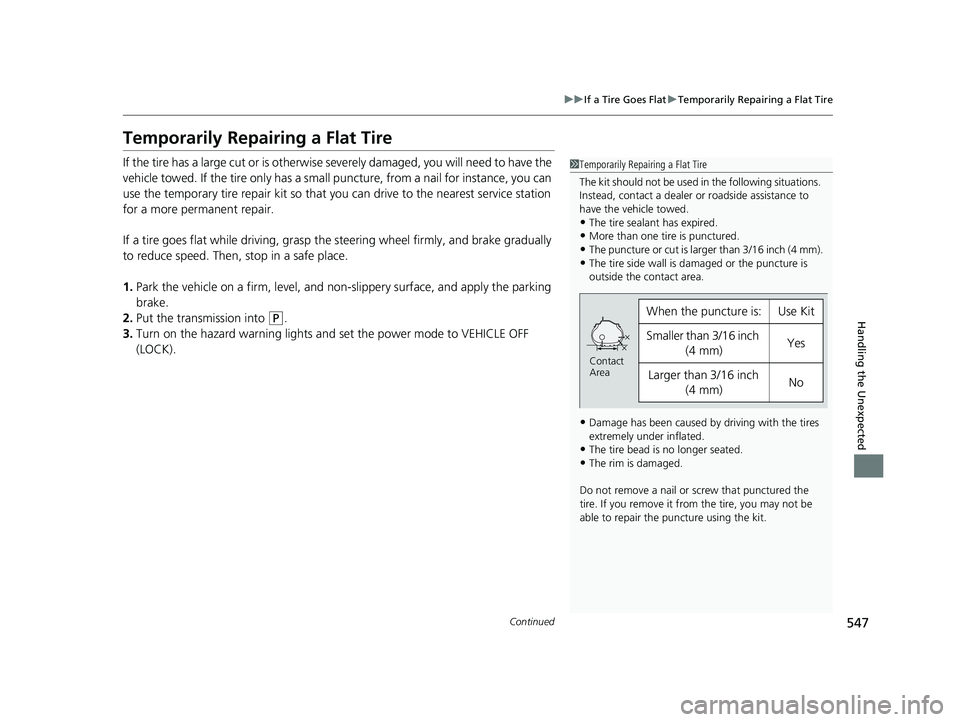
1 Temporarily Repairing a Flat Tire
The kit should not be used in the following situations.
Instead, contact a dealer or roadside assistance to
have the vehicle towed.
•The tire sealant has expired.
•More than one tire is punctured.
•The puncture or cut is larger than 3/16 inch (4 mm).•The tire side wall is da maged or the puncture is
outside the contact area.
•Damage has been caused by driving with the tires
extremely under inflated.
•The tire bead is no longer seated.
•The rim is damaged.
Do not remove a nail or screw that punctured the
tire. If you remove it from the tire, you may not be
able to repair the puncture using the kit.
When the puncture is:Use Kit
Smaller than 3/16 inch (4 mm)Yes
Larger than 3/16 inch (4 mm)No
Contact
Area
22 INSIGHT HMIN-31TXM6300.book 547 ページ 2021年2月24日 水曜日 午後3時45分
Page 554 of 609
553
uuIf a Tire Goes Flat uTemporarily Repairing a Flat Tire
Continued
Handling the Unexpected
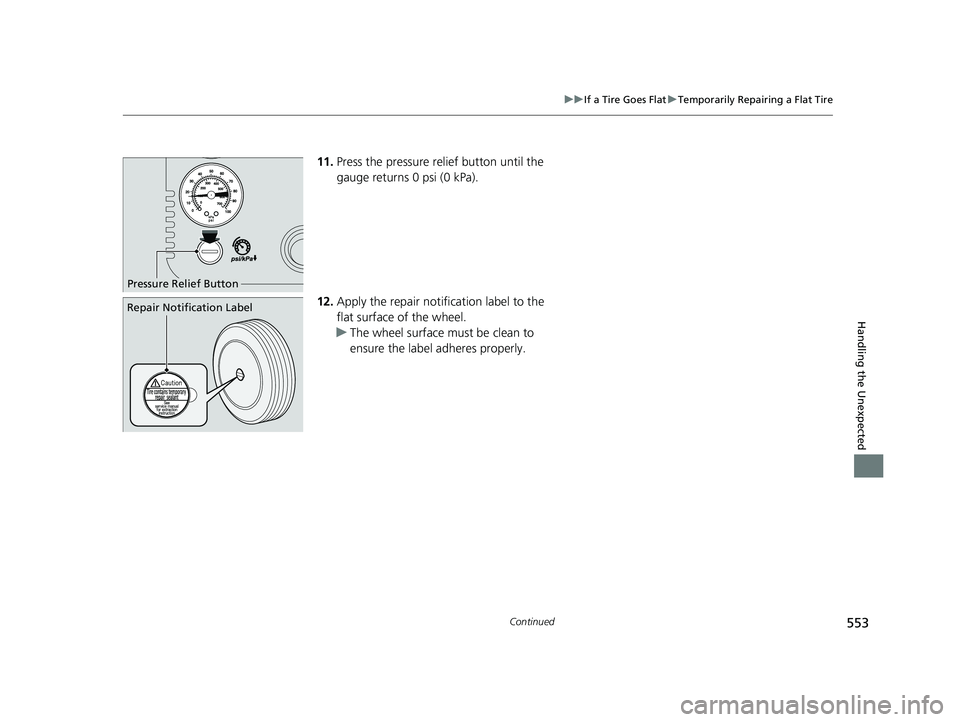
11. Press the pressure relief button until the
gauge returns 0 psi (0 kPa).
12. Apply the repair notification label to the
flat surface of the wheel.
u The wheel surface must be clean to
ensure the label adheres properly.
Pressure Relief Button
Repair Notification Label
22 INSIGHT HMIN-31TXM6300.book 553 ページ 2021年2月24日 水曜日 午後3時45分
Page 564 of 609
563
uuPower System Won’t StartuEmergency Power System Off
Handling the Unexpected
Emergency Power System Off
The POWER button may be used to turn the power system off due to an emergency
situation even while driving. If you must tu rn the power system off, do either of the
following operations:
• Press and hold the POWER button about for two seconds.
• Firmly press the POWER button three times.
The steering wheel will not lock. However, because turning off the power system
disables the power assist the power syst em provides to the steering and braking
systems, it will require significantly more physical effort and time to steer and slow
the vehicle. Use both feet on the brake pe dal to slow down the vehicle and stop
immediately in a safe place.
The transmission automa tically changes to
(P after the vehicle comes to a complete
stop. Then, the power mode changes to VEHICLE OFF.
1 Emergency Power System Off
Do not press the POWER button while driving unless
it is absolutely necessary for the power system to be
turned off.
If you press the POWER button while driving, the
beeper sounds.
22 INSIGHT HMIN-31TXM6300.book 563 ページ 2021年2月24日 水曜日 午後3時45分
Page 584 of 609
583
Handling the Unexpected
Emergency Towing
Call a professional towing service if you need to tow your vehicle.
■Flat bed equipment
The operator loads your vehicle on the back of a truck.
This is the best way to transport your vehicle.
■Wheel lift equipment
The tow truck uses two pivoti ng arms that go under the front tires and lift them off
the ground. The rear tires remain on the ground. This is an acceptable way to
tow your vehicle.
1 Emergency Towing
NOTICE
Trying to lift or tow your vehicle by the bumpers will
cause serious damage. The bumpers are not designed
to support the vehicle’s weight.
Make sure the parking brake is released. If you
cannot release the parking brake, your vehicle must
be transported by the flat bed equipment. 2 Parking Brake P. 468
NOTICE
Improper towing such as towing behind a
motorhome or other motor vehicle can damage the
transmission.
Never tow your vehicle with just a rope or chain.
It is very dangerous since ropes or chains may shift
from side to side or break.
22 INSIGHT HMIN-31TXM6300.book 583 ページ 2021年2月24日 水曜日 午後3時45分
Page 590 of 609
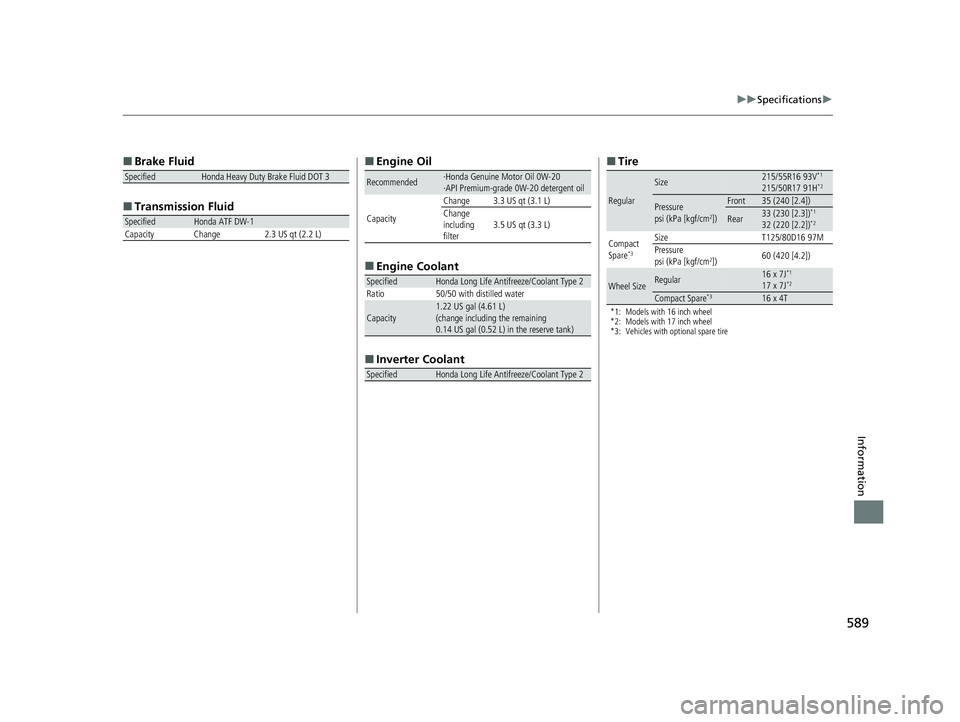
589
uuSpecifications u
Information
■
Brake Fluid
■ Transmissi on Fluid
SpecifiedHonda Heavy Duty Brake Fluid DOT 3
SpecifiedHonda ATF DW-1
Capacity Change 2.3 US qt (2.2 L)
■ Engine Oil
■ Engine Coolant
■ Inverter Coolant
Recommended·Honda Genuine Motor Oil 0W-20
·API Premium-grade 0W-20 detergent oil
Capacity Change 3.3 US qt (3.1 L)
Change
including
filter
3.5 US qt (3.3 L)
SpecifiedHonda Long Life Antifreeze/Coolant Type 2
Ratio 50/50 with distilled water
Capacity1.22 US gal (4.61 L)
(change including the remaining
0.14 US gal (0.52 L) in the reserve tank)
SpecifiedHonda Long Life Antifreeze/Coolant Type 2
■ Tire
*1: Models with 16 inch wheel
*2: Models with 17 inch wheel
*3: Vehicles with optional spare tire
Regular
Size215/55R16 93V*1
215/50R17 91H*2
Pressure
psi (kPa [kgf/cm2])
Front35 (240 [2.4])
Rear33 (230 [2.3])*1
32 (220 [2.2])*2
Compact
Spare*3
Size T125/80D16 97M
Pressure
psi (kPa [kgf/cm
2]) 60 (420 [4.2])
Wheel SizeRegular16 x 7J*1
17 x 7J*2
Compact Spare*316 x 4T
22 INSIGHT HMIN-31TXM6300.book 589 ページ 2021年2月24日 水曜日 午後3時45分
Page 600 of 609
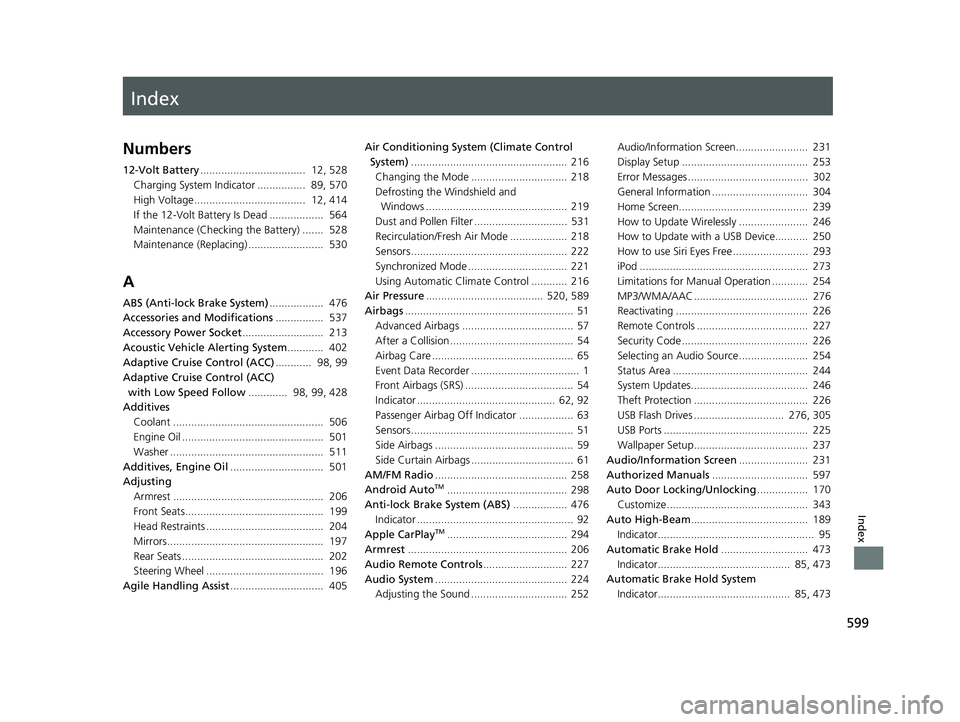
Index
599
Index
Index
Numbers
12-Volt Battery................................... 12, 528
Charging System Indicator ................ 89, 570
High Voltage..................................... 12, 414
If the 12-Volt Battery Is Dead .................. 564
Maintenance (Checking the Battery) ....... 528
Maintenance (Replacing) ......................... 530
A
ABS (Anti-lock Brake System) .................. 476
Accessories and Modifications ................ 537
Accessory Power Socket ........................... 213
Acoustic Vehicle Alerting System ............ 402
Adaptive Cruise Control (ACC) ............ 98, 99
Adaptive Cruise Control (ACC)
with Low Speed Follow ............. 98, 99, 428
Additives
Coolant .................................................. 506
Engine Oil ............................................... 501
Washer ................................................... 511
Additives, Engine Oil ............................... 501
Adjusting Armrest .................................................. 206
Front Seats.............................................. 199
Head Restraints ....................................... 204
Mirrors.................................................... 197
Rear Seats ............................................... 202
Steering Wheel ....................................... 196
Agile Handling Assist ............................... 405 Air Conditioning System (Climate Control
System) .................................................... 216
Changing the Mode ................................ 218
Defrosting the Windshield and Windows ............................................... 219
Dust and Pollen Filter ............................... 531
Recirculation/Fresh Air Mode ................... 218
Sensors .................................................... 222
Synchronized Mode ................................. 221
Using Automatic Climate Control ............ 216
Air Pressure ....................................... 520, 589
Airbags ........................................................ 51
Advanced Airbags ..................................... 57
After a Collision ......................................... 54
Airbag Care ............................................... 65
Event Data Recorder .................................... 1
Front Airbags (SRS) .................................... 54
Indicator .............................................. 62, 92
Passenger Airbag Off Indicator .................. 63
Sensors ...................................................... 51
Side Airbags .............................................. 59
Side Curtain Airbags .................................. 61
AM/FM Radio ............................................ 258
Android Auto
TM........................................ 298
Anti-lock Brake System (ABS) .................. 476
Indicator .................................................... 92
Apple CarPlay
TM........................................ 294
Armrest ..................................................... 206
Audio Remote Controls ............................ 227
Audio System ............................................ 224
Adjusting the Sound ................................ 252 Audio/Information Screen........................ 231
Display Setup .......................................... 253
Error Messages ........................................ 302
General Information ................................ 304
Home Screen........................................... 239
How to Update Wirelessly ....................... 246
How to Update with a USB Device........... 250
How to use Siri Eyes Free ......................... 293
iPod ........................................................ 273
Limitations for Manual Operation ............ 254
MP3/WMA/AAC ...................................... 276
Reactivating ............................................ 226
Remote Controls ..................................... 227
Security Code .......................................... 226
Selecting an Audio Source ....................... 254
Status Area ............................................. 244
System Updates....................................... 246
Theft Protection ...................................... 226
USB Flash Drives .............................. 276, 305
USB Ports ................................................ 225
Wallpaper Setup...................................... 237
Audio/Information Screen ....................... 231
Authorized Manuals ................................ 597
Auto Door Locking/Unlocking ................. 170
Customize ............................................... 343
Auto High-Beam ....................................... 189
Indicator.................................................... 95
Automatic Brake Hold ............................. 473
Indicator............................................ 85, 473
Automatic Brake Hold System Indicator............................................ 85, 473
22 INSIGHT HMIN-31TXM6300.book 599 ページ 2021年2月24日 水曜日 午後3時45分