audio HONDA INSIGHT 2022 User Guide
[x] Cancel search | Manufacturer: HONDA, Model Year: 2022, Model line: INSIGHT, Model: HONDA INSIGHT 2022Pages: 609, PDF Size: 18.48 MB
Page 153 of 609
152
uuGauges and Driver Information Interface uDriver Information Interface
Instrument Panel
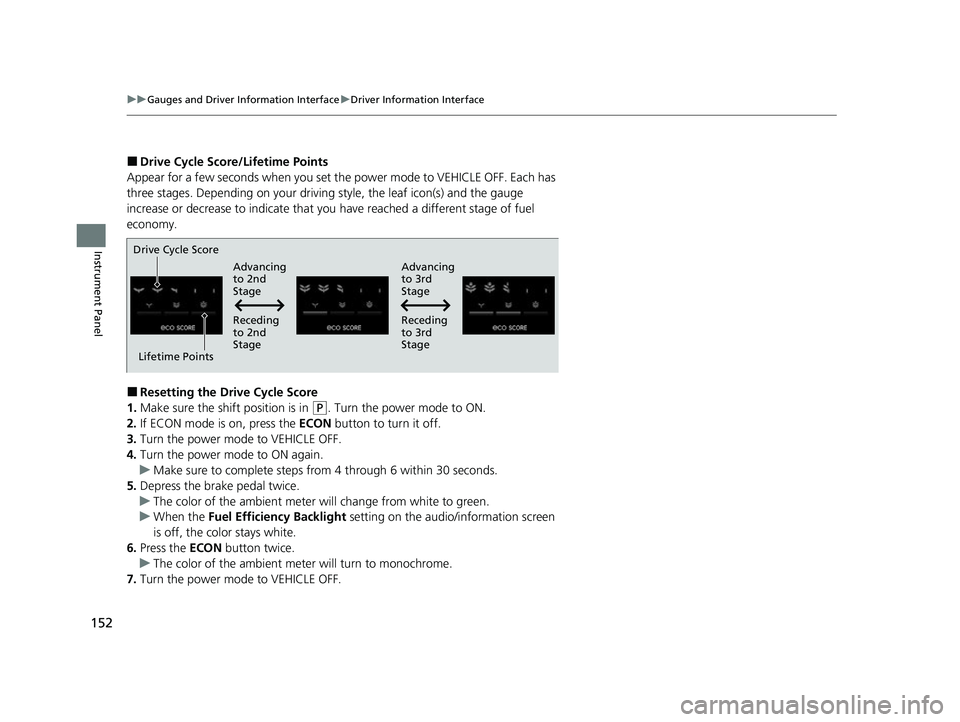
■Drive Cycle Score/Lifetime Points
Appear for a few seconds when you set th e power mode to VEHICLE OFF. Each has
three stages. Depending on your driving style, the leaf icon(s) and the gauge
increase or decrease to indicate that you have reached a different stage of fuel
economy.
■Resetting the Drive Cycle Score
1. Make sure the shift position is in
(P. Turn the power mode to ON.
2. If ECON mode is on, press the ECON button to turn it off.
3. Turn the power mode to VEHICLE OFF.
4. Turn the power mode to ON again.
u Make sure to complete steps from 4 through 6 within 30 seconds.
5. Depress the brake pedal twice.
u The color of the ambient meter wi ll change from white to green.
u When the Fuel Efficiency Backlight setting on the audio/information screen
is off, the color stays white.
6. Press the ECON button twice.
u The color of the ambient mete r will turn to monochrome.
7. Turn the power mode to VEHICLE OFF.
Drive Cycle Score
Lifetime Points Advancing
to 2nd
Stage
Advancing
to 3rd
Stage
Receding
to 3rd
Stage
Receding
to 2nd
Stage
22 INSIGHT HMIN-31TXM6300.book 152 ページ 2021年2月24日 水曜日 午後3時45分
Page 157 of 609
156
Controls
Clock
Adjusting the Clock
You can adjust the time manually in the audio/information screen with the power
mode in ON.
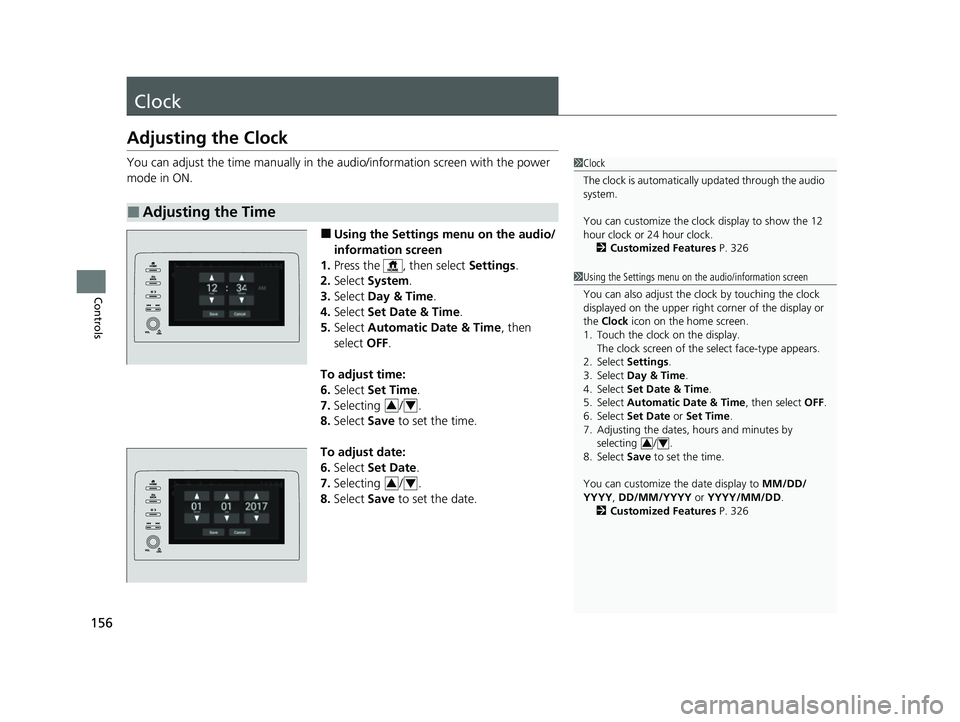
■Using the Settings menu on the audio/
information screen
1. Press the , then select Settings.
2. Select System .
3. Select Day & Time .
4. Select Set Date & Time .
5. Select Automatic Date & Time , then
select OFF.
To adjust time:
6. Select Set Time.
7. Selecting / .
8. Select Save to set the time.
To adjust date:
6. Select Set Date .
7. Selecting / .
8. Select Save to set the date.
■Adjusting the Time
1Clock
The clock is automatically updated through the audio
system.
You can customize the clock display to show the 12
hour clock or 24 hour clock.
2 Customized Features P. 326
1Using the Settings menu on the audio/information screen
You can also adjust the clock by touching the clock
displayed on the upper right corner of the display or
the Clock icon on the home screen.
1. Touch the clock on the display. The clock screen of the select face-type appears.
2. Select Settings .
3. Select Day & Time .
4. Select Set Date & Time .
5. Select Automatic Date & Time , then select OFF.
6. Select Set Date or Set Time.
7. Adjusting the dates, hours and minutes by
selecting / .
8. Select Save to set the time.
You can customize the date display to MM/DD/
YYYY, DD/MM/YYYY or YYYY/MM/DD .
2 Customized Features P. 326
34
34
34
22 INSIGHT HMIN-31TXM6300.book 156 ページ 2021年2月24日 水曜日 午後3時45分
Page 162 of 609
Continued161
uuLocking and Unlocking the Doors uLocking/Unlocking the Doors from the Outside
Controls
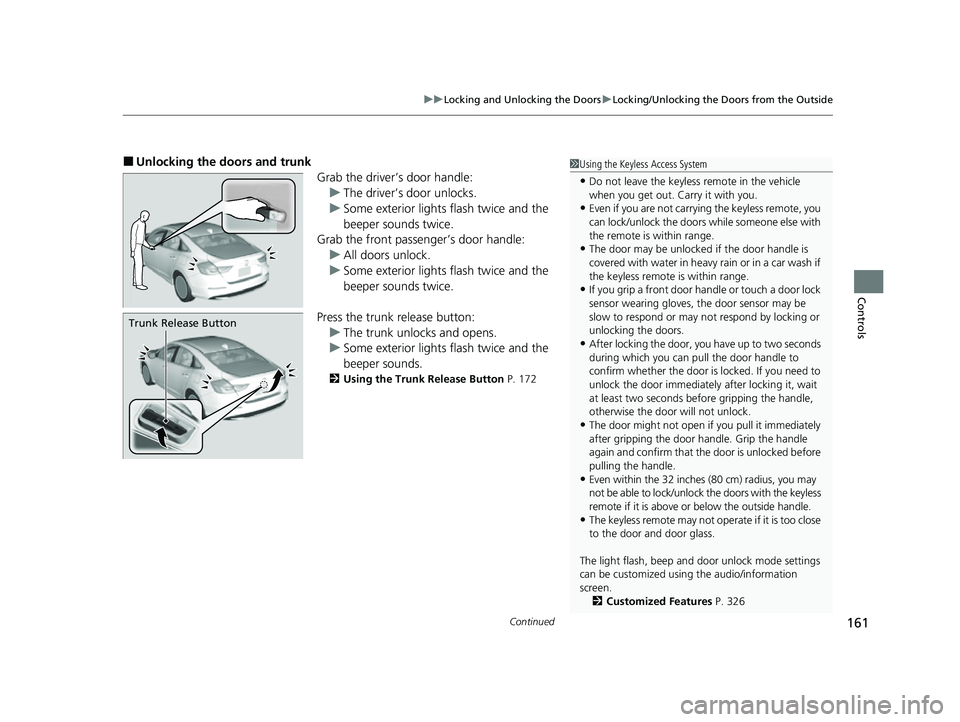
■Unlocking the doors and trunk
Grab the driver’s door handle:u The driver’s door unlocks.
u Some exterior lights flash twice and the
beeper sounds twice.
Grab the front passenger’s door handle:
u All doors unlock.
u Some exterior lights flash twice and the
beeper sounds twice.
Press the trunk release button: u The trunk unlocks and opens.
u Some exterior lights flash twice and the
beeper sounds.
2 Using the Trunk Release Button P. 172
Trunk Release Button
1Using the Keyless Access System
•Do not leave the keyless remote in the vehicle
when you get out. Carry it with you.
•Even if you are not carrying the keyless remote, you
can lock/unlock the doors while someone else with
the remote is within range.
•The door may be unlocked if the door handle is
covered with water in heavy rain or in a car wash if
the keyless remote is within range.
•If you grip a front door ha ndle or touch a door lock
sensor wearing gloves, the door sensor may be
slow to respond or may no t respond by locking or
unlocking the doors.
•After locking the door, yo u have up to two seconds
during which you can pull the door handle to
confirm whether the door is locked. If you need to
unlock the door immediately after locking it, wait
at least two seconds befo re gripping the handle,
otherwise the door will not unlock.
•The door might not open if you pull it immediately
after gripping the door handle. Grip the handle
again and confirm that th e door is unlocked before
pulling the handle.
•Even within the 32 inches (80 cm) radius, you may
not be able to lock/unloc k the doors with the keyless
remote if it is above or below the outside handle.
•The keyless remote may not operate if it is too close
to the door and door glass.
The light flash, beep and door unlock mode settings
can be customized using the audio/information
screen. 2 Customized Features P. 326
22 INSIGHT HMIN-31TXM6300.book 161 ページ 2021年2月24日 水曜日 午後3時45分
Page 163 of 609
uuLocking and Unlocking the Doors uLocking/Unlocking the Doors from the Outside
162
Controls
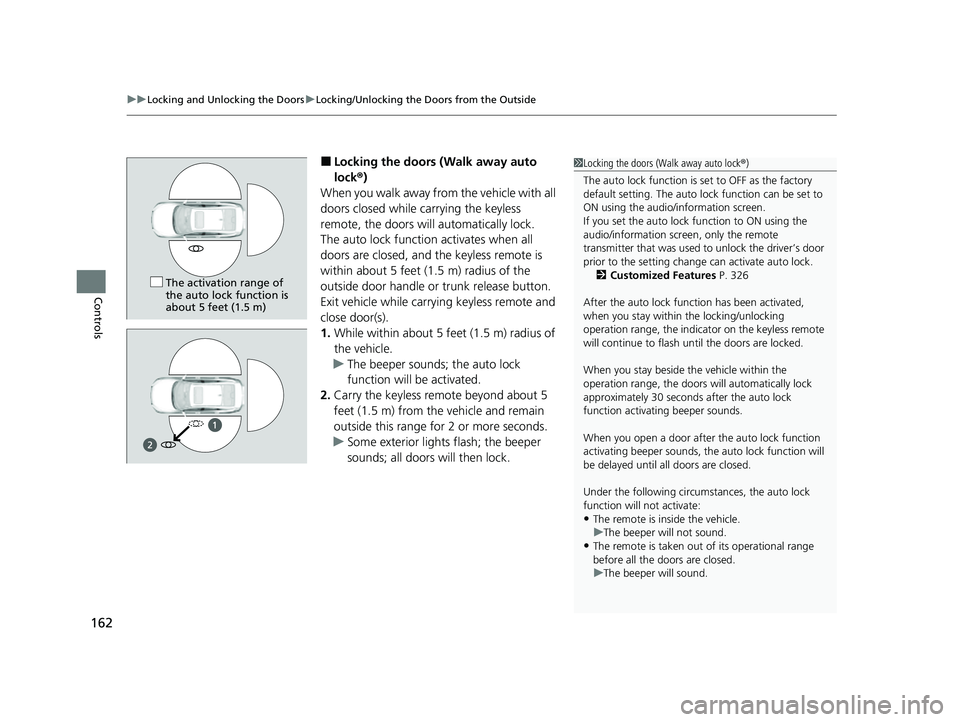
■Locking the doors (Walk away auto
lock ®)
When you walk away from the vehicle with all
doors closed while carrying the keyless
remote, the doors will automatically lock.
The auto lock function activates when all
doors are closed, and the keyless remote is
within about 5 feet (1 .5 m) radius of the
outside door handle or trunk release button.
Exit vehicle while carry ing keyless remote and
close door(s).
1. While within about 5 feet (1.5 m) radius of
the vehicle.
u The beeper sounds; the auto lock
function will be activated.
2. Carry the keyless remote beyond about 5
feet (1.5 m) from the vehicle and remain
outside this range fo r 2 or more seconds.
u Some exterior lights flash; the beeper
sounds; all doors will then lock.1Locking the doors (Walk away auto lock ®)
The auto lock function is set to OFF as the factory
default setting. The auto lo ck function can be set to
ON using the audio/information screen.
If you set the auto lock function to ON using the
audio/information screen, only the remote
transmitter that was used to unlock the driver’s door
prior to the setting change can activate auto lock. 2 Customized Features P. 326
After the auto lock function has been activated,
when you stay within the locking/unlocking
operation range, the indicato r on the keyless remote
will continue to flash until the doors are locked.
When you stay beside the vehicle within the
operation range, the doors wi ll automatically lock
approximately 30 seconds after the auto lock
function activating beeper sounds.
When you open a door after the auto lock function
activating beeper sounds, the auto lock function will
be delayed until all doors are closed.
Under the following circumstances, the auto lock
function will not activate:
•The remote is inside the vehicle.
•The remote is taken out of its operational range
before all the doors are closed. u The beeper will not sound.
u The beeper will sound.
The activation range of
the auto lock function is
about 5 feet (1.5 m)
22 INSIGHT HMIN-31TXM6300.book 162 ページ 2021年2月24日 水曜日 午後3時45分
Page 169 of 609
uuLocking and Unlocking the Doors uLocking/Unlocking the Doors from the Inside
168
Controls
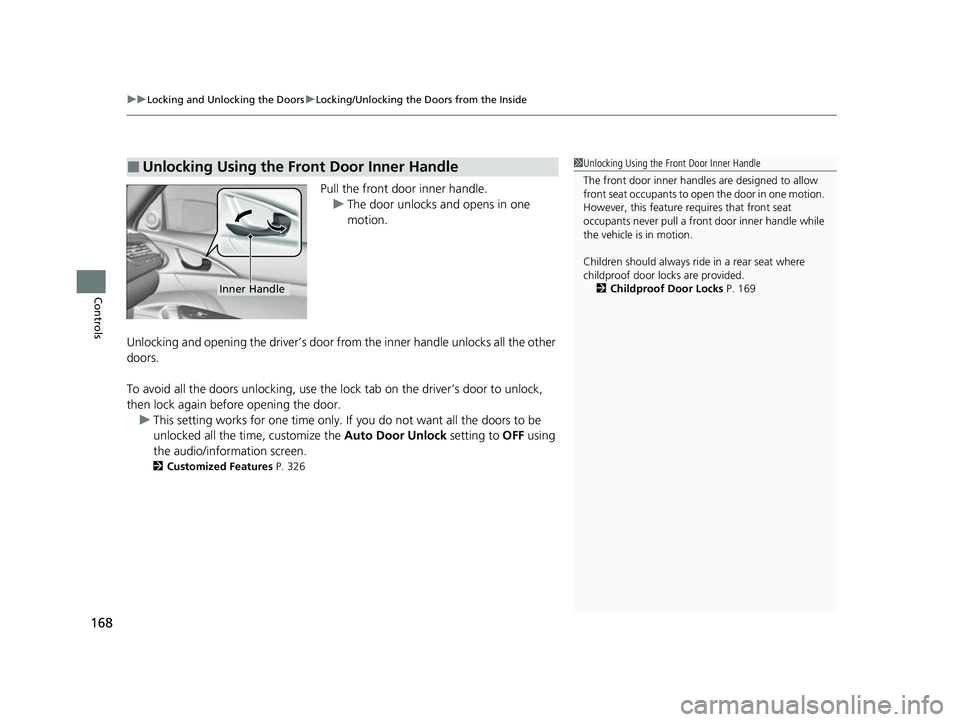
Pull the front door inner handle.
u The door unlocks and opens in one
motion.
Unlocking and opening the driver’s door from the inner handle unlocks all the other
doors.
To avoid all the doors unlocking, use the lock tab on the driver’s door to unlock,
then lock again before opening the door. u This setting works for one time only. If you do not want all the doors to be
unlocked all the time, customize the Auto Door Unlock setting to OFF using
the audio/information screen.
2 Customized Features P. 326
■Unlocking Using the Front Door Inner Handle1Unlocking Using the Front Door Inner Handle
The front door inne r handles are designed to allow
front seat occupants to ope n the door in one motion.
However, this feature requires that front seat
occupants never pull a front door inner handle while
the vehicle is in motion.
Children should always ride in a rear seat where
childproof door locks are provided.
2 Childproof Door Locks P. 169
Inner Handle
22 INSIGHT HMIN-31TXM6300.book 168 ページ 2021年2月24日 水曜日 午後3時45分
Page 171 of 609
170
uuLocking and Unlocking the Doors uAuto Door Locking/Unlocking
Controls
Auto Door Locking/Unlocking
Your vehicle locks or unlocks all doors auto matically when a certain condition is met.
■Drive lock mode
All doors lock when the vehicle’s speed reaches about 10 mph (15 km/h).
■Driver’s door open mode
All doors unlock when the driver’s door is opened.
■Auto Door Locking
■Auto Door Unlocking
1 Auto Door Locking/Unlocking
You can turn off or cha nge to another auto door
locking/unlocking sett ing using the audio/
information screen. 2 Customized Features P. 326
22 INSIGHT HMIN-31TXM6300.book 170 ページ 2021年2月24日 水曜日 午後3時45分
Page 175 of 609
174
Controls
Security System
Immobilizer System
The immobilizer system prevents a key that has not been pre-registered from
starting the power system. Each key cont ains electronic transmitters that use
electronic signals to verify the key.
Pay attention to the follo wing when pressing the POWER button:
• Do not allow objects that emit strong radio waves near the POWER button.
• Make sure the key is not covered by or touching a metal object.
• Do not bring a key from another vehicle’s immobilizer system near the POWER
button.
• Do not put the key near magnetic items. Electronic devices, such as televisions
and audio systems emit strong magnetic fields. Note that even a key chain can
become magnetic.1 Immobilizer System
NOTICE
Leaving the key in the vehicl e can result in theft or
accidental movement of the vehicle.
Always take the key with you whenever you leave the
vehicle unattendedM
Do not alter the system or add other devices to itM
Doing so may damage the system and make your
vehicle inoperableM
22 INSIGHT HMIN-31TXM6300.book 174 ページ 2021年2月24日 水曜日 午後3時45分
Page 182 of 609
181Continued
Controls
Operating the Switches Around the Steering Wheel
POWER Button
■Changing the Power Mode1POWER Button
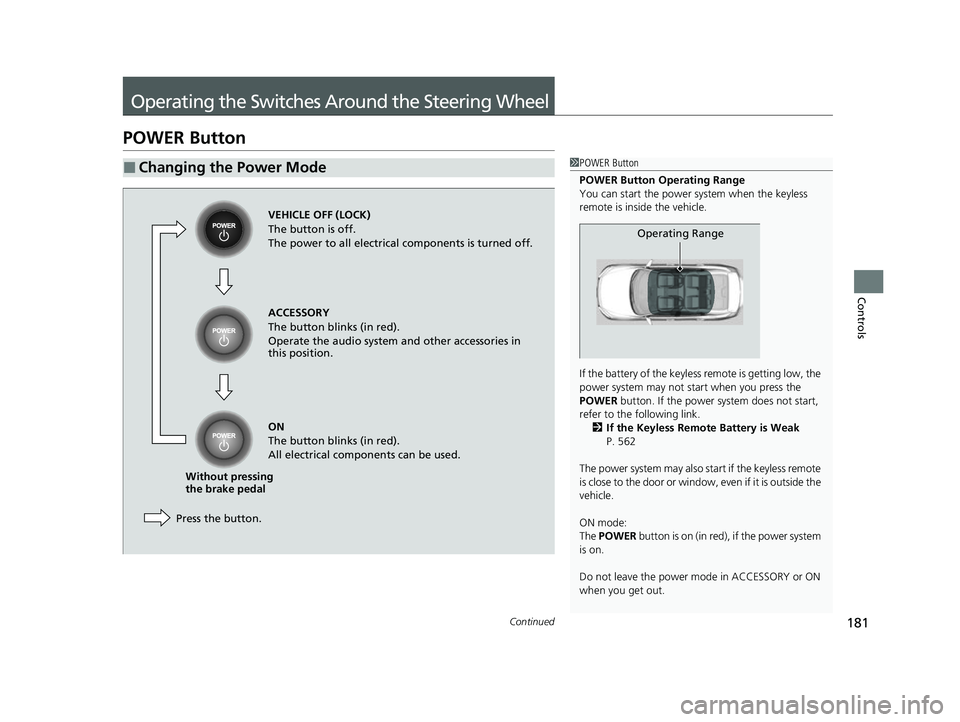
POWER Button Operating Range
You can start the power system when the keyless
remote is inside the vehicle.
If the battery of the keyless remote is getting low, the
power system may not st art when you press the
POWER button. If the power system does not start,
refer to the following link. 2 If the Keyless Remote Battery is Weak
P. 562
The power system may also start if the keyless remote
is close to the door or window, even if it is outside the
vehicle.
ON mode:
The POWER button is on (in red), if the power system
is on.
Do not leave the power mode in ACCESSORY or ON
when you get out.
Operating Range
VEHICLE OFF (LOCK)
The button is off.
The power to all electrical components is turned off.
Press the button. Without pressing
the brake pedal ACCESSORY
The button blinks (in red).
Operate the audio system and other accessories in
this position.
ON
The button blinks (in red).
All electrical components can be used.
22 INSIGHT HMIN-31TXM6300.book 181 ページ 2021年2月24日 水曜日 午後3時45分
Page 224 of 609
223
Features
This chapter describes how to operate technology features.
Audio SystemAbout Your Audio System ................ 224
USB Ports ......................................... 225
Audio System Theft Protection ......... 226
Audio Remote Controls .................... 227
Audio System Basic Operation ........ 230
Audio/Information Screen ................ 231
System Updates ............................... 246
Adjusting the Sound ........................ 252
Display Setup ................................... 253
Voice Control Operation .................. 255
Playing AM/FM Radio ....................... 258 Playing SiriusXM
® Radio ................... 262
Playing an iPod ................................ 273
Playing a USB Flash Drive ................. 276
Playing Bluetooth ® Audio................. 279
HondaLink ®..................................... 281
HondaLink ® Service
*........................ 285
Wi-Fi Connection ............................. 290
AT&T Hotspot
*................................ 292
Siri ® Eyes Free .................................. 293
Apple CarPlay
TM............................... 294
Android AutoTM................................ 298
Audio Error Messages ...................... 302 General Information on the Audio
System ............................................. 304
Customized Features ........................ 326
HomeLink ® Universal Transceiver
*.. 346
Bluetooth ® HandsFreeLink® ............. 349
Refuel Recommend .......................... 374
* Not available on all models
22 INSIGHT HMIN-31TXM6300.book 223 ページ 2021年2月24日 水曜日 午後3時45分
Page 225 of 609
224
Features
Audio System
About Your Audio System
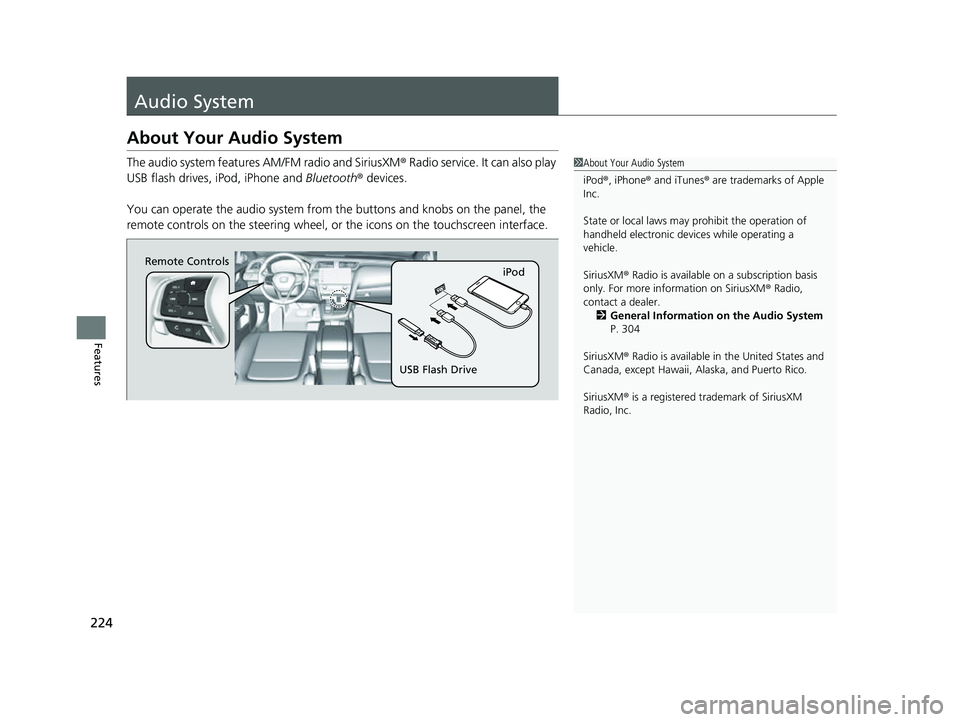
The audio system features AM/FM radio and SiriusXM® Radio service. It can also play
USB flash drives, iPod, iPhone and Bluetooth® devices.
You can operate the audio system from the buttons and knobs on the panel, the
remote controls on the steering wheel, or the icons on the touchscreen interface.1About Your Audio System
iPod ®, iPhone ® and iTunes ® are trademarks of Apple
Inc.
State or local laws may prohibit the operation of
handheld electronic devi ces while operating a
vehicle.
SiriusXM ® Radio is available on a subscription basis
only. For more information on SiriusXM ® Radio,
contact a dealer. 2 General Information on the Audio System
P. 304
SiriusXM ® Radio is available in the United States and
Canada, except Ha waii, Alaska, and Puerto Rico.
SiriusXM ® is a registered trademark of SiriusXM
Radio, Inc.
Remote Controls iPod
USB Flash Drive
22 INSIGHT HMIN-31TXM6300.book 224 ページ 2021年2月24日 水曜日 午後3時45分