automatic transmission HONDA INSIGHT 2022 User Guide
[x] Cancel search | Manufacturer: HONDA, Model Year: 2022, Model line: INSIGHT, Model: HONDA INSIGHT 2022Pages: 609, PDF Size: 18.48 MB
Page 471 of 609
uuBraking uBrake System
470
Driving
■Automatic parking brake feature operation
If the automatic parking brake feature has been activated:
• The parking brake is applied automatica lly when you set the power mode to
VEHICLE OFF.
• To confirm that the parking brake is app lied, check if the parking brake indicator
(red) is on.
2 Activating and deactivating the automatic parking brake feature P. 471
■To release automatically
Depressing the accelerator pedal releases the parking brake.
Use the accelerator pedal to release the parking brake when you are starting the
vehicle facing uphill, or in a traffic jam.
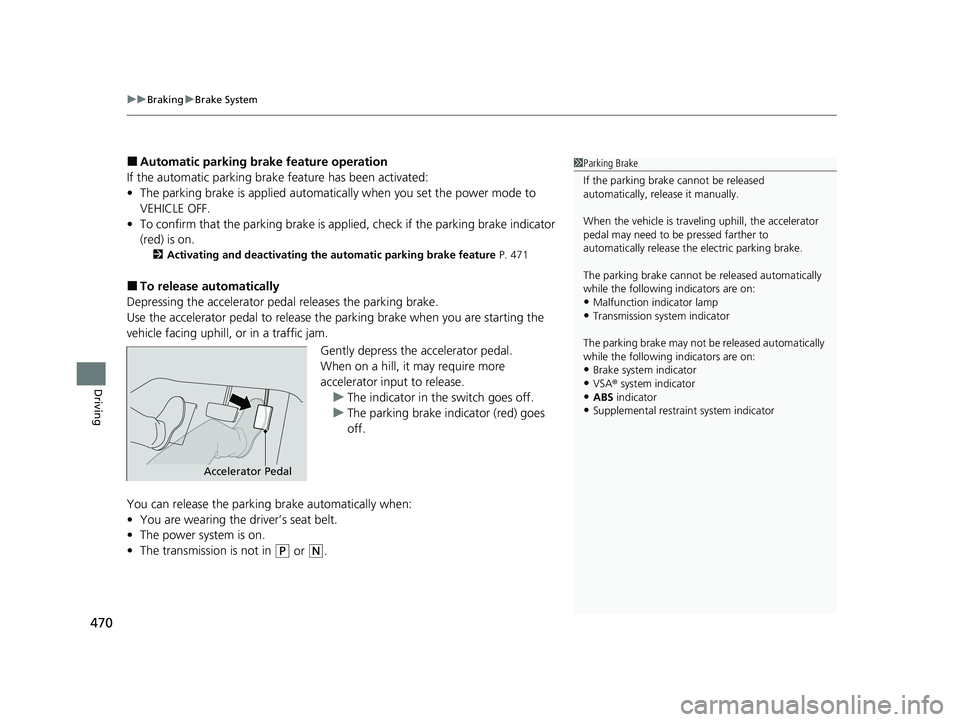
Gently depress the accelerator pedal.
When on a hill, it may require more
accelerator input to release.u The indicator in th e switch goes off.
u The parking brake indicator (red) goes
off.
You can release the parki ng brake automatically when:
• You are wearing the driver’s seat belt.
• The power system is on.
• The transmission is not in
(P or (N.
1Parking Brake
If the parking brake cannot be released
automatically, release it manually.
When the vehicle is travel ing uphill, the accelerator
pedal may need to be pressed farther to
automatically release the electric parking brake.
The parking brake cannot be released automatically
while the following indicators are on:
•Malfunction indicator lamp•Transmission system indicator
The parking brake may not be released automatically
while the following indicators are on:
•Brake system indicator
•VSA® system indicator•ABS indicator
•Supplemental restraint system indicator
Accelerator Pedal
22 INSIGHT HMIN-31TXM6300.book 470 ページ 2021年2月24日 水曜日 午後3時45分
Page 472 of 609
Continued471
uuBraking uBrake System
Driving
■Activating and deactivating the automatic parking brake feature
With the power mode is in ON, carry out th e following steps to either activate or
deactivate the automatic parking brake feature.
1. Put the transmission into
(P.
2. Without depressing the brake pedal, pull up and release the parking brake switch.
u Check that the parking brake indicator (red) has come on.
3. Pull up and hold the parking brake swit ch. When you hear a beeping sound,
release the switch and within 3 second s pull up and hold the switch again.
4. When you hear a sound indicating that the procedure is completed, release the
switch.
u Two beeps indicates that the feature has been activated.
u One beep indicates that the feature has been deactivated.
u When you have completed activating the feature, the parking brake will
remain applied after you turn off the engine.
u To confirm that the park ing brake is applied, check if the parking brake
indicator (red) is on.
If you need to temporarily deactivate the feature while putting your vehicle through
a conveyor type car wash, you can follow the procedure explained below.
1. Depress the brake pedal and bring the vehicle to a stop.
2. Set the power mode to VEHICLE OFF and then within 2 seconds push down the
parking brake switch.
u Activation and deactivation settings for the feature will not be affected.
u Before temporarily deactivating the feat ure, make sure to first turn off both
ACC with Low Speed Follow and the automatic brake hold system.
u To confirm that the park ing brake is applied, check if the parking brake
indicator (red) is on.
1 Parking Brake
In cold climates, the parking brake may freeze in
place if applied.
When parking the vehicle, chock the wheels and
make sure the automatic parking brake feature is
deactivated.
Also, when putting your vehicle through a conveyor-
type car wash or when ha ving your vehicle towed,
deactivate the automatic parking brake feature and
leave the parking brake released.
22 INSIGHT HMIN-31TXM6300.book 471 ページ 2021年2月24日 水曜日 午後3時45分
Page 474 of 609
Continued473
uuBraking uBrake System
Driving
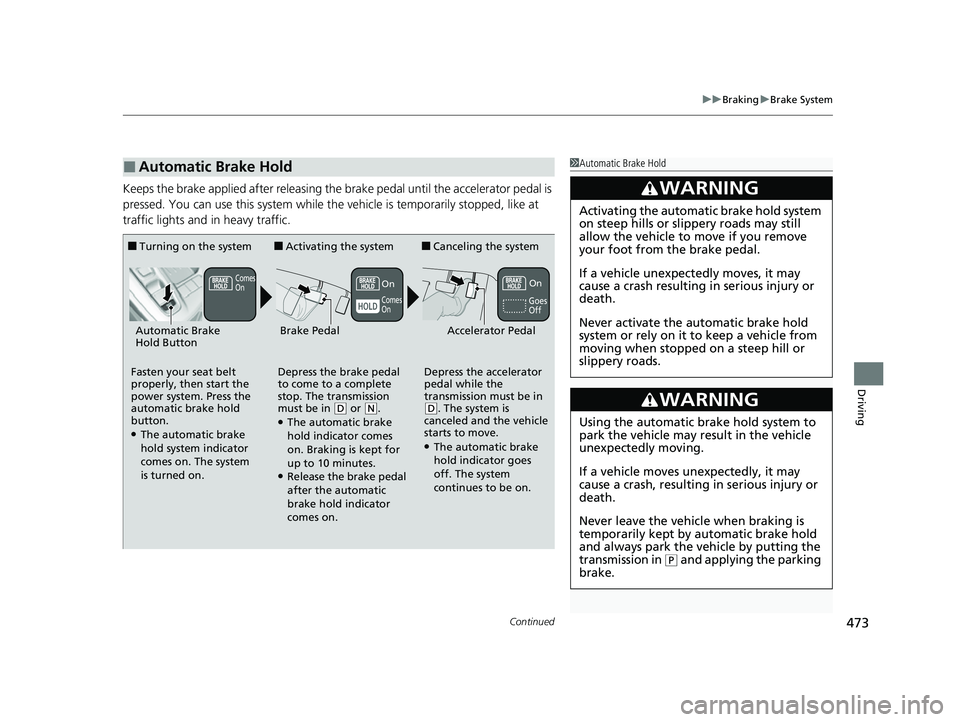
Keeps the brake applied after releasing the brake pedal until the accelerator pedal is
pressed. You can use this system while th e vehicle is temporarily stopped, like at
traffic lights and in heavy traffic.
■Automatic Brake Hold1 Automatic Brake Hold
3WARNING
Activating the automatic brake hold system
on steep hills or slippery roads may still
allow the vehicle to move if you remove
your foot from the brake pedal.
If a vehicle unexpectedly moves, it may
cause a crash resulting in serious injury or
death.
Never activate the automatic brake hold
system or rely on it to keep a vehicle from
moving when stopped on a steep hill or
slippery roads.
3WARNING
Using the automatic brake hold system to
park the vehicle may result in the vehicle
unexpectedly moving.
If a vehicle moves unexpectedly, it may
cause a crash, resulting in serious injury or
death.
Never leave the vehicle when braking is
temporarily kept by automatic brake hold
and always park the vehicle by putting the
transmission in
( P and applying the parking
brake.
■Turning on the system
Fasten your seat belt
properly, then start the
power system. Press the
automatic brake hold
button.
●The automatic brake
hold system indicator
comes on. The system
is turned on.
■Activating the system
Depress the brake pedal
to come to a complete
stop. The transmission
must be in
( D or (N.●The automatic brake
hold indicator comes
on. Braking is kept for
up to 10 minutes.
●Release the brake pedal
after the automatic
brake hold indicator
comes on.
■Canceling the system
Depress the accelerator
pedal while the
transmission must be in
( D. The system is
canceled and the vehicle
starts to move.
●The automatic brake
hold indicator goes
off. The system
continues to be on.
Accelerator PedalBrake PedalAutomatic Brake
Hold Button
Goes
Off
On
OnComes
On
Comes
On
22 INSIGHT HMIN-31TXM6300.book 473 ページ 2021年2月24日 水曜日 午後3時45分
Page 475 of 609
uuBraking uBrake System
474
Driving
■The system automatically cancels when:
• You engage the parking brake.
• You depress the brake pedal and put the transmission into
(P or (R.
■The system automatically cancels and the parking brake is applied when:
• Braking is kept for more than 10 minutes.
• The driver’s seat belt is unfastened.
• The power system is turned off.
• There is a problem with au tomatic brake hold system.
1Automatic Brake Hold
While the system is activated, you can turn off the
power system or park th e vehicle through the same
procedure as you normally do. 2 When Stopped P. 478
Whether the system is on, or the system is activated,
the automatic brake hold turns off once the power
system is off.
22 INSIGHT HMIN-31TXM6300.book 474 ページ 2021年2月24日 水曜日 午後3時45分
Page 484 of 609
483Continued
Driving
Multi-View Rear Camera
About Your Multi-View Rear Camera
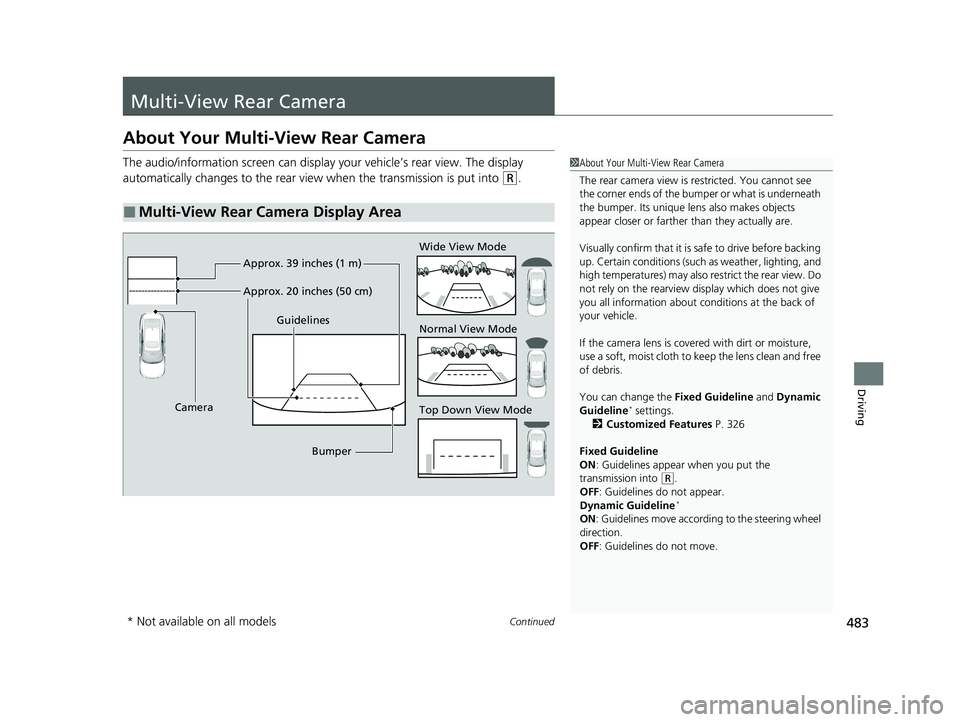
The audio/information screen can display your vehicle’s rear view. The display
automatically changes to the rear view when the transmission is put into
(R.
■Multi-View Rear Camera Display Area
1About Your Multi-View Rear Camera
The rear camera view is restricted. You cannot see
the corner ends of the bumper or what is underneath
the bumper. Its unique le ns also makes objects
appear closer or farther than they actually are.
Visually confirm that it is safe to drive before backing
up. Certain conditions (such as weather, lighting, and
high temperatures) may also restrict the rear view. Do
not rely on the rearview display which does not give
you all information about conditions at the back of
your vehicle.
If the camera lens is cove red with dirt or moisture,
use a soft, moist cloth to keep the lens clean and free
of debris.
You can change the Fixed Guideline and Dynamic
Guideline
* settings.
2 Customized Features P. 326
Fixed Guideline
ON : Guidelines appear when you put the
transmission into
( R.
OFF: Guidelines do not appear.
Dynamic Guideline
*
ON : Guidelines move accord ing to the steering wheel
direction.
OFF: Guidelines do not move.
Top Down View Mode Normal View Mode Wide View Mode
Guidelines
Bumper
Camera Approx. 39 inches (1 m)
Approx. 20 inches (50 cm)
* Not available on all models
22 INSIGHT HMIN-31TXM6300.book 483 ページ 2021年2月24日 水曜日 午後3時45分
Page 487 of 609
486
uuRefueling uHow to Refuel
Driving
How to Refuel
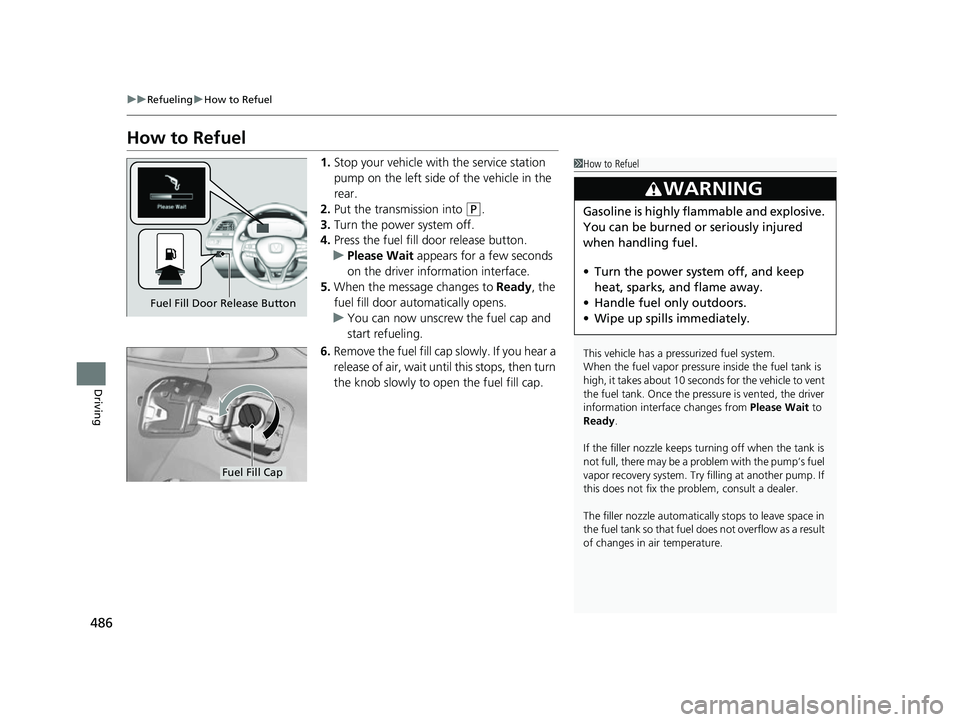
1. Stop your vehicle with the service station
pump on the left side of the vehicle in the
rear.
2. Put the transmission into
(P.
3. Turn the power system off.
4. Press the fuel fill door release button.
u Please Wait appears for a few seconds
on the driver information interface.
5. When the message changes to Ready, the
fuel fill door automatically opens.
u You can now unscrew the fuel cap and
start refueling.
6. Remove the fuel fill cap slowly. If you hear a
release of air, wait until this stops, then turn
the knob slowly to open the fuel fill cap.
1How to Refuel
This vehicle has a pressurized fuel system.
When the fuel vapor pressure inside the fuel tank is
high, it takes about 10 seconds for the vehicle to vent
the fuel tank. Once the pressure is vented, the driver
information interface changes from Please Wait to
Ready.
If the filler nozzle keeps tu rning off when the tank is
not full, there may be a pr oblem with the pump’s fuel
vapor recovery system. Try fi lling at another pump. If
this does not fix the problem, consult a dealer.
The filler nozzle automatically stops to leave space in
the fuel tank so that fuel do es not overflow as a result
of changes in air temperature.
3WARNING
Gasoline is highly flammable and explosive.
You can be burned or seriously injured
when handling fuel.
• Turn the power syste m off, and keep
heat, sparks, and flame away.
• Handle fuel only outdoors.
• Wipe up spills immediately.
Fuel Fill Door Release Button
Fuel Fill Cap
22 INSIGHT HMIN-31TXM6300.book 486 ページ 2021年2月24日 水曜日 午後3時45分
Page 535 of 609

534
uuCleaning uExterior Care
Maintenance
Exterior Care
Dust off the vehicle body after you drive. Re gularly inspect your vehicle for scratches
on painted surfaces. A scratch on a painted surface can result in body rust. If you
find a scratch, pr omptly repair it.
Wash the vehicle regularly. Wash more frequently when driving in the following
conditions:
• If driving on roads with road salt.
• If driving in coastal areas.
• If tar, soot, bird droppings, insects, or tree sap are stuck to painted surfaces.
• Make sure to follow the instructions indicated on the automated car wash.
• Fold in the door mirrors.
• For models equipped with automatic inte rmittent wipers, turn the wipers off.
• Keep sufficient distance between the cleaning nozzl e and the vehicle body.
• Take particular care around the windows. Standing too close may cause water to
enter the vehicle interior.
• Do not spray high pressure water directly into the engine compartment. Instead,
use low pressure water and a mild detergent.
■Washing the Vehicle
■Using an Automated Car Wash
■Using High Pressure Cleaners
1 Washing the Vehicle
Do not spray water into the air intake vents. It can
cause a malfunction.
If you need to lift the wiper arms away from the
windshield, first set the wiper arms to the
maintenance position. 2 Changing the Wiper Blade Rubber P. 516
Air Intake Vents
1Using an Automated Car Wash
When using an automated car wash that pulls the
vehicle through with a convey or, make sure vehicle is
in car wash mode.
2 If you want to keep the transmission in
(N
position [car wash mode] P. 395
22 INSIGHT HMIN-31TXM6300.book 534 ページ 2021年2月24日 水曜日 午後3時45分
Page 574 of 609
573
uuIndicator, Coming On/BlinkinguIf the Brake System Indicator (Red) Comes On or Blinks at the Same Time When the Brake System Indicator (Amber) Comes On
Handling the Unexpected
If the Brake System Indicator (Red) Comes On or
Blinks at the Same Time When the Brake System
Indicator (Amber) Comes On
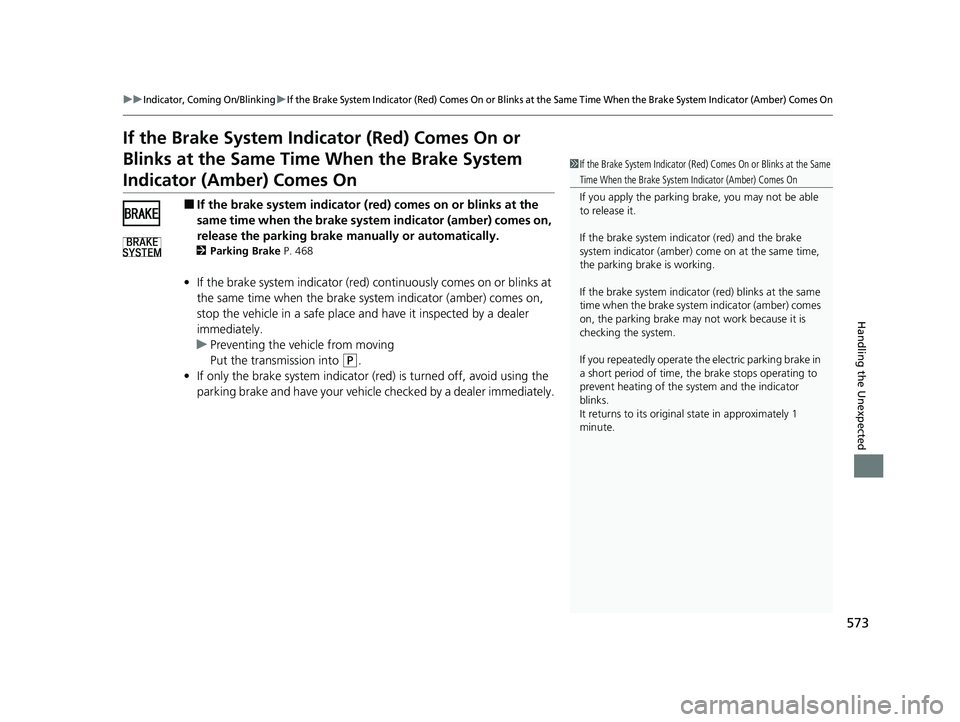
■If the brake system indicator (red) comes on or blinks at the
same time when the brake syst em indicator (amber) comes on,
release the parking brake ma nually or automatically.
2Parking Brake P. 468
•If the brake system indicator (red) co ntinuously comes on or blinks at
the same time when the brake sy stem indicator (amber) comes on,
stop the vehicle in a safe place an d have it inspected by a dealer
immediately.
u Preventing the ve hicle from moving
Put the transmission into
(P.
• If only the brake system indicator (red) is turned off, avoid using the
parking brake and have your vehicle checked by a dealer immediately.
1If the Brake System Indicator (Red) Comes On or Blinks at the Same
Time When the Brake System Indicator (Amber) Comes On
If you apply the parking br ake, you may not be able
to release it.
If the brake system indicator (red) and the brake
system indicator (amber) come on at the same time,
the parking brake is working.
If the brake system indicator (red) blinks at the same
time when the brake system indicator (amber) comes
on, the parking brake may not work because it is
checking the system.
If you repeatedly operate the electric parking brake in
a short period of time, the brake stops operating to
prevent heating of the system and the indicator
blinks.
It returns to its original state in approximately 1
minute.
22 INSIGHT HMIN-31TXM6300.book 573 ページ 2021年2月24日 水曜日 午後3時45分
Page 603 of 609
602
Index
Fuel...................................................... 31, 485
Economy ................................................. 488
Gauge ..................................................... 129
Instant Fuel Economy ............................... 137
Low Fuel Indicator ..................................... 91
Range ...................................................... 137
Recommendation .................................... 485
Refueling ................................................. 485
Fuel Economy and CO
2 Emissions ............ 488
Fuel Fill Cap ......................................... 31, 486
Fuel Fill Door ....................................... 31, 486
Unable to Unlock ..................................... 584
Fuses .......................................................... 577
Inspecting and Changing ......................... 582
Locations ......................................... 577, 581
G
Gasoline (Fuel) Economy ................................................. 488
Gauge ..................................................... 129
Information ............................................. 485
Instant Fuel Economy ............................... 137
Low Fuel Indicator ..................................... 91
Refueling ................................................. 485
Gauges ....................................................... 129
Glass (care) ........................................ 532, 535
Glove Box .................................................. 209
H
Handling the Unexpected ........................ 539
HandsFreeLink ® (HFL) ............................... 349
Automatic Import of Cellular Phonebook
and Call History ..................................... 358
Automatic Transferring............................ 357
Displaying Messages................................ 368
Favorite Contacts .................................... 359
HFL Buttons............................................. 349
HFL Menus .............................................. 352
HFL Status Display ................................... 351
In Case of Emergency ...................... 285, 372
Limitations for Manual Operation ............ 351
Making a Call .......................................... 361
Options During a Call .............................. 364
Phone Setup............................................ 354
Receiving a Call ....................................... 364
Receiving a Text Message ........................ 366
Ringtone ................................................. 357
Selecting a Phone .................................... 367
To Set Up a Text Message Options .......... 365
Hazard Warning Button .............................. 6
HD Radio
TM................................................ 261
Head Restraints ........................................ 204
Headlights ................................................. 185
Auto High-Beam System.......................... 189
Automatic Operation............................... 186
Dimming ......................................... 185, 188
Operating................................................ 185
Heaters (Seat) ........................................... 215
HFL (HandsFreeLink ®)............................... 349 High Beam Indicator
.................................. 95
High Voltage Battery ............................... 414
High Voltage Battery Charge Level Gauge ..................................................... 130
Hill Start Assist System ............................. 387
HomeLink ® Universal Transceiver ........... 346
Honda App License Agreement .............. 306
Honda Sensing ®................................ 32, 415
HondaLink ®............................................ 281
Hybrid Vehicle SPORT HYBRID i-MMD (intelligent
Multi-Mode Drive) ................................... 11
I
Identification Numbers Engine and Transmission ......................... 590
Vehicle Identification............................... 590
Illumination Control Dial ......................................................... 195
Immobilizer System .................................. 174
Indicator ................................................... 96
Indicators .................................................... 82
12-Volt Battery Charging System ...... 89, 570
Adaptive Cruise Control (ACC) with Low Speed Follow (Amber) ............................. 98
Adaptive Cruise Control (ACC) with
Low Speed Follow (Green)............... 99, 429
Anti-lock Brake System (ABS) .................... 92
Auto High-Beam ....................................... 95
Automatic Brake Hold ....................... 85, 473
22 INSIGHT HMIN-31TXM6300.book 602 ページ 2021年2月24日 水曜日 午後3時45分
Page 604 of 609
603
Index
Automatic Brake Hold System ........... 85, 473
Blind spot information System................. 412
Deceleration Paddle Selector ..................... 89
ECON Mode ..................................... 97, 401
Electric Power Steering (EPS)
System ............................................ 92, 574
EV............................................................. 87
EV Mode................................................... 87
Fog Light .................................................. 95
High Beam ................................................ 95
Immobilizer System ................................... 96
Lane Keeping Assist System (LKAS) (Amber) .................................................. 99
Lane Keeping Assist System (LKAS)
(Green) ........................................... 99, 448
Lights On .................................................. 95
Low Fuel ................................................... 91
Low Tire Pressure/TPMS ............ 94, 406, 409
Malfunction Indicator Lamp .............. 88, 571
Parking Brake and Brake System (Amber) .......................................... 84, 573
Parking Brake and Brake System
(Red) ....................................... 83, 572, 573
POWER SYSTEM ....................................... 86
READY ...................................................... 87
Safety Support (Amber)........................... 100
Safety Support (Green/Gray) ................... 103
Seat Belt Reminder.............................. 45, 91
Security System Alarm............................... 96
Shift Position............................................. 89
SPORT Mode..................................... 97, 397 Supplemental Restraint System ............ 62, 92
System Message ........................................ 97
Transmission System .................................. 90
Turn Signal and Haza
rd Warning ............... 95
Vehicle Stability Assist
TM (VSA ®) OFF ... 93, 404
Vehicle Stability AssistTM (VSA ®)
System............................................. 93, 403
Information ............................................... 587
Instant Fuel Economy ............................... 137
Instrument Panel ........................................ 81
Brightness Control ................................... 195
Interior Lights ........................................... 207
Interior Rearview Mirror .......................... 197
Inverter Coolant ....................................... 508
iPad ............................................................ 305
iPhone ....................................................... 305
iPod ................................................... 273, 305
J
Jack (Wheel Nut Wrench) ........................ 544
Jump Starting ........................................... 564
K
Key Number Tag ....................................... 158
Keyless Access System ............................... 160
Keyless Lockout Prevention ..................... 166
Keys ........................................................... 157
Lockout Prevention .................................. 166
Number Tag ............................................ 158 Rear Door Won’t Open............................ 169
Remote Transmitter ................................. 164
Types and Functions ................................ 157
L
Lane Keeping Assist System (LKAS)
......... 446
Language (HFL) ........................................ 351
LATCH (Child Seats) .................................... 71
Lights ................................................. 185, 512
Automatic ............................................... 186
Bulb Replacement ................................... 512
Daytime Running Lights........................... 188
Fog Lights ............................................... 188
High Beam Indicator .................................. 95
Interior .................................................... 207
Light Switches ......................................... 185
Lights On Indicator .................................... 95
Turn Signals ............................................ 184
Load Limits ................................................ 379
Locking/Unlocking .................................... 157
Auto Door Locking/Unlocking.................. 170
Childproof Door Locks............................. 169
From Inside ............................................. 167
From Outside .......................................... 160
Keys ........................................................ 157
Using a Key ............................................. 165
Lockout Prevention System ..................... 166
Low Battery Charge ................................. 570
Low Fuel Indicator ...................................... 91
Low Keyless Remote Signal Strength ...... 159
22 INSIGHT HMIN-31TXM6300.book 603 ページ 2021年2月24日 水曜日 午後3時45分