service HONDA INSIGHT 2022 User Guide
[x] Cancel search | Manufacturer: HONDA, Model Year: 2022, Model line: INSIGHT, Model: HONDA INSIGHT 2022Pages: 609, PDF Size: 18.48 MB
Page 288 of 609
Continued287
uuAudio System Basic Operation uHondaLink® Service*
Features
Your subscribed telematics service prov ider can track your vehicle
Page 289 of 609
uuAudio System Basic Operation uHondaLink ® Service*
288
Features
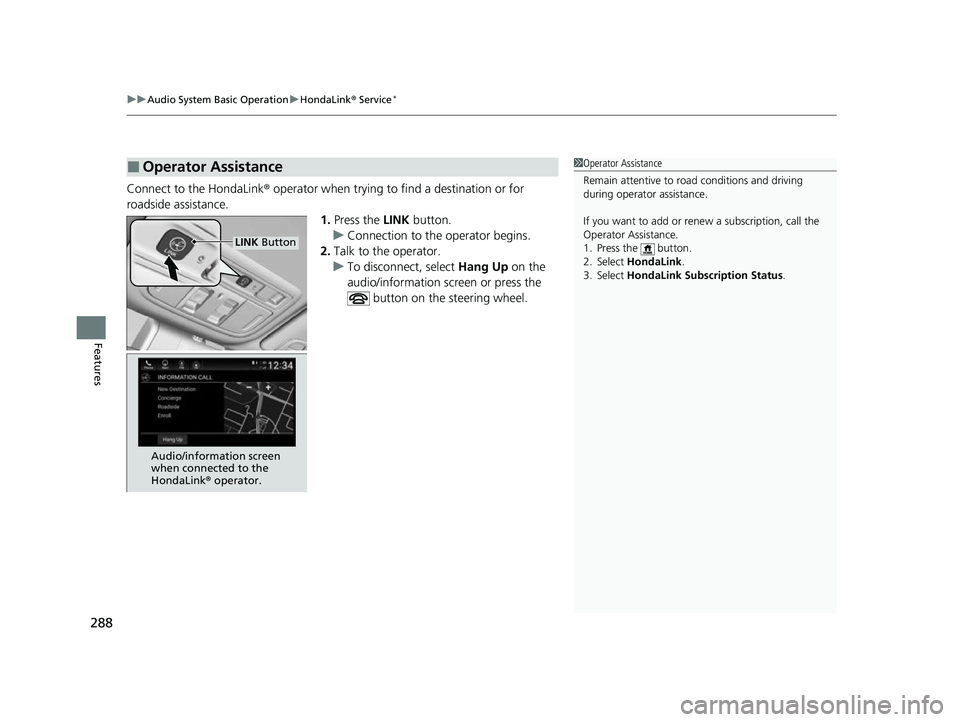
Connect to the HondaLink ® operator when trying to find a destination or for
roadside assistance. 1.Press the LINK button.
u Connection to the operator begins.
2. Talk to the operator.
u To disconnect, select Hang Up on the
audio/information sc reen or press the
button on the steering wheel.
■Operator Assistance1 Operator Assistance
Remain attentive to road conditions and driving
during operator assistance.
If you want to add or re new a subscription, call the
Operator Assistance.
1. Press the button.
2. Select HondaLink .
3. Select HondaLink Subscription Status .
LINK Button
Audio/information screen
when connected to the
HondaLink ® operator.
22 INSIGHT HMIN-31TXM6300.book 288 ページ 2021年2月24日 水曜日 午後3時45分
Page 290 of 609
289
uuAudio System Basic Operation uHondaLink® Service*
Features
Your subscribed telematics service prov ider can check your vehicle
Page 293 of 609
292
uuAudio System Basic Operation uAT&T Hotspot*
Features
AT&T Hotspot*
If you have subscribed to AT&T hotspot services, your vehicle will provide data to
connect your mobile devices to the Intern et. You can use the AT&T Hotspot app to
turn on/off vehicle data and monitor data usage left on your subscription.
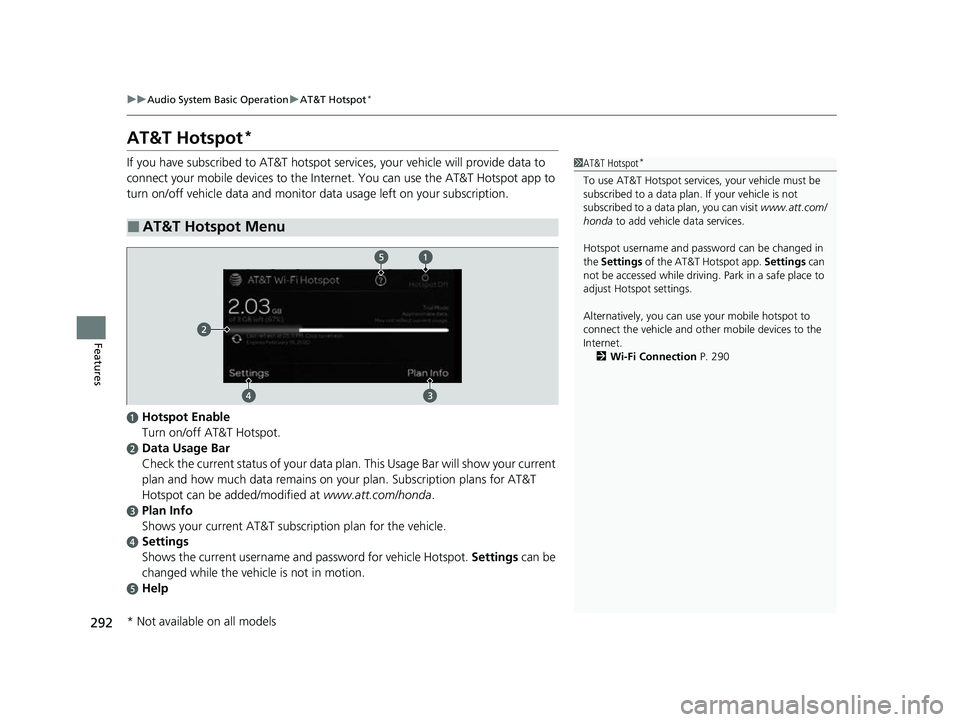
■AT&T Hotspot Menu
1 AT&T Hotspot*
To use AT&T Hotspot servic es, your vehicle must be
subscribed to a data plan . If your vehicle is not
subscribed to a data plan, you can visit www.att.com/
honda to add vehicle data services.
Hotspot username and pass word can be changed in
the Settings of the AT&T Hotspot app. Settings can
not be accessed while driving. Park in a safe place to
adjust Hotspot settings.
Alternatively, you can use your mobile hotspot to
connect the vehicle and other mobile devices to the
Internet. 2 Wi-Fi Connection P. 290
aHotspot Enable
Turn on/off AT&T Hotspot.
bData Usage Bar
Check the current status of your data plan. This Usage Bar will show your current
plan and how much data remains on your plan. Subscription plans for AT&T
Hotspot can be added/modified at www.att.com/honda.
cPlan Info
Shows your current AT&T subscription plan for the vehicle.
dSettings
Shows the current username and password for vehicle Hotspot. Settings can be
changed while the vehicle is not in motion.
eHelp
* Not available on all models
22 INSIGHT HMIN-31TXM6300.book 292 ページ 2021年2月24日 水曜日 午後3時45分
Page 296 of 609
Continued295
uuAudio System Basic Operation uApple CarPlayTM
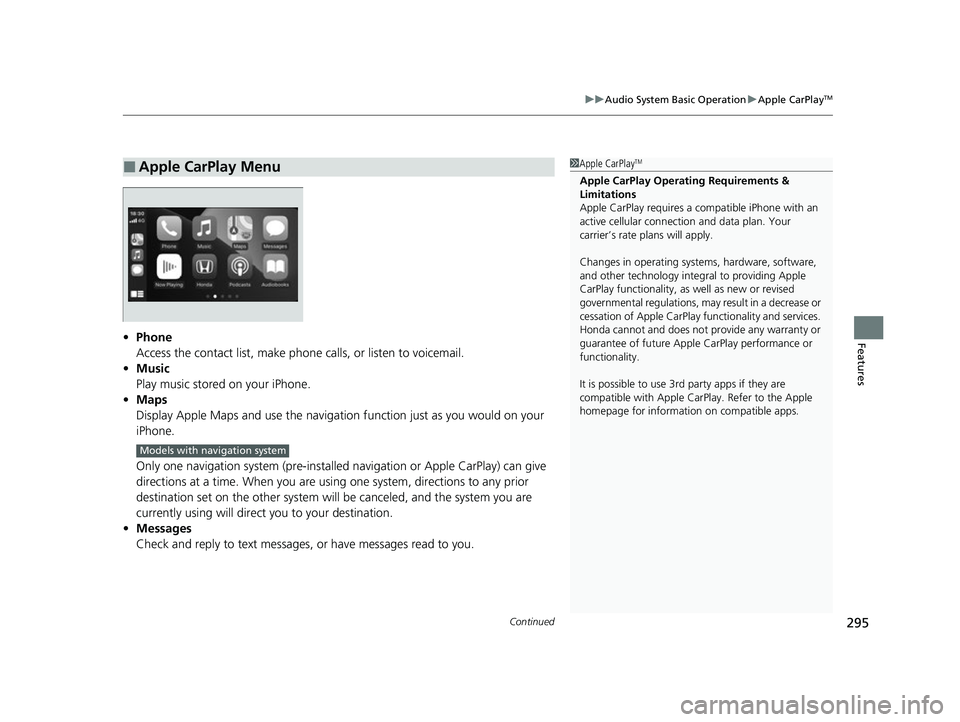
Features• Phone
Access the contact list, make phone calls, or listen to voicemail.
• Music
Play music stored on your iPhone.
• Maps
Display Apple Maps and use the navigation function just as you would on your
iPhone.
Only one navigation system (pre-installed navigation or Apple CarPlay) can give
directions at a time. When you are usin g one system, directions to any prior
destination set on the other system wi ll be canceled, and the system you are
currently using will direct you to your destination.
• Messages
Check and reply to text messages, or have messages read to you.
■Apple CarPlay Menu1Apple CarPlayTM
Apple CarPlay Operating Requirements &
Limitations
Apple CarPlay requi res a compatible iPhone with an
active cellular connecti on and data plan. Your
carrier’s rate plans will apply.
Changes in operating systems, hardware, software,
and other technology integral to providing Apple
CarPlay functionality, as well as new or revised
governmental regulations, may result in a decrease or
cessation of Apple CarPlay functionality and services.
Honda cannot and does not pr ovide any warranty or
guarantee of future Appl e CarPlay performance or
functionality.
It is possible to use 3r d party apps if they are
compatible with Apple CarPlay. Refer to the Apple
homepage for information on compatible apps.
Models with navigation system
22 INSIGHT HMIN-31TXM6300.book 295 ページ 2021年2月24日 水曜日 午後3時45分
Page 300 of 609
Continued299
uuAudio System Basic Operation uAndroid AutoTM
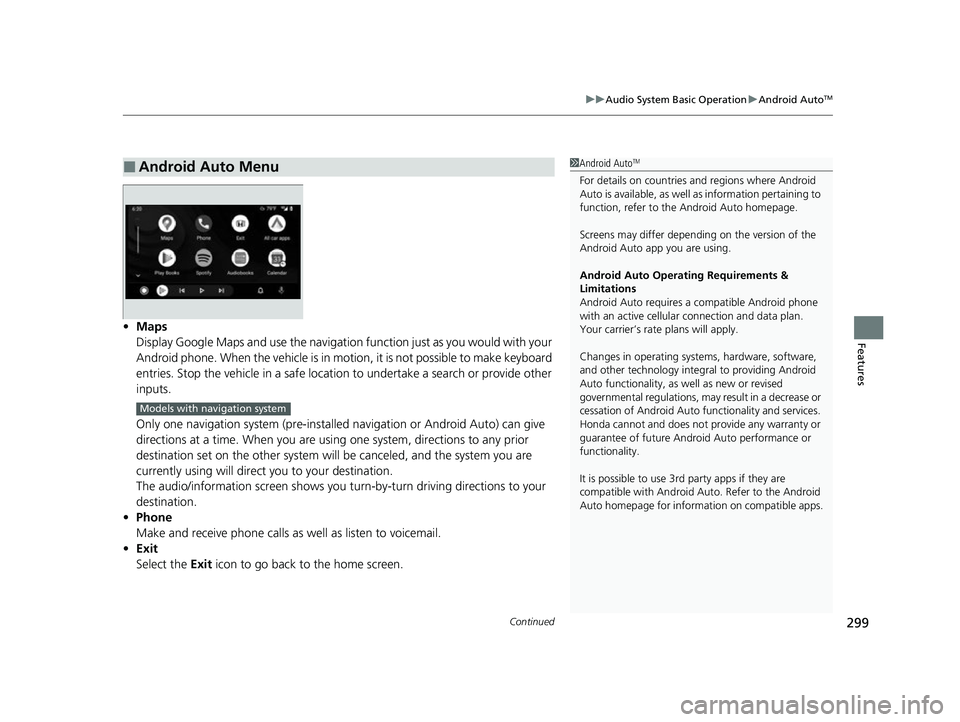
Features• Maps
Display Google Maps and use the navigation function just as you would with your
Android phone. When the vehicle is in motion, it is not possible to make keyboard
entries. Stop the vehicle in a safe location to undertake a search or provide other
inputs.
Only one navigation system (pre-installed navigation or Android Auto) can give
directions at a time. When you are usin g one system, directions to any prior
destination set on the other system wi ll be canceled, and the system you are
currently using will direct you to your destination.
The audio/information screen shows you turn-by-turn driving directions to your
destination.
• Phone
Make and receive phone calls as well as listen to voicemail.
• Exit
Select the Exit icon to go back to the home screen.
■Android Auto Menu1Android AutoTM
For details on c ountries and regions where Android
Auto is available, as well as information pertaining to
function, refer to the Android Auto homepage.
Screens may differ depending on the version of the
Android Auto app you are using.
Android Auto Operating Requirements &
Limitations
Android Auto requires a compatible Android phone
with an active cellular connection and data plan.
Your carrier’s rate plans will apply.
Changes in operating systems, hardware, software,
and other technology integral to providing Android
Auto functionality, as well as new or revised
governmental regulations, may result in a decrease or
cessation of Android Auto functionality and services.
Honda cannot and does not pr ovide any warranty or
guarantee of future Android Auto performance or
functionality.
It is possible to use 3r d party apps if they are
compatible with Android Auto. Refer to the Android
Auto homepage for informat ion on compatible apps.
Models with navigation system
22 INSIGHT HMIN-31TXM6300.book 299 ページ 2021年2月24日 水曜日 午後3時45分
Page 305 of 609
304
Features
General Information on the Audio System
SiriusXM® Radio Service
1. You need your radio ID ready before regist ering for subscription. To see the ID in
the screen, select Channel to 0.
2. Have your radio ID ready, and either call or visit the SiriusXM® website to
subscribe.
Switch to the SiriusXM ® mode by using the audio remote controls on the steering
wheel, or through the audio/information screen, and stay in this mode for about 30
minutes until the service is activated. Make sure your vehicle is in an open area with
good reception.
Channel **** is not subscribed. Call SiriusXM to subscribe.
*1
You are not subscribed to the channel selected.
Subscription Updated:
SiriusXM ® radio is receiving information update from the network.
Channel Not Available:
No such channel exits, or the artist or title information is unavailable.
No Signal:
The signal is too weak in the current location.
Check Tuner:
There is a problem with the SiriusXM ® tuner. Contact a dealer.
Antenna Disconnected, Antenna Shorted:
There is a problem with the SiriusXM ® antenna. Contact a dealer.
*1 : ****part is variable characters, and w ill change depending upon where an subscribe.
■Subscribing to SiriusXM® Radio
■Receiving SiriusXM ® Radio
■SiriusXM ® Radio Display Messages
1 Subscribing to SiriusXM ® Radio
Contact Information for SiriusXM ® Radio:
SiriusXM ® Radio at
www.siriusxm.com/subscribenow , or 1-866-635-
2349
1 Receiving SiriusXM ® Radio
The SiriusXM ® satellites are in orbit over the equator;
therefore, objects south of the vehicle may cause
satellite rece ption interruptions. Sa tellite signals are
more likely to be blocked by tall buildings and
mountains the farther north you travel from the
equator.
You may experience rece ption problems under the
following circumstances:
•In a location with an obstruction to the south of
your vehicle.
•In tunnels•On the lower level of a multi-tiered road
•Large items carried on the roof rack
22 INSIGHT HMIN-31TXM6300.book 304 ページ 2021年2月24日 水曜日 午後3時45分
Page 307 of 609
306
uuGeneral Information on the Audio System uHonda App License Agreement
Features
Honda App License Agreement
PLEASE CAREFULLY READ THIS END USER LICENSE AGREEMENT (T HIS “AGREEMENT”) WHICH GOVERNS YOUR USE OF THE SOFTWARE
INSTALLED ON YOUR HONDA OR ACURA VEHICLE (YOUR “VEHICLE”) AS WELL AS THE APPLICATIONS, SERVICES, FUNCTIONS, AND
CONTENT PROVIDED THROUGH THE SOFTWARE (COLLECTIVELY, THE “SERVICES”). YOUR USE OF THE SOFTWARE OR SERVICES WILL
SERVE AS YOUR CONSENT TO THE TERMS OF THIS AGREEMENT. THE SOFTWARE IS OWNED (OR LICENSED), PROVIDED, AND/OR
OPERATED BY AMERICAN HONDA MOTOR CO. INC., (“HONDA,” “US,” “WE,” OR “OUR”), WITH ITS BUSINESS ADDRESS AT 1919
TORRANCE BLVD., TORRANCE, CA 90501. REFERENCE TO “HO NDA” IN THIS AGREEMENT INCLUDES HONDA’S PARENT COMPANY AND
ITS AFFILIATES AND DESIGNATED AGENTS. TH E SERVICES ARE OWNED (OR LICENSED), PROV IDED, AND/OR OPERATED BY HONDA OR A
THIRD-PARTY SERVICE PROVIDER (A “PROVIDER”). REFERENCE TO A “PROVIDER” IN THIS AGREEMENT INCLUDES SUCH PROVIDER’S
PARENT COMPANY, AFFILIATES, AND DESIGNATED AGENTS.
A. Description of the Software. The SOFTWARE includes the softwar e, firmware and the like, installed and executing on your VEHICLE
during manufacture, and thereafter updated from time to time by HONDA, you or an authorized HONDA dealer (a “DEALER”). The
SOFTWARE allows you to access and use a va riety of SERVICES, including but not limited to: (a) HONDA applications, services, and content
provided through the SOFTWARE (together, “H ONDA SERVICES”); and (b) PROVIDER applications, services, and content provided throu gh
the SOFTWARE (together, “PROVIDER SERVICES” ), each of which may provide access to various information, media, content, and services.
B. SOFTWARE Licensing and Intellectual Property.
1. SOFTWARE. This AGREEMENT grants you a non-exclusi ve, limited, and revocable license to use the SOFTWARE and SERVICES solely (a)
as installed on your VEHICLE by HONDA, (b) as updated on your Vehicle by HONDA, you (but only as and when directed by HONDA), or a
DEALER and (c) as permitted under the terms of this AGREEMENT.
2. HONDA Services. The SOFTWARE may provide you with access to various HONDA SERVICES. Installation, activation, or use of HONDA
SERVICES may require your consent to additi onal terms, conditions, and privacy policies applicable to those HONDA SERVICES (the
“HONDA TERMS”). You acknowledge a nd agree that any collection, use, sharing of data generated by your VEHICLE or your use of your
VEHICLE, and your use of the HONDA SERVI CES shall be subject to this AGREEMENT and any additional HONDA TERMS that may be
specifically applicable to such HONDA SERVI CES or data generation. The HONDA SERVICES may collect, use, and share such data whi le
you are using the SOFTWARE.
■END USER LICENSE AGREEMENT
22 INSIGHT HMIN-31TXM6300.book 306 ページ 2021年2月24日 水曜日 午後3時45分
Page 308 of 609
307
uuGeneral Information on the Audio System uHonda App License Agreement
Continued
Features
3. Open-Source Software. The SOFTWARE and SERVICES may incorporate softwar e licensed to HONDA under free or open-source
licenses which govern HONDA’s distribution and your use of such software. HONDA and the third-party authors, licensors, and distributors
of such software disclaim all warranties and all liability arising from any and all use or distribution of the software. To the extent such
software is provided under terms that diffe r from the applicable free or open-source licenses, those terms are offered by HONDA alone.
Additional information regarding free and open-source software incorporated in the SOFTWARE and SERVICES is available in this manual
or within the SOFTWARE.
4. Provider Services. The SOFTWARE may provide you with access to various PR OVIDER SERVICES. Installation or use of such PROVIDER
SERVICES may require your consent to addition al terms, conditions, and privacy policies of the applicable PROVIDER (the “PROVID ER
TERMS”). This AGREEMENT restricts the manner in which you can install and us e PROVIDER SERVICES but does not grant you a licens e or
permission to use such PROVIDER SERVICES. Your permission to us e PROVIDER SERVICES is limited and subject to any license grants,
conditions, and limitations included in the PROVIDER TERMS. You ac knowledge that any collection, use, sharing of your information,
targeted advertising practice s by PROVIDERS, and your use of the PROVIDER SERVICES shall be subject to both this AGREEMENT and any
applicable PROVIDER TERMS. The PR OVIDER SERVICES may collect, use, and share such information while you are using the SOFTWARE.
5. License Limitations an d Restrictions on Use.
(a) Limited License.
You understand and agree that the SOFTWARE and SERVICES are licensed, not sold, to you solely for use in accordance
with this AGREEMENT and any a pplicable PROVIDER TERMS, and an y documentation for the VEHICLE made available to you by HONDA
(any “DOCUMENTATION”). HONDA and its licensors reserve all rights in the SOFTWARE and HONDA SERVICES not expressly granted to
you under this AGREEMENT. PROVIDERS and th eir licensors reserve all rights in the PROVIDER SERVICES not expressly granted to yo u under
the applicable PROVIDER TERMS.
22 INSIGHT HMIN-31TXM6300.book 307 ページ 2021年2月24日 水曜日 午後3時45分
Page 309 of 609
308
uuGeneral Information on the Audio System uHonda App License Agreement
Features
(b) Restrictions on Use. The licenses granted under this AGREEMENT do not perm it you to use the SOFTWARE or SERVICES on a device
other than your VEHICLE. As a condition of using the SOFT WARE and SERVICES, you agree that you may not and will not:
6. Intellectual Property Rights. All title and intellectual property rights in and to the SOFTWARE and SERVICES, the accompanying
DOCUMENTATION, and all copies of the SOFTWARE or SERVICES are ow ned by HONDA, PROVIDERS, or their suppliers or licensors. This
AGREEMENT does not grant you any rights in connection with any trademarks or service marks of HONDA, PROVIDERS, or their licensors,
affiliates, or suppliers. (1) copy, download, distribute, modify, publish, sell, rent, leas
e, lend, license, sublicense, reuse, or create derivative works of the
SOFTWARE or SERVICES or any of the content or other material within the SOFTWARE or SERVICES, including without limitation,
HONDA or PROVIDER names, logos, or any othe r trademarks of HONDA or PROVIDERS or used in association with the SOFTWARE or
any SERVICES, except as required to use th e SOFTWARE or SERVICES in accordance with this AGREEMENT, any applicable PROVIDER
TERMS, and the DOCUMENTATION;
(2) access or use the SOFTWARE or SERVICES in any manner intended to damage or impair the operation of the SOFTWARE or SERVICES
or interfere with anyone else’s use and enjoyment of the SOFTWARE or SERVICES;
(3) access or attempt to access any system or server on which the SOFTWARE or SERVICES is hosted or modify or alter the SOFTWAR E
or SERVICES in any way;
(4) use the SOFTWARE or SERVICES for any unlawful pu rpose, or in violation of any third party rights;
(5) use the SOFTWARE or SERVICES in violatio n of any applicable traffic regulations, rules or laws, including but not limited t o any driver
distraction laws, rules or regulations;
(6) violate the terms of this AGREEMENT, any HONDA TERMS, any PROV IDER TERMS or other applicable third-party terms, conditions,
and privacy policies; or
(7) reverse engineer, decompile, disassemble, attempt to derive the source code of, nor permit others to reverse engineer, deco mpile,
or disassemble, or attempt to derive the so urce code of the SOFTWARE or SERVICES, except and only to the extent that such activ ity is
expressly permitted (a) by applicable law notwithstanding this li mitation or (b) the terms of applicable free or opensource software
licenses.
22 INSIGHT HMIN-31TXM6300.book 308 ページ 2021年2月24日 水曜日 午後3時45分