ECU HONDA INSIGHT 2022 Owner's Manual
[x] Cancel search | Manufacturer: HONDA, Model Year: 2022, Model line: INSIGHT, Model: HONDA INSIGHT 2022Pages: 609, PDF Size: 18.48 MB
Page 165 of 609
uuLocking and Unlocking the Doors uLocking/Unlocking the Doors from the Outside
164
Controls
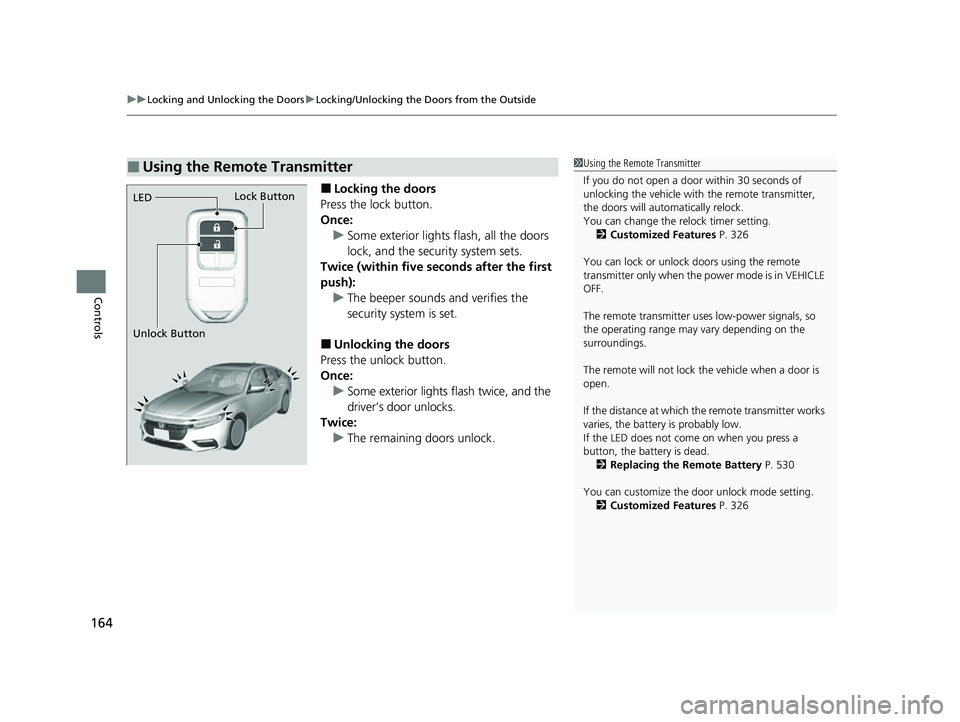
■Locking the doors
Press the lock button.
Once: u Some exterior lights flash, all the doors
lock, and the security system sets.
Twice (within five se conds after the first
push):
u The beeper sounds and verifies the
security system is set.
■Unlocking the doors
Press the unlock button.
Once: u Some exterior lights flash twice, and the
driver’s door unlocks.
Twice:
u The remaining doors unlock.
■Using the Remote Transmitter1Using the Remote Transmitter
If you do not open a door within 30 seconds of
unlocking the vehicle with the remote transmitter,
the doors will automatically relock.
You can change the relock timer setting. 2 Customized Features P. 326
You can lock or unlock doors using the remote
transmitter only when the power mode is in VEHICLE
OFF.
The remote transmitter us es low-power signals, so
the operating range may vary depending on the
surroundings.
The remote will not lock th e vehicle when a door is
open.
If the distance at which the remote transmitter works
varies, the batter y is probably low.
If the LED does not come on when you press a
button, the battery is dead. 2 Replacing the Remote Battery P. 530
You can customize the door unlock mode setting. 2 Customized Features P. 326
LED
Unlock ButtonLock Button
22 INSIGHT HMIN-31TXM6300.book 164 ページ 2021年2月24日 水曜日 午後3時45分
Page 175 of 609
174
Controls
Security System
Immobilizer System
The immobilizer system prevents a key that has not been pre-registered from
starting the power system. Each key cont ains electronic transmitters that use
electronic signals to verify the key.
Pay attention to the follo wing when pressing the POWER button:
• Do not allow objects that emit strong radio waves near the POWER button.
• Make sure the key is not covered by or touching a metal object.
• Do not bring a key from another vehicle’s immobilizer system near the POWER
button.
• Do not put the key near magnetic items. Electronic devices, such as televisions
and audio systems emit strong magnetic fields. Note that even a key chain can
become magnetic.1 Immobilizer System
NOTICE
Leaving the key in the vehicl e can result in theft or
accidental movement of the vehicle.
Always take the key with you whenever you leave the
vehicle unattendedM
Do not alter the system or add other devices to itM
Doing so may damage the system and make your
vehicle inoperableM
22 INSIGHT HMIN-31TXM6300.book 174 ページ 2021年2月24日 水曜日 午後3時45分
Page 176 of 609
175
uuSecurity System uSecurity System Alarm
Continued
Controls
Security System Alarm
The security system alarm activates when the trunk, hood or doors are forcibly
opened. The alarm does not activate if the trunk or doors are opened with the key,
remote transmitter or keyless access system.
However, the alarm activates if a door is op ened with the key and then the hood is
opened before the power mode is set to ON.
■When the security system alarm activates
The horn sounds intermittently and some exterior lights flash.
■To deactivate the security system alarm
Unlock the vehicle using the key, remote tra nsmitter or keyless access system, or set
the power mode to ON. The system, along with the horn and flashing lights, is
deactivated.
■Setting the security system alarm
The security system alarm automatically sets when the following conditions have
been met:
• The power mode is set to VEHICLE OFF (LOCK).
• The hood is closed.
• All doors and the trunk are locked from ou tside with the key, remote transmitter
or keyless access system.
■When the security system alarm sets
The security system alarm in dicator in the instrument panel blinks and the blinking
interval changes after about 15 seconds.
■To cancel the security system alarm
The security system alarm is canceled when the vehicle is unlocked using the remote
transmitter or keyless access system, or when the power mode is set to ON. The
security system alarm indicato r goes off at the same time.
1Security System Alarm
Do not alter the system or add other devices to it.
Doing so may damage the system and make your
vehicle inoperable.
The security system alarm continues for a maximum
of two minutes until the security system alarm
deactivates.
Do not set the security system alarm when someone
is in the vehicle or a window is open. The system can
accidentally activate when:
•Unlocking the door with the lock tab.
•Opening the trunk with the trunk opener or the
emergency trunk opener.
•Opening the hood with the hood release.
If the 12-volt battery goes dead after you have set the
security system alarm, the security alarm may go off
once the 12-volt battery is recharged or replaced.
If this occurs, deactivate the security system alarm by
unlocking a door using the ke y, remote transmitter,
or keyless access system.
22 INSIGHT HMIN-31TXM6300.book 175 ページ 2021年2月24日 水曜日 午後3時45分
Page 177 of 609
176
uuSecurity System uSecurity System Alarm
Controls
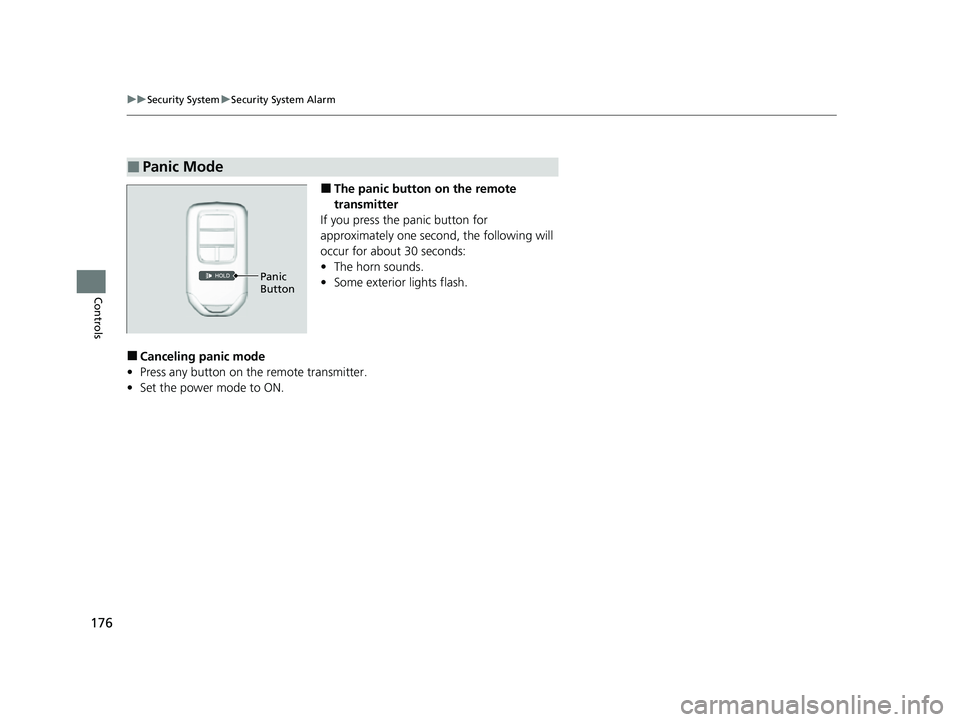
■The panic button on the remote
transmitter
If you press the panic button for
approximately one seco nd, the following will
occur for about 30 seconds:
• The horn sounds.
• Some exterior lights flash.
■Canceling panic mode
• Press any button on the remote transmitter.
• Set the power mode to ON.
■Panic Mode
Panic
Button
22 INSIGHT HMIN-31TXM6300.book 176 ページ 2021年2月24日 水曜日 午後3時45分
Page 197 of 609
196
uuOperating the Switches Around the Steering Wheel uAdjusting the Steering Wheel
Controls
Adjusting the Steering Wheel
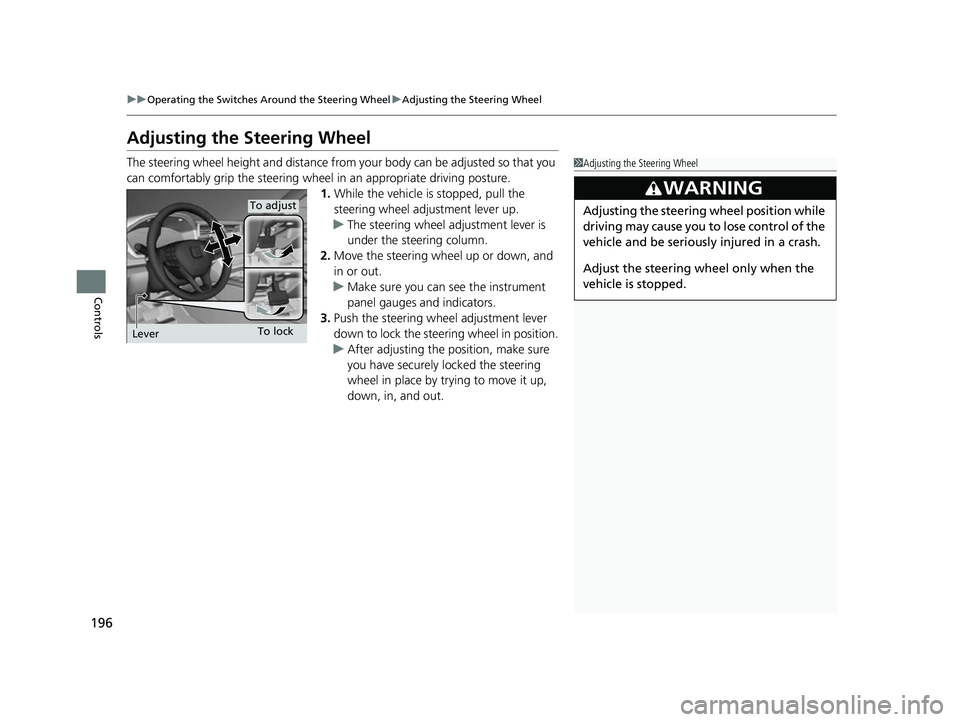
The steering wheel height and distance from your body can be adjusted so that you
can comfortably grip the steering wheel in an appropriate driving posture.
1.While the vehicle is stopped, pull the
steering wheel adjustment lever up.
u The steering wheel adjustment lever is
under the steering column.
2. Move the steering wheel up or down, and
in or out.
u Make sure you can see the instrument
panel gauges and indicators.
3. Push the steering wheel adjustment lever
down to lock the steering wheel in position.
u After adjusting the position, make sure
you have securely locked the steering
wheel in place by trying to move it up,
down, in, and out.1Adjusting the Steering Wheel
3WARNING
Adjusting the steering wheel position while
driving may cause you to lose control of the
vehicle and be seriously injured in a crash.
Adjust the steering wheel only when the
vehicle is stopped.To adjust
To lock
Lever
22 INSIGHT HMIN-31TXM6300.book 196 ページ 2021年2月24日 水曜日 午後3時45分
Page 203 of 609
202
uuAdjusting the Seats uRear Seats
Controls
Rear Seats
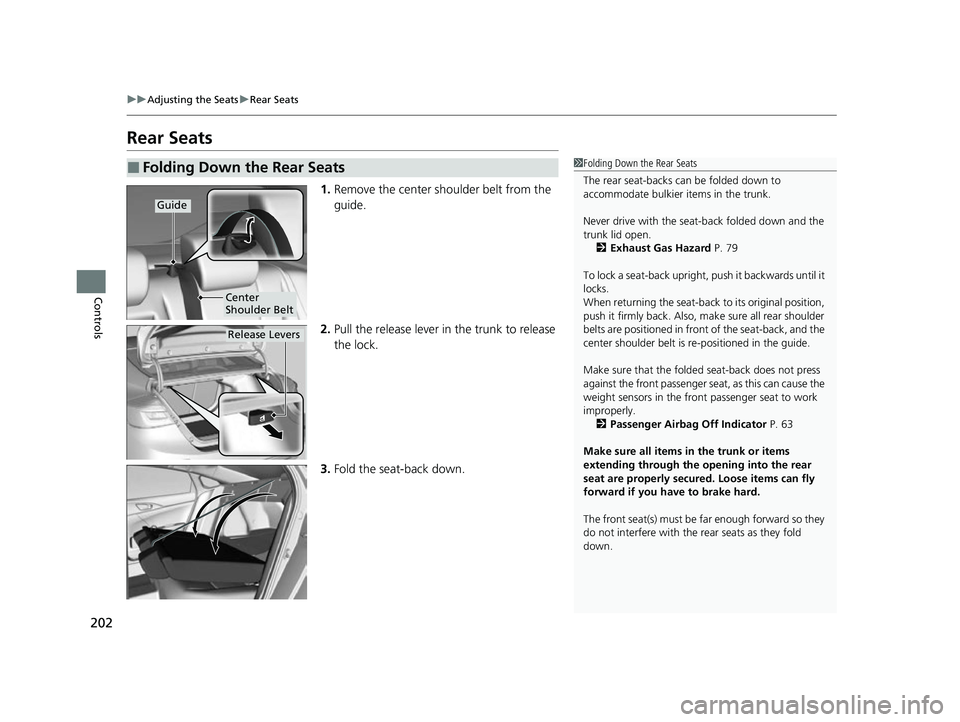
1. Remove the center shoulder belt from the
guide.
2. Pull the release lever in the trunk to release
the lock.
3. Fold the seat-back down.
■Folding Down the Rear Seats1Folding Down the Rear Seats
The rear seat-backs can be folded down to
accommodate bulkier items in the trunk.
Never drive with the seat-back folded down and the
trunk lid open. 2 Exhaust Gas Hazard P. 79
To lock a seat-back upright, push it backwards until it
locks.
When returning the seat-back to its original position,
push it firmly back. Also, m ake sure all rear shoulder
belts are positioned in front of the seat-back, and the
center shoulder belt is re -positioned in the guide.
Make sure that the folded seat-back does not press
against the front passenger seat, as this can cause the
weight sensors in the front passenger seat to work
improperly. 2 Passenger Airbag Off Indicator P. 63
Make sure all items in the trunk or items
extending through the opening into the rear
seat are properly secured. Loose items can fly
forward if you have to brake hard.
The front seat(s) must be far enough forward so they
do not interfere with the rear seats as they fold
down.
Guide
Center
Shoulder Belt
Release Levers
22 INSIGHT HMIN-31TXM6300.book 202 ページ 2021年2月24日 水曜日 午後3時45分
Page 286 of 609
285
uuAudio System Basic Operation uHondaLink® Service*
Continued
Features
HondaLink® Service*
Is a subscription-based service that provid es convenient features such as voice
communication in case of emergency, online security, and one-on-one operator
assistance.
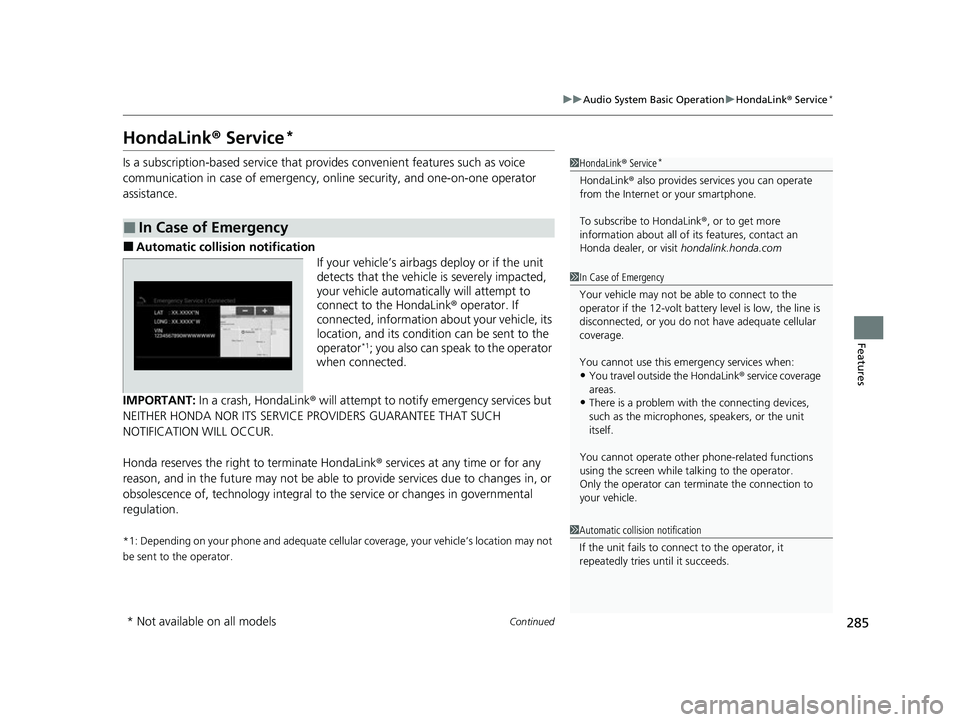
■Automatic collis ion notification
If your vehicle’s airbags deploy or if the unit
detects that the vehicle is severely impacted,
your vehicle automatically will attempt to
connect to the HondaLink ® operator. If
connected, information ab out your vehicle, its
location, and its condition can be sent to the
operator
*1; you also can speak to the operator
when connected.
IMPORTANT: In a crash, HondaLink® will attempt to notify emergency services but
NEITHER HONDA NOR ITS SERVICE PROVIDERS GUARANTEE THAT SUCH
NOTIFICATION WILL OCCUR.
Honda reserves the right to terminate HondaLink ® services at any time or for any
reason, and in the future may not be able to provide services due to changes in, or
obsolescence of, technology integral to the service or changes in governmental
regulation.
*1: Depending on your phone and adequate cellular coverage, your vehicle’s location may not
be sent to the operator.
■In Case of Emergency
1 HondaLink ® Service*
HondaLink ® also provides serv ices you can operate
from the Internet or your smartphone.
To subscribe to HondaLink ®, or to get more
information about all of its features, contact an
Honda dealer, or visit hondalink.honda.com
1In Case of Emergency
Your vehicle may not be able to connect to the
operator if the 12-volt battery level is low, the line is
disconnected, or you do not have adequate cellular
coverage.
You cannot use this emergency services when:
•You travel outside the HondaLink ® service coverage
areas.
•There is a problem with the connecting devices,
such as the microphones, speakers, or the unit
itself.
You cannot operate othe r phone-related functions
using the screen while talking to the operator.
Only the operator can terminate the connection to
your vehicle.
1 Automatic collision notification
If the unit fails to connect to the operator, it
repeatedly tries until it succeeds.
* Not available on all models
22 INSIGHT HMIN-31TXM6300.book 285 ページ 2021年2月24日 水曜日 午後3時45分
Page 306 of 609
305
uuGeneral Information on the Audio System uCompatible iPod, iPhone, and USB Flash Drives
Features
Compatible iPod, iPhone , and USB Flash Drives
•A USB flash drive of 256 MB or higher is recommended.
• Some digital audio players may not be compatible.
• Some USB flash drives (e.g., a device with security lockout) may not work.
• Some software files may not allow for audio play or text data display.
• Some versions of MP3, WMA, AAC, FLAC, or WAV formats may be unsupported.
■iPod, and iPhone Model Compatibility
Model
Made for iPod touch (6th generation), iPod touch (5th generation)
Made for iPhone 7 Plus/iPhone 7/iPhone SE/iPhone 6s Plus/iPhone 6s/iPhone 6 Plus/
iPhone 6/iPhone 5c/iPhone 5s/iPhone 5/iPhone 4s
1iPod, and iPhone Model Compatibility
This system may not work with all software versions
of these devices.
The Lightning connector work s with iPhone 7 Plus,
iPhone 7, iPhone SE, iPhone 6s Plus, iPhone 6s,
iPhone 6 Plus, iPhone 6, iP hone 5c, iPhone 5s, iPhone
5, iPod touch (6th generation), iPod touch (5th
generation).
The 30-pin connector wo rks with iPhone 4s.
USB works with iPhone 7 Pl us, iPhone 7, iPhone SE,
iPhone 6s Plus, iPhone 6s, iPhone 6 Plus, iPhone 6,
iPhone 5c, iPhone 5s, iPhone 5, iPhone 4s, iPod touch
(6th generation), iPod t ouch (5th generation).
■USB Flash Drives1USB Flash Drives
Files on the USB flash drive are played in their stored
order. This order may be different from the order
displayed on your PC or device.
22 INSIGHT HMIN-31TXM6300.book 305 ページ 2021年2月24日 水曜日 午後3時45分
Page 307 of 609
306
uuGeneral Information on the Audio System uHonda App License Agreement
Features
Honda App License Agreement
PLEASE CAREFULLY READ THIS END USER LICENSE AGREEMENT (T HIS “AGREEMENT”) WHICH GOVERNS YOUR USE OF THE SOFTWARE
INSTALLED ON YOUR HONDA OR ACURA VEHICLE (YOUR “VEHICLE”) AS WELL AS THE APPLICATIONS, SERVICES, FUNCTIONS, AND
CONTENT PROVIDED THROUGH THE SOFTWARE (COLLECTIVELY, THE “SERVICES”). YOUR USE OF THE SOFTWARE OR SERVICES WILL
SERVE AS YOUR CONSENT TO THE TERMS OF THIS AGREEMENT. THE SOFTWARE IS OWNED (OR LICENSED), PROVIDED, AND/OR
OPERATED BY AMERICAN HONDA MOTOR CO. INC., (“HONDA,” “US,” “WE,” OR “OUR”), WITH ITS BUSINESS ADDRESS AT 1919
TORRANCE BLVD., TORRANCE, CA 90501. REFERENCE TO “HO NDA” IN THIS AGREEMENT INCLUDES HONDA’S PARENT COMPANY AND
ITS AFFILIATES AND DESIGNATED AGENTS. TH E SERVICES ARE OWNED (OR LICENSED), PROV IDED, AND/OR OPERATED BY HONDA OR A
THIRD-PARTY SERVICE PROVIDER (A “PROVIDER”). REFERENCE TO A “PROVIDER” IN THIS AGREEMENT INCLUDES SUCH PROVIDER’S
PARENT COMPANY, AFFILIATES, AND DESIGNATED AGENTS.
A. Description of the Software. The SOFTWARE includes the softwar e, firmware and the like, installed and executing on your VEHICLE
during manufacture, and thereafter updated from time to time by HONDA, you or an authorized HONDA dealer (a “DEALER”). The
SOFTWARE allows you to access and use a va riety of SERVICES, including but not limited to: (a) HONDA applications, services, and content
provided through the SOFTWARE (together, “H ONDA SERVICES”); and (b) PROVIDER applications, services, and content provided throu gh
the SOFTWARE (together, “PROVIDER SERVICES” ), each of which may provide access to various information, media, content, and services.
B. SOFTWARE Licensing and Intellectual Property.
1. SOFTWARE. This AGREEMENT grants you a non-exclusi ve, limited, and revocable license to use the SOFTWARE and SERVICES solely (a)
as installed on your VEHICLE by HONDA, (b) as updated on your Vehicle by HONDA, you (but only as and when directed by HONDA), or a
DEALER and (c) as permitted under the terms of this AGREEMENT.
2. HONDA Services. The SOFTWARE may provide you with access to various HONDA SERVICES. Installation, activation, or use of HONDA
SERVICES may require your consent to additi onal terms, conditions, and privacy policies applicable to those HONDA SERVICES (the
“HONDA TERMS”). You acknowledge a nd agree that any collection, use, sharing of data generated by your VEHICLE or your use of your
VEHICLE, and your use of the HONDA SERVI CES shall be subject to this AGREEMENT and any additional HONDA TERMS that may be
specifically applicable to such HONDA SERVI CES or data generation. The HONDA SERVICES may collect, use, and share such data whi le
you are using the SOFTWARE.
■END USER LICENSE AGREEMENT
22 INSIGHT HMIN-31TXM6300.book 306 ページ 2021年2月24日 水曜日 午後3時45分
Page 310 of 609
309
uuGeneral Information on the Audio System uHonda App License Agreement
Continued
Features
7. Export Restrictions: You acknowledge that the SOFTWARE and SERVICES are subject to U.S., European Union, and other export
jurisdictions. You agree to comply with all applicable internat ional and national laws that apply to the SOFTWARE and SERVICES, including
the U.S. Export Administration Regulations, as well as end-user, end-use, and destination restrictions issued by the U.S. and other
governments.
C. SOFTWARE Operation
1. HONDA reserves the right to suspend or terminate your access to and use of the SOFTWARE or SERVICES if you are found to be in
violation of this AGREEMENT or as reasonably deemed necessary by HONDA.
2. Eligibility/Registration/Activation.
The SOFTWARE is intended for and available to individuals who (a) are of legal age of majority in their
jurisdiction of residence (and at least 18 years of age), or are younger than 18 years of age and possess a valid driver’s license issued by
their jurisdiction of residence, and (b) own or have permissive access to a compatible VEHICLE. We do not knowingly collect any
information, including personal information, from children under 13. If we learn or are notified that we have collected persona l
information of a child under 13, we will immediately take steps to delete such information.
3. Use of PROVIDER SERVICES through the SOFTWARE.
Certain PROVIDER SERVICES made availa ble through the SOFTWARE may require
that you register or otherwise have an ac count with the PROVIDER and agree to PROVIDER TERMS. Any us e of any of such PROVIDER
SERVICES within the SOFTWARE is subject to this AGREEMENT and the applicable PROVIDER TERMS. HONDA does not exercise control
over such PROVIDER SERVICES and is not resp onsible or liable for the availability, security, or content of such PROVIDER SERVIC ES, and the
inclusion of any PROVIDER SERVIC ES does not imply a referral from, the approval of, or the endorsement by HONDA of such PROVIDE R
SERVICES. HONDA is not responsible or liable, directly or indirectly, for any damage relating to or result ing from your use of the PROVIDER
SERVICES.
4. Links to Third Party Sites:
The SOFTWARE may provide you with th e ability to access third-party sites and content through the use of the
SOFTWARE or SERVICES. The third-party sites and content are not under the control of HONDA. HONDA is not responsible or liable,
directly or indirectly, for such third-party websites and their content or for any damage relating to or resulting from your ac cess or use of
such websites and content.
22 INSIGHT HMIN-31TXM6300.book 309 ページ 2021年2月24日 水曜日 午後3時45分