brake HONDA INSIGHT 2022 Service Manual
[x] Cancel search | Manufacturer: HONDA, Model Year: 2022, Model line: INSIGHT, Model: HONDA INSIGHT 2022Pages: 609, PDF Size: 18.48 MB
Page 396 of 609
![HONDA INSIGHT 2022 Service Manual Continued395
uuWhen Driving uShifting
Driving
■If you want to keep the transmission in (N position [car wash mode]
With the power system on:
1. Press and hold the brake pedal.
2. Press and release t](/img/13/58871/w960_58871-395.png "HONDA INSIGHT 2022 Service Manual Continued395
uuWhen Driving uShifting
Driving
■If you want to keep the transmission in (N position [car wash mode]
With the power system on:
1. Press and hold the brake pedal.
2. Press and release t")
Continued395
uuWhen Driving uShifting
Driving
■If you want to keep the transmission in (N position [car wash mode]
With the power system on:
1. Press and hold the brake pedal.
2. Press and release the
(N button.
u
(N (Neutral) hold mode will appear on the driver information interface.
3. Press the
(N button again and hold it for two seconds.
u The vehicle will enter car wash mode, which must be used when your vehicle
is pulled through a conveyor type automatic car wash where you or an
attendant do not remain in the vehicle.
If the POWER button is pressed after car wash
mode has been activated, the power mode
will change to ACCESSORY and a message
will be displayed on the driver information
interface. u For 15 minutes the transmission remains
in
(N with the power mode will remain
in ACCESSORY. After that, the
transmission automatically changes to
(P and the power mode changes to OFF.
u Manually changing to
(P cancels
ACCESSORY mode. The
(P indicator
comes on and the power mode changes
to OFF. You must always put the
transmission into
(P when car wash
mode is no longer needed.
1 If you want to keep the transmission in (N position [car wash
mode]
To keep the vehicle in
(N position, you can also
follow this procedure:
While the power mode is on, select
( N, and then
within five seconds, press the POWER button.
Note that the transmiss ion may not stay in
(N
position while any of the following indicators is on:
•Transmission system indicator.
•Malfunction indicator lamp.•Charging system indicator.
22 INSIGHT HMIN-31TXM6300.book 395 ページ 2021年2月24日 水曜日 午後3時45分
Page 397 of 609
396
uuWhen Driving uShifting
Driving
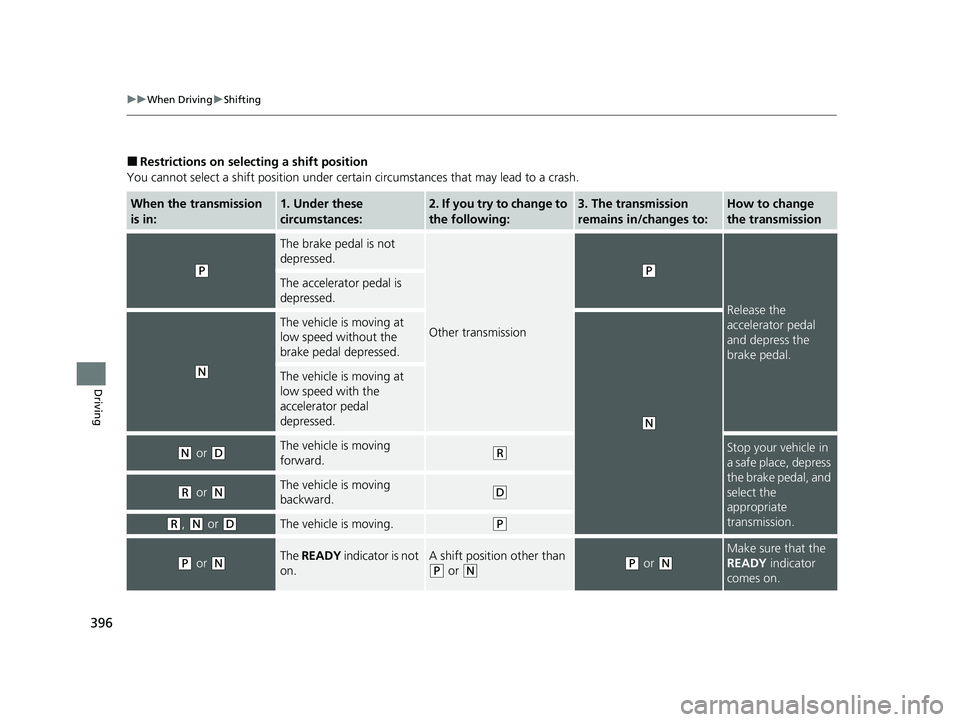
■Restrictions on selecting a shift position
You cannot select a shift position under certain circumstances that may lead to a crash.
When the transmission
is in:1. Under these
circumstances:2. If you try to change to
the following:3. The transmission
remains in/changes to:How to change
the transmission
(P
The brake pedal is not
depressed.
Other transmission
(P
Release the
accelerator pedal
and depress the
brake pedal.
The accelerator pedal is
depressed.
(N
The vehicle is moving at
low speed without the
brake pedal depressed.
(N
The vehicle is moving at
low speed with the
accelerator pedal
depressed.
(N or (DThe vehicle is moving
forward.(RStop your vehicle in
a safe place, depress
the brake pedal, and
select the
appropriate
transmission.
(R or (NThe vehicle is moving
backward.(D
(R, (N or (DThe vehicle is moving.(P
(P or (NThe READY indicator is not
on.A shift position other than
(P or (N(P or (N
Make sure that the
READY indicator
comes on.
22 INSIGHT HMIN-31TXM6300.book 396 ページ 2021年2月24日 水曜日 午後3時45分
Page 402 of 609
401
uuWhen Driving uECON Mode
Driving
ECON Mode
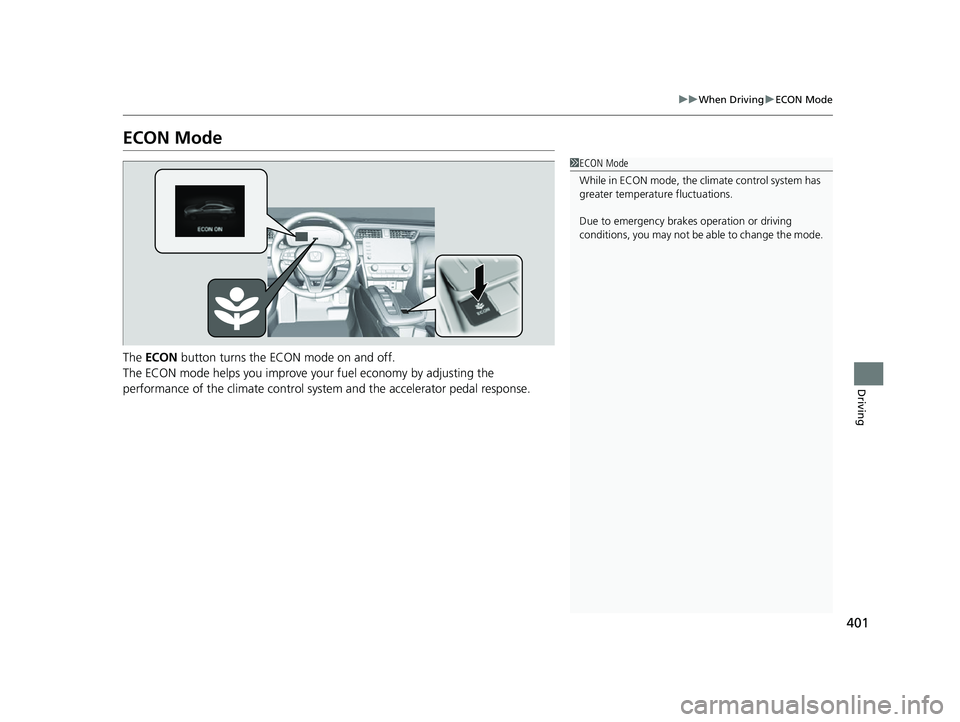
The ECON button turns the ECON mode on and off.
The ECON mode helps you improve yo ur fuel economy by adjusting the
performance of the climate control syst em and the accelerator pedal response.
1ECON Mode
While in ECON mode, the climate control system has
greater temperature fluctuations.
Due to emergency brake s operation or driving
conditions, you may not be ab le to change the mode.
22 INSIGHT HMIN-31TXM6300.book 401 ページ 2021年2月24日 水曜日 午後3時45分
Page 404 of 609
403
uuWhen Driving uVehicle Stability AssistTM (VSA ®), aka Electronic Stability Control (ESC), System
Continued
Driving
Vehicle Stability AssistTM (VSA ®), aka Electronic
Stability Control (ESC), System
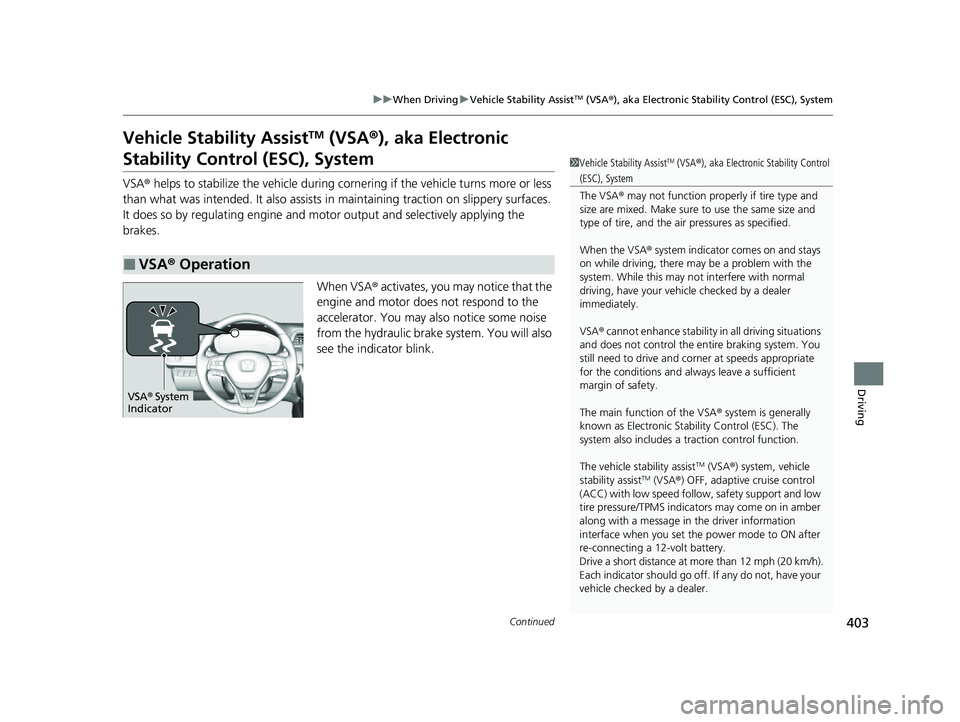
VSA ® helps to stabilize the vehicle during corn ering if the vehicle turns more or less
than what was intended. It also assists in maintaining traction on slippery surfaces.
It does so by regulating engine and motor output and selectively applying the
brakes.
When VSA® activates, you may notice that the
engine and motor does not respond to the
accelerator. You may also notice some noise
from the hydraulic brake system. You will also
see the indicator blink.
■VSA ® Operation
1 Vehicle Stability AssistTM (VSA® ), aka Electronic Stability Control
(ESC), System
The VSA ® may not function properl y if tire type and
size are mixed. Make sure to use the same size and
type of tire, and the air pressures as specified.
When the VSA ® system indicator comes on and stays
on while driving, there may be a problem with the
system. While this may not interfere with normal
driving, have your vehi cle checked by a dealer
immediately.
VSA ® cannot enhance stability in all driving situations
and does not control the entire braking system. You
still need to drive and corner at speeds appropriate
for the conditions and alwa ys leave a sufficient
margin of safety.
The main function of the VSA ® system is generally
known as Electronic Stability Control (ESC). The
system also includes a traction control function.
The vehicle stability assist
TM (VSA ®) system, vehicle
stability assistTM (VSA ®) OFF, adaptive cruise control
(ACC) with low speed follow, safety support and low
tire pressure/TPMS indicato rs may come on in amber
along with a message in the driver information
interface when you set the power mode to ON after
re-connecting a 12-volt battery.
Drive a short distance at more than 12 mph (20 km/h).
Each indicator should go off. If any do not, have your
vehicle checked by a dealer.
VSA ® System
Indicator
22 INSIGHT HMIN-31TXM6300.book 403 ページ 2021年2月24日 水曜日 午後3時45分
Page 406 of 609
405
uuWhen Driving uAgile Handling Assist
Driving
Agile Handling Assist
Lightly brakes the front wheels, as needed , when you turn the steering wheel, and
helps support the vehicle’s stability and performance during cornering.1 Agile Handling Assist
The agile handling assist ca nnot enhance stability in
all driving situations. You still need to drive and
corner at speeds appropriate for the conditions and
always leave a sufficient margin of safety.
When the VSA ® system indicator comes on and stays
on while driving, the agil e handling assist does not
activate.
You may hear a sound coming from the engine
compartment while the agile handling assist is
activated. This is normal.
22 INSIGHT HMIN-31TXM6300.book 405 ページ 2021年2月24日 水曜日 午後3時45分
Page 419 of 609
418
uuHonda Sensing ®u Collision Mitigation Braking SystemTM (CMBSTM)
Driving
Collision Mitigati on Braking SystemTM (CMBSTM)
The system can assist you when it determin es there is a possibility of your vehicle
colliding with a vehicle or a pedestrian de tected in front of your vehicle. The CMBSTM
is designed to alert you when the potential for a collision is determined, as well as to
reduce your vehicle speed to help minimize collision severity when a collision is
deemed unavoidable.
1 Collision Mitigation Braking SystemTM (CMBSTM)
Important Safety Reminder
The CMBS
TM is designed to reduce the severity of an
unavoidable collision. It do es not prevent a collision
nor stop the vehicle automati cally. It is still your
responsibility to operate the brake pedal and steering
wheel appropriately acco rding to the driving
conditions.
The CMBS
TM may not activate or may not detect a
vehicle in front of y our vehicle under certain
conditions: 2 CMBS
TM Conditions and Limitations P. 423
You can read about handling information for the
camera equipped with this system. 2 Front Sensor Camera P. 465
For directions on the prop er handling of the radar
sensor, refer to the following page. 2 Radar Sensor P. 467
When the CMBS
TM activates, it may automatically
apply the brake. It will be canceled when your vehicle
stops or a potential coll ision is not determined.
22 INSIGHT HMIN-31TXM6300.book 418 ページ 2021年2月24日 水曜日 午後3時45分
Page 421 of 609
420
uuHonda Sensing ®u Collision Mitigation Braking SystemTM (CMBSTM)
Driving
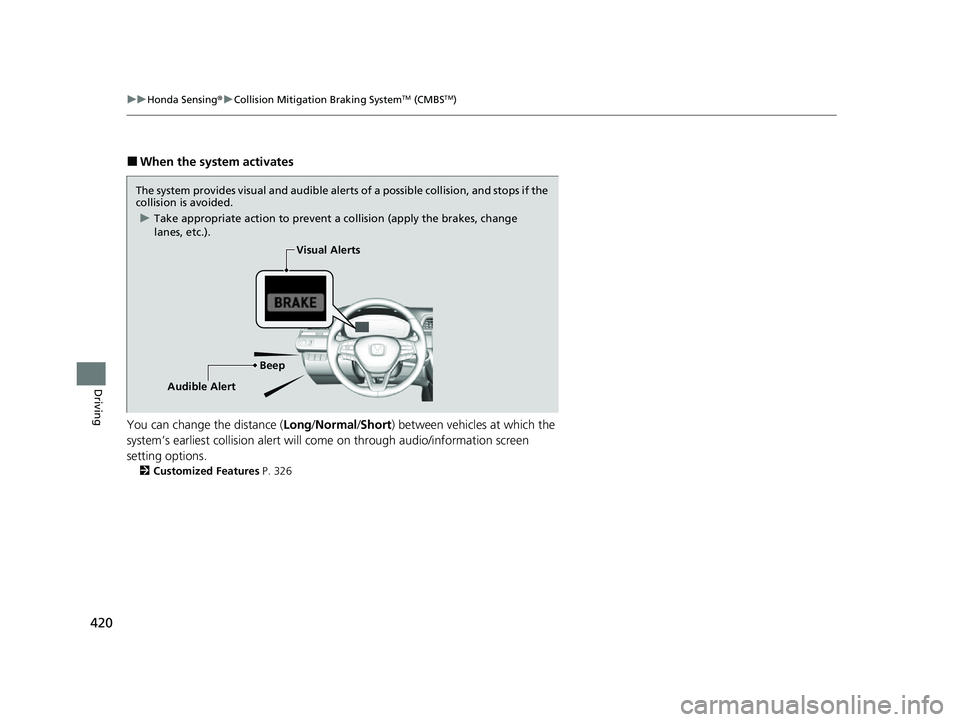
■When the system activates
You can change the distance ( Long/Normal /Short ) between vehicles at which the
system’s earliest collision alert will co me on through audio/information screen
setting options.
2 Customized Features P. 326
The system provides visual and audible alerts of a possible collision, and stops if the
collision is avoided.
u Take appropriate action to prevent a collision (apply the brakes, change
lanes, etc.).
BeepVisual Alerts
Audible Alert
22 INSIGHT HMIN-31TXM6300.book 420 ページ 2021年2月24日 水曜日 午後3時45分
Page 425 of 609
424
uuHonda Sensing ®u Collision Mitigation Braking SystemTM (CMBSTM)
Driving
■Vehicle conditions
• Headlight lenses are dirty or the headlights are not properly adjusted.
• The outside of the windshie ld is blocked by dirt, mud, leaves, wet snow, etc.
• The inside of the windshield is fogged.
• An abnormal tire or wheel condition (incor rect sizes, varied sizes or construction,
improperly inflated, compact spare tire
*, etc.).
• When tire chains are installed.
• The vehicle is tilted due to a heav y load or suspension modifications.
• The camera temperature gets too high.
• Driving with the parking brake applied.
• When the radar sensor at the lower part of the front bumper gets dirty.
• Driving at night or in a dark place (e .g., a tunnel) with the headlights off.
■Detection limitations
• A vehicle or pedestrian suddenly crosses in front of you.
• The distance between your vehicle and the vehicle or pedestrian ahead of you is
too short.
• A vehicle cuts in front of you at a slow speed, and it brakes suddenly.
• When you accelerate rapidly and approach the vehicle or pedestrian ahead of you
at high speed.
• The vehicle ahead of you is a motorcycle, bicycle, mobility scooter or other small
vehicle.
• When there are animals in front of your vehicle.
• When you drive on a curved, winding or undulating road that makes it difficult for
the sensor to properly detect a vehicle in front of you.
• The speed difference between your vehicle an d a vehicle or pedestrian in front of
you is significantly large.
• An oncoming vehicle suddenly comes in front of you.
• Another vehicle suddenly comes in front of you at an intersection, etc.
• Your vehicle abruptly crosses over in front of an oncoming vehicle.
• When driving through a narrow iron bridge.
• When the lead vehicle suddenly slows down.
* Not available on all models
22 INSIGHT HMIN-31TXM6300.book 424 ページ 2021年2月24日 水曜日 午後3時45分
Page 429 of 609
428
uuHonda Sensing ®u Adaptive Cruise Control (ACC) with Low Speed Follow
Driving
Adaptive Cruise Control (ACC) with Low Speed
Follow
Helps maintain a constant vehicle speed and a set following interval behind a vehicle
detected ahead of yours and, if the detect ed vehicle comes to a stop, can decelerate
and stop your vehicle, without you having to keep your foot on the brake or the
accelerator.
When ACC with Low Speed Follow slows y our vehicle by applying the brakes, your
vehicle’s brake lights will illuminate.
1 Adaptive Cruise Control (ACC) with Low Speed Follow
Important Reminder
As with any system, there are limits to ACC with Low
Speed Follow. Use the brake pedal whenever
necessary, and always keep a safe interval between
your vehicle and other vehicles.
For directions on the prop er handling of the radar
sensor, refer to the following page.
2 Radar Sensor P. 467
3WARNING
Improper use of ACC with Low Speed
Follow can lead to a crash.
Use ACC with Low Speed Follow only when
driving on expressways or freeways and in
good road and weather conditions.
3WARNING
ACC with Low Speed Follow has limited
braking capability and may not stop your
vehicle in time to avoid a collision with a
vehicle that quickly stops in front of you.
Always be prepared to apply the brake
pedal if the conditions require.
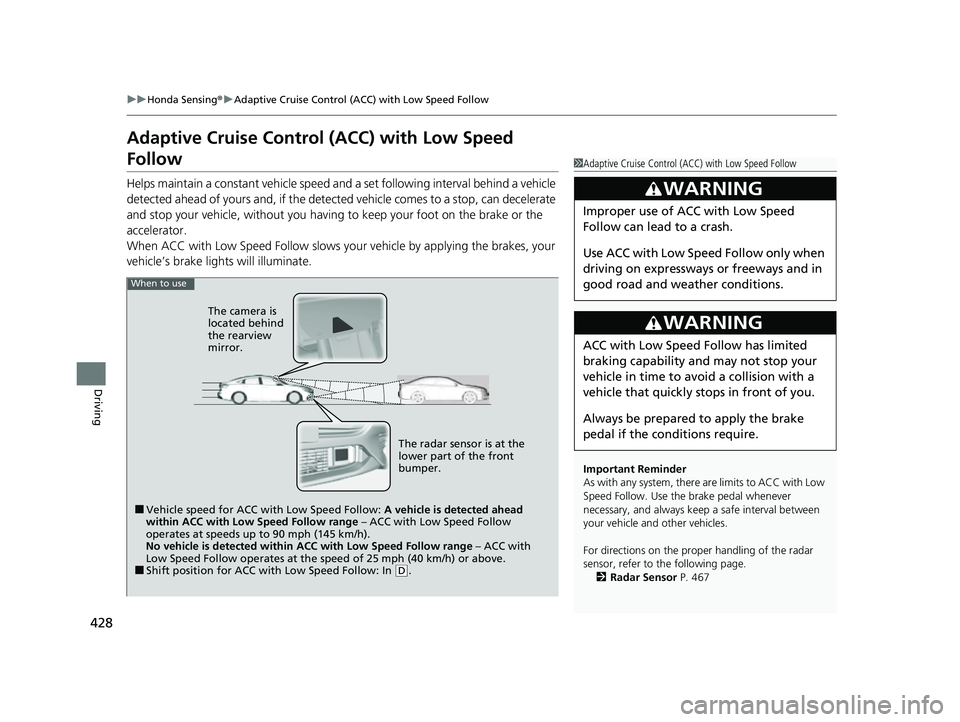
When to use
■Vehicle speed for ACC wi th Low Speed Follow: A vehicle is detected ahead
within ACC with Low Speed Follow range – ACC with Low Speed Follow
operates at speeds up to 90 mph (145 km/h).
No vehicle is detected within ACC with Low Speed Follow range – ACC with
Low Speed Follow operates at the speed of 25 mph (40 km/h) or above.
■Shift position for ACC with Low Speed Follow: In ( D.
The radar sensor is at the
lower part of the front
bumper.
The camera is
located behind
the rearview
mirror.
22 INSIGHT HMIN-31TXM6300.book 428 ページ 2021年2月24日 水曜日 午後3時45分
Page 430 of 609
Continued429
uuHonda Sensing ®u Adaptive Cruise Control (ACC) with Low Speed Follow
Driving
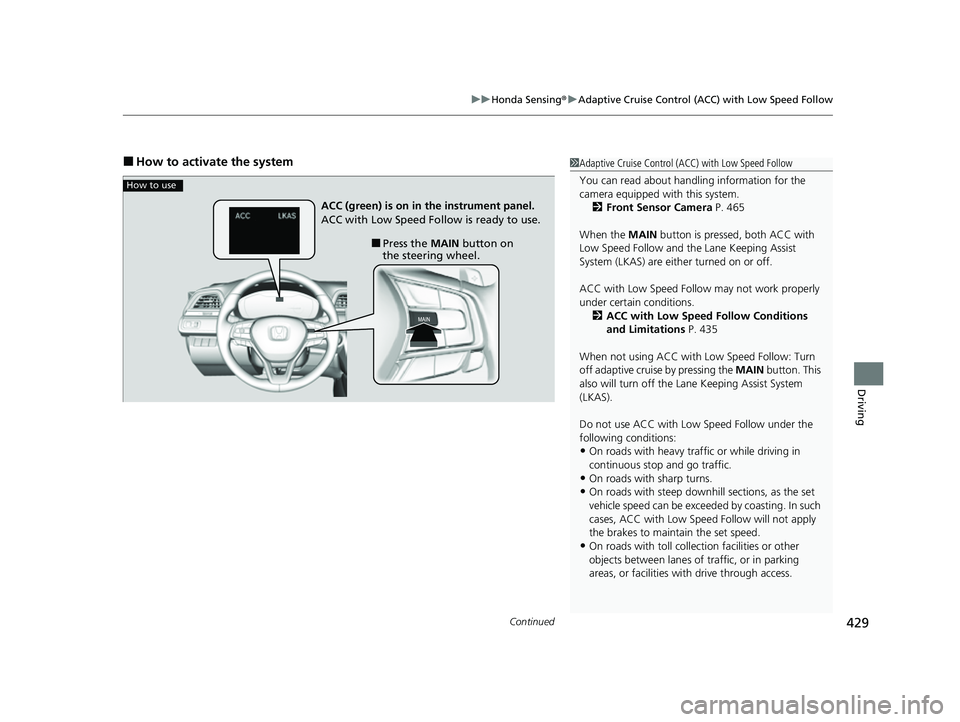
■How to activate the system1Adaptive Cruise Control (ACC) with Low Speed Follow
You can read about handling information for the
camera equipped with this system.
2 Front Sensor Camera P. 465
When the MAIN button is pressed, both ACC with
Low Speed Follow and the Lane Keeping Assist
System (LKAS) are either turned on or off.
ACC with Low Speed Follow may not work properly
under certain conditions.
2 ACC with Low Speed Follow Conditions
and Limitations P. 435
When not using ACC with Low Speed Follow: Turn
off adaptive cruise by pressing the MAIN button. This
also will turn off the Lane Keeping Assist System
(LKAS).
Do not use ACC with Low Speed Follow under the
following conditions:
•On roads with heavy traf fic or while driving in
continuous stop and go traffic.
•On roads with sharp turns.•On roads with steep downhill sections, as the set
vehicle speed can be exceeded by coasting. In such
cases, ACC with Low Speed Follow will not apply
the brakes to maintain the set speed.
•On roads with toll collection facilities or other
objects between lanes of traffic, or in parking
areas, or faci lities with driv e through access.
How to use
■Press the MAIN button on
the steering wheel.
ACC (green) is on in the instrument panel.
ACC with Low Speed Follow is ready to use.
22 INSIGHT HMIN-31TXM6300.book 429 ページ 2021年2月24日 水曜日 午後3時45分