battery HONDA INSIGHT 2022 Manual PDF
[x] Cancel search | Manufacturer: HONDA, Model Year: 2022, Model line: INSIGHT, Model: HONDA INSIGHT 2022Pages: 609, PDF Size: 18.48 MB
Page 505 of 609
504
uuMaintenance Under the Hood uChanging the Engine Oil and Oil Filter
Maintenance
Changing the Engine Oil and Oil Filter
You must change the engine oil and oil filter regularly in order to maintain the
engine’s lubrication. The engine may be damaged if they are not changed regularly.
Turning the power system on automatically starts the engine if the High Voltage
battery charge level gauge shows two segments or less.
2 High Voltage Battery Charge Level Gauge P. 130
Change the oil and filter in accordance with the mainte nance message on the driver
information interface.
1.Run the engine until it reaches normal
operating temperature, and then turn the
engine off.
2. Open the hood and remove the engine oil
fill cap.
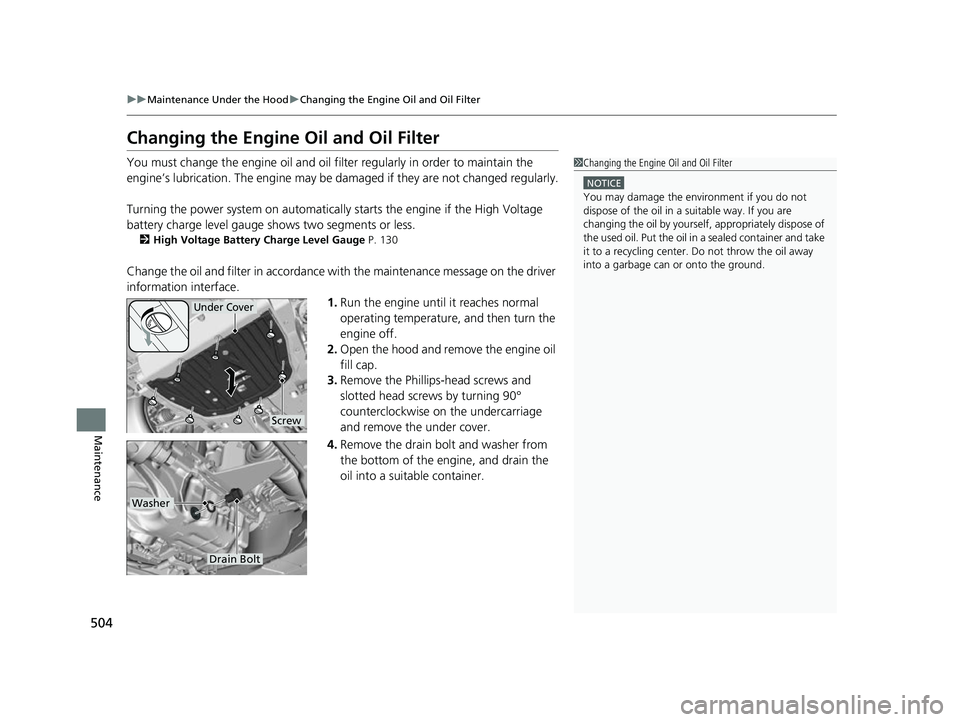
3. Remove the Phillips-head screws and
slotted head screws by turning 90°
counterclockwise on the undercarriage
and remove the under cover.
4. Remove the drain bolt and washer from
the bottom of the engine, and drain the
oil into a suitable container.
1Changing the Engine Oil and Oil Filter
NOTICE
You may damage the environment if you do not
dispose of the oil in a suitable way. If you are
changing the oil by yourself , appropriately dispose of
the used oil. Put the oil in a sealed container and take
it to a recycling center. Do not throw the oil away
into a garbage can or onto the ground.
Under Cover
Screw
Drain Bolt
Washer
22 INSIGHT HMIN-31TXM6300.book 504 ページ 2021年2月24日 水曜日 午後3時45分
Page 529 of 609
528
Maintenance
12-Volt Battery
Checking the 12-Volt Battery
The condition of the battery is monitored by a sensor located on the negative
terminal of the battery. If there is a problem with this sensor, the driver information
interface will display a warning message. If this happens, have your vehicle inspected
by a dealer.
If your vehicle’s battery is disconnected or goes dead:
• The audio system is disabled.
2 Reactivating the audio system P. 226
•The clock resets.
2 Clock P. 156
112-Volt Battery
WARNING: Battery post, terminals,
and related accessories contain lead
and lead compounds.
Wash your hands after handling.
3WARNING
The battery gives off explosive hydrogen
gas during normal operation.
A spark or flame can cause the battery to
explode with enough force to kill or
seriously hurt you.
When conducting any battery
maintenance, wear prot ective clothing and
a face shield, or have a skilled technician do
it.
22 INSIGHT HMIN-31TXM6300.book 528 ページ 2021年2月24日 水曜日 午後3時45分
Page 530 of 609
529
uu12-Volt Battery uCharging the AGM Battery
Maintenance
Charging the AGM Battery
AGM labeled batteries like those installed in your vehicle require a compatible
charger to be properly charged. Damage to the battery can result if the battery is
charged improperly or with the wrong equi pment. For more information on how to
charge your vehicle’s AGM battery, consult a dealer.1 12-Volt Battery
The vehicle stability assist
TM (VSA ®) system, vehicle
stability assistTM (VSA ®) OFF, adaptive cruise control
(ACC) with low speed follow, safety support and low
tire pressure/TPMS indicato rs may come on in amber
along with a message in the driver information
interface when you set the power mode to ON after
re-connecting a battery.
Drive a short distance at more than 12 mph (20
km/h). The indicator should go off. If it does not, have
your vehicle checked by a dealer.
3WARNING
• Use of a battery not designed for this
vehicle could cause a hydrogen gas leak
inside the vehicle, resulting in a fire or
explosion that may cause injury or death.
• Only install a 12V AGM battery designed
for use in this vehicle.
• Contact your Honda dealer for more
information.
22 INSIGHT HMIN-31TXM6300.book 529 ページ 2021年2月24日 水曜日 午後3時45分
Page 531 of 609
530
Maintenance
Remote Transmitter Care
Replacing the Remote Battery
If the indicator does not come on when the button is pressed, replace the battery.
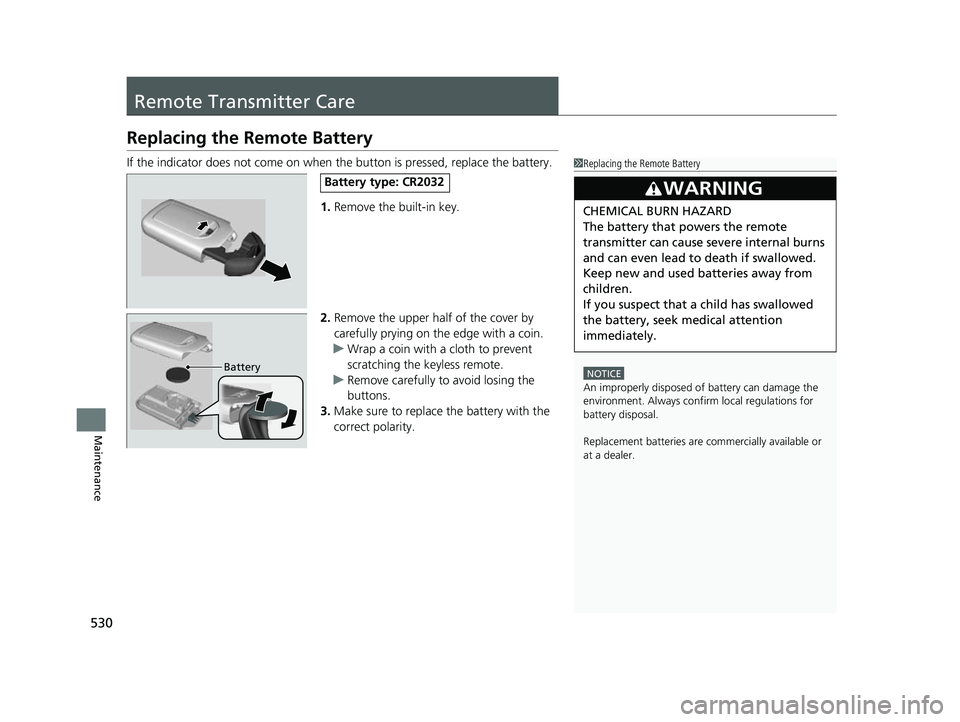
1. Remove the built-in key.
2. Remove the upper half of the cover by
carefully prying on the edge with a coin.
u Wrap a coin with a cloth to prevent
scratching the keyless remote.
u Remove carefully to avoid losing the
buttons.
3. Make sure to replace the battery with the
correct polarity.1 Replacing the Remote Battery
NOTICE
An improperly disposed of battery can damage the
environment. Always conf irm local regulations for
battery disposalM
Replacement batteries are commercially available or
at a dealer.
3WARNING
CHEMICAL BURN HAZARD
The battery that powers the remote
transmitter can cause severe internal burns
and can even lead to death if swallowed.
Keep new and used batteries away from
children.
If you suspect that a child has swallowed
the battery, seek medical attention
immediately.
Battery type: CR2032
Battery
22 INSIGHT HMIN-31TXM6300.book 530 ページ 2021年2月24日 水曜日 午後3時45分
Page 536 of 609
Continued535
uuCleaning uExterior Care
Maintenance
A good coat of automotive body wax helps protect your vehicle’s paint from the
elements. Wax will wear off over time and expose your vehicle’s paint to the
elements, so reapply as necessary.
If you get gasoline, oil, engine coolant, or battery fluid on resin coated parts, they
may be stained or the coating may peel. Prom ptly wipe it away using a soft cloth and
clean water.
Wipe using a glass cleaner.
Aluminum is susceptible to deterioration caused by salt and other road
contaminants. When necessary, as early as possible use a sponge and mild detergent
to wipe away these contaminants. Do no t use a stiff brush or harsh chemicals
(including some commercial wheel cleaners). These can damage the protective finish
on aluminum alloy wheels, resulting in corrosion. Depending on the type of finish,
the wheels also may lo se their luster or appear burn ished. To avoid water stains,
wipe the wheels dry with a cloth while they are still wet.
■Applying Wax
■Maintaining the Bumpers and Other Resin Coated Parts
■Cleaning the Window
■Maintaining Aluminum Wheels
1 Applying Wax
NOTICE
Chemical solvents and strong cleaners can damage
the paint, metal, and plasti c on your vehicle. Wipe
away spills immediately.
1 Maintaining the Bumpers an d Other Resin Coated Parts
Ask a dealer about the corr ect coating material when
you want to repair the painted surface of the parts
made of resin.
22 INSIGHT HMIN-31TXM6300.book 535 ページ 2021年2月24日 水曜日 午後3時45分
Page 538 of 609
537
Maintenance
Accessories and Modifications
Accessories
When installing accessories, check the following:
• Do not install accessories on the windsh ield. They can obstruct your view and
delay your reaction to driving conditions.
• Do not install any accessories over areas marked SRS Airbag, on the sides or backs
of the front seats, on front or side pillars, or near the side windows.
Accessories installed in these areas may interfere with proper operation of the
vehicle’s airbags or may be propelled into you or another occupant if the airbags
deploy.
• Be sure electronic accessories do not overload electrical circuits or interfere with
proper operation of your vehicle.
2 Fuses P. 577
•Before installing any electro nic accessory, have the installer contact a dealer for
assistance. If possible, have a deal er inspect the final installation.
1Accessories and Modifications
Honda Genuine accessor ies are recommended to
ensure proper operati on on your vehicle.
3WARNING
Improper accessories or modifications can
affect your vehicle’s handling, stability, and
performance, and cause a crash in which
you can be seriously hurt or killed.
Follow all instruction s in this owner’s
manual regarding accessories and
modifications.
3WARNING
Use of improperly designed, engineered or
manufactured high-voltage battery
assemblies could cause a fire in your
vehicle.
A vehicle fire could result in a crash or
injury.
Only use a genuine Honda high-voltage
battery assembly, or it s equivalent, in your
vehicle.
22 INSIGHT HMIN-31TXM6300.book 537 ページ 2021年2月24日 水曜日 午後3時45分
Page 539 of 609
538
uuAccessories and Modifications uModifications
Maintenance
Modifications
Do not modify your vehicle in a manner that may affect its handling, stability, or
reliability, or install non-genuine Honda parts or accessories that may have a similar
effect.
Even minor modifications to vehicle system s can affect overall vehicle performance.
Always make sure all equipment is prop erly installed and maintained, and do not
make any modification to your vehicle or its systems that might cause your vehicle
to no longer meet federal, state, prov ince, territory, and local regulations.
The on-board diagnostic port (OBD-II/SAE J1962 connector) installed on this vehicle
is intended to be used with automobile system diagnostic devices or with other
devices that Honda has approved. Use of any other type of device may adversely
affect the vehicle’s electronic systems or allow them to be compromised, possibly
resulting in a system malfunction, drained battery, or other unexpected problems.
Do not modify or attempt to repair your vehicle's high-voltage hybrid power system
or otherwise modify vehicle electrical systems. Disassembling or modifying electrical
equipment can result in a crash or a fire.
If you ever need to replace your vehicle’s high-voltage battery assembly outside of
warranty coverage, we highly recommend that you only use a genuine Honda high-
voltage battery assembly. Genuine Hond a high-voltage battery assemblies are
designed to work with your vehicle’s hybrid power system and have been designed,
engineered and manufactured to avoid overcharging situations. Non-genuine high-
voltage battery assemblies may not have be en similarly designed, engineered and
manufactured, and installation of such assemblies could result in overcharging, fires,
loss of power, or other conditions that may increase the likelihood of a crash or
injury.
22 INSIGHT HMIN-31TXM6300.book 538 ページ 2021年2月24日 水曜日 午後3時45分
Page 540 of 609
539
Handling the Unexpected
This chapter explains how to handle unexpected troubles.
ToolsTypes of Tools .................................. 540
If a Tire Goes Flat
Changing a Flat Tire ......................... 541
Temporarily Repairi ng a Flat Tire....... 547
Power System Won’t Start Checking the Procedure ................... 561
If the Keyless Remote Battery is Weak ...562
Emergency Power System Off........... 563
If the 12-Volt Battery Is Dead .......... 564
Jump Starting Procedure .................. 564
Models with optional spare tire
Overheating How to Handle Overheating............. 567
Indicator, Coming On/Blinking
If the Low Oil Pressure Warning Appears ... 569If the 12-Volt Battery Charging System Indicator Comes On ....................... 570
If the Malfunction Indicator Lamp Comes On or Blinks ..................................... 571
If the Brake System Indicator (Red) Comes
On or Blinks ..................................... 572
If the Brake System Indicator (Red) Comes On or Blinks at the Same Time When the Brake
System Indicator (Amber) Comes On .....573
If the Electric Power Steering (EPS) System Indicator Comes On......................... 574
If the Low Tire Pressure/TPMS Indicator
Comes On or Blinks ....................... 575
If the Transmission System Indicator Blinks along with the Warning Message ...... 576
Fuses Fuse Locations ................................. 577
Inspecting and Changing Fuses ........ 582
Emergency Towing ........................... 583
If You Cannot Unlock the Fuel Fill Door.. 584If You Cannot Open the Trunk ........ 585
22 INSIGHT HMIN-31TXM6300.book 539 ページ 2021年2月24日 水曜日 午後3時45分
Page 562 of 609
561
Handling the Unexpected
Power System Won’t Start
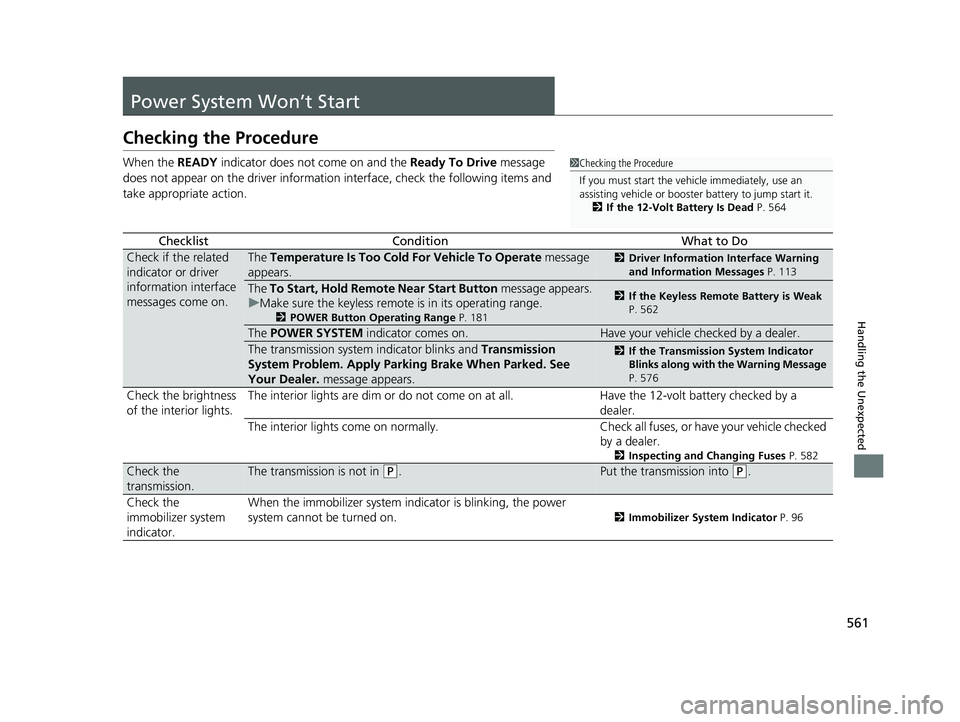
Checking the Procedure
When the READY indicator does not come on and the Ready To Drive message
does not appear on the driver informatio n interface, check the following items and
take appropriate action.
ChecklistConditionWhat to Do
Check if the related
indicator or driver
information interface
messages come on.The Temperature Is Too Cold For Vehicle To Operate message
appears.2 Driver Information Interface Warning
and Information Messages P. 113
The To Start, Hold Remote Near Start Button message appears.
u Make sure the keyless remote is in its operating range.
2 POWER Button Operating Range P. 181
2If the Keyless Remote Battery is Weak
P. 562
The POWER SYSTEM indicator comes on.Have your vehicle checked by a dealer.
The transmission system indicator blinks and Transmission
System Problem. Apply Parking Brake When Parked. See
Your Dealer. message appears.2If the Transmission System Indicator
Blinks along with the Warning Message
P. 576
Check the brightness
of the interior lights. The interior lights are dim or do not come on at all. Have the 12-volt battery checked by a
dealer.
The interior lights come on normally. Check all fuses, or have your vehicle checked
by a dealer.
2 Inspecting and Changing Fuses P. 582
Check the
transmission.The transmission is not in (P.Put the transmission into (P.
Check the
immobilizer system
indicator. When the immobilizer system indicator is blinking, the power
system cannot be turned on.
2
Immobilizer System Indicator P. 96
1Checking the Procedure
If you must start the vehi cle immediately, use an
assisting vehicle or booster battery to jump start it.
2 If the 12-Volt Battery Is Dead P. 564
22 INSIGHT HMIN-31TXM6300.book 561 ページ 2021年2月24日 水曜日 午後3時45分
Page 563 of 609
562
uuPower System Won’t Start uIf the Keyless Remote Battery is Weak
Handling the Unexpected
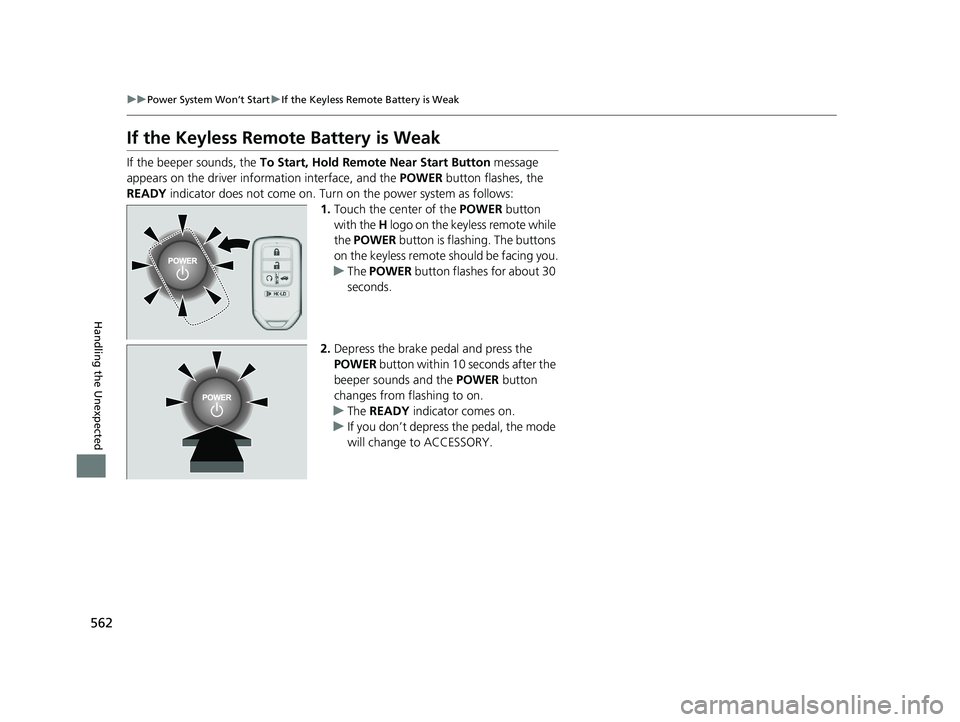
If the Keyless Remote Battery is Weak
If the beeper sounds, the To Start, Hold Remote Near Start Button message
appears on the driver info rmation interface, and the POWER button flashes, the
READY indicator does not come on. Turn on the power system as follows:
1.Touch the center of the POWER button
with the H logo on the keyle ss remote while
the POWER button is flashing. The buttons
on the keyless remote should be facing you.
u The POWER button flashes for about 30
seconds.
2. Depress the brake pedal and press the
POWER button within 10 seconds after the
beeper sounds and the POWER button
changes from flashing to on.
u The READY indicator comes on.
u If you don’t depress the pedal, the mode
will change to ACCESSORY.
22 INSIGHT HMIN-31TXM6300.book 562 ページ 2021年2月24日 水曜日 午後3時45分