ESP HONDA ODYSSEY 1995 User Guide
[x] Cancel search | Manufacturer: HONDA, Model Year: 1995, Model line: ODYSSEY, Model: HONDA ODYSSEY 1995Pages: 240, PDF Size: 2.44 MB
Page 84 of 240

Audio System
AM/FM/Cassette Stereo Audio
System
For U.S. LX and Canadian models
Your Honda audio system is easy to use, and will give clear AM/FM
reception. The preset buttons allow
you to select six stations on AM andtwelve stations on FM.
The cassette system uses Dolby B ®
* noise reduction to give
excellent sound reproduction. The
system also senses when a metal or
chromium-dioxide (CrO2) tape is
being played and adjusts accordingly.
* Dolby noise reduction manufac-
tured under license from Dolby Laboratories Licensing Corporation.
"DOLBY" and the double-D symbol are trademarks of Dolby
Laboratories Licensing Corporation. PWR/VOL KNOB
CASSETTE SLOT
AM/FM
BUTTON
PRESET
BUTTONS
Comfort and Convenience FeaturesProCarManuals.comMain Menu Table of Contents s t
Page 90 of 240
Audio System
Cassette Search Functions
Once a cassette is playing, you can
use the FF, REW, RPT, or SKIP
function to look for desired songs or
passages.
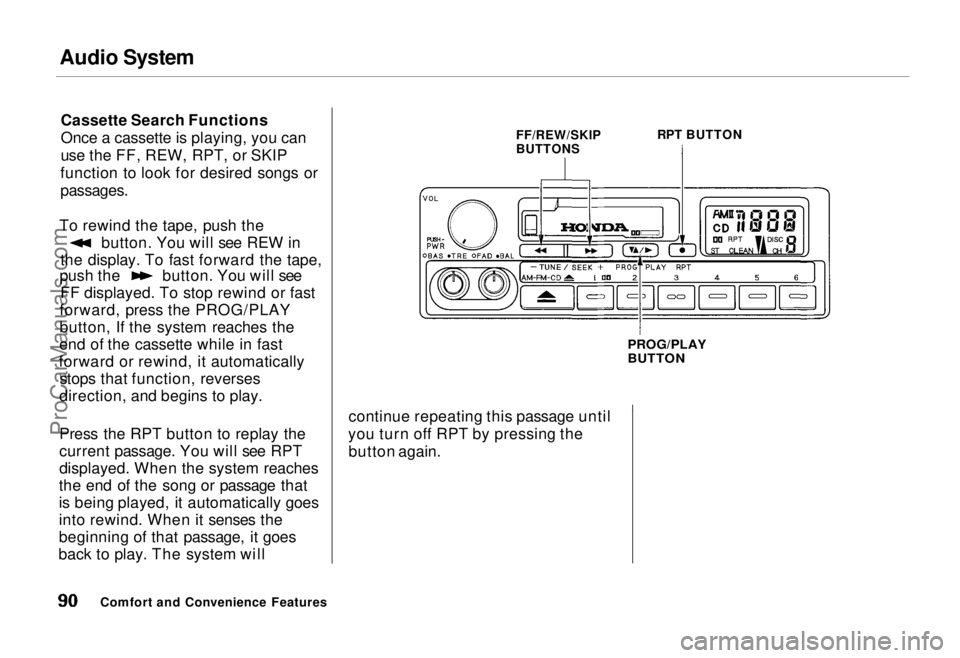
To rewind the tape, push the button. You will see REW in
the display. To fast forward the tape, push the button. You will see
FF displayed. To stop rewind or fast
forward, press the PROG/PLAY
button, If the system reaches the
end of the cassette while in fast
forward or rewind, it automatically stops that function, reverses
direction, and begins to play.
Press the RPT button to replay the
current passage. You will see RPT
displayed. When the system reaches
the end of the song or passage that
is being played, it automatically goes
into rewind. When it senses the
beginning of that passage, it goes
back to play. The system will FF/REW/SKIP
BUTTONS
RPT BUTTON
PROG/PLAY
BUTTON
continue repeating this passage until
you turn off RPT by pressing the button again.
Comfort and Convenience FeaturesProCarManuals.comMain Menu Table of Contents s t
Page 91 of 240
Audio System
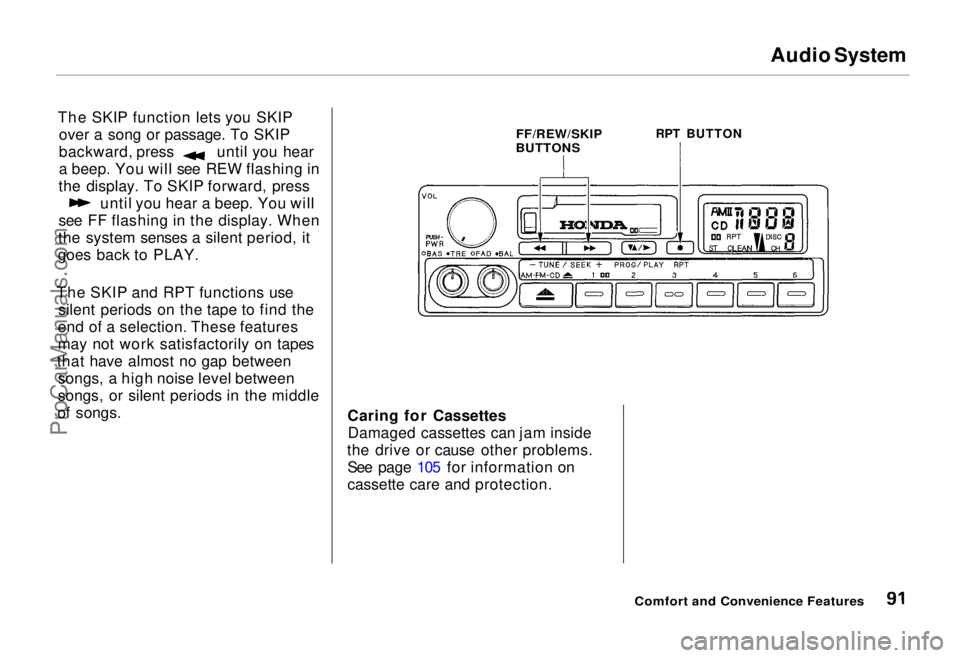
The SKIP function lets you SKIP over a song or passage. To SKIP backward, press until you hear
a beep. You will see REW flashing in
the display. To SKIP forward, press until you hear a beep. You will
see FF flashing in the display. When
the system senses a silent period, it
goes back to PLAY.
The SKIP and RPT functions use silent periods on the tape to find the
end of a selection. These features
may not work satisfactorily on tapes
that have almost no gap between songs, a high noise level between
songs, or silent periods in the middle
of songs.
FF/REW/SKIP
BUTTONS
RPT BUTTON
Caring for Cassettes Damaged cassettes can jam inside
the drive or cause other problems. See page 105 for information on
cassette care and protection.
Comfort and Convenience FeaturesProCarManuals.comMain Menu Table of Contents s t
Page 92 of 240
Audio System
AM/FM/Cassette Stereo Audio
System
For U.S. EX model
Your Honda audio system is easy to use, and will give clear AM/FM
reception. The preset buttons allow
you to select six stations on AM and twelve stations on FM.
The cassette system uses Dolby B ®
*
noise reduction to give
excellent sound reproduction. The system also senses when a metal or
chromium-dioxide (CrO 2) tape is
being played and adjusts accordingly.
The Anti-theft feature disables the system if it is disconnected from the
car's battery. To get the system
working again, you must enter a
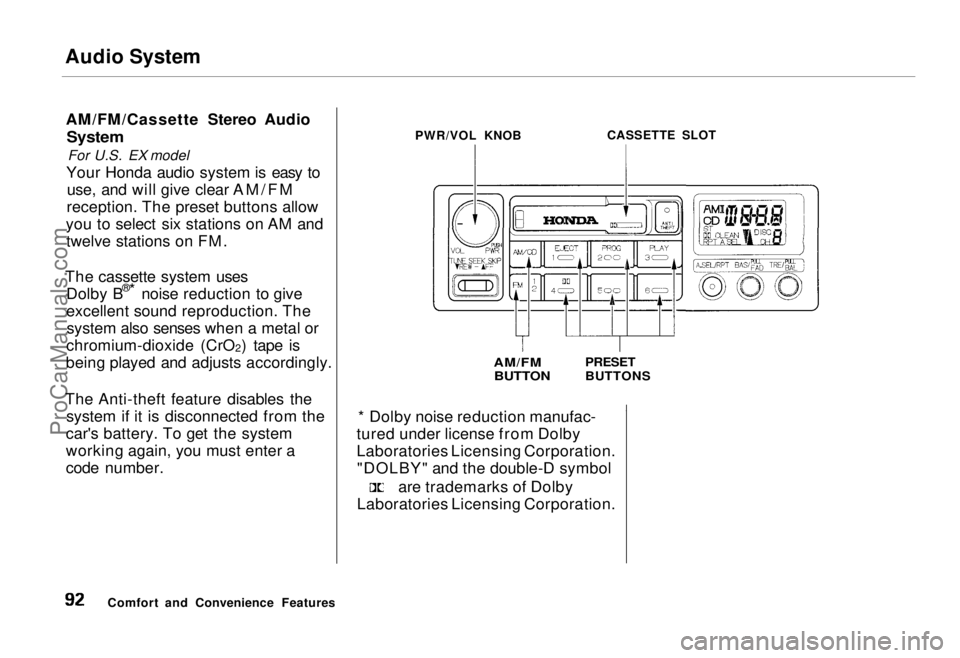
code number. PWR/VOL KNOB
CASSETTE SLOT
AM/FM
BUTTON
PRESET
BUTTONS
* Dolby noise reduction manufac-
tured under license from Dolby
Laboratories Licensing Corporation. "DOLBY" and the double-D symbol are trademarks of Dolby
Laboratories Licensing Corporation.
Comfort and Convenience FeaturesProCarManuals.comMain Menu Table of Contents s t
Page 93 of 240
Audio System
Operating the Radio
The ignition switch must be in
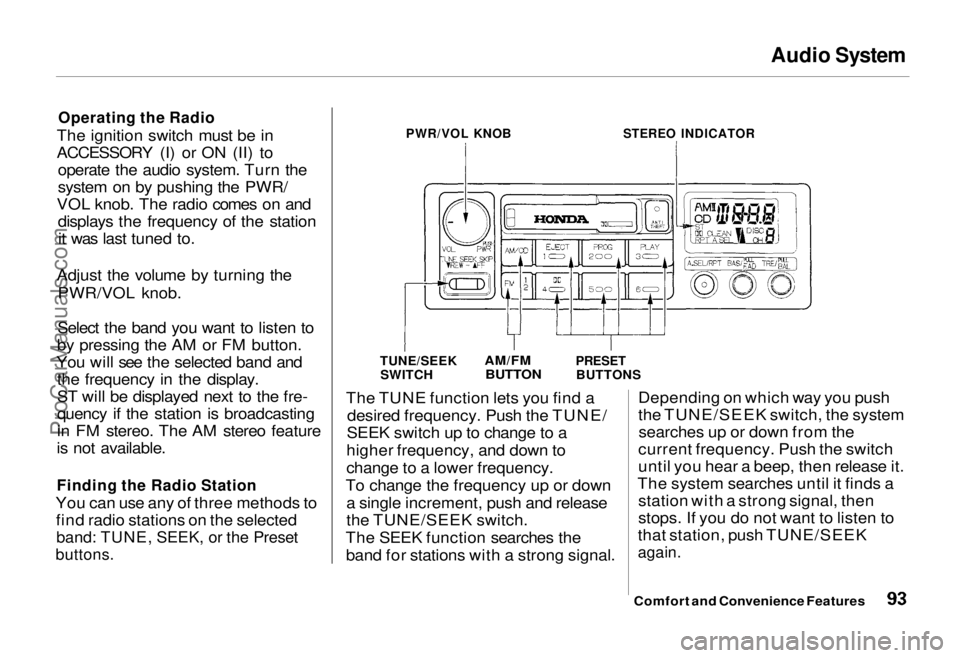
ACCESSORY (I) or ON (II) to operate the audio system. Turn the
system on by pushing the PWR/
VOL knob. The radio comes on and displays the frequency of the stationit was last tuned to.
Adjust the volume by turning the PWR/VOL knob.
Select the band you want to listen to
by pressing the AM or FM button.
You will see the selected band and the frequency in the display.
ST will be displayed next to the fre-
quency if the station is broadcasting
in FM stereo. The AM stereo feature
is not available.
Finding the Radio Station
You can use any of three methods to find radio stations on the selected
band: TUNE, SEEK, or the Preset
buttons.
PWR/VOL KNOB
STEREO INDICATOR
TUNE/SEEK SWITCH
AM/FM
BUTTON
PRESET
BUTTONS
The TUNE function lets you find a desired frequency. Push the TUNE/
SEEK switch up to change to a
higher frequency, and down to
change to a lower frequency.
To change the frequency up or down a single increment, push and release
the TUNE/SEEK switch.
The SEEK function searches the band for stations with a strong signal. Depending on which way you push
the TUNE/SEEK switch, the system
searches up or down from the
current frequency. Push the switch
until you hear a beep, then release it.
The system searches until it finds a station with a strong signal, then
stops. If you do not want to listen to
that station, push TUNE/SEEK
again.
Comfort and Convenience FeaturesProCarManuals.comMain Menu Table of Contents s t
Page 94 of 240
Audio System
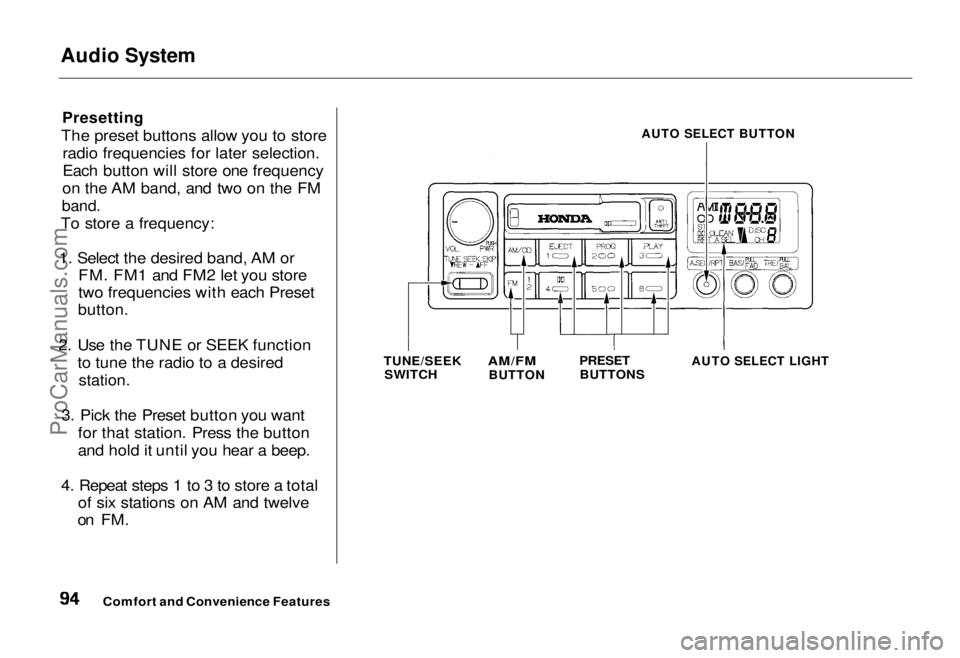
Presetting
The preset buttons allow you to store radio frequencies for later selection.
Each button will store one frequency
on the AM band, and two on the FM
band.
To store a frequency:
1. Select the desired band, AM or FM. FM1 and FM2 let you store
two frequencies with each Preset
button.
2. Use the TUNE or SEEK function to tune the radio to a desired
station.
3. Pick the Preset button you want for that station. Press the button
and hold it until you hear a beep.
4. Repeat steps 1 to 3 to store a total of six stations on AM and twelve
on FM.
AUTO SELECT BUTTON
TUNE/SEEK SWITCH
AM/FM
BUTTON
PRESET
BUTTONS
AUTO SELECT LIGHT
Comfort and Convenience FeaturesProCarManuals.comMain Menu Table of Contents s t
Page 95 of 240
Audio System
Once that station's frequency is
stored, simply press and release the
proper preset button to tune to it. If
you want to change any preset button's selection, store another fre-
quency as described. The frequen-
cies you preset will be lost if your
car's battery goes dead or is discon-
nected.
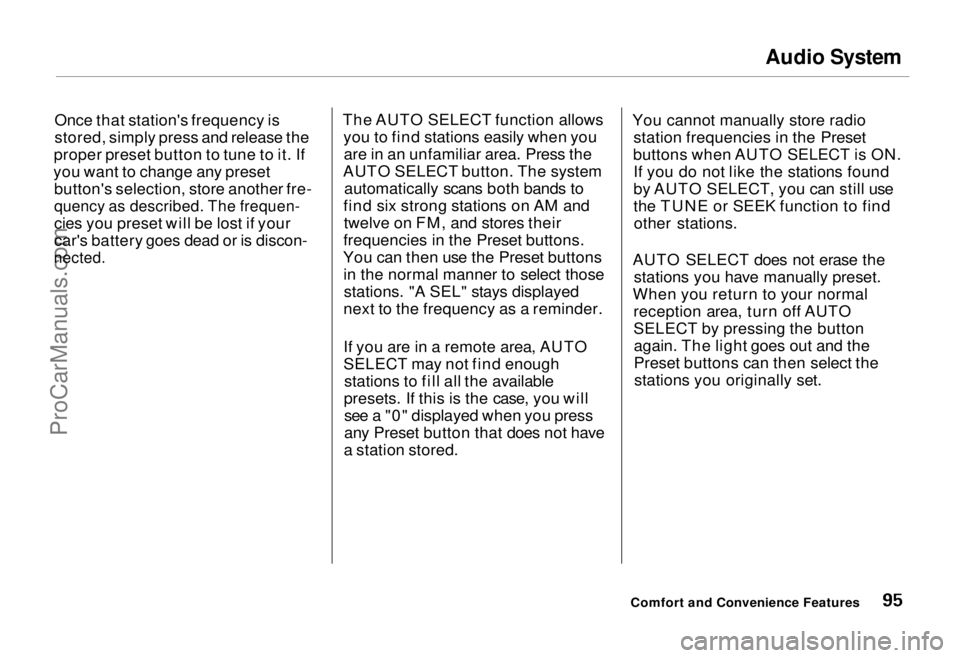
The AUTO SELECT function allows
you to find stations easily when youare in an unfamiliar area. Press the
AUTO SELECT button. The system automatically scans both bands to
find six strong stations on AM and twelve on FM, and stores their
frequencies in the Preset buttons.
You can then use the Preset buttons in the normal manner to select thosestations. "A SEL" stays displayed
next to the frequency as a reminder.
If you are in a remote area, AUTO
SELECT may not find enough stations to fill all the available
presets. If this is the case, you will see a "0" displayed when you press
any Preset button that does not have
a station stored. You cannot manually store radio
station frequencies in the Preset
buttons when AUTO SELECT is ON. If you do not like the stations found
by AUTO SELECT, you can still use
the TUNE or SEEK function to findother stations.
AUTO SELECT does not erase the stations you have manually preset.
When you return to your normal reception area, turn off AUTO
SELECT by pressing the buttonagain. The light goes out and the
Preset buttons can then select thestations you originally set.
Comfort and Convenience FeaturesProCarManuals.comMain Menu Table of Contents s t
Page 103 of 240
Audio System
U.S. LX and Canadian EX models
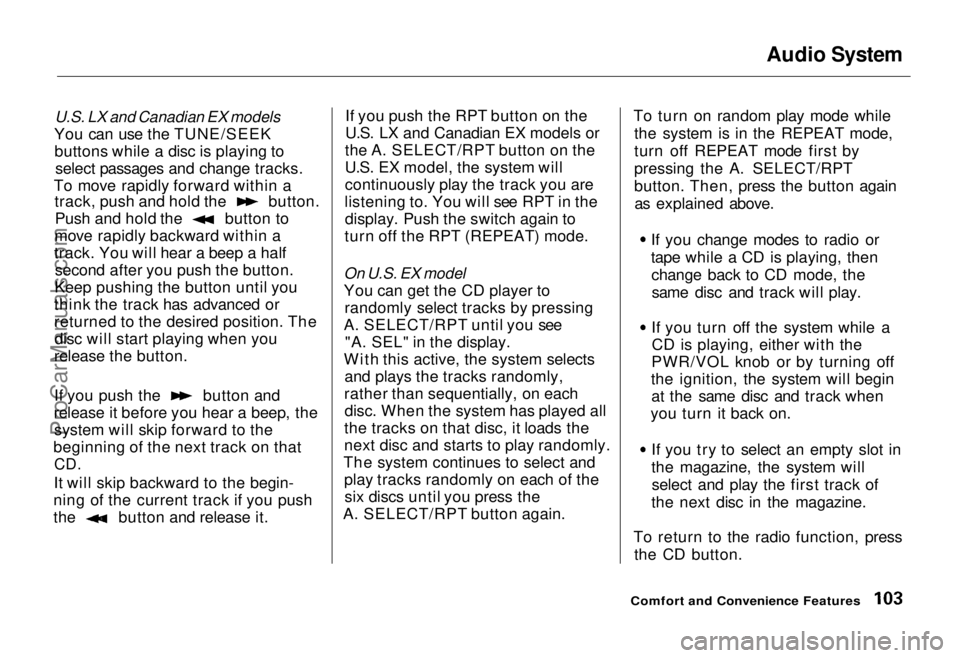
You can use the TUNE/SEEK buttons while a disc is playing to select passages and change tracks.
To move rapidly forward within a track, push and hold the button.
Push and hold the button to
move rapidly backward within a
track. You will hear a beep a half second after you push the button.
Keep pushing the button until you
think the track has advanced or
returned to the desired position. The disc will start playing when you
release the button. If you push the button and
release it before you hear a beep, the system will skip forward to the
beginning of the next track on that
CD.
It will skip backward to the begin-
ning of the current track if you push the button and release it. If you push the RPT button on the
U.S. LX and Canadian EX models or
the A. SELECT/RPT button on the
U.S. EX model, the system will
continuously play the track you are
listening to. You will see RPT in the display. Push the switch again to
turn off the RPT (REPEAT) mode.
On U.S. EX model
You can get the CD player to randomly select tracks by pressing
A. SELECT/RPT until you see "A. SEL" in the display.
With this active, the system selects and plays the tracks randomly,
rather than sequentially, on each disc. When the system has played all
the tracks on that disc, it loads the
next disc and starts to play randomly.
The system continues to select and play tracks randomly on each of thesix discs until you press the
A. SELECT/RPT button again. To turn on random play mode while
the system is in the REPEAT mode,
turn off REPEAT mode first by
pressing the A. SELECT/RPT
button. Then, press the button againas explained above.
If you change modes to radio or
tape while a CD is playing, thenchange back to CD mode, thesame disc and track will play.
If you turn off the system while a CD is playing, either with the
PWR/VOL knob or by turning off
the ignition, the system will begin at the same disc and track when
you turn it back on.
If you try to select an empty slot in
the magazine, the system willselect and play the first track of
the next disc in the magazine.
To return to the radio function, press the CD button.
Comfort and Convenience FeaturesProCarManuals.comMain Menu Table of Contents s t
Page 104 of 240
Audio System
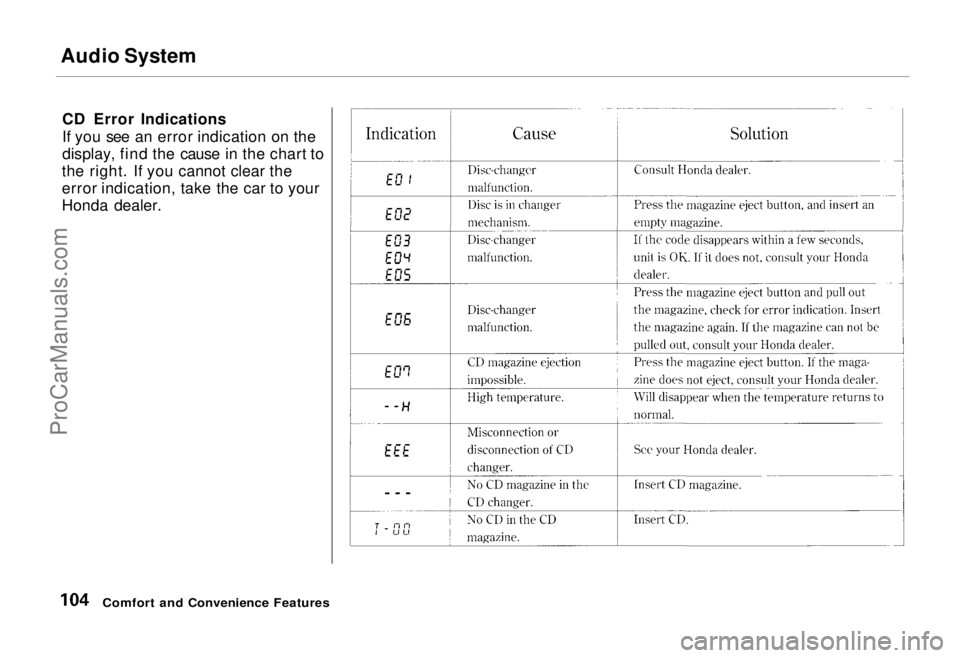
CD Error Indications
If you see an error indication on the
display, find the cause in the chart to
the right. If you cannot clear the
error indication, take the car to your
Honda dealer.
Comfort and Convenience FeaturesProCarManuals.comMain Menu Table of Contents s t
Page 106 of 240
Theft Protection
On U.S. EX model Your car's audio system will disableitself if it is disconnected from
electrical power for any reason. Tomake it work again, the user must
enter a specific five-digit code in the
Preset buttons. Because there are
hundreds of number combinations
possible from five digits, making the system work without knowing the
exact code is nearly impossible.
You should have received a card that lists your audio system's code
number and serial number. It is best
to store this card in a safe place at
home, or to keep it in your wallet or
purse. In addition, you should write
the audio system's serial number in
this Owner's Manual. If you should
happen to lose the card, you must obtain the code number from your
Honda dealer. To do this, you will
need the system's serial number. If your car's battery is disconnected
or goes dead, the audio system will
disable itself. If this happens, you
will see "Code" in the frequency display the next time you turn on the
system. Use the Preset buttons to
enter the five-digit code. If it is
entered correctly, the radio will start
playing.
If you make a mistake entering the
code, do not start over or try to
correct your mistake. Complete the
five-digit sequence, then enter the correct code. You have three tries to
enter the correct code. If you are
unsuccessful in three attempts, you must then leave the system on for
one hour before trying again. You will have to store your favorite
stations in the Preset buttons after
the system begins working. Your original settings were lost when
power was disconnected.
Comfort and Convenience FeaturesProCarManuals.comMain Menu Table of Contents s t