engine HONDA ODYSSEY 1996 User Guide
[x] Cancel search | Manufacturer: HONDA, Model Year: 1996, Model line: ODYSSEY, Model: HONDA ODYSSEY 1996Pages: 240, PDF Size: 2.64 MB
Page 80 of 240
Heating and Cooling
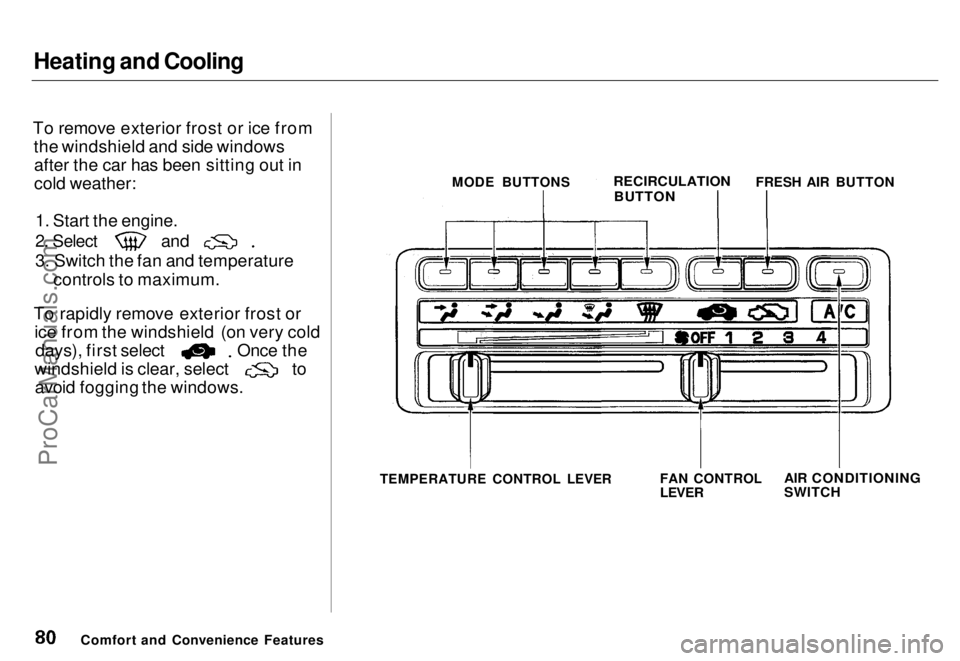
To remove exterior frost or ice from the windshield and side windowsafter the car has been sitting out in
cold weather:
1. Start the engine.
2. Select
and
3. Switch the fan and temperature
controls to maximum.
To rapidly remove exterior frost or ice from the windshield (on very cold days), first select Once the
windshield is clear, select to
avoid fogging the windows.
TEMPERATURE CONTROL LEVER
Comfort and Convenience Features MODE BUTTONS
RECIRCULATION
BUTTON
FRESH AIR BUTTON
FAN CONTROL
LEVER
AIR CONDITIONING
SWITCHProCarManuals.comMain Menu s t Table of Contents
Page 81 of 240
Heating and Cooling
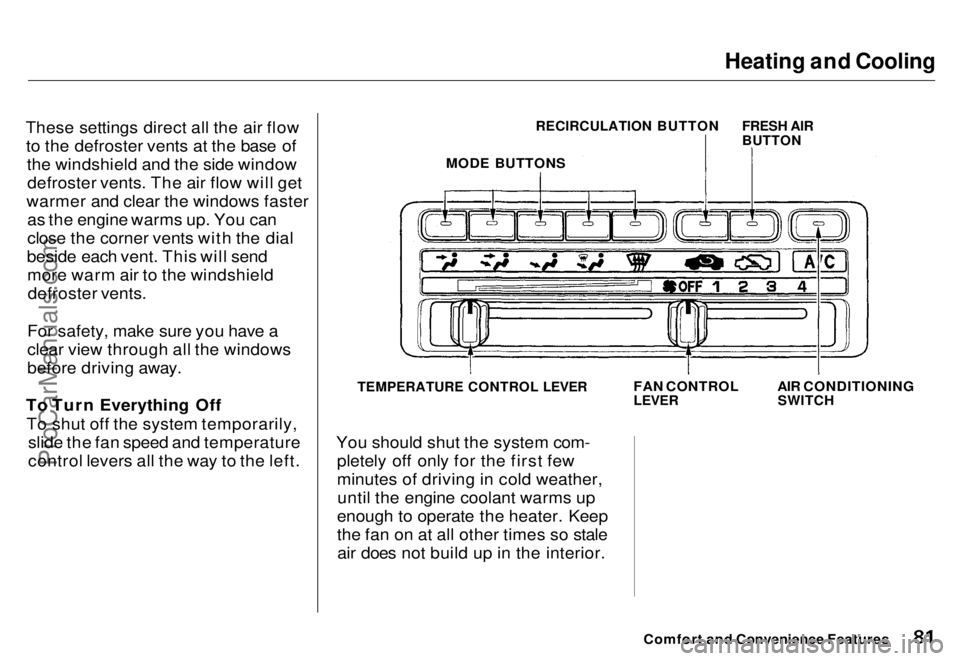
These settings direct all the air flow to the defroster vents at the base of the windshield and the side windowdefroster vents. The air flow will get
warmer and clear the windows faster as the engine warms up. You can
close the corner vents with the dial
beside each vent. This will send more warm air to the windshielddefroster vents.
For safety, make sure you have a
clear view through all the windows
before driving away.
To Turn Everything Off To shut off the system temporarily, slide the fan speed and temperature
control levers all the way to the left.
TEMPERATURE CONTROL LEVER
You should shut the system com- pletely off only for the first few
minutes of driving in cold weather,until the engine coolant warms up
enough to operate the heater. Keep
the fan on at all other times so stale air does not build up in the interior.
Comfort and Convenience Features
FAN CONTROL
LEVER
AIR CONDITIONING
SWITCH
RECIRCULATION BUTTON
FRESH AIR
BUTTON
MODE BUTTONSProCarManuals.comMain Menu s t Table of Contents
Page 108 of 240
Break-in Period, Gasoline
Break-in Period
Help assure your car's future
reliability and performance by payingextra attention to how you drive
during the first 1,000 km (600 miles).
During this period:
Avoid full-throttle starts and rapid
acceleration.
If you need to add oil, use the
engine oil recommended in this
owner's manual.
Avoid hard braking. New brakes need to be broken-in by moderate
use for the first 300 km (200
miles).
You should follow these same re- commendations with an overhauled
or exchanged engine, or when the
brakes are relined.
Gasoline
Your Honda operates most effec- tively on unleaded gasoline with a
pump octane number of 86 or higher.
Use of a lower octane gasoline can
cause a persistent, heavy metallicrapping noise in the engine that can
lead to mechanical damage.
We recommend gasolines containing detergent additives that help prevent
fuel system and engine deposits.
Using gasoline containing lead will
damage your car's emission controls.
This contributes to air pollution and can void certain parts of your
warranty. Oxygenated Fuels
Some conventional gasolines are
being blended with alcohol or an
ether compound. These gasolines
are collectively referred to as
oxygenated fuels. To meet clean air standards, some areas of the United
States and Canada use oxygenated
fuels to help reduce emissions.
If you use an oxygenated fuel, besure it is unleaded and meets the
minimum octane rating requiremen
Before using an oxygenated fuel,
to confirm the fuel's contents. Some states/provinces require this
information to be posted on the
pump.
Before DrivingProCarManuals.comMain Menu s t Table of Contents
Page 110 of 240
Service Station Procedures
Filling the Fuel Tank
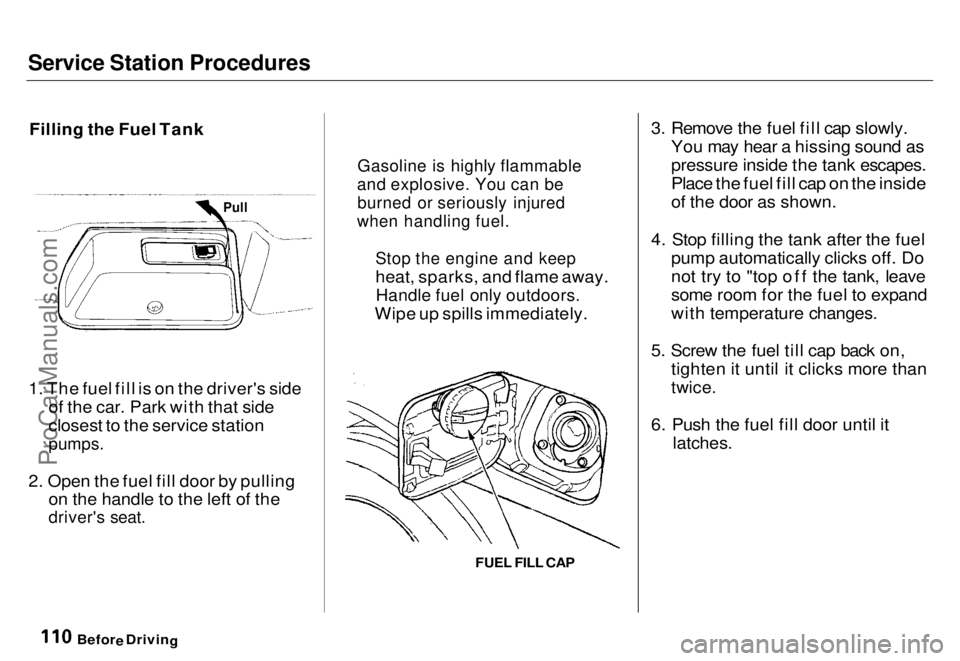
1. The fuel fill is on the driver's side of the car. Park with that side
closest to the service station
pumps.
2. Open the fuel fill door by pulling on the handle to the left of the
driver's seat.
3. Remove the fuel fill cap slowly.
You may hear a hissing sound as
pressure inside the tank escapes.
Place the fuel fill cap on the inside
of the door as shown.
4. Stop filling the tank after the fuel pump automatically clicks off. Do
not try to "top off the tank, leave
some room for the fuel to expand
with temperature changes.
5. Screw the fuel till cap back on, tighten it until it clicks more than
twice.
6. Push the fuel fill door until it
latches.
Befor
e
Drivin
g
Gasoline i
s highly flammable
and explosive. You can be
burned or seriously injured
when handling fuel.
Stop the engine and keep
heat, sparks, and flame away.
Handle fuel only outdoors.
Wipe up spills immediately.
Pull
FUEL FILL CAPProCarManuals.comMain Menu s t Table of Contents
Page 112 of 240
Service Station Procedures
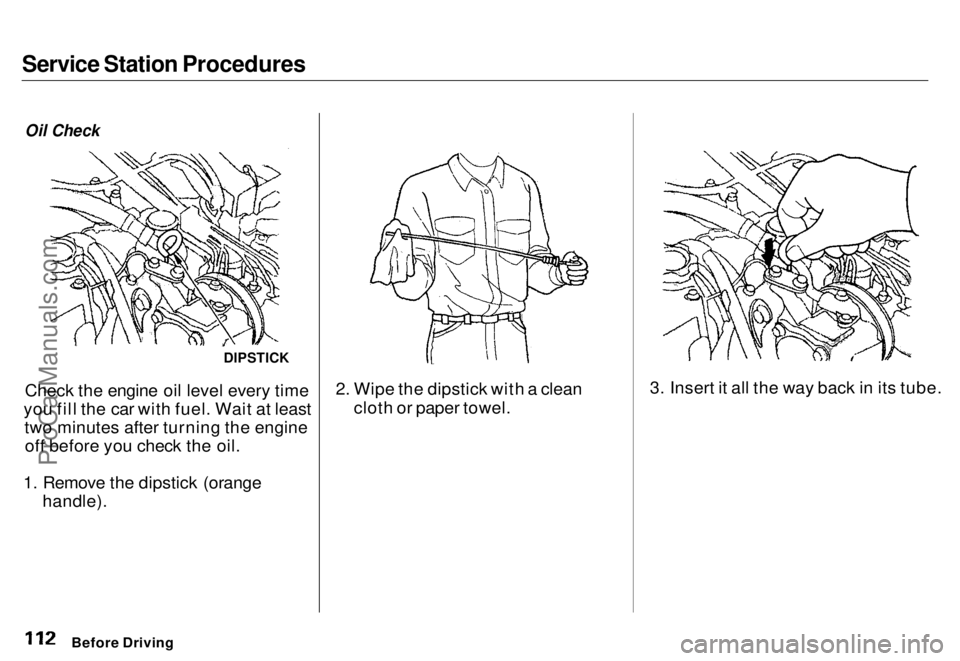
Oil Check
Check the engine oil level every time
you fill the car with fuel. Wait at least two minutes after turning the engineoff before you check the oil.
1. Remove the dipstick (orange handle). 2. Wipe the dipstick with a clean
cloth or paper towel. 3. Insert it all the way back in its tube.
Before Driving
DIPSTICKProCarManuals.comMain Menu s t Table of Contents
Page 113 of 240
Service Station Procedures
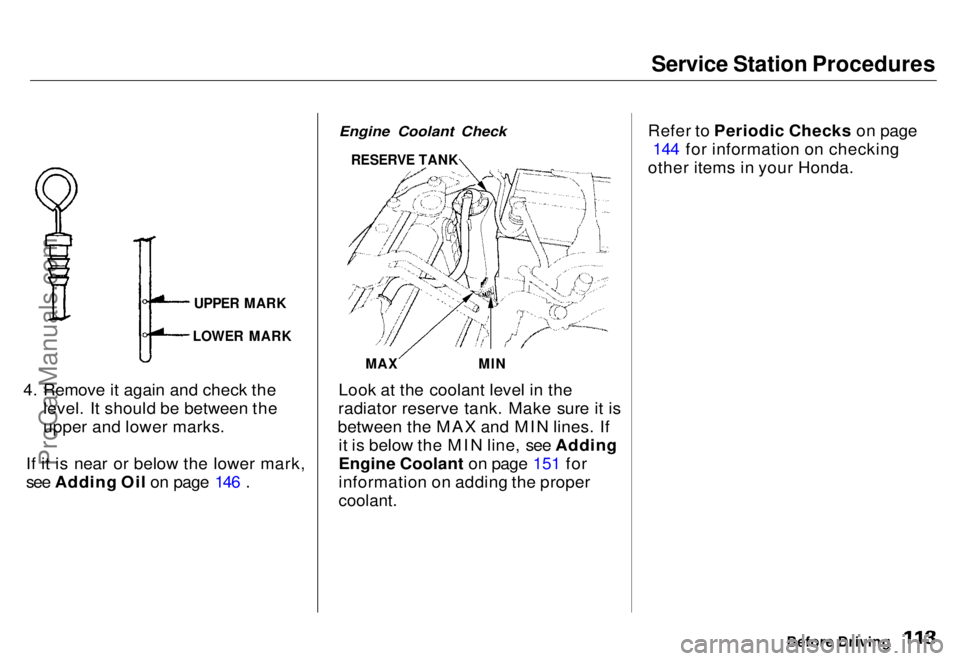
4. Remove it again and check the level. It should be between the
upper and lower marks.
If it is near or below the lower mark,
see Adding Oil on page 146 .
Engine Coolant Check
Look at the coolant level in the
radiator reserve tank. Make sure it is
between the MAX and MIN lines. If it is below the MIN line, see Adding
Engine Coolant on page 151 for
information on adding the proper
coolant.
Refer to Periodic Checks on page
144 for information on checking
other items in your Honda.
Before Driving
UPPER MARK
LOWER MARK
RESERVE TANK
MAX
MINProCarManuals.comMain Menu s t Table of Contents
Page 114 of 240
Fuel Economy
The condition of your car and your driving habits are the two most
important things that affect the fuel
mileage you get.
Vehicle Condition
Always maintain your car according to the maintenance schedule. This
will keep it in top operating condition.
An important part of that mainte- nance is the Periodic Checks (see
page 144). For example, an under- inflated tire causes more "rolling
resistance," which uses fuel. It also
wears out faster, so check the tire pressure at least monthly. In winter,the build-up of snow on your car'sunderside adds weight and rolling
resistance. Frequent cleaning helps
your fuel mileage and reduces the chance of corrosion. Driving Habits
You can improve fuel economy by
driving moderately. Rapid acceler-
ation, abrupt cornering, and hard
braking use more fuel.
Always drive in the highest gear that
allows the engine to run and acceler-
ate smoothly.
Depending on traffic conditions, try
to maintain a constant speed. Every
time you slow down and speed up, your car uses extra fuel. Use thecruise control, when appropriate, to
increase fuel economy. A cold engine uses more fuel than a
warm engine. It is not necessary to"warm-up" a cold engine by letting it
idle for a long time. You can drive away in about a minute, no matter
how cold it is outside. The engine
will warm up faster, and you get better fuel economy. To cut down on
the number of "cold starts," try to combine several short trips into one.
The air conditioning puts an extra load on the engine which makes it use more fuel. Turn off the A/C to
cut down on air conditioning use.
Use the flow-through ventilation
when the outside air temperature is
moderate.
Before DrivingProCarManuals.comMain Menu s t Table of Contents
Page 115 of 240
Accessories
Your Honda dealer has many Genuine Honda Accessories that
allow you to personalize your car.
These have all been approved for
ar
e
covered by warranty.
Some non-Honda accessories you
can buy in the "aftermarket" are designed for universal applications.
Although they may fit your Honda, they may not be within factoryspecifications. For example, after-
market wheels may not meet Honda'sspecifications for width and offset.
They could cause suspension problems that would not be covered
by your warranty. Improperly- designed accessories can adversely
affect your car's handling andstability. Your car has several computer-
controlled systems, including theSRS system, the engine's fuel
injection, and the Anti-lock brake
rerence Sarrarred
Electronic communications equip-
ment, such as cellular telephones and two-way radios are regulated by
the FCC (DOC in Canada) andshould not interfere with your car's
systems. Improper installation, or
using electrical equipment not in-
tended for mobile use may interfere
with your car's operation. If you want to install a cellular telephone, other
mobile communications equipmentor even add-on stereo amplifiers,
please discuss it first with your Honda dealer. In many cases, improper installation
is the real cause of problems with aftermarket accessories. Have these
accessories installed by qualified
technicians.who are familiar with Honda dealer inspect the final
installation.
Before Driving
ProCarManuals.comMain Menu s t Table of Contents
Page 117 of 240
Driving
This section gives you tips on starting the engine under various
conditions, and how to operate the automatic transmission. It also
includes important information on
your car's braking system and facts
you need if you are planning to tow a trailer.
Preparing to Drive......................... 118
Starting the Engine........................ 119
Starting in Cold Weather at High Altitude ..................... 119
Automatic Transmission............... 120 Shift Lever Positions................. 120
Maximum Speeds...................... 123
Shift Lock Release..................... 123
The Braking System...................... 124 Brake Wear Indicators.............. 124Brake System Design................ 124
Anti-lock Brakes........................ 125
Driving in Bad Weather................ 126
Towing a Trailer............................ 128
DrivingProCarManuals.comMain Menu s t
Page 118 of 240
Preparing to Drive
You should do the following checks
and adjustments every day before
you drive your car.
1. Make sure all windows, mirrors, and outside
lights are clean and
unobstructed. Remove frost, snow,
or ice.
2. Check that the hood and tailgate are fully closed.
3. Visually check the tires. If a tire looks low, use a gauge to check its
pressure.
4. Check that any items you may be carrying with you inside are stored
properly or fastened down
securely. 5. Check the adjustment of the seat
(see page 54).
6. Check the adjustment of the inside and outside mirrors (see
page 64).
7. Check the adjustment of the steering wheel (see page 44).
8. Make sure the doors are securely closed and locked.
9. Fasten your seat belt. Check that your passengers have fastened
their seat belts (see page 7 ). 10.Turn the ignition ON (II). Check
the indicator lights in the instru-
ment panel.
11. Start the engine (see page 119 ).
12. Check the gauges and indicator lights in the instrument panel (see
page 33 ).
DrivingProCarManuals.comMain Menu s t Table of Contents