belt HONDA ODYSSEY 1996 Owner's Manual
[x] Cancel search | Manufacturer: HONDA, Model Year: 1996, Model line: ODYSSEY, Model: HONDA ODYSSEY 1996Pages: 240, PDF Size: 2.64 MB
Page 26 of 240
Child Safety
Securing a Child Seat with a Lap/
Shoulder Belt
The lap/shoulder belt retractors in the passenger seating positions havea built-in locking mechanism
intended to secure a child seat. If
you are placing a child seat in one of the outside seating positions, do the
following:
1. Place the child restraint in the
desired seating position. Route the
lap/shoulder belt through the seat
according to the seat manufac-
turer's instructions.
2. Insert the latch plate into the buckle. Make sure it is fully
latched.
3. Slowly pull the shoulder portion of the belt out of the retractor until it
stops.
4. Allow the belt to slowly feed back into the retractor. You should hear
a clicking noise that indicates the
locking mechanism has engaged.
5. After the belt has retracted fully, pull up on the shoulder portion to
remove any slack. 6. Push and pull on the child seat to
verify that it is held firmly in place.
If not, unlatch the seat belt, allow
it to retract fully, and repeat these
steps.
To unlatch the seat belt, push the red PRESS button on the buckle.Guide the belt across to the door
pillar. If the belt doesn't retract easily, pull it out and check for twists
or kinks.
Driver and Passenger SafetyProCarManuals.comMain Menu s t Table of Contents
Page 34 of 240
Indicator Lights
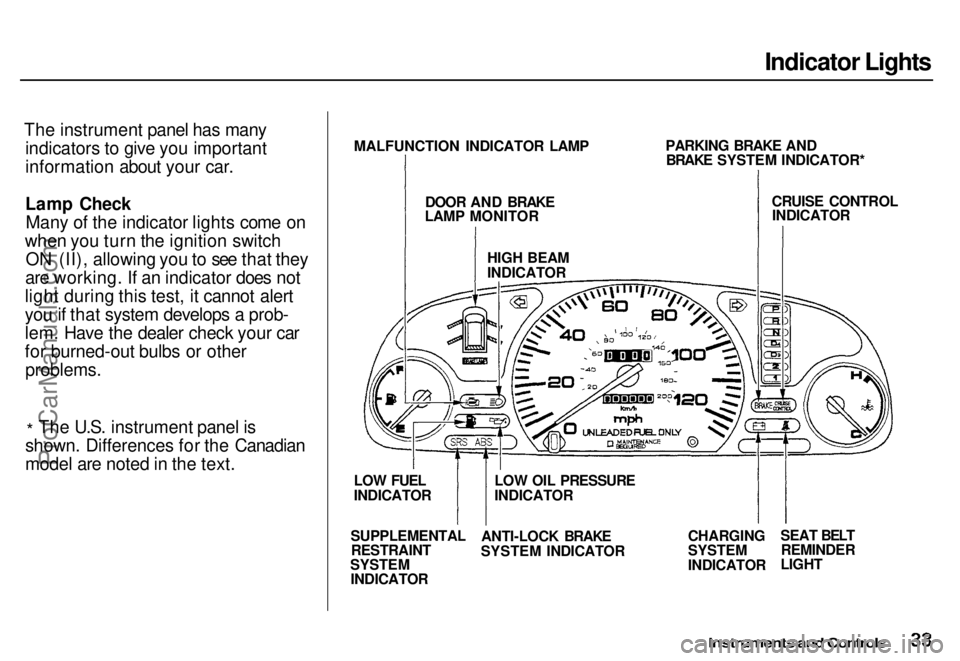
The instrument panel has many indicators to give you important
information about your car.
Lamp CheckMany of the indicator lights come on
when you turn the ignition switch ON (II), allowing you to see that they
are working. If an indicator does not
light during this test, it cannot alert
you if that system develops a prob-
lem. Have the dealer check your car
for burned-out bulbs or other
problems.
* The U.S. instrument panel is
shown. Differences for the Canadian
model are noted in the text.
Instruments and Controls
MALFUNCTION INDICATOR LAMP
DOOR AND BRAKE
LAMP MONITOR
HIGH BEAM
INDICATOR
PARKING BRAKE AND
BRAKE SYSTEM INDICATOR*
CRUISE CONTROL
INDICATOR
CHARGING
SYSTEM
INDICATOR
SEAT BELT
REMINDER
LIGHT
LOW OIL PRESSURE
INDICATOR
ANTI-LOCK BRAKE
SYSTEM INDICATOR
SUPPLEMENTAL
RESTRAINT
SYSTEM
INDICATOR
LOW FUEL
INDICATORProCarManuals.comMain Menu s t Table of Contents
Page 35 of 240
Indicator Lights
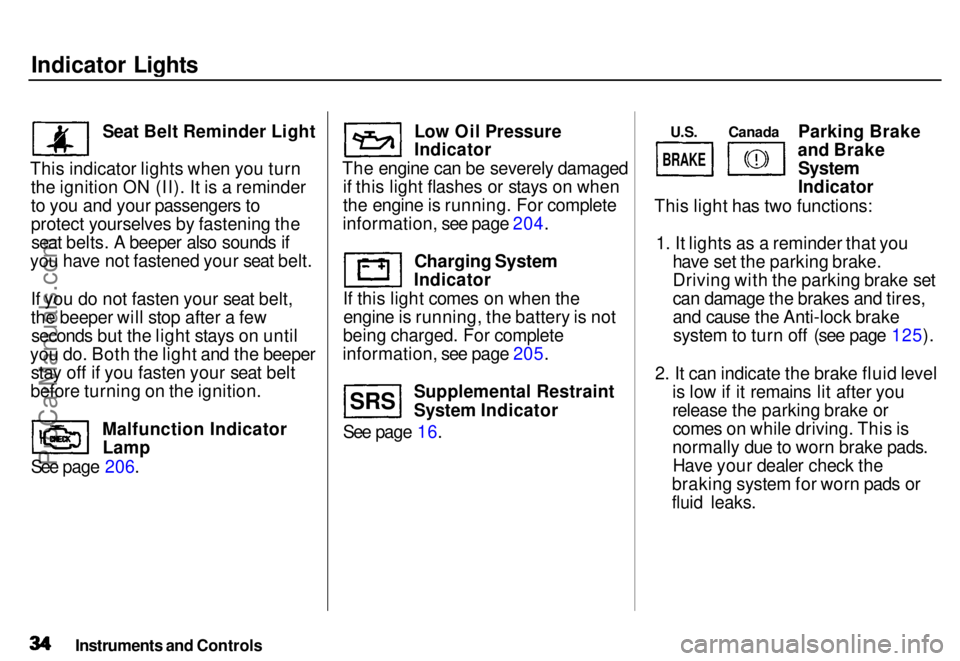
Seat Belt Reminder Light
This indicator lights when you turn the ignition ON (II). It is a reminder
to you and your passengers to
protect yourselves by fastening theseat belts. A beeper also sounds if
you have not fastened your seat belt.
If you do not fasten your seat belt,
the beeper will stop after a fewseconds but the light stays on until
you do. Both the light and the beeper stay off if you fasten your seat belt
before turning on the ignition.
See page 206. Malfunction Indicator
Lamp Low Oil Pressure
Indicator
The engine can be severely damaged if this light flashes or stays on when
the engine is running. For complete
information, see page 204.
Charging System
Indicator
If this light comes on when the engine is running, the battery is not
being charged. For complete
information, see page 205.
See page 16. Supplemental Restraint
System Indicator Parking Brake
and Brake
System
Indicator
This light has two functions:
1. It lights as a reminder that you have set the parking brake.
Driving with the parking brake set
can damage the brakes and tires,
and cause the Anti-lock brakesystem to turn off (see page 125).
2. It can indicate the brake fluid level is low if it remains lit after you
release the parking brake orcomes on while driving. This is
normally due to worn brake pads. Have your dealer check the
braking system for worn pads or
fluid leaks.
Instruments and Controls
S R S U.S.
Canada
BRAKE
ProCarManuals.comMain Menu s t Table of Contents
Page 54 of 240
Keys and Locks
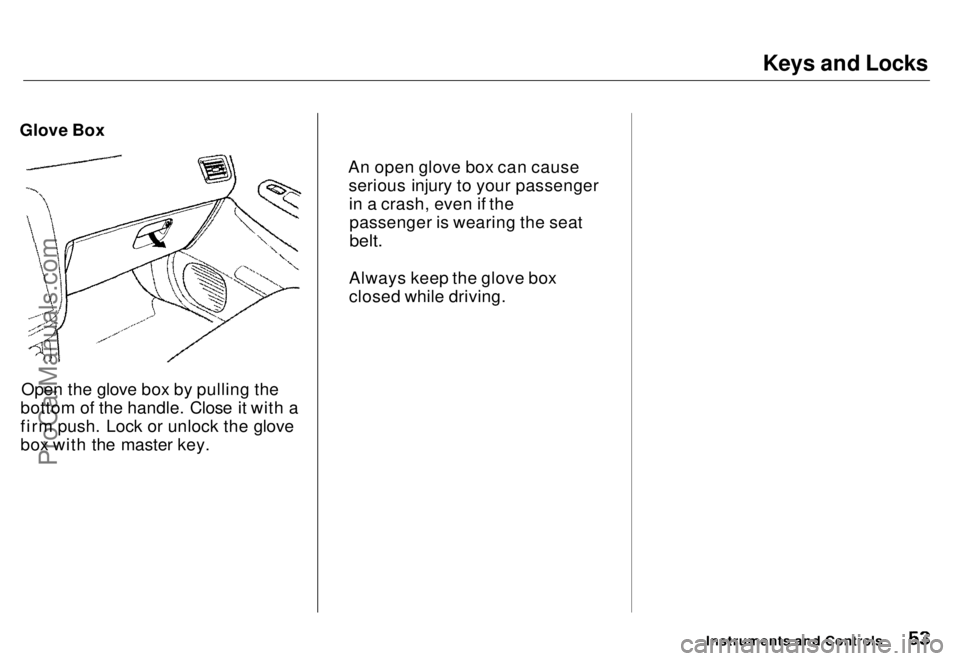
Glove Box
Open the glove box by pulling the
bottom of the handle. Close it with a
firm push. Lock or unlock the glove
box with the master key.
Instruments and Controls
An open glove box can cause
serious injury to your passengerin a crash, even if thepassenger is wearing the seat
belt.
Always keep the glove box
closed while driving.ProCarManuals.comMain Menu s t Table of Contents
Page 56 of 240
Seats
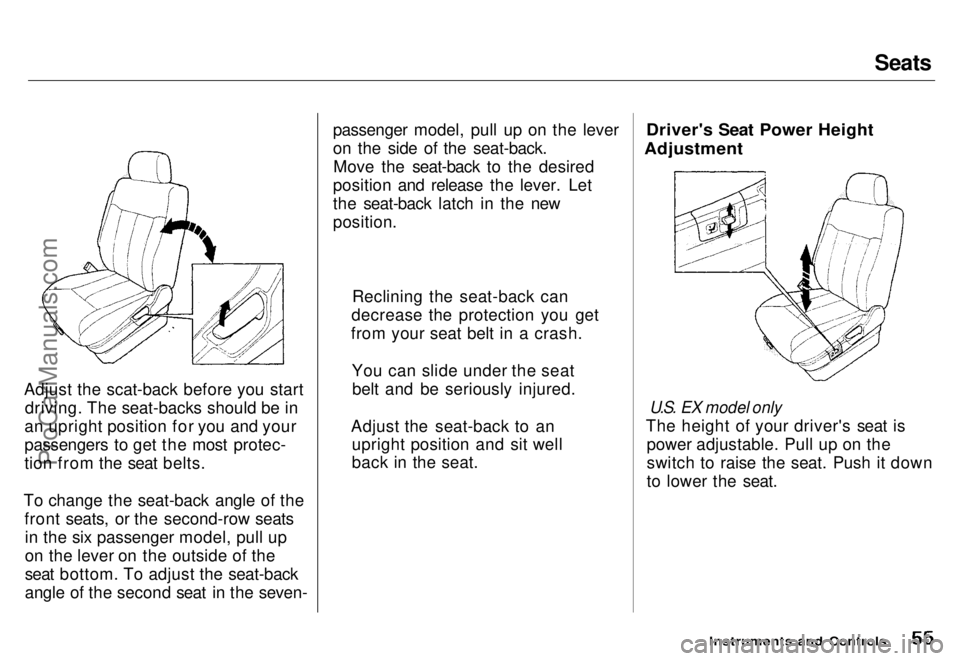
Adjust the scat-back before you start driving. The seat-backs should be in
an upright position for you and your
passengers to get the most protec-
tion from the seat belts.
To change the seat-back angle of the front seats, or the second-row seatsin the six passenger model, pull up
on the lever on the outside of the
seat bottom. To adjust the seat-back
angle of the second seat in the seven- passenger model, pull up on the lever
on the side of the seat-back.
Move the seat-back to the desired
position and release the lever. Let
the seat-back latch in the new
position.
Driver's Seat Power Height
Adjustment
U.S. EX model only
The height of your driver's seat is power adjustable. Pull up on the
switch to raise the seat. Push it down
to lower the seat.
Instruments and Controls
Reclining the seat-back can
decrease the protection you get
from your seat belt in a crash.
You can slide under the seatbelt and be seriously injured.
Adjust the seat-back to an upright position and sit well
back in the seat.ProCarManuals.comMain Menu s t Table of Contents
Page 116 of 240
Loading Cargo
The maximum load you can carry in your Honda is 535 kg (1,150 Ibs). It includes the total weight of all
passengers and their belongings, anyaccessories, and the tongue weight
figure is shown as the Vehicle Capacity Weight on the tire infor-
mation label attached to the driver's doorjamb. To figure out how much cargo you
can carry:
Figure the total "occupant weight"
you will be transporting. To. do this. (driver and all passengers) by 70
kg
(150 Ibs).
Subtract this number from the
Vehicle Capacity Weight (535 kg/ 1,150 Ibs).
If you are towing a trailer, subtract
the tongue weight. See Towing a
Trailer on page 128.
This final number is the total weight of cargo you can load in or on the car.
With seven occupants (driver and six passengers), the maximum recom-
mended weight for cargo is 45 kg (100 Ibs).
Where you store this cargo, and how
well you secure it, are just as important as how much it weighs.Make sure you load cargo so it will not shift while driving. Items stored
in the cargo area behind the third
seat should be placed as far forward
as possible. You could store addi-
tional items on the floor behind the
roll under the front seat and
interfere with the pedals.
For greater cargo capacity, the third seat can be folded into the floor and
the second row seats can either be
removed or folded up (depending on
model). Passengers should never sit in the open cargo area while the car
is moving. They should sit in one of
the seats and wear their seat belts.
If you must carry large objects that
prevent you from closing the tailgate
be aware that exhaust gas can enter
the interior. See Carbon Monoxide
Hazard on page 29 .
Before DrivingProCarManuals.comMain Menu s t Table of Contents
Page 118 of 240
Preparing to Drive
You should do the following checks
and adjustments every day before
you drive your car.
1. Make sure all windows, mirrors, and outside
lights are clean and
unobstructed. Remove frost, snow,
or ice.
2. Check that the hood and tailgate are fully closed.
3. Visually check the tires. If a tire looks low, use a gauge to check its
pressure.
4. Check that any items you may be carrying with you inside are stored
properly or fastened down
securely. 5. Check the adjustment of the seat
(see page 54).
6. Check the adjustment of the inside and outside mirrors (see
page 64).
7. Check the adjustment of the steering wheel (see page 44).
8. Make sure the doors are securely closed and locked.
9. Fasten your seat belt. Check that your passengers have fastened
their seat belts (see page 7 ). 10.Turn the ignition ON (II). Check
the indicator lights in the instru-
ment panel.
11. Start the engine (see page 119 ).
12. Check the gauges and indicator lights in the instrument panel (see
page 33 ).
DrivingProCarManuals.comMain Menu s t Table of Contents
Page 134 of 240
Maintenance
This section explains why it is important to keep your car well
maintained and to follow basic
maintenance safety precautions.
This section also includes Maintenance Schedules for normaldriving and severe driving conditions,
a Maintenance Record, and instruc-
tions for simple maintenance tasks
you may want to take care of
yourself.
If you have the skills and tools
required to perform more complex
maintenance tasks on your Honda,
you may want to purchase the Service Manual. See page 233 for
information on how to obtain a copy,or see your Honda dealer.
Maintenance Safety....................... 136
Important Safety Precautions.. 137
Maintenance Schedule.................. 138
Maintenance Record..................... 142
Periodic Checks............................. 144
Fluid Locations............................... 145
Engine Oil....................................... 146
Checking Engine Oil................. 146
Adding Oil................................... 146 Recommended Oil..................... 147
Synthetic Oil............................... 148
Additives..................................... 148
Oil and Filter Changes.............. 148
Cooling System.............................. 150
Checking the Engine Coolant
Level........................................ 150
Adding Engine Coolant............. 151 Replacing Engine Coolant........ 152
Windshield Washers..................... 154
Automatic Transmission Fluid..... 155
Brake Fluid..................................... 156
Brake System............................. 156
Anti-lock Brake System............ 157
Power Steering............................... 157
Air Cleaner..................................... 158 Spark Plugs..................................... 160
Replacement............................... 160
Specifications............................. 161
Battery............................................ 162
Windshield Wipers........................ 165
Air Conditioning............................. 168 Drive Belts...................................... 169
Tires................................................ 169 Inflation....................................... 170
Inspection................................... 171
Maintenance............................... 171
Tire Rotation.............................. 172 Replacing Tires and Wheels .... 172
Wheels and Tires....................... 173
Winter Driving........................... 173 Snow Tires.............................. 174
Tire Chains............................. 174
Lights.............................................. 175 Headlight Aiming...................... 175Replacing Bulbs......................... 177
Storing Your Car............................ 182
MaintenanceProCarManuals.comMain Menu s t
Page 168 of 240
Drive Belts, Tires
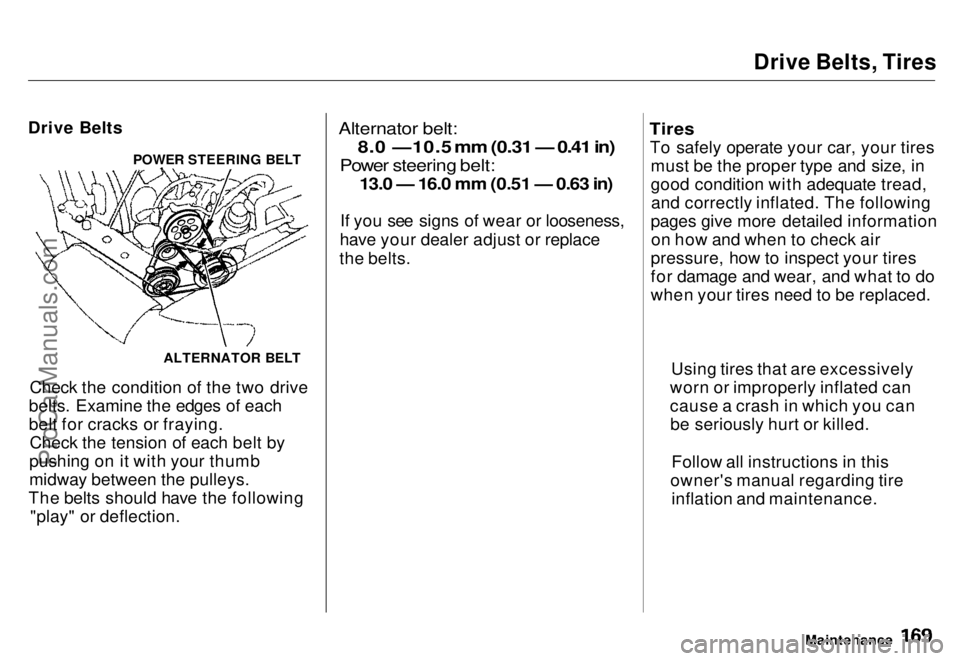
Drive Belts
Check the condition of the two drive
belts. Examine the edges of each
belt for cracks or fraying. Check the tension of each belt by
pushing on it with your thumb
midway between the pulleys.
The belts should have the following "play" or deflection.
Alternator belt:
8.0 —10.5 mm (0.31 — 0.41 in)
Power steering belt:
13.0 — 16.0 mm (0.51 — 0.63 in)
If you see signs of wear or looseness,
have your dealer adjust or replace
the belts.
Tires
To safely operate your car, your tires must be the proper type and size, in
good condition with adequate tread,and correctly inflated. The following
pages give more detailed information on how and when to check air
pressure, how to inspect your tires
for damage and wear, and what to do
when your tires need to be replaced.
Maintenance
POWER STEERING BELT
ALTERNATOR BELT Using tires that are excessively
worn or improperly inflated can
cause a crash in which you can be seriously hurt or killed.
Follow all instructions in this
owner's manual regarding tire inflation and maintenance.ProCarManuals.comMain Menu s t Table of Contents
Page 182 of 240
Appearance Care
Regular cleaning and polishing of
your Honda helps to keep it "new"
looking. This section gives you hints on how to clean and preserve your
car's appearance: the paint, bright-
work, wheels and interior. Also included are several things you can
do to help prevent corrosion. Exterior Care.................................. 184
Washing...................................... 184
Waxing........................................ 184
Aluminum Wheels..................... 185 Paint Touch-up........................... 185
Interior Care................................... 186
Carpeting.................................... 186
Fabric.......................................... 186
Vinyl............................................ 186
Seat Belts.................................... 187
Windows..................................... 187
Air Fresheners........................... 187
Corrosion Protection..................... 188
Body Repairs.................................. 189
Appearance CareProCarManuals.comMain Menu s t