ignition HONDA ODYSSEY 1996 Owner's Manual
[x] Cancel search | Manufacturer: HONDA, Model Year: 1996, Model line: ODYSSEY, Model: HONDA ODYSSEY 1996Pages: 240, PDF Size: 2.64 MB
Page 84 of 240
Audio System
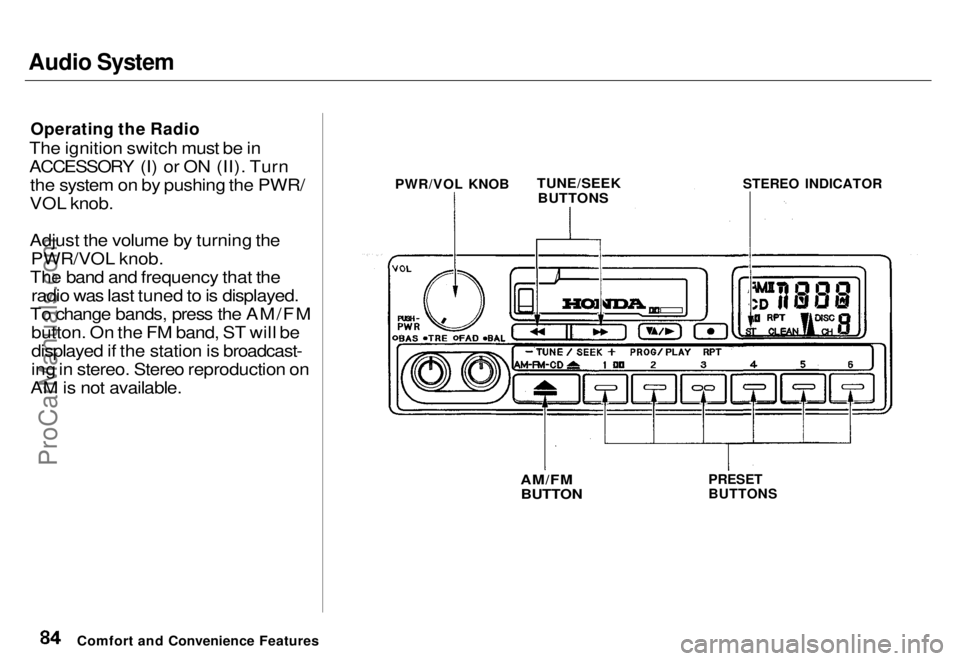
Operating the Radio
The ignition switch must be in
ACCESSORY (I) or ON (II). Turn the system on by pushing the PWR/
VOL knob.
Adjust the volume by turning the PWR/VOL knob.
The band and frequency that the radio was last tuned to is displayed.
To change bands, press the AM/FM button. On the FM band, ST will be
displayed if the station is broadcast-
ing in stereo. Stereo reproduction on
AM is not available.
Comfort and Convenience Features
TUNE/SEEK
BUTTONS
STEREO INDICATOR
PRESET
BUTTONS
AM/FM
BUTTON
PWR/VOL KNOBProCarManuals.comMain Menu s t Table of Contents
Page 90 of 240
Audio System
Operating the Optional CD
Player/Changer
A Compact Disc changer is available through your dealer. It holds up to six discs, providing several hours of
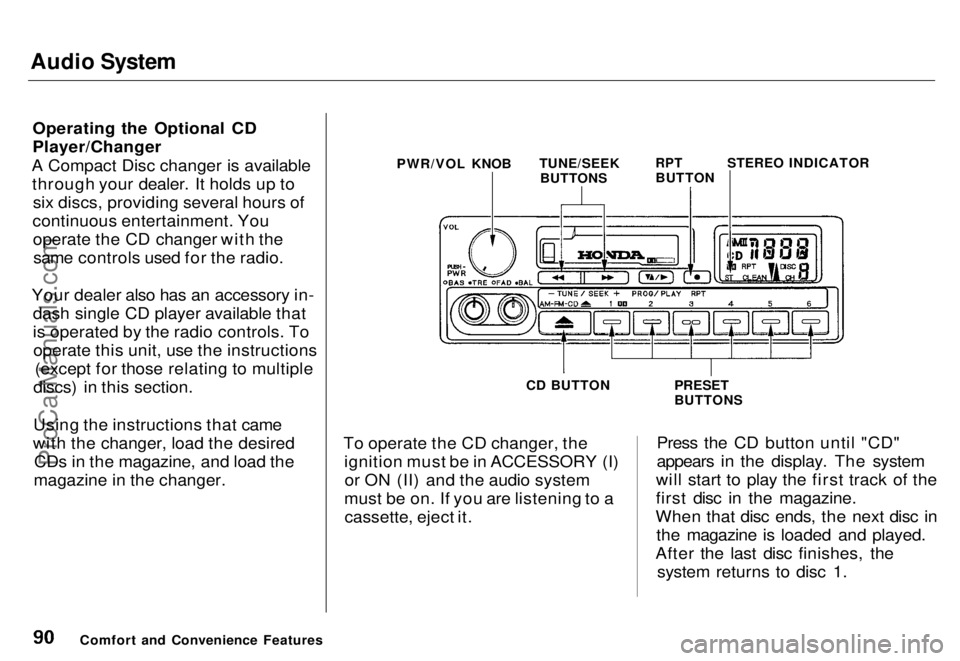
continuous entertainment. You operate the CD changer with thesame controls used for the radio.
Your dealer also has an accessory in- dash single CD player available that
is operated by the radio controls. Tooperate this unit, use the instructions (except for those relating to multiple
discs) in this section.
Using the instructions that came
with the changer, load the desired CDs in the magazine, and load the
magazine in the changer. To operate the CD changer, the
ignition must be in ACCESSORY (I)or ON (II) and the audio system
must be on. If you are listening to a cassette, eject it. Press the CD button until "CD"
appears in the display. The system
will start to play the first track of the
first disc in the magazine.
When that disc ends, the next disc in the magazine is loaded and played.
After the last disc finishes, the system returns to disc 1.
Comfort and Convenience Features PWR/VOL KNOB
TUNE/SEEK
BUTTONS
RPT
BUTTON
STEREO INDICATOR
PRESET
BUTTONS
CD BUTTONProCarManuals.comMain Menu s t Table of Contents
Page 91 of 240
Audio System
To select a different disc than the one that is playing, press the
appropriate preset button (1 — 6).
The system will load that disc and begin playing it from the first track.
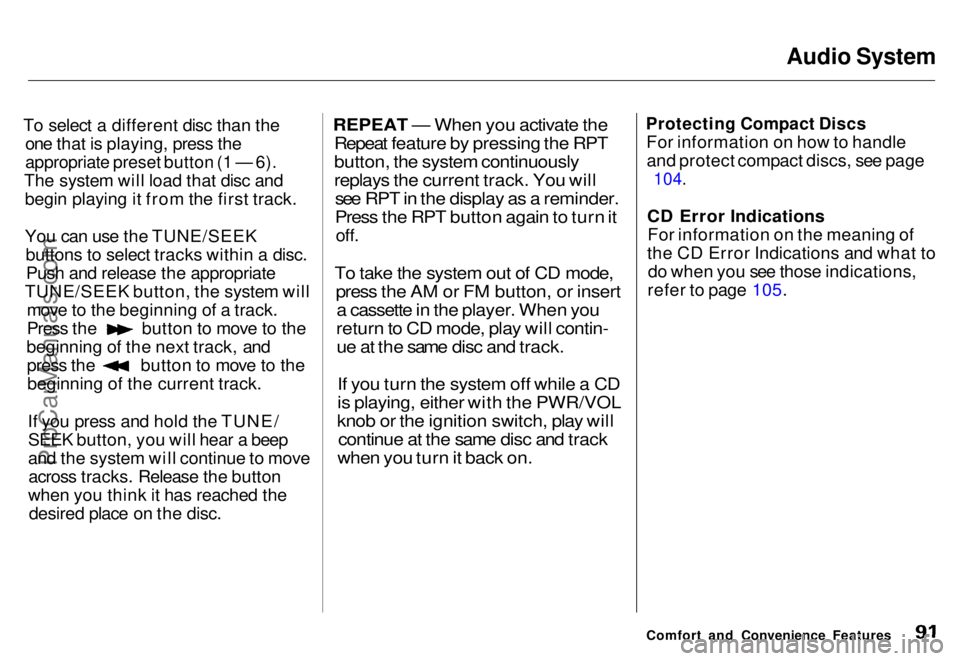
You can use the TUNE/SEEKbuttons to select tracks within a disc.Push and release the appropriate
TUNE/SEEK button, the system will move to the beginning of a track. Press the button to move to the
beginning of the next track, and press the button to move to the
beginning of the current track.
If you press and hold the TUNE/SEEK button, you will hear a beep
and the system will continue to moveacross tracks. Release the button
when you think it has reached the desired place on the disc.
REPEAT — When you activate the
Repeat feature by pressing the RPT
button, the system continuously
replays the current track. You will
see RPT in the display as a reminder.
Press the RPT button again to turn it
off.
To take the system out of CD mode,
press the AM or FM button, or insert
a cassette in the player. When you
return to CD mode, play will contin-
ue at the same disc and track.
If you turn the system off while a CD
is playing, either with the PWR/VOL
knob or the ignition switch, play will
continue at the same disc and track
when you turn it back on.
Protecting Compact Discs
For information on how to handleand protect compact discs, see page
104.
CD Error Indications For information on the meaning of
the CD Error Indications and what to do when you see those indications,
refer to page 105.
Comfort and Convenience FeaturesProCarManuals.comMain Menu s t Table of Contents
Page 93 of 240
Audio System
Operating the Radio
The ignition switch must be in
ACCESSORY (I) or ON (II). Turn the system on by pushing the PWR/
VOL knob.
Adjust the volume by turning the PWR/VOL knob.
The band and frequency that the radio was last tuned to is displayed.
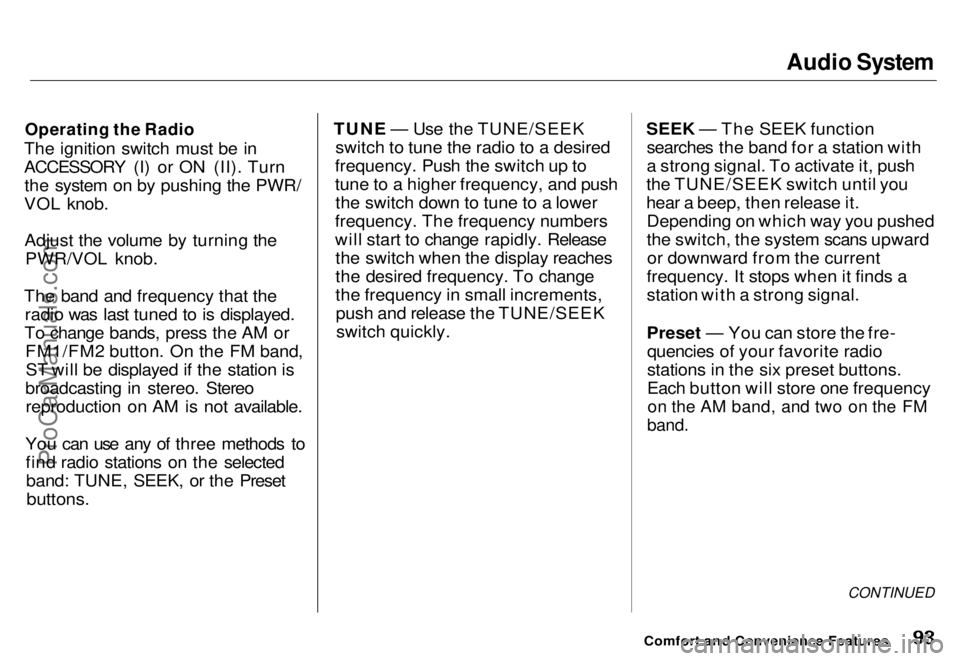
To change bands, press the AM or FM1/FM2 button. On the FM band,ST will be displayed if the station is
broadcasting in stereo. Stereo reproduction on AM is not available.
You can use any of three methods to find radio stations on the selectedband: TUNE, SEEK, or the Preset
buttons.
TUNE — Use the TUNE/SEEK
switch to tune the radio to a desired
frequency. Push the switch up to
tune to a higher frequency, and push the switch down to tune to a lower
frequency. The frequency numbers
will start to change rapidly. Release the switch when the display reaches
the desired frequency. To change
the frequency in small increments,push and release the TUNE/SEEKswitch quickly. SEEK — The SEEK function
searches the band for a station with
a strong signal. To activate it, push
the TUNE/SEEK switch until you
hear a beep, then release it. Depending on which way you pushed
the switch, the system scans upwardor downward from the current
frequency. It stops when it finds a
station with a strong signal.
Preset — You can store the fre- quencies of your favorite radio
stations in the six preset buttons.
Each button will store one frequency
on the AM band, and two on the FM
band.
CONTINUED
Comfort and Convenience FeaturesProCarManuals.comMain Menu s t Table of Contents
Page 102 of 240
Audio System
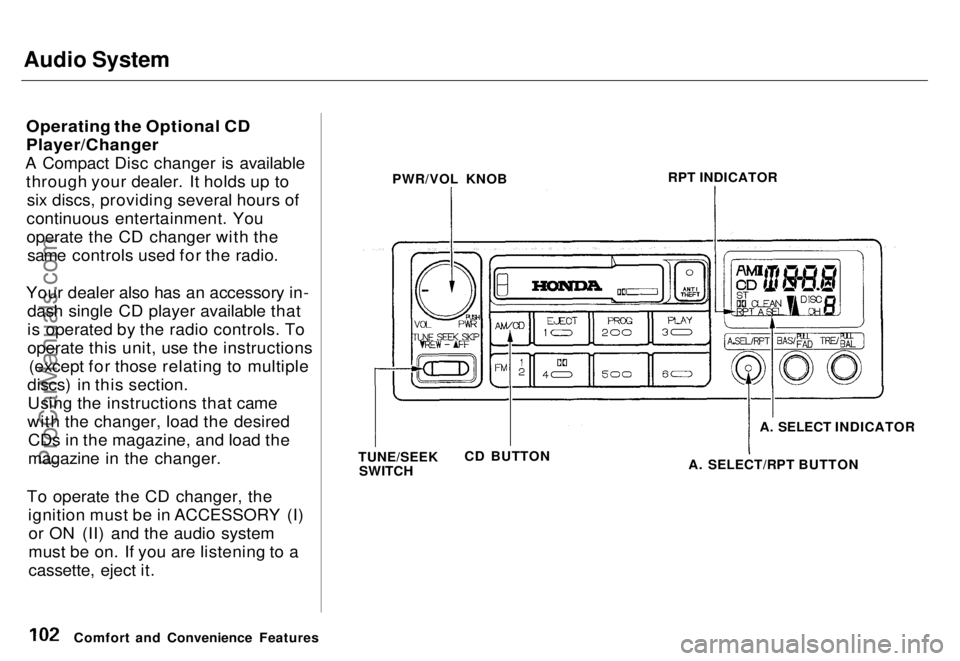
Operating the Optional CD
Player/Changer
A Compact Disc changer is available through your dealer. It holds up tosix discs, providing several hours of
continuous entertainment. You
operate the CD changer with the same controls used for the radio.
Your dealer also has an accessory in- dash single CD player available that
is operated by the radio controls. To
operate this unit, use the instructions (except for those relating to multiple
discs) in this section. Using the instructions that came
with the changer, load the desired CDs in the magazine, and load the
magazine in the changer.
To operate the CD changer, the ignition must be in ACCESSORY (I)or ON (II) and the audio system
must be on. If you are listening to a
cassette, eject it.
Comfort and Convenience Features PWR/VOL KNOB
RPT INDICATOR
TUNE/SEEK SWITCH CD BUTTON A. SELECT INDICATOR
A. SELECT/RPT BUTTONProCarManuals.comMain Menu s t Table of Contents
Page 103 of 240
Audio System
Press the CD button until "CD"
appears in the display. The system
will start to play the first track of the first disc in the magazine.
When that disc ends, the next disc inthe magazine is loaded and played.
After the last disc finishes, the system returns to disc 1.
To select a different disc than the one that is playing, press theappropriate preset button (1 — 6).
The system will load that disc and begin playing it from the first track.
You can use the TUNE/SEEK switch to select tracks within a disc.
If you push and release the TUNE/
SEEK switch, the system will move
to the beginning of a track. Push the switch up to move to the beginning
of the next track, and push theswitch down to move to the begin-
ning of the current track.
If you push and hold the TUNE/
SEEK switch, you will hear a beep
and the system will continue to move across tracks. Release the switch
when you think it has reached the desired place on the disc.
RPT — When you activate the Repeat feature by pressing the A.SEL/RPT button, the system continu-
ously replays the current track. You
will see RPT in the display as a reminder. Press the button again to
turn it off.
RANDOM PLAY — This feature,
when activated, plays the tracks on a CD in random order, rather than in
the order they are recorded on the CD. To activate Random Play, press
the A. SEL/RPT button until you see
A. SEL in the display. The system will then select and play tracksrandomly on the current disc. When
all tracks on that disc have been
played, the next disc is loaded and
played randomly. This continues
until you deactivate Random Play by
pressing A. SEL/RPT again.
If the system is in Repeat mode, you
must turn it off by pressing A. SEL/
RPT before you can select Random
Play. Then press the button again
until you see A. SEL displayed.
To take the system out of CD mode, press the AM or FM button, or inserta cassette in the player. When you
return to CD mode, play will contin-
ue at the same disc and track.
If you turn the system off while a CD
is playing, either with the PWR/VOL
knob or the ignition switch, play will
continue at the same disc and track
when you turn it back on.
Comfort and Convenience FeaturesProCarManuals.comMain Menu s t Table of Contents
Page 118 of 240
Preparing to Drive
You should do the following checks
and adjustments every day before
you drive your car.
1. Make sure all windows, mirrors, and outside
lights are clean and
unobstructed. Remove frost, snow,
or ice.
2. Check that the hood and tailgate are fully closed.
3. Visually check the tires. If a tire looks low, use a gauge to check its
pressure.
4. Check that any items you may be carrying with you inside are stored
properly or fastened down
securely. 5. Check the adjustment of the seat
(see page 54).
6. Check the adjustment of the inside and outside mirrors (see
page 64).
7. Check the adjustment of the steering wheel (see page 44).
8. Make sure the doors are securely closed and locked.
9. Fasten your seat belt. Check that your passengers have fastened
their seat belts (see page 7 ). 10.Turn the ignition ON (II). Check
the indicator lights in the instru-
ment panel.
11. Start the engine (see page 119 ).
12. Check the gauges and indicator lights in the instrument panel (see
page 33 ).
DrivingProCarManuals.comMain Menu s t Table of Contents
Page 119 of 240
Starting the Engine
1. Apply the parking brake.
2. In cold weather, turn off all electrical accessories to reduce
the drain on the battery.
3. Make sure the shift lever is in Park. Press on the brake pedal.
4. Without touching the accelerator pedal, turn the ignition key to the
START (III) position. If the engine
does not start right away, do not
hold the key in START (III) for
more than 15 seconds at a time.
Pause for at least 10 seconds
before trying again.
5. If the engine does not start within 15 seconds, or starts but stalls
right away, repeat step 4 with the
accelerator pedal pressed half-way
down. If the engine starts, release
pressure on the accelerator pedal
so the engine does not race.
6. If the engine still does not start,
press the accelerator pedal all the
way down and hold it there while
starting in order to clear flooding.
As before, keep the ignition key in
the START (III) position for no
more than 15 seconds. Return to
step 5 if the engine does not start.
If it starts, lift your foot off the
accelerator pedal so the engine
does not race.
Starting in Cold Weather at High
Altitude (Above 2,400 meters/ 8,000 feet)
An engine is harder to start in cold weather. The thinner air found at
high altitude above 2,400 meters (8,000 feet) adds to the problem.
Use the following procedure:
1. Turn off all electrical accessories to reduce the drain on the battery. 2. Push the accelerator pedal half-
way to the floor and hold it there
while starting the engine. Do not
hold the ignition key in START
(III) for more than 15 seconds.
When the engine starts, release
the accelerator pedal gradually as
the engine speeds up and smooths
out.
3. If the engine fails to start in step 2, push the accelerator pedal to the
floor and hold it there while you
try to start the engine for no more
than 15 seconds. If the engine
does not start, return to step 2.
DrivingProCarManuals.comMain Menu s t Table of Contents
Page 120 of 240
Automatic Transmission
Your Honda's transmission has fourforward speeds, and is electronicallycontrolled for smoother shifting. It
also has a "lock-up" torque converter
for better fuel economy. You may
feel what seems like another shift
when the converter locks. Shift Lever Positions
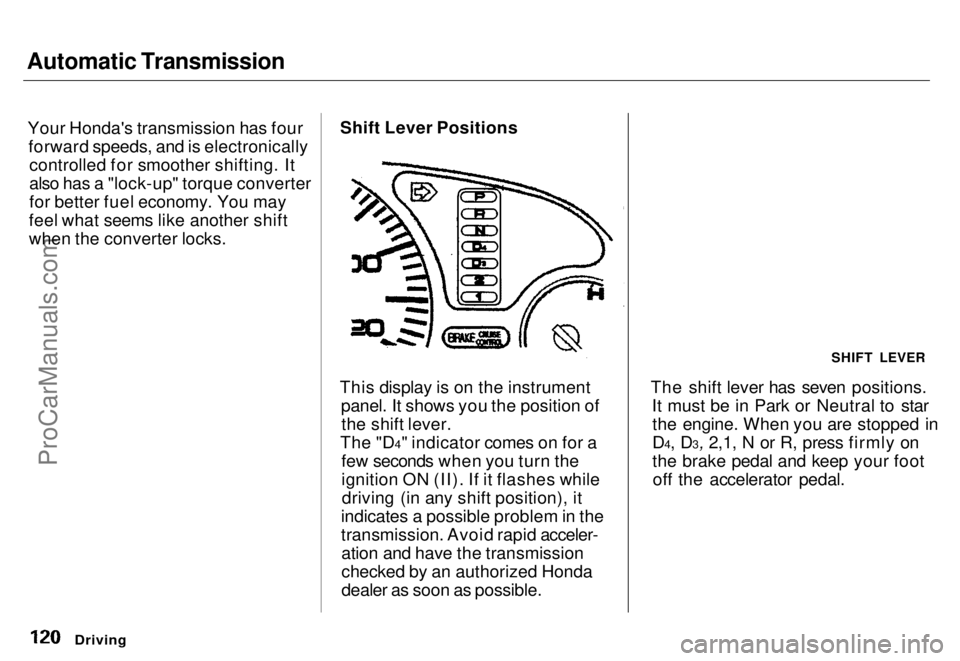
This display is on the instrument panel. It shows you the position ofthe shift lever.
The "D4" indicator comes on for a few seconds when you turn the
ignition ON (II). If it flashes whiledriving (in any shift position), it
indicates a possible problem in the
transmission. Avoid rapid acceler- ation and have the transmission
checked by an authorized Honda
dealer as soon as possible. The shift lever has seven positions.
It must be in Park or Neutral to starthe engine. When you are stopped in
D4, D3, 2,1, N or R, press firmly on
the brake pedal and keep your footoff the accelerator pedal.
Driving
SHIFT LEVERProCarManuals.comMain Menu s t Table of Contents
Page 121 of 240
Automatic Transmission
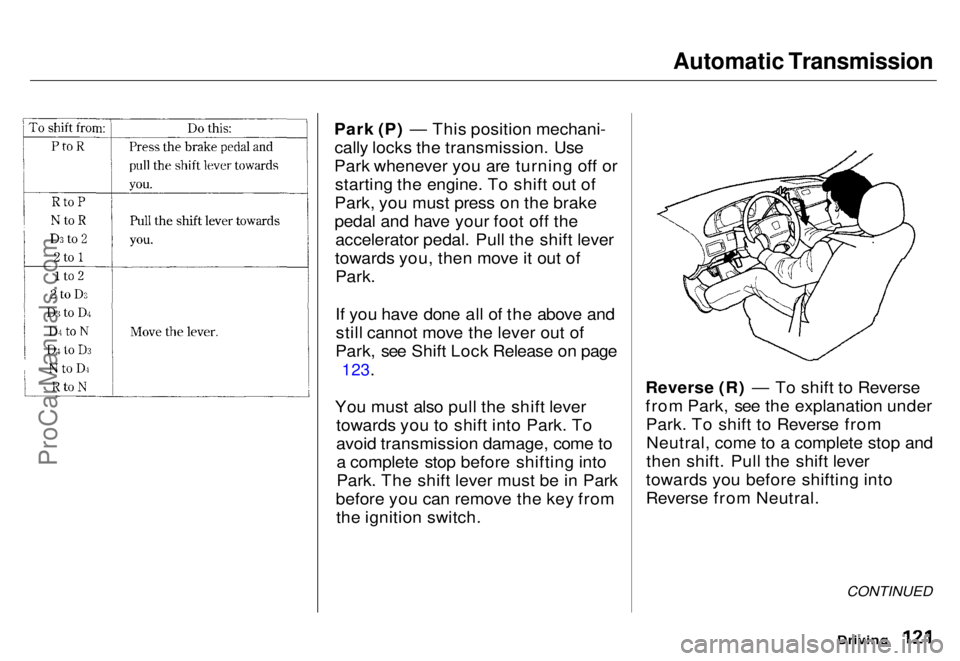
Park (P) — This position mechani- cally locks the transmission. Use
Park whenever you are turning off or starting the engine. To shift out of
Park, you must press on the brake
pedal and have your foot off the accelerator pedal. Pull the shift lever
towards you, then move it out of Park.
If you have done all of the above andstill cannot move the lever out of
Park, see Shift Lock Release on page
123.
You must also pull the shift lever towards you to shift into Park. To
avoid transmission damage, come toa complete stop before shifting into
Park. The shift lever must be in Park
before you can remove the key from the ignition switch. Reverse (R) — To shift to Reverse
from Park, see the explanation under
Park. To shift to Reverse fromNeutral, come to a complete stop and
then shift. Pull the shift lever
towards you before shifting into
Reverse from Neutral.
Driving
CONTINUEDProCarManuals.comMain Menu s t Table of Contents