check oil HONDA ODYSSEY 1996 Owners Manual
[x] Cancel search | Manufacturer: HONDA, Model Year: 1996, Model line: ODYSSEY, Model: HONDA ODYSSEY 1996Pages: 240, PDF Size: 2.64 MB
Page 34 of 240
Indicator Lights
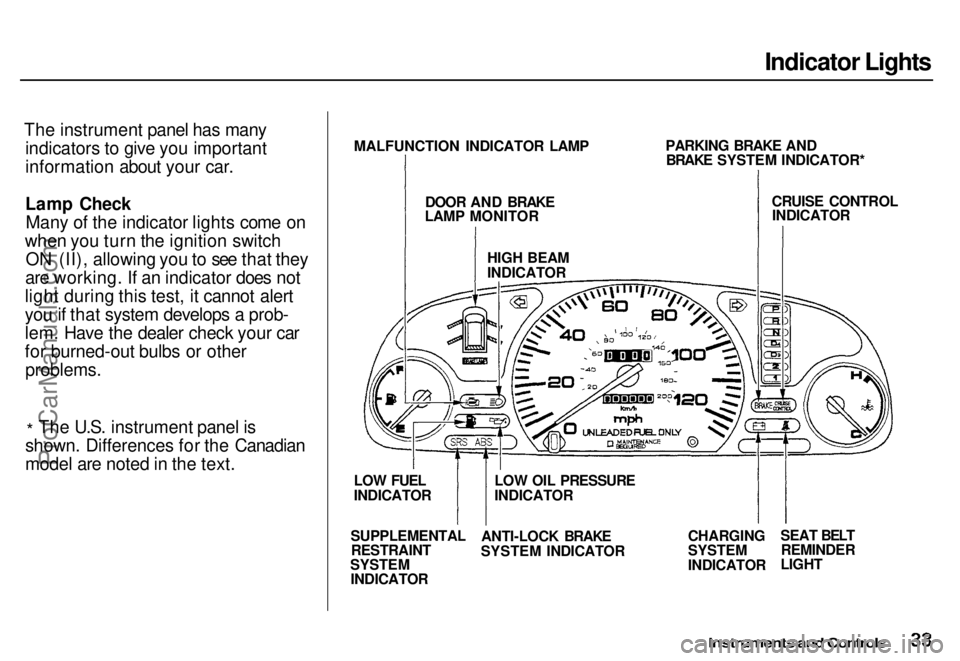
The instrument panel has many indicators to give you important
information about your car.
Lamp CheckMany of the indicator lights come on
when you turn the ignition switch ON (II), allowing you to see that they
are working. If an indicator does not
light during this test, it cannot alert
you if that system develops a prob-
lem. Have the dealer check your car
for burned-out bulbs or other
problems.
* The U.S. instrument panel is
shown. Differences for the Canadian
model are noted in the text.
Instruments and Controls
MALFUNCTION INDICATOR LAMP
DOOR AND BRAKE
LAMP MONITOR
HIGH BEAM
INDICATOR
PARKING BRAKE AND
BRAKE SYSTEM INDICATOR*
CRUISE CONTROL
INDICATOR
CHARGING
SYSTEM
INDICATOR
SEAT BELT
REMINDER
LIGHT
LOW OIL PRESSURE
INDICATOR
ANTI-LOCK BRAKE
SYSTEM INDICATOR
SUPPLEMENTAL
RESTRAINT
SYSTEM
INDICATOR
LOW FUEL
INDICATORProCarManuals.comMain Menu s t Table of Contents
Page 35 of 240
Indicator Lights
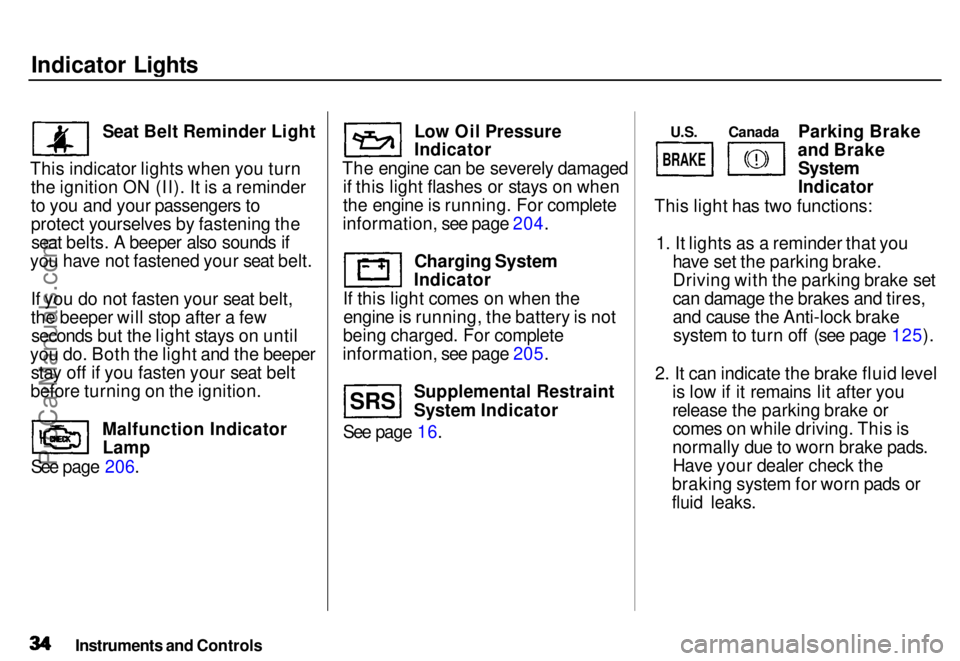
Seat Belt Reminder Light
This indicator lights when you turn the ignition ON (II). It is a reminder
to you and your passengers to
protect yourselves by fastening theseat belts. A beeper also sounds if
you have not fastened your seat belt.
If you do not fasten your seat belt,
the beeper will stop after a fewseconds but the light stays on until
you do. Both the light and the beeper stay off if you fasten your seat belt
before turning on the ignition.
See page 206. Malfunction Indicator
Lamp Low Oil Pressure
Indicator
The engine can be severely damaged if this light flashes or stays on when
the engine is running. For complete
information, see page 204.
Charging System
Indicator
If this light comes on when the engine is running, the battery is not
being charged. For complete
information, see page 205.
See page 16. Supplemental Restraint
System Indicator Parking Brake
and Brake
System
Indicator
This light has two functions:
1. It lights as a reminder that you have set the parking brake.
Driving with the parking brake set
can damage the brakes and tires,
and cause the Anti-lock brakesystem to turn off (see page 125).
2. It can indicate the brake fluid level is low if it remains lit after you
release the parking brake orcomes on while driving. This is
normally due to worn brake pads. Have your dealer check the
braking system for worn pads or
fluid leaks.
Instruments and Controls
S R S U.S.
Canada
BRAKE
ProCarManuals.comMain Menu s t Table of Contents
Page 112 of 240
Service Station Procedures
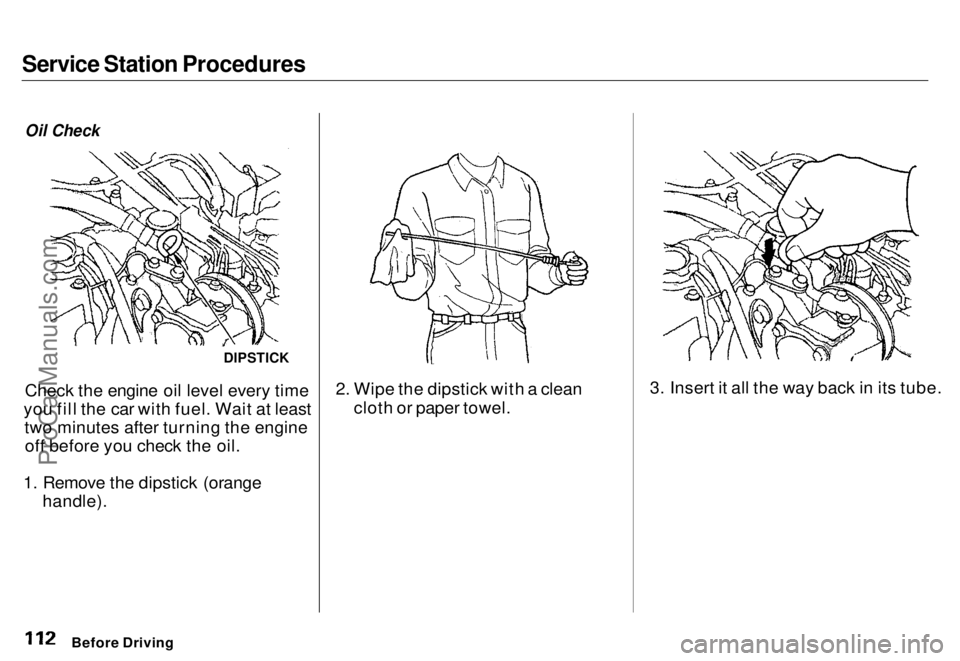
Oil Check
Check the engine oil level every time
you fill the car with fuel. Wait at least two minutes after turning the engineoff before you check the oil.
1. Remove the dipstick (orange handle). 2. Wipe the dipstick with a clean
cloth or paper towel. 3. Insert it all the way back in its tube.
Before Driving
DIPSTICKProCarManuals.comMain Menu s t Table of Contents
Page 113 of 240
Service Station Procedures
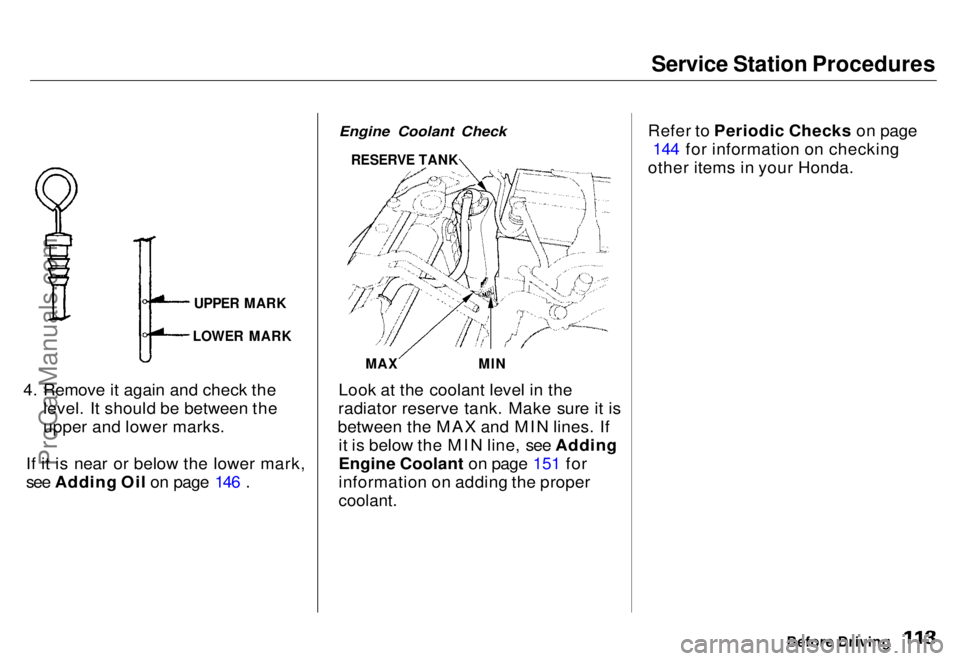
4. Remove it again and check the level. It should be between the
upper and lower marks.
If it is near or below the lower mark,
see Adding Oil on page 146 .
Engine Coolant Check
Look at the coolant level in the
radiator reserve tank. Make sure it is
between the MAX and MIN lines. If it is below the MIN line, see Adding
Engine Coolant on page 151 for
information on adding the proper
coolant.
Refer to Periodic Checks on page
144 for information on checking
other items in your Honda.
Before Driving
UPPER MARK
LOWER MARK
RESERVE TANK
MAX
MINProCarManuals.comMain Menu s t Table of Contents
Page 134 of 240
Maintenance
This section explains why it is important to keep your car well
maintained and to follow basic
maintenance safety precautions.
This section also includes Maintenance Schedules for normaldriving and severe driving conditions,
a Maintenance Record, and instruc-
tions for simple maintenance tasks
you may want to take care of
yourself.
If you have the skills and tools
required to perform more complex
maintenance tasks on your Honda,
you may want to purchase the Service Manual. See page 233 for
information on how to obtain a copy,or see your Honda dealer.
Maintenance Safety....................... 136
Important Safety Precautions.. 137
Maintenance Schedule.................. 138
Maintenance Record..................... 142
Periodic Checks............................. 144
Fluid Locations............................... 145
Engine Oil....................................... 146
Checking Engine Oil................. 146
Adding Oil................................... 146 Recommended Oil..................... 147
Synthetic Oil............................... 148
Additives..................................... 148
Oil and Filter Changes.............. 148
Cooling System.............................. 150
Checking the Engine Coolant
Level........................................ 150
Adding Engine Coolant............. 151 Replacing Engine Coolant........ 152
Windshield Washers..................... 154
Automatic Transmission Fluid..... 155
Brake Fluid..................................... 156
Brake System............................. 156
Anti-lock Brake System............ 157
Power Steering............................... 157
Air Cleaner..................................... 158 Spark Plugs..................................... 160
Replacement............................... 160
Specifications............................. 161
Battery............................................ 162
Windshield Wipers........................ 165
Air Conditioning............................. 168 Drive Belts...................................... 169
Tires................................................ 169 Inflation....................................... 170
Inspection................................... 171
Maintenance............................... 171
Tire Rotation.............................. 172 Replacing Tires and Wheels .... 172
Wheels and Tires....................... 173
Winter Driving........................... 173 Snow Tires.............................. 174
Tire Chains............................. 174
Lights.............................................. 175 Headlight Aiming...................... 175Replacing Bulbs......................... 177
Storing Your Car............................ 182
MaintenanceProCarManuals.comMain Menu s t
Page 135 of 240
Maintenance Safety
Regularly maintaining your car is the
best way to protect your investment. Proper maintenance is essential to
your safety and the safety of your
passengers. It will also reward you
with more economical, trouble-free driving and help reduce air pollution. This section includes instructions for
simple maintenance tasks, such as
checking and adding oil. Any service
items not detailed in this section should be performed by a Honda
technician or other qualified mechanic. Some of the most important safety
precautions are given in the next page. However, we cannot warn youof every conceivable hazard that can
arise in performing maintenance.Only you can decide whether or not
you should perform a given task.
Maintenance
Improperly maintaining this car
or failing to correct a problem before driving can cause a
crash in which you can be
seriously hurt or killed.
Always follow the inspection and maintenance recommendations and
schedules in this owner's
manual.
Failure to properly follow
maintenance instructions and
precautions can cause you to
be seriously hurt or killed.
Always follow the procedures and precautions in this owner'smanual.ProCarManuals.comMain Menu s t Table of Contents
Page 143 of 240
Periodic Checks
You should check the following items at the specified intervals. If
you are unsure of how to perform any check, turn to the page given. Engine oil level — Check every
time you fill the fuel tank. See
page 112.
Engine coolant level — Check the
radiator reserve tank every time
you fill the fuel tank. See page 113 .
Windshield washer fluid — Check the level in the reservoir monthly.If weather conditions cause you to
use the washers frequently, check
the reservoir each time you stop
for fuel. See page 154 .
Automatic transmission — Check the fluid level monthly. See page 155.
Brakes and power steering — Check the fluid level monthly. See
page 156. Tires — Check the tire pressure
monthly. Examine the tread for
wear and foreign objects. See page
169 .
Battery — Check its condition and
the terminals for corrosion monthly. See page 162 .
Air conditioning — Check its operation weekly. See page 168 .
Lights — Check the operation of
the headlights, parking lights,
taillights, high-mount brake light,
turn signals, brake lights, and
license plate lights monthly. See
page 175.
MaintenanceProCarManuals.comMain Menu s t Table of Contents
Page 145 of 240
Engine Oil
Checking Engine Oil
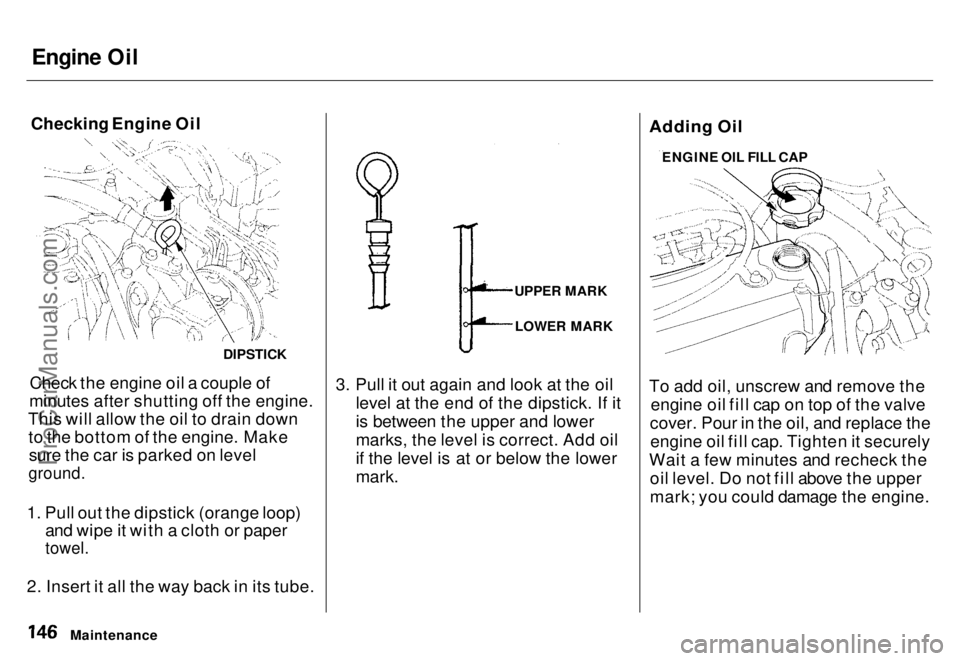
Check the engine oil a couple of
minutes after shutting off the engine.
This will allow the oil to drain down to the bottom of the engine. Makesure the car is parked on level
ground.
1. Pull out the dipstick (orange loop) and wipe it with a cloth or paper
towel.
2. Insert it all the way back in its tube. 3. Pull it out again and look at the oil
level at the end of the dipstick. If it
is between the upper and lower
marks, the level is correct. Add oil
if the level is at or below the lower
mark.
Adding Oil
To add oil, unscrew and remove the
engine oil fill cap on top of the valve
cover. Pour in the oil, and replace the engine oil fill cap. Tighten it securely
Wait a few minutes and recheck the oil level. Do not fill above the upper
mark; you could damage the engine.
Maintenance
DIPSTICK
UPPER MARK
LOWER MARK ENGINE OIL FILL CAPProCarManuals.comMain Menu s t Table of Contents
Page 148 of 240
Engine Oil
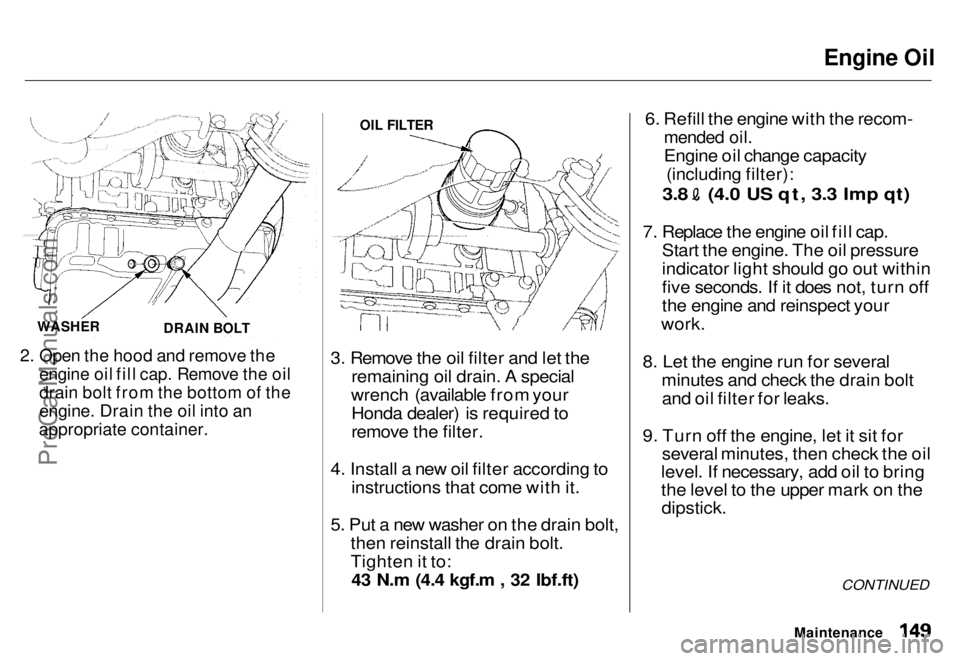
2. Open the hood and remove the
engine oil fill cap. Remove the oil
drain bolt from the bottom of the
engine. Drain the oil into an
appropriate container.
3. Remove the oil filter and let the
remaining oil drain. A special
wrench (available from your Honda dealer) is required to
remove the filter.
4. Install a new oil filter according to instructions that come with it.
5. Put a new washer on the drain bolt, then reinstall the drain bolt.
Tighten it to:43 N.m (4.4 kgf.m , 32 Ibf.ft) 6. Refill the engine with the recom-
mended oil.
Engine oil change capacity
(including filter):
3.8 (4.0 US qt, 3.3 Imp qt)
7. Replace the engine oil fill cap. Start the engine. The oil pressure
indicator light should go out within
five seconds. If it does not, turn off
the engine and reinspect your
work.
8. Let the engine run for several minutes and check the drain boltand oil filter for leaks.
9. Turn off the engine, let it sit for several minutes, then check the oil
level. If necessary, add oil to bring
the level to the upper mark on the
dipstick.
CONTINUED
Maintenance
WASHER
DRAIN BOLT OIL FILTER
ProCarManuals.comMain Menu s t Table of Contents
Page 149 of 240
Engine Oil, Cooling System
If you change your own oil, pleasedispose of the used oil properly. Put it in a sealed container and take it to arecycling center. Do not discard it in a
trash bin or dump it on the ground.
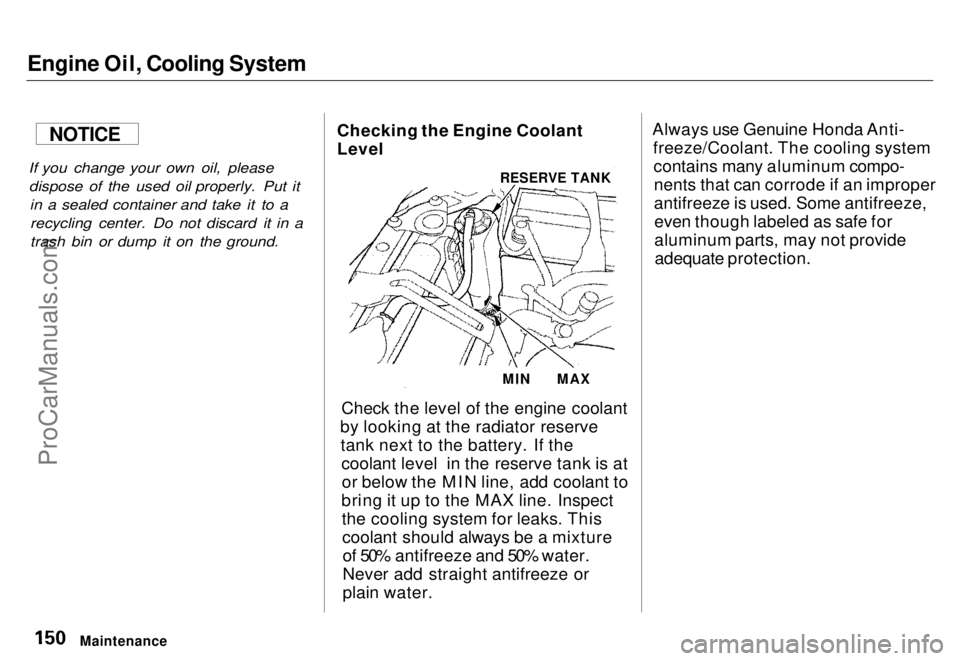
Checking the Engine Coolant
Level
Check the level of the engine coolant
by looking at the radiator reserve tank next to the battery. If the coolant level in the reserve tank is ator below the MIN line, add coolant to
bring it up to the MAX line. Inspect the cooling system for leaks. Thiscoolant should always be a mixtureof 50% antifreeze and 50% water.
Never add straight antifreeze or
plain water. Always use Genuine Honda Anti-
freeze/Coolant. The cooling systemcontains many aluminum compo-nents that can corrode if an improper
antifreeze is used. Some antifreeze,even though labeled as safe for
aluminum parts, may not provideadequate protection.
Maintenance
RESERVE TANK
MIN
MAX
NOTICEProCarManuals.comMain Menu s t Table of Contents