steering HONDA ODYSSEY 1997 User Guide
[x] Cancel search | Manufacturer: HONDA, Model Year: 1997, Model line: ODYSSEY, Model: HONDA ODYSSEY 1997Pages: 241, PDF Size: 2.52 MB
Page 44 of 241
Controls Near the Steering Wheel
Windshield Washers
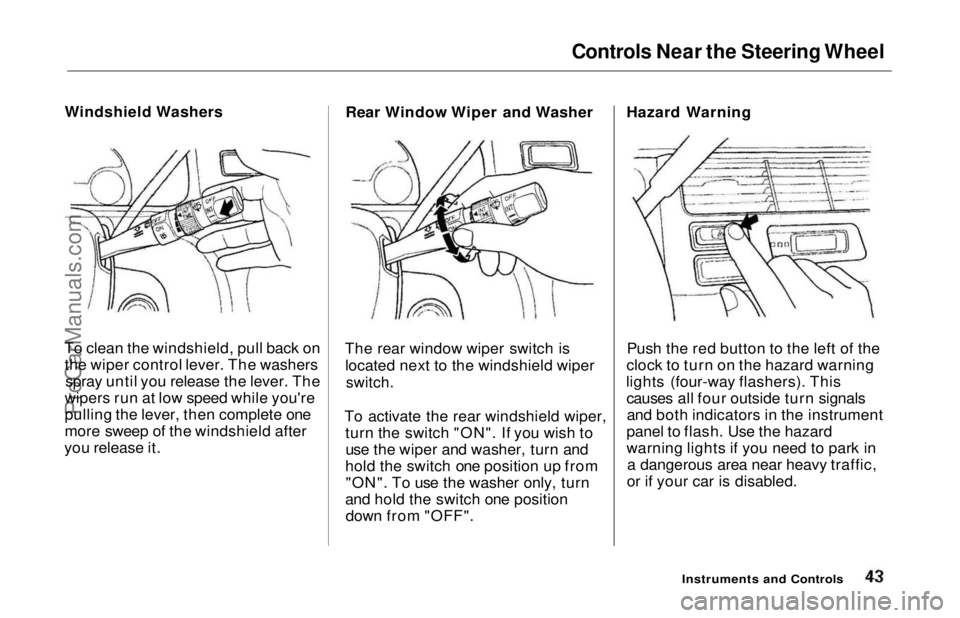
To clean the windshield, pull back on the wiper control lever. The washers spray until you release the lever. The
wipers run at low speed while you're
pulling the lever, then complete one
more sweep of the windshield after
you release it. Rear Window Wiper and Washer
The rear window wiper switch is located next to the windshield wiper
switch.
To activate the rear windshield wiper, turn the switch "ON". If you wish touse the wiper and washer, turn and
hold the switch one position up from "ON". To use the washer only, turn
and hold the switch one position down from "OFF". Hazard Warning
Push the red button to the left of the
clock to turn on the hazard warning
lights (four-way flashers). This causes all four outside turn signalsand both indicators in the instrument
panel to flash. Use the hazard
warning lights if you need to park in a dangerous area near heavy traffic,
or if your car is disabled.
Instruments and ControlsProCarManuals.comMain Menu Table of Contents s t
Page 45 of 241
Controls Near the Steering Wheel
Rear Window Defogger
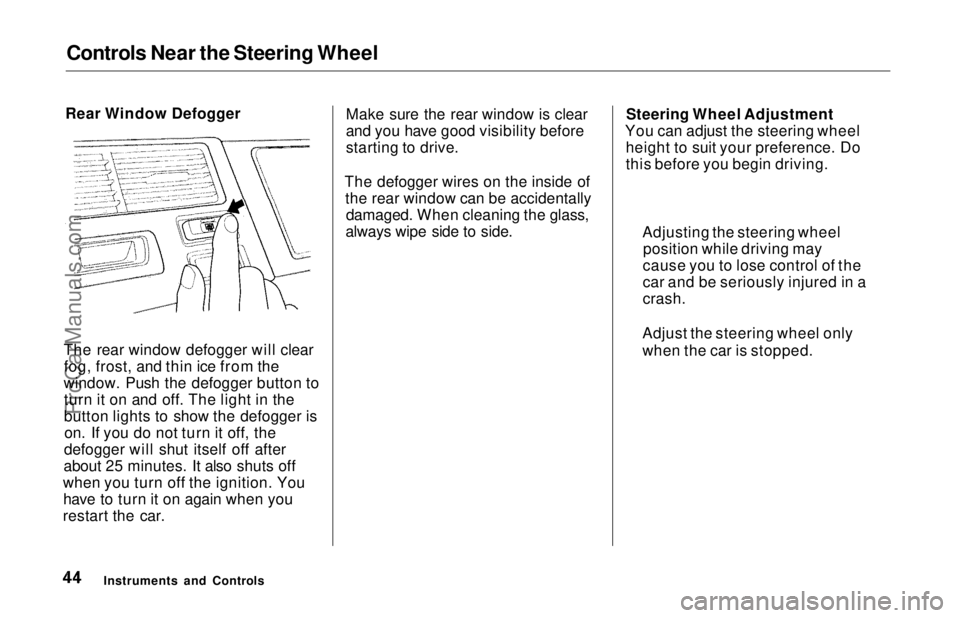
The rear window defogger will clear fog, frost, and thin ice from the
window. Push the defogger button to turn it on and off. The light in the
button lights to show the defogger ison. If you do not turn it off, the
defogger will shut itself off after
about 25 minutes. It also shuts off
when you turn off the ignition. You have to turn it on again when you
restart the car. Make sure the rear window is clear
and you have good visibility before
starting to drive.
The defogger wires on the inside of the rear window can be accidentallydamaged. When cleaning the glass,
always wipe side to side. Steering Wheel Adjustment
You can adjust the steering wheel height to suit your preference. Do
this before you begin driving.
Instruments and Controls Adjusting the steering wheel
position while driving may
cause you to lose control of the
car and be seriously injured in a
crash.
Adjust the steering wheel only
when the car is stopped.ProCarManuals.comMain Menu Table of Contents s t
Page 46 of 241
Controls Near the Steering Wheel
1. Adjust the seat so you are a comfortable distance from the
pedals and can operate them safely.
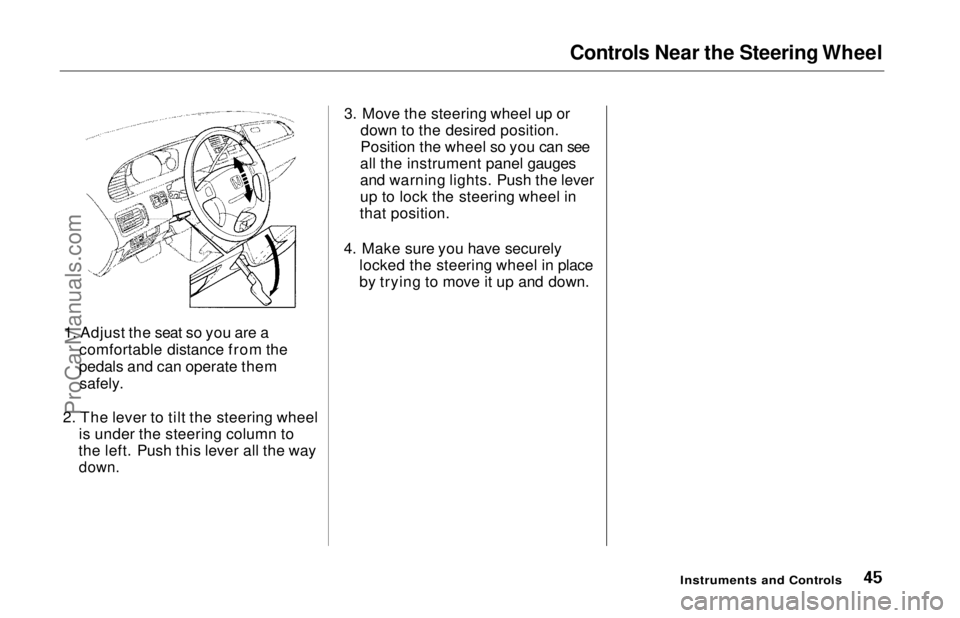
2. The lever to tilt the steering wheel is under the steering column to
the left. Push this lever all the way
down.
3. Move the steering wheel up or
down to the desired position.
Position the wheel so you can see
all the instrument panel gauges
and warning lights. Push the lever
up to lock the steering wheel in
that position.
4. Make sure you have securely locked the steering wheel in place
by trying to move it up and down.
Instruments and ControlsProCarManuals.comMain Menu Table of Contents s t
Page 47 of 241
Steering Wheel Controls
Cruise Control
Cruise control allows you to maintain
a set speed above 25 mph (40 km/h)
without keeping your foot on the accelerator pedal. It should be used
for cruising on straight, open
highways. It is not recommended for conditions such as city driving,
winding roads, slippery roads, heavy rain, or bad weather. You should
have full control of the car under
those conditions. Using the Cruise Control
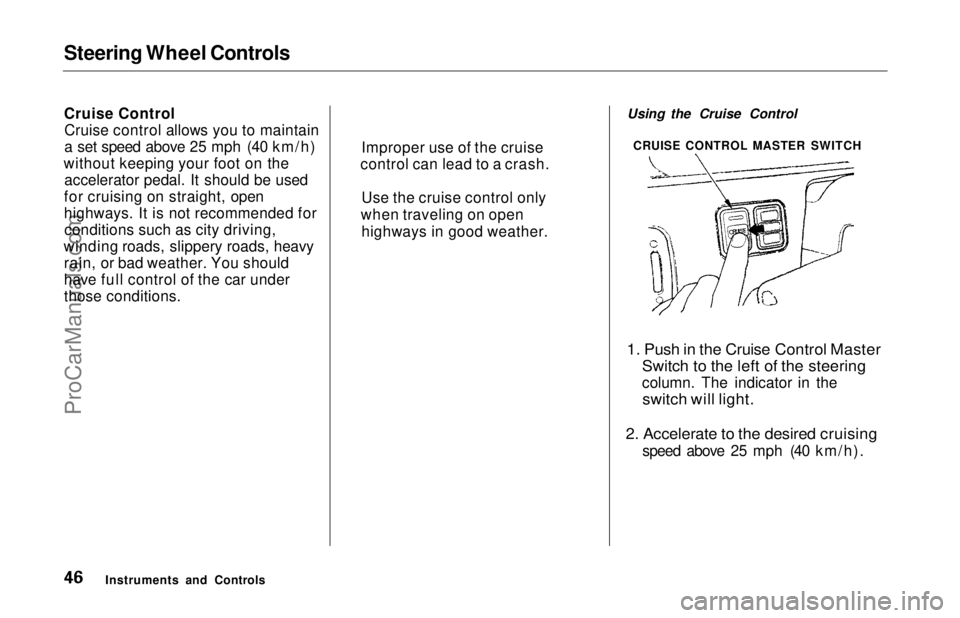
1. Push in the Cruise Control Master
Switch to the left of the steering
column. The indicator in the
switch will light.
2. Accelerate to the desired cruising
speed above 25 mph (40 km/h).
Instruments and Controls CRUISE CONTROL MASTER SWITCH
Improper use of the cruise
control can lead to a crash.
Use the cruise control only
when traveling on open highways in good weather.ProCarManuals.comMain Menu Table of Contents s t
Page 48 of 241
Steering Wheel Controls
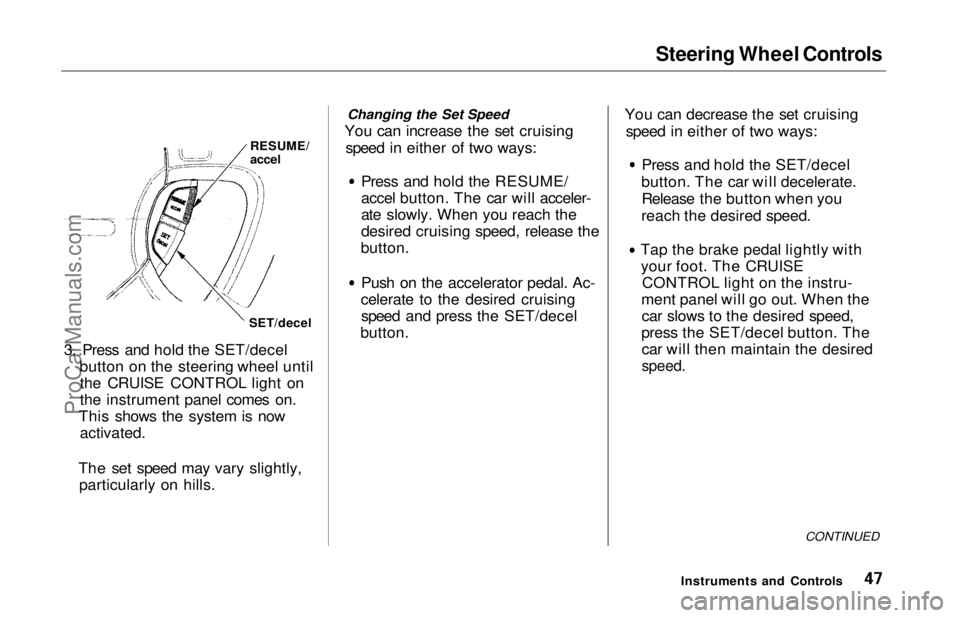
RESUME/
accel
SET/decel
3. Press and hold the SET/decel button on the steering wheel untilthe CRUISE CONTROL light on
the instrument panel comes on.
This shows the system is now
activated.
The set speed may vary slightly, particularly on hills. Changing the Set Speed
You can increase the set cruising speed in either of two ways: Press and hold the RESUME/
accel button. The car will acceler-
ate slowly. When you reach the
desired cruising speed, release the
button. Push on the accelerator pedal. Ac-
celerate to the desired cruising speed and press the SET/decel
button. You can decrease the set cruising
speed in either of two ways: Press and hold the SET/decel
button. The car will decelerate. Release the button when you
reach the desired speed. Tap the brake pedal lightly with
your foot. The CRUISE CONTROL light on the instru-
ment panel will go out. When the car slows to the desired speed,
press the SET/decel button. The car will then maintain the desired
speed.
CONTINUED
Instruments and ControlsProCarManuals.comMain Menu Table of Contents s t
Page 49 of 241
Steering Wheel Controls
Even with the cruise control turned
on, you can still use the accelerator
pedal to speed up for passing. After
completing the pass, take your foot
off the accelerator pedal. The car
will return to the set cruising speed.
Resting your foot on the brake pedal
will cause the cruise control to
cancel.
Cancelling the Cruise Control
You can cancel the cruise control in any of these ways: Tap the brake pedal.
Press the SET/decel and RE-
SUME/accel buttons at the same
time.
Press the Cruise Control Master
Switch.
When you tap the brake pedal, or press the SET and RESUME buttons at the same time, the CRUISECONTROL light on the instrument
panel will go out and the car will
begin to slow down. You can use the accelerator pedal in the normal way. If you use the brake pedal to cancel
cruise control, the system
remembers the previously-set
cruising speed. To return to that
speed, accelerate to above 25 mph (40 km/h) and press the RESUME/
accel button until the CRUISE CON-
TROL light comes on. The car will accelerate to the same cruisingspeed as before.
If you cancel cruise control by
pressing the SET and RESUME
buttons at the same time, the
previously-set cruising speed is erased. To use the cruise control,
accelerate to the desired cruisingspeed and press the SET/decel
button.
Pressing the Cruise Control Master
Switch turns the system completely
off and erases the previous cruising
speed from memory. To use the
system again, refer to Using the
Cruise Control.
Instruments and ControlsProCarManuals.comMain Menu Table of Contents s t
Page 50 of 241
Keys and Locks
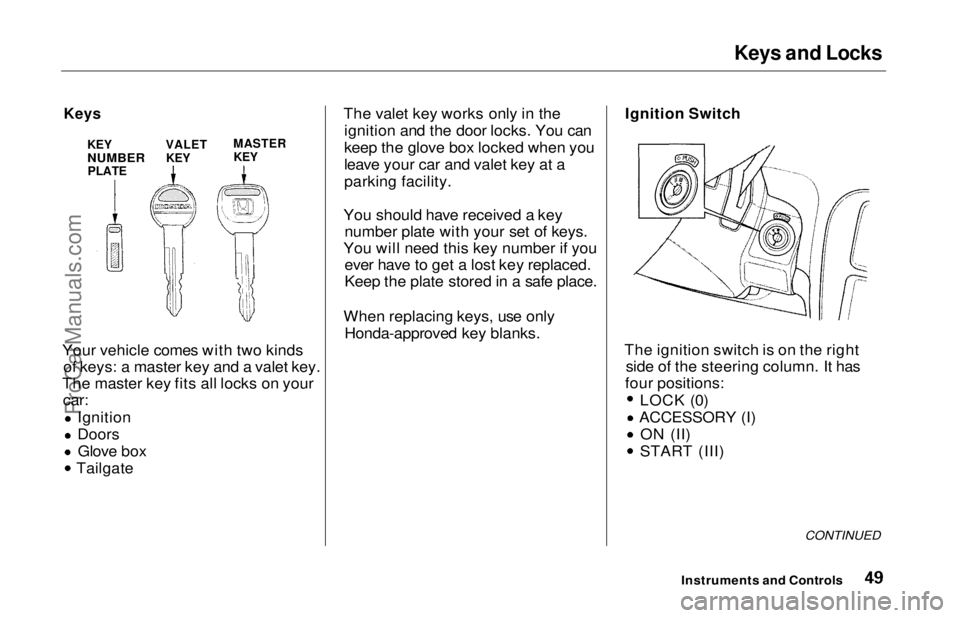
Keys KEY
NUMBER
PLATE MASTER
KEY
Your vehicle comes with two kinds of keys: a master key and a valet key.
The master key fits all locks on your car: Ignition
Doors
Glove box
Tailgate The valet key works only in the
ignition and the door locks. You can
keep the glove box locked when you
leave your car and valet key at a
parking facility.
You should have received a key number plate with your set of keys.
You will need this key number if you ever have to get a lost key replaced.
Keep the plate stored in a safe place.
When replacing keys, use only Honda-approved key blanks.
Ignition Switch
The ignition switch is on the right side of the steering column. It has
four positions: LOCK (0)
ACCESSORY (I)
ON (II)
START (III)
CONTINUED
Instruments and Controls
VALET
KEYProCarManuals.comMain Menu Table of Contents s t
Page 51 of 241
Keys and Locks
LOCK (0) — You can insert or
remove the key only in this position.
When you turn the key from LOCK to ACCESSORY, you may have to
turn the steering wheel to release
the anti-theft lock. To switch from
ACCESSORY to LOCK, you must push the key in slightly as you turn it.
The shift lever must also be in Park.
The anti-theft lock will lock the steering column when you remove
the key.
ACCESSORY (I) — In this position, you can operate the audio systemand the cigarette lighter.
ON (II) — This is the normal key
position when driving. All features and accessories on the car are usable.
Several of the lights on the instru-
ment panel come on as a test when
you turn the ignition switch from
ACCESSORY to ON (see page 33). START (III) — Use this position
only to start the engine. The switch
returns to ON (II) when you let go of
the key.
You will hear a reminder beeper if you leave the key in the ignition switch in the LOCK (0) or
ACCESSORY (I) position and open the driver's door. Remove the key to
turn off the beeper. Power Door Locks
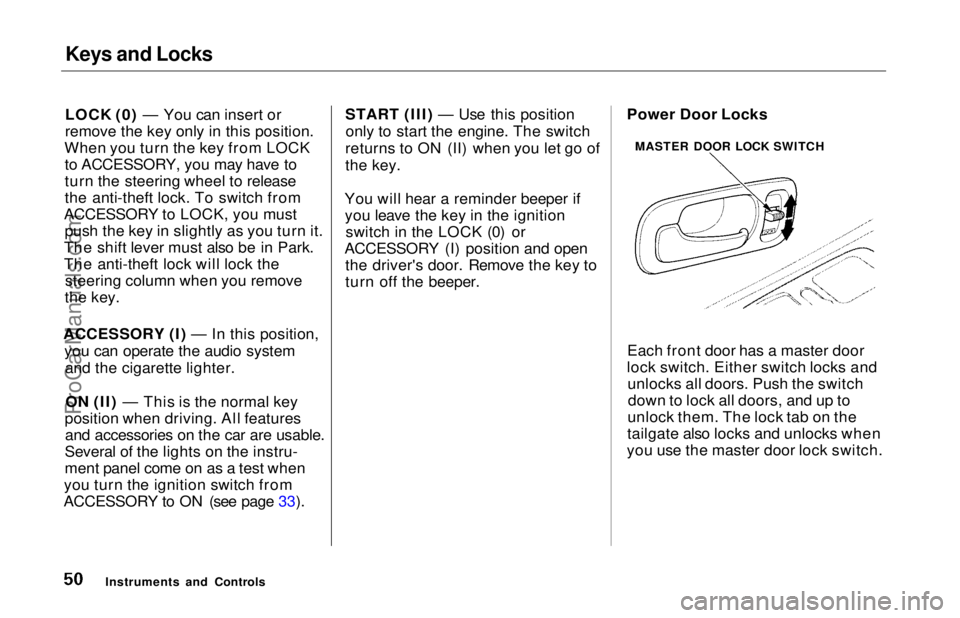
Each front door has a master door
lock switch. Either switch locks and unlocks all doors. Push the switchdown to lock all doors, and up to
unlock them. The lock tab on the
tailgate also locks and unlocks when
you use the master door lock switch.
Instruments and Controls MASTER DOOR LOCK SWITCHProCarManuals.comMain Menu Table of Contents s t
Page 118 of 241
Preparing to Drive
You should do the following checks and adjustments every day before
you drive your car.
1. Make sure all windows, mirrors, and outside lights are clean and
unobstructed. Remove frost, snow,or ice.
2. Check that the hood and tailgate are fully closed.
3. Visually check the tires. If a tire looks low, use a gauge to check its
pressure.
4. Check that any items you may be carrying with you inside are stored
properly or fastened down securely. 5. Check the adjustment of the seat
(see page 54).
6. Check the adjustment of the inside and outside mirrors (see
page 64).
7. Check the adjustment of the steering wheel (see page 44).
8. Make sure the doors are securely
closed and locked.
9. Fasten your seat belt. Check that your passengers have fastenedtheir seat belts (see page 7). 10.Turn the ignition ON (II). Check
the indicator lights in the instru-
ment panel.
11. Start the engine (see page 119).
12. Check the gauges and indicator lights in the instrument panel (seepage 33).
DrivingProCarManuals.comMain Menu Table of Contents s t
Page 123 of 241
Automatic Transmission
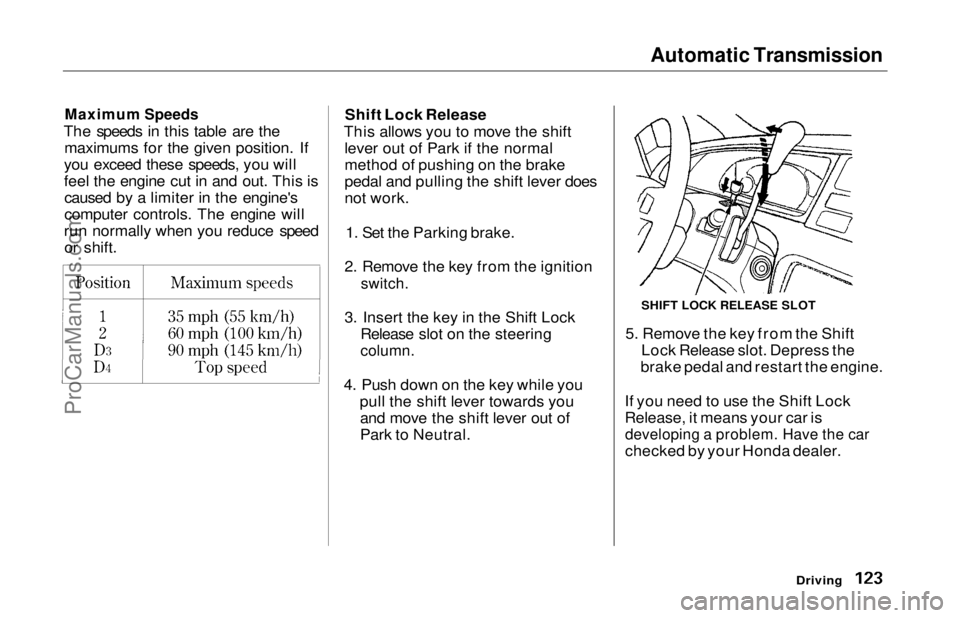
Maximum Speeds
The speeds in this table are the maximums for the given position. If
you exceed these speeds, you will
feel the engine cut in and out. This is caused by a limiter in the engine's
computer controls. The engine will
run normally when you reduce speed or shift. Shift Lock Release
This allows you to move the shift lever out of Park if the normal
method of pushing on the brake
pedal and pulling the shift lever does
not work.
1. Set the Parking brake.
2. Remove the key from the ignition
switch.
3. Insert the key in the Shift Lock Release slot on the steering
column.
4. Push down on the key while you pull the shift lever towards youand move the shift lever out of
Park to Neutral. 5. Remove the key from the Shift
Lock Release slot. Depress the
brake pedal and restart the engine.
If you need to use the Shift Lock
Release, it means your car is
developing a problem. Have the car
checked by your Honda dealer.
Driving
SHIFT LOCK RELEASE SLOTProCarManuals.comMain Menu Table of Contents s t