CD changer HONDA ODYSSEY 1997 Owners Manual
[x] Cancel search | Manufacturer: HONDA, Model Year: 1997, Model line: ODYSSEY, Model: HONDA ODYSSEY 1997Pages: 241, PDF Size: 2.52 MB
Page 73 of 241
Comfort and Convenience Features
The heating and air conditioning systems in your Honda provide a
comfortable driving environment in
all weather conditions.
The standard audio system has many features. This section de-scribes those features and how to
use them. (If you selected an
optional audio system, refer to the
operating instructions that came
with it.)
Some models have an anti-theft
audio system that requires a code
number to enable it. Heating and Cooling........................ 74
What Each Control Does............ 74How to Use the System............... 76
To Turn Everything Off ............. 81
Rear A/C Unit.............................. 82
Audio System (U.S. LX and
Canadian EX)........................... 83
Operating the Radio.................... 84
Adjusting the Sound.................... 86
Audio System Lighting............... 86
Radio Frequencies and Reception.................................. 86
Operating the Cassette Player... 87
Tape Search Functions............... 88
Caring for Cassettes.................... 89
Operating the Optional CD Player/Changer....................... 90
Audio System (U.S. EX).................. 92
Operating the Radio.................... 93
Adjusting the Sound.................... 96 Radio Frequencies....................... 97
Radio Reception........................... 97
Operating the Cassette Player... 99
Tape Search Functions............. 100
Caring for the Cassette Player...................................... 101
Operating the Optional CD
Player/Changer..................... 102
Protecting Compact Discs........ 104
CD Changer Error
Indications.............................. 105
Theft Protection........................ 106
Comfort and Convenience FeaturesProCarManuals.comMain Menu Table of Contents s t
Page 90 of 241
Audio System
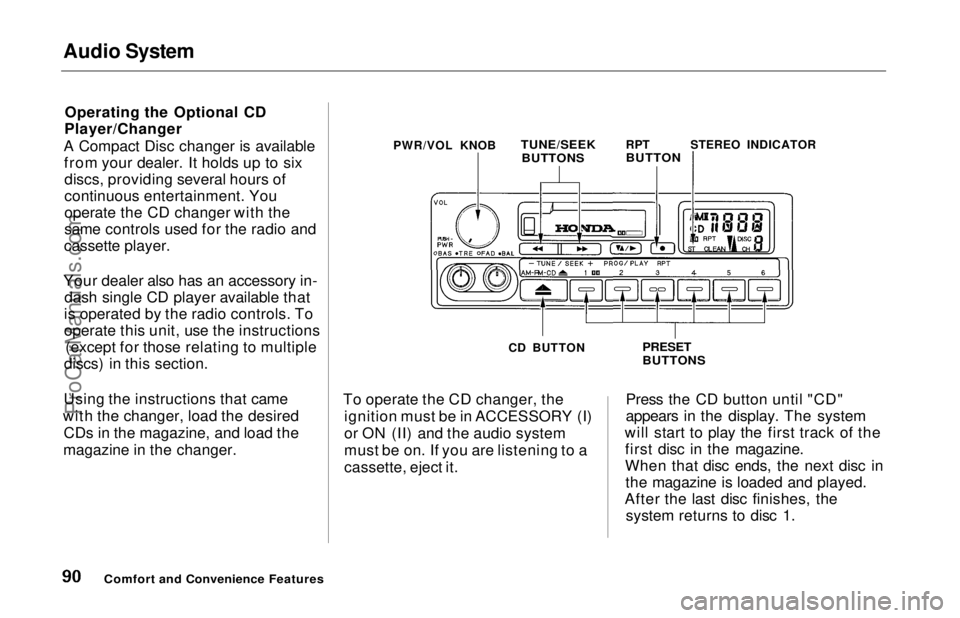
Operating the Optional CD
Player/Changer
A Compact Disc changer is available from your dealer. It holds up to sixdiscs, providing several hours of
continuous entertainment. You
operate the CD changer with the
same controls used for the radio and
cassette player.
Your dealer also has an accessory in- dash single CD player available that
is operated by the radio controls. To
operate this unit, use the instructions (except for those relating to multiple
discs) in this section.
Using the instructions that came
with the changer, load the desired CDs in the magazine, and load the
magazine in the changer. To operate the CD changer, the
ignition must be in ACCESSORY (I)
or ON (II) and the audio system
must be on. If you are listening to a
cassette, eject it. Press the CD button until "CD"
appears in the display. The system
will start to play the first track of the first disc in the magazine.
When that disc ends, the next disc inthe magazine is loaded and played.
After the last disc finishes, the system returns to disc 1.
Comfort and Convenience Features
PWR/VOL KNOB
TUNE/SEEK
BUTTONS
RPT
BUTTON
STEREO INDICATOR
CD BUTTON
PRESET
BUTTONSProCarManuals.comMain Menu Table of Contents s t
Page 91 of 241
Audio System
To select a different disc, press the appropriate preset button (1 — 6). If
you select an empty slot in the magazine, the changer will, after
finding that slot empty, try to load
the CD in the next slot. This continues until it finds a CD to load
and play.
You can use the TUNE/SEEK buttons to select tracks within a disc.Push and release the appropriate
TUNE/SEEK button, the system will move to the beginning of a track. Press the button to move to the
beginning of the next track, and press the button to move to the
beginning of the current track.
If you press and hold the TUNE/
SEEK button, you will hear a beep
and the system will continue to move
across tracks. Release the button
when you think it has reached the desired place on the disc. REPEAT — When you activate the
Repeat feature by pressing the RPT
button, the system continuously
replays the current track. You will see RPT in the display as a reminder.
Press the RPT button again to turn it
off.
To take the system out of CD mode, press the AM or FM button, or inserta cassette in the player. When you
return to CD mode, play will contin-
ue at the same disc and track.
If you turn the system off while a CD
is playing, either with the PWR/VOL
knob or the ignition switch, play will
continue at the same disc and track
when you turn it back on.
Protecting Compact Discs
For information on how to handle
and protect compact discs, see page
104.
CD Changer Error Indications
For information on the meaning of
the CD Error Indications and what to do when you see those indications,
refer to page 105 .
Comfort and Convenience FeaturesProCarManuals.comMain Menu Table of Contents s t
Page 102 of 241
Audio System
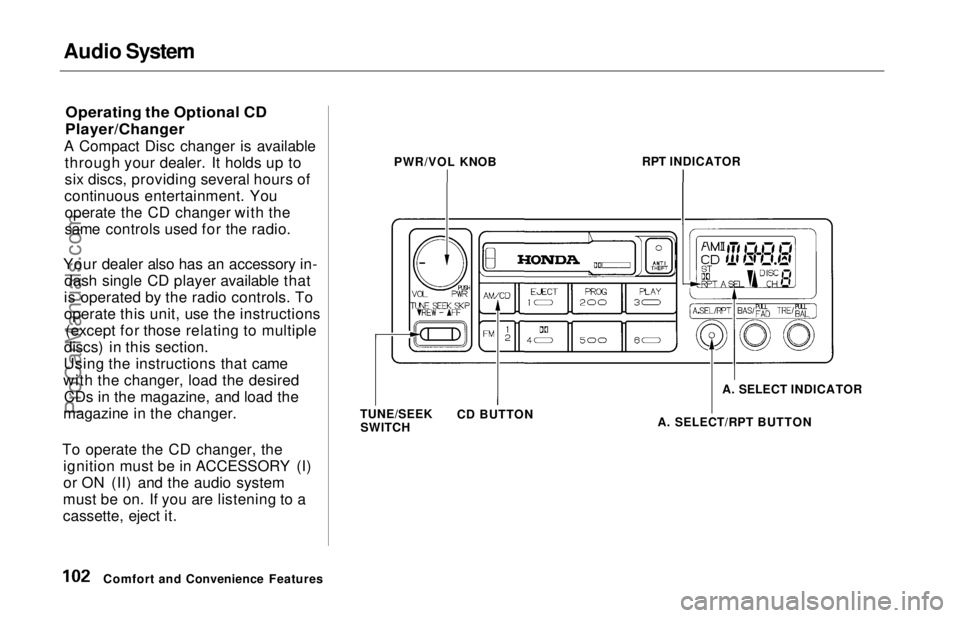
Operating the Optional CD
Player/Changer
A Compact Disc changer is available through your dealer. It holds up to
six discs, providing several hours of
continuous entertainment. You operate the CD changer with the
same controls used for the radio.
Your dealer also has an accessory in- dash single CD player available that
is operated by the radio controls. To
operate this unit, use the instructions (except for those relating to multiple
discs) in this section.
Using the instructions that came
with the changer, load the desired CDs in the magazine, and load the
magazine in the changer.
To operate the CD changer, the ignition must be in ACCESSORY (I)
or ON (II) and the audio system
must be on. If you are listening to a
cassette, eject it.
Comfort and Convenience Features PWR/VOL KNOB
RPT INDICATOR
TUNE/SEEK SWITCH CD BUTTON
A. SELECT/RPT BUTTONA. SELECT INDICATORProCarManuals.comMain Menu Table of Contents s t
Page 103 of 241
Audio System
Press the CD button until "CD"
appears in the display. The system
will start to play the first track of the
first disc in the magazine.
When that disc ends, the next disc in the magazine is loaded and played.
After the last disc finishes, the system returns to disc 1.
To select a different disc, press the appropriate preset button (1 — 6). If
you select an empty slot in the magazine, the changer will, after
finding that slot empty, try to load the CD in the next slot. This
continues until it finds a CD to load
and play.
You can use the TUNE/SEEK switch to select tracks within a disc.
If you push and release the TUNE/
SEEK switch, the system will move
to the beginning of a track. Push the switch up to move to the beginning
of the next track, and push the
switch down to move to the begin-
ning of the current track. If you push and hold the TUNE/
SEEK switch, you will hear a beep
and the system will continue to move
across tracks. Release the switch
when you think it has reached the desired place on the disc.
RPT —
When you activate the
Repeat feature by pressing the
A. SEL/RPT button, the system continuously replays the current
track. You will see RPT in the display as a reminder. Press the button
again to turn it off.
RANDOM PLAY —
This feature,
when activated, plays the tracks on a CD in random order, rather than in
the order they are recorded on the CD. To activate Random Play, press
the A. SEL/RPT button until you see
A. SEL in the display. The system will then select and play tracksrandomly on the current disc. When
all tracks on that disc have been
played, the next disc is loaded and played randomly. This continues
until you deactivate Random Play by
pressing A. SEL/RPT again.
If the system is in Repeat mode, you must turn it off by pressing A. SEL/RPT before you can select Random
Play. Then press the button again
until you see A. SEL displayed.
To take the system out of CD mode, press the AM or FM button, or inserta cassette in the player. When you
return to CD mode, play will contin-
ue at the same disc and track.
If you turn the system off while a CD
is playing, either with the PWR/VOL
knob or the ignition switch, play will continue at the same point when you
turn it back on.
Comfort and Convenience FeaturesProCarManuals.comMain Menu Table of Contents s t
Page 105 of 241
Audio System
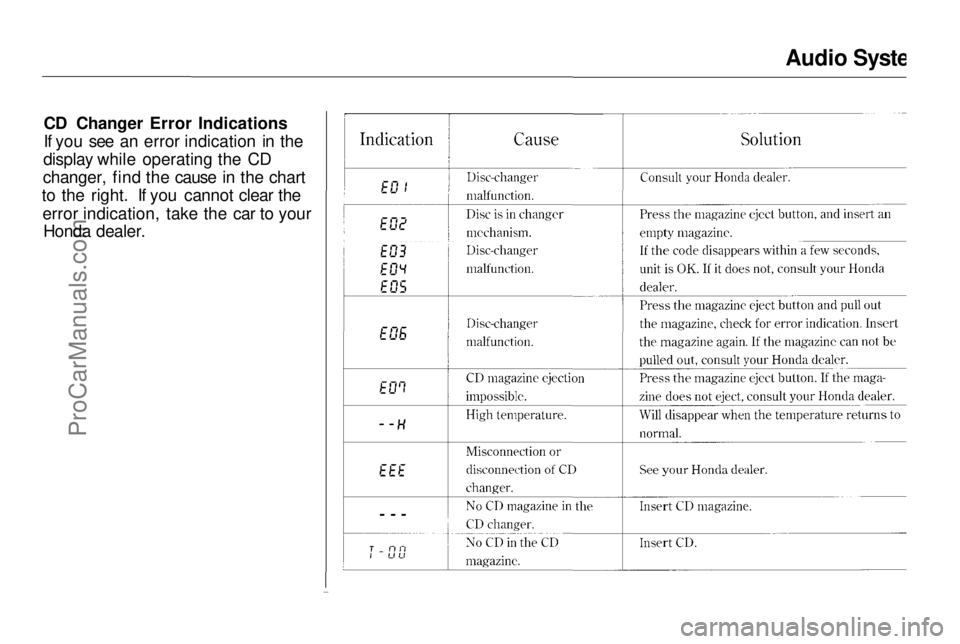
CD Changer Error Indications
If you see an error indication in the
display while operating the CD
changer, find the cause in the chart
to the right. If you cannot clear the
error indication, take the car to your Honda dealer.
Comfort and Convenience FeaturesProCarManuals.comMain Menu Table of Contents s t