tow HONDA ODYSSEY 1997 Owners Manual
[x] Cancel search | Manufacturer: HONDA, Model Year: 1997, Model line: ODYSSEY, Model: HONDA ODYSSEY 1997Pages: 241, PDF Size: 2.52 MB
Page 1 of 241
 to navigate through\
this reference.
For a printed owners manual, click on authorized manuals or go")
1997 Odyssey Online Reference Owner's Manual
Use these links (and links throughout this manual) to navigate through\
this reference.
For a printed owner's manual, click on authorized manuals or go to www.h\
elminc.com.
Contents
Owner's Identification Form
Introduction ........................................................................\
............................................................... i
A Few Words About Safety........................................................................\
....................................... ii
Driver and Passenger Safety ........................................................................\
.................................... 3
Proper use and care of your vehicle's seat belts, and Supplemental Restr\
aint System.
Instruments and Control s........................................................................\
........................................ 31
Instrument panel indicator and gauge, and how to use dashboard and steering colu\
mn controls.
Comfort and Convenience Features ........................................................................\
...................... 73
How to operate the climate control system, the audio system, and other c\
onvenience features.
Before Driving........................................................................\
..........................................................107
What gasoline to use, how to break -in your new vehicle, and how to load luggage and other cargo.
Driving ........................................................................\
......................................................................117
The proper way to start the engine, shift the transmission, and park, pl\
us towing a trailer.
Maintenance........................................................................\
.............................................................137
The Maintenance Schedule shows you when you need to take you r vehicle to the dealer.
Appearance Car e........................................................................\
..................................................... .185
Tips on cleaning and protecting your vehicle. Things to look for if your\
vehicle ever needs body repairs.
Taking Care of the Unexpecte d........................................................................\
..............................193
This section covers several problems motorists sometimes experience, an d how to handle them.
Technical Informatio n........................................................................\
.............................................217
ID numbers, dimensions, capacities, and technical information.
Warranty and Customer Relations (U.S. and Canada)................................................................229
A summary of the warranties covering your new Acura, and how to contact \
us.
Authorized Manu als (U.S. only)........................................................................\
..............................235
How to order manuals and other technical literature.
Index........................................................................\
.............................................................................. I
Gas Station Information
A summary of information you need when you pull up to the fuel pump.
ProCarManuals.com
Page 10 of 241
The Seat Belt System and How It Works
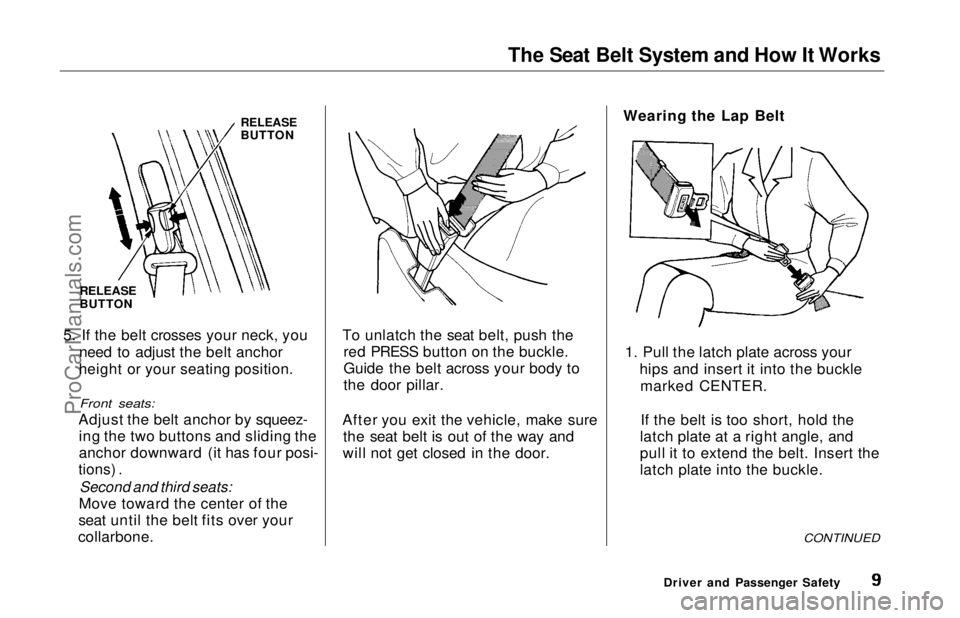
RELEASE
BUTTON
RELEASE
BUTTON
5. If the belt crosses your neck, you need to adjust the belt anchor
height or your seating position.
Front seats:
Adjust the belt anchor by squeez- ing the two buttons and sliding the
anchor downward (it has four posi-
tions) .
Second and third seats:
Move toward the center of the
seat until the belt fits over your
collarbone.
To unlatch the seat belt, push the
red PRESS button on the buckle.
Guide the belt across your body to
the door pillar.
After you exit the vehicle, make sure the seat belt is out of the way and
will not get closed in the door. Wearing the Lap Belt
1. Pull the latch plate across your hips and insert it into the bucklemarked CENTER.
If the belt is too short, hold the
latch plate at a right angle, and
pull it to extend the belt. Insert the
latch plate into the buckle.
CONTINUED
Driver and Passenger SafetyProCarManuals.comMain Menu Table of Contents s t
Page 19 of 241
Additional Safety Information
The seat belts and airbags are obvi-ously important parts of your occu-
pant protection system.
In addition, you should know thatsitting upright, adjusting the head
restraints properly, locking the doors, and stowing things properly can also
increase your safety and possibly even save your life. Seat-back Position
The seat-backs should be in an upright position for you and your
passengers to get the most protec-
tion from the seat belts.
If you recline a seat-back, you reduce
the protective capability of your seat belt. The farther a seat-back is
reclined, the greater the risk that
you will slide under the belt in a severe crash and be very seriously
injured.
For information on how to adjust the
seat-back, see page 55 . Head Restraint Position
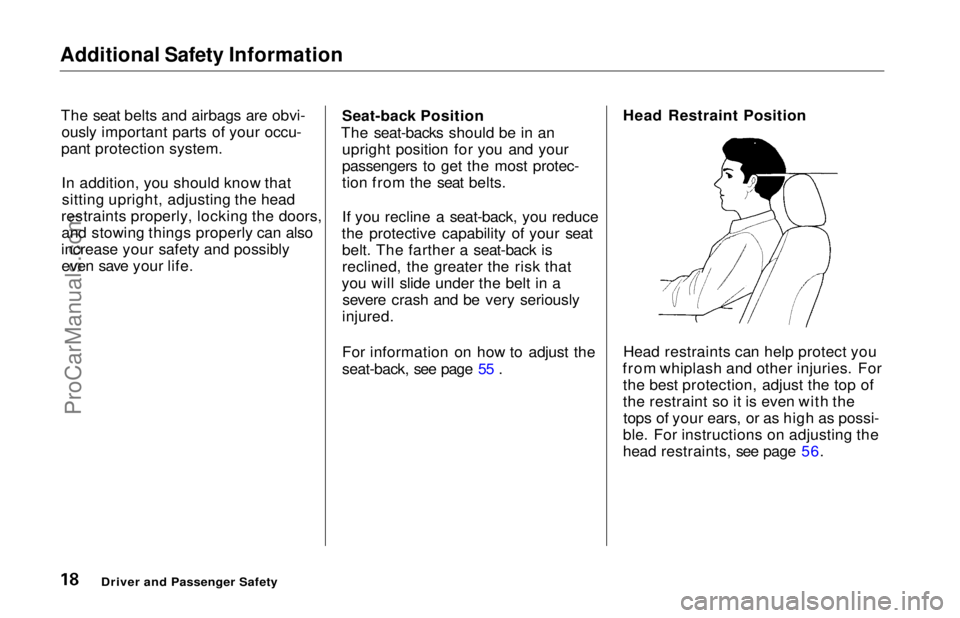
Head restraints can help protect you
from whiplash and other injuries. For the best protection, adjust the top of
the restraint so it is even with thetops of your ears, or as high as possi-
ble. For instructions on adjusting the
head restraints, see page 56.
Driver and Passenger SafetyProCarManuals.comMain Menu Table of Contents s t
Page 25 of 241
Child Safety
If you are using a toddler seat in the
front passenger's seat, move the
passenger's seat as far back as possible before installing the child
seat. If the passenger's bag inflates,
it could seriously hurt a toddler who
is not in the proper position or
properly restrained.
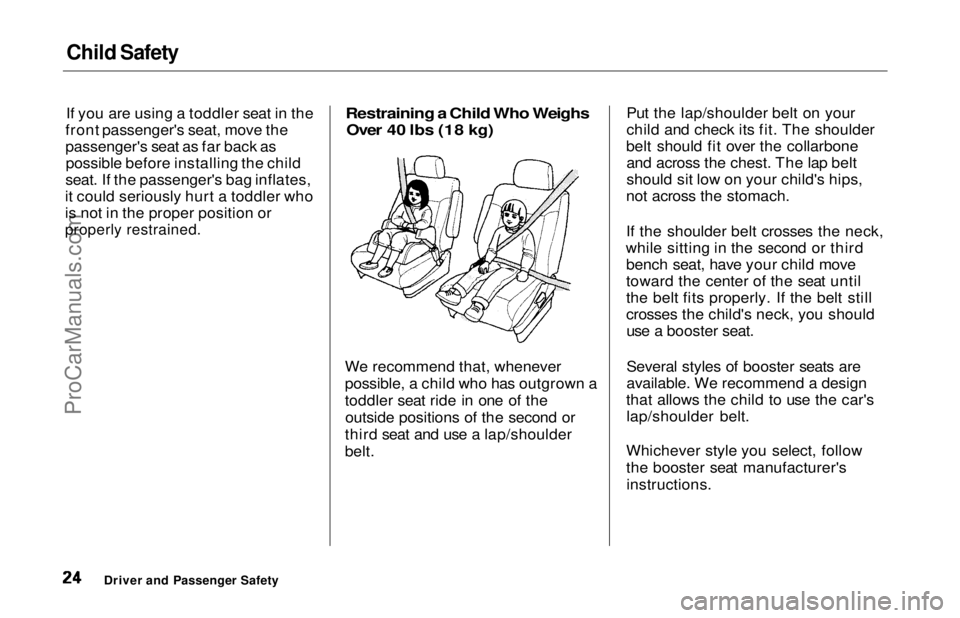
Restraining a Child Who Weighs
Over 40 lbs (18 kg)
We recommend that, whenever
possible, a child who has outgrown a
toddler seat ride in one of the outside positions of the second or
third seat and use a lap/shoulder
belt. Put the lap/shoulder belt on your
child and check its fit. The shoulder
belt should fit over the collarbone and across the chest. The lap belt
should sit low on your child's hips,
not across the stomach.
If the shoulder belt crosses the neck,
while sitting in the second or third bench seat, have your child move
toward the center of the seat until
the belt fits properly. If the belt still
crosses the child's neck, you shoulduse a booster seat.
Several styles of booster seats are
available. We recommend a design
that allows the child to use the car's lap/shoulder belt.
Whichever style you select, follow
the booster seat manufacturer's instructions.
Driver and Passenger SafetyProCarManuals.comMain Menu Table of Contents s t
Page 62 of 241
Seats
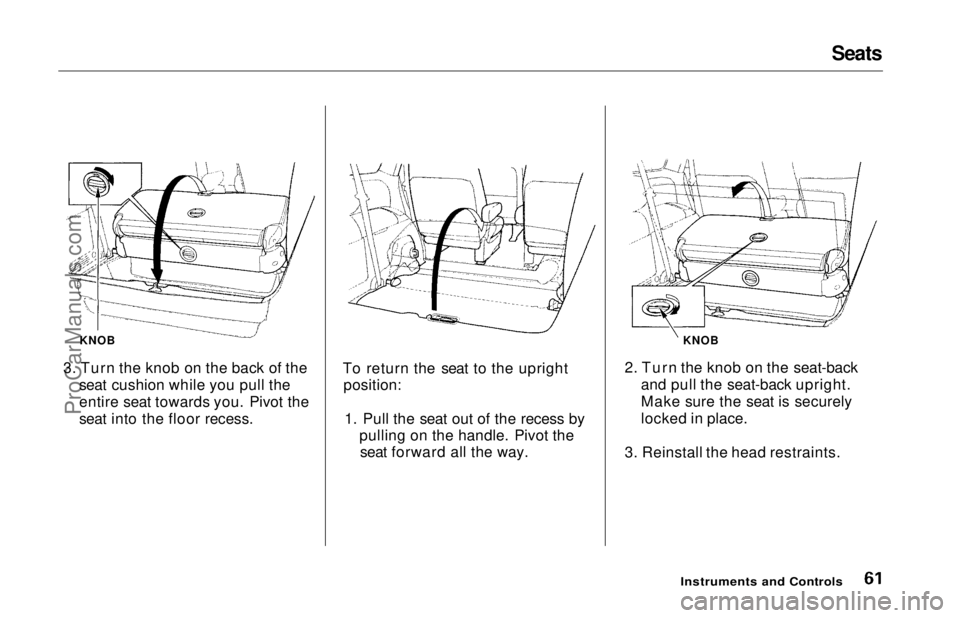
KNOB
3. Turn the knob on the back of the seat cushion while you pull the
entire seat towards you. Pivot the
seat into the floor recess. To return the seat to the upright
position:
1. Pull the seat out of the recess by pulling on the handle. Pivot theseat forward all the way. KNOB
2. Turn the knob on the seat-back and pull the seat-back upright.
Make sure the seat is securely
locked in place.
3. Reinstall the head restraints.
Instruments and ControlsProCarManuals.comMain Menu Table of Contents s t
Page 112 of 241
Service Station Procedures
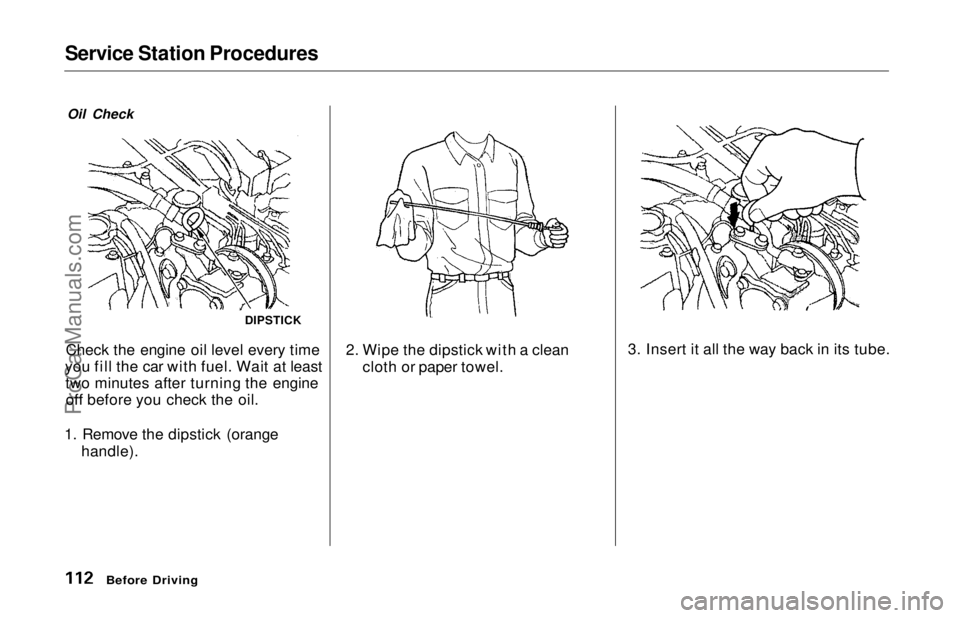
Oil Check
Check the engine oil level every time
you fill the car with fuel. Wait at least two minutes after turning the engineoff before you check the oil.
1. Remove the dipstick (orange handle). 2. Wipe the dipstick with a clean
cloth or paper towel.
Before Driving
DIPSTICK
3. Insert it all the way back in its tube.ProCarManuals.comMain Menu Table of Contents s t
Page 116 of 241
Loading Cargo
The maximum load you can carry in your Honda is 1,150 Ibs (535 kg). It
includes the total weight of all
passengers and their belongings, any
accessories, and the tongue weight
of a trailer. This 1,150 Ibs (535 kg)
figure is shown as the Vehicle Capacity Weight on the tire infor-
mation label attached to the driver's doorjamb.
To figure out how much cargo you
can cany: Figure the total "occupant weight"
you will be transporting. To do this, multiply the number of people (driver and all passengers) by 150
Ibs (70 kg). Subtract this number from the
Vehicle Capacity Weight (1,150 lbs/535 kg). If you are towing a trailer, subtract
the tongue weight. See Towing a
Trailer on page 130 .
This final number is the total weight of cargo you can load in or on the car.
With seven occupants (driver and six passengers), the maximum recom-
mended weight for cargo is 100 Ibs
(45 kg).
Where you store this cargo, and how
well you secure it, are just as important as how much it weighs.
Make sure you load cargo so it will
not shift while driving. Items stored
in the cargo area behind the third
seat should be stored as far forward
as possible. You could store addi-
tional items on the floor behind the
front seats. Make sure they cannot roll under the front seat and
interfere with the pedals.
For greater cargo capacity, the thirdseat can be folded into the floor and
the second row seats can either be removed or folded up (depending onmodel). Passengers should never sit
in the open cargo area while the car
is moving. They should sit in one of
the seats and wear their seat belts.
If you must carry large objects that
prevent you from closing the tailgate,
be aware that exhaust gas can enter the interior. See Carbon Monoxide
Hazard on page 29 .
Before DrivingProCarManuals.comMain Menu Table of Contents s t
Page 117 of 241
Driving
This section gives you tips on starting the engine under various
conditions, and how to operate the
automatic transmission. It also
includes important information on
parking your car, the braking system and facts you need if you are plan-
ning to tow a trailer. Preparing to Drive......................... 118
Starting the Engine........................ 119
Starting in Cold Weatherat High Altitude ..................... 119
Automatic Transmission............... 120 Shift Lever Position Indicator.. 120
Shift Lever Positions................. 120
Maximum Speeds...................... 123
Shift Lock Release..................... 123
Parking............................................ 124
The Braking System...................... 124 Brake Wear Indicators.............. 125
Brake System Design................ 125
Anti-lock Brakes........................ 126 Important Safety Reminders.... 127
ABS Indicator............................. 127
Driving in Bad Weather................ 128
Towing a Trailer............................ 130
DrivingProCarManuals.comMain Menu s t
Page 121 of 241
Automatic Transmission
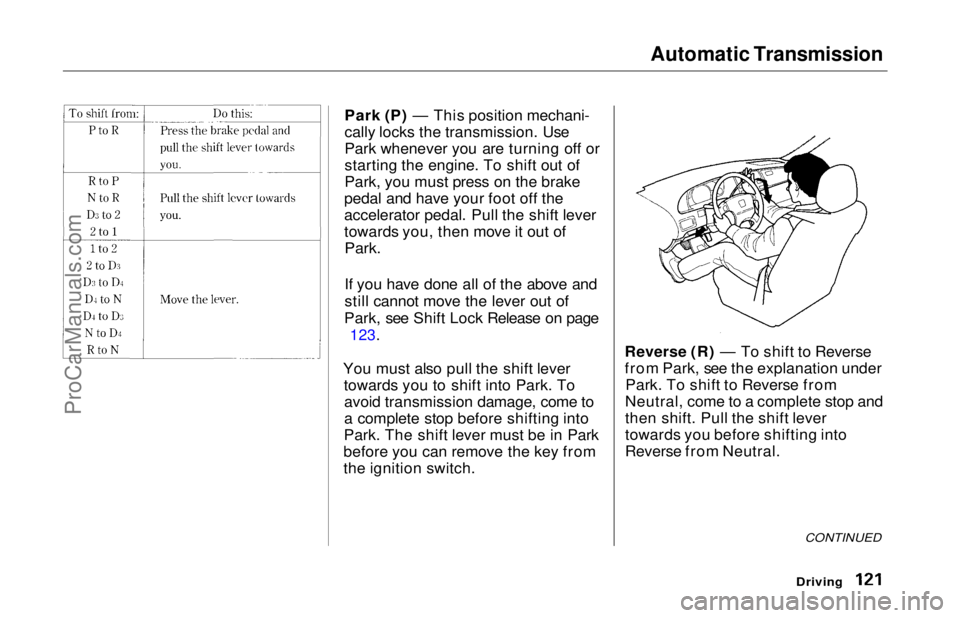
Park (P) — This position mechani-
cally locks the transmission. Use
Park whenever you are turning off or
starting the engine. To shift out of
Park, you must press on the brake
pedal and have your foot off the
accelerator pedal. Pull the shift lever
towards you, then move it out of
Park.
If you have done all of the above and
still cannot move the lever out of
Park, see Shift Lock Release on page
123.
You must also pull the shift lever towards you to shift into Park. Toavoid transmission damage, come to
a complete stop before shifting into
Park. The shift lever must be in Park
before you can remove the key from
the ignition switch. Reverse (R) — To shift to Reverse
from Park, see the explanation under
Park. To shift to Reverse from
Neutral, come to a complete stop and
then shift. Pull the shift lever
towards you before shifting into
Reverse from Neutral.
Driving
CONTINUEDProCarManuals.comMain Menu Table of Contents s t
Page 122 of 241
Automatic Transmission
Neutral (N) — Use Neutral if youneed to restart a stalled engine, or if
it is necessary to stop briefly with
the engine idling. Shift to Park posi-
tion if you need to leave the car for
any reason. Press on the brake pedal
when you are moving the shift lever
from Neutral to another gear.
Drive (D4) — Use this position for
your normal driving. The transmis- sion automatically selects a suitable
gear for your speed and acceleration.
You may notice the transmission shifting up at higher speeds when
the engine is cold. This helps the
engine warm up faster.
Drive (D3) — This position is similar
to D4, except only the first three
gears are selected. Use D3 when
towing a trailer in hilly terrain, or to
provide engine braking when going down a steep hill. D3 can also keep
the transmission from cycling
between third and fourth gears in stop-and-go driving.
For faster acceleration when in D3 or
D4, you can get the transmission to
automatically downshift by pushing
the accelerator pedal to the floor.
The transmission will shift down one or two gears, depending on your
speed.
Second (2) — To shift to Second,
pull the shift lever towards you, then shift to the lower gear. This position
locks the transmission in second
gear. It does not downshift to first gear when you come to a stop.Second gives you more power when
climbing, and increased engine
braking when going down steep hills.
Use second gear when starting out
on a slippery surface or in deep snow.
It will help reduce wheelspin.
Whenever you move the shift lever to a lower gear, the transmissiondownshifts only if the engine's redline will not be exceeded in the
lower gear.
First (1) — To shift from Second to
First, pull the shift lever towards you,
then shift to the lower gear. With the lever in this position, the transmis-sion locks in First gear. By upshift-
ing and downshifting through 1, 2,
D3 and D4, you can operate this
transmission much like a manual
transmission without a clutch pedal.
DrivingProCarManuals.comMain Menu Table of Contents s t