dashboard HONDA ODYSSEY 1998 User Guide
[x] Cancel search | Manufacturer: HONDA, Model Year: 1998, Model line: ODYSSEY, Model: HONDA ODYSSEY 1998Pages: 272, PDF Size: 2.67 MB
Page 45 of 272
Additional Information About Your SRS
SRS Components
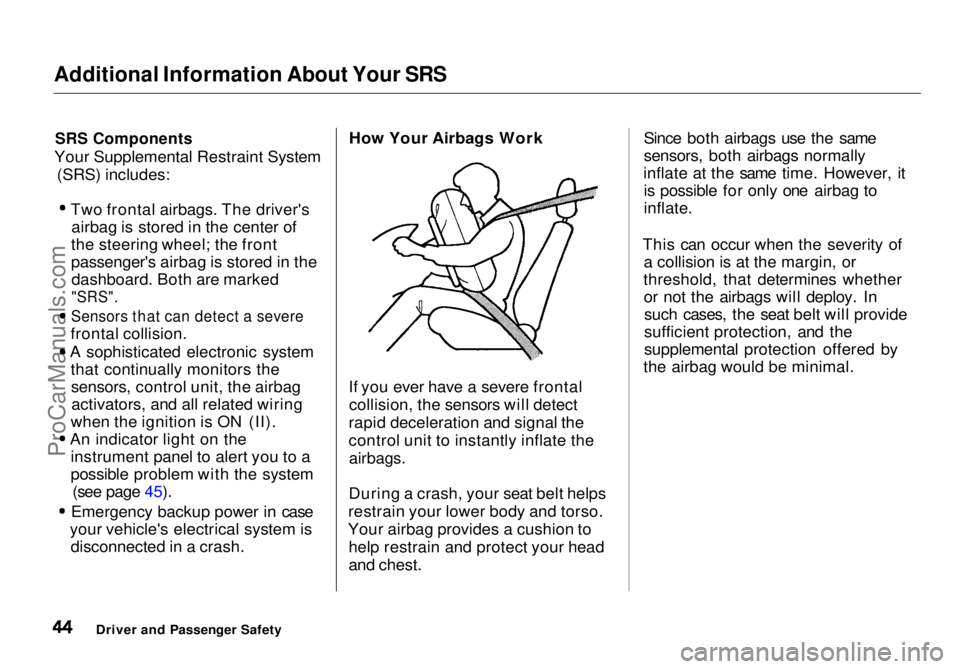
Your Supplemental Restraint System (SRS) includes: Two frontal airbags. The driver's
airbag is stored in the center of
the steering wheel; the front
passenger's airbag is stored in the dashboard. Both are marked
"SRS".
Sensors that can detect a severe
frontal collision.
A sophisticated electronic system that continually monitors thesensors, control unit, the airbagactivators, and all related wiring
when the ignition is ON (II). An indicator light on the
instrument panel to alert you to a
possible problem with the system (see page 45). Emergency backup power in case
your vehicle's electrical system is disconnected in a crash. How Your Airbags Work
If you ever have a severe frontal collision, the sensors will detect
rapid deceleration and signal the
control unit to instantly inflate the
airbags.
During a crash, your seat belt helps
restrain your lower body and torso.
Your airbag provides a cushion to help restrain and protect your head
and chest. Since both airbags use the same
sensors, both airbags normally
inflate at the same time. However, it is possible for only one airbag to
inflate.
This can occur when the severity of a collision is at the margin, or
threshold, that determines whether or not the airbags will deploy. Insuch cases, the seat belt will provide
sufficient protection, and the
supplemental protection offered by
the airbag would be minimal.
Driver and Passenger SafetyProCarManuals.comMain Menu Table of Contents s t
Page 50 of 272
Instruments and Controls
This section gives information about
the controls and displays thatcontribute to the daily operation of
your Honda. All the essential
controls are within easy reach.
Control Locations............................ 50
Indicator Lights................................ 51
Gauges.............................................. 54
Tachometer.................................. 54
Trip Meter.................................... 54
Speedometer................................ 55
Odometer...................................... 55
Temperature Gauge.................... 55
Fuel Gauge................................... 55
Maintenance Required
Indicator.................................... 56
Controls Near the Steering
Wheel........................................ 57
Headlights.................................... 58
Daytime Running Lights............. 58
Instrument Panel Brightness..... 59
Turn Signals................................. 59
Windshield Wipers...................... 60
Windshield Washers................... 61
Rear Window Wiper and
Washer...................................... 61
Hazard Warning........................... 61
Rear Window Defogger.............. 62
Steering Wheel Adjustment....... 62
Steering Wheel Controls ................ 64
Cruise Control.............................. 64
Keys and Locks................................ 67
Keys............................................... 67
Immobilizer System..................... 68
Ignition Switch............................. 69
Power Door Locks....................... 70
Remote Transmitter.................... 71
Childproof Door Locks............... 72
Tailgate......................................... 72
Glove Box..................................... 73
Seats.................................................. 74
Passenger Seating....................... 74
Seat Adjustments......................... 74
Driver's Seat Power Height
Adjustment............................... 75
Armrests....................................... 76
Head Restraints........................... 76
Third Seat Access........................ 77
Removing the Second Seats
in the Six-Passenger Model.... 78
Folding the Second Seats
in the Seven-Passenger
Model.................................... 78
Reclining the Second Seat.......... 79
Folding the Third Seat
in All Models............................ 80
Power Windows............................... 82
Sunroof.............................................. 83
Mirrors.............................................. 84
Adjusting the Power Mirrors..... 84
Parking Brake.................................. 85
Digital Clock..................................... 86 Beverage Holder.............................. 86
Dashboard Compartment............... 88
Center Pocket.................................. 88
Vanity Mirror................................... 88
Cigarette Lighter............................. 89
Ashtrays............................................ 89 Interior Lights.................................. 90
Ceiling Lights............................... 90
Spotlights...................................... 90
Tailgate Light............................... 91 Courtesy Lights........................... 91
Instruments and ControlsProCarManuals.comMain Menu s t
Page 58 of 272
Controls Near the Steering Wheel
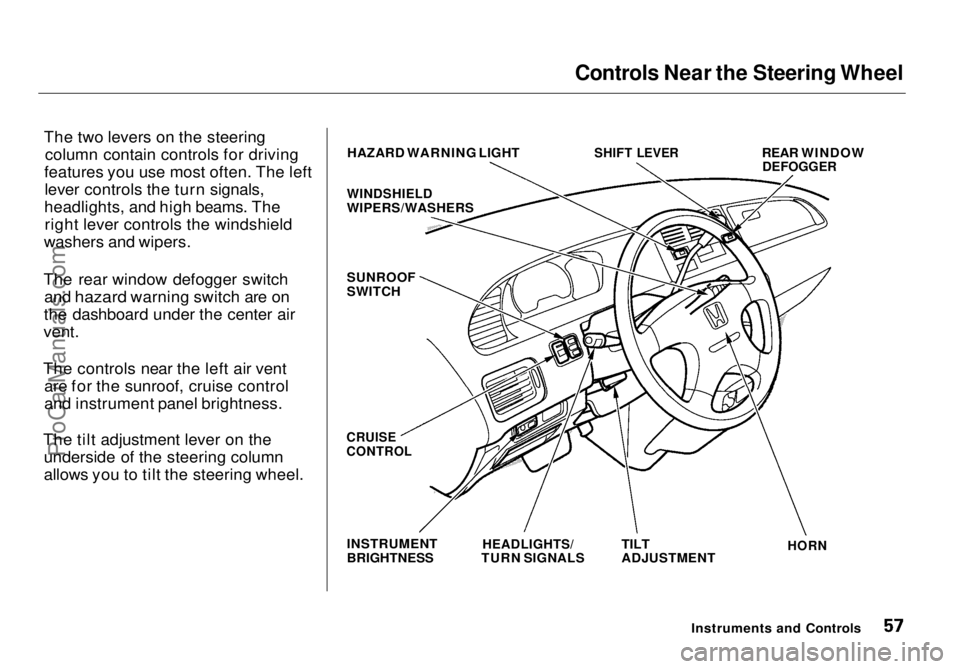
The two levers on the steering column contain controls for driving
features you use most often. The left lever controls the turn signals,
headlights, and high beams. The right lever controls the windshield
washers and wipers.
The rear window defogger switch and hazard warning switch are on
the dashboard
under the center air
vent.
The controls near the left air vent are for the sunroof, cruise control
and instrument panel brightness.
The tilt adjustment lever on the underside of the steering column
allows you to tilt the steering wheel. HAZARD WARNING LIGHT
WINDSHIELD
WIPERS/WASHERS
SUNROOF
SWITCH
SHIFT LEVER
REAR WINDOW
DEFOGGER
CRUISE
CONTROL
INSTRUMENT
BRIGHTNESS
HEADLIGHTS/
TURN SIGNALS
TILT
ADJUSTMENT
HORN
Instruments and ControlsProCarManuals.comMain Menu Table of Contents s t
Page 60 of 272
Controls Near the Steering Wheel
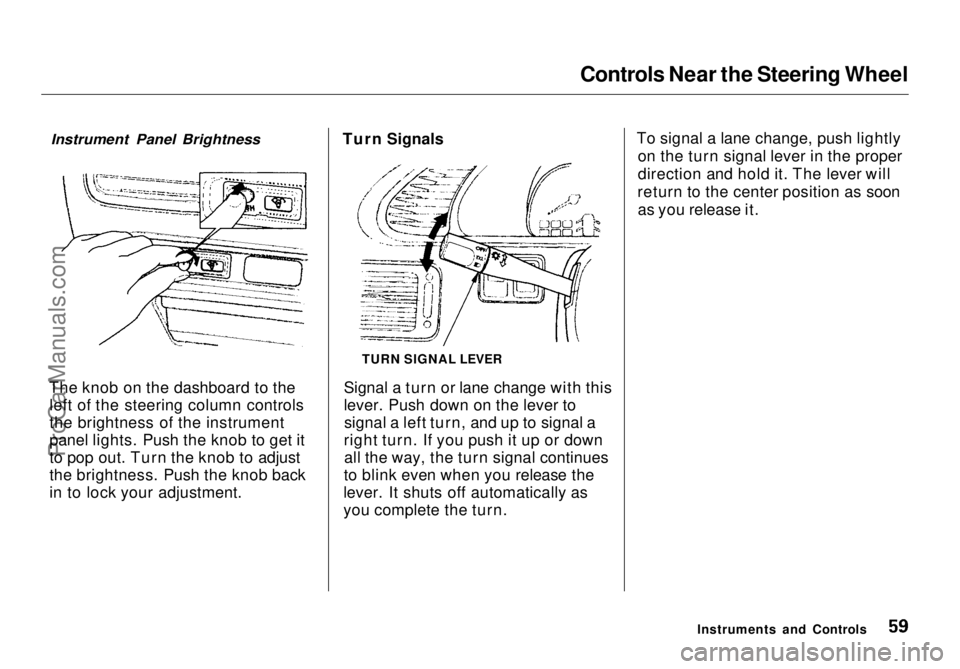
The knob on the dashboard to the left of the steering column controls
the brightness of the instrument
panel lights. Push the knob to get it
to pop out. Turn the knob to adjust
the brightness. Push the knob back
in to lock your adjustment. Turn Signals
Signal a turn or lane change with this
lever. Push down on the lever tosignal a left turn, and up to signal a
right turn. If you push it up or down all the way, the turn signal continues
to blink even when you release the
lever. It shuts off automatically as
you complete the turn. To signal a lane change, push lightly
on the turn signal lever in the proper
direction and hold it. The lever will
return to the center position as soon as you release it.
Instruments and Controls
TURN SIGNAL LEVER
Instrument Panel BrightnessProCarManuals.comMain Menu Table of Contents s t
Page 84 of 272
Power Windows, Sunroof
The MAIN switch controls power to the passengers' windows. With thisswitch off, the passengers' windows
cannot be raised or lowered. The
MAIN switch does not affect the
driver's window. Keep the MAIN
switch off when you have children in
the vehicle so they do not injure
themselves by operating the
windows unintentionally.
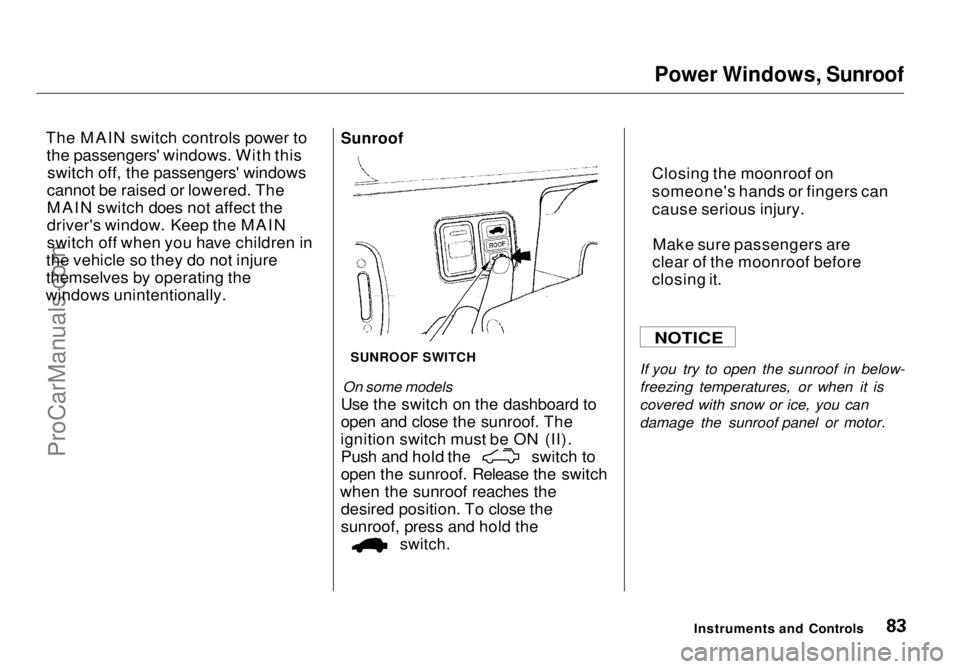
Sunroof
SUNROOF SWITCH
On some models
Use the switch on the dashboard to
open and close the sunroof. The
ignition switch must be ON (II). Push and hold the switch to
open the sunroof. Release the switch
when th
e sunroof reaches the
desired position. To close the
sunroof, press and hold the
switch.
If you try
to open the sunroof in below-
freezing temperatures, or when it is
covered with snow or ice, you can
damage the sunroof panel or motor.
Instruments and Controls
NOTICE
Closing the moonroof on
someone's hand
s or fingers can
cause serious injury.
Make sure passengers are
clear of the moonroof before
closing it.
ProCarManuals.comMain Menu Table of Contents s t
Page 89 of 272
Dashboard Compartment, Center Pocket, Vanity Mirror
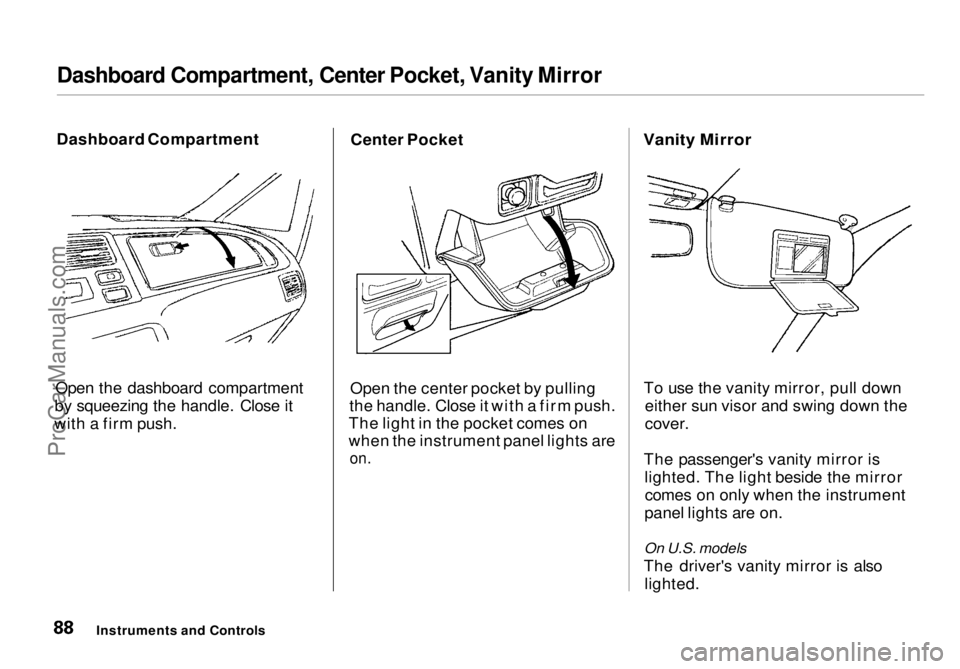
Dashboard Compartment
Open the dashboard compartment
by squeezing the handle. Close it
with a firm push. Center Pocket
Open the center pocket by pulling
the handle. Close it with a firm push.
The light in the pocket comes on
when the instrument panel lights are
on.
Vanity Mirror
To use the vanity mirror, pull down either sun visor and swing down the
cover.
The passenger's vanity mirror is lighted. The light beside the mirrorcomes on only when the instrument
panel lights are on.
On U.S. models
The driver's vanity mirror is also lighted.
Instruments and ControlsProCarManuals.comMain Menu Table of Contents s t
Page 95 of 272
Heating and Cooling
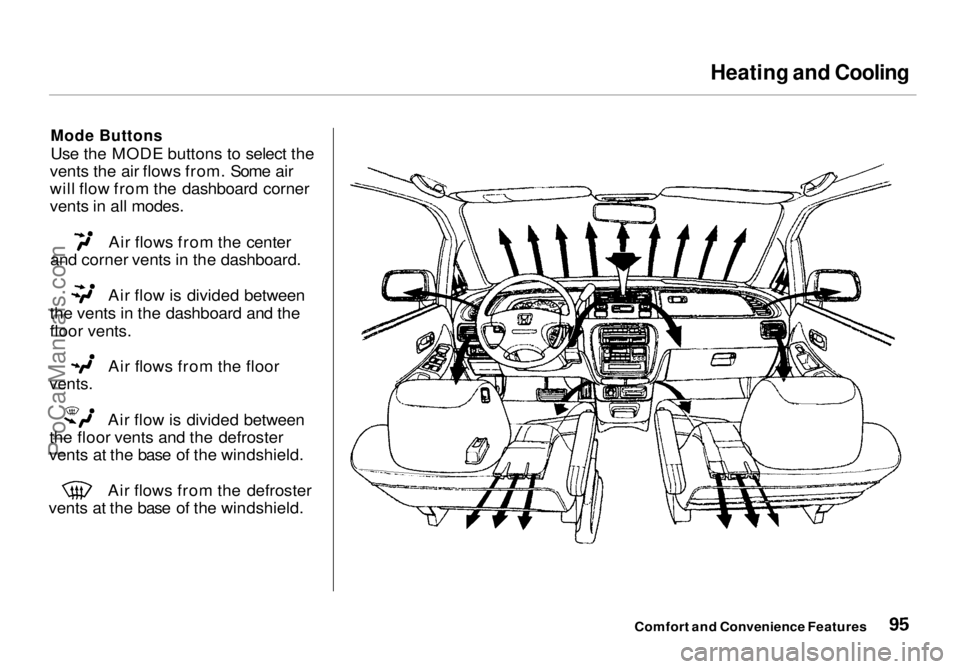
Mode Buttons
Use the MODE buttons to select the
vents the air flows from. Some air
will flow from the dashboard corner
vents in all modes. Air flows from the center
and corner vents in the dashboard. Air flow is divided between
the vents in the dashboard and the
floor vents. Air flows from the floor
vents.
Air flow is divided between
the floor vents and the defroster
vents at the base of the windshield. Air flows from the defroster
vents at the base of the windshield.
Comfort and Convenience FeaturesProCarManuals.comMain Menu Table of Contents s t
Page 96 of 272
Heating and Cooling
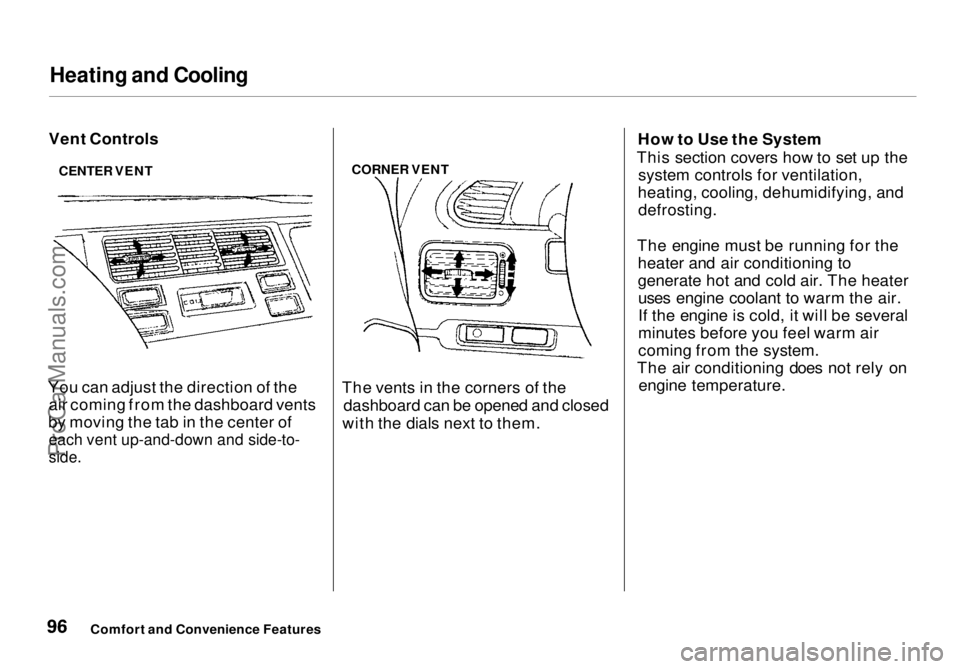
Vent Controls
You can adjust the direction of the air coming from the dashboard vents
by moving the tab in the center of
each vent up-and-down and side-to-
side.
CORNER VENT
The vents in the corners of the dashboard can be opened and closed
with the dials next to them. How to Use the System
This section covers how to set up the system controls for ventilation,
heating, cooling, dehumidifying, and defrosting.
The engine must be running for the heater and air conditioning to
generate hot and cold air. The heateruses engine coolant to warm the air.
If the engine is cold, it will be several
minutes before you feel warm air
coming from the system.
The air conditioning does not rely on engine temperature.
Comfort and Convenience Features
CENTER VENTProCarManuals.comMain Menu Table of Contents s t
Page 130 of 272
Service Station Procedures
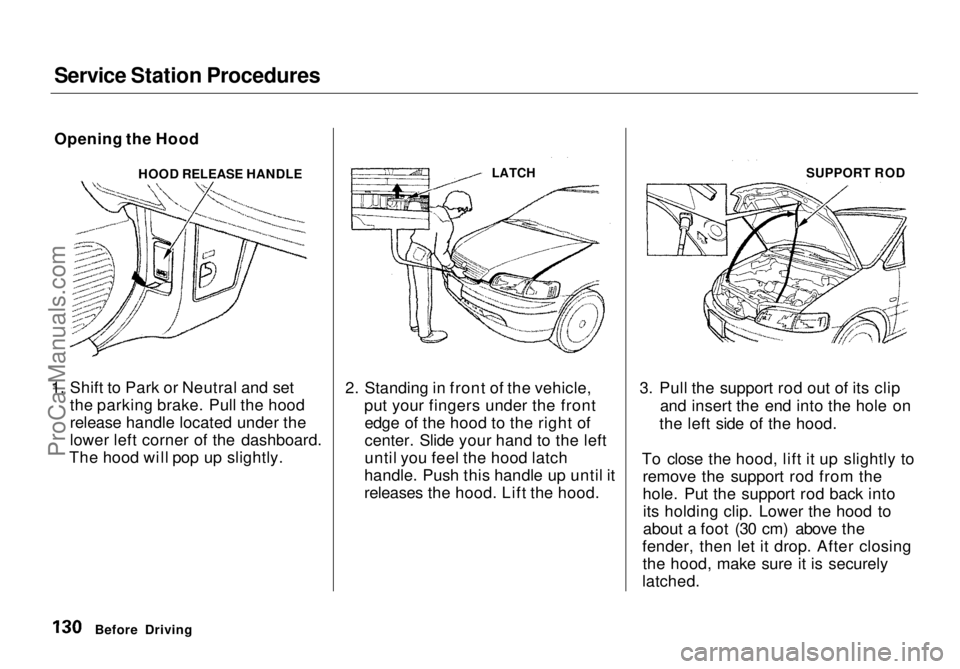
Opening the Hood
HOOD RELEASE HANDLE
1. Shift to Park or Neutral and set the parking brake. Pull the hood
release handle located under the
lower left corner of the dashboard.
The hood will pop up slightly. 2. Standing in front of the vehicle,
put your fingers under the frontedge of the hood to the right of
center. Slide your hand to the left
until you feel the hood latch
handle. Push this handle up until it
releases the hood. Lift the hood. 3. Pull the support rod out of its clip
and insert the end into the hole on
the left side of the hood.
To close the hood, lift it up slightly to remove the support rod from the
hole. Put the support rod back intoits holding clip. Lower the hood to
about a foot (30 cm) above the
fender, then let it drop. After closing the hood, make sure it is securely
latched.
Before Driving
LATCH
SUPPORT RODProCarManuals.comMain Menu Table of Contents s t
Page 135 of 272

Accessories and Modifications
Modifications
Do not remove any original
equipment or modify your vehicle in
any way that would alter its design or
operation. This could make your
vehicle unsafe and illegal to drive.
For example, do not make any
modifications that would change the
ride height of your vehicle, or install
wheels and tires with a different overall diameter.
Such modifications can adversely
affect handling, and interfere with
the operation of the vehicle's anti-
lock brakes and other systems. In addition, any modifications that
decrease ground clearance increase
the chance of undercarriage parts striking a curb, speed bump, or other
raised object, which could cause
your airbags to deploy.
Do not modify your steering wheel
or any other part of your
Supplemental Restraint System. Modifications could make the
system ineffective. Additional Safety Precaution
Do not attach or place objects on theairbag covers. Any object attached to
or placed on the covers marked "SRS,"
in the center of the steering wheel and on top of the dashboard, could
interfere with the proper operation of the airbags. Or, if the airbags
inflate, the objects could be
propelled inside the vehicle and hurt
someone.
Before DrivingProCarManuals.comMain Menu Table of Contents s t