radio HONDA ODYSSEY 1998 User Guide
[x] Cancel search | Manufacturer: HONDA, Model Year: 1998, Model line: ODYSSEY, Model: HONDA ODYSSEY 1998Pages: 272, PDF Size: 2.67 MB
Page 126 of 272
Audio System
Theft Protection
On U.S. EX model
Your vehicle's audio system will disable itself if it is disconnected
from electrical power for any reason.
To make it work again, the user must enter a specific five-digit code
in the Preset buttons. Because thereare hundreds of number
combinations possible from five digits, making the system work
without knowing the exact code is nearly impossible.
You should have received a card that lists your audio system's code
number and serial number. It is best
to store this card in a safe place at
home. In addition, you should write
the audio system's serial number in
this Owner's Manual. If you should
happen to lose the card, you must obtain the code number from your
Honda dealer. To do this, you will
need the system's serial number. If your vehicle's battery is discon-
nected or goes dead, the audio
system will disable itself. If this
happens, you will see "Code" in the
frequency display the next time you
turn on the system. Use the Preset
buttons to enter the five-digit code. If it is entered correctly, the radio willstart playing.
If you make a mistake entering the
code, do not start over or try to
correct your mistake. Complete the
five-digit sequence, then enter the correct code. You have three tries toenter the correct code. If you are
unsuccessful in three attempts, you
must then leave the system on for
one hour before trying again. You will have to store your favorite
stations in the Preset buttons after
the system begins working. Your original settings were lost when
power was disconnected.
Comfort and Convenience FeaturesProCarManuals.comMain Menu Table of Contents s t
Page 134 of 272
Accessories and Modifications
Modifying your vehicle, or installing
some non-Honda accessories, can
make your vehicle unsafe. Before
you make any modifications or add any accessories, be sure to read the
following information.
Accessories
Your dealer has Genuine Hondaaccessories that allow you to
personalize your vehicle. These accessories have been designed and
approved for your vehicle, and are
covered by warranty.
Non-Honda accessories are usually
designed for universal applications.
Although aftermarket accessories may fit on your vehicle, they may not
meet factory specifications, and
could adversely affect your vehicle's
handling and stability. (See "Modifications" on the page 135 for
additional information.) When properly installed, car phones,
alarms, two-way radios, and low-
powered audio systems should not interfere with your vehicle's
computer-controlled systems, such
as the SRS and anti-lock brake
system.
However, if electronic accessories are improperly installed, or exceed
your vehicle's electrical system capacity, they can interfere with the operation of your vehicle, or even
cause the airbags to deploy.
Before installing any accessory:
Make sure the accessory does notobscure any lights, or interfere
with proper vehicle operation or
performance. Be sure electronic accessories do
not overload electrical circuits
(see page 242).
Have the installer contact your Honda dealer for assistance before
installing any electronic accessory.
If possible, have your dealer inspect
the final installation.
Before Driving
Improper accessories or
modifications can affect your
vehicle's handling, stability and performance, and cause a
crash in which you can be hurt
or killed.
Follow all instructions in this
owner's manual regarding accessories and modifications.ProCarManuals.comMain Menu Table of Contents s t
Page 189 of 272
Battery
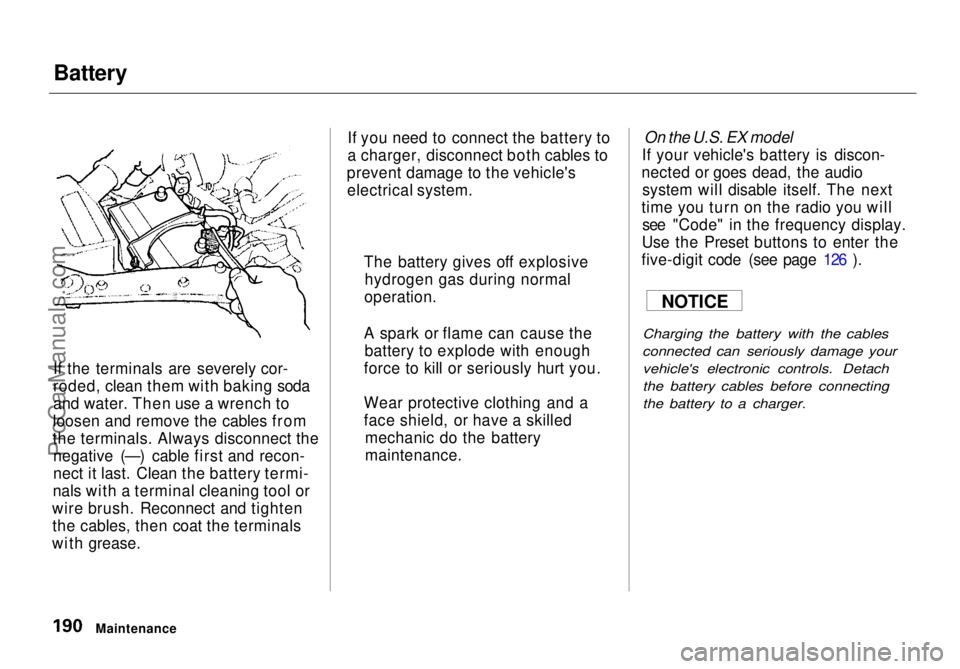
If the terminals are severely cor-
roded, clean them with baking soda
and water. Then use a wrench to
loosen and remove the cables from
the terminals. Always disconnect the negative (—) cable first and recon-
nect it last. Clean the battery termi-
nals with a terminal cleaning tool or
wire brush. Reconnect and tighten the cables, then coat the terminals
with grease. If you need to connect the battery to
a charger, disconnect both cables to
prevent damage to the vehicle's electrical system.
On the U.S. EX model
If your vehicle's battery is discon-
nected or goes dead, the audio system will disable itself. The next
time you turn on the radio you will see "Code" in the frequency display.
Use the Preset buttons to enter the
five-digit code (see page 126 ).
Charging the battery with the cables
connected can seriously damage your vehicle's electronic controls. Detach
the battery cables before connecting
the battery to a charger.
Maintenance The battery gives off explosive
hydrogen gas during normal
operation.
A spark or flame can cause the battery to explode with enough
force to kill or seriously hurt you.
Wear protective clothing and a
face shield, or have a skilled mechanic do the battery
maintenance. NOTICEProCarManuals.comMain Menu Table of Contents s t
Page 212 of 272
Exterior Care
Washing Frequent washing helps preserve
your vehicle's beauty. Dirt and grit can scratch the paint, while tree sap
and bird droppings can permanently
ruin the finish.
Wash your vehicle in a shady area, not in direct sunlight. If the vehicle is
parked in the sun, move it into the shade and let the exterior cool down
before you start.
Only use the solvents and cleaners
recommended in this Owner's
Manual.
Chemical solvents and strong cleaners
can damage the paint, metal, and
plastic on your vehicle.
Rinse the vehicle thoroughly with
cool water to remove loose dirt.
Fill a bucket with cool water. Mix
in a mild detergent, such as dishwashing liquid or a product
made especially for car washing.
Wash the vehicle using the water and detergent solution and a soft-
bristle brush, sponge, or soft cloth. Start at the top and work your waydown. Rinse frequently.
Check the body for road tar, tree
sap, etc. Remove these stains with
tar remover or turpentine. Rinse it off immediately so it does not
harm the finish. Remember to re-
wax these areas, even if the rest of the vehicle does not need waxing. When you have washed and rinsed
the whole exterior, dry it with achamois or soft towel. Letting it
air-dry will cause dulling and water
spots.
As you dry the vehicle, inspect it for chips and scratches that could allow
corrosion to start. Repair them with
touch-up paint (see page 215).
The radio antenna on your vehicle does
not need to be removed when you use a "drive-through'' car wash. However, if
you remove the antenna, make sure to
reinstall it and tighten it securely using
an appropriate tool.
Appearance Care
NOTICE
NOTICEProCarManuals.comMain Menu Table of Contents s t
Page 232 of 272
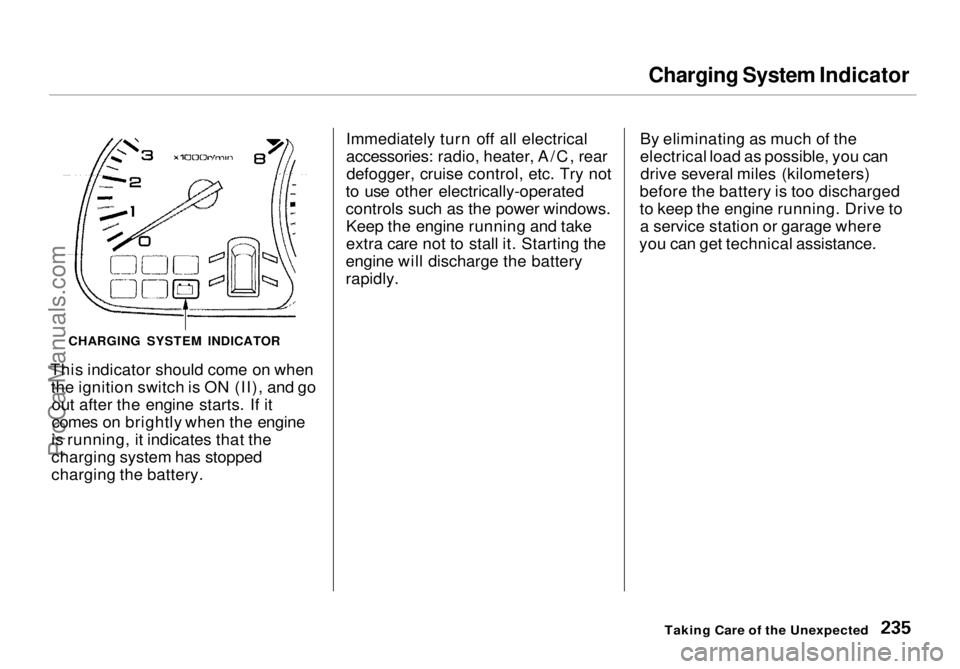
Charging System Indicator
This indicator should come on when the ignition switch is ON (II), and goout after the engine starts. If it
comes on brightly when the engine
is running, it indicates that the
charging system has stopped
charging the battery. Immediately turn off all electrical
accessories: radio, heater, A/C, rear
defogger, cruise control, etc. Try not
to use other electrically-operated
controls such as the power windows. Keep the engine running and take
extra care not to stall it. Starting the
engine will discharge the battery
rapidly. By eliminating as much of the
electrical load as possible, you can
drive several miles (kilometers)
before the battery is too discharged
to keep the engine running. Drive to a service station or garage where
you can get technical assistance.
Taking Care of the Unexpected
CHARGING SYSTEM INDICATORProCarManuals.comMain Menu Table of Contents s t
Page 238 of 272
Fuses
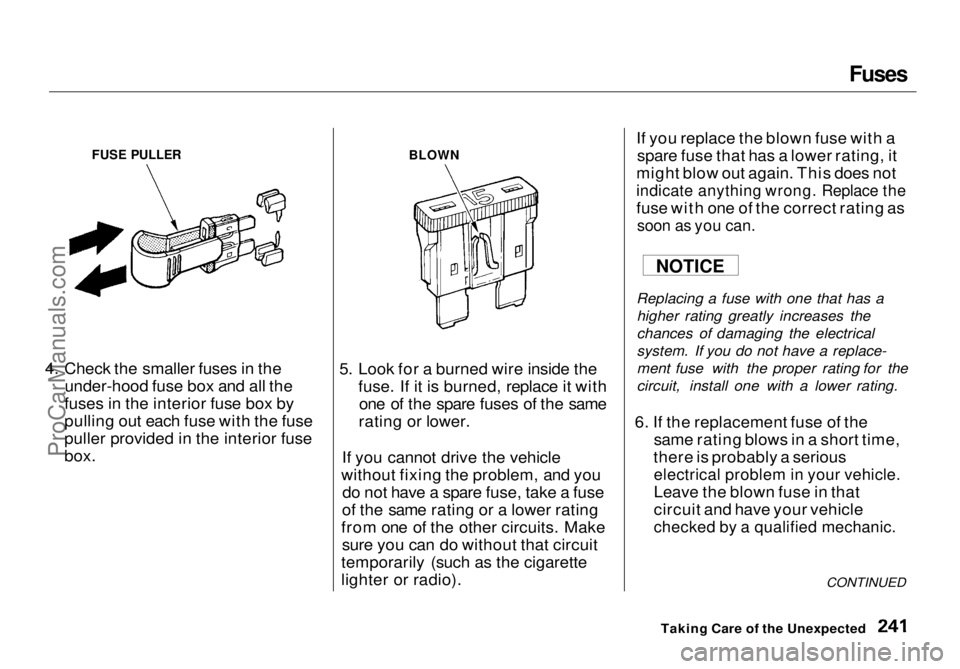
4. Check the smaller fuses in the under-hood fuse box and all the
fuses in the interior fuse box by
pulling out each fuse with the fuse
puller provided in the interior fuse
box. 5. Look for a burned wire inside the
fuse. If it is burned, replace it withone of the spare fuses of the same
rating or lower.
If you cannot drive the vehicle
without fixing the problem, and you do not have a spare fuse, take a fuse
of the same rating or a lower rating
from one of the other circuits. Make sure you can do without that circuit
temporarily (such as the cigarette
lighter or radio). If you replace the blown fuse with a
spare fuse that has a lower rating, it
might blow out again. This does not
indicate anything wrong. Replace the
fuse with one of the correct rating as
soon as you can.
Replacing a fuse with one that has a higher rating greatly increases the
chances of damaging the electrical
system. If you do not have a replace-
ment fuse with the proper rating for the
circuit, install one with a lower rating.
6. If the replacement fuse of the same rating blows in a short time,
there is probably a serious
electrical problem in your vehicle.
Leave the blown fuse in that
circuit and have your vehicle
checked by a qualified mechanic.
CONTINUED
Taking Care of the Unexpected
FUSE PULLER
BLOWN
NOTICEProCarManuals.comMain Menu Table of Contents s t
Page 266 of 272
Index
Fabric, Cleaning............................. 216
Fan, Interior...................................... 94
Features, Comfort and Convenience................................. 93
Filling the Fuel Tank..................... 129
Filter
Air................................................ 185
Oil................................................ 175
First Gear Position......................... 144
Flashers, Hazard Warning.............. 61
Flat Tire, Changing a.................... 223
Fluids
Automatic Transmission........... 182
Brake........................................... 183
Power Steering........................... 184
Windshield Washer................... 181
FM Stereo Radio Reception.................................... 117
Folding the Second Seats ............... 78
Folding the Third Seats.................. 80
Foreign Countries, Driving in...... 254
Four-way Flashers........................... 61
Front End, Towing by Emergency
Wrecker...................................... 244
Fuel.................................................. 128
Fill Door and Cap....................... 129
Gauge............................................ 56
Octane Requirement................. 128
Oxygenated................................ 128
Tank, Filling the......................... 129
Fuses, Checking the...................... 240
Gas Mileage, Improving................ 133
Gasohol........................................... 128
Gasoline.......................................... 128
Gauge............................................ 56
Octane Requirement................. 128
Tank, Filling the......................... 129
Gas Station Procedures................. 129
Gauges
Engine Coolant Temperature .... 56
Fuel................................................ 56
Gearshift Lever Positions............. 142
Glass Cleaning............................... 217
Glove Box......................................... 73 Halogen Headlight Bulbs.............. 206
Hazard Warning Flashers............... 61
Headlights......................................... 58
Aiming......................................... 202Daytime Running Lights............. 58
High Beam Indicator................... 54
High Beams, Turning on............ 58
Low Beams, Turning on............. 58
Reminder Chime.......................... 58
Replacing Halogen Bulbs ......... 206
Turning on.................................... 58
Head Restraints............................... 76 Heating and Cooling........................ 94
High Altitude, Starting at.............. 141 High-Low Beam Switch .................. 58
Hood, Opening the ........................ 130 Horn................................................... 57
Hot Coolant, Warning about........ 177 Hydroplaning.................................. 151
Identification Number, Vehicle.... 246
If Your Car Has to be Towed....... 244ProCarManuals.comMain Menu s t
Page 268 of 272
Index
Octane Requirement, Gasoline.... 128
Odometer.......................................... 55
Odometer, Trip................................ 54
Oil Change, How to ......................... 175
Change, When to....................... 164
Checking Engine....................... 131
Pressure Indicator............... 52, 234
Selecting Proper Viscosity
Chart....................................... 174
ON (Ignition Key Position)............ 70
Opening the Hood......................... 130
Operation in Foreign Countries... 254
Outside Mirrors............................... 84
Overheating, Engine..................... 232
Owner Maintenance Checks........ 171
Panel Brightness Control............... 59
Park Gear Position......................... 143
Parking............................................ 146
Parking Brake.................................. 85
Parking Lights.................................. 58
Parking Over Things that Burn... 257
PGM-FI System.............................. 256
Polishing and Waxing................... 215
Power
Door Locks................................... 70
Mirrors.......................................... 84
Steering....................................... 184
Windows....................................... 82
Pre-Drive Safety Checklist............... 9
Pregnancy, Using Seat Belts.......... 17
Protecting Adults............................. 10
Additional Safety Precautions.... 17
Advice for Pregnant Women...... 17
Protecting Children......................... 19 Protecting Infants........................ 27
Protecting Larger Children........ 35
Protecting Small Children.......... 31
Using Child Seats withTethers...................................... 38
Radiator Overheating.................... 232
Radio/Cassette Sound System .... 103
Rear A/C Unit................................ 102
Rear End Towing........................... 244
Rear Lights, Bulb Replacement... 208
Rear View Mirror............................. 84
Rear Window Defogger.................. 62
Rear Window Wiper and Washer.. 61
Reclining the Seat Backs................ 75
Reclining the Second Seats............ 79 Reminder Lights.............................. 51
Remote Transmitter........................ 71 Removing the Second Seats........... 78
Replacement Information Air Cleaner Element.................. 185
Coolant........................................ 179
Engine Oil and Filter................. 175
Fuses........................................... 240
Light Bulbs................................. 206
Schedule..................................... 162
Spark Plugs................................. 187
Timing Belt................................. 195
Tires............................................ 199
Wiper Blades.............................. 191
Replacing Seat Belts After a Crash............................................. 43
Reserve Tank, Coolant.................. 132 Restraint, Child................................ 19
Reverse Gear Position................... 143
Rotation, Tire................................. 199ProCarManuals.comMain Menu s t