light HONDA ODYSSEY 1998 Owner's Manual
[x] Cancel search | Manufacturer: HONDA, Model Year: 1998, Model line: ODYSSEY, Model: HONDA ODYSSEY 1998Pages: 272, PDF Size: 2.67 MB
Page 64 of 272
Controls Near the Steering Wheel
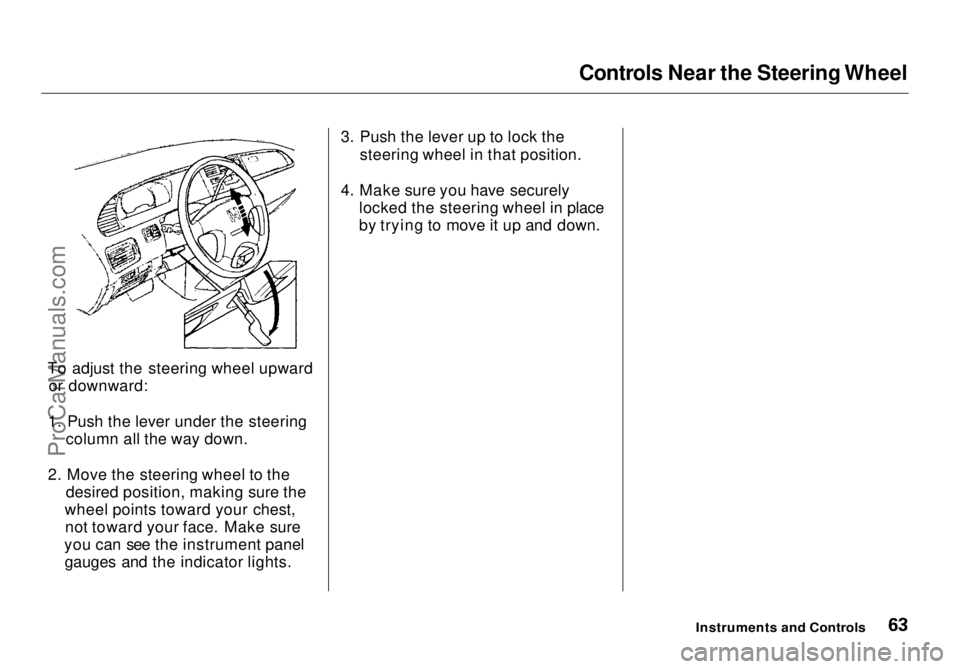
To adjust the steering wheel upward or downward:
1. Push the lever under the steering column all the way down.
2. Move the steering wheel to the desired position, making sure the
wheel points toward your chest, not toward your face. Make sure
you can see the instrument panel gauges and the indicator lights. 3. Push the lever up to lock the
steering wheel in that position.
4. Make sure you have securely locked the steering wheel in place
by trying to move it up and down.
Instruments and ControlsProCarManuals.comMain Menu Table of Contents s t
Page 65 of 272
Steering Wheel Controls
Cruise Control
Cruise control allows you to maintain
a set speed above 25 mph (40 km/h)
without keeping your foot on the accelerator pedal. It should be used
for cruising on straight, open
highways. It is not recommended for conditions such as city driving,
winding roads, slippery roads, heavy rain, or bad weather. You should
have full control of the vehicle under
those conditions. Using the Cruise Control
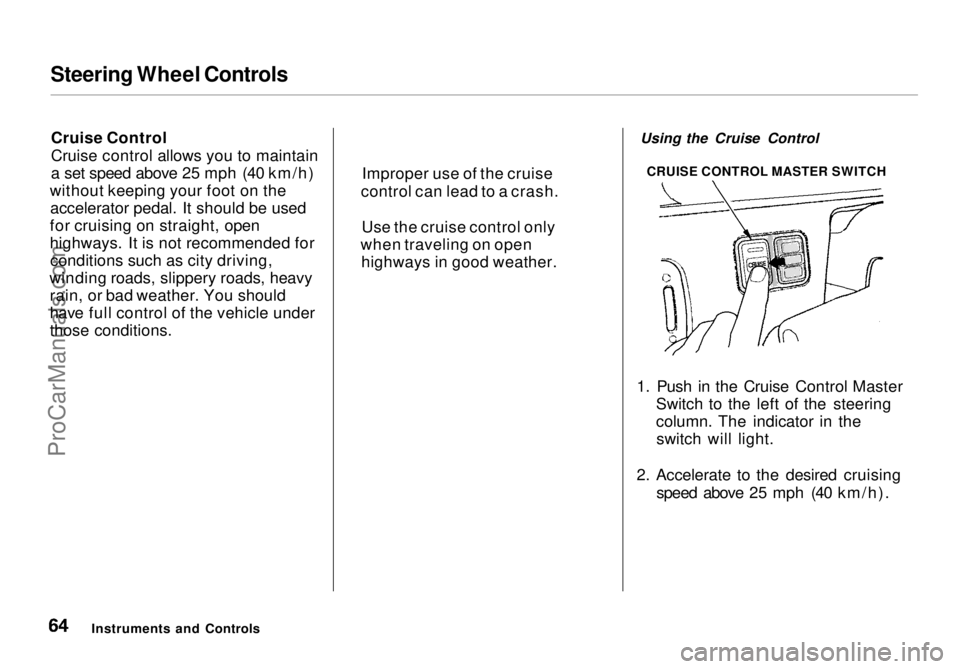
1. Push in the Cruise Control Master Switch to the left of the steering
column. The indicator in theswitch will light.
2. Accelerate to the desired cruising speed above 25 mph (40 km/h).
Instruments and Controls Improper use of the cruise
control can lead to a crash.
Use the cruise control only
when traveling on open highways in good weather. CRUISE CONTROL MASTER SWITCHProCarManuals.comMain Menu Table of Contents s t
Page 66 of 272
Steering Wheel Controls
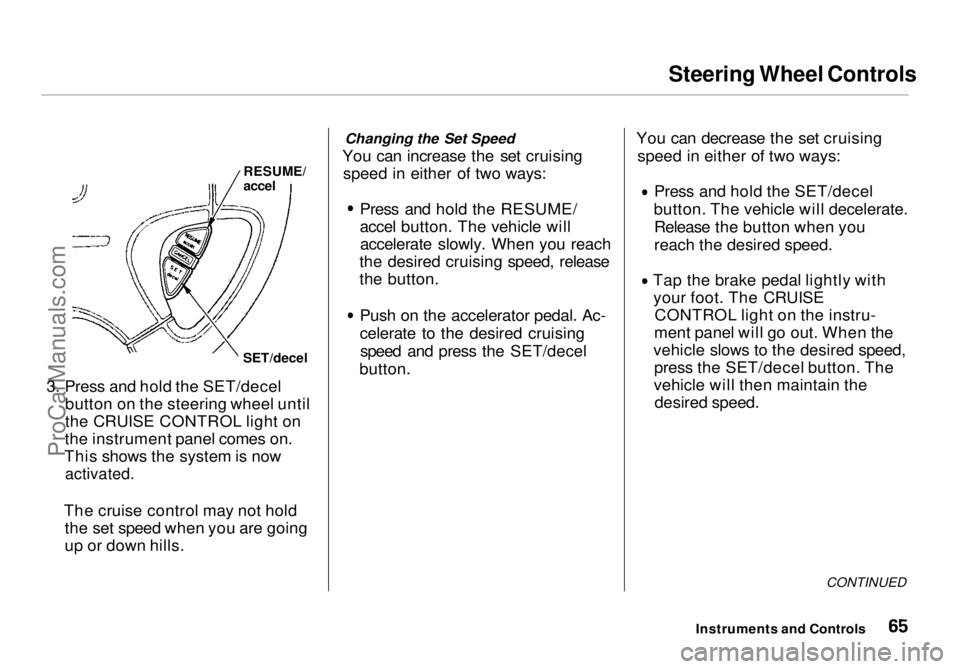
3. Press and hold the SET/decel button on the steering wheel until
the CRUISE CONTROL light on
the instrument panel comes on.
This shows the system is now
activated.
The cruise control may not hold the set speed when you are going
up or down hills. Changing the Set Speed
You can increase the set cruising speed in either of two ways:
Press and hold the RESUME/
accel button. The vehicle willaccelerate slowly. When you reach
the desired cruising speed, release
the button.
Push on the accelerator pedal. Ac-
celerate to the desired cruisingspeed and press the SET/decel
button. You can decrease the set cruising
speed in either of two ways: Press and hold the SET/decel
button. The vehicle will decelerate. Release the button when you
reach the desired speed. Tap the brake pedal lightly with
your foot. The CRUISE CONTROL light on the instru-
ment panel will go out. When the
vehicle slows to the desired speed, press the SET/decel button. The
vehicle will then maintain the desired speed.
CONTINUED
Instruments and Controls
RESUME/
accel
SET/decelProCarManuals.comMain Menu Table of Contents s t
Page 67 of 272
Steering Wheel Controls
Even with the cruise control turned
on, you can still use the accelerator
pedal to speed up for passing. After
completing the pass, take your foot
off the accelerator pedal. The vehicle
will return to the set cruising speed.
Resting your foot on the brake pedal
will cause the cruise control to
cancel.
Cancelling the Cruise Control
You can cancel the cruise control in any of these ways: Tap the brake pedal.
Press the SET/decel and RE-
SUME/accel buttons at the same
time.
Press the Cruise Control Master
Switch.
When you tap the brake or clutch
pedal, or press the SET and RE- SUME buttons at the same time, the
CRUISE CONTROL light on the
instrument panel will go out and the
vehicle will begin to slow down. You can use the accelerator pedal in the
normal way.
If you use the brake pedal to cancel
cruise control, the system
remembers the previously-set
cruising speed. To return to thatspeed, accelerate to above 25 mph (40 km/h) and press the RESUME/
accel button until the CRUISE CON-
TROL light comes on. The vehicle will accelerate to the same cruisingspeed as before.
If you cancel cruise control by
pressing the SET and RESUME
buttons at the same time, the
previously-set cruising speed is erased. To use the cruise control,accelerate to the desired cruising
speed and press the SET/decel
button.
Pressing the Cruise Control Master
Switch turns the system completelyoff and erases the previous cruising
speed from memory. To use the
system again, refer to Using the
Cruise Control
Instruments and ControlsProCarManuals.comMain Menu Table of Contents s t
Page 68 of 272
Keys and Locks
Keys
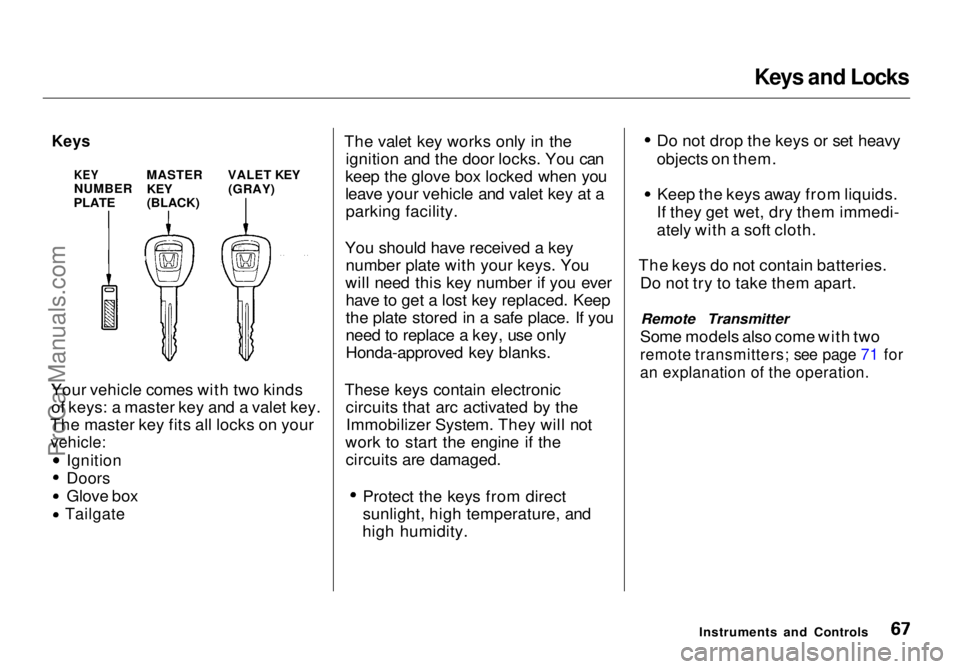
Your vehicle comes with two kinds of keys: a master key and a valet key.
The master key fits all locks on your
vehicle:
Ignition
Doors
Glove box
Tailgate
The valet key works only in the
ignition and the door locks. You can
keep the glove box locked when you
leave your vehicle and valet key at a parking facility.
You should have received a key number plate with your keys. You
will need this key number if you ever have to get a lost key replaced. Keep
the plate stored in a safe place. If you
need to replace a key, use only
Honda-approved key blanks.
These keys contain electronic circuits that arc activated by theImmobilizer System. They will not
work to start the engine if the circuits are damaged. Protect the keys from direct
sunlight, high temperature, and
high humidity. Do not drop the keys or set heavy
objects on them. Keep the keys away from liquids.
If they get wet, dry them immedi-
ately with a soft cloth.
The keys do not contain batteries. Do not try to take them apart.
Remote Transmitter
Some models also come with two
remote transmitters; see page 71 for
an explanation of the operation.
Instruments and Controls
KEY
NUMBER
PLATE
MASTER
KEY
(BLACK)
VALET KEY
(GRAY)ProCarManuals.comMain Menu Table of Contents s t
Page 70 of 272
Keys and Locks
Ignition Switch
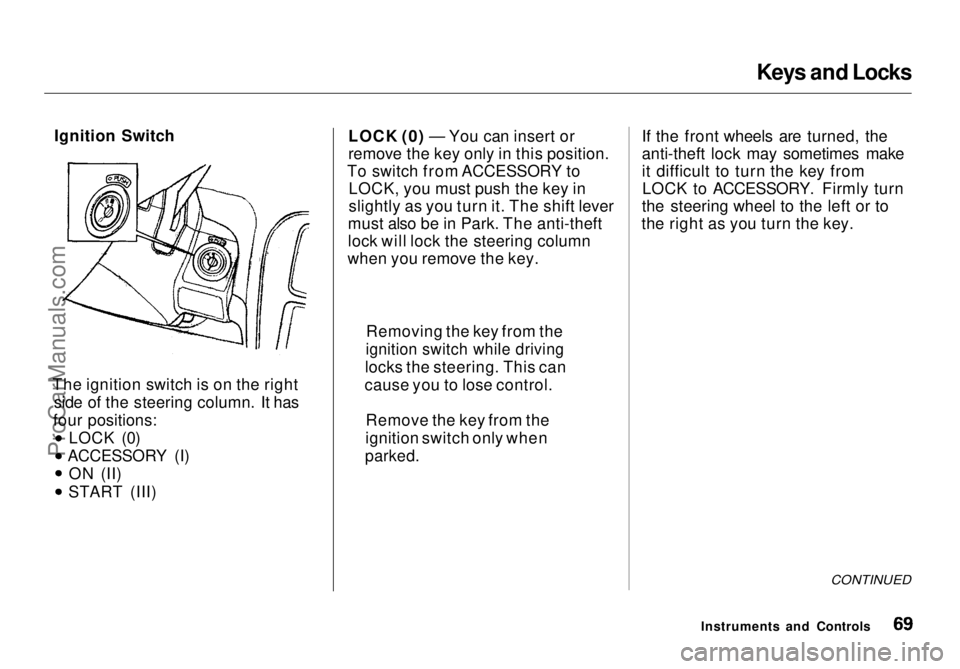
The ignition switch is on the right side of the steering column. It has
four positions: LOCK (0)
ACCESSORY (I) ON (II) START (III) LOCK (0) — You can insert or
remove the key only in this position.
To switch from ACCESSORY to LOCK, you must push the key in
slightly as you turn it. The shift lever
must also be in Park. The anti-theft
lock will lock the steering column
when you remove the key. If the front wheels are turned, the
anti-theft lock may sometimes make
it difficult to turn the key from
LOCK to ACCESSORY. Firmly turn
the steering wheel to the left or to
the right as you turn the key.
CONTINUED
Instruments and Controls
Removing the key from the
ignition switch while driving
locks the steering. This can
cause you to lose control.
Remove the key from the
ignition switch only when
parked.ProCarManuals.comMain Menu Table of Contents s t
Page 71 of 272
Keys and Locks
ACCESSORY (I) — In this position, you can operate the audio systemand the cigarette lighter.
ON (II) — This is the normal key
position when driving. All features and accessories on the vehicle are
usable. Several of the lights on the
instrument panel come on as a test
when you turn the ignition switch
from ACCESSORY to ON (see page 51). START (III) — Use this position
only to start the engine. The switch
returns to ON (II) when you let go of
the key.
The engine will not start if the Immobilizer System does not
recognize the key's coding (see page 68).
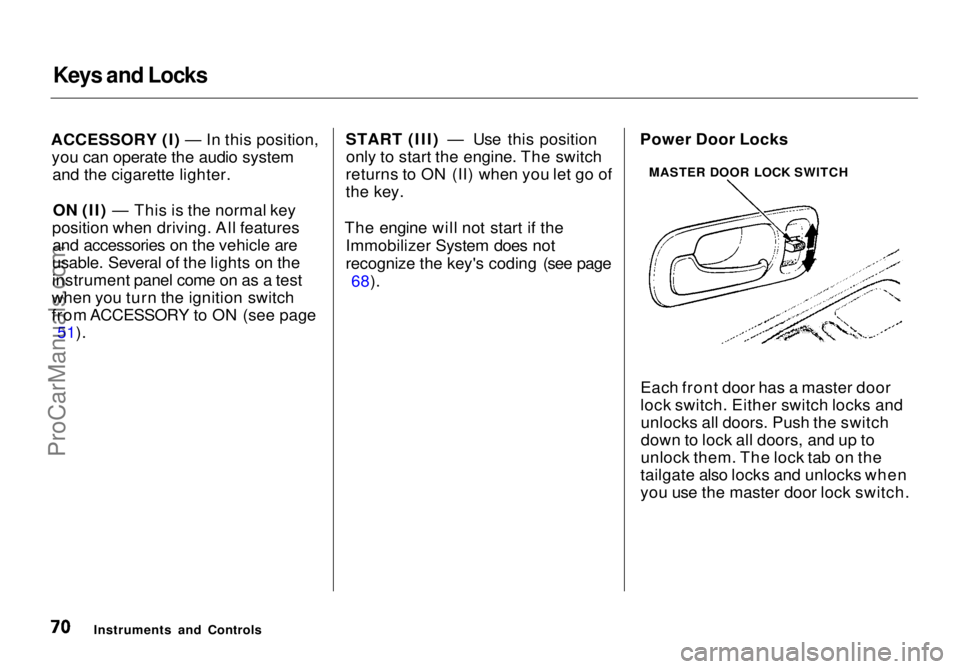
Each front door has a master door
lock switch. Either switch locks andunlocks all doors. Push the switch
down to lock all doors, and up to
unlock them. The lock tab on the
tailgate also locks and unlocks when
you use the master door lock switch.
Instruments and Controls Power Door Locks
MASTER DOOR LOCK SWITCHProCarManuals.comMain Menu Table of Contents s t
Page 79 of 272
Seats
Removing the Second Seats in the
Six-Passenger Model
Both seats can be removed to give
more cargo capacity.
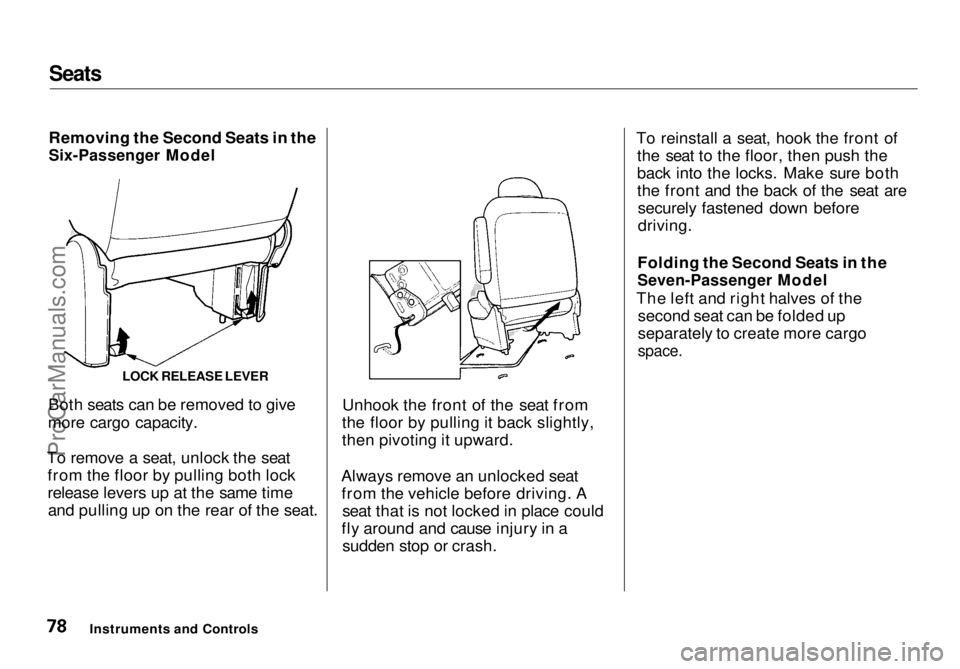
To remove a seat, unlock the seat from the floor by pulling both lock
release levers up at the same timeand pulling up on the rear of the seat. Unhook the front of the seat from
the floor by pulling it back slightly,
then pivoting it upward.
Always remove an unlocked seat from the vehicle before driving. A seat that is not locked in place could
fly around and cause injury in a sudden stop or crash. To reinstall a seat, hook the front of
the seat to the floor, then push the
back into the locks. Make sure both
the front and the back of the seat aresecurely fastened down before
driving.
Folding the Second Seats in the
Seven-Passenger Model
The left and right halves of the second seat can be folded up
separately to create more cargo
space.
Instruments and Controls LOCK RELEASE LEVERProCarManuals.comMain Menu Table of Contents s t
Page 83 of 272
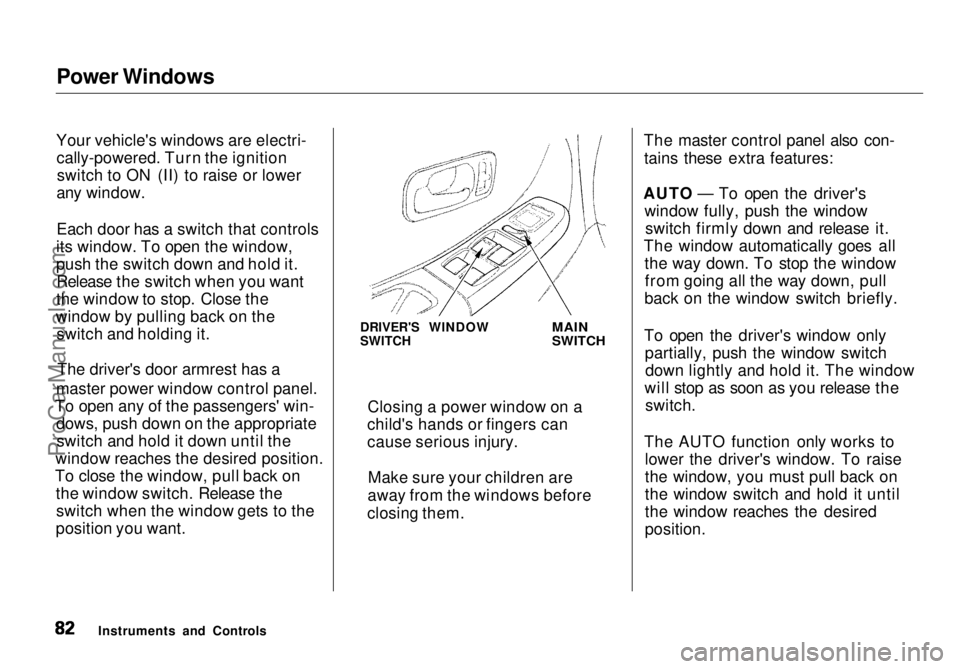
Power Windows
Your vehicle's windows are electri- cally-powered. Turn the ignitionswitch to ON (II) to raise or lower
any window.
Each door has a switch that controls
its window. To open the window,
push the switch down and hold it. Release the switch when you want
the window to stop. Close the
window by pulling back on the switch and holding it.
master power window control panel.
To open any of the passengers' win- dows, push down on the appropriateswitch and hold it down until the
window reaches the desired position.
To close the window, pull back on the window switch. Release theswitch when the window gets to the
position you want. The master control panel also con-
tains these extra features:
AUTO — To open the driver's window fully, push the windowswitch firmly down and release it.
The window automatically goes all the way down. To stop the windowfrom going all the way down, pull
back on the window switch briefly.
To open the driver's window only partially, push the window switchdown lightly and hold it. The window
will stop as soon as you release the switch.
The AUTO function only works to lower the driver's window. To raise
the window, you must pull back on
the window switch and hold it until
the window reaches the desired
position.
Instruments and Controls DRIVER'S WINDOW
SWITCH
MAIN
SWITCH
Closing a power window on a
child's hands or fingers can
cause serious injury.
Make sure your children are
away from the windows before
closing them.The driver's door armrest has a
ProCarManuals.comMain Menu Table of Contents s t
Page 85 of 272
Mirrors
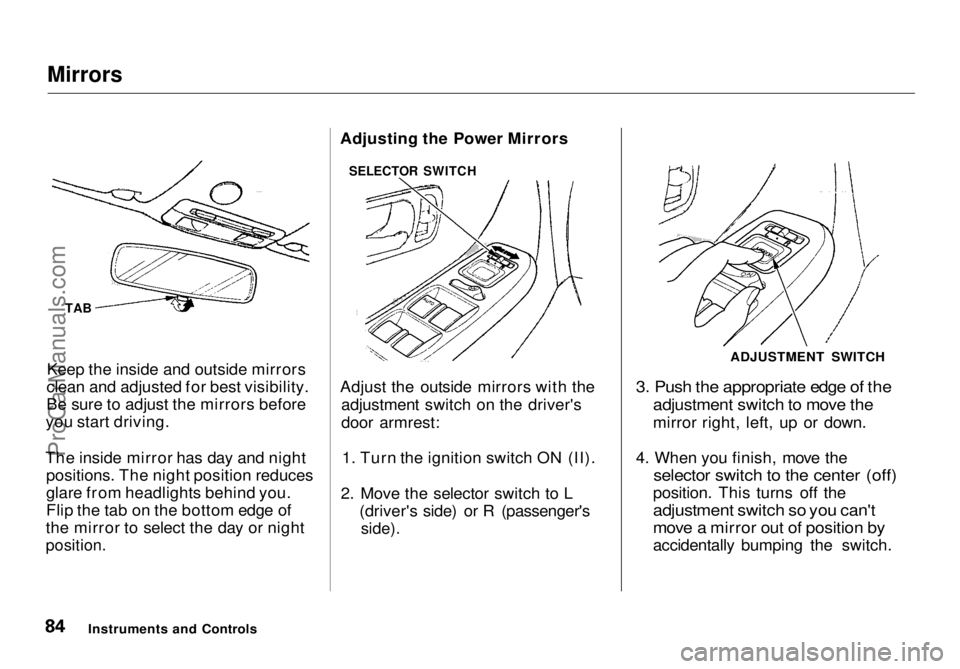
Keep the inside and outside mirrors
clean and adjusted for best visibility.
Be sure to adjust the mirrors before
you start driving.
The inside mirror has day and night positions. The night position reduces
glare from headlights behind you.
Flip the tab on the bottom edge of
the mirror to select the day or night
position.
Adjusting the Power Mirrors
Adjust the outside mirrors with the
adjustment switch on the driver's
door armrest:
1. Turn the ignition switch ON (II).
2. Move the selector switch to L (driver's side) or R (passenger's
side).
3. Push the appropriate edge of the
adjustment switch to move the
mirror right, left, up or down.
4. When you finish, move the
selector switch to the center (off)
position. This turns off the
adjustment switch so you can't
move a mirror out of position by
accidentally bumping the switch.
Instruments and Controls ADJUSTMENT SWITCH
TAB SELECTOR SWITCHProCarManuals.comMain Menu Table of Contents s t