seats HONDA ODYSSEY 1998 Owner's Manual
[x] Cancel search | Manufacturer: HONDA, Model Year: 1998, Model line: ODYSSEY, Model: HONDA ODYSSEY 1998Pages: 272, PDF Size: 2.67 MB
Page 42 of 272
Additional Information About Your Seat Belts
Seat Belt System Components
All the seat belts in the 6-passenger model are lap/shoulder belts. In the7-passenger model, the center
position of the bench-type second seat has a lap belt.
The system also includes alight on the instrument
panel to remind you and your
passengers to fasten your belts. If
the driver's seat belt is not fastened
before the ignition is turned ON (II), the light will come on and a beeper
will also sound. The beeper will stop after a few seconds, but the light will
stay on until the driver's seat belt is
fastened.
Lap/Shoulder Belt
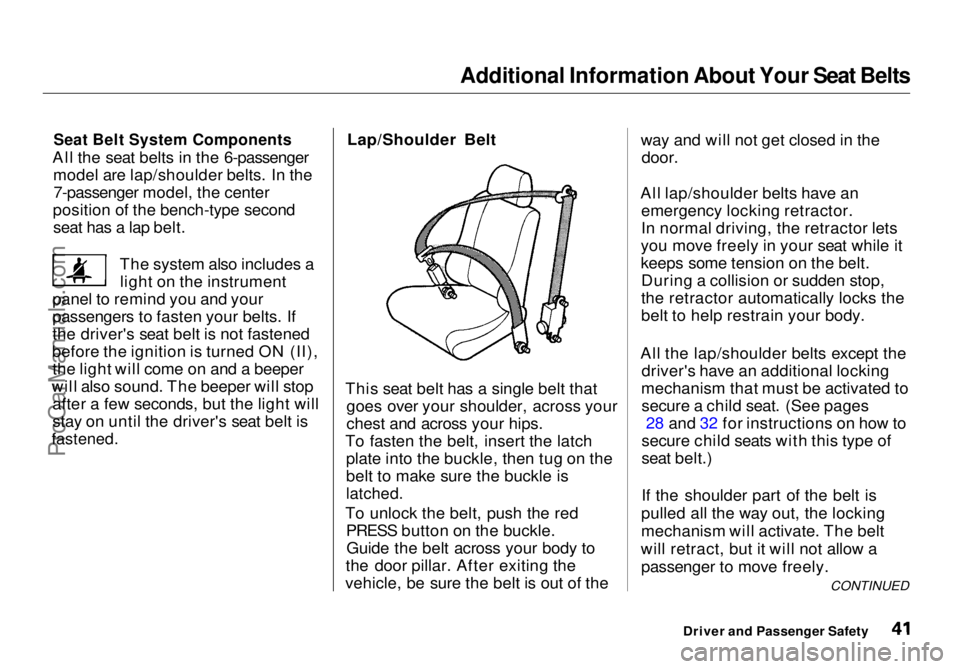
This seat belt has a single belt that goes over your shoulder, across your
ches
t and
across your hips.
To fasten the belt, insert the latch plate into the buckle, then tug on the
belt to make sure the buckle is
latched.
To unlock the belt, push the red PRESS button on the buckle.Guide the belt across your body to
the door pillar. After exiting the
vehicle, be sure the belt is out of the way and will not get closed in the
door.
All lap/shoulder belts have an emergency locking retractor.
In normal driving, the retractor lets
you move freely in your seat while it
keeps some tension on the belt. During a collision or sudden stop,
the retractor automatically locks the
belt to help restrain your body.
All the lap/shoulder belts except the driver's have an additional locking
mechanism that must be activated to secure a child seat. (See pages 28 and 32 for instructions on how to
secure child seats with this type of
seat belt.)
If the shoulder part of the belt is
pulled all the way out, the locking
mechanism will activate. The belt
will retract, but it will not allow a passenger to move freely.
Driver and Passenger Safety CONTINUEDProCarManuals.comMain Menu Table of Contents s t
Page 50 of 272
Instruments and Controls
This section gives information about
the controls and displays thatcontribute to the daily operation of
your Honda. All the essential
controls are within easy reach.
Control Locations............................ 50
Indicator Lights................................ 51
Gauges.............................................. 54
Tachometer.................................. 54
Trip Meter.................................... 54
Speedometer................................ 55
Odometer...................................... 55
Temperature Gauge.................... 55
Fuel Gauge................................... 55
Maintenance Required
Indicator.................................... 56
Controls Near the Steering
Wheel........................................ 57
Headlights.................................... 58
Daytime Running Lights............. 58
Instrument Panel Brightness..... 59
Turn Signals................................. 59
Windshield Wipers...................... 60
Windshield Washers................... 61
Rear Window Wiper and
Washer...................................... 61
Hazard Warning........................... 61
Rear Window Defogger.............. 62
Steering Wheel Adjustment....... 62
Steering Wheel Controls ................ 64
Cruise Control.............................. 64
Keys and Locks................................ 67
Keys............................................... 67
Immobilizer System..................... 68
Ignition Switch............................. 69
Power Door Locks....................... 70
Remote Transmitter.................... 71
Childproof Door Locks............... 72
Tailgate......................................... 72
Glove Box..................................... 73
Seats.................................................. 74
Passenger Seating....................... 74
Seat Adjustments......................... 74
Driver's Seat Power Height
Adjustment............................... 75
Armrests....................................... 76
Head Restraints........................... 76
Third Seat Access........................ 77
Removing the Second Seats
in the Six-Passenger Model.... 78
Folding the Second Seats
in the Seven-Passenger
Model.................................... 78
Reclining the Second Seat.......... 79
Folding the Third Seat
in All Models............................ 80
Power Windows............................... 82
Sunroof.............................................. 83
Mirrors.............................................. 84
Adjusting the Power Mirrors..... 84
Parking Brake.................................. 85
Digital Clock..................................... 86 Beverage Holder.............................. 86
Dashboard Compartment............... 88
Center Pocket.................................. 88
Vanity Mirror................................... 88
Cigarette Lighter............................. 89
Ashtrays............................................ 89 Interior Lights.................................. 90
Ceiling Lights............................... 90
Spotlights...................................... 90
Tailgate Light............................... 91 Courtesy Lights........................... 91
Instruments and ControlsProCarManuals.comMain Menu s t
Page 75 of 272
Seats
Passenger Seating
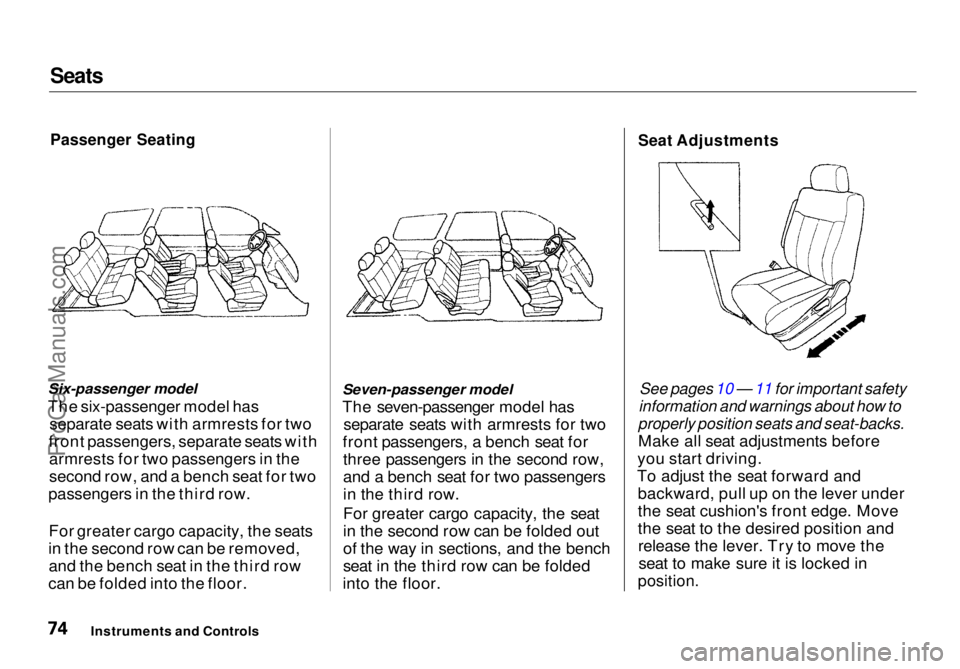
Six-passenger model
The six-passenger model has separate seats with armrests for two
front passengers, separate seats with armrests for two passengers in the
second row, and a bench seat for two
passengers in the third row.
For greater cargo capacity, the seats
in the second row can be removed, and the bench seat in the third row
can be folded into the floor. Seven-passenger model
The seven-passenger model has separate seats with armrests for two
front passengers, a bench seat for three passengers in the second row,
and a bench seat for two passengers
in the third row.
For greater cargo capacity, the seat
in the second row can be folded out
of the way in sections, and the bench
seat in the third row can be folded
into the floor.
Seat Adjustments
See pages 10 — 11 for important safety
information and warnings about how to
properly position seats and seat-backs.
Make all seat adjustments before
you start driving.
To adjust the seat forward and backward, pull up on the lever under
the seat cushion's front edge. Move
the seat to the desired position andrelease the lever. Try to move theseat to make sure it is locked in
position.
Instruments and ControlsProCarManuals.comMain Menu Table of Contents s t
Page 76 of 272
Seats
Adjust the seat-back before you start driving. The seat-backs should be in
an upright position for you and your
passengers to get the most protec-
tion from the seat belts.
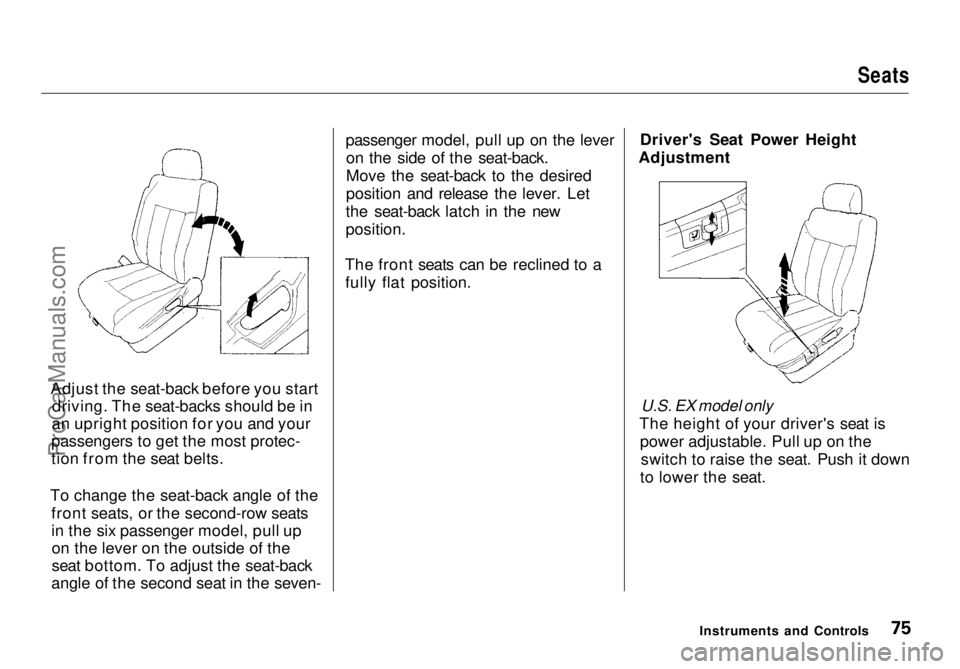
To change the seat-back angle of the front seats, or the second-row seats
in the six passenger model, pull upon the lever on the outside of the
seat bottom. To adjust the seat-back
angle of the second seat in the seven- passenger model, pull up on the lever
on the side of the seat-back.
Move the seat-back to the desired
position and release the lever. Let
the seat-back latch in the new
position.
The front seats can be reclined to a fully flat position. Driver's Seat Power Height
Adjustment
U.S. EX model only
The height of your driver's seat is power adjustable. Pull up on theswitch to raise the seat. Push it down
to lower the seat.
Instruments and ControlsProCarManuals.comMain Menu Table of Contents s t
Page 77 of 272
Seats
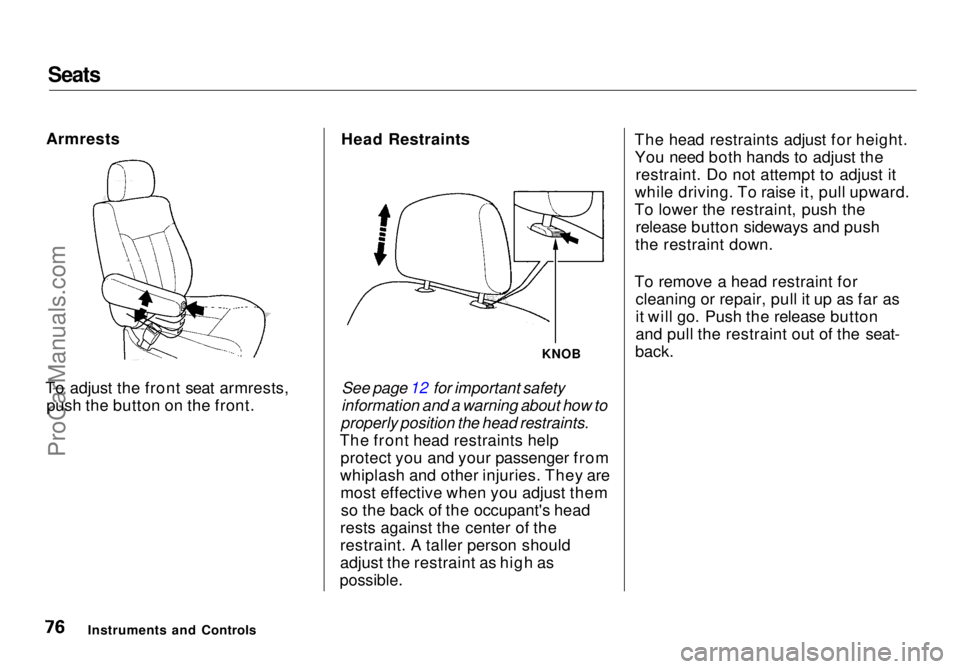
Armrests
To adjust the front seat armrests, push the button on the front. Head Restraints
See page 12 for important safety
information and a warning about how to
properly position the head restraints.
The front head restraints help protect you and your passenger from
whiplash and other injuries. They are most effective when you adjust themso the back of the occupant's head
rests against the center of the
restraint. A taller person should
adjust the restraint as high as
possible.
The head restraints adjust for height.
You need both hands to adjust the restraint. Do not attempt to adjust it
while driving. To raise it, pull upward.
To lower the restraint, push the release button sideways and push
the restraint down.
To remove a head restraint for cleaning or repair, pull it up as far as
it will go. Push the release button
and pull the restraint out of the seat-
back.
Instruments and Controls
KNOBProCarManuals.comMain Menu Table of Contents s t
Page 78 of 272
Seats
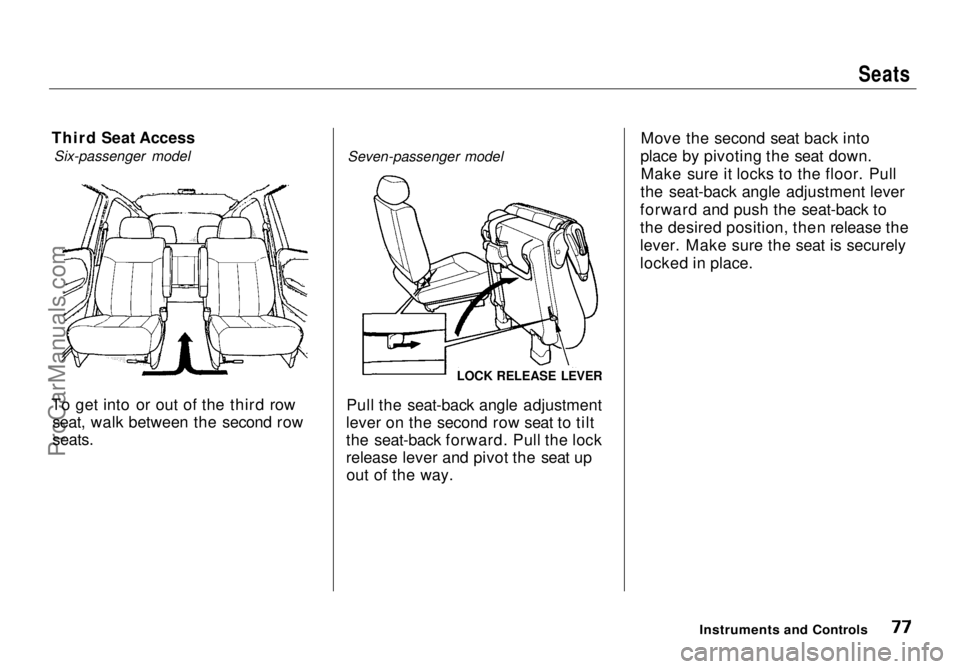
Third Seat Access Six-passenger model
To get into or out of the third row seat, walk between the second row
seats.
Seven-passenger model
Pull the seat-back angle adjustment
lever on the second row seat to tilt
the seat-back forward. Pull the lock
release lever and pivot the seat up out of the way. Move the second seat back into
place by pivoting the seat down. Make sure it locks to the floor. Pull
the seat-back angle adjustment lever
forward and push the seat-back to
the desired position, then release the
lever. Make sure the seat is securely
locked in place.
Instruments and Controls
LOCK RELEASE LEVERProCarManuals.comMain Menu Table of Contents s t
Page 79 of 272
Seats
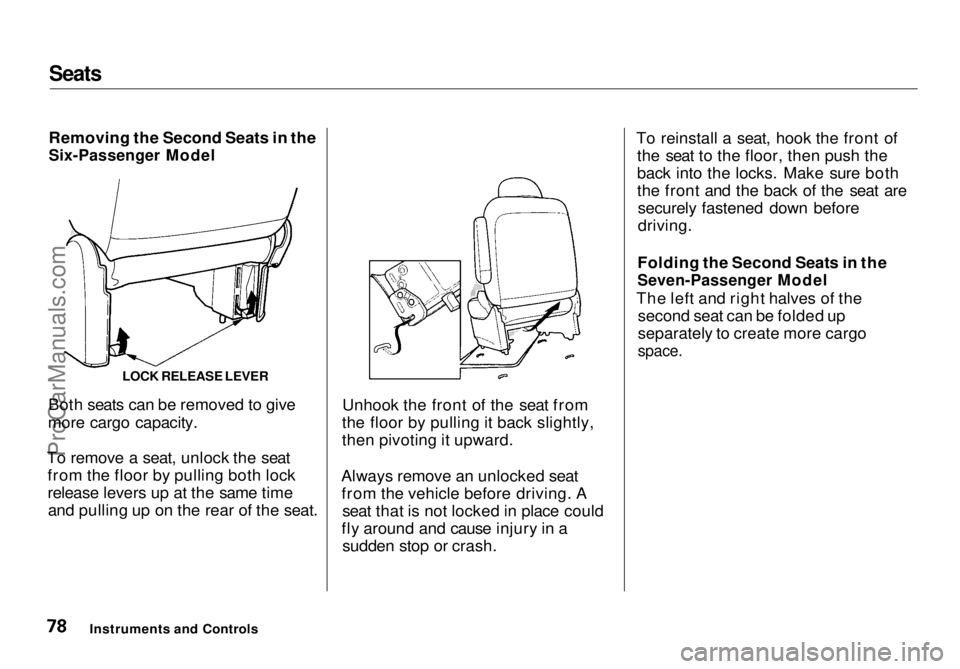
Removing the Second Seats in the
Six-Passenger Model
Both seats can be removed to give
more cargo capacity.
To remove a seat, unlock the seat from the floor by pulling both lock
release levers up at the same timeand pulling up on the rear of the seat. Unhook the front of the seat from
the floor by pulling it back slightly,
then pivoting it upward.
Always remove an unlocked seat from the vehicle before driving. A seat that is not locked in place could
fly around and cause injury in a sudden stop or crash. To reinstall a seat, hook the front of
the seat to the floor, then push the
back into the locks. Make sure both
the front and the back of the seat aresecurely fastened down before
driving.
Folding the Second Seats in the
Seven-Passenger Model
The left and right halves of the second seat can be folded up
separately to create more cargo
space.
Instruments and Controls LOCK RELEASE LEVERProCarManuals.comMain Menu Table of Contents s t
Page 80 of 272
Seats
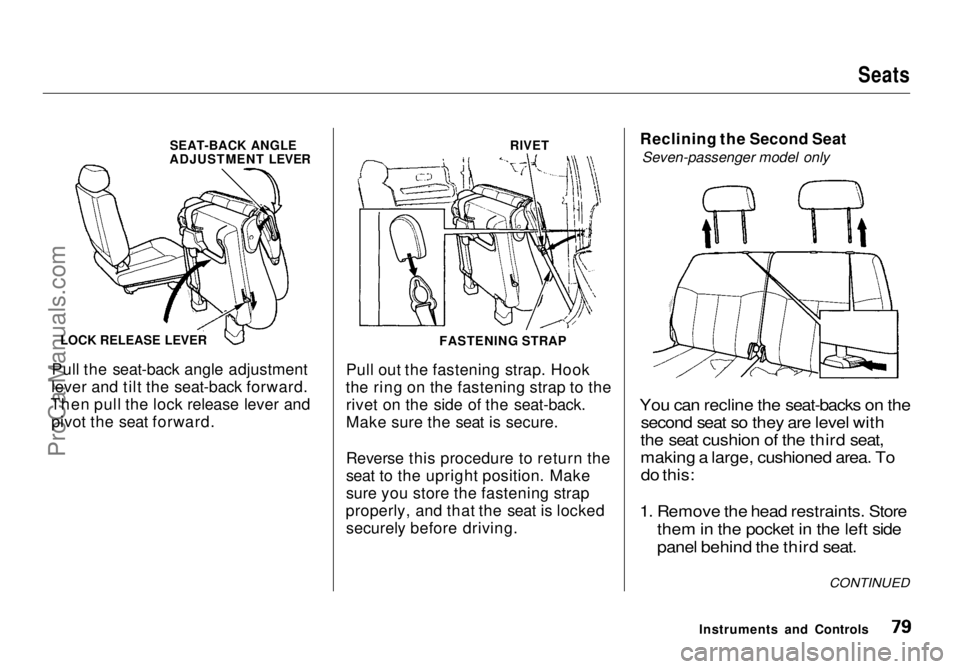
Pull the seat-back angle adjustment
lever and tilt the seat-back forward.
Then pull the lock release lever and pivot the seat forward. Pull out the fastening strap. Hook
the ring on the fastening strap to the rivet on the side of the seat-back.
Make sure the seat is secure.
Reverse this procedure to return the
seat to the upright position. Make
sure you store the fastening strap
properly, and that the seat is locked securely before driving. Reclining the Second Seat
Seven-passenger model only
You can recline the seat-backs on the second seat so they are level with
the seat cushion of the third seat,
making a large, cushioned area. To
do this:
1. Remove the hea d restraints. Store
them in
the pocket in the left side
panel behind the third seat.
Instruments and Controls
LOCK RELEASE LEVER
SEAT-BACK ANGLE
ADJUSTMENT LEVER
FASTENING STRAPRIVET
CONTINUEDProCarManuals.comMain Menu Table of Contents s t
Page 81 of 272
Seats
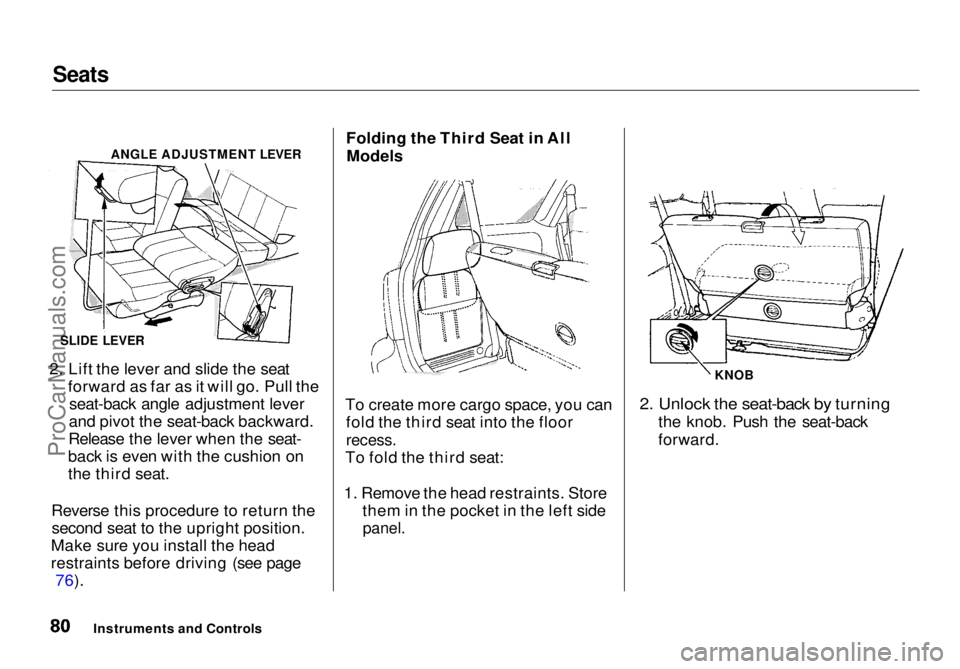
2. Lift the lever and slide the seat forward as far as it will go. Pull theseat-back angle adjustment lever
and pivot the seat-back backward.
Release the lever when the seat-
back is even with the cushion on
the third seat.
Reverse this procedure to return the second seat to the upright position.
Make sure you install the head
restraints before driving (see page 76). Folding the Third Seat in All
Models
To create more cargo space, you can fold the third seat into the floor
recess.
To fold the third seat:
1. Remove the head restraints. Store them in the pocket in the left side
panel.
2. Unlock the seat-back by turning
the knob. Push the seat-back
forward.
Instruments and Controls
ANGLE ADJUSTMENT LEVER
SLIDE LEVER KNOBProCarManuals.comMain Menu Table of Contents s t
Page 82 of 272
Seats
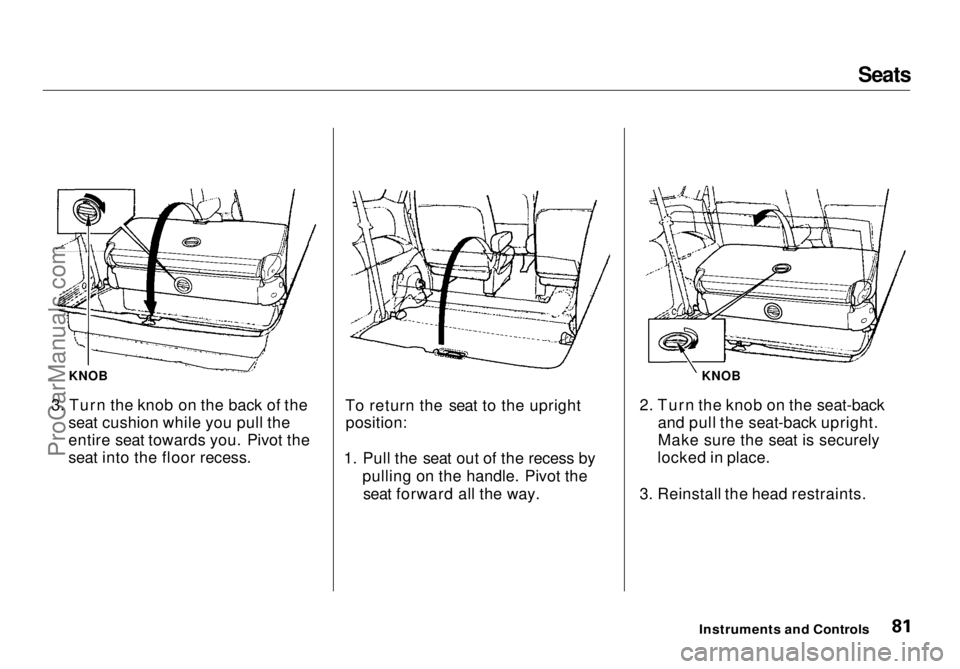
3. Turn the knob on the back of the seat cushion while you pull the
entire seat towards you. Pivot the
seat into the floor recess. To return the seat to the upright
position:
1. Pull the seat out of the recess by pulling on the handle. Pivot theseat forward all the way. 2. Turn the knob on the seat-back
and pull the seat-back upright.
Make sure the seat is securely
locked in place.
3. Reinstall the head restraints.
Instruments and Controls
KNOB
KNOBProCarManuals.comMain Menu Table of Contents s t