belt HONDA ODYSSEY 1998 Service Manual
[x] Cancel search | Manufacturer: HONDA, Model Year: 1998, Model line: ODYSSEY, Model: HONDA ODYSSEY 1998Pages: 272, PDF Size: 2.67 MB
Page 74 of 272
Keys and Locks
Glove Box
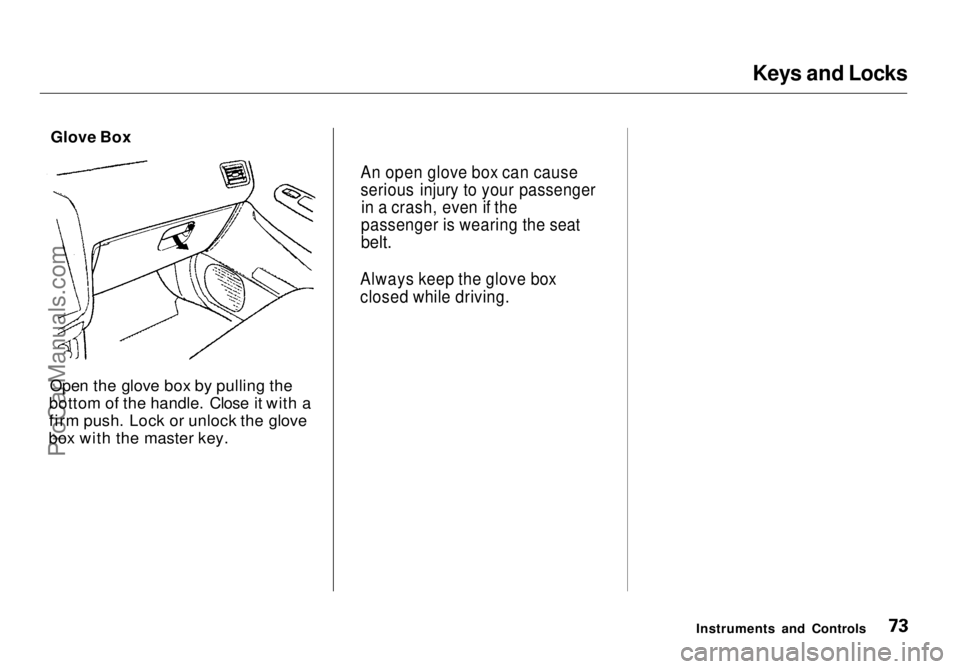
Open the glove box by pulling the
bottom of the handle. Close it with a
firm push. Lock or unlock the glove
box with the master key.
Instruments and Controls
An open glove box can cause
serious injury to your passenger
in a crash, even if the
passenger is wearing the seat
belt.
Always keep the glove box
closed while driving.ProCarManuals.comMain Menu Table of Contents s t
Page 76 of 272
Seats
Adjust the seat-back before you start driving. The seat-backs should be in
an upright position for you and your
passengers to get the most protec-
tion from the seat belts.
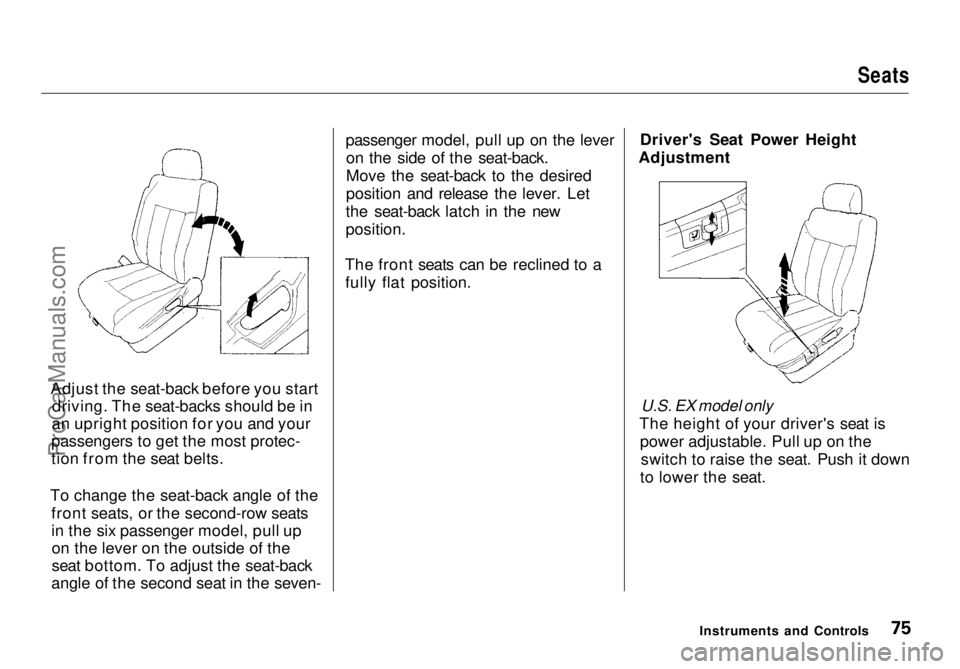
To change the seat-back angle of the front seats, or the second-row seats
in the six passenger model, pull upon the lever on the outside of the
seat bottom. To adjust the seat-back
angle of the second seat in the seven- passenger model, pull up on the lever
on the side of the seat-back.
Move the seat-back to the desired
position and release the lever. Let
the seat-back latch in the new
position.
The front seats can be reclined to a fully flat position. Driver's Seat Power Height
Adjustment
U.S. EX model only
The height of your driver's seat is power adjustable. Pull up on theswitch to raise the seat. Push it down
to lower the seat.
Instruments and ControlsProCarManuals.comMain Menu Table of Contents s t
Page 140 of 272
Preparing to Drive
You should do the following checks and adjustments every day before
you drive your vehicle.
1. Make sure all windows, mirrors, and outside lights are clean and
unobstructed. Remove frost, snow, or ice.
2. Check that the hood and tailgate are fully closed.
3. Visually check the tires. If a tire looks low, use a gauge to check its
pressure.
4. Check that any items you may be carrying with you inside are stored
properly or fastened down
securely.
5. Check the adjustment of the seat
(see page 74).
6. Check the adjustment of the inside and outside mirrors (seepage 84).
7. Check the adjustment of the steering wheel (see page 63).
8. Make sure the doors and tailgate are securely closed and locked.
9. Fasten your seat belt. Check that your passengers have fastenedtheir seat belts (see page 13). 10. Turn the ignition switch ON (II).
Check the indicator lights in the
instrument panel.
11. Start the engine (see page 141).
12. Check the gauges and indicator lights in the instrument panel (see
page 51).
DrivingProCarManuals.comMain Menu Table of Contents s t
Page 158 of 272
Maintenance
This section explains why it is important to keep your vehicle well
maintained and to follow basic
maintenance safety precautions.
This section also includes Maintenance Schedules for normaldriving and severe driving conditions,
a Maintenance Record, and instruc-
tions for simple maintenance tasks
you may want to take care of
yourself.
If you have the skills and tools to per-
form more complex maintenance tasks on your Honda, you may want
to purchase the Service Manual. See
page 235 for information on how to obtain a copy, or see your Honda
dealer.
Maintenance Safety....................... 160
Important Safety Precautions.. 161
Maintenance Schedule.................. 162
Required Maintenance Record.... 169 Owner Maintenance Checks........ 171
Fluid Locations............................... 172
Engine Oil....................................... 173 Adding Oil................................... 173Recommended Oil..................... 173
Synthetic Oil............................... 174
Additives..................................... 175
Changing the Oil and Filter...... 175
Cooling System.............................. 177
Adding Engine Coolant............. 177Replacing Engine Coolant........ 179
Windshield Washers..................... 181
Automatic Transmission Fluid..... 182
Brake Fluid..................................... 183
Brake System............................. 183
Power Steering............................... 184
Air Cleaner Element...................... 185 Spark Plugs..................................... 187
Replacement............................... 187
Specifications............................. 188
Battery............................................ 189
Wiper Blades.................................. 191 Air Conditioning System............... 194
Drive Belts...................................... 195
Timing Belt..................................... 195
Tires................................................ 196 Inflation....................................... 196
Inspection................................... 198
Maintenance............................... 198
Tire Rotation.............................. 199
Replacing Tires and Wheels .... 199
Wheels and Tires....................... 200
Winter Driving........................... 200
Snow Tires.............................. 201
Tire Chains............................. 201
Lights.............................................. 202 Headlight Aiming...................... 204
Replacing Bulbs......................... 206
Storing Your Vehicle..................... 211
MaintenanceProCarManuals.comMain Menu s t
Page 164 of 272
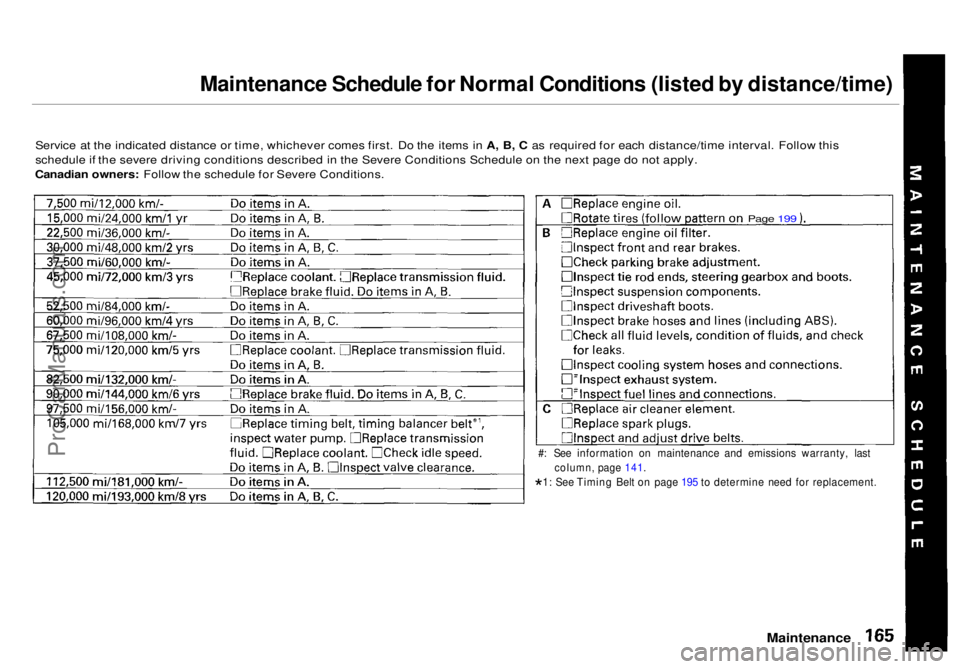
Maintenance Schedule for Normal Conditions (listed by distance/time)
Service at the indicated distance or time, whichever comes first. Do the items in A, B, C as required for each distance/time interval. Follow this
schedule if the severe driving conditions described in the Severe Conditions Schedule on the next page do not apply.
Canadian owners: Follow the schedule for Severe Conditions.
Maintenance
#: See information on maintenance and emissions warranty, last
column, page 141.
* 1: See Timing Belt on page 195 to determine need for replacement.
Page 199ProCarManuals.comMain Menu Table of Contents s t
Page 167 of 272
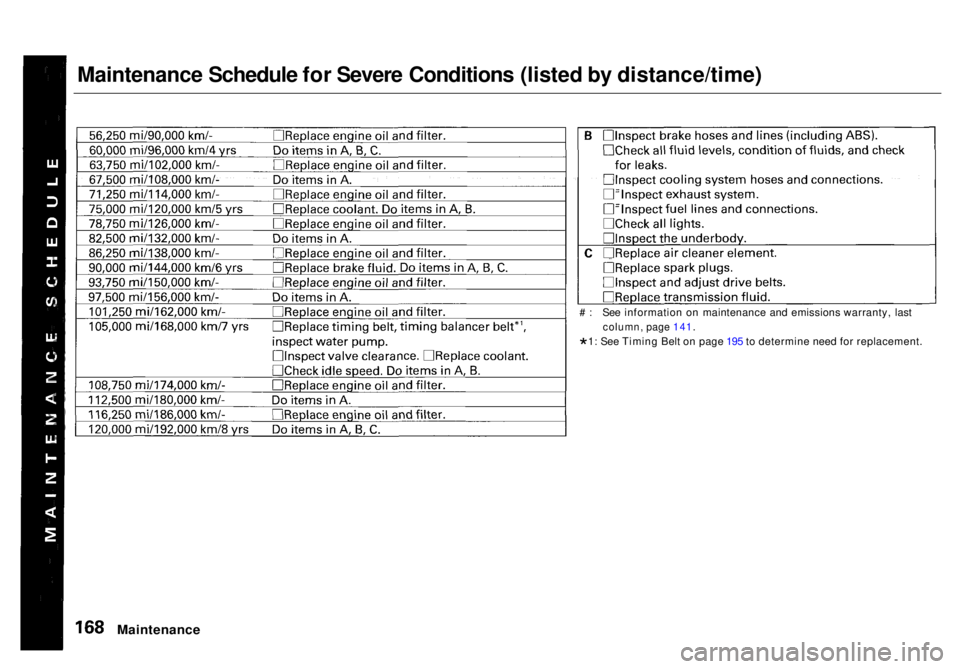
Maintenance Schedule for Severe Conditions (listed by distance/time)
Maintenance
# : See information on maintenance and emissions warranty, last
column, page 141.
* 1: See Timing Belt on page 195 to determine need for replacement.ProCarManuals.comMain Menu Table of Contents s t
Page 194 of 272
Drive Belts, Timing Belt
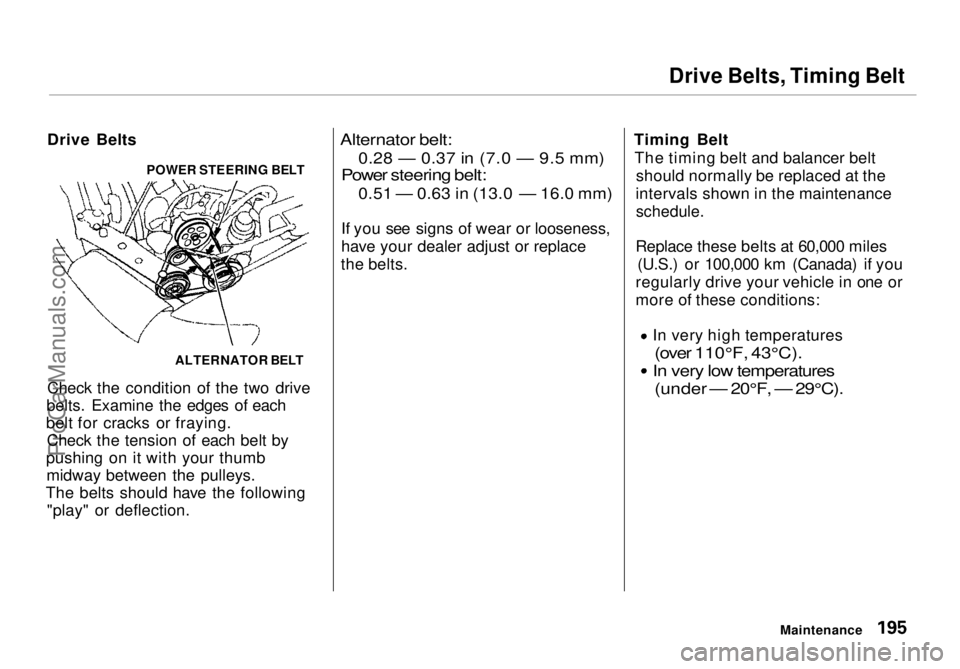
Drive Belts
Check the condition of the two drive
belts. Examine the edges of each
belt for cracks or fraying. Check the tension of each belt by
pushing on it with your thumb midway between the pulleys.
The belts should have the following "play" or deflection.
Alternator belt:0.28 — 0.37 in (7.0 — 9.5 mm)
Power steering
belt:
0.51 — 0.63 in (13.0 —
16.0
mm)
If you
see signs of wear or looseness,
have your dealer adjust or replace
the belts. Timing Belt
The timing belt and balancer belt should normally be replaced at the
intervals shown in the maintenance
schedule.
Replace these belts at 60,000 miles (U.S.) or 100,000 km (Canada) if you
regularly drive your vehicle in one or
more of these conditions: In very high temperatures
(over 110°F, 43°C).
In very low temperatures
(under — 20°F, — 29°C).
Maintenance
ALTERNATOR BELT
POWER STEERING BELTProCarManuals.comMain Menu Table of Contents s t
Page 211 of 272
Appearance Care
Regular cleaning and polishing of
your Honda helps to keep it "new" looking. This section gives you hintson how to clean your vehicle and
preserve its appearance: the paint,
brightwork, wheels and interior. Also included are several things you can
do to help prevent corrosion. Exterior Care.................................. 214
Washing...................................... 214
Waxing........................................ 215
Aluminum Wheels..................... 215
Paint Touch-up........................... 215
Interior Care................................... 216 Carpeting.................................... 216
Fabric.......................................... 216
Vinyl............................................ 216
Seat Belts.................................... 217
Windows..................................... 217
Air Fresheners........................... 217
Corrosion Protection..................... 218
Body Repairs.................................. 219
Appearance CareProCarManuals.comMain Menu s t
Page 215 of 272
Interior Care
Seat Belts
If your seat belts get dirty, you can
use a soft brush with a mixture of
mild soap and warm water to clean
them. Do not use bleach, dye, or cleaning solvents. They can weaken
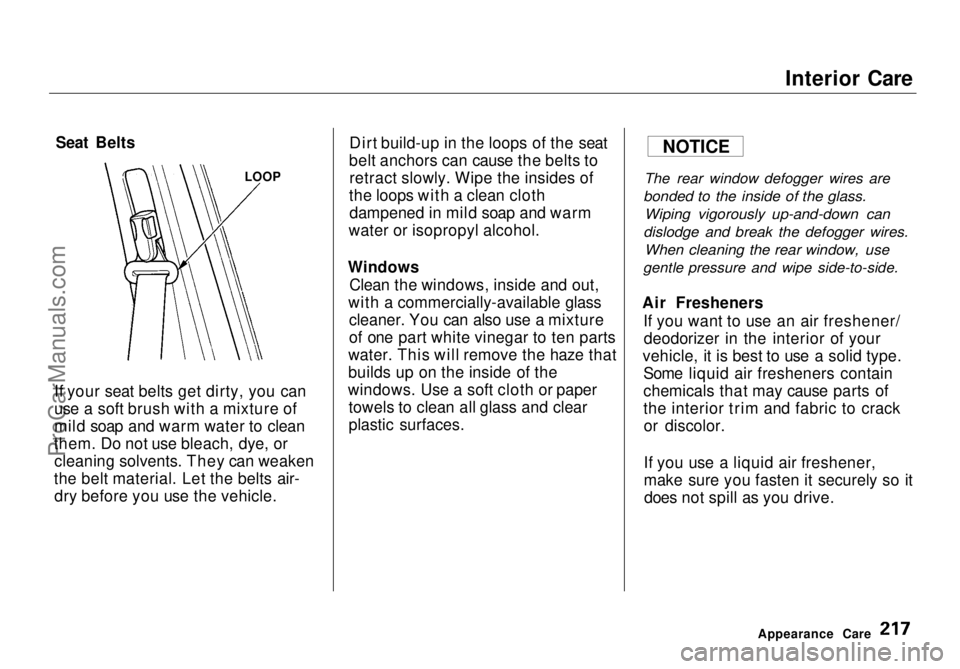
the belt material. Let the belts air- dry before you use the vehicle. Dirt build-up in the loops of the seat
belt anchors can cause the belts to retract slowly. Wipe the insides of
the loops with a clean cloth dampened in mild soap and warm
water or isopropyl alcohol.
Windows Clean the windows, inside and out,
with a commercially-available glass cleaner. You can also use a mixture
of one part white vinegar to ten parts
water. This will remove the haze that
builds up on the inside of the
windows. Use a soft cloth or paper towels to clean all glass and clear
plastic surfaces.
The rear window defogger wires are
bonded to the inside of the glass.
Wiping vigorously up-and-down can
dislodge and break the defogger wires.
When cleaning the rear window, use
gentle pressure and wipe side-to-side.
Air Fresheners If you want to use an air freshener/deodorizer in the interior of your
vehicle, it is best to use a solid type. Some liquid air fresheners contain
chemicals that may cause parts of
the interior trim and fabric to crackor discolor.
If you use a liquid air freshener,
make sure you fasten it securely so itdoes not spill as you drive.
Appearance Care
LOOP
NOTICEProCarManuals.comMain Menu Table of Contents s t
Page 259 of 272
Warranty Coverages
U.S. Owners
Your new Honda is covered by these
warranties:
New Vehicle Limited Warranty —
covers your new vehicle, except for
the battery, emissions control
systems and accessories, against
defects in materials and
workmanship.
Emissions Control Systems Defects
Warranty and Emissions
Performance Warranty — these two
warranties cover your vehicle's emis- sions control systems. Time, mileage,
and coverage are conditional. Please
read the warranty manual for exact
information.
Original Equipment Battery Limited
Warranty — this warranty gives up
to 100 percent credit toward a
replacement battery.
Seat Belt Limited Warranty — a seat
belt that fails to function properly is covered for the useful life of the
vehicle.
Rust Perforation Limited Warranty
— all exterior body panels are
covered for rust-through from the
inside for the specified time period
with no mileage limit.
Accessory Limited Warranty —
Genuine Honda Accessories are
covered under this warranty. Time
and mileage limits depend on the
type of accessory and other factors. Please read your warranty manual
for details.
Replacement Parts Limited
Warranty — covers all Genuine
Honda replacement parts against defects in materials and workman-
ship.
Replacement Battery Limited
Warranty — provides prorated
coverage for a replacement battery
purchased from a Honda dealer.
Replacement Muffler Lifetime
Limited Warranty — provides
coverage for as long as the pur- chaser of the muffler owns the
vehicle.
Restrictions and exclusions apply to
all these warranties. Please read the1998 Honda Warranty Information
booklet that came with your vehicle
for precise information on warranty coverages. Your Honda's original
tires are covered by their
manufacturer. Tire warranty infor-
mation is in a separate booklet.
Canadian Owners
Please refer to the 1998 Warranty
Manual that came with your vehicle.
Warranty and Customer RelationsProCarManuals.comMain Menu Table of Contents s t