fuel HONDA ODYSSEY 1998 Owners Manual
[x] Cancel search | Manufacturer: HONDA, Model Year: 1998, Model line: ODYSSEY, Model: HONDA ODYSSEY 1998Pages: 272, PDF Size: 2.67 MB
Page 1 of 272
 to navigate through\
this reference.
For a printed owners manual, click on authorized manuals or go")
1998 Odyssey Online Reference Owner's Manual
Use these links (and links throughout this manual) to navigate through\
this reference.
For a printed owner's manual, click on authorized manuals or go to www.h\
elminc.com.
Contents
Owner's Identification Form
Introduction ........................................................................\
............................................................... i
A Few Words About Safety........................................................................\
....................................... ii
Driver and Passenger Safety ........................................................................\
.................................... 3
Proper use and care of your vehicle's seat belts, and Supplemental Restr\
aint System.
Instruments and Control s........................................................................\
........................................ 49
Instrument panel indicator and gauge, and how to use dashboard and steering colu\
mn controls.
Comfort and Convenience Features ........................................................................\
...................... 93
How to operate the climate control system, the audio system, and other c\
onvenience features.
Before Driving........................................................................\
..........................................................127
What gasoline to use, how to break -in your new vehicle, and how to load luggage and other cargo.
Driving ........................................................................\
......................................................................139
The proper way to start the engine, shift the transmission, and park, pl\
us towing a trailer.
Maintenance........................................................................\
.............................................................159
The Maintenance Schedule shows you when you need to take you r vehicle to the dealer.
Appearance Car e........................................................................\
..................................................... .213
Tips on cleaning and protecting your vehicle. Things to look for if your\
vehicle ever needs body repairs.
Taking Care of the Unexpecte d........................................................................\
..............................221
This section covers several problems motorists sometimes experience, an d how to handle them.
Technical Informatio n........................................................................\
.............................................245
ID numbers, dimensions, capacities, and technical information.
Warranty and Customer Relations (U.S. and Canada)................................................................259
A summary of the warranties covering your new Acura, and how to contact \
us.
Authorized Manu als (U.S. only)........................................................................\
..............................265
How to order manuals and other technical literature.
Index........................................................................\
.............................................................................. I
Service Information Summary
A summary of information you need when you pull up to the fuel pump.
ProCarManuals.com
Page 50 of 272
Instruments and Controls
This section gives information about
the controls and displays thatcontribute to the daily operation of
your Honda. All the essential
controls are within easy reach.
Control Locations............................ 50
Indicator Lights................................ 51
Gauges.............................................. 54
Tachometer.................................. 54
Trip Meter.................................... 54
Speedometer................................ 55
Odometer...................................... 55
Temperature Gauge.................... 55
Fuel Gauge................................... 55
Maintenance Required
Indicator.................................... 56
Controls Near the Steering
Wheel........................................ 57
Headlights.................................... 58
Daytime Running Lights............. 58
Instrument Panel Brightness..... 59
Turn Signals................................. 59
Windshield Wipers...................... 60
Windshield Washers................... 61
Rear Window Wiper and
Washer...................................... 61
Hazard Warning........................... 61
Rear Window Defogger.............. 62
Steering Wheel Adjustment....... 62
Steering Wheel Controls ................ 64
Cruise Control.............................. 64
Keys and Locks................................ 67
Keys............................................... 67
Immobilizer System..................... 68
Ignition Switch............................. 69
Power Door Locks....................... 70
Remote Transmitter.................... 71
Childproof Door Locks............... 72
Tailgate......................................... 72
Glove Box..................................... 73
Seats.................................................. 74
Passenger Seating....................... 74
Seat Adjustments......................... 74
Driver's Seat Power Height
Adjustment............................... 75
Armrests....................................... 76
Head Restraints........................... 76
Third Seat Access........................ 77
Removing the Second Seats
in the Six-Passenger Model.... 78
Folding the Second Seats
in the Seven-Passenger
Model.................................... 78
Reclining the Second Seat.......... 79
Folding the Third Seat
in All Models............................ 80
Power Windows............................... 82
Sunroof.............................................. 83
Mirrors.............................................. 84
Adjusting the Power Mirrors..... 84
Parking Brake.................................. 85
Digital Clock..................................... 86 Beverage Holder.............................. 86
Dashboard Compartment............... 88
Center Pocket.................................. 88
Vanity Mirror................................... 88
Cigarette Lighter............................. 89
Ashtrays............................................ 89 Interior Lights.................................. 90
Ceiling Lights............................... 90
Spotlights...................................... 90
Tailgate Light............................... 91 Courtesy Lights........................... 91
Instruments and ControlsProCarManuals.comMain Menu s t
Page 51 of 272
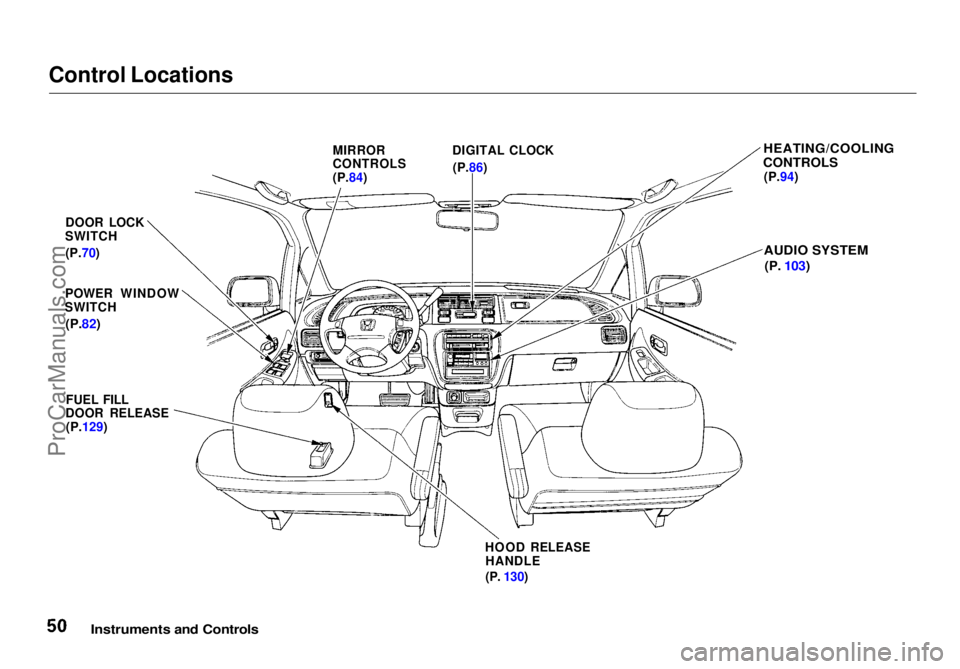
Control Locations
Instruments and Controls
MIRROR
CONTROLS
(P.84)
DIGITAL CLOCK
(P.86)
HEATING/COOLING
CONTROLS
(P.94)
AUDIO SYSTEM
(P.
103)
DOOR LOCK
SWITCH
(P.70)
POWER WINDOW
SWITCH
(P.82)
FUEL FILL
DOOR RELEASE
(P.129)
HOOD RELEASEHANDLE
(P.
130)ProCarManuals.comMain Menu Table of Contents s t
Page 52 of 272
Indicator Lights
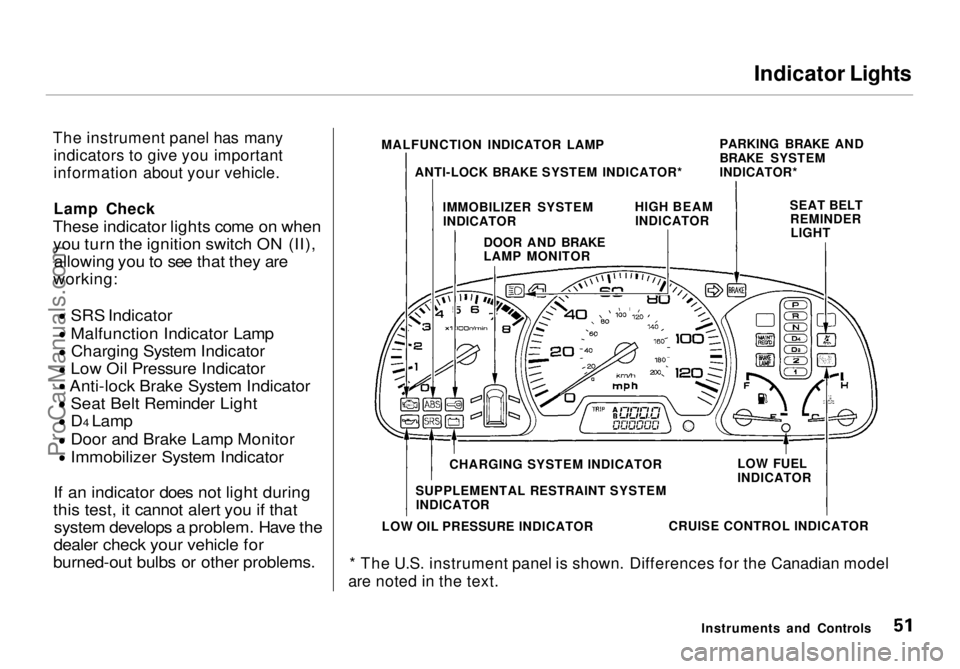
The instrument panel has many indicators to give you important
information about your vehicle.
Lamp Check
These indicator lights come on when you turn the ignition switch ON (II), allowing you to see that they are
working:
SRS Indicator
Malfunction Indicator Lamp
Charging System Indicator
Low Oil Pressure Indicator
Anti-lock Brake System Indicator
Seat Belt Reminder Light
D4 Lamp
Door and Brake Lamp Monitor
Immobilizer System Indicator
If an indicator does not light during
this test, it cannot alert you if that system develops a problem. Have the
dealer check your vehicle for
burned-out bulbs or other problems.
* The U.S. instrument panel is shown. Differences for the Canadian model
are noted in the text.
Instruments and Controls
MALFUNCTION INDICATOR LAMP
ANTI-LOCK BRAKE SYSTEM INDICATOR* PARKING BRAKE AND
BRAKE SYSTEM
INDICATOR*
IMMOBILIZER SYSTEM INDICATOR HIGH BEAM
INDICATOR SEAT BELT
REMINDERLIGHT
DOOR AND BRAKE
LAMP MONITOR
CHARGING SYSTEM INDICATOR
SUPPLEMENTAL RESTRAINT SYSTEM INDICATOR
LOW OIL PRESSURE INDICATOR CRUISE CONTROL INDICATORLOW FUEL
INDICATORProCarManuals.comMain Menu Table of Contents s t
Page 56 of 272
Gauges
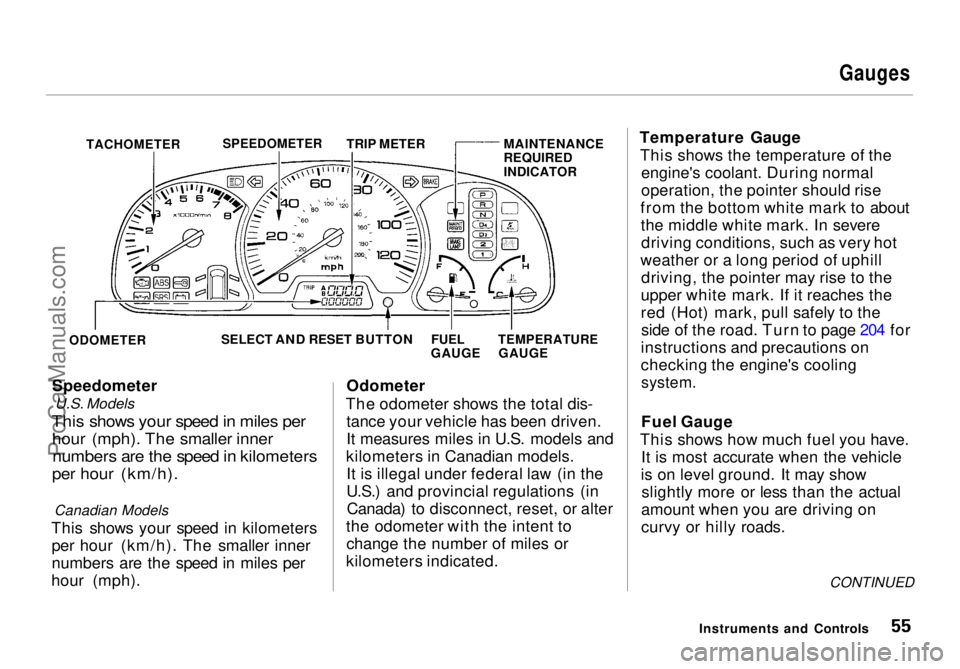
TACHOMETER
Speedometer
U.S. Models
This shows your speed in miles per
hour (mph). The smaller inner
numbers are the speed in kilometers
per hour (km/h).
Canadian Models
This shows your speed in kilometers per hour (km/h). The smaller inner
numbers are the speed in miles per
hour (mph). Odometer
The odometer shows the total dis- tance your vehicle has been driven.
It measures miles in U.S. models and
kilometers in Canadian models. It is illegal under federal law (in the
U.S.) and provincial regulations (inCanada) to disconnect, reset, or alter
the odometer with the intent to change the number of miles or
kilometers indicated. Temperature Gauge
This shows the temperature of the engine's coolant. During normal
operation, the pointer should rise
from the bottom white mark to about the middle white mark. In severedriving conditions, such as very hot
weather or a long period of uphill driving, the pointer may rise to the
upper white mark. If it reaches the
red (Hot) mark, pull safely to the side of the road. Turn to page 204 for
instructions and precautions on
checking the engine's cooling
system.
Fuel Gauge
This shows how much fuel you have. It is most accurate when the vehicle
is on level ground. It may show slightly more or less than the actual
amount when you are driving on
curvy or hilly roads.
CONTINUED
Instruments and Controls
SPEEDOMETER
TRIP METER MAINTENANCE
REQUIRED
INDICATOR
ODOMETER
SELECT AND RESET BUTTON
FUEL
GAUGE
TEMPERATURE
GAUGEProCarManuals.comMain Menu Table of Contents s t
Page 57 of 272
Gauges
The gauge does not stay at the same fuel level reading after you turn off
the ignition. When you add fuel, the
gauge slowly changes to the new
reading after you turn the ignitionswitch back ON (II).
Maintenance Required
Indicator
This indicator reminds you that it is time to take your vehicle in for sched-
uled maintenance.Refer to the Maintenance Schedules
for Normal and Severe Driving Conditions on pages 164 — 168 .
For the first 6,000 miles (9,600 km)
after the Maintenance Required
Indicator is reset, it will come on for
two seconds when you turn the
ignition switch ON (II).
Between 6,000 miles (9,600 km) and
7,500 miles (12,000 km) this
indicator will light for two seconds
when you first turn the ignition switch ON (II), and then flash for
ten seconds.
If you exceed 7,500 miles (12,000
km) without having the scheduled
maintenance performed, this
indicator will remain on as a constant
reminder.
Your dealer will reset this indicator after completing the scheduled
maintenance. If this maintenance is done by someone other than your
Honda dealer, reset the indicator as
follows.
1. Turn off the engine.
2. Press and hold the select/reset button in the instrument panel,
then turn the ignition switch ON
(II).
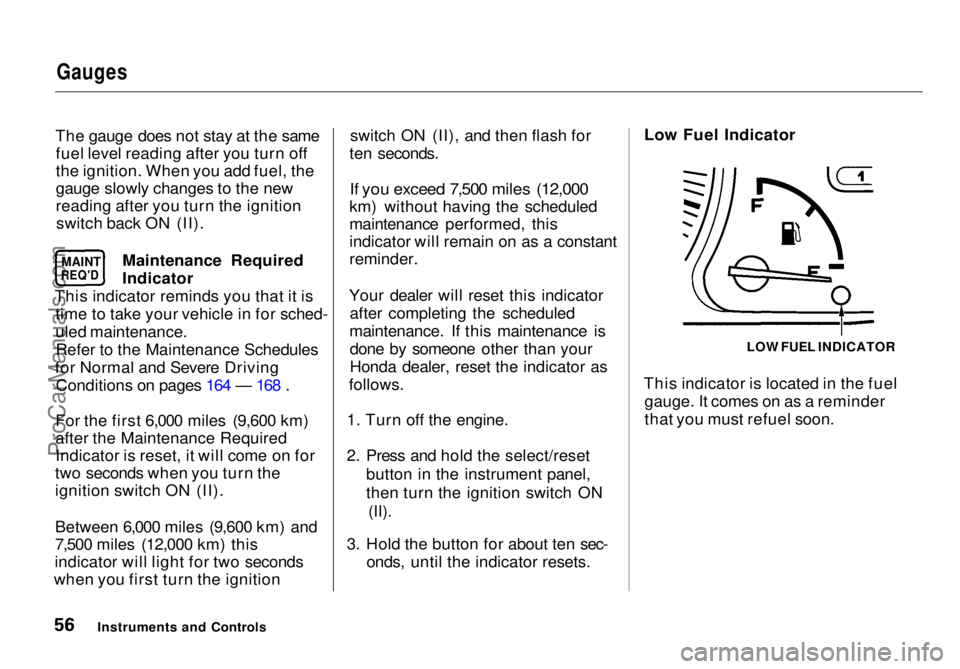
3. Hold the button for about ten sec- onds, until the indicator resets. Low Fuel Indicator
This indicator is located in the fuel gauge. It comes on as a reminder
that you must refuel soon.
Instruments and Controls LOW FUEL INDICATOR
MAINT
REQ'DProCarManuals.comMain Menu Table of Contents s t
Page 127 of 272
Before Driving
Before you begin driving your Honda,
you should know what gasoline to use, and how to check the levels of
important fluids. You also need to
know how to properly store luggageor packages. The information in this
section will help you. If you plan to
add any accessories to your vehicle,
please read the information in this section first. Break-in Period.............................. 128
Gasoline.......................................... 128
Service Station Procedures .......... 129 Filling the Fuel Tank................. 129
Opening the Hood..................... 130 Oil Check................................ 131
Engine Coolant Check.......... 132
Fuel Economy................................ 133 Vehicle Condition...................... 133
Driving Habits............................ 133
Accessories and Modifications.... 134 Carrying Cargo.............................. 136
Before DrivingProCarManuals.comMain Menu s t
Page 128 of 272
Break-in Period, Gasoline
Break-in Period
Help assure your vehicle's future
reliability and performance by paying extra attention to how you drive
during the first 600 miles (1,000 km).
During this period:
Avoid full-throttle starts and rapid
acceleration.
Avoid hard braking. New brakes
need to be broken-in by moderate
use for the first 200 miles (300
km).
You should follow these same re- commendations with an overhauled
or exchanged engine, or when the
brakes are relined.
Gasoline
Your Honda is designed to operate on unleaded gasoline with a pump
octane number of 86 or higher. Use
of a lower octane gasoline can cause
a persistent, heavy metallic rapping
noise in the engine that can lead to
mechanical damage.
We recommend gasolines containing detergent additives that help prevent
fuel system and engine deposits.
Using gasoline containing lead will
damage your vehicle's emissions
controls. This contributes to air
pollution. In Canada, some gasolines contain
an octane-enhancing additive called
MMT. If you use such gasolines,
your emission control system performance may deteriorate and
the Malfunction Indicator Lamp on
your instrument panel may turn on. If this happens, contact your
authorized Honda dealer for service.
Before DrivingProCarManuals.comMain Menu Table of Contents s t
Page 129 of 272
Service Station Procedures
Filling the Fuel Tank
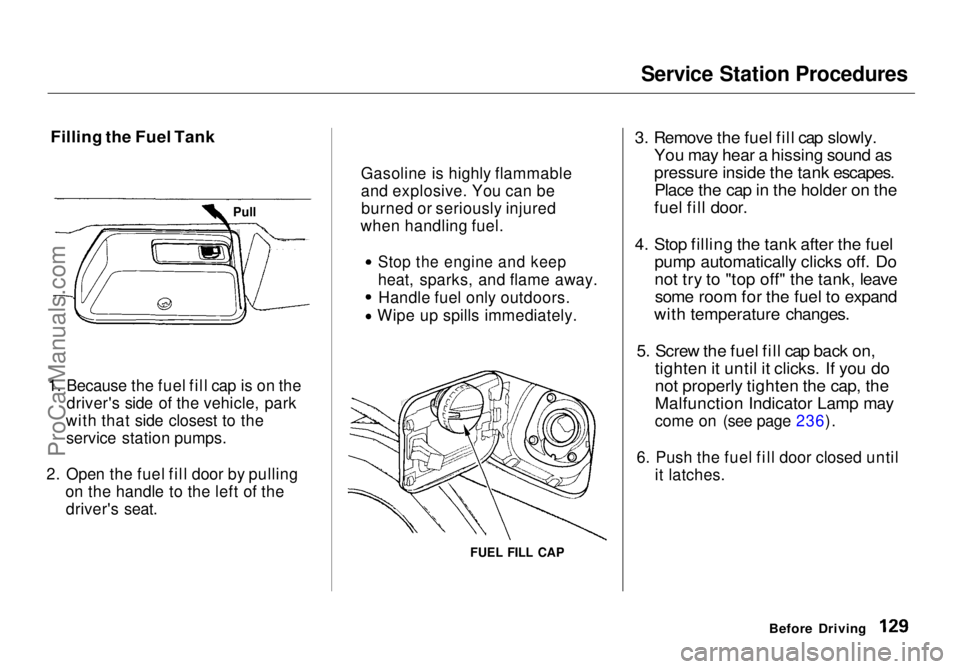
1. Because the fuel fill cap is on the driver's side of the vehicle, park
with that side closest to the service station pumps.
2. Open the fuel fill door by pulling on the handle to the left of thedriver's seat.
FUEL FILL CAP
3. Remove the fuel fill cap slowly.
You may hear a hissing sound as
pressure inside the tank escapes.Place the cap in the holder on the
fuel fill door.
4. Stop filling the tank after the fuel pump automatically clicks off. Do
not try to "top off" the tank, leavesome room for the fuel to expand
with temperature changes.
5. Screw the fuel fill cap back on, tighten it until it clicks. If you do
not properly tighten the cap, the
Malfunction Indicator Lamp may
come on (see page 236).
6. Push the fuel fill door closed until it latches.
Before Driving
Gasoline is highly flammable
and explosive. You can be
burned or seriously injured
when handling fuel.
Stop the engine and keep
heat, sparks, and flame away.
Handle fuel only outdoors.
Wipe up spills immediately.
PullProCarManuals.comMain Menu Table of Contents s t
Page 131 of 272
Service Station Procedures
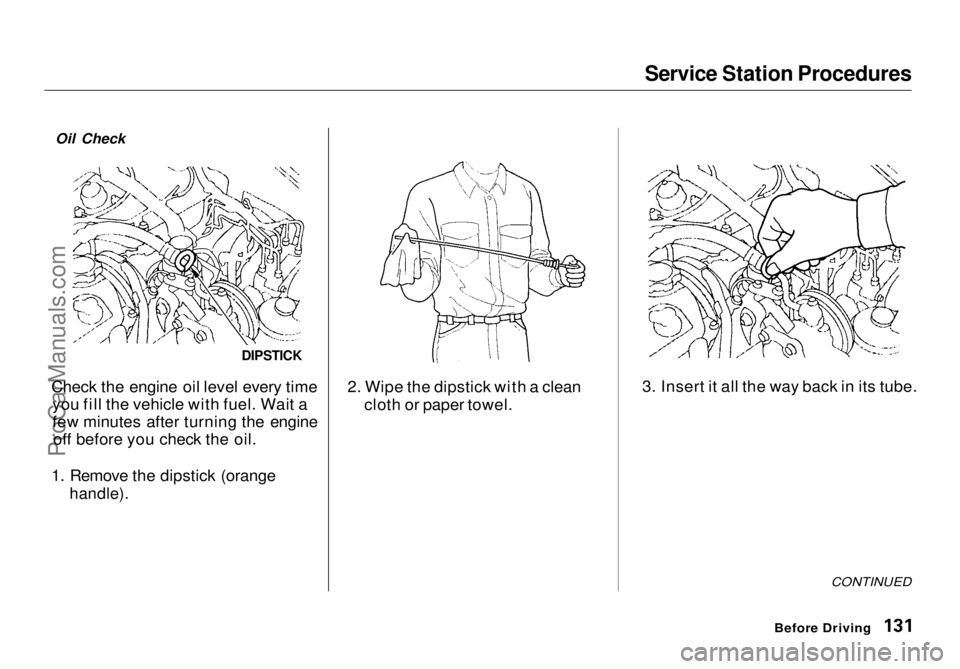
Check the engine oil level every time you fill the vehicle with fuel. Wait a
few minutes after turning the engineoff before you check the oil.
1. Remove the dipstick (orange
handle).
2. Wipe the dipstick with a clean
cloth or paper towel. 3. Insert it all the way back in its tube.
CONTINUED
Before Driving
Oil Check
DIPSTICKProCarManuals.comMain Menu Table of Contents s t