CD player HONDA ODYSSEY 1999 User Guide
[x] Cancel search | Manufacturer: HONDA, Model Year: 1999, Model line: ODYSSEY, Model: HONDA ODYSSEY 1999Pages: 343, PDF Size: 3.73 MB
Page 176 of 343
Audio System
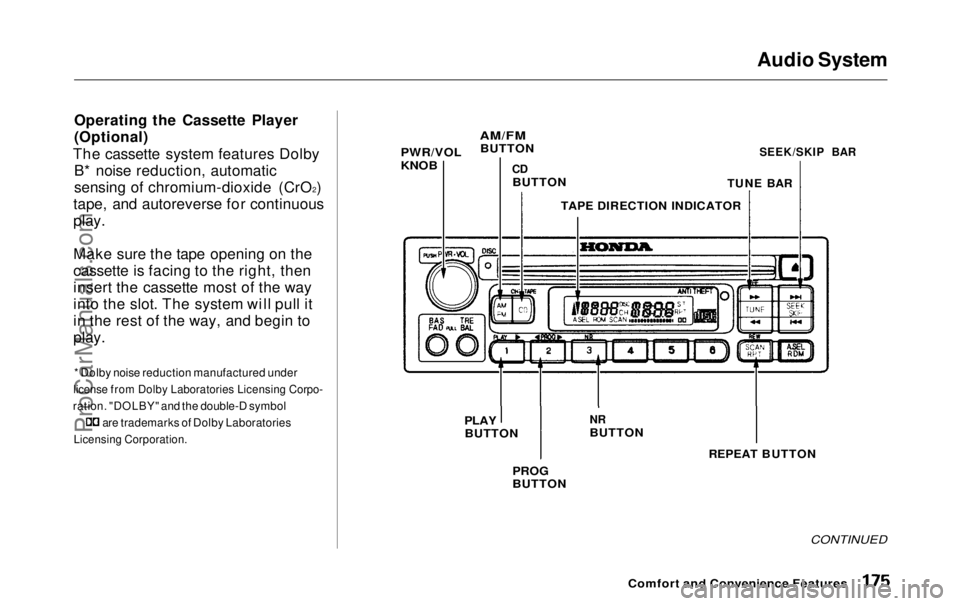
Operating the Cassette Player
(Optional)
The cassette system features Dolby B* noise reduction, automatic
sensing of chromium-dioxide (CrO 2
)
tape, and autoreverse for continuous
play.
Make sure the tape opening on the
cassette is facing to the right, then
insert the cassette most of the way
into the slot. The system will pull it
in the rest of the way, and begin to
play.
* Dolby noise reduction manufactured under
license from Dolby Laboratories Licensing Corpo-
ration. "DOLBY" and the double-D symbol are trademarks of Dolby Laboratories
Licensing Corporation.
CONTINUED
Comfort and Convenience Features
PWR/VOL
KNOB
AM/FM
BUTTON
CD
BUTTON
TAPE DIRECTION INDICATOR
TUNE BAR
SEEK/SKIP BAR
PLAY
BUTTON
NR
BUTTON
PROG
BUTTON
REPEAT BUTTONProCarManuals.comMain Menu Table of Contents s t
Page 177 of 343
Audio System
The tape direction indicator will light to show you which side of the cassette is playing. The indicates
the side you inserted facing upward is now playing. If you want to play
the other side, press the PROG
button.
Dolby B noise reduction turns on
when you insert a cassette. If the tape was not recorded with Dolby Bnoise reduction, turn it off by
pressing the NR button. Dolby remains off until you turn it on
by pressing the button again.
When the system reaches the end of the tape, it will automatically reverse direction and play the other side. If
you want to remove the cassette
from the drive, press the EJECT button on the cassette player. If you turn the system off while a
tape is playing, either with the PWR/
VOL knob or by turning off the ignition, the cassette will remain in
the drive. When you turn the system
back on, the cassette player will be inpause mode. To begin playing, press
the PLAY button.
To switch to the radio or CD player while a tape is playing, press the
AM/FM, or CD button. To changeback to the cassette player, push the CD button.
Tape Search Functions
With a cassette playing, you can use the FF, REW, SKIP, or REPEAT
function to find a desired program.
FF/REW — Fast Forward andRewind move the tape rapidly. Press
and release the
side of the
TUNE bar to fast forward the tape, or the side to rewind. You will
see FF or REW flashing in the
display. To stop fast forward or
rewind, press either side of the
TUNE bar or the PLAY button. If the system reaches the end of the tape
while in fast forward or rewind, it
automatically stops that function,
reverses direction, and begins to play.
Comfort and Convenience FeaturesProCarManuals.comMain Menu Table of Contents s t
Page 179 of 343
Audio System
Caring for the Cassette Player
The cassette player picks up dirt and oxides from the tape. This contami-
nation builds up over time and
causes the sound quality to degrade.
To prevent this, you should clean the player after every 30 hours of use.
Your dealer has a cleaning kit
available.
If you do not clean the cassette
player regularly, it may eventually
become impossible to remove the
contamination with a normal
cleaning kit.
Use 100-minute or shorter cassettes.
Cassettes longer than that use
thinner tape that may break or jam
the drive. Look at the cassette before you
insert it. If the tape is loose, tighten
it by turning a hub with a pencil or
your finger.
If the label is peeling off, remove it
from the cassette or it could cause the cassette to jam in the player.
Never try to insert a warped ordamaged cassette in the player.
When they are not in use, store cassettes in their cases to protect
them from dust and moisture. Never place cassettes where they will be
exposed to direct sunlight, high heat,or high humidity. If a cassette is
exposed to extreme heat or cold, let
it reach a moderate temperature
before inserting it in the player.
Never try to insert foreign objects
into the cassette player. If you see the error indication (LX model)/
(EX model) on the display, press the
EJECT button and remove the
cassette from the unit. Make sure
the tape is not damaged. If the
cassette will not eject or the error
indication stays on after the cassette
ejects, take the vehicle to your
Honda dealer.
On LX model
If a problem develops in the connec-
tion between the cassette player and
the radio, you will see
in
the display. Take the vehicle to your
Honda dealer.
Comfort and Convenience FeaturesProCarManuals.comMain Menu Table of Contents s t
Page 334 of 343
Index
Battery
Charging SystemIndicator............................ 58, 302
Jump Starting............................. 297 Maintenance............................... 251
Specifications............................. 317
Before Driving............................... 181
Belts, Seat..................................... 8, 45
Beverage Holder............................ 118
Body Repair.................................... 283
Brakes Anti-lock System (ABS)............ 205Break-in, New Linings .............. 182
Fluid............................................ 244
Light, Burned-out...................... 268
Parking........................................ 116
System Indicator.................. 58, 304
Wear Indicators......................... 204
Brakes, ABS Operation.................................... 205
System Indicator.................. 59, 206
Braking System.............................. 204
Break-in, New Vehicle .................. 182
Brightness Control, Instruments... 67 Brights, Headlights......................... 66
Bulb Replacement
Back-up Lights........................... 269
Brake Lights............................... 268Cargo Area Light....................... 272
Front Parking Lights................. 267
Front Side Marker Lights......... 267 Headlights.................................. 266
High-mount Brake Light.......... 270
Individual Map Lights............... 272 License Plate Light.................... 271
Rear Bulbs.......................... 268, 269
Specifications............................. 317
Turn Signal Lights..................... 267
Bulbs, Halogen............................... 266
Cables, Jump Starting With.......... 298
Cancel Button................................... 75
Capacities Chart............................. 316
Carbon Monoxide Hazard.............. 53
Cargo Area Light........................... 127
Cargo Net....................................... 194
Carrying Cargo.............................. 191
Cassette Player
Care............................................. 178
Operation........................... 154, 175
CAUTION, Explanation of.............. ii
CD Changer...........................157, 171 CD Player ...............................157, 169
Center Pocket................................ 122
Center Table................................... 117
Certification Label......................... 314
Chains............................................. 263 Change Oil How to.........................................235
When to....................................... 224
Changing a Flat Tire..................... 287
Changing Engine Coolant............. 239
Charging System Indicator .... 58, 302
Checking Automatic Transmission
Fluid........................................ 243
Battery Condition...................... 251
Brake Fluid................................. 244Drive Belts.................................. 256
Engine Coolant........................... 187
Engine Oil................................... 186
Fuses........................................... 306
Power Steering Fluid................. 245ProCarManuals.comMain Menu s t
Page 341 of 343
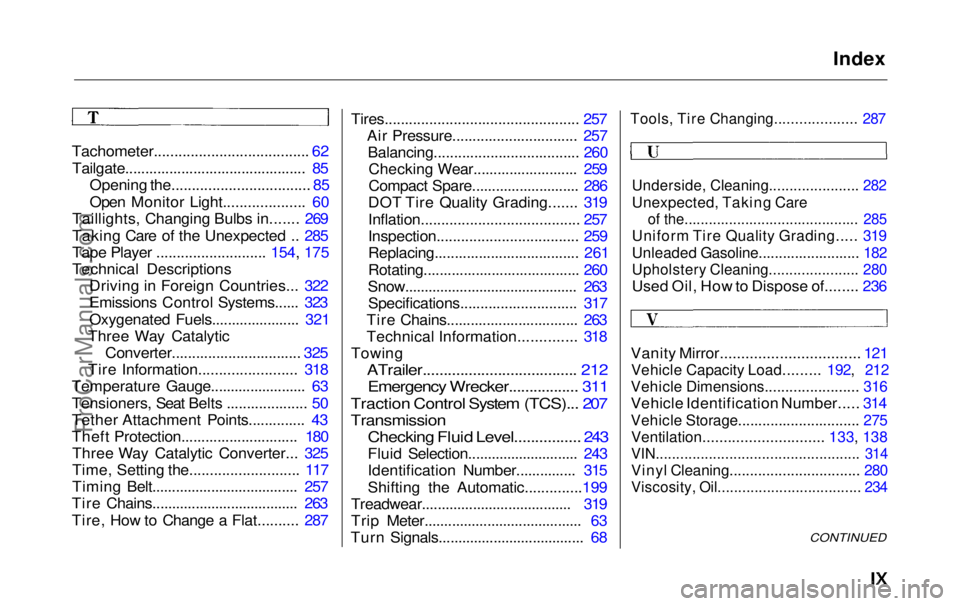
Index
Tachometer...................................... 62
Tailgate............................................. 85
Opening the.................................. 85
Open Monitor Light.................... 60
Taillights, Changing Bulbs in....... 269
Taking Care of the Unexpected .. 285
Tape Player ........................... 154, 175
Technical Descriptions Driving in Foreign Countries... 322
Emissions Control Systems...... 323
Oxygenated Fuels...................... 321
Three Way Catalytic
Converter................................ 325
Tire Information........................ 318
Temperature Gauge........................ 63
Tensioners, Seat Belts .................... 50
Tether Attachment Points.............. 43
Theft Protection............................. 180 Three Way Catalytic Converter... 325
Time, Setting the........................... 117
Timing Belt..................................... 257
Tire Chains..................................... 263
Tire, How to Change a Flat.......... 287 Tires................................................ 257
Air Pressure............................... 257Balancing.................................... 260Checking Wear.......................... 259
Compact Spare........................... 286
DOT Tire Quality Grading....... 319
Inflation....................................... 257
Inspection................................... 259
Replacing.................................... 261
Rotating....................................... 260
Snow............................................ 263 Specifications............................. 317
Tire Chains................................. 263
Technical Information.............. 318
Towing
ATrailer..................................... 212
Emergency Wrecker.................
311
Traction Contro l
System (TCS)... 207
Transmission
Checking Fluid Level................ 243
Fluid Selection............................ 243
Identification Number............... 315
Shifting the Automatic..............199
Treadwear...................................... 319
Trip Meter........................................ 63
Turn Signals..................................... 68
Tools, Tire Changing.................... 287
Underside, Cleaning...................... 282
Unexpected, Taking Care
of the........................................... 285
Uniform Tire Quality Grading..... 319
Unleaded Gasoline......................... 182
Upholstery Cleaning...................... 280
Used Oil, How to Dispose of........ 236
Vanity Mirror................................. 121
Vehicle Capacity Load......... 192, 212
Vehicle Dimensions....................... 316
Vehicle Identification Number..... 314
Vehicle Storage.............................. 275
Ventilation............................. 133, 138
VIN.................................................. 314
Vinyl Cleaning................................ 280
Viscosity, Oil................................... 234
CONTINUEDProCarManuals.comMain Menu s t