check engine HONDA ODYSSEY 1999 User Guide
[x] Cancel search | Manufacturer: HONDA, Model Year: 1999, Model line: ODYSSEY, Model: HONDA ODYSSEY 1999Pages: 343, PDF Size: 3.73 MB
Page 203 of 343
Automatic Transmission
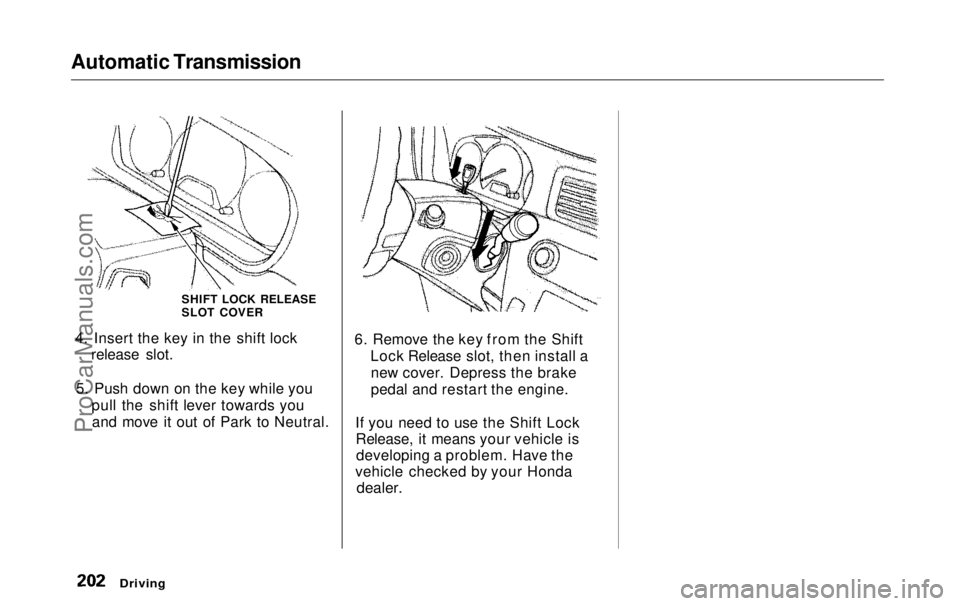
4. Insert the key in the shift lock release slot.
5. Push down on the key while you pull the shift lever towards youand move it out of Park to Neutral. 6. Remove the key from the Shift
Lock Release slot, then install anew cover. Depress the brake
pedal and restart the engine.
If you need to use the Shift Lock Release, it means your vehicle isdeveloping a problem. Have the
vehicle checked by your Honda
dealer.
Driving
SHIFT LOCK RELEASE
SLOT COVERProCarManuals.comMain Menu Table of Contents s t
Page 205 of 343
The Braking System
Your Honda is equipped with front disc brakes. The brakes on the rear
wheels are drum. A power assist helps reduce the effort needed on
the brake pedal. The ABS helps you retain steering control when braking
very hard.
Put your foot on the brake pedal only
when you intend to brake. Resting
your foot on the pedal keeps the brakes applied lightly, causing themto build up heat. Heat build-up can
reduce how well your brakes work. Italso keeps your brake lights on all
the time, confusing drivers behind
you.
Constant application of the brakes
when going down a long hill builds up heat and reduces their effective-
ness. Use the engine to assist the
brakes by downshifting to a lower gear and taking your foot off the
accelerator pedal.
Check your brakes after driving
through deep water. Apply the
brakes moderately to see if they feel normal. If not, apply them gently and
frequently until they do. Since a
longer distance is needed to stop
with wet brakes, be extra cautious and alert in your driving. Brake Wear Indicators
The front disc brakes on all vehicles have audible brake wear indicators.
When the brake pads need replacing,
you will hear a distinctive metallic "screeching" sound when you apply
the brakes. If you do not have the
brake pads replaced, they will begin screeching all the time.
Your brakes may sometimes squeal or squeak when you apply them
lightly. Do not confuse this with the
brake wear indicators. They make a
very audible "screeching."
DrivingProCarManuals.comMain Menu Table of Contents s t
Page 207 of 343
The Braking System
Important Safety Reminders
ABS does not reduce the time or distance it takes to stop the
vehicle, it only helps with steering control during braking. You should
always maintain a safe followingdistance from other vehicles.
ABS will not prevent a skid that results from changing direction
abruptly, such as trying to take a
corner too fast or making a sudden
lane change. Always drive at a safe, prudent speed for the road and
weather conditions.
ABS cannot prevent a loss of stability. Always steer moderately
when you are braking hard. Severe or sharp steering wheel movement
can still cause your vehicle to veer
into oncoming traffic or off the road. A vehicle with ABS may require a
longer distance to stop on loose or
uneven surfaces, such as gravel orsnow, than a vehicle without anti-
lock. Slow down and allow a greater distance between vehicles under
those conditions.
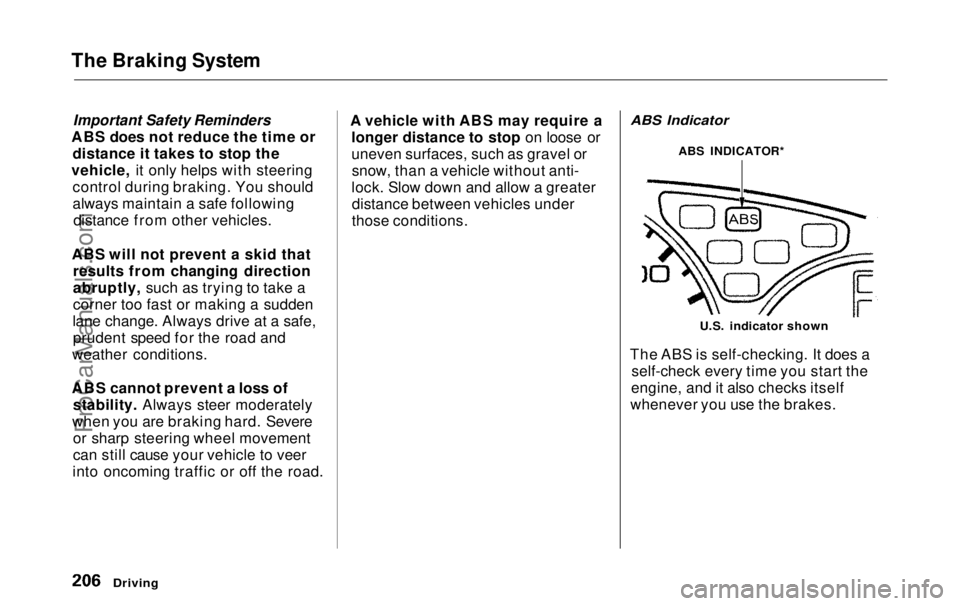
ABS Indicator
U.S. indicator shown
The ABS is self-checking. It does a self-check every time you start the
engine, and it also checks itself
whenever you use the brakes.
Driving
ABS INDICATOR*ProCarManuals.comMain Menu Table of Contents s t
Page 220 of 343
Maintenance
This section explains why it is important to keep your vehicle well
maintained and to follow basic
maintenance safety precautions.
This section also includes Maintenance Schedules for normaldriving and severe driving conditions,
a Maintenance Record, and instruc-
tions for simple maintenance tasks
you may want to take care of yourself.
If you have the skills and tools to per-
form more complex maintenance tasks on your Honda, you may want
to purchase the Service Manual. See page 333 for information on how toobtain a copy, or see your Honda
dealer.
Maintenance Safety.......................
220
Important Safet
y
Precautions ..
221
Maintenance Schedule.................
.
222
Required Maintenance Record.... 229
Owner Maintenance Checks........ 231
Fluid Locations............................... 232
Engine Oil....................................... 233
Adding Oil................................... 233
Recommended Oil..................... 233
Synthetic Oil............................... 234
Additives..................................... 235
Changing the Oil and Filter...... 235
Cooling System.............................. 237
Adding Engine Coolant............. 237Replacing Engine Coolant........ 239
Windshield Washers..................... 242
Automatic Transmission Fluid..... 243
Brake Fluid..................................... 244
Brake System............................. 244
Power Steering............................... 245
Air Cleaner Element...................... 246
Hood Latch..................................... 248
Spark Plugs..................................... 248
Replacement............................... 248
Specifications............................. 250
Battery............................................ 251
Wiper Blades.................................. 253
Air Conditioning System............... 255
Air Conditioning Filter.................. 256
Drive Belts...................................... 256
Timing Belt..................................... 257
Tires................................................ 257 Inflation....................................... 257
Inspection................................... 259Maintenance............................... 260
Tire Rotation.............................. 260
Replacing Tires and Wheels.... 261
Wheels and Tires....................... 262 Winter Driving........................... 262
Snow Tires.............................. 263
Tire Chains............................. 263
Lights..............................................264
Headlight Aiming...................... 266
Replacing Bulbs......................... 266
Storing Your Vehicle..................... 275
MaintenanceProCarManuals.comMain Menu s t
Page 226 of 343
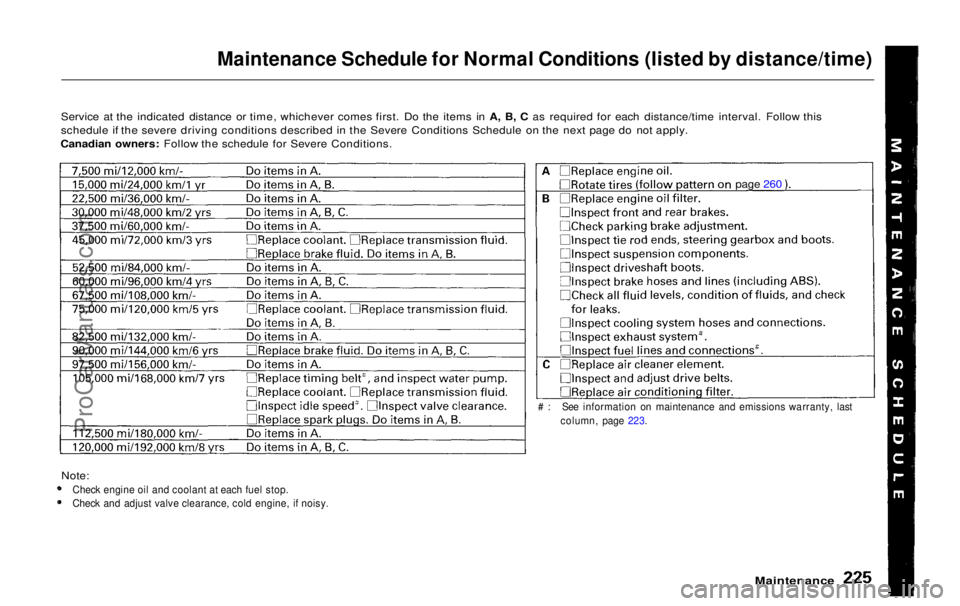
Maintenance Schedule for Normal Conditions (listed by distance/time)
Service at the indicated distance or time, whichever comes first. Do the items in A, B, C as required for each distance/time interval. Follow this
schedule if the severe driving conditions described in the Severe Conditions Schedule on the next page do not apply.
Canadian owners: Follow the schedule for Severe Conditions.
Note:
Check engine oil and coolant at each fuel stop.
Check and adjust valve clearance, cold engine, if noisy.
Maintenance
# : See information on maintenance and emissions warranty, last
column, page 223.
page 260ProCarManuals.comMain Menu Table of Contents s t
Page 229 of 343
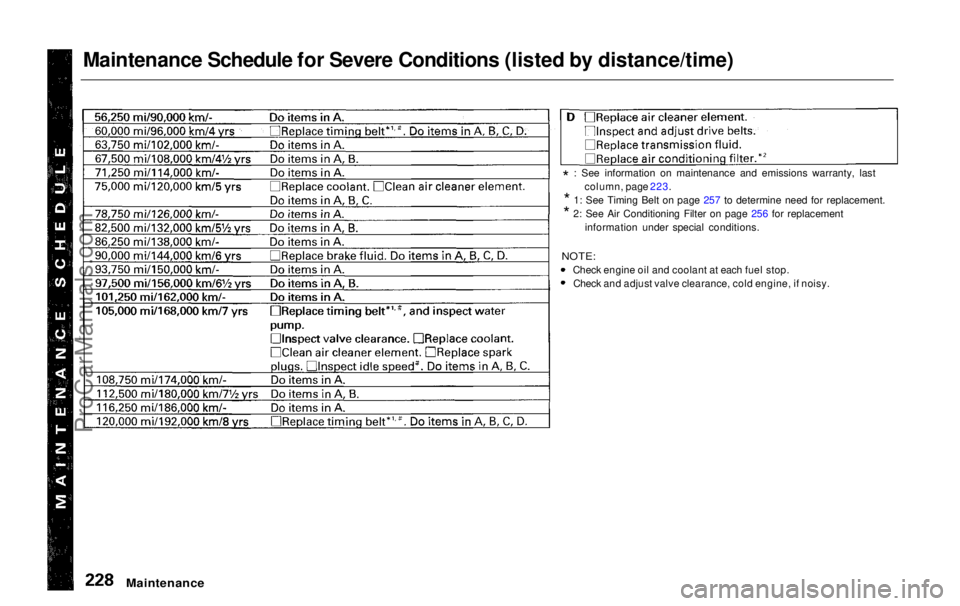
Maintenance Schedule for Severe Conditions (listed by distance/time)
Maintenance
*
: See information on maintenance and emissions warranty, last
column, page 223.
*
1: See Timing Belt on page 257 to determine need for replacement.
*
2: See Air Conditioning Filter on page 256 for replacement
information under special conditions.
NOTE:
Check engine oil and coolant at each fuel stop. Check and adjust valve clearance, cold engine, if noisy.
ProCarManuals.comMain Menu Table of Contents s t
Page 232 of 343
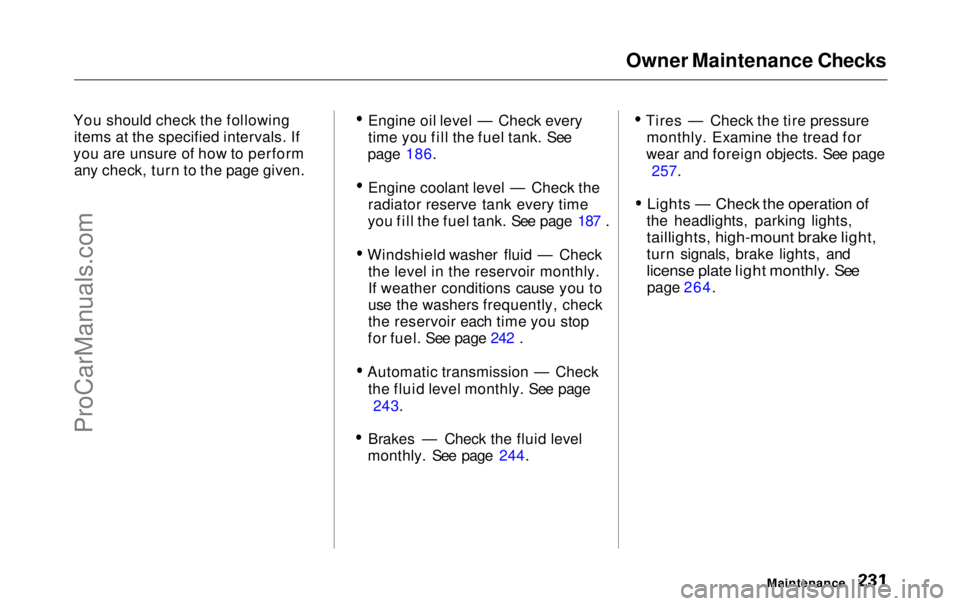
Owner Maintenance Checks
You should check the following items at the specified intervals. If
you are unsure of how to perform any check, turn to the page given. Engine oil level — Check every
time you fill the fuel tank. See
page 186.
Engine coolant level — Check the
radiator reserve tank every time
you fill the fuel tank. See page 187 .
Windshield washer fluid — Check the level in the reservoir monthly.
If weather conditions cause you to
use the washers frequently, check
the reservoir each time you stop
for fuel. See page 242 .
Automatic transmission — Check the fluid level monthly. See page 243.
Brakes — Check the fluid level
monthly. See page 244. Tires — Check the tire pressure
monthly. Examine the tread for
wear and foreign objects. See page
257.
Lights — Check the operation of
the headlights, parking lights,
taillights, high-mount brake light,
turn signals, brake lights, and
license plate light monthly. See
page 264.
MaintenanceProCarManuals.comMain Menu Table of Contents s t
Page 234 of 343
Engine Oil
Adding Oil Recommended Oil
Oil is a major contributor to your
engine's performance and longevity.
Always use a premium-grade deter- gent oil.
You can determine an oil's SAE viscosity and Service Classificationfrom the API Service label on the oil
container.
A fuel-efficient oil is recommended for your Honda. This is shown on the
API Service label by the words "Energy Conserving." This oil is
formulated to help your engine use
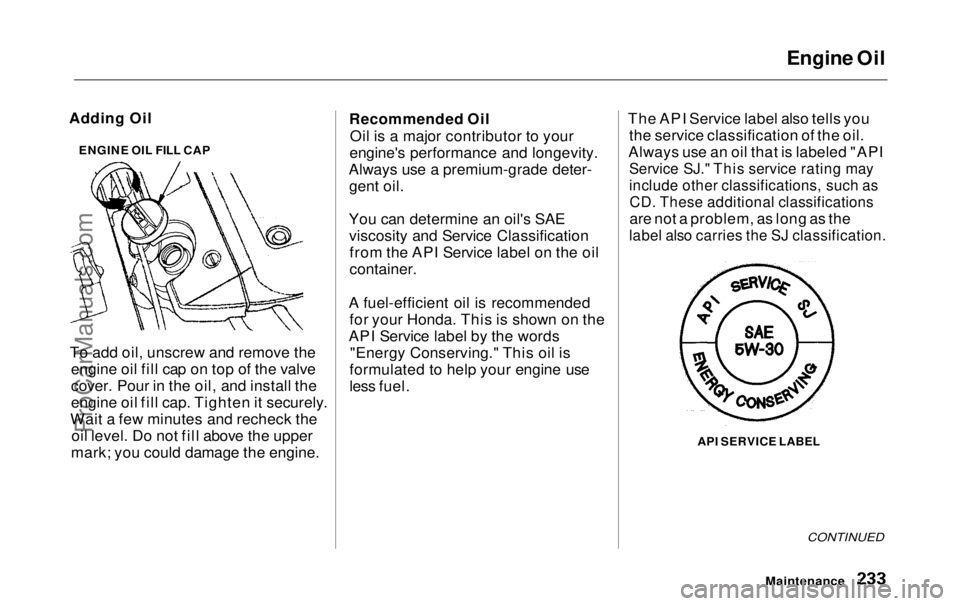
less fuel. The API Service label also tells you
the service classification of the oil.
Always use an oil that is labeled "API
Service SJ." This service rating may
include other classifications, such as
CD. These additional classifications
are not a problem, as long as the
label also carries the SJ classification.
API SERVICE LABEL
CONTINUED
Maintenance
To add oil, unscrew and remove the
engine oil fill cap on top of the valve
cover. Pour in the oil, and install the
engine oil fill cap. Tighten it securely.
Wait a few minutes and recheck the oil level. Do not fill above the upper
mark; you could damage the engine. ENGINE OIL FILL CAPProCarManuals.comMain Menu Table of Contents s t
Page 237 of 343
Engine Oil
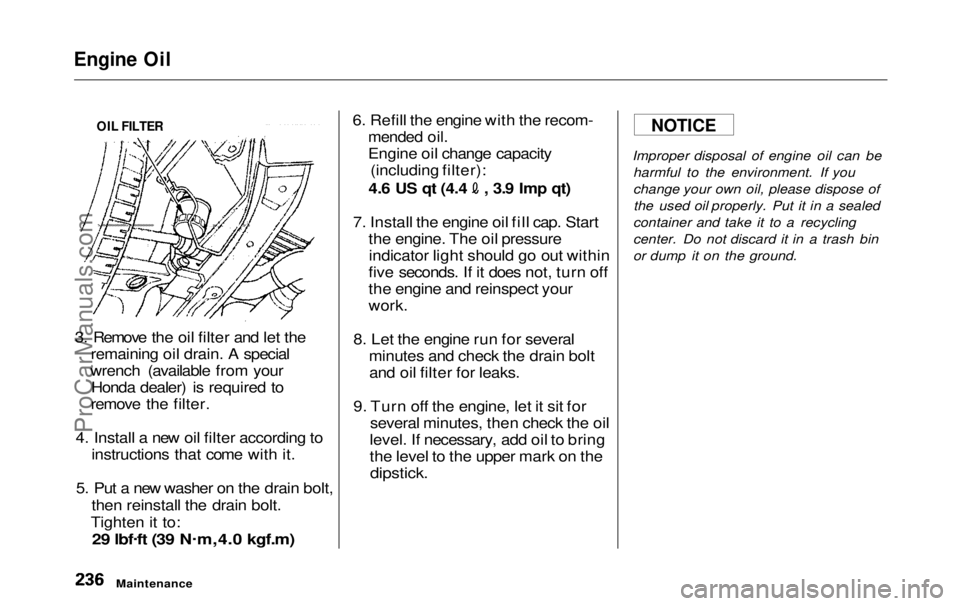
3. Remove the oil filter and let the remaining oil drain. A special
wrench (available from your Honda dealer) is required to
remove the filter.
4. Install a new oil filter according to instructions that come with it.
5. Put a new washer on the drain bolt, then reinstall the drain bolt.
Tighten it to:
29 lbf .
ft (39 N .
m,4.0 kgf.m)
6. Refill the engine with the recom-
mended oil.
Engine oil change capacity(including filter): 4.6 US qt (4.4 , 3.9 Imp qt)
7. Install the engine oil fill cap. Start the engine. The oil pressureindicator light should go out within
five seconds. If it does not, turn off
the engine and reinspect your
work.
8. Let the engine run for several minutes and check the drain boltand oil filter for leaks.
9. Turn off the engine, let it sit for several minutes, then check the oil
level. If necessary, add oil to bring
the level to the upper mark on the
dipstick.
Improper disposal of engine oil can be
harmful to the environment. If you
change your own oil, please dispose ofthe used oil properly. Put it in a sealed
container and take it to a recycling
center. Do not discard it in a trash bin
or dump it on the ground.
Maintenance
NOTICE
OIL FILTERProCarManuals.comMain Menu Table of Contents s t
Page 238 of 343
Cooling System
Adding Engine Coolant
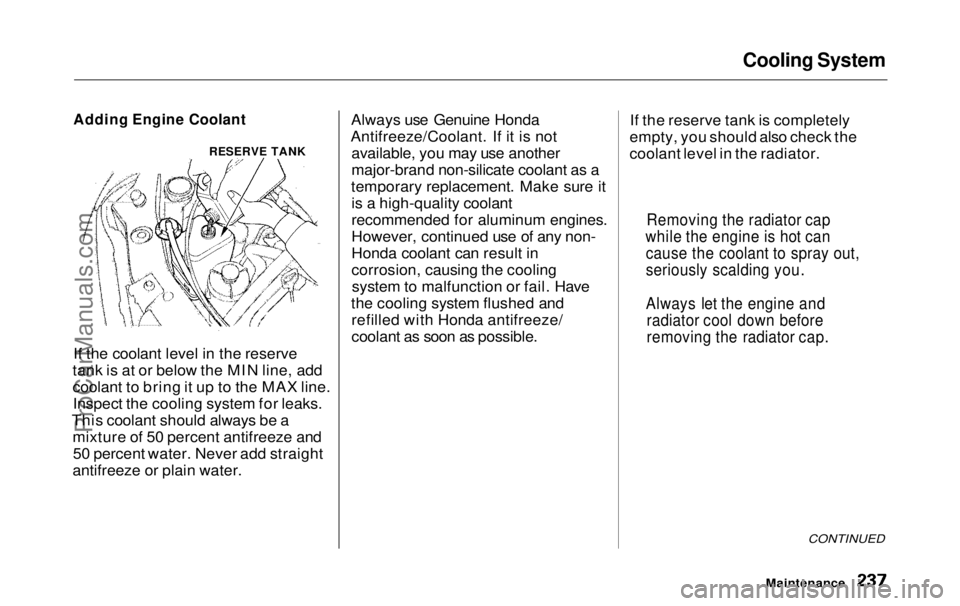
If the coolant level in the reserve
tank is at or below the MIN line, add
coolant to bring it up to the MAX line. Inspect the cooling system for leaks.
This coolant should always be a mixture of 50 percent antifreeze and50 percent water. Never add straight
antifreeze or plain water. Always use Genuine Honda
Antifreeze/Coolant. If it is not available, you may use another
major-brand non-silicate coolant as a
temporary replacement. Make sure it is a high-quality coolant
recommended for aluminum engines.
However, continued use of any non-
Honda coolant can result in
corrosion, causing the coolingsystem to malfunction or fail. Have
the cooling system flushed and refilled with Honda antifreeze/
coolant as soon as possible. If the reserve tank is completely
empty, you should also check the
coolant level in the radiator.
CONTINUED
Maintenance
Removing the radiator cap
while the engine is hot can cause the coolant to spray out,
seriously scalding you.
Always let the engine and radiator cool down before
removing the radiator cap.
RESERVE TANKProCarManuals.comMain Menu Table of Contents s t