remote control HONDA ODYSSEY 1999 User Guide
[x] Cancel search | Manufacturer: HONDA, Model Year: 1999, Model line: ODYSSEY, Model: HONDA ODYSSEY 1999Pages: 343, PDF Size: 3.73 MB
Page 91 of 343
Sliding Doors
Power Sliding Doors
On EX model
The sliding doors on your vehicle are electrically-powered. You can openor close each power sliding door with
the switches on the dashboard, with
the inside or outside door handles, or
with the remote transmitter. The power sliding doors operate
with the ignition switch in anyposition. In addition: The shift lever must be in Park.
The MAIN switch on the
dashboard must be in the ON
position.
The sliding door you want to
operate must be unlocked. To open the door with the inside
handle, the childproof door lockon the door you want to operate
must be unlocked (see page 85).
You should close each sliding door before you start driving.
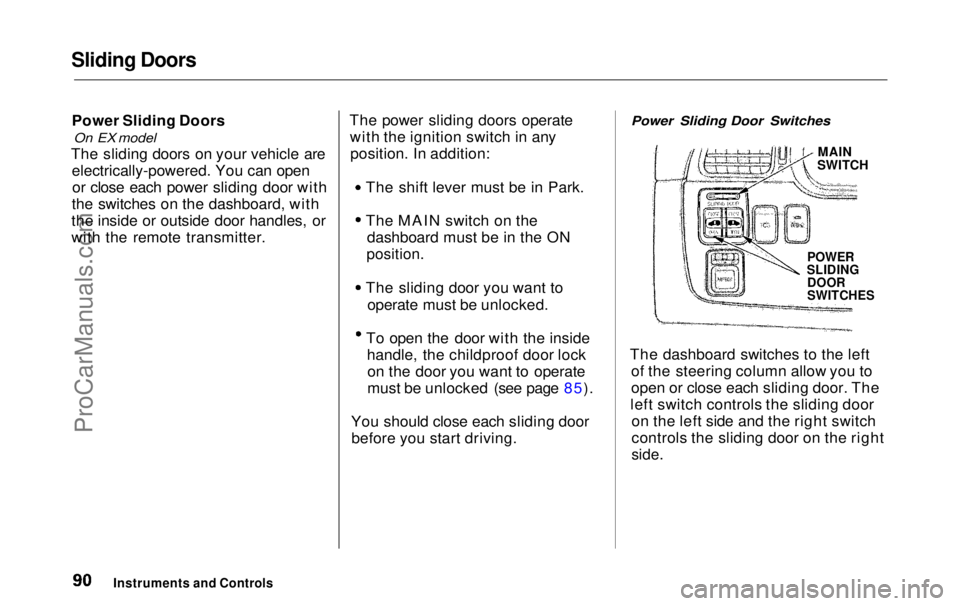
Power Sliding Door Switches
MAIN
SWITCH
POWER
SLIDING
DOOR
SWITCHES
The dashboard switches to the left of the steering column allow you to
open or close each sliding door. The
left switch controls the sliding door on the left side and the right switch
controls the sliding door on the right
side.
Instruments and ControlsProCarManuals.comMain Menu Table of Contents s t
Page 92 of 343
Sliding Doors
To close a sliding door, push the top of the appropriate switch, thenrelease it. To open the door, push
and release the bottom of the switch.
The MAIN switch on the dashboard controls door operation. With theMAIN switch off, automatic
operation with the power sliding
door switches, the door handles, and
the remote transmitter is disabled.
When the MAIN switch is off, you can operate each sliding door
manually. To open or close a door,
pull the inside or outside door handle and slide the door.
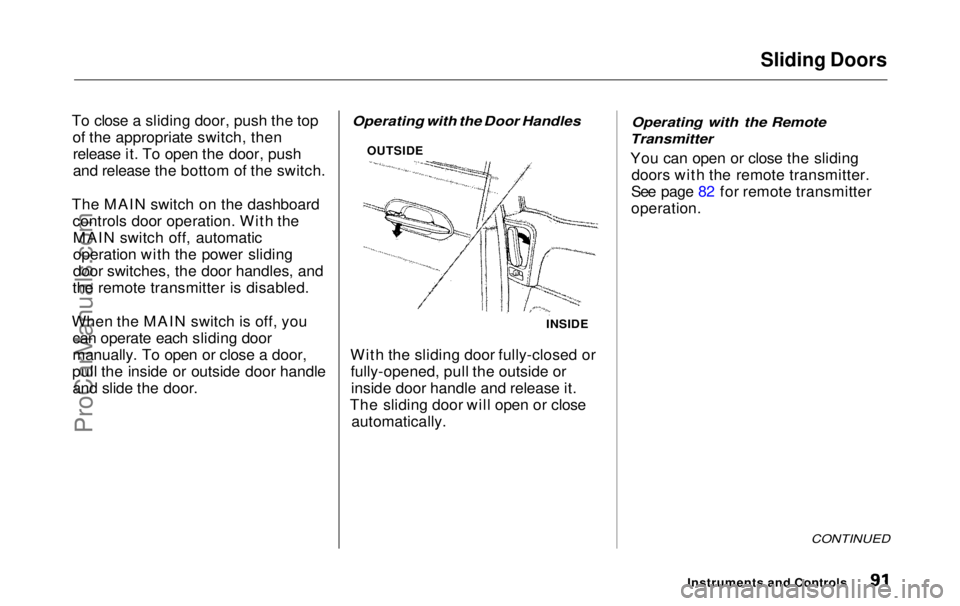
Operating with the Door Handles
With the sliding door fully-closed or fully-opened, pull the outside orinside door handle and release it.
The sliding door will open or close automatically.
Operating with the Remote
Transmitter
You can open or close the sliding doors with the remote transmitter.
See page 82 for remote transmitter
operation.
CONTINUED
Instruments and Controls
INSIDE
OUTSIDEProCarManuals.comMain Menu Table of Contents s t
Page 93 of 343
Sliding Doors
Stopping Power Sliding Door
Movement
To stop automatic operation: Push either side of the dashboard
power sliding door switch for the moving door. Push the button on the remote
transmitter for the moving door. If
you push the same button a second time, the door reverses
direction.
When you stop automatic operation with the dashboard
switch or the remote transmitter,
you will hear three beeps. If you try to open a locked sliding
door with the power sliding door
switch or the remote transmitter,
you will hear three beeps. Unlock the door, then try again.
If you shift out of Park while a door
is opening, you will hear a
continuous tone and the door willstop moving. If you keep driving with
the door open, the tone continues
until you stop and close the door.
If you shift out of Park while a door
is closing, the door will close
completely. You will hear a beep
until the door is completely closed. When parked on steep hills, the
power sliding doors may not open or
close as they do normally.
If a power sliding door runs into any
obstacle while it is closing, the doorwill stop, and then reverse direction.
You will hear three beeps.
Even with this safety feature, you
should still check that all passengers
and objects are away from the sliding
doors before closing them as this
feature stops working when the door is almost closed.
Instruments and ControlsProCarManuals.comMain Menu Table of Contents s t
Page 96 of 343
HomeLink Universal Transmitter
On EX model
The HomeLink Universal Transmit- ter built into your vehicle can be
programmed to operate remotely-controlled devices around your home,
such as garage doors, lighting, or
home security systems. It can
replace up to three remote
transmitters.
Customer Assistance
If you have problems with training
the HomeLink Universal
Transmitter, or would like information on home products that
can be operated by the transmitter,
call (800) 355-3515.
Important Safety Precautions
Always refer to the operating instruc- tions and safety information thatcame with your garage door opener
or other equipment you intend to
operate with the HomeLink
Universal Transmitter. If you do not
have this information, you should contact the manufacturer of the
equipment.
While training or using the transmitter, make sure you have a
clear view of the garage door or gate,and that no one will be injured by its
movement.
If your garage door opener was
manufactured before April 1982, you
may not be able to program the
HomeLink Universal Transmitter to operate it. Garage door openers
manufactured before that date do
not have a safety feature that causes
them to stop and reverse if an obstacle is detected during closing,
increasing the risk of injury. If you
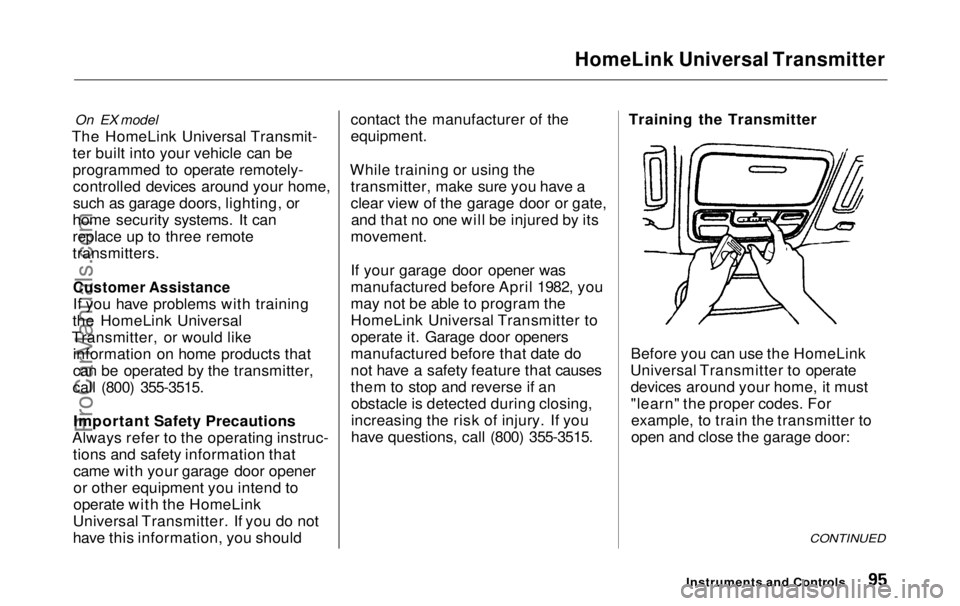
have questions, call (800) 355-3515. Training the Transmitter
Before you can use the HomeLink
Universal Transmitter to operate devices around your home, it must
"learn" the proper codes. Forexample, to train the transmitter to
open and close the garage door:
CONTINUED
Instruments and ControlsProCarManuals.comMain Menu Table of Contents s t
Page 97 of 343
HomeLink Universal Transmitter
1. This step erases all previously learned
codes. Perform this step before
training the transmitter for the very
first time. Press and hold the two
outside buttons until the red light
in the transmitter flashes (approximately 20 seconds).
Release the buttons.
2. Hold the end of the garage door opener remote control 1 to 3
inches from the HomeLink
transmitter. Make sure you are
not blocking your view of the redlight in the transmitter.
3. Select the transmitter button you want to train.
4. Press the button on the remote control and the button on the
transmitter at the same time. Holddown both buttons. 5. The red light in the transmitter
should begin flashing. It will flashslowly at first, then rapidly.
6. When the red light flashes rapidly, release both buttons. The
transmitter should have learned
the code from the remote control.
7. Test the transmitter button by pushing it. It should operate the
garage door.
8. Repeat these steps to train the other two transmitter buttons to
operate any other remotely-
controlled devices around your
home (lighting, automatic gate, security system, etc.).
Canadian Owners:
The remote control you are training from may stop transmitting after twoseconds. This is not long enough for
the HomeLink transmitter to learn
the code. Release and press the
button on the remote control every
two seconds until the transmitter has
learned the code.
If you are programming the
transmitter to operate a garage door or gate, it is recommended that you
unplug the motor for that device during programming. Repeatedly
pressing the remote control button could burn out the motor.
The HomeLink transmitter stores the code in a permanent memory.
There should be no need to retrain the transmitter if your vehicle's
battery goes dead or is disconnected.
Instruments and ControlsProCarManuals.comMain Menu Table of Contents s t
Page 98 of 343
HomeLink Universal Transmitter
Retrainings Button
To train an already programmed transmitter button to operate a new
device:
1. Select the transmitter button you want to train.
2. Press and hold the transmitter button until the red light begins to
flash slowly (approximately 20
seconds).
3. While continuing to hold the transmitter button, place the
remote control for the device 1 to 3 inches from the HomeLink
transmitter.
4. Press and hold the button on the remote control. Hold both buttons
until the red light begins to flash
rapidly.
5. Release both buttons. The transmitter, should now be trained
to operate the device. Training With a Rolling Code
System
For security purposes, newer garage
door opening systems use a "rolling"
or variable code. If you know that
your garage door opener has a rolling code, or you have been
unable to train the transmitter afterseveral attempts, use the following
procedure. You will need someone to
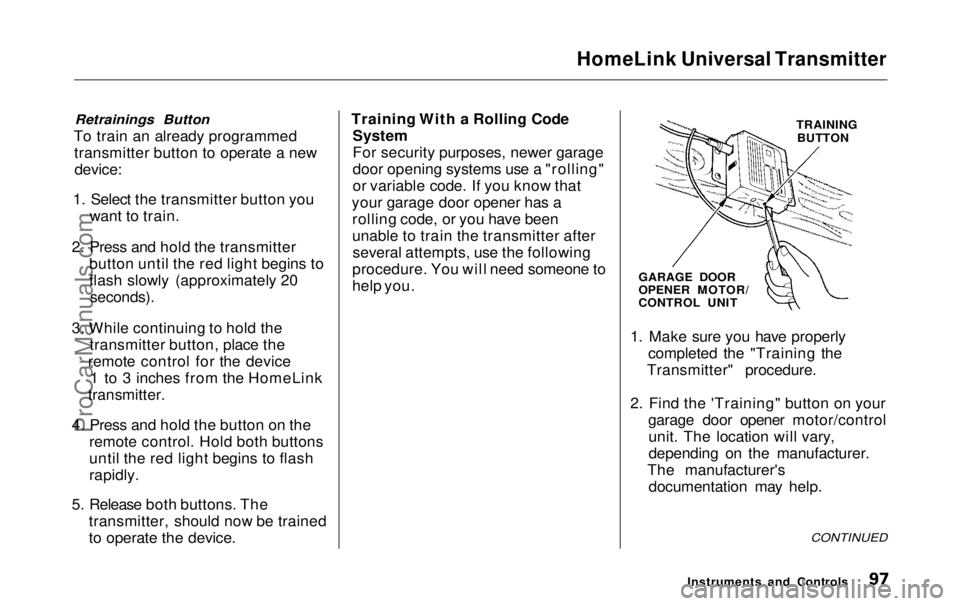
help you. TRAINING
BUTTON
GARAGE DOOR
OPENER MOTOR/
CONTROL UNIT
1. Make sure you have properly completed the "Training the
Transmitter" procedure.
2. Find the 'Training" button on your garage door opener motor/controlunit. The location will vary,
depending on the manufacturer.
The manufacturer's documentation may help.
CONTINUED
Instruments and ControlsProCarManuals.comMain Menu Table of Contents s t
Page 127 of 343
Interior Lights
The cargo area light comes onwhen any door or the tailgate isopened if the switch in the light is
in the door activated (center)
position. When the doors and the
tailgate are closed, it can be turned
on with the switch in the light. When the switch is in the ON
position:
All the individual map lights comeon and stay on as long as theswitch remains in the ON position.
The cargo area light comes on and stays on if the switch in the light is
in the door activated (center)
position.
On EX model
The lights go out about six seconds after all the doors and the tailgate
are closed.
With the light control switch in the Door Activated position, all the
individual map lights and the cargo
area light (with the switch in the
center position) come on when you
unlock the door with the remote
transmitter (see page 81 ).
With any door or the tailgate leftopen, the lights stay on about threeminutes, then go out.
Instruments and ControlsProCarManuals.comMain Menu Table of Contents s t
Page 130 of 343
Comfort and Convenience Features
The heating and air conditioning systems in your Honda provide a
comfortable driving environment in
all weather conditions.
The standard audio system has many features. This section de-scribes those features and how to
use them. (If you selected an optional audio system, refer to the
operating instructions that came
with it.)
On EX model
Your Honda has an anti-theft audio
system that requires a code number
to enable it.
Heating and Cooling...................... 130
What Each Control Does.......... 130How to Use the System............. 133
To Turn Everything Off........... 137
Climate Control System ................138 Fully-automatic Operation........ 140
Semi-automatic Operation........ 141
Sunlight Sensor/Temperature Sensor............. 145
Rear A/C Unit............................ 146
Audio System (LX)........................ 149 AM/FM/Cassette StereoAudio System......................... 149
Operating the Radio.................. 150
Adjusting the Sound.................. 153
Audio System Lighting............. 154
Operating the Cassette Player...................................... 154
Tape Search Functions............. 154 Operating the Optional CD Player/Changer..................... 157
CD Changer Error
Indications.............................. 160
Audio System (EX)........................ 161
AM/FM/CD Audio System..... 161
Operating the Radio.................. 162
Adjusting the Sound.................. 166
Audio System Lighting............. 167 Radio Frequencies..................... 167
Radio Reception......................... 167Operating the CD Player.......... 169
Operating the CD Changer...... 171
Protecting Compact Discs........ 172 CD Player Error Indications..... 173
CD Changer Error
Indications.............................. 174
Operating the Cassette Player...................................... 175
Tape Search Functions............. 176 Caring for the Cassette Player...................................... 178
Remote Audio Controls ............ 179
Theft Protection........................ 180
Comfort and Convenience FeaturesProCarManuals.comMain Menu s t
Page 180 of 343
Audio System
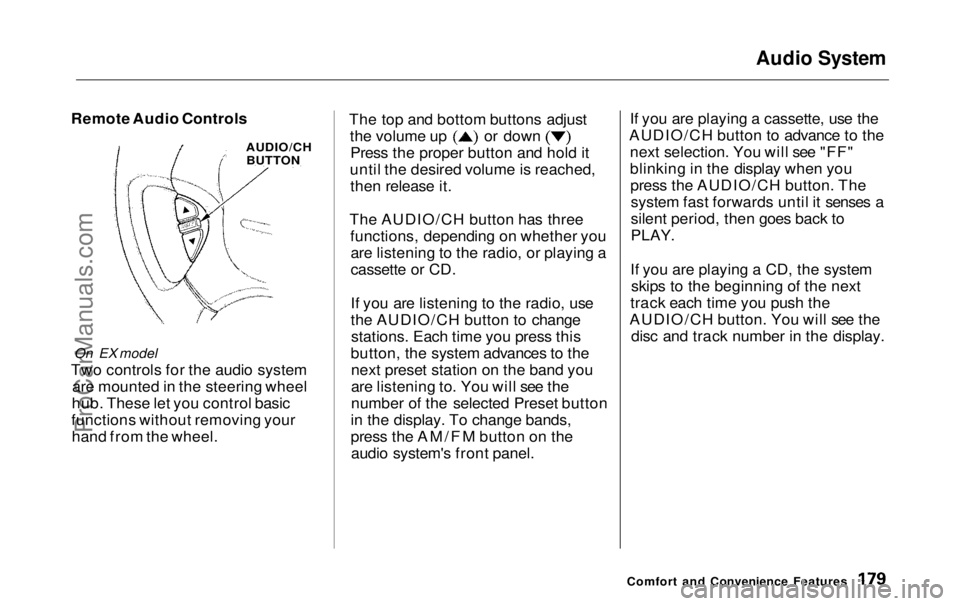
Remote Audio Controls
On EX model
Two controls for the audio system are mounted in the steering wheel
hub. These let you control basic
functions without removing your hand from the wheel. The top and bottom buttons adjust the volume up or down
Press the proper button and hold it
until the desired volume is reached, then release it.
The AUDIO/CH button has three functions, depending on whether youare listening to the radio, or playing a
cassette or CD.
If you are listening to the radio, use
the AUDIO/CH button to changestations. Each time you press this
button, the system advances to the next preset station on the band you
are listening to. You will see the
number of the selected Preset button
in the display. To change bands,
press the AM/FM button on the audio system's front panel. If you are playing a cassette, use the
AUDIO/CH button to advance to the next selection. You will see "FF"
blinking in the display when youpress the AUDIO/CH button. Thesystem fast forwards until it senses a
silent period, then goes back to
PLAY.
If you are playing a CD, the system skips to the beginning of the next
track each time you push the
AUDIO/CH button. You will see the disc and track number in the display.
Comfort and Convenience Features
AUDIO/CH
BUTTONProCarManuals.comMain Menu Table of Contents s t
Page 333 of 343
Index
Accessories and Modifications.... 189 Accessories................................. 189
Additional Safety Precaution.... 190Modifications............................. 190
ACCESSORY (Ignition Key Position)........................................ 79
Accessory Power Sockets............. 124
Adding Automatic Transmission
Fluid........................................ 243
Brake Fluid................................. 244
Engine Coolant........................... 237
Engine Oil................................... 233
Power Steering Fluid................. 245
Windshield Washer Fluid......... 242
Additional Information About Your Seat Belts........................ 45
Lap/Shoulder Belt....................... 45
Seat Belt Maintenance................ 47
Seat Belt System Components... 45
Additional Information About Your SRS................................... 48
Additional Safety Precautions.... 52
How the Automatic Seat Belt
Tensioners Work..................... 50
How the SRS Indicator
Works...................................... 50
How Your Airbags Work............ 48
SRS Components......................... 48
Additives, Engine Oil..................... 235
Adjustments Head Restraints......................... 104
Mirrors........................................ 115
Seats............................................ 100
Steering Wheel............................
72
Airbag (SRS)............................... 9
, 49
Air Cleaner Element...................... 246
Air Conditioning Filter.................. 256 Air Conditioning System.......130, 138 Maintenance............................... 255
Rear A/C Control......................
146
Usage..................................130 ,
138
Air Outlet
s
(Vents)................132, 138
Air Pressure, Tires........................ 25
7
Alcohol i n
Gasoline........................ 321
Aluminum Wheels, Cleaning........ 279
Antifreeze....................................... 237
Anti-lock Brakes (ABS) Indicator Light..................... 59, 206 Operation.................................... 205
Anti-theft, Audio System............... 180 Anti-theft Steering Column Lock .. 78
Appearance Care........................... 277
Armrests......................................... 103
Audio Controls, Remote................ 179
Audio System......................... 149, 161Automatic Seat Belt Tensioners.... 50
Automatic Lighting Off Feature.... 67
Automatic Speed Control................ 73
Automatic Transmission............... 198
Capacity, Fluid........................... 316
Checking Fluid Level................ 243
Shifting........................................199
Shift Lever Position Indicator.. 198 Shift Lever Positions................. 199
Shift Lock Release..................... 201
CONTINUEDProCarManuals.comMain Menu s t