trailer HONDA ODYSSEY 1999 User Guide
[x] Cancel search | Manufacturer: HONDA, Model Year: 1999, Model line: ODYSSEY, Model: HONDA ODYSSEY 1999Pages: 343, PDF Size: 3.73 MB
Page 217 of 343
Towing a Trailer
Spare Vehicle Tire
When towing a trailer, you should carry a full-size wheel and tire as aspare in case you have a flat. If you
use the compact spare tire that came
with the vehicle, it may adversely affect vehicle handling. See page 317 for information on proper tire
size, and page 293 for information on
how to store a full-size tire. When storing a full-size spare tire in the
trailer, follow the trailer maker's
instructions.
Additional Trailer equipment
Many states and provinces require
special outside mirrors when towing
a trailer. Even if they don't, you should install special mirrors if you
cannot clearly see behind you, or if
the trailer creates a blind spot.
Ask your trailer sales or rental agency if any other items are
recommended or required for your
towing situation. Pre-Tow Checklist
When preparing to tow, and before driving away, be sure to check the
following:
The vehicle has been properlyserviced, and the tires, brakes,
suspension, and cooling system
are in good operating condition.
All weights and loads are within limits (see pages 212 and 213).
The hitch, safety chain, and any other attachments are secure.
All items on and in the trailer are properly secured and cannot shift
while you drive.
The lights and brakes on your vehicle and the trailer are workingproperly. Your vehicle tires and spare are
properly inflated (see page 317),and the trailer tires and spare are
inflated as recommended by the
trailer maker.
You may want to fill the fuel tank with premium fuel. Premium fuelprovides improved performance.
DrivingProCarManuals.comMain Menu Table of Contents s t
Page 218 of 343

Towing a Trailer
Driving Safely With a Trailer
The added weight, length, and height of a trailer will affect your
vehicle's handling and performance, so driving with a trailer requires
some special driving skills and
techniques.
For your safety and the safety of
others, take time to practice driving
maneuvers before heading for the
open road, and follow the guidelines
discussed below.
Towing Speeds and Gears
Driving slower than normal in all driving situations, and obey posted
speed limits for vehicles with trailers.
Use the D 4
position when towing
a trailer on level roads. D 3
is the
proper shift lever position to use when towing a trailer in hilly terrain.
(See "Driving on Hills" in the next
column for additional gear
information.)
Making Turns and Braking
Make turns more slowly and wider
than normal. The trailer tracks a smaller arc than your vehicle, and it
can hit or run over something the
vehicle misses. Allow more time and distance for braking. Do not brake or
turn suddenly as this could cause the
trailer to jackknife or turn over.
Driving on Hills
When climbing hills, closely watch your temperature gauge. If it nearsthe red mark, turn the air
conditioning off, reduce speed and, if
necessary, pull to the side of the
road to let the engine cool. Do notdrive over 45 mph (72 km/h) on a
long uphill stretch.
If the transmission shifts frequently
between 3rd and 4th gears while
going up a hill, shift to D 3
. If you must stop when facing uphill,
use the foot brake or parking brake.
Do not try to hold the vehicle in
place by pressing on the accelerator,
as this can cause the transmission to
overheat.
When driving down hills, reduce your speed and shift down to 2ndgear. Do not "ride" the brakes, and
remember it will take longer to slowdown and stop when towing a trailer.
CONTINUED
DrivingProCarManuals.comMain Menu Table of Contents s t
Page 219 of 343

Towing a Trailer
Handling Crosswinds and Buffeting
Crosswinds and air turbulence
caused by passing trucks can disrupt
your steering and cause trailer swaying. When being passed by a
large vehicle, keep a constant speed and steer straight ahead. Do not try
to make quick steering or braking corrections.
Backing Up
Always drive slowly and have someone guide you when backing up.
Grip the bottom of the steering
wheel; then turn the wheel to the left to get the trailer to move to the left,
and turn the wheel right to move the
trailer to the right.
Parking
Follow all normal precautions when
parking, including putting the
transmission in Park and firmly setting the parking brake. Also, place
wheel chocks at each of the trailer's
tires.
DrivingProCarManuals.comMain Menu Table of Contents s t
Page 227 of 343
Maintenance Schedule (Severe Conditions)Maintenance
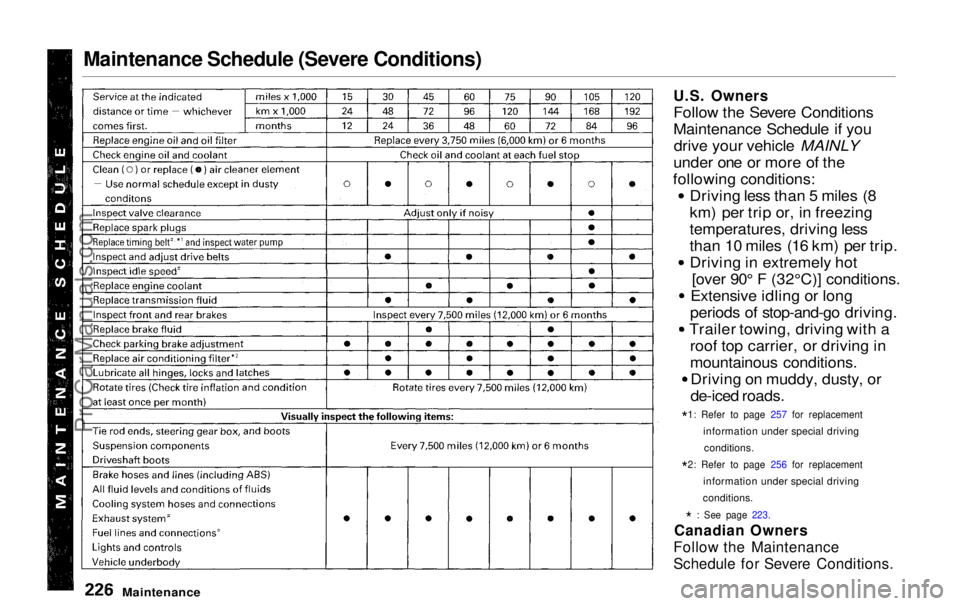
U.S. Owners
Follo
w the Severe Conditions
Maintenance Schedule if you drive your vehicle MAINLY
under one or more of the
following conditions: Driving less than 5 miles (8
km) per trip or, in freezing
temperatures, driving less
than 10 miles (16 km) per trip.
Driving in extremely hot[over 90° F (32°C)] conditions.
Extensive idling or long
periods of stop-and-go driving.
Trailer towing, driving with a roof top carrier, or driving in
mountainous conditions.Driving on muddy, dusty, or
de-iced roads.
*1
:
Refer to page 257 for replacement
information under special driving conditions.
*2
:
Refer to page 256 for replacement
information under special driving
conditions.
*
: See page 223.
Canadian Owners
Follow the Maintenance
Schedule for Severe Conditions.
ProCarManuals.comMain Menu Table of Contents s t
Page 228 of 343
Maintenance Schedule for Severe Conditions (listed by distance/time)
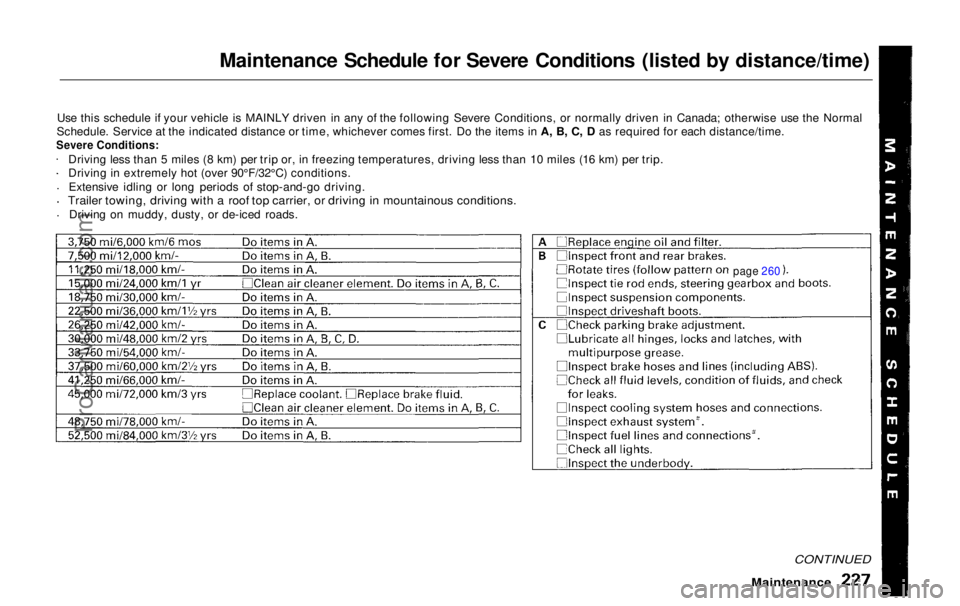
Use this schedule if your vehicle is MAINLY driven in any of the following Severe Conditions, or normally driven in Canada; otherwise use the Normal
Schedule. Service at the indicated distance or time, whichever comes first. Do the items in A, B, C, D as required for each distance/time.
Severe Conditions:
Driving less than 5 miles (8 km) per trip or, in freezing temperatures, driving less than 10 miles (16 km) per trip.
Driving in extremely hot (over 90°F/32°C) conditions.
Extensive idling or long periods of stop-and-go driving.
Trailer towing, driving with a roof top carrier, or driving in mountainous conditions.
Driving on muddy, dusty, or de-iced roads.
Maintenance
CONTINUED
page 260ProCarManuals.comMain Menu Table of Contents s t
Page 267 of 343
Lights
Headlight Aiming
The headlights were properly aimed when your vehicle was new. If youregularly carry heavy items in thecargo area or pull a trailer,
readjustment may be required.
Adjustment of the headlights should be performed by a Honda technicianor other qualified mechanic. Replacing a Headlight Bulb
Your vehicle has halogen headlight bulbs, one on each side. When
replacing a bulb, handle it by its steel
base and protect the glass fromcontact with your skin or hard
objects. If you touch the glass, clean
it with denatured alcohol and a clean cloth.
Halogen headlight bulbs get very hot when lit. Oil, perspiration, or a scratch
on the glass can cause the bulb to
overheat and shatter.
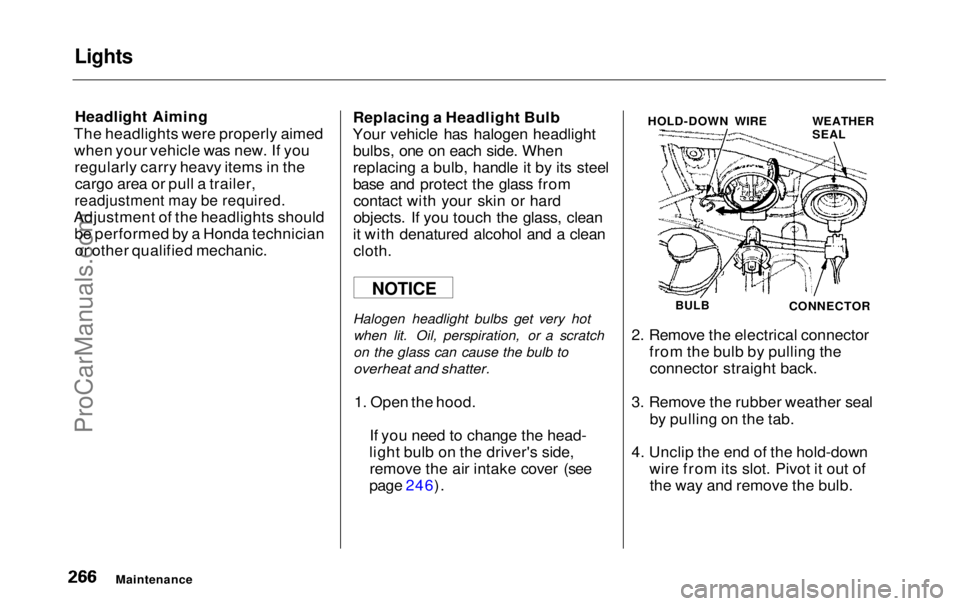
1. Open the hood. If you need to change the head-
light bulb on the driver's side, remove the air intake cover (see
page 246). HOLD-DOWN WIRE
WEATHER
SEAL
BULB
CONNECTOR
2. Remove the electrical connector from the bulb by pulling theconnector straight back.
3. Remove the rubber weather seal by pulling on the tab.
4. Unclip the end of the hold-down wire from its slot. Pivot it out ofthe way and remove the bulb.
Maintenance
NOTICEProCarManuals.comMain Menu Table of Contents s t
Page 285 of 343
Compact Spare Tire
Your vehicle has a compact spare tire that takes up less space. Use thisspare tire as a temporary replace-
ment only. Get your regular tire
repaired or replaced and put back on
your vehicle as soon as you can.
Check the inflation pressure of the
compact spare tire every time you
check the other tires. It should be
inflated to: 60 psi (420 kPa , 4.2 kgf/cm2)
Follow these precautions whenever
you are using the compact spare tire: Do not exceed 50 mph (80 km/h)
under any circumstances. This tire gives a harsher ride and
less traction on some road sur-
faces than the regular tire. Use
greater caution while driving on this tire. Do not mount snow chains on the
compact spare.
Do not use the compact spare tire
if you are towing a trailer. The wheel of the compact spare
tire is designed especially to fit
your vehicle. Do not use your spare tire on another vehicle
unless it is the same make and
model.
On EX model
Turn off the Traction Control
System (see page 207 ). Driving
with the compact spare tire may activate the TCS.
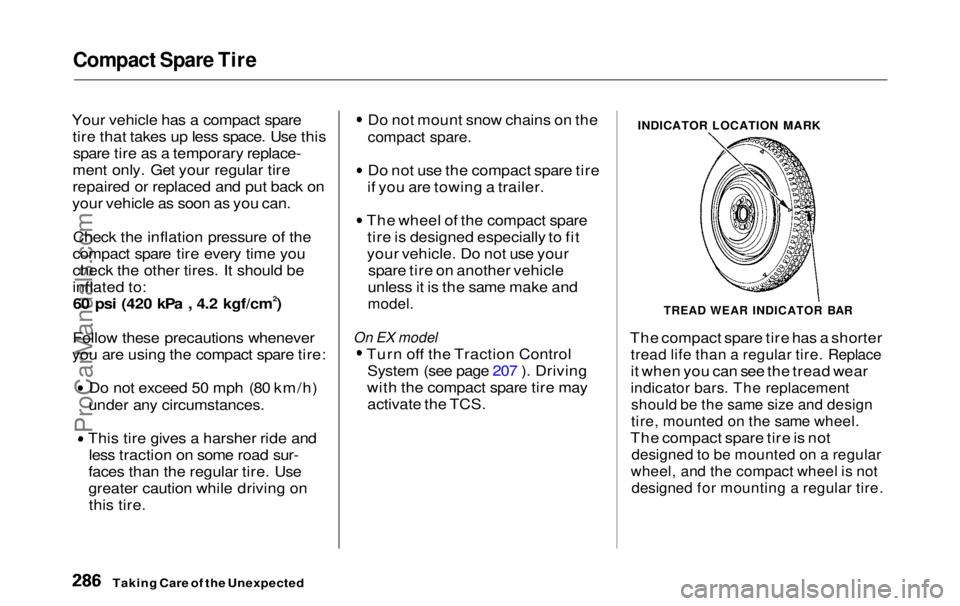
INDICATOR LOCATION MARK
TREAD WEAR INDICATOR BAR
The compact spare tire has a shorter
tread life than a regular tire. Replace
it when you can see the tread wear
indicator bars. The replacement
should be the same size and design
tire, mounted on the same wheel.
The compact spare tire is not
designed to be mounted on a regular
wheel, and the compact wheel is not
designed for mounting a regular tire.
Taking Care of the UnexpectedProCarManuals.comMain Menu Table of Contents s t
Page 341 of 343
Index
Tachometer...................................... 62
Tailgate............................................. 85
Opening the.................................. 85
Open Monitor Light.................... 60
Taillights, Changing Bulbs in....... 269
Taking Care of the Unexpected .. 285
Tape Player ........................... 154, 175
Technical Descriptions Driving in Foreign Countries... 322
Emissions Control Systems...... 323
Oxygenated Fuels...................... 321
Three Way Catalytic
Converter................................ 325
Tire Information........................ 318
Temperature Gauge........................ 63
Tensioners, Seat Belts .................... 50
Tether Attachment Points.............. 43
Theft Protection............................. 180 Three Way Catalytic Converter... 325
Time, Setting the........................... 117
Timing Belt..................................... 257
Tire Chains..................................... 263
Tire, How to Change a Flat.......... 287 Tires................................................ 257
Air Pressure............................... 257Balancing.................................... 260Checking Wear.......................... 259
Compact Spare........................... 286
DOT Tire Quality Grading....... 319
Inflation....................................... 257
Inspection................................... 259
Replacing.................................... 261
Rotating....................................... 260
Snow............................................ 263 Specifications............................. 317
Tire Chains................................. 263
Technical Information.............. 318
Towing
ATrailer..................................... 212
Emergency Wrecker.................
311
Traction Contro l
System (TCS)... 207
Transmission
Checking Fluid Level................ 243
Fluid Selection............................ 243
Identification Number............... 315
Shifting the Automatic..............199
Treadwear...................................... 319
Trip Meter........................................ 63
Turn Signals..................................... 68
Tools, Tire Changing.................... 287
Underside, Cleaning...................... 282
Unexpected, Taking Care
of the........................................... 285
Uniform Tire Quality Grading..... 319
Unleaded Gasoline......................... 182
Upholstery Cleaning...................... 280
Used Oil, How to Dispose of........ 236
Vanity Mirror................................. 121
Vehicle Capacity Load......... 192, 212
Vehicle Dimensions....................... 316
Vehicle Identification Number..... 314
Vehicle Storage.............................. 275
Ventilation............................. 133, 138
VIN.................................................. 314
Vinyl Cleaning................................ 280
Viscosity, Oil................................... 234
CONTINUEDProCarManuals.comMain Menu s t