lights HONDA ODYSSEY 1999 Service Manual
[x] Cancel search | Manufacturer: HONDA, Model Year: 1999, Model line: ODYSSEY, Model: HONDA ODYSSEY 1999Pages: 343, PDF Size: 3.73 MB
Page 269 of 343
Lights
4. Remove the socket from the headlight assembly by turning itone-quarter turn counterclockwise.
5. Remove the burned out bulb from the socket by pushing it in and
turning counterclockwise until it
unlocks.
6. Install the new bulb in the socket. Turn it clockwise to lock it in place.
7. Insert the socket back into the headlight assembly. Turn it
clockwise to lock it in place.
8. Test the lights to make sure the new bulb is working.
9. Put the inner fender in place. Install the two holding clips. Lock
each clip in place by pushing on
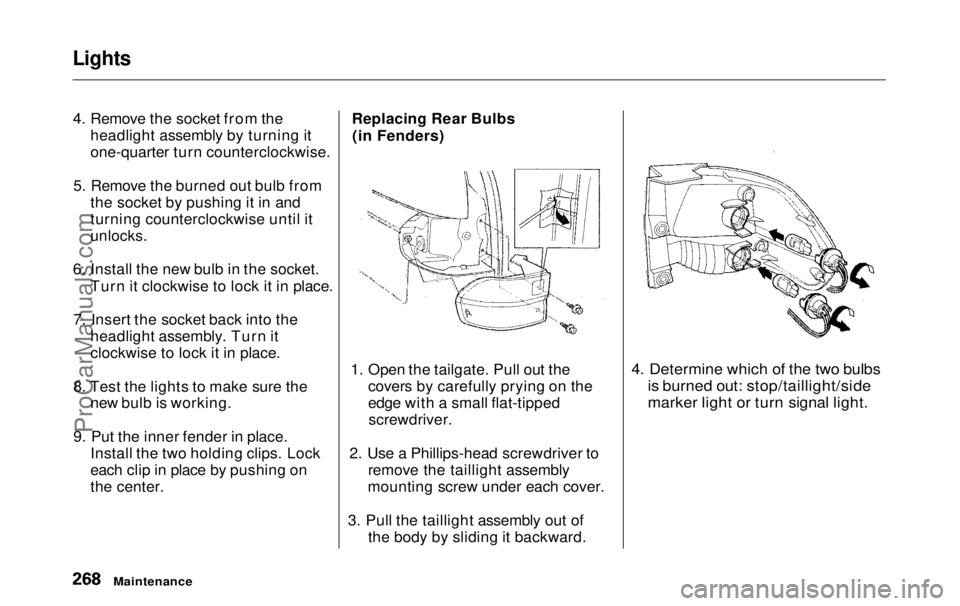
the center. Replacing Rear Bulbs
(in Fenders)
1. Open the tailgate. Pull out the covers by carefully prying on the
edge with a small flat-tippedscrewdriver.
2. Use a Phillips-head screwdriver to remove the taillight assembly
mounting screw under each cover.
3. Pull the taillight assembly out of the body by sliding it backward.
4. Determine which of the two bulbs
is burned out: stop/taillight/side
marker light or turn signal light.
MaintenanceProCarManuals.comMain Menu Table of Contents s t
Page 270 of 343
Lights
5. Remove the socket by turning it one-quarter turn counterclockwise.
6. Pull the bulb straight out of its
socket.
Push the new bulb straight into
the socket until it bottoms.
7. Reinstall the socket into the light assembly by turning it clockwise
until it locks.
8. Test the lights to make sure the new bulb is working.
9. When reinstalling the taillight assembly, align and pop the snap
fasteners in place. Tighten the two mounting screws and reinstall the
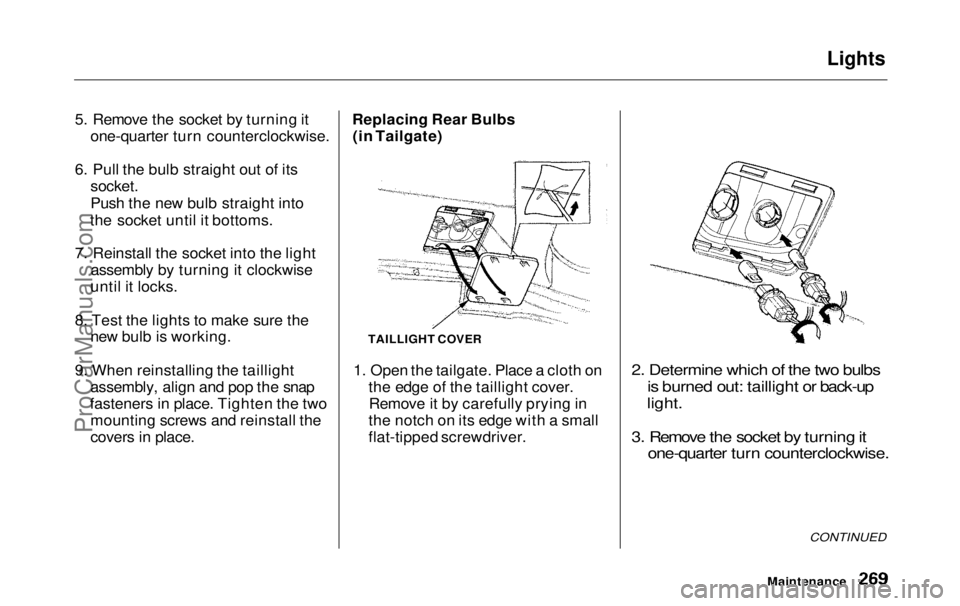
covers in place. Replacing Rear Bulbs
(in Tailgate)
1. Open the tailgate. Place a cloth on the edge of the taillight cover.Remove it by carefully prying in
the notch on its edge with a small
flat-tipped screwdriver.
2. Determine which of the two bulbs
is burned out: taillight or back-up
light.
3. Remove the socket by turning it one-quarter turn counterclockwise.
CONTINUED
Maintenance
TAILLIGHT COVERProCarManuals.comMain Menu Table of Contents s t
Page 271 of 343
Lights
4. Pull the bulb straight out of its
socket.
Push the new bulb straight into
the socket until it bottoms.
5. Insert the socket back into the light assembly. Turn it clockwise
to lock it in place.
6. Test the lights to make sure the new bulb is working.
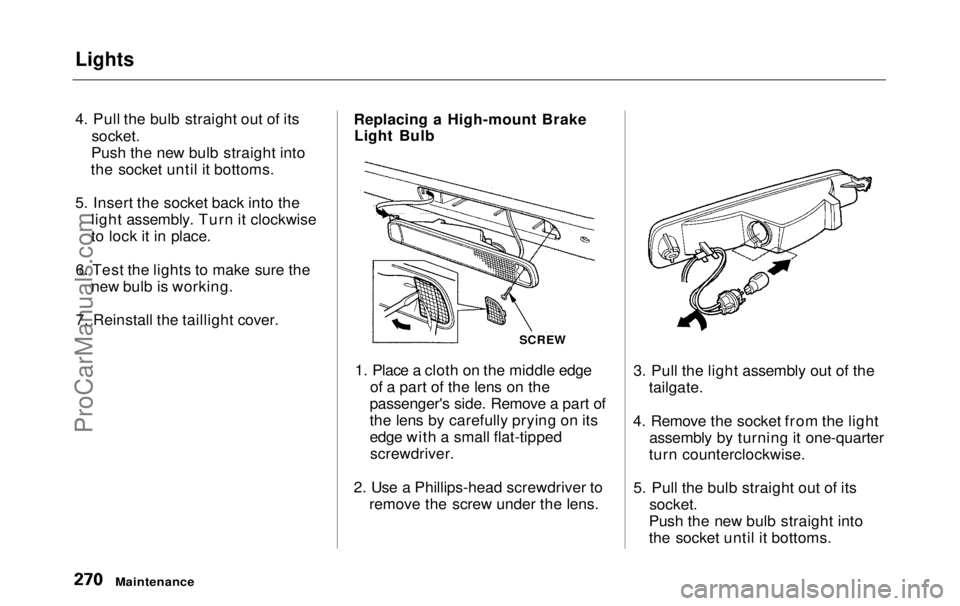
7. Reinstall the taillight cover. Replacing a High-mount Brake
Light Bulb
1. Place a cloth on the middle edge of a part of the lens on the
passenger's side. Remove a part of
the lens by carefully prying on its
edge with a small flat-tipped screwdriver.
2. Use a Phillips-head screwdriver to remove the screw under the lens. 3. Pull the light assembly out of the
tailgate.
4. Remove the socket from the light assembly by turning it one-quarter
turn counterclockwise.
5. Pull the bulb straight out of its
socket.
Push the new bulb straight into
the socket until it bottoms.
Maintenance
SCREWProCarManuals.comMain Menu Table of Contents s t
Page 272 of 343
Lights
6. Put the socket back into the light assembly and turn it clockwise to
lock it in place.
7. Test the light to make sure the new bulb is working.
8. Put the light assembly back into the tailgate. Install the screw and
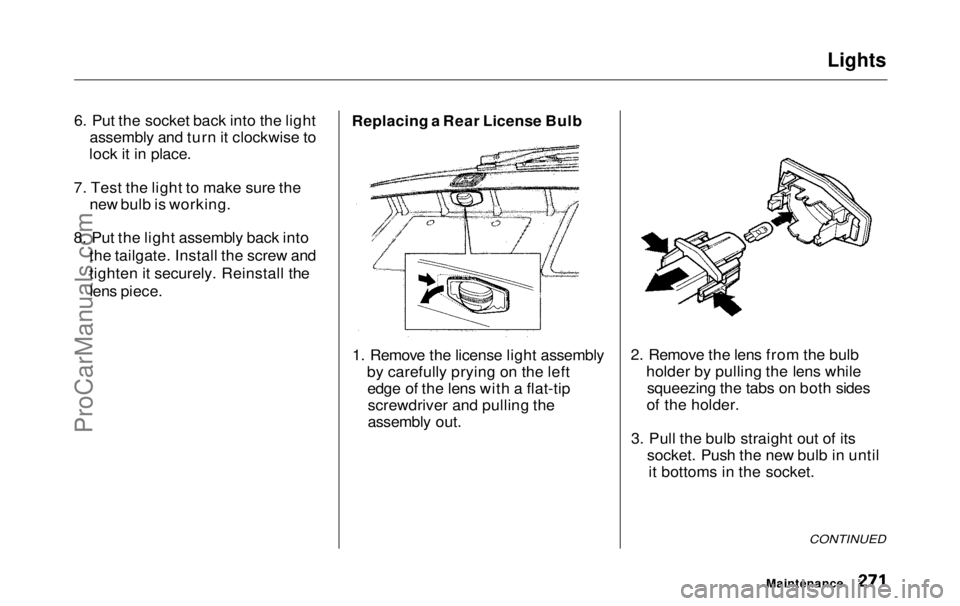
tighten it securely. Reinstall thelens piece. Replacing a Rear License Bulb
1. Remove the license light assembly by carefully prying on the leftedge of the lens with a flat-tipscrewdriver and pulling the
assembly out. 2. Remove the lens from the bulb
holder by pulling the lens whilesqueezing the tabs on both sides
of the holder.
3. Pull the bulb straight out of its socket. Push the new bulb in untilit bottoms in the socket.
CONTINUED
MaintenanceProCarManuals.comMain Menu Table of Contents s t
Page 273 of 343
Lights
4. Turn on the parking lights and
check that the new bulb is
working.
5. Put the lens back on the bulb holder and push it until it latches.
6. Slide the left side of the light assembly into the hole. Push on
the right side to latch the assembly into place. Replacing Bulbs in the Interior
Lights
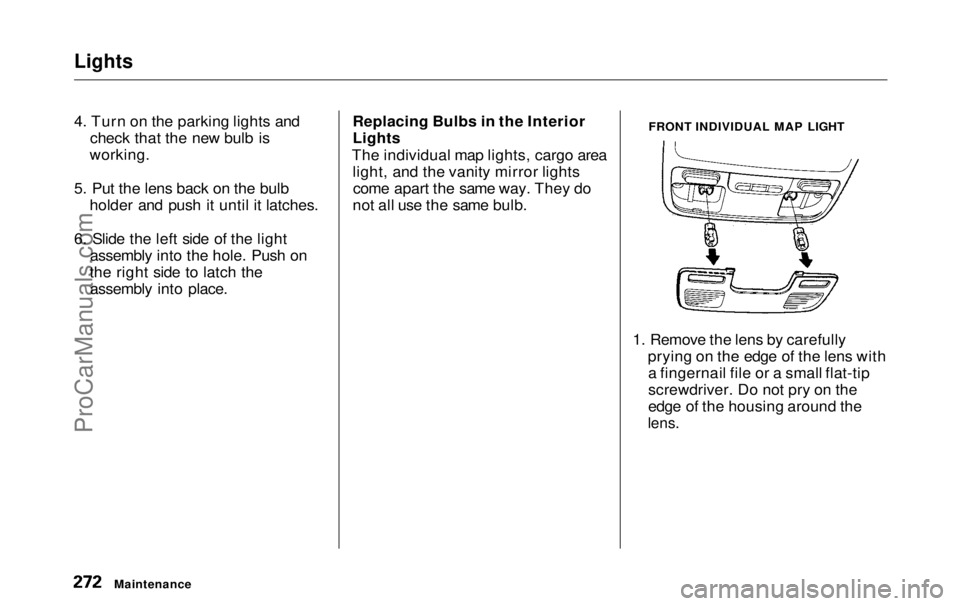
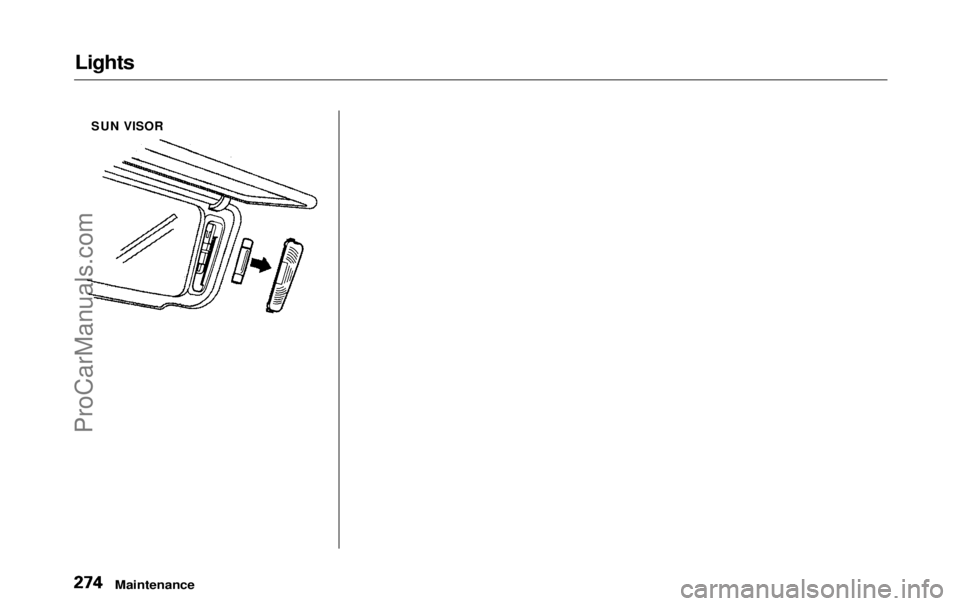
The individual map lights, cargo area light, and the vanity mirror lightscome apart the same way. They do
not all use the same bulb. FRONT INDIVIDUAL MAP LIGHT
1. Remove the lens by carefully prying on the edge of the lens witha fingernail file or a small flat-tip
screwdriver. Do not pry on the
edge of the housing around the
lens.
MaintenanceProCarManuals.comMain Menu Table of Contents s t
Page 274 of 343
Lights
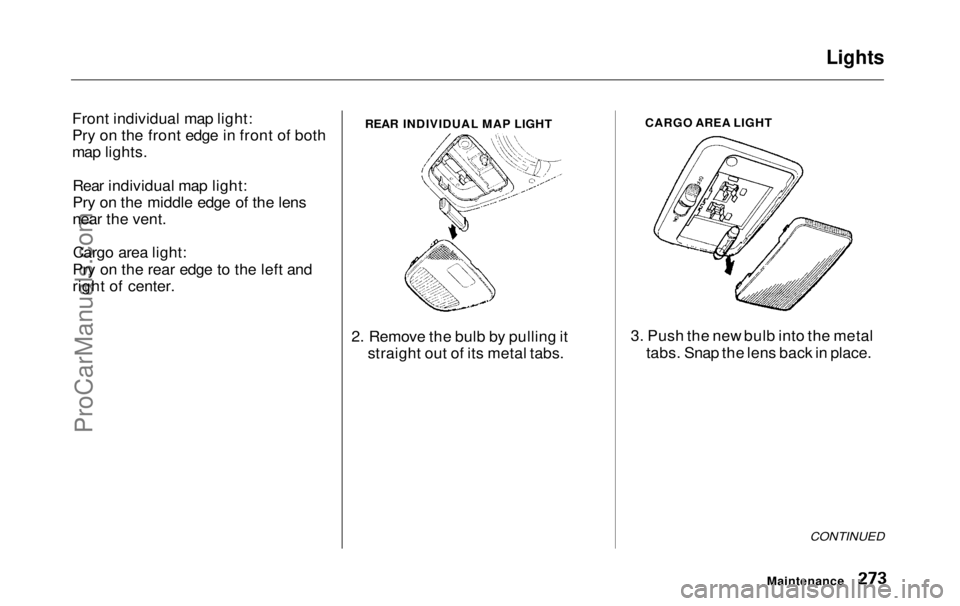
Front individual map light:
Pry on the front edge in front of both
map lights. Rear individual map light:
Pry on the middle edge of the lens
near the vent.Cargo area light:
Pry on the rear edge to the left and
right of center.
2. Remove the bulb by pulling itstraight out of its metal tabs. CARGO AREA LIGHT
3. Push the new bulb into the metal tabs. Snap the lens back in place.
CONTINUED
Maintenance
REAR INDIVIDUAL MAP LIGHTProCarManuals.comMain Menu Table of Contents s t
Page 275 of 343
Lights
SUN VISOR
MaintenanceProCarManuals.comMain Menu Table of Contents s t
Page 286 of 343
Changing a Flat Tire
If you have a flat tire while driving, stop in a safe place to change it.
Stopping in traffic or on the shoulder
of a busy road is dangerous. Drive slowly along the shoulder until you
get to an exit or an area to stop that
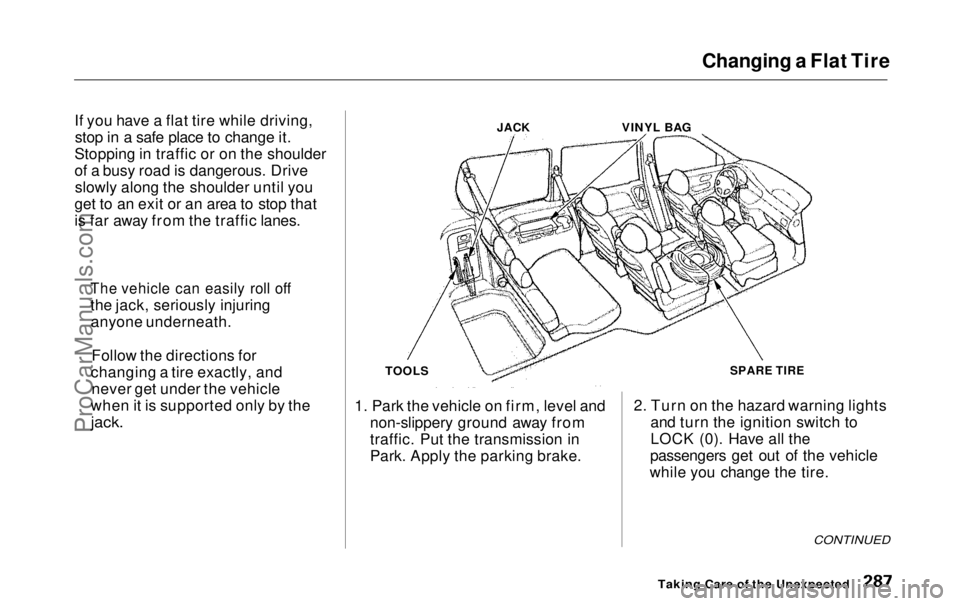
is far away from the traffic lanes. JACK
VINYL BAG
TOOLS
1. Park the vehicle on firm, level and non-slippery ground away from
traffic. Put the transmission in
Park. Apply the parking brake. SPARE TIRE
2. Turn on the hazard warning lights and turn the ignition switch to
LOCK (0). Have all the
passengers get out of the vehicle
while you change the tire.
CONTINUED
Taking Care of the Unexpected
The vehicle can easily roll off
the jack, seriously injuring
anyone underneath.
Follow the directions for
changing a tire exactly, and never get under the vehicle
when it is supported only by the
jack.ProCarManuals.comMain Menu Table of Contents s t
Page 295 of 343
If Your Engine Won't Start
Diagnosing why your engine won't
start falls into two areas, depending
on what you hear when you turn the
key to START (III): You hear nothing, or almost
nothing. The engine's starter
motor does not operate at all, oroperates very slowly. You can hear the starter motor
operating normally, or the starter
motor sounds like it is spinning
faster than normal, but the engine does not start up and run.
Nothing Happens or the Starter
Motor Operates Very Slowly
When you turn the ignition switch to START (III), you do not hear the
normal noise of the engine trying tostart. You may hear a clicking sound
or series of clicks, or nothing at all. Check these things: Check the transmission interlock.
The transmission must be in Park or Neutral or the starter will not
operate.
Turn the ignition switch to ON (II).
Turn on the headlights and check
their brightness. If the headlightsare very dim or don't light at all,
the battery is discharged. See
Jump Starting on page 297.
Turn the ignition switch to START
(III). If the headlights do not dim,
check the condition of the fuses. If
the fuses are OK, there is proba-
bly something wrong with the electrical circuit for the ignitionswitch or starter motor. You will
need a qualified technician to determine the problem. (See
Emergency Towing on page 311.)
If the headlights dim noticeably or
go out when you try to start the
engine, either the battery is dis-
charged or the connections are
corroded. Check the condition of
the battery and terminal connec-
tions (see page 251). You can then try jump starting the vehicle
from a booster battery (see page 297).
The Starter Operates Normally In this case, the starter motor'sspeed sounds normal, or even faster
than normal, when you turn the
ignition switch to START (III), but
the engine does not run. Are you using the proper starting
procedure? Refer to Starting the
Engine on page 197.
Taking Care of the UnexpectedProCarManuals.comMain Menu Table of Contents s t
Page 296 of 343
If Your Engine Won't Start, Jump Starting
Your vehicle has the Immobilizer
System. You should use a
properly-coded master or valet key
to start the engine (see page 77).
A key that is not properly coded
will cause the immobilizer system indicator in the dash panel to blink
rapidly. Do you have fuel? Turn the
ignition switch to ON (II) for a
minute and watch the fuel gauge.
The low fuel level warning light may not be working, so you were
not reminded to fill the tank. There may be an electrical
problem, such as no power to the
fuel pump. Check all the fuses (see page 305).
If you find nothing wrong, you will
need a qualified technician to find
the problem. See Emergency
Towing on page 311. Jump Starting
If your vehicle's battery has run
down, you may be able to start the
engine by using a booster battery.
Although this seems like a simple procedure, you should take several
precautions.
You cannot start a Honda by pushing or pulling it. To jump start your vehicle, follow
these directions closely:
1. Open the hood and check the physical condition of the battery(see page 251). In very cold
weather, check the condition of the electrolyte. If it seems slushyor like ice, do not try jump starting
until it thaws.
If a battery sits in extreme cold, the
electrolyte inside can freeze.
Attempting to jump start with a frozen
battery can cause it to rupture.
2. Turn off all the electrical acces- sories: heater, A/C, climate
control, stereo system, lights, etc.
Put the transmission in Neutral or
Park and set the parking brake.
CONTINUED
Taking Care of the Unexpected
A battery can explode if you do
not follow the correct procedure,
seriously injuring anyone nearby.
Keep all sparks, open flames,
and smoking materials away
from the battery.
NOTICEProCarManuals.comMain Menu Table of Contents s t