map HONDA ODYSSEY 1999 Owners Manual
[x] Cancel search | Manufacturer: HONDA, Model Year: 1999, Model line: ODYSSEY, Model: HONDA ODYSSEY 1999Pages: 343, PDF Size: 3.73 MB
Page 82 of 343
Keys and Locks
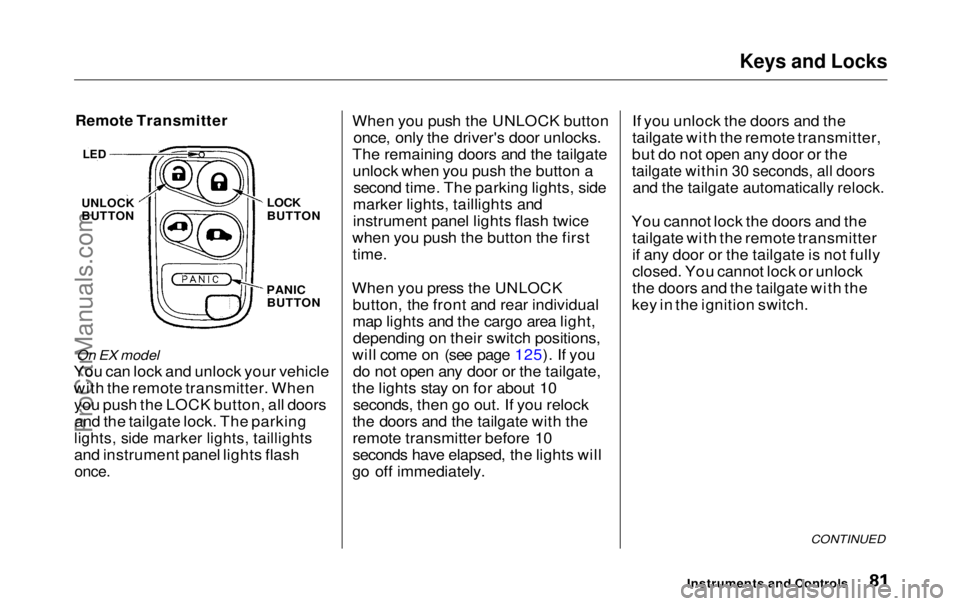
Remote Transmitter
On EX model
You can lock and unlock your vehicle
with the remote transmitter. When you push the LOCK button, all doorsand the tailgate lock. The parking
lights, side marker lights, taillights
and instrument panel lights flash
once.
When you push the UNLOCK button
once, only the driver's door unlocks.
The remaining doors and the tailgate unlock when you push the button a second time. The parking lights, side
marker lights, taillights and
instrument panel lights flash twice
when you push the button the first
time.
When you press the UNLOCK button, the front and rear individual
map lights and the cargo area light,depending on their switch positions,
will come on (see page 125). If you do not open any door or the tailgate,
the lights stay on for about 10 seconds, then go out. If you relock
the doors and the tailgate with the
remote transmitter before 10
seconds have elapsed, the lights will
go off immediately. If you unlock the doors and the
tailgate with the remote transmitter,
but do not open any door or the
tailgate within 30 seconds, all doors
and the tailgate automatically relock.
You cannot lock the doors and the tailgate with the remote transmitter
if any door or the tailgate is not fully
closed. You cannot lock or unlock
the doors and the tailgate with the
key in the ignition switch.
CONTINUED
Instruments and Controls
LED
UNLOCK
BUTTON
LOCK
BUTTON
PANIC BUTTONProCarManuals.comMain Menu Table of Contents s t
Page 126 of 343
Interior Lights
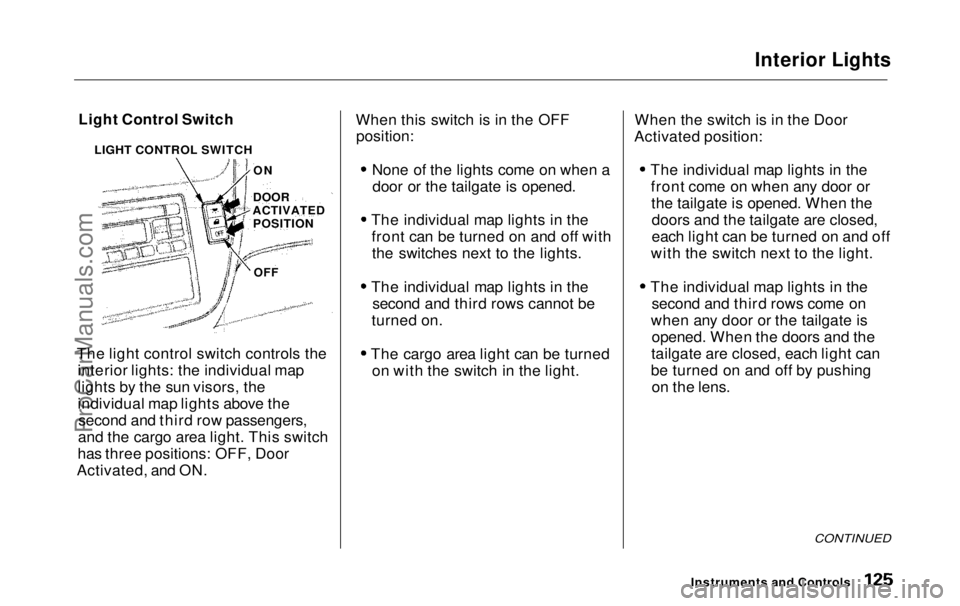
Light Control Switch
The light control switch controls the interior lights: the individual map
lights by the sun visors, the
individual map lights above thesecond and third row passengers,
and the cargo area light. This switch
has three positions: OFF, Door
Activated, and ON. When this switch is in the OFF
position:
None of the lights come on when adoor or the tailgate is opened.
The individual map lights in the front can be turned on and off withthe switches next to the lights.
The individual map lights in the second and third rows cannot be
turned on.
The cargo area light can be turned on with the switch in the light. When the switch is in the Door
Activated position:
The individual map lights in thefront come on when any door orthe tailgate is opened. When thedoors and the tailgate are closed,
each light can be turned on and off
with the switch next to the light.
The individual map lights in the second and third rows come on
when any door or the tailgate is opened. When the doors and the
tailgate are closed, each light can
be turned on and off by pushing on the lens.
CONTINUED
Instruments and Controls
LIGHT CONTROL SWITCH
ON
DOOR
ACTIVATED POSITION
OFFProCarManuals.comMain Menu Table of Contents s t
Page 127 of 343
Interior Lights
The cargo area light comes onwhen any door or the tailgate isopened if the switch in the light is
in the door activated (center)
position. When the doors and the
tailgate are closed, it can be turned
on with the switch in the light. When the switch is in the ON
position:
All the individual map lights comeon and stay on as long as theswitch remains in the ON position.
The cargo area light comes on and stays on if the switch in the light is
in the door activated (center)
position.
On EX model
The lights go out about six seconds after all the doors and the tailgate
are closed.
With the light control switch in the Door Activated position, all the
individual map lights and the cargo
area light (with the switch in the
center position) come on when you
unlock the door with the remote
transmitter (see page 81 ).
With any door or the tailgate leftopen, the lights stay on about threeminutes, then go out.
Instruments and ControlsProCarManuals.comMain Menu Table of Contents s t
Page 128 of 343
Interior Lights
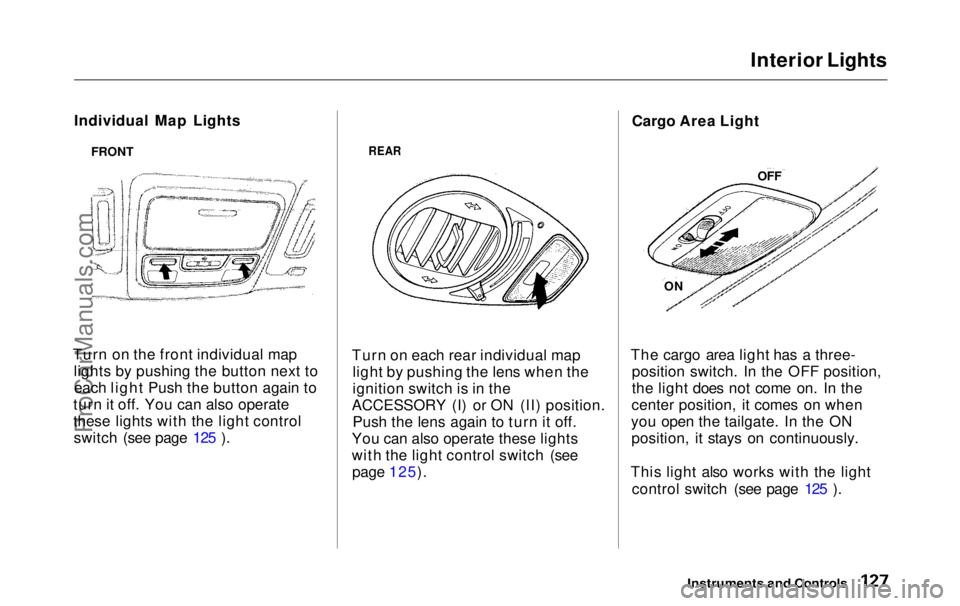
Individual Map Lights
Turn on the front individual map lights by pushing the button next toeach light Push the button again to
turn it off. You can also operate
these lights with the light control switch (see page 125 ).
REAR
Turn on each rear individual map light by pushing the lens when the
ignition switch is in the
ACCESSORY (I) or ON (II) position. Push the lens again to turn it off.
You can also operate these lights
with the light control switch (see page 125). Cargo Area Light
The cargo area light has a three- position switch. In the OFF position,
the light does not come on. In the
center position, it comes on when
you open the tailgate. In the ON position, it stays on continuously.
This light also works with the light control switch (see page 125 ).
Instruments and Controls
FRONT
OFF
ONProCarManuals.comMain Menu Table of Contents s t
Page 273 of 343
Lights
4. Turn on the parking lights and
check that the new bulb is
working.
5. Put the lens back on the bulb holder and push it until it latches.
6. Slide the left side of the light assembly into the hole. Push on
the right side to latch the assembly into place. Replacing Bulbs in the Interior
Lights
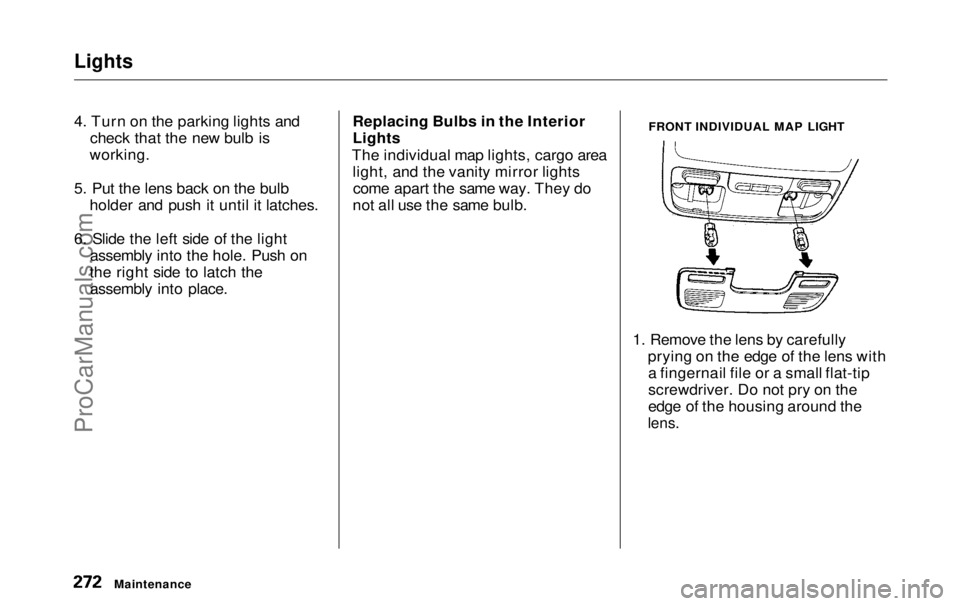
The individual map lights, cargo area light, and the vanity mirror lightscome apart the same way. They do
not all use the same bulb. FRONT INDIVIDUAL MAP LIGHT
1. Remove the lens by carefully prying on the edge of the lens witha fingernail file or a small flat-tip
screwdriver. Do not pry on the
edge of the housing around the
lens.
MaintenanceProCarManuals.comMain Menu Table of Contents s t
Page 274 of 343
Lights
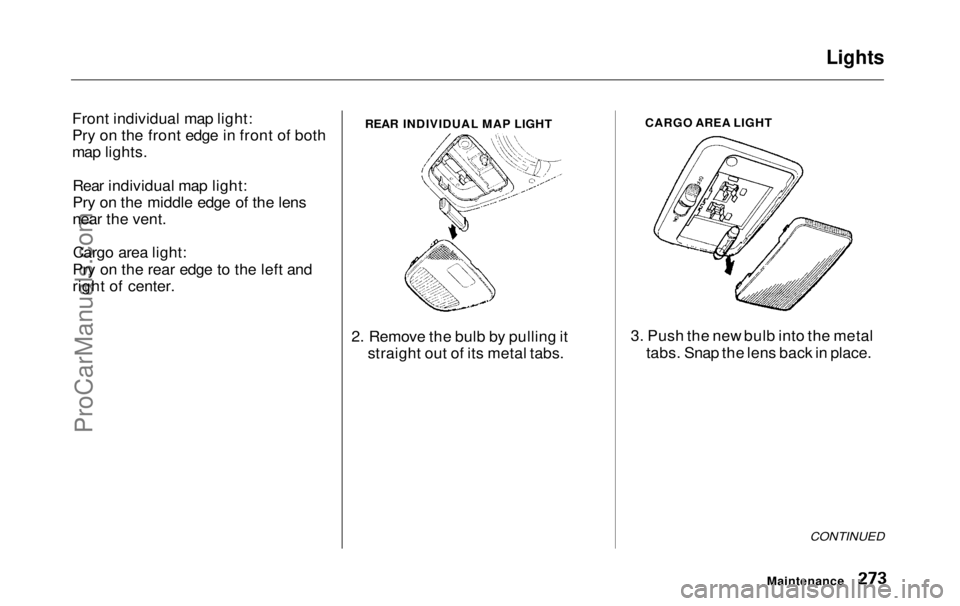
Front individual map light:
Pry on the front edge in front of both
map lights. Rear individual map light:
Pry on the middle edge of the lens
near the vent.Cargo area light:
Pry on the rear edge to the left and
right of center.
2. Remove the bulb by pulling itstraight out of its metal tabs. CARGO AREA LIGHT
3. Push the new bulb into the metal tabs. Snap the lens back in place.
CONTINUED
Maintenance
REAR INDIVIDUAL MAP LIGHTProCarManuals.comMain Menu Table of Contents s t
Page 325 of 343
Warranty and Customer Relations
Customer RelationsInformation................................. 328
U.S. Zone Office Map.................... 329
Canada Zone Office Map.............. 330
Warranty Coverages..................... 331
Reporting Safety Defects (U.S. Vehicles)........................... 332
Authorized Manuals...................... 333
Warranty and Customer RelationsProCarManuals.comMain Menu s t
Page 326 of 343
Customer Relations Information
Honda dealership personnel are
trained professionals. They should
be able to answer all your questions.
If you encounter a problem that your dealership does not solve to yoursatisfaction, please discuss it with
the dealership's management. The
Service Manager or General Manager can help. Almost all
problems are solved in this way. If you are dissatisfied with the
decision made by the dealership's
management, contact your Honda
Customer Relations Zone Office.
Refer to the U.S. and Canadian Zone Office maps on the following pages.
When you call or write, please give
us this information:
Vehicle Identification Number
(see page 314)
Name and address of the dealer
who services your vehicle Date of purchase
Mileage on your vehicle
Your name, address, and tele- phone number
A detailed description of the problem
Name of the dealer who sold the
vehicle to you
Warranty and Customer RelationsProCarManuals.comMain Menu Table of Contents s t
Page 327 of 343
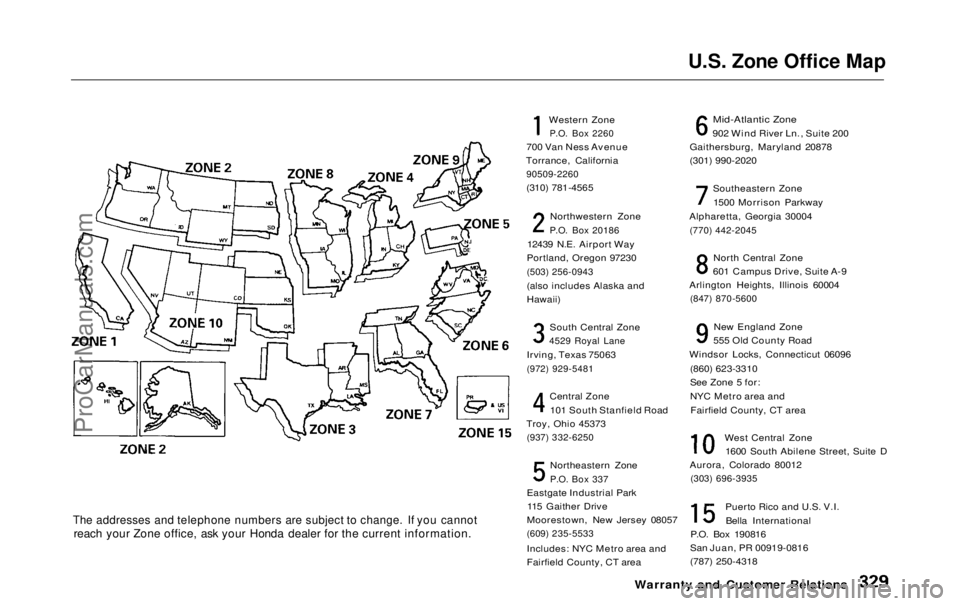
U.S. Zone Office Map
The addresses and telephone numbers are subject to change. If you cannot
reach your Zone office, ask your Honda dealer for the current information.
Western Zone
P.O. Box 2260
700 Van Ness Avenue
Torrance, California
90509-2260
(310) 781-4565
Northwestern Zone
P.O. Box 20186
12439 N.E. Airport Way
Portland, Oregon 97230
(503) 256-0943
(also includes Alaska and
Hawaii)
South Central Zone
4529 Royal Lane
Irving, Texas 75063
(972) 929-5481
Central Zone101 South Stanfield Road
Troy, Ohio 45373
(937) 332-6250
Northeastern Zone
P.O. Box 337
Eastgate Industrial Park 115 Gaither Drive
Moorestown, New Jersey 08057
(609) 235-5533
Includes: NYC Metro area and
Fairfield County, CT area
Mid-Atlantic Zone
902 Wind River Ln., Suite 200
Gaithersburg, Maryland 20878
(301) 990-2020
Southeastern Zone1500 Morrison Parkway
Alpharetta, Georgia 30004
(770) 442-2045
North Central Zone
601 Campus Drive, Suite A-9
Arlington Heights, Illinois 60004
(847) 870-5600
New England Zone
555 Old County Road
Windsor Locks, Connecticut 06096
(860) 623-3310
See Zone 5 for:
NYC Metro area andFairfield County, CT area
West Central Zone1600 South Abilene Street, Suite D
Aurora, Colorado 80012
(303) 696-3935
Puerto Rico and U.S. V.I.Bella International
P.O. Box 190816
San Juan, PR 00919-0816
(787) 250-4318
Warranty and Customer RelationsProCarManuals.comMain Menu Table of Contents s t
Page 328 of 343
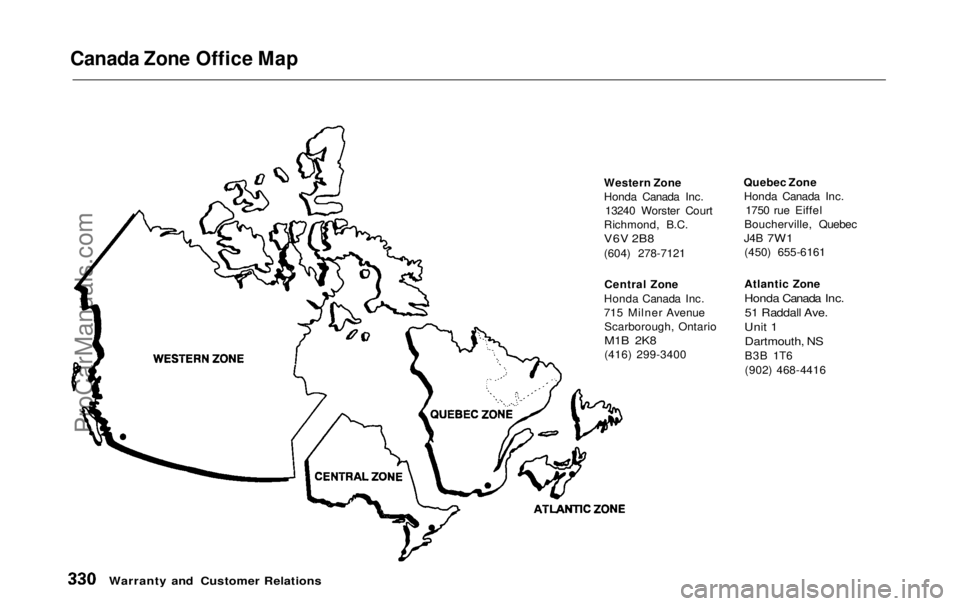
Canada Zone Office Map
Western Zone
Honda Canada Inc.13240 Worster Court
Richmond, B.C.
V6V 2B8
(604) 278-7121
Central Zone
Honda Canada Inc.
715 Milner Avenue Scarborough, Ontario
M1B 2K8
(416) 299-3400 Quebec Zone
Honda Canada Inc. 1750 rue Eiffel
Boucherville, Quebec
J4B
7W1
(450) 655-6161
Atlantic Zone
Honda Canada Inc.
51 Raddall Ave.
Unit 1 Dartmouth, NS
B3B 1T6
(902) 468-4416
Warranty and Customer RelationsProCarManuals.comMain Menu Table of Contents s t