tow HONDA ODYSSEY 1999 Owners Manual
[x] Cancel search | Manufacturer: HONDA, Model Year: 1999, Model line: ODYSSEY, Model: HONDA ODYSSEY 1999Pages: 343, PDF Size: 3.73 MB
Page 1 of 343
 to navigate through\
this reference.
For a printed owners manual, click on authorized manuals or go")
1999 Odyssey Online Reference Owner's Manual
Use these links (and links throughout this manual) to navigate through\
this reference.
For a printed owner's manual, click on authorized manuals or go to www.h\
elminc.com.
Contents
Introduction ........................................................................\
................................................................. i
A Few Words About Safety........................................................................\
.........................................ii
Your Vehicle at a Glanc e........................................................................\
............................................ .2
Driver and Passenger Safety ........................................................................\
......................................5
Proper use and care of your vehicle's seat belts, and Supplemental Restr\
aint System.
Instruments and Control s........................................................................\
.........................................55
Instrume nt panel indicator and gauge, and how to use dashboard and steering colu\
mn controls.
Comfort and Convenience Features ........................................................................\
......................129
How to operate the climate control system, the audio system, and other c\
onvenience features.
Before Driving........................................................................\
..........................................................181
What gasoline to use, how to break -in your new vehicle, and how to load luggage and other cargo.
Driving ........................................................................\
......................................................................195
The proper way to start the engine, shift the transmission, and park, pl\
us towing a trailer.
Maintenance........................................................................\
.............................................................219
The Maintenance Schedule shows you when you need to take you r vehicle to the dealer.
Appearance Car e........................................................................\
..................................................... .277
Tips on cleaning and protecting your vehicle. Things to look for if your\
vehicle ever needs body repairs.
Taking Care of the Unexpecte d........................................................................\
..............................285
This section covers several problems motorists sometimes experience, an d how to handle them.
Technical Informatio n........................................................................\
.............................................313
ID numbers, dimensions, capacities, and technical information.
Warranty and Customer Relations (U.S. and Canad a
)...............................................................
.327
A summary of the warranties covering your new Acura, and how to contact \
us.
Authorized Manu als (U.S. only)........................................................................\
..............................333
How to order manuals and other technical literature.
Index........................................................................\
.............................................................................. I
Service Information Summary
A summary of information you need when you pull up to the fuel pump.
Owner's Identification Form
ProCarManuals.com
Page 20 of 343
Protecting Adults
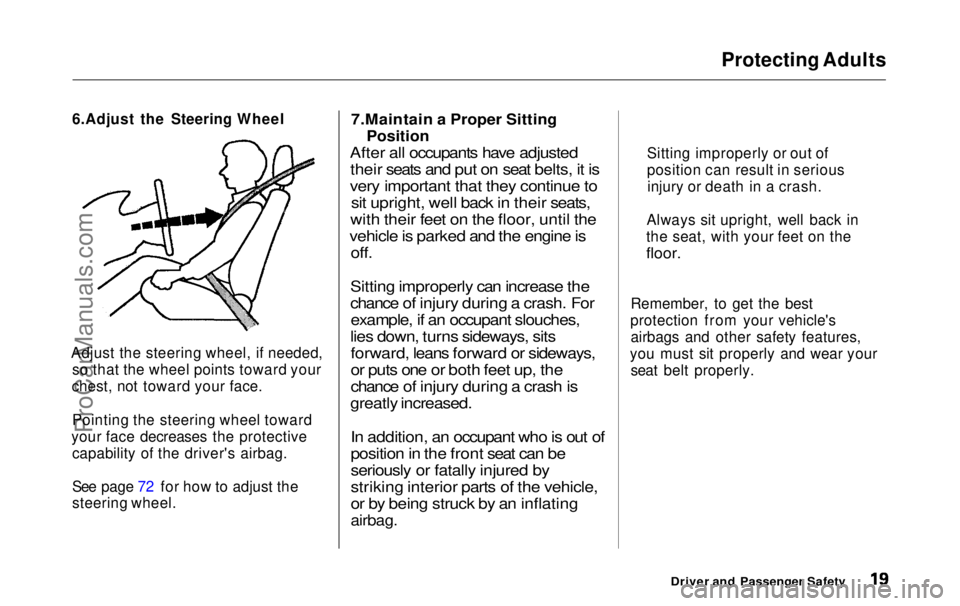
6.Adjust the Steering Wheel
Adjust the steering wheel, if needed, so that the wheel points toward your
chest, not toward your face.
Pointing the steering wheel toward
your face decreases the protective capability of the driver's airbag.
See page 72 for how to adjust the
steering wheel.
7.Maintain a Proper Sitting
Position
After all occupants have adjusted their seats and put on seat belts, it is
very important that they continue to sit upright, well back in their seats,
with their feet on the floor, until the
vehicle is parked and the engine is off.
Sitting improperly can increase the
chance of injury during a crash. For example, if an occupant slouches,
lies down, turns sideways, sits forward, leans forward or sideways,
or puts one or both feet up, the
chance of injury during a crash is
greatly increased.
In addition, an occupant who is out of
position in the front seat can be
seriously or fatally injured by
striking interior parts of the vehicle,
or by being struck by an inflating
airbag.
Remember, to get the best
protection from your vehicle's airbags and other safety features,
you must sit properly and wear your seat belt properly.
Driver and Passenger Safety
Sitting improperly or out of
position can result in serious
injury or death in a crash.
Always sit upright, well back in
the seat, with your feet on the
floor.ProCarManuals.comMain Menu Table of Contents s t
Page 35 of 343
Protecting Children
Rear-Facing Child Seat Installation
Tips
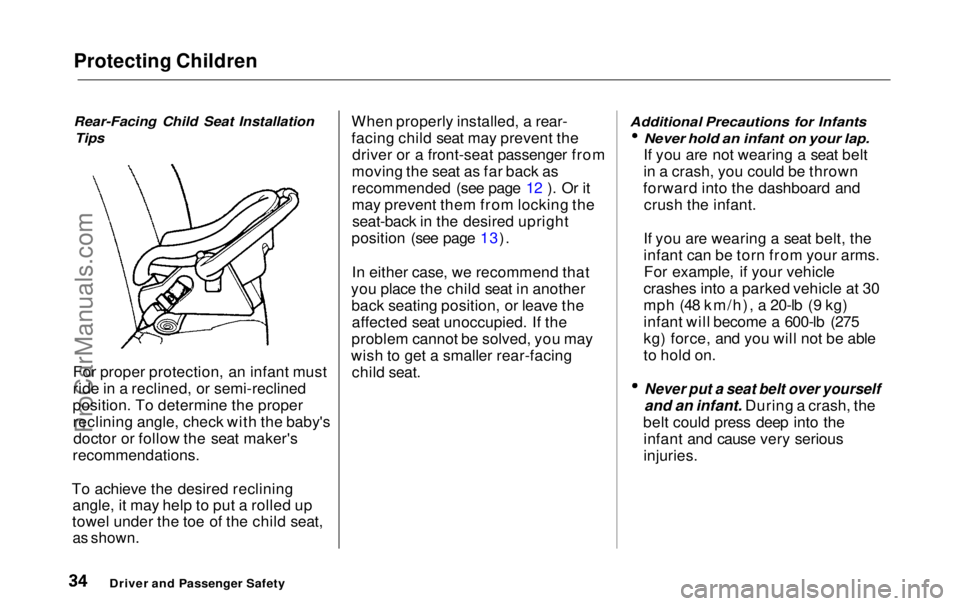
For proper protection, an infant must
ride in a reclined, or semi-reclined
position. To determine the proper reclining angle, check with the baby'sdoctor or follow the seat maker's
recommendations.
To achieve the desired reclining angle, it may help to put a rolled up
towel under the toe of the child seat,
as shown.
When properly installed, a rear-
facing child seat may prevent the
driver or a front-seat passenger from
moving the seat as far back as
recommended (see page 12 ). Or it
may prevent them from locking the seat-back in the desired upright
position (see page 13).
In either case, we recommend that
you place the child seat in another back seating position, or leave theaffected seat unoccupied. If the
problem cannot be solved, you may
wish to get a smaller rear-facing child seat.
Additional Precautions for Infants
Never hold an infant on your lap.
If you are not wearing a seat belt
in a crash, you could be thrown
forward into the dashboard and crush the infant.
If you are wearing a seat belt, the
infant can be torn from your arms. For example, if your vehicle
crashes into a parked vehicle at 30
mph (48 km/h), a 20-lb (9 kg)
infant will become a 600-lb (275
kg) force, and you will not be able
to hold on.
Never put a seat belt over yourself
and an infant. During a crash, the
belt could press deep into the infant and cause very serious
injuries.
Driver and Passenger SafetyProCarManuals.comMain Menu Table of Contents s t
Page 73 of 343
Controls Near the Steering Wheel
Steering Wheel Adjustment
See page 19 for important safety
information about how to properly
position the steering wheel.
Make any steering wheel adjustment
before you start driving.
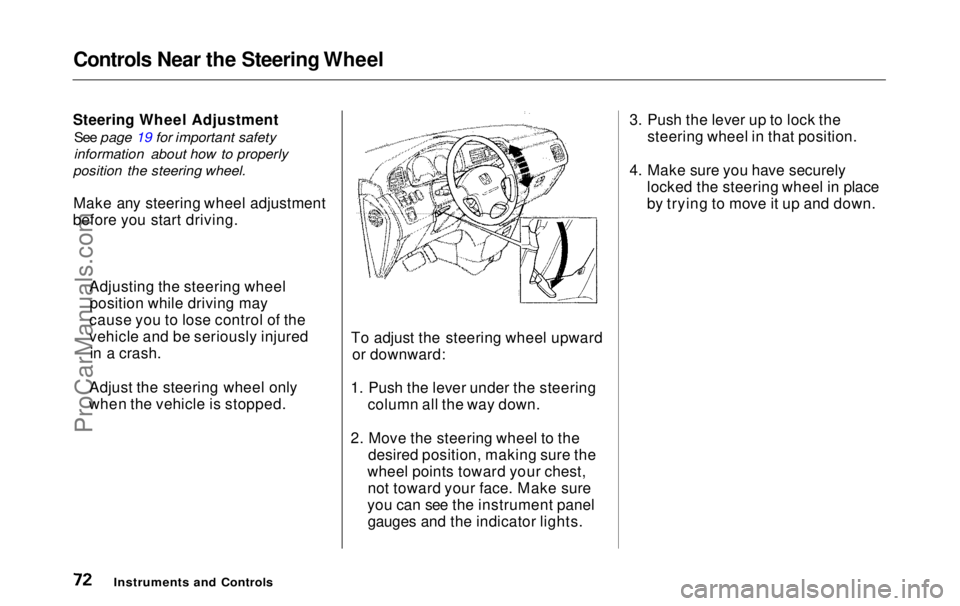
To adjust the steering wheel upwardor downward:
1. Push the lever under the steering column all the way down.
2. Move the steering wheel to the desired position, making sure the
wheel points toward your chest, not toward your face. Make sure
you can see the instrument panel gauges and the indicator lights. 3. Push the lever up to lock the
steering wheel in that position.
4. Make sure you have securely locked the steering wheel in place
by trying to move it up and down.
Instruments and Controls
Adjusting the steering wheel
position while driving may
cause you to lose control of the
vehicle and be seriously injured in a crash.
Adjust the steering wheel only
when the vehicle is stopped.ProCarManuals.comMain Menu Table of Contents s t
Page 107 of 343
Seats
Moving the Second Row Bucket
Seat
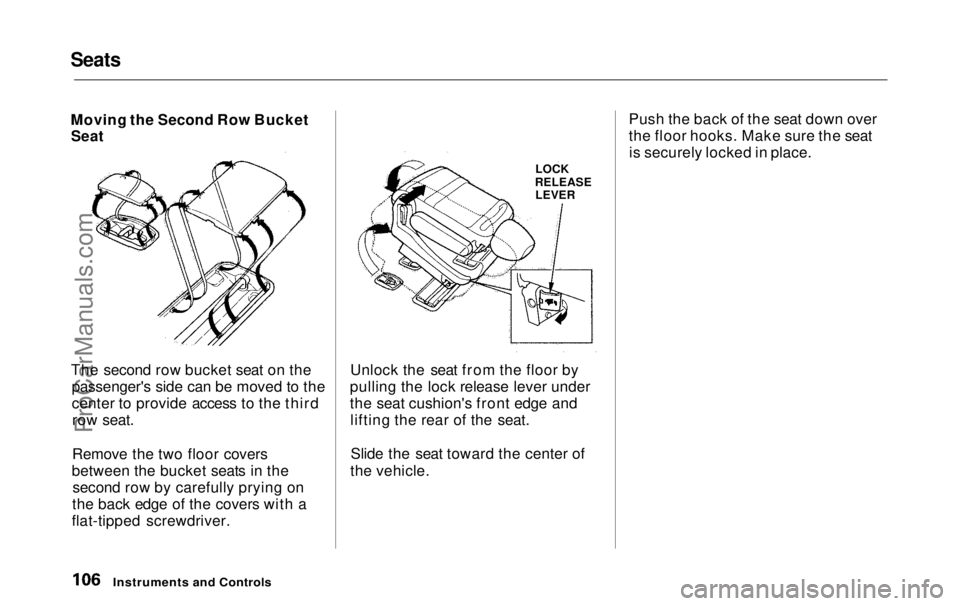
The second row bucket seat on the
passenger's side can be moved to the
center to provide access to the thirdrow seat.
Remove the two floor covers
between the bucket seats in the second row by carefully prying on
the back edge of the covers with a
flat-tipped screwdriver. Unlock the seat from the floor by
pulling the lock release lever under
the seat cushion's front edge and lifting the rear of the seat.
Slide the seat toward the center of
the vehicle. Push the back of the seat down over
the floor hooks. Make sure the seat
is securely locked in place.
Instruments and Controls
LOCK
RELEASE LEVERProCarManuals.comMain Menu Table of Contents s t
Page 112 of 343
Seats
HANDLE
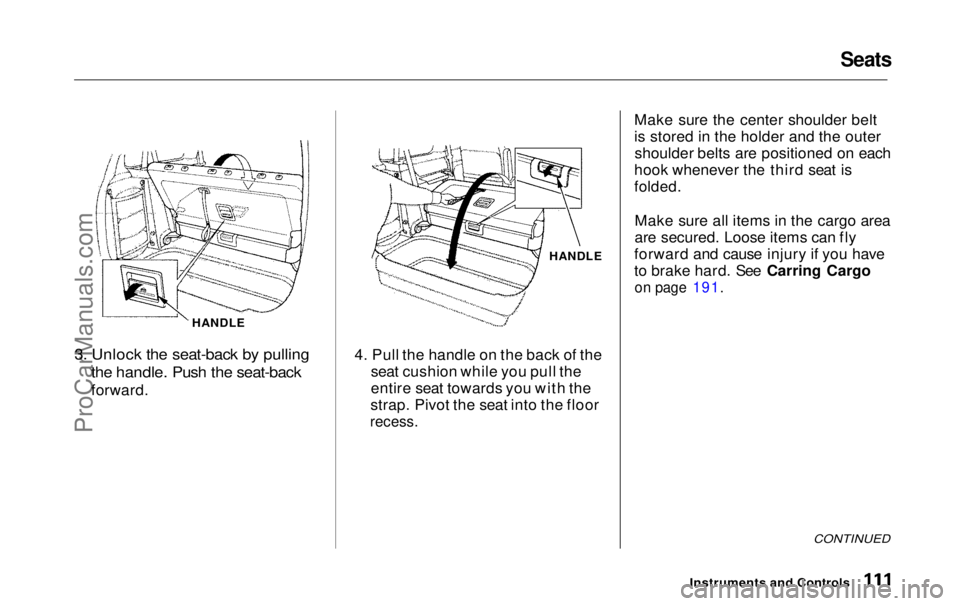
3. Unlock the seat-back by pulling
the handle. Push the seat-back
forward. HANDLE
4. Pull the handle on the back of the seat cushion while you pull the
entire seat towards you with the
strap. Pivot the seat into the floor
recess.
Make sure the center shoulder belt
is stored in the holder and the outer
shoulder belts are positioned on each
hook whenever the third seat is
folded.
Make sure all items in the cargo area
are secured. Loose items can fly
forward and cause injury if you have
to brake hard. See Carring Cargo
on page 191.
CONTINUED
Instruments and ControlsProCarManuals.comMain Menu Table of Contents s t
Page 122 of 343
Sun Visor, Vanity Mirror
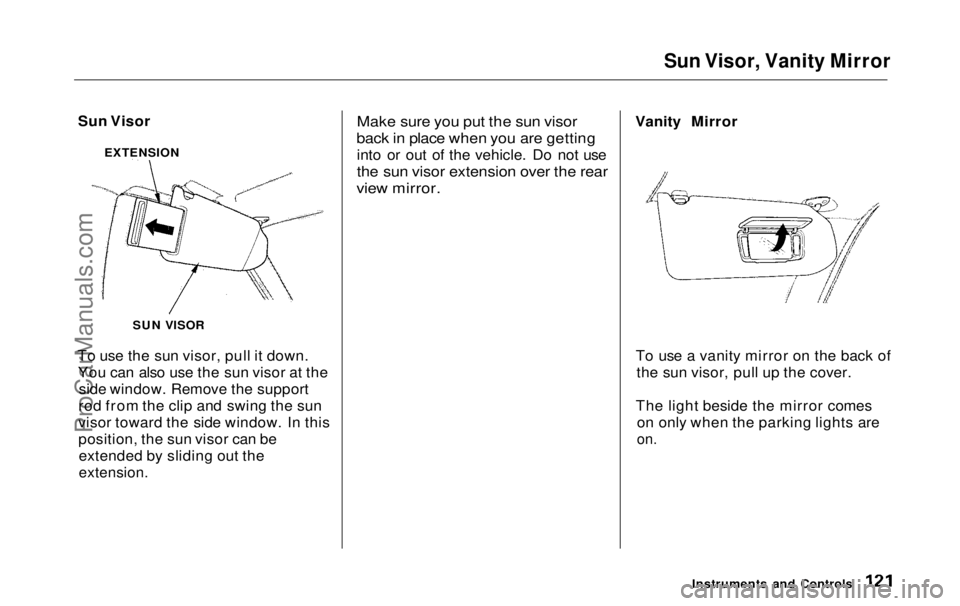
Sun Visor
To use the sun visor, pull it down. You can also use the sun visor at the side window. Remove the support
rod from the clip and swing the sun
visor toward the side window. In this
position, the sun visor can be extended by sliding out the
extension.
Make sure you put the sun visor
back in place when you are getting
into or out of the vehicle. Do not use
the sun visor extension over the rear
view mirror.
Vanity Mirror
To use a vanity mirror on the back of the sun visor, pull up the cover.
The light beside the mirror comes on only when the parking lights are
on.
Instruments and Controls
EXTENSION
SUN VISORProCarManuals.comMain Menu Table of Contents s t
Page 183 of 343
Break-in Period, Gasoline
Break-in Period
Help assure your vehicle's future
reliability and performance by paying extra attention to how you driveduring the first 600 miles (1,000 km).
During this period:
Avoid full-throttle starts and rapid
acceleration.
Avoid hard braking. New brakes need to be broken-in by moderate
use for the first 200 miles (300
km). You should follow these same re-
commendations with an overhauled
or exchanged engine, or when the
brakes are replaced.
We also recommend that you should not tow a trailer during the first 500
miles (800 km).
Gasoline
Your Honda is designed to operate on unleaded gasoline with a pump
octane number of 86 or higher. Use
of a lower octane gasoline can cause
a persistent, heavy metallic rapping
noise in the engine that can lead to
mechanical damage.
We recommend gasolines containing detergent additives that help prevent
fuel system and engine deposits.
Using gasoline containing lead will
damage your vehicle's emissions
controls. This contributes to air
pollution.
Before DrivingProCarManuals.comMain Menu Table of Contents s t
Page 187 of 343
Service Station Procedures
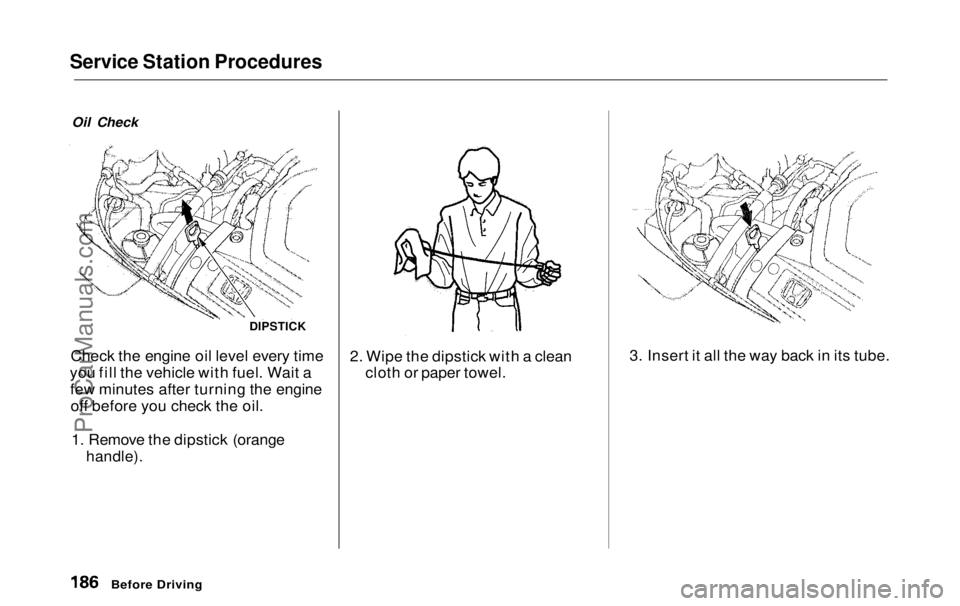
Oil Check
Check the engine oil level every time
you fill the vehicle with fuel. Wait a few minutes after turning the engineoff before you check the oil.
1. Remove the dipstick (orange
handle).
2. Wipe the dipstick with a clean
cloth or paper towel. 3. Insert it all the way back in its tube.
Before Driving
DIPSTICKProCarManuals.comMain Menu Table of Contents s t
Page 192 of 343
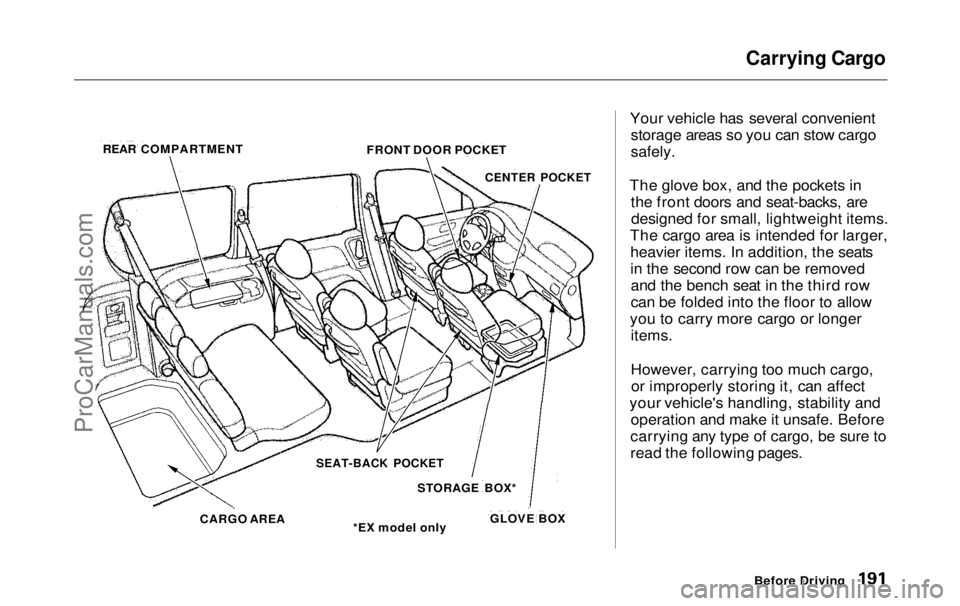
Carrying Cargo
Your vehicle has several convenient storage areas so you can stow cargo
safely.
The glove box, and the pockets in the front doors and seat-backs, aredesigned for small, lightweight items.
The cargo area is intended for larger, heavier items. In addition, the seats
in the second row can be removedand the bench seat in the third row
can be folded into the floor to allow
you to carry more cargo or longer items.
However, carrying too much cargo,or improperly storing it, can affect
your vehicle's handling, stability and operation and make it unsafe. Before
carrying any type of cargo, be sure to
read the following pages.
Before Driving
REAR COMPARTMENT
FRONT DOOR POCKET
CENTER POCKET
SEAT-BACK POCKET
STORAGE BOX*
*EX model only
CARGO AREA
GLOVE BOXProCarManuals.comMain Menu Table of Contents s t