reset HONDA ODYSSEY 2000 RA6-RA9 / 2.G Owners Manual
[x] Cancel search | Manufacturer: HONDA, Model Year: 2000, Model line: ODYSSEY, Model: HONDA ODYSSEY 2000 RA6-RA9 / 2.GPages: 352, PDF Size: 4.43 MB
Page 65 of 352
Gauges
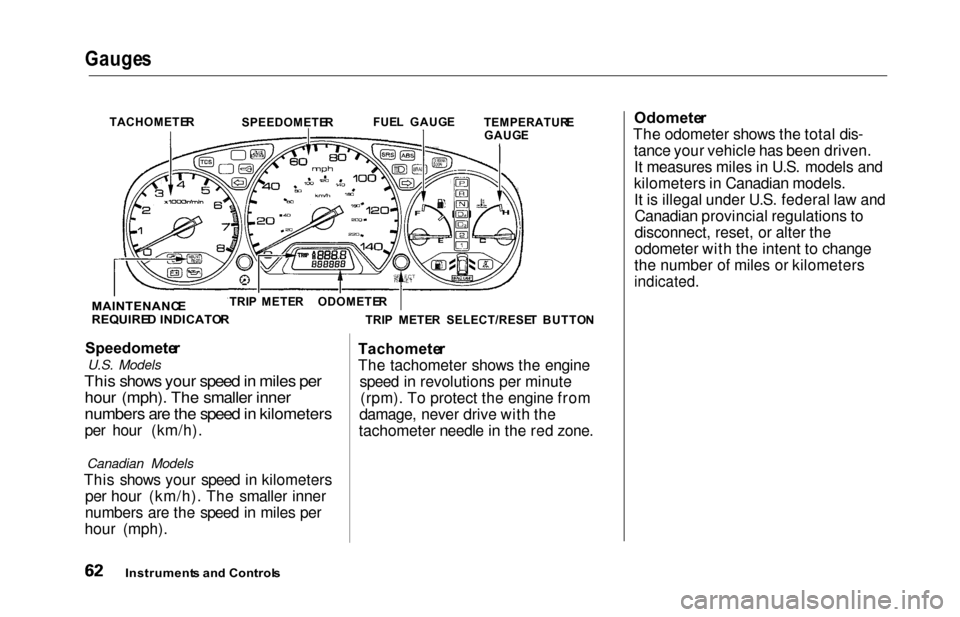
Speedomete r
U.S. Models
This shows your speed in miles per
hour (mph). The smaller inner
numbers are the speed in kilometers
per hour (km/h).
Canadian Models
This shows your speed in kilometers
per hour (km/h). The smaller inner
numbers are the speed in miles per
hour (mph). Tachomete
r
The tachometer shows the engine speed in revolutions per minute(rpm). To protect the engine from
damage, never drive with the
tachometer needle in the red zone. Odomete
r
The odometer shows the total dis- tance your vehicle has been driven.It measures miles in U.S. models and
kilometers in Canadian models. It is illegal under U.S. federal law andCanadian provincial regulations to
disconnect, reset, or alter the
odometer with the intent to change
the number of miles or kilometers
indicated.
Instrument s an d Control s
TACHOMETE R
SPEEDOMETE RFUE
L GAUG E
TEMPERATUR E
GAUG E
TRI P METE R SELECT/RESE T BUTTO N
TRI
P METE RODOMETE R
MAINTENANC E
REQUIRE D INDICATO R
Page 66 of 352
Gauges
Trip Mete r
This meter shows the number of
miles (U.S.) or kilometers (Canada)driven since you last reset it.
There are two trip meters: Trip A and Trip B. Switch between these
displays by pressing the Select/
Reset button repeatedly. Each trip
meter works independently, so you can keep track of two different
distances.
To reset a trip meter, display it and then press and hold the Select/Reset
button until the number resets to
"0.0".
Temperatur e Gaug e
This shows the temperature of the engine's coolant. During normal
operation, the pointer should rise
from the bottom white mark to about the middle of the gauge. In severedriving conditions, such as very hot
weather or a long period of uphill driving, the pointer may rise to near
the upper white mark. If it reaches
the red (Hot) mark, pull safely to the side of the road. Turn to page 305 for
instructions and precautions on checking the engine's cooling
system.
Fue l Gaug e
This shows how much fuel you have. It is most accurate when the vehicle
is on level ground. It may showslightly more or less than the actual
amount when you are driving on
curvy or hilly roads.
The needle returns to the bottom after you turn off the ignition. The
gauge shows the fuel level reading
immediately after you turn the
ignition switch back ON (II).
Instrument s an d Control s
Page 67 of 352
Gauges
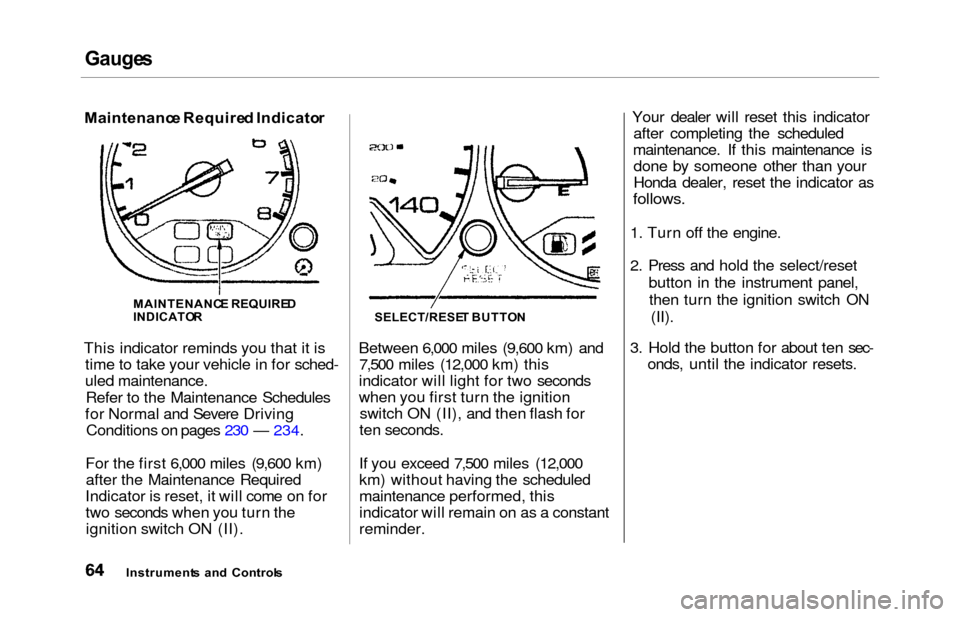
Maintenanc e Require d Indicato r
This indicator reminds you that it is time to take your vehicle in for sched-
uled maintenance.
Refer to the Maintenance Schedules
for Normal and Severe Driving Conditions on pages 230 — 234.
For the first 6,000 miles (9,600 km) after the Maintenance Required
Indicator is reset, it will come on for
two seconds when you turn the ignition switch ON (II). Between 6,000 miles (9,600 km) and
7,500 miles (12,000 km) this
indicator will light for two seconds
when you first turn the ignition switch ON (II), and then flash for
ten seconds.
If you exceed 7,500 miles (12,000
km) without having the scheduled
maintenance performed, this
indicator will remain on as a constant
reminder. Your dealer will reset this indicator
after completing the scheduled
maintenance. If this maintenance is done by someone other than your
Honda dealer, reset the indicator as
follows.
1. Turn off the engine.
2. Press and hold the select/reset
button in the instrument panel,then turn the ignition switch ON (II).
3. Hold the button for about ten sec- onds, until the indicator resets.
Instrument s an d Control s
MAINTENANC
E REQUIRE D
INDICATO RSELECT/RESE T BUTTO N
Page 96 of 352
Power Slidin g Door s (E X Model )
If a person or object is in the way
after the door begins to close, the
door handles cannot be used to stop
the door. To stop the door, use the dashboard switches or the remote
transmitter.
A Note About Refueling
Before refueling, make sure the driver's side sliding door is fully
closed. When you release the fuel fill
door, the driver's side sliding door
automatically locks so it cannot open
and interfere with the fuel door. If a
passenger attempts to unlock the door by cycling the lock knob several
times, the door may unlock and can be opened.
If a passenger needs to get out of the
vehicle while you are refueling, instruct that person to exit on the
passenger's side, not the driver's
side.
After you close the fuel fill door, the sliding door does not automatically
unlock. You must unlock it manually.
Parking Facing Downhill
When parking facing downhill on a steep grade, the power sliding doors
may not open or close as they do
normally.
Make sure the MAIN switch is in
the ON position. This allows the
power assist to keep the doors
from slamming shut.
If the MAIN switch is off, the doorcan slam shut and possibly injure
someone.
Make sure the power sliding doors
are latched in the fully-open
position, then hold the door open
while allowing your passengers to enter or exit the vehicle. Do not
pull the inside or outside door
handle, or the latch will release
and the door will close.
How to Reset the Power Sliding
Doors
If your vehicle's battery is
disconnected or goes dead while asliding door is open, the power
sliding door system needs to be reset.
After reconnecting the battery:
Close each sliding door completely
by hand; or
Move the MAIN switch on the
dashboard to the ON position.
Push and hold the top of each door switch until each sliding door
closes completely.
If the power sliding doors are closed, the system will reset itselfautomatically once the battery has
been reconnected. If the power sliding doors do notoperate properly after resetting,
have your vehicle checked by a Honda dealer.
Instrument s an d Control s
CONTINUED
Page 120 of 352
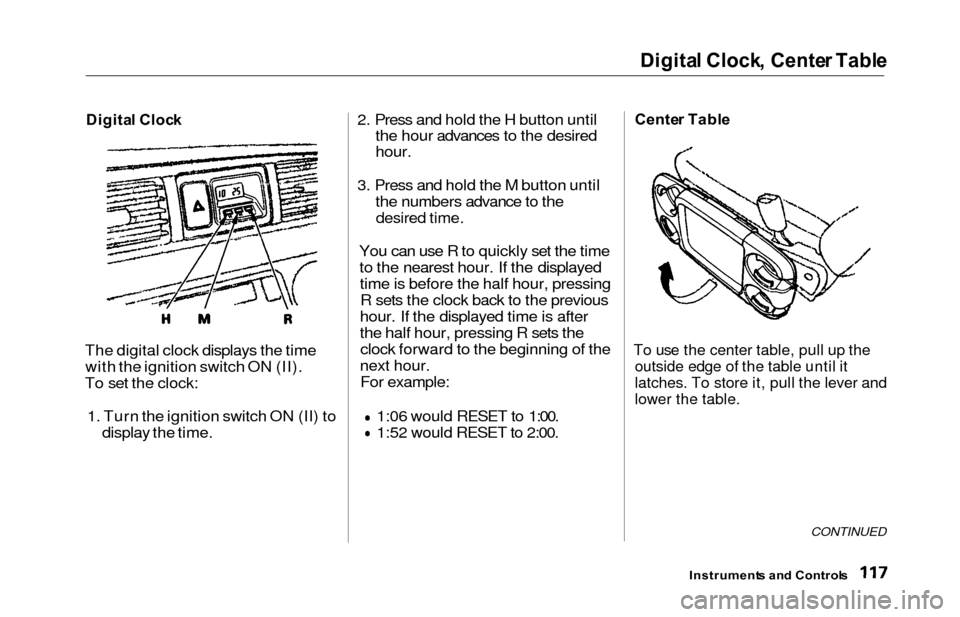
Digital Clock , Cente r Tabl e
Digita l Cloc k
The digital clock displays the time
with the ignition switch ON (II).
To set the clock:
1. Turn the ignition switch ON (II) to display the time. 2. Press and hold the H button until
the hour advances to the desired
hour.
3. Press and hold the M button until
the numbers advance to the
desired time.
You can use R to quickly set the timeto the nearest hour. If the displayedtime is before the half hour, pressingR sets the clock back to the previous
hour. If the displayed time is after
the half hour, pressing R sets the clock forward to the beginning of the
next hour. For example:
1:06 would RESET to 1:00.
1:52 would RESET to 2:00.
Cente r Tabl e
To use the center table, pull up the
outside edge of the table until it
latches. To store it, pull the lever and
lower the table.
CONTINUED
Instrument s an d Control s
Page 158 of 352
Audio Syste m
AM/FM/Cassett e Stere o Audi o
Syste m
On LX model
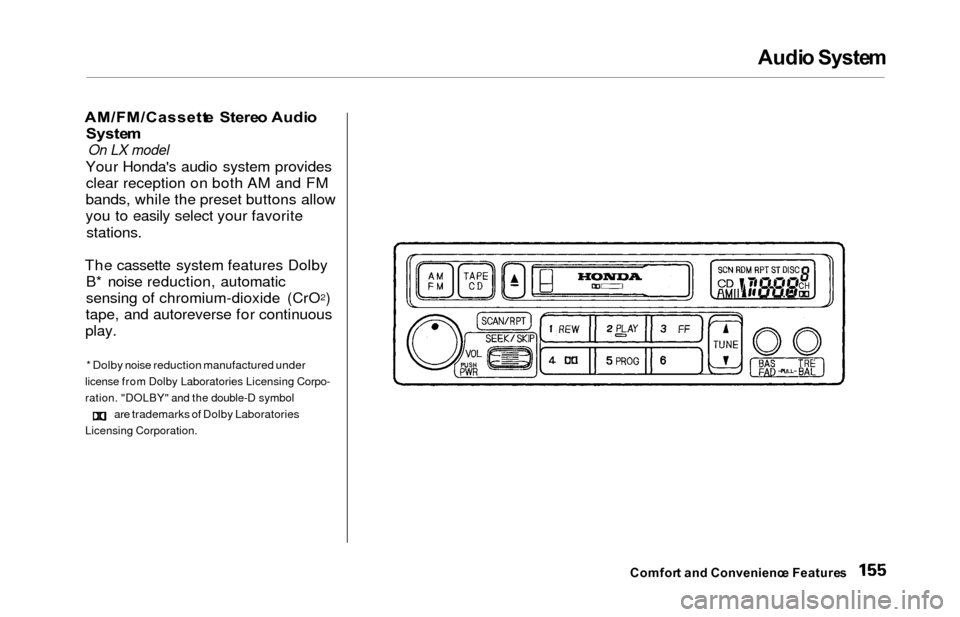
Your Honda's audio system provides
clear reception on both AM and FM
bands, while the preset buttons allow
you to easily select your favorite
stations.
The cassette system features Dolby B* noise reduction, automatic
sensing of chromium-dioxide (CrO
2)
tape, and autoreverse for continuous
play.
* Dolby noise reduction manufactured under
license from Dolby Laboratories Licensing Corpo-
ration. "DOLBY" and the double-D symbol
are trademarks of Dolby Laboratories
Licensing Corporation.
Comfor t an d Convenienc e Feature s
Page 159 of 352
Audio Syste m
Operatin g th e Radi o
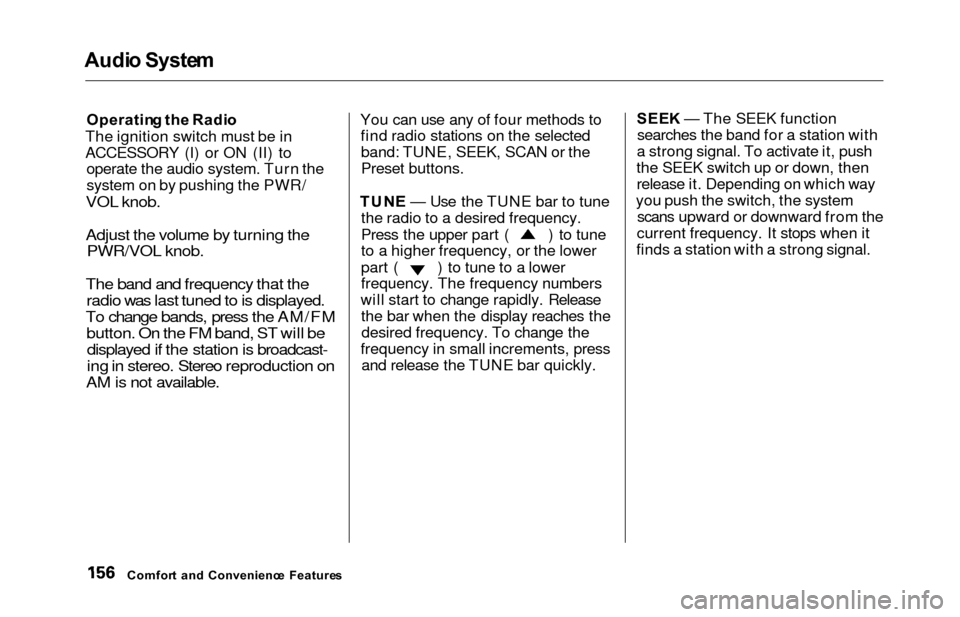
The ignition switch must be in
ACCESSORY (I) or ON (II) to operate the audio system. Turn the
system on by pushing the PWR/
VOL knob.
Adjust the volume by turning thePWR/VOL knob.
The band and frequency that the radio was last tuned to is displayed.
To change bands, press the AM/FM button. On the FM band, ST will bedisplayed if the station is broadcast-
ing in stereo. Stereo reproduction on
AM is not available.
You can use any of four methods to find radio stations on the selectedband: TUNE, SEEK, SCAN or the
Preset buttons.
TUN E — Use the TUNE bar to tune
the radio to a desired frequency.
Press the upper part ( ) to tune
to a higher frequency, or the lower
part ( ) to tune to a lower
frequency. The frequency numbers
will start to change rapidly. Release the bar when the display reaches thedesired frequency. To change the
frequency in small increments, press and release the TUNE bar quickly. SEE
K — The SEEK function
searches the band for a station with
a strong signal. To activate it, push
the SEEK switch up or down, then release it. Depending on which way
you push the switch, the system scans upward or downward from the
current frequency. It stops when it
finds a station with a strong signal.
Comfor t an d Convenienc e Feature s
Page 161 of 352
Audio Syste m
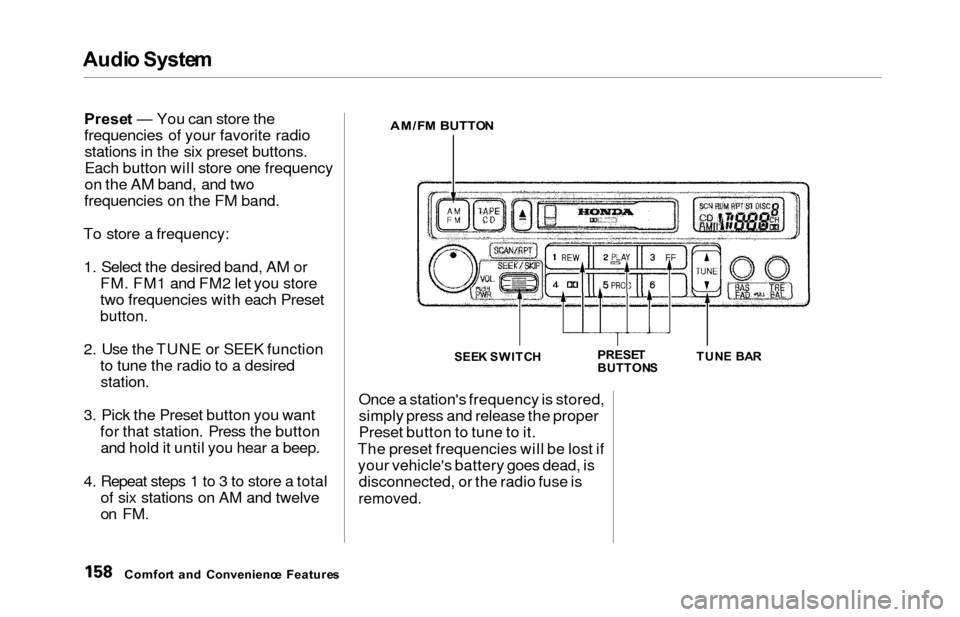
Prese t — You can store the
frequencies of your favorite radio stations in the six preset buttons.
Each button will store one frequency
on the AM band, and two
frequencies on the FM band.
To store a frequency: 1. Select the desired band, AM or FM. FM1 and FM2 let you store
two frequencies with each Preset
button.
2. Use the TUNE or SEEK functionto tune the radio to a desired
station.
3. Pick the Preset button you wantfor that station. Press the buttonand hold it until you hear a beep.
4. Repeat steps 1 to 3 to store a total of six stations on AM and twelve
on FM.
AM/F M BUTTO N
SEEK SWITC HPRESETBUTTON STUN
E BA R
Once a station's frequency is stored,
simply press and release the proper
Preset button to tune to it.
The preset frequencies will be lost if your vehicle's battery goes dead, is disconnected, or the radio fuse is
removed.
Comfor t an d Convenienc e Feature s
Page 167 of 352
Audio Syste m
To operate the CD changer or player,
the ignition must be in ACCESSORY (I) or ON (II) and the audio system
must be on.
Press the CD button until "CD"
appears in the display. The system
will start to play the first track of the first disc in the magazine. Play only standard round discs.
When that disc ends, the next disc in the magazine is loaded and played.
After the last disc finishes, the system returns to disc 1.
To select a different disc, press the appropriate preset button (1 — 6). If
you select an empty slot in the magazine, the changer will, after
finding that slot empty, try to load the CD in the next slot. This
continues until it finds a CD to loadand play. You can use the SKIP switch to
select tracks within a disc. If you
push and release the SKIP switch,
the system will move to the
beginning of a track. Push the switch
up to move to the beginning of the
next track, and push the switch down to move to the beginning of
the current track.
If you push and hold the SKIP switch,
you will hear a beep and the system
will continue to move across tracks. Release the switch when you think it
has reached the desired place on the
disc.
REPEA T — When you activate the
Repeat feature by pressing the RPT
button, the system continuously
replays the current track. You will see RPT in the display as a reminder.
Press the RPT button again to turn it
off.
RANDO M PLA Y — This feature,
when activated, plays the tracks on a CD in random order, rather than in
the order they are recorded on the
CD. To activate Random Play, press
and hold the RPT button until you see RDM in the display. The system
will then select and play tracks randomly on the current disc. When all tracks on that disc have been
played, the next disc is loaded and
played randomly. This continues
until you deactivate Random Play by
pressing RPT again.
Comfor t an d Convenienc e Feature s
Page 168 of 352
Audi
o Syste m
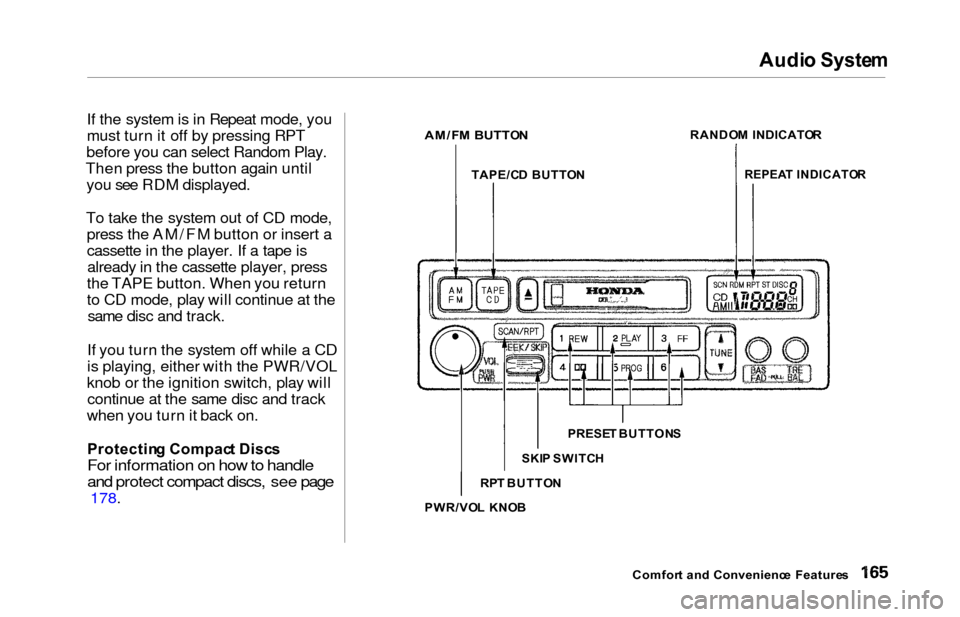
If the system is in Repeat mode, you
must turn it off by pressing RPT
before you can select Random Play.
Then press the button again until you see RDM displayed.
To take the system out of CD mode, press the AM/FM button or insert a
cassette in the player. If a tape isalready in the cassette player, press
the TAPE button. When you return
to CD mode, play will continue at the same disc and track.
If you turn the system off while a CD
is playing, either with the PWR/VOL
knob or the ignition switch, play will continue at the same disc and track
when you turn it back on.
Protectin g Compac t Disc s
For information on how to handle
and protect compact discs, see page
178.
Comfort an d Convenienc e Feature s
AM/F
M BUTTO N
PRESET BUTTON S
SKI P SWITC H
PWR/VO L KNO B
RP
T BUTTO N RANDO
M INDICATO R
REPEA T INDICATO R
TAPE/C D BUTTO N