Controls HONDA ODYSSEY 2002 RA6-RA9 / 2.G Owner's Manual
[x] Cancel search | Manufacturer: HONDA, Model Year: 2002, Model line: ODYSSEY, Model: HONDA ODYSSEY 2002 RA6-RA9 / 2.GPages: 399, PDF Size: 4.97 MB
Page 134 of 399
.....................
Heating and Cooling .132
.........
What Each Control Does . 132
............
How to Use the System . 135
..........
To Turn Everything Of f . 139
...............
Climate Control System . 140
(EX model and EX-L model without Navigation System) .......
Fully-automatic Operation . 142
.......
Semi-automatic Operation . 144
(EX-L model with Navigation System) .......
Fully-automatic Operation . 148
.......
Semi-automatic Operation . 149
Sunlight Sensor/ ............
Temperature Sensor . 153
...........................
Rear A/C Unit .154
.......................
Audio System (LX) .157
AM/FM/Cassette Stereo ........................
Audio System .157
.................
Operating the Radio . 158
.................
Adjusting the Sound . 161
............
Audio System Lighting . 162
Operating the Cassette .....................................
Player .162
............
Tape Search Functions . 162Operating the Optional CD
....................
Player/Changer .165
CD Changer Error .............................
Indications .168
............
Audio System (EX, EX-L) . 169
....
AM/FM/CD Audio System . 169
.................
Operating the Radio . 170
.................
Adjusting the Sound . 174
............
Audio System Lighting . 175
....................
Radio Frequencies . 175
........................
Radio Reception .175
.........
Operating the CD Player . 177
.....
Operating the CD Changer . 179
.......
Protecting Compact Discs . 180
....
CD Player Error Indications . 181
CD Changer Error .............................
Indications .182
Operating the Cassette .....................................
Player .183
............
Tape Search Functions . 184
Caring f or the Cassette .....................................
Player .186
...........
Remote Audio Controls . 187
.......................
Thef t Protection .188 Audio System (Optional on
..................
U.S. EX-L model) . 189
AM/FM/CD/DVD Audio ....................................
System .189
.................
Operating the Radio . 191
.................
Adjusting the Sound . 195
............
Audio System Lighting . 196
Operating the Cassette .....................................
Player .197
.........
Operating the CD Player . 200
.....
Operating the CD Changer . 202
....
CD Player Error Indications . 203
CD Changer Error .............................
Indications .204
........
Rear Entertainment System . 205
............................
Security System .221
...............................
Cruise Control .222
HomeLink Universal .................................
Tranceiver .225
Comf ort and Convenience Features
Comf ort and Convenience Feat ures131
Page 135 of 399
Proper use of the Heating and
Cooling system can make the
interior dry and comf ortable, and
keep the windows clear f or best
visibility.
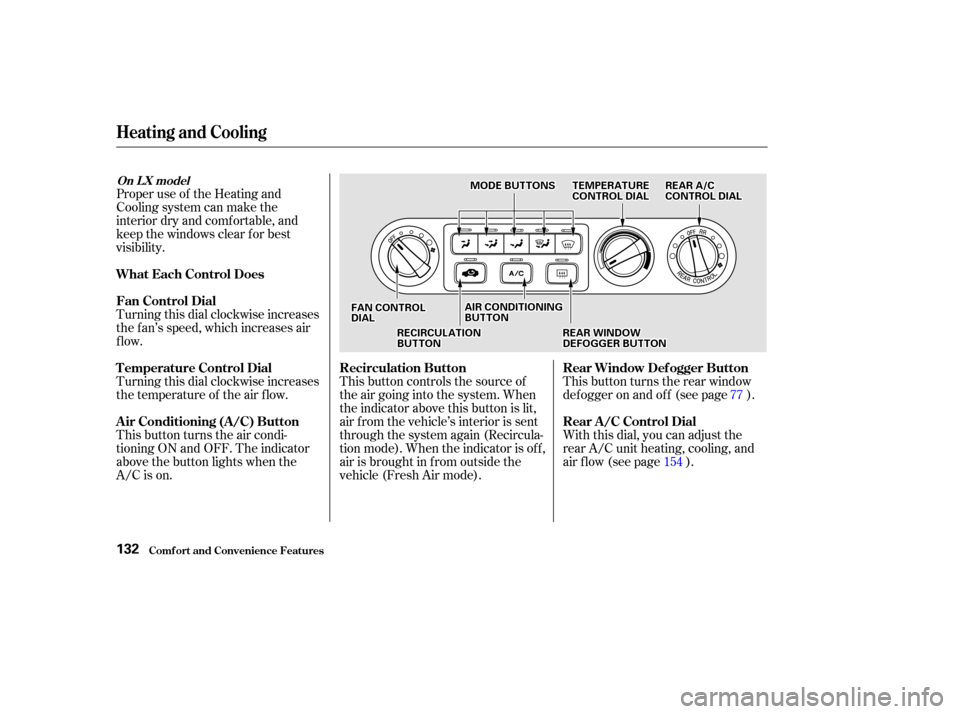
Turning this dial clockwise increases
the f an’s speed, which increases air
flow.
Turning this dial clockwise increases
the temperature of the air flow.
This button turns the air condi-
tioning ON and OFF. The indicator
above the button lights when the
A/C is on.This button controls the source of
the air going into the system. When
the indicator above this button is lit,
air f rom the vehicle’s interior is sent
through the system again (Recircula-
tion mode). When the indicator is off,
air is brought in f rom outside the
vehicle (Fresh Air mode).
With this dial, you can adjust the
rear A/C unit heating, cooling, and
air flow (see page ). This button turns the rear window
def ogger on and of f (see page ).
15477
Comf ort and Convenience Feat ures
Heating and Cooling
What Each Control Does
Fan Control Dial
T emperature Control Dial
Air Conditioning (A/C) Button
Recirculation Button
Rear Window Def ogger Button
Rear A /C Control Dial
On L X model
132
F FAA N
N C
COON NTTR
RO OL L
D
D I
IAA L
L R
RE
EA
A R
R A
A/
/C
C
C
CO ON NTTR
RO OL L D
DI
IAA L
L
R
RE EC
CI IRRC CUUL LAA T
TI
IOON N
B
BU UT TT
TO
ON N A
A
I
IRR C
COON NDDI
ITT I
IOON NIINNG G
B
BU UT TT
TO
ON N
R
REEA
A R
R W
WI INND DO
OW W
D
D E
EF
FOOG GGGEER
R B
BUUT TT
TO
ON N
T
T
E
EM
M P
PE
ER
RA A T
TU
UR REE
C
CO ON NTTR
RO OL L D
DI
IAA L
L
M
M
O
ODDE
E B
BUUT TT
TO
ON NSS
Page 137 of 399
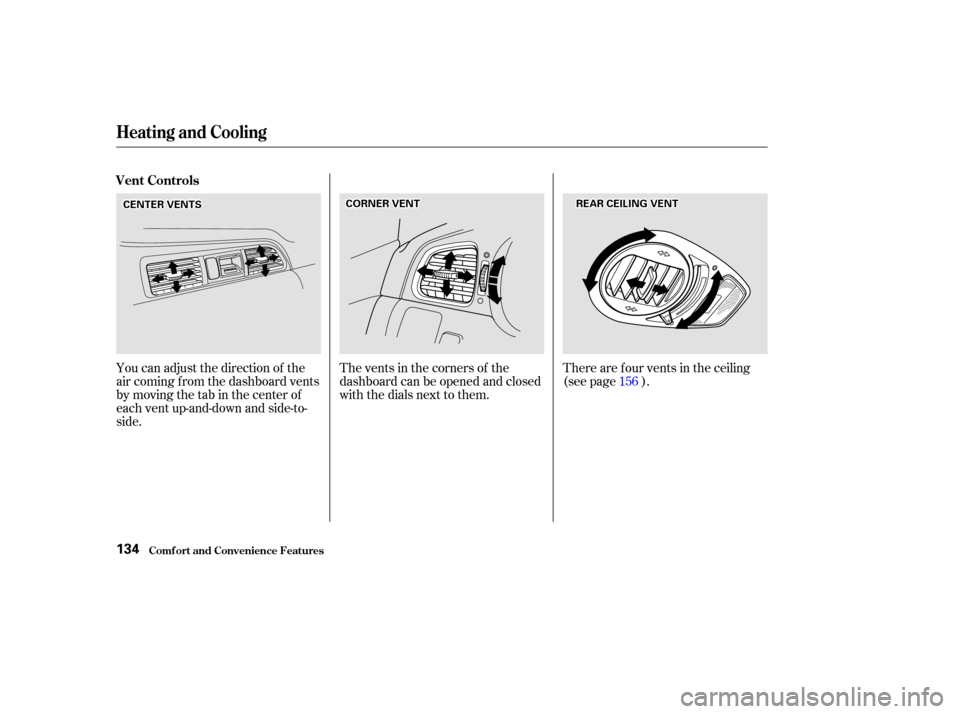
The vents in the corners of the
dashboard can be opened and closed
with the dials next to them.
You can adjust the direction of the
air coming f rom the dashboard vents
by moving the tab in the center of
each vent up-and-down and side-to-
side. There are f our vents in the ceiling
(see page ).
156
Heating and Cooling
Comf ort and Convenience Feat ures
Vent Controls
134
C COOR RNNE ER
R V
VE
EN
NT T
C
CE EN
NT TE
ER
R V
VE
EN
NT TS
S R
RE
EA
A R
R C
CEEI
ILLI INNG G V
VE
EN
NT T
Page 138 of 399
CONT INUED
This section covers how to set up the
system controls f or ventilation,
heating, cooling, dehumidif ying, and
def rosting.
The engine must be running f or the
heater and air conditioning to
generate hot and cold air. The heater
uses engine coolant to warm the air.
If the engine is cold, it will be several
minutes bef ore you f eel warm air
coming from the system.The f low-through ventilation system
draws in outside air, circulates it
through the interior, then exhausts it
through vents near the rear side
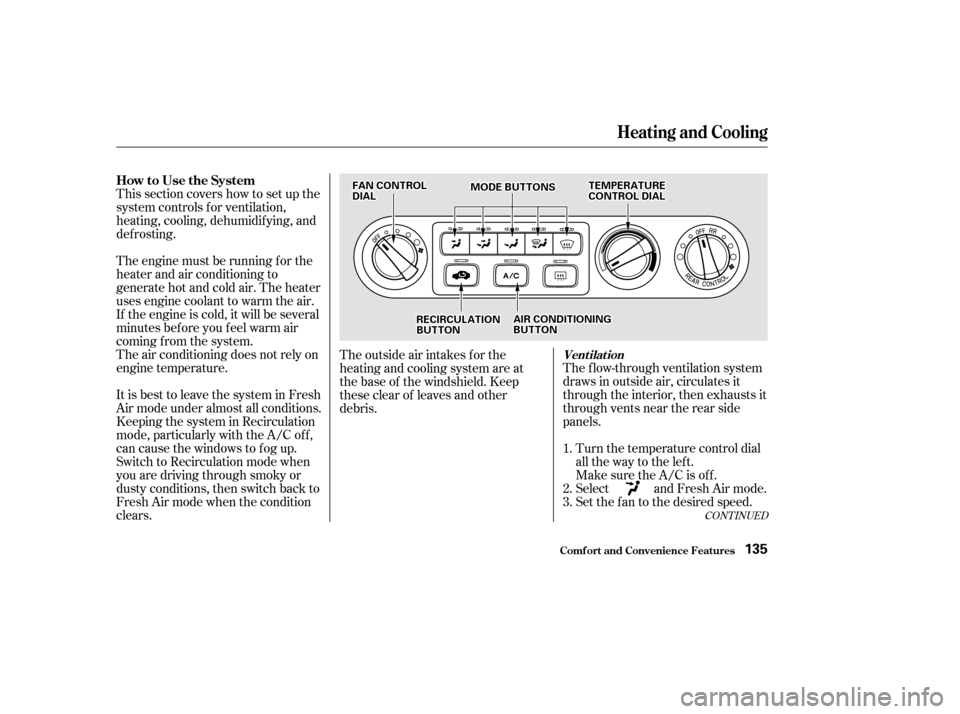
panels.Turn the temperature control dial
all the way to the lef t.
Make sure the A/C is of f .
Select and Fresh Air mode.
Set the f an to the desired speed.
The air conditioning does not rely on
engine temperature.
It is best to leave the system in Fresh
Air mode under almost all conditions.
Keeping the system in Recirculation
mode, particularly with the A/C of f ,
can cause the windows to fog up.
Switch to Recirculation mode when
you are driving through smoky or
dusty conditions, then switch back to
Fresh Air mode when the condition
clears. The outside air intakes f or the
heating and cooling system are at
the base of the windshield. Keep
these clear of leaves and other
debris.
1.
2.
3.
Heating and Cooling
Comf ort and Convenience Feat ures
Vent ilat ion
How to Use the System
135
F FAA N
N C
COON NTTR
RO OL L
D
D I
IAA L
L M
M
O
ODDE
E B
BUUT TT
TO
ON NSS T
T
E
EM
M P
PE
ER
RA A T
TU
UR REE
C
CO ON NTTR
RO OL L D
DI
IAA L
L
R
RE EC
CI IRRC CUUL LAA T
TI
IOON N
B
BU UT TT
TO
ON N A
A
I
IRR C
COON NDDI
ITT I
IOON NIINNG G
B
BU UT TT
TO
ON N
Page 139 of 399
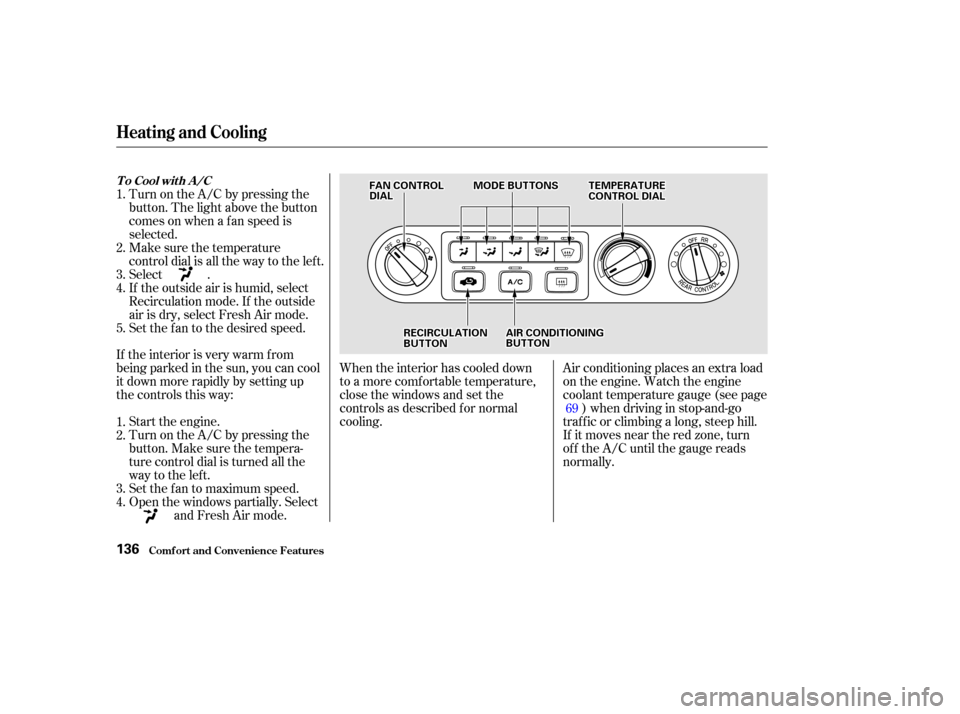
When the interior has cooled down
to a more comf ortable temperature,
close the windows and set the
controls as described f or normal
cooling.Air conditioning places an extra load
on the engine. Watch the engine
coolant temperature gauge (see page
) when driving in stop-and-go
traf f ic or climbing a long, steep hill.
If it moves near the red zone, turn
of f the A/C until the gauge reads
normally.
If the interior is very warm f rom
beingparkedinthesun,youcancool
it down more rapidly by setting up
the controls this way:
Start the engine.
Turn on the A/C by pressing the
button. Make sure the tempera-
ture control dial is turned all the
way to the left.
Set the f an to maximum speed.
Open the windows partially. Select and Fresh Air mode.
Turn on the A/C by pressing the
button. The light above the button
comesonwhenafanspeedis
selected.
Make sure the temperature
control dial is all the way to the left.
Select .
If the outside air is humid, select
Recirculation mode. If the outside
air is dry, select Fresh Air mode.
Set the f an to the desired speed.
1.
2.
3.
4. 1.
2.
3.
4.
5. 69
Comf ort and Convenience Feat ures
Heating and Cooling
T o Cool wit h A /C
136
F FAA N
N C
COON NTTR
RO OL L
D
D I
IAA L
L M
M
O
ODDE
E B
BUUT TT
TO
ON NSS
T
TE
EM
M P
PE
ER
RA A T
TU
UR REE
C
CO ON NTTR
RO OL L D
DI
IAA L
L
R
RE EC
CI IRRC CUUL LAA T
TI
IOON N
B
BU UT TT
TO
ON N A
A
I
IRR C
COON NDDI
ITT I
IOON NIINNG G
B
BU UT TT
TO
ON N
Page 141 of 399
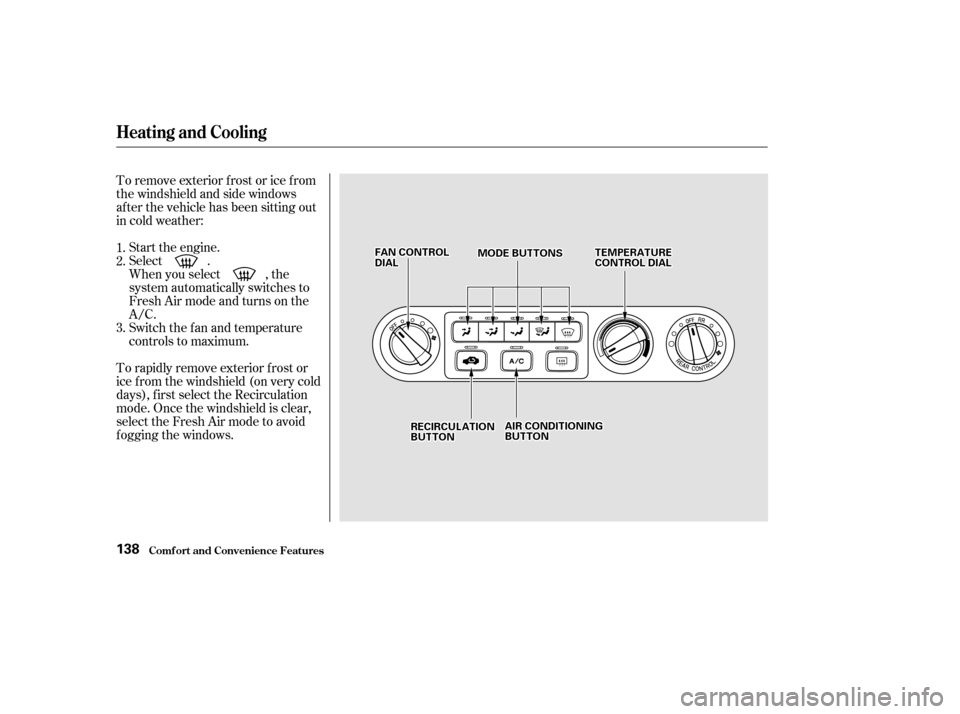
To remove exterior f rost or ice f rom
the windshield and side windows
after the vehicle has been sitting out
in cold weather:Start the engine.
Select .
When you select , the
system automatically switches to
Fresh Air mode and turns on the
A/C.
Switch the fan and temperature
controls to maximum.
To rapidly remove exterior f rost or
ice f rom the windshield (on very cold
days), f irst select the Recirculation
mode. Once the windshield is clear,
select the Fresh Air mode to avoid
f ogging the windows. 1.
2.
3.
Comf ort and Convenience Feat ures
Heating and Cooling
138
F FA A N
N C
COON NTTR
RO OL L
D
D I
IAA L
L M
M
O
ODDE
E B
BUUT TT
TO
ON NSS T
T
E
EM
M P
PE
ER
RA A T
TU
UR REE
C
CO ON NTTR
RO OL L D
DI
IAA L
L
A
A I
IRR C
COON NDDI
ITT I
IOON NIINNG G
B
BU UT TT
TO
ON N
R
RE
EC
CI IRRC CUUL LAA T
TI
IOON N
B
BU UT TT
TO
ON N
Page 147 of 399
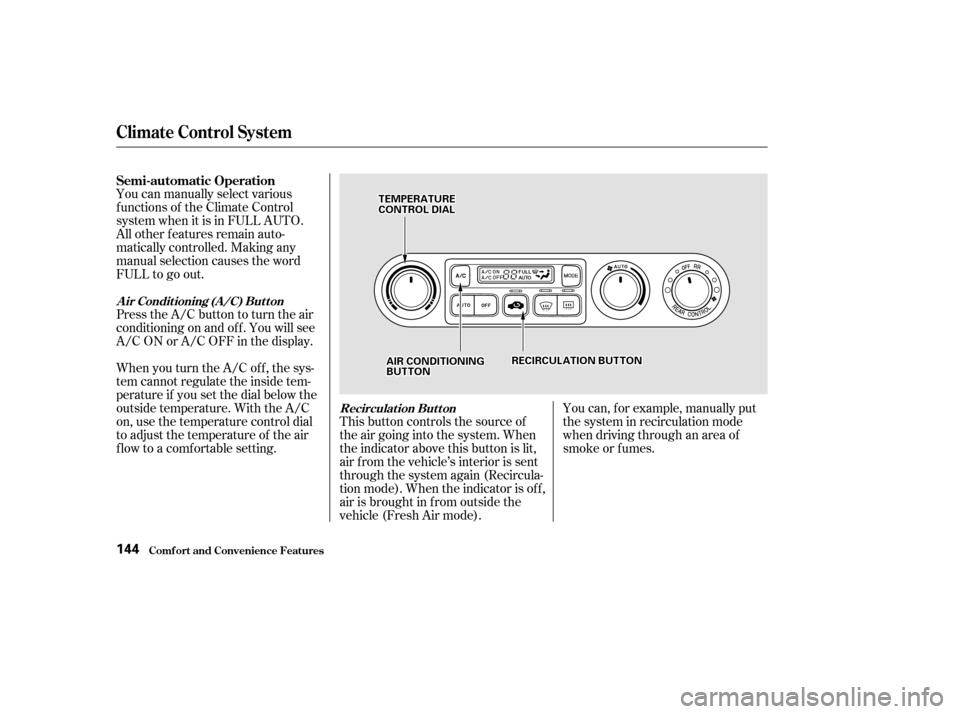
You can manually select various
f unctions of the Climate Control
system when it is in FULL AUTO.
All other f eatures remain auto-
matically controlled. Making any
manual selection causes the word
FULL to go out.
Press the A/C button to turn the air
conditioningonandoff.Youwillsee
A/C ON or A/C OFF in the display.
When you turn the A/C of f , the sys-
tem cannot regulate the inside tem-
perature if you set the dial below the
outside temperature. With the A/C
on, use the temperature control dial
to adjust the temperature of the air
flow to a comfortable setting.This button controls the source of
the air going into the system. When
the indicator above this button is lit,
air f rom the vehicle’s interior is sent
through the system again (Recircula-
tion mode). When the indicator is off,
air is brought in f rom outside the
vehicle (Fresh Air mode).You can, f or example, manually put
the system in recirculation mode
when driving through an area of
smoke or f umes.
Semi-automatic Operation
A ir Condit ioning (A /C) But t on
Recirculat ion But t on
Climat e Cont rol Syst em
Comf ort and Convenience Feat ures144
T TE
EM
M P
PE
ER
RA A T
TU
UR REE
C
CO ON NTTR
RO OL L D
DI
IAA L
L
R
REEC
CI IRRC CUUL LAA T
TI
IOON N B
BUUT TT
TO
ON N
A
A I
IRR C
COON NDDI
ITT I
IOON NIINNG G
B
BU UT TT
TO
ON N
Page 153 of 399
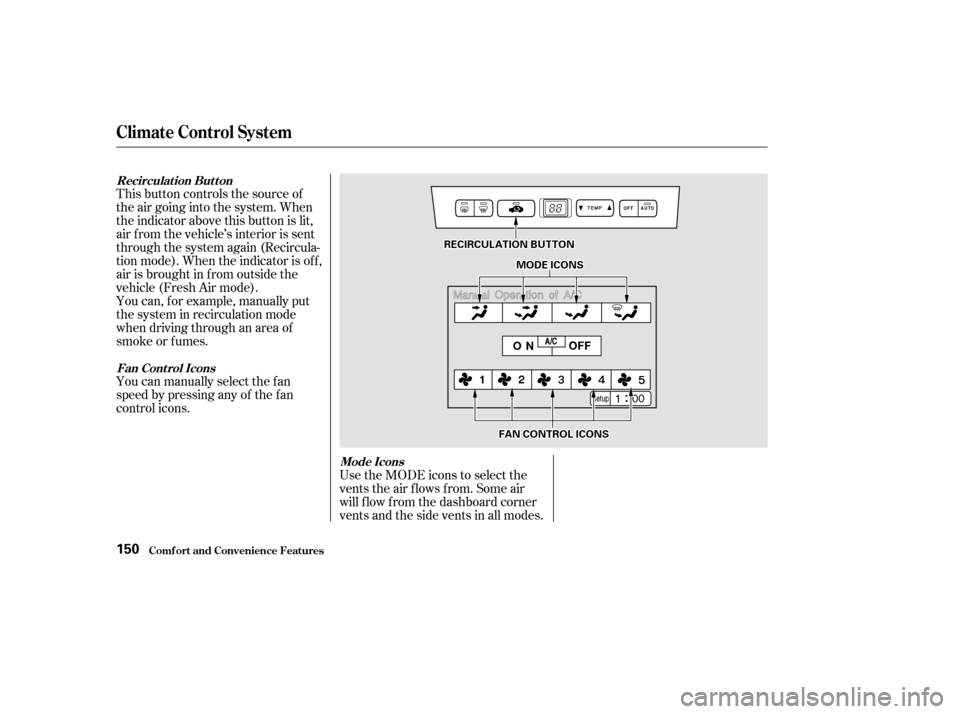
This button controls the source of
the air going into the system. When
the indicator above this button is lit,
air f rom the vehicle’s interior is sent
through the system again (Recircula-
tion mode). When the indicator is off,
air is brought in f rom outside the
vehicle (Fresh Air mode).
You can, f or example, manually put
the system in recirculation mode
when driving through an area of
smoke or f umes.
You can manually select the f an
speed by pressing any of the f an
control icons.Use the MODE icons to select the
vents the air flows from. Some air
will f low f rom the dashboard corner
vents and the side vents in all modes.
Climat e Cont rol Syst em
Comf ort and Convenience Feat ures
Recirculat ion But t on
Fan Cont rol Icons Mode Icons
150
R REEC
CI IRRC CUUL LAA T
TI
IOON N B
BUUT TT
TO
ON N
M
M O
ODDE
E I
ICCO ON NSS
F
FA A N
N C
COON NTTR
RO OL L I
ICCO ON NSS
Page 156 of 399
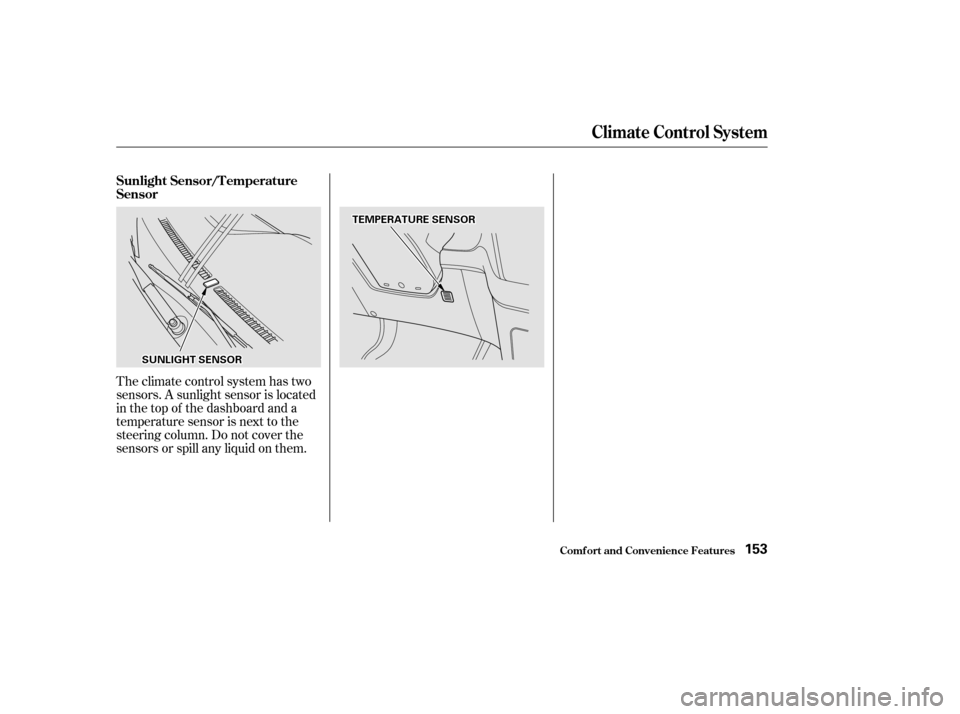
Theclimatecontrolsystemhastwo
sensors. A sunlight sensor is located
in the top of the dashboard and a
temperature sensor is next to the
steering column. Do not cover the
sensors or spill any liquid on them. Sunlight Sensor/T emperature
Sensor
Climat e Cont rol Syst em
Comf ort and Convenience Feat ures153
T TE
EM
M P
PE
ER
RA A T
TU
UR REE S
SEEN
NS SOOR R
S
SU UN NLLIIGGH HT
T S
SEEN
NS SOOR R
Page 157 of 399
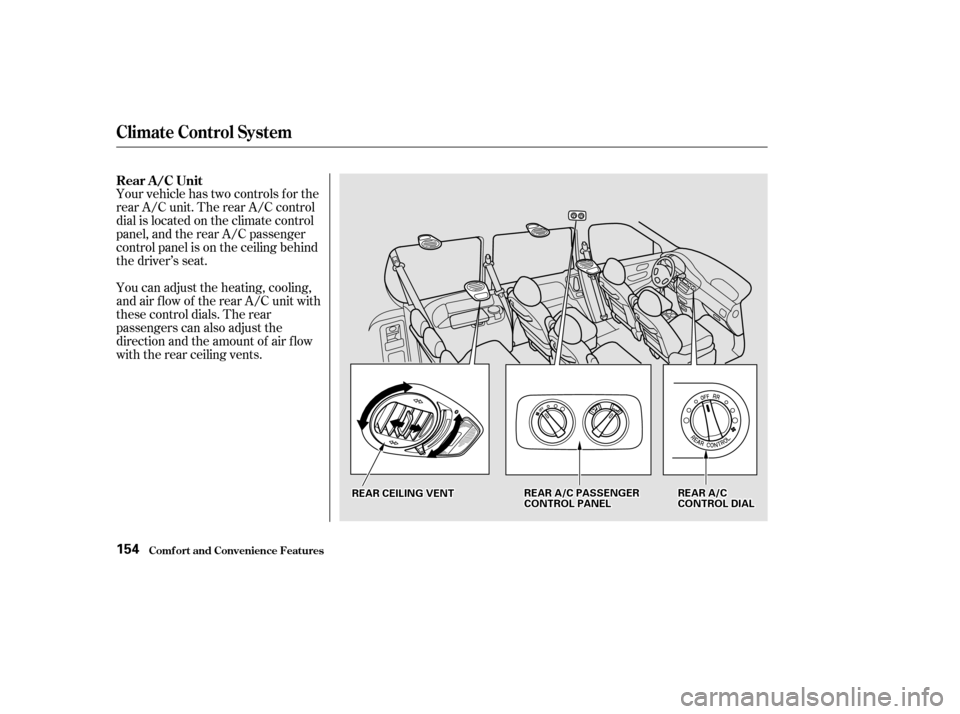
Your vehicle has two controls f or the
rear A/C unit. The rear A/C control
dial is located on the climate control
panel, and the rear A/C passenger
control panel is on the ceiling behind
the driver’s seat.
You can adjust the heating, cooling,
and air f low of the rear A/C unit with
these control dials. The rear
passengers can also adjust the
direction and the amount of air f low
with the rear ceiling vents. Rear A/C Unit
Comf ort and Convenience Feat ures
Climat e Cont rol Syst em
154
R REEA
A R
R A
A/
/C
C P
PA
A S
SSSEEN
NG GEER
R
C
CO ON NTTR
RO OL L P
PA
A N
NE EL
L
R
RE
EA
A R
R C
CEEI
ILLI INNG G V
VE
EN
NT T R
RE
EA
A R
R A
A/
/C
C
C
CO ON NTTR
RO OL L D
DI
IAA L
L