change wheel HONDA ODYSSEY 2006 RB1-RB2 / 3.G User Guide
[x] Cancel search | Manufacturer: HONDA, Model Year: 2006, Model line: ODYSSEY, Model: HONDA ODYSSEY 2006 RB1-RB2 / 3.GPages: 420, PDF Size: 6.01 MB
Page 108 of 420
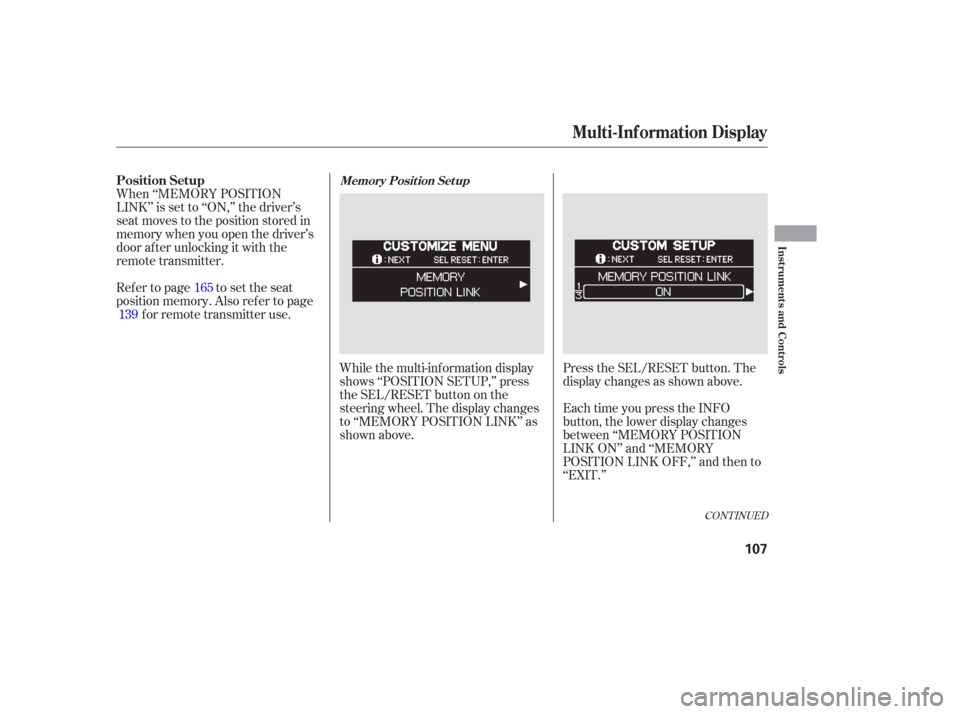
While the multi-information display
shows ‘‘POSITION SETUP,’’ press
the SEL/RESET button on the
steering wheel. The display changes
to ‘‘MEMORY POSITION LINK’’ as
shown above.Press the SEL/RESET button. The
display changes as shown above.
When ‘‘MEMORY POSITION
LINK’’ is set to ‘‘ON,’’ the driver’s
seat moves to the position stored in
memory when you open the driver’s
door af ter unlocking it with the
remote transmitter.
Ref er to page to set the seat
position memory. Also ref er to page
forremotetransmitteruse.
Each time you press the INFO
button, the lower display changes
between ‘‘MEMORY POSITION
LINK ON’’ and ‘‘MEMORY
POSITION LINK OFF,’’ and then to
‘‘EXIT.’’
165
139
CONT INUED
Position SetupMemory Posit ion Set up
Multi-Inf ormation Display
Inst rument s and Cont rols
107
Page 110 of 420
There are two custom settings in the
Lighting Setup:The interior lights f ade out when you
close all doors and the tailgate. You
can change the time that the interior
lights f ade out.
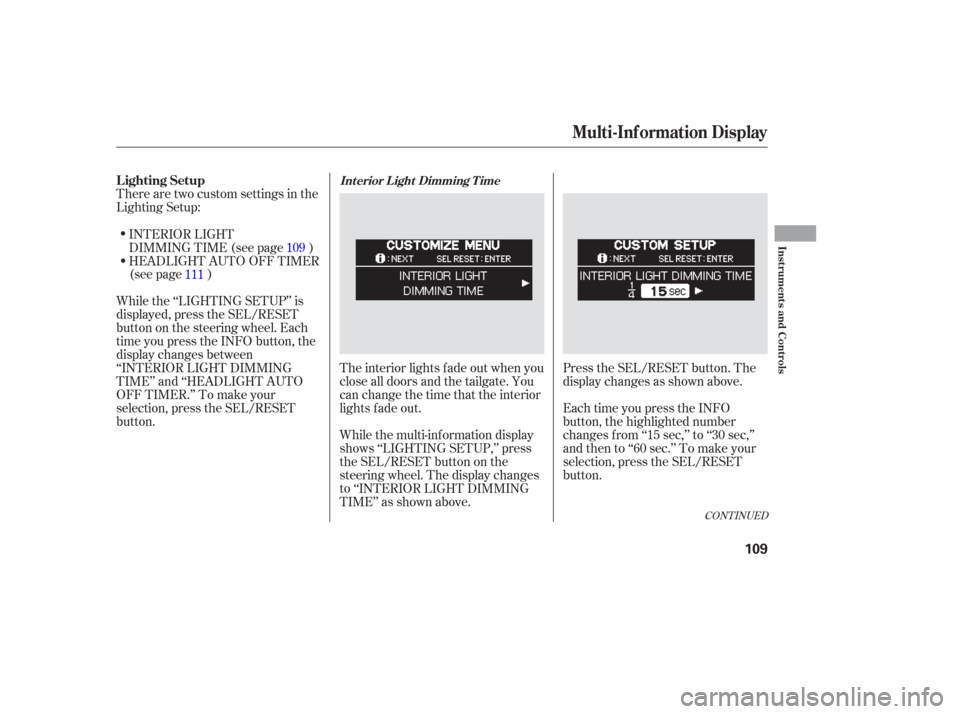
While the multi-information display
shows ‘‘LIGHTING SETUP,’’ press
the SEL/RESET button on the
steering wheel. The display changes
to ‘‘INTERIOR LIGHT DIMMING
TIME’’ as shown above.Press the SEL/RESET button. The
display changes as shown above.
Each time you press the INFO
button, the highlighted number
changes f rom ‘‘15 sec,’’ to ‘‘30 sec,’’
andthento‘‘60sec.’’Tomakeyour
selection, press the SEL/RESET
button.
INTERIOR LIGHT
DIMMING TIME (see page )
HEADLIGHT AUTO OFF TIMER
(see page )
While the ‘‘LIGHTING SETUP’’ is
displayed, press the SEL/RESET
button on the steering wheel. Each
time you press the INFO button, the
display changes between
‘‘INTERIOR LIGHT DIMMING
TIME’’ and ‘‘HEADLIGHT AUTO
OFF TIMER.’’ To make your
selection, press the SEL/RESET
button. 109
111
CONT INUED
Lighting SetupInt erior L ight Dimming T ime
Multi-Inf ormation Display
Inst rument s and Cont rols
109
Page 112 of 420
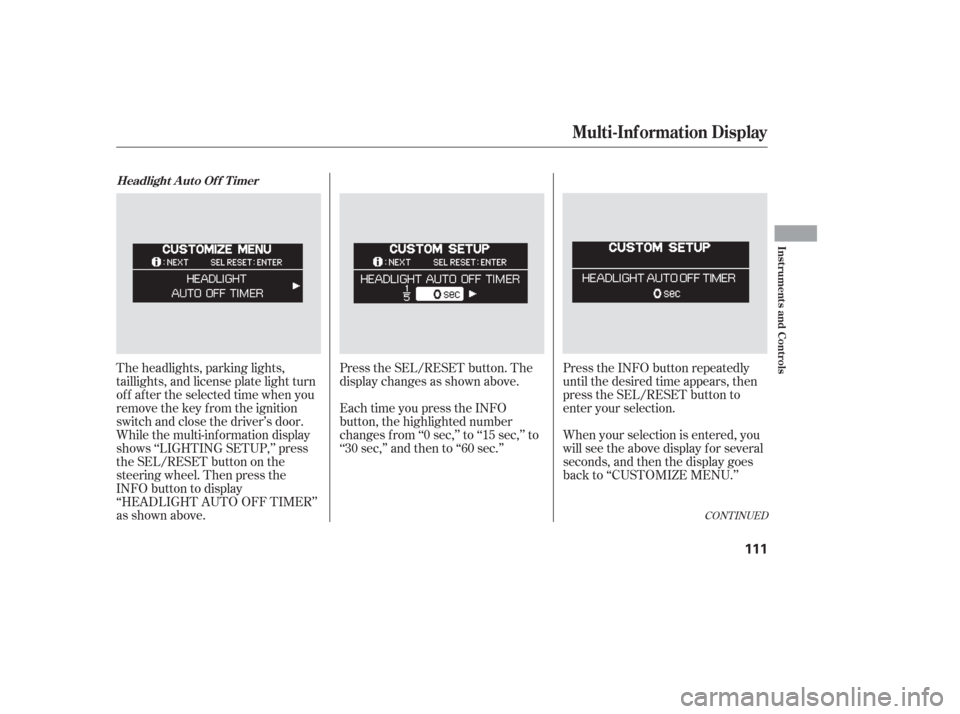
Press the SEL/RESET button. The
display changes as shown above.
Each time you press the INFO
button, the highlighted number
changes f rom ‘‘0 sec,’’ to ‘‘15 sec,’’ to
‘‘30 sec,’’ and then to ‘‘60 sec.’’Press the INFO button repeatedly
until the desired time appears, then
press the SEL/RESET button to
enter your selection.
When your selection is entered, you
will see the above display for several
seconds, and then the display goes
back to ‘‘CUSTOMIZE MENU.’’
The headlights, parking lights,
taillights, and license plate light turn
of f af ter the selected time when you
remove the key from the ignition
switch and close the driver’s door.
While the multi-information display
shows ‘‘LIGHTING SETUP,’’ press
the SEL/RESET button on the
steering wheel. Then press the
INFO button to display
‘‘HEADLIGHT AUTO OFF TIMER’’
as shown above.
CONT INUED
Headlight A uto Of f T imer
Multi-Inf ormation Display
Inst rument s and Cont rols
111
Page 114 of 420
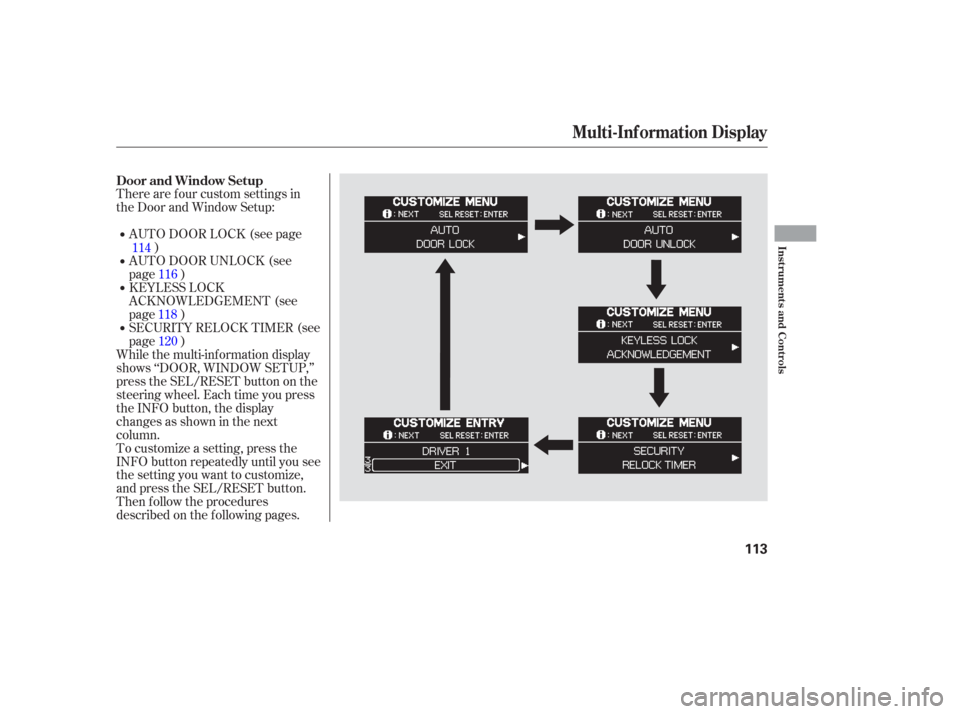
There are f our custom settings in
the Door and Window Setup:
To customize a setting, press the
INFO button repeatedly until you see
the setting you want to customize,
and press the SEL/RESET button.
Then f ollow the procedures
described on the f ollowing pages.AUTO DOOR LOCK (see page
)
While the multi-information display
shows ‘‘DOOR, WINDOW SETUP,’’
press the SEL/RESET button on the
steering wheel. Each time you press
the INFO button, the display
changesasshowninthenext
column. SECURITY RELOCK TIMER (see
page ) KEYLESS LOCK
ACKNOWLEDGEMENT (see
page ) AUTO DOOR UNLOCK (see
page )
114
116
118 120
Door and Window Setup
Multi-Inf ormation Display
Inst rument s and Cont rols
113
Page 115 of 420
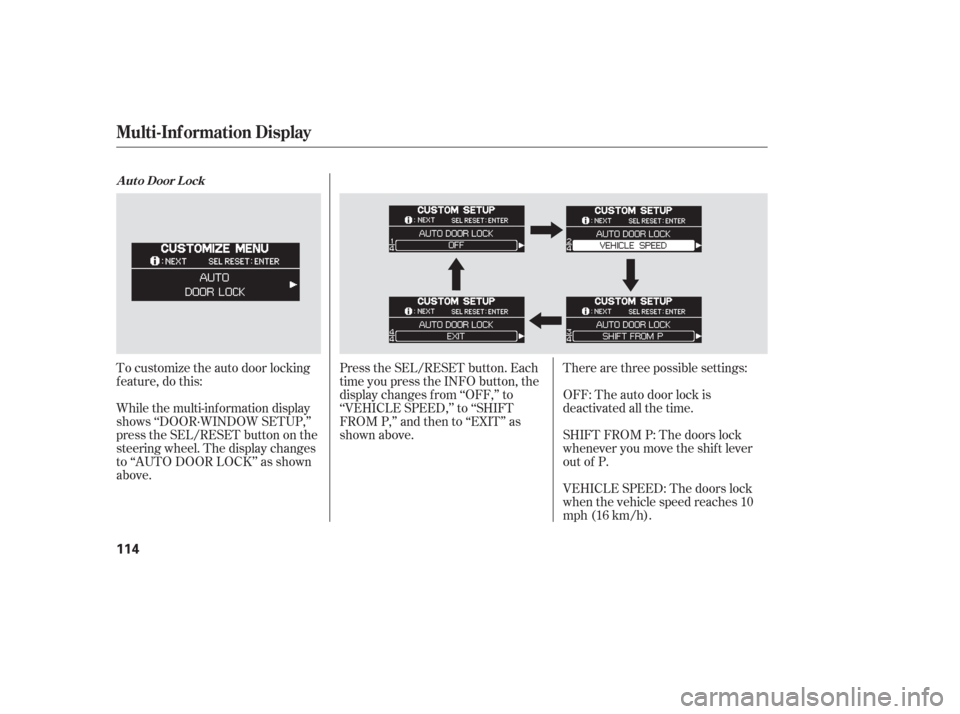
To customize the auto door locking
f eature, do this:
While the multi-information display
shows ‘‘DOOR·WINDOW SETUP,’’
press the SEL/RESET button on the
steering wheel. The display changes
to ‘‘AUTO DOOR LOCK’’ as shown
above.Therearethreepossiblesettings:
OFF: The auto door lock is
deactivated all the time.
SHIFT FROM P: The doors lock
whenever you move the shif t lever
out of P.
VEHICLE SPEED: The doors lock
when the vehicle speed reaches 10
mph (16 km/h).
Press the SEL/RESET button. Each
time you press the INFO button, the
display changes f rom ‘‘OFF,’’ to
‘‘VEHICLE SPEED,’’ to ‘‘SHIFT
FROM P,’’ and then to ‘‘EXIT’’ as
shown above.
A ut o Door L ock
Multi-Inf ormation Display
114
Page 117 of 420
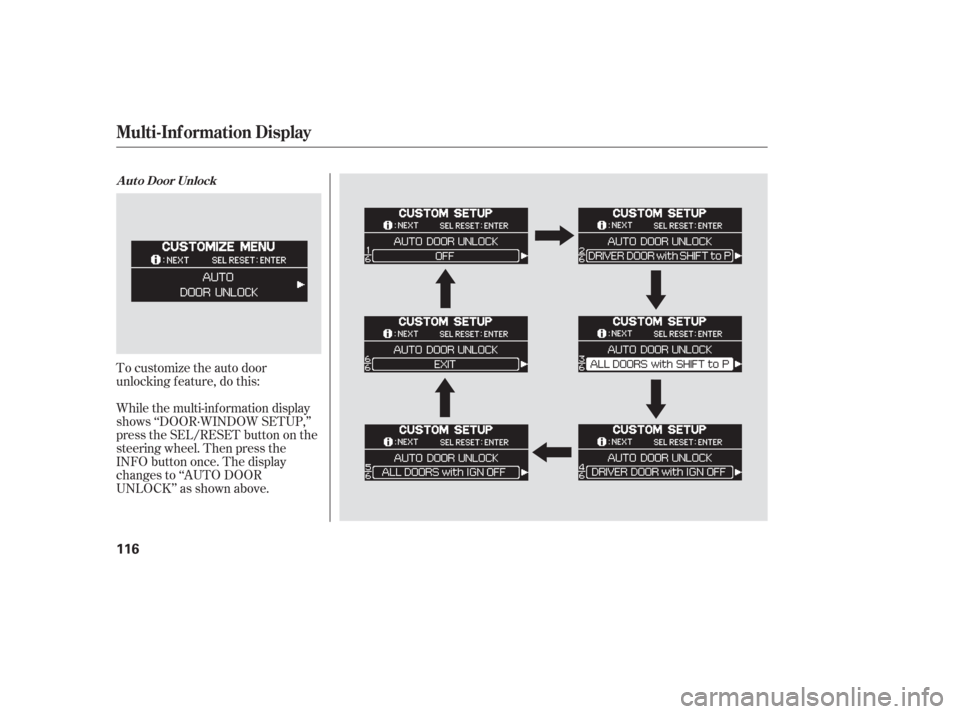
To customize the auto door
unlocking f eature, do this:
While the multi-information display
shows ‘‘DOOR·WINDOW SETUP,’’
press the SEL/RESET button on the
steering wheel. Then press the
INFO button once. The display
changes to ‘‘AUTO DOOR
UNLOCK’’ as shown above.
A ut o Door Unlock
Multi-Inf ormation Display
116
Page 119 of 420
When you push the LOCK button on
the remote transmitter, some
exterior lights f lash, and a beeper
sounds when you push the LOCK
button again within 5 seconds to
verify that the doors and the tailgate
arelockedandthesecuritysystem
has set (see page ). You can
customize the exterior lights not to
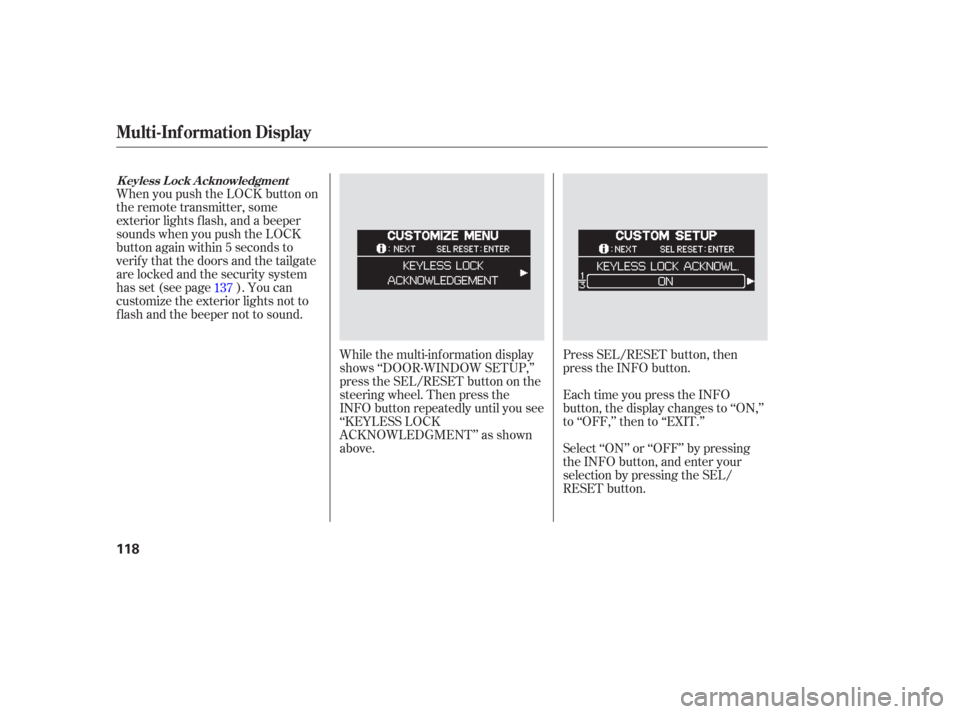
f lash and the beeper not to sound.While the multi-information display
shows ‘‘DOOR·WINDOW SETUP,’’
press the SEL/RESET button on the
steering wheel. Then press the
INFO button repeatedly until you see
‘‘KEYLESS LOCK
ACKNOWLEDGMENT’’ as shown
above.Press SEL/RESET button, then
press the INFO button.
Each time you press the INFO
button, the display changes to ‘‘ON,’’
to ‘‘OFF,’’ then to ‘‘EXIT.’’
Select ‘‘ON’’ or ‘‘OFF’’ by pressing
the INFO button, and enter your
selection by pressing the SEL/
RESET button.
137
K eyless L ock A cknowledgment
Multi-Inf ormation Display
118
Page 121 of 420
If you unlock the doors and the
tailgate with the remote transmitter,
but do not open any of the doors or
thetailgatewithin30seconds,the
doors and the tailgate automatically
relock and the security system sets.
You can change this relock time
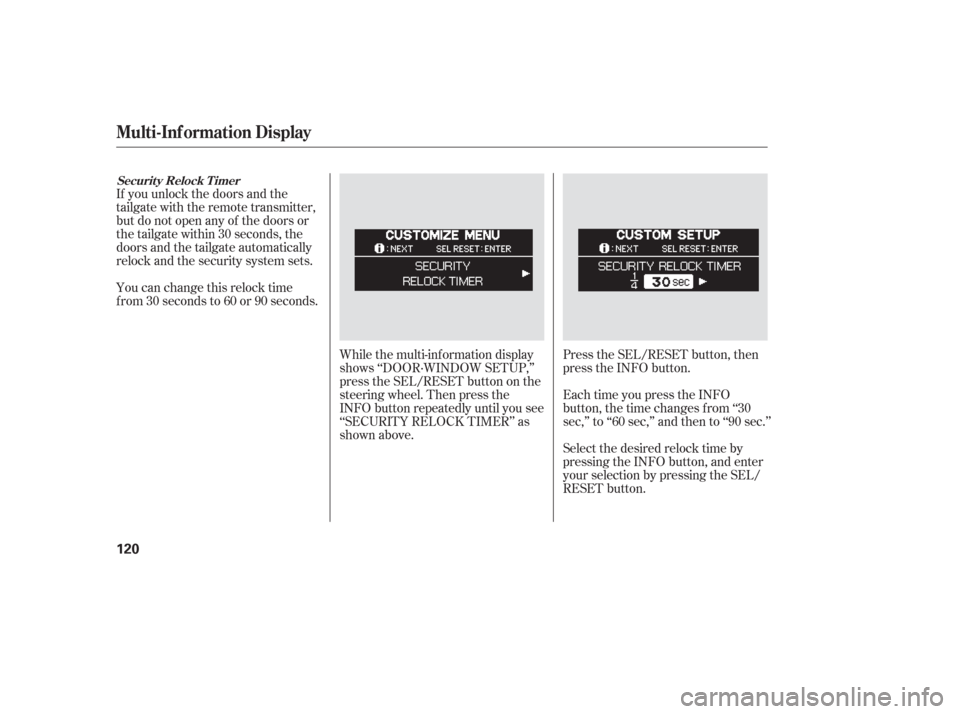
f rom 30 seconds to 60 or 90 seconds.While the multi-information display
shows ‘‘DOOR·WINDOW SETUP,’’
press the SEL/RESET button on the
steering wheel. Then press the
INFO button repeatedly until you see
‘‘SECURITY RELOCK TIMER’’ as
shown above.Press the SEL/RESET button, then
press the INFO button.
Each time you press the INFO
button, the time changes f rom ‘‘30
sec,’’ to ‘‘60 sec,’’ and then to ‘‘90 sec.’’
Select the desired relock time by
pressing the INFO button, and enter
your selection by pressing the SEL/
RESET button.
Securit y Relock T imer
Multi-Inf ormation Display
120
Page 123 of 420
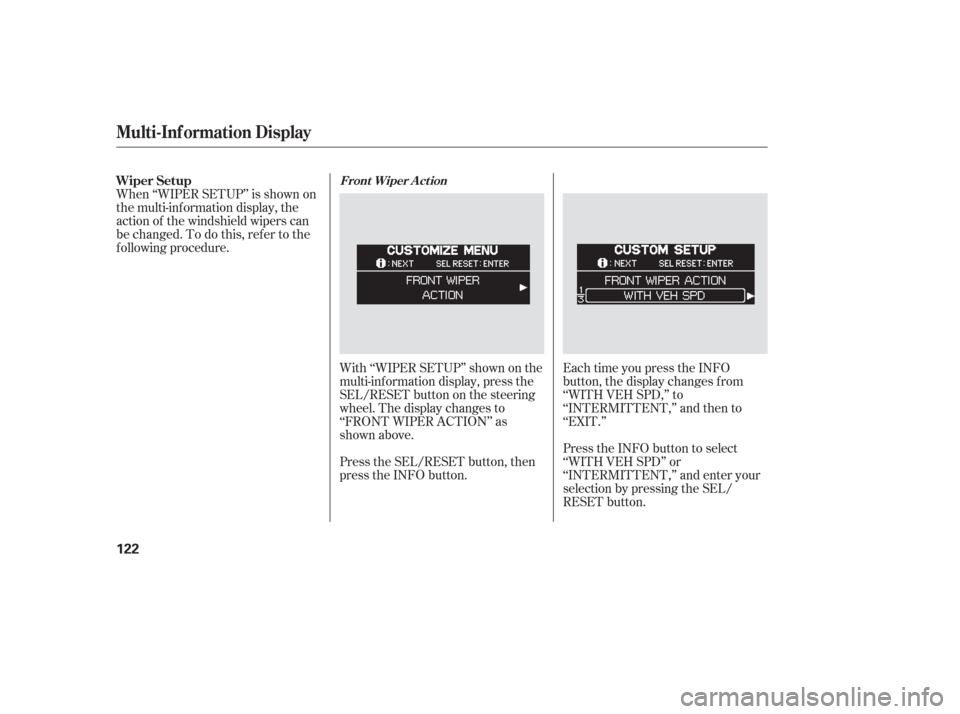
With ‘‘WIPER SETUP’’ shown on the
multi-inf ormation display, press the
SEL/RESET button on the steering
wheel. The display changes to
‘‘FRONT WIPER ACTION’’ as
shown above.
Press the SEL/RESET button, then
press the INFO button.Each time you press the INFO
button, the display changes f rom
‘‘WITH VEH SPD,’’ to
‘‘INTERMITTENT,’’ and then to
‘‘EXIT.’’
Press the INFO button to select
‘‘WITH VEH SPD’’ or
‘‘INTERMITTENT,’’ and enter your
selection by pressing the SEL/
RESET button.
When ‘‘WIPER SETUP’’ is shown on
the multi-information display, the
action of the windshield wipers can
be changed. To do this, ref er to the
f ollowing procedure. Wiper Setup
Front Wiper A ct ion
Multi-Inf ormation Display
122
Page 192 of 420
The standard audio system has
many f eatures. This section
describes those f eatures and how to
use them. (If you selected an
optional audio system, ref er to the
operating instructions that came
with it.) The heating and air conditioning
system in your vehicle provides a
comf ortable driving environment in
all weather conditions.
The security system helps to
discourage vandalism and thef t of
your vehicle. Your vehicle has an anti-theft audio
system that requires a code number
to enable it..............
Vents, Heating, and A/C .192
Using Automatic Climate ...................................
Control .197
.........
Using the Rear A/C Unit .198
...................
Rear Climate Control .201
..............
Climate Control Sensors .202
..........
Playing the AM/FM Radio .203
............
AM/FM Radio Reception .209
...
Playing the XM Satellite Radio .211
..................................
Playing a CD .217
...................................
CD Changer .220
....................
Protecting Your CDs .226
.....
CD Changer Error Messages .227
...............................
Playing a Tape .228
.............
Steering Wheel Controls .233
.................
Radio Thef t Protection .234
........
Rear Entertainment System .235
..........................
Playable DVDs .263
............................
Security System .268
...............................
Cruise Control .269
HomeLink Universal ................................
Transceiver .272
................
Parking Sensor System .277
.
Rear View Camera and Monitor .281
Features
Features
191