110 HONDA ODYSSEY 2011 RB3-RB4 / 4.G Navigation Manual
[x] Cancel search | Manufacturer: HONDA, Model Year: 2011, Model line: ODYSSEY, Model: HONDA ODYSSEY 2011 RB3-RB4 / 4.GPages: 178, PDF Size: 3.97 MB
Page 2 of 178
2Navigation System
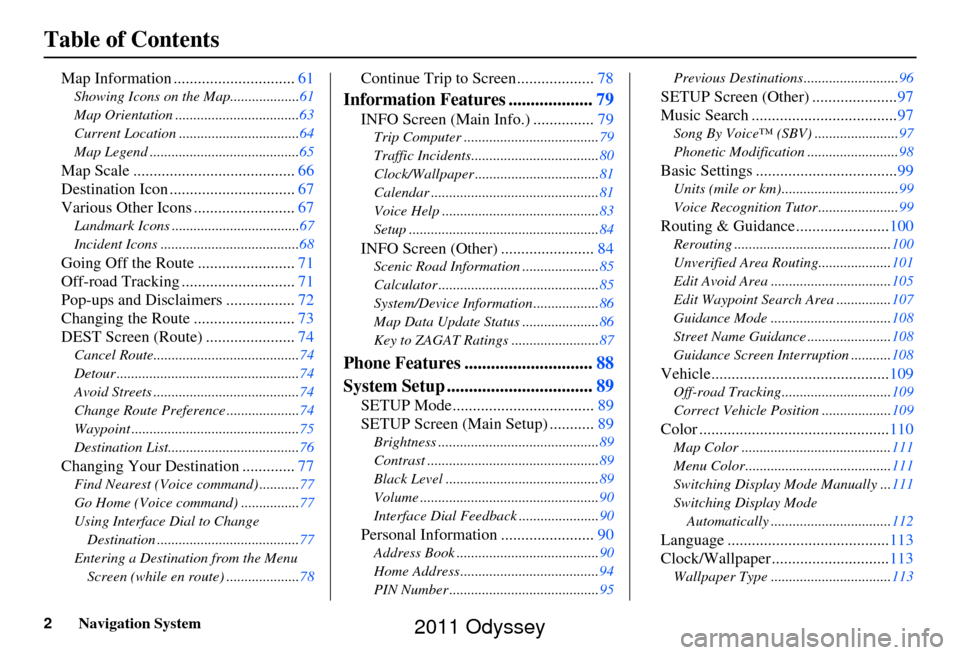
Table of Contents
Map Information ..............................61
Showing Icons on the Map...................61
Map Orientation ..................................63
Current Location .................................64
Map Legend .........................................65
Map Scale ........................................ 66
Destination Icon ............................... 67
Various Other Icons ......................... 67
Landmark Icons ...................................67
Incident Icons ......................................68
Going Off the Route ........................71
Off-road Tracking ............................ 71
Pop-ups and Disclaimers ................. 72
Changing the Route ......................... 73
DEST Screen (Route) ...................... 74
Cancel Route........................................74
Detour ..................................................74
Avoid Streets ........................................74
Change Route Preference ....................74
Waypoint ..............................................75
Destination List....................................76
Changing Your Destination .............77
Find Nearest (Voice command) ...........77
Go Home (Voice command) ................77
Using Interface Dial to Change
Destination .......................................77
Entering a Destination from the Menu Screen (while en route) ....................78
Continue Trip to Screen................... 78
Information Features ...................79
INFO Screen (Main Info.) ............... 79
Trip Computer ..................................... 79
Traffic Incidents................................... 80
Clock/Wallpaper .................................. 81
Calendar .............................................. 81
Voice Help ........................................... 83
Setup .................................................... 84
INFO Screen (Other) .......................84
Scenic Road Information ..................... 85
Calculator ............................................ 85
System/Device Information .................. 86
Map Data Update Status ..................... 86
Key to ZAGAT Ratings ........................ 87
Phone Features .............................88
System Setup ................................. 89
SETUP Mode................................... 89
SETUP Screen (Main Setup) ........... 89
Brightness ............................................ 89
Contrast ............................................... 89
Black Level .......................................... 89
Volume ................................................. 90
Interface Dial Feedback ...................... 90
Personal Information .......................90
Address Book ....................................... 90
Home Address ...................................... 94
PIN Number ......................................... 95Previous Destinations..........................
96
SETUP Screen (Other) .....................97
Music Search .................................... 97
Song By Voice™ (SBV) ....................... 97
Phonetic Modification ......................... 98
Basic Settings ...................................99
Units (mile or km)................................ 99
Voice Recognition Tutor ...................... 99
Routing & Guidance.......................100
Rerouting ........................................... 100
Unverified Area Routing.................... 101
Edit Avoid Area ................................. 105
Edit Waypoint Search Area ............... 107
Guidance Mode ........... ......................108
Street Name Guidance ....................... 108
Guidance Screen Interruption ........... 108
Vehicle............................................109
Off-road Tracking..............................109
Correct Vehicle Position ................... 109
Color ...............................................110
Map Color ......................................... 111
Menu Color........................................ 111
Switching Display Mode Manually ... 111
Switching Display Mode Automatically ................................. 112
Language ........................................ 113
Clock/Wallpaper............................. 113
Wallpaper Type ................................. 113
2011 Odyssey
Page 27 of 178
Navigation System27
Getting Started
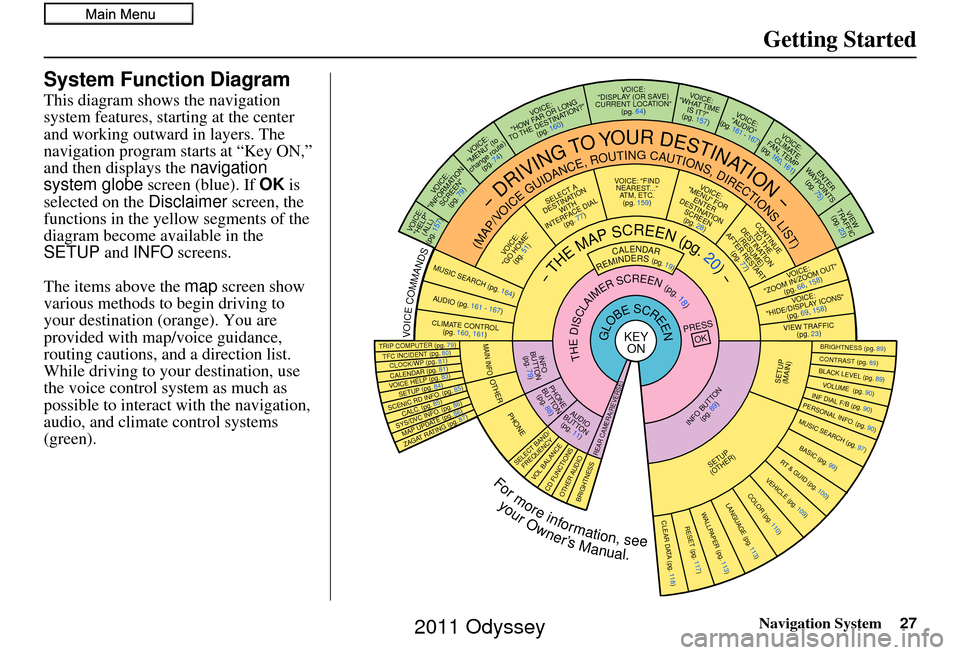
System Function Diagram
This diagram shows the navigation
system features, starting at the center
and working outward in layers. The
navigation program starts at “Key ON,”
and then displays the navigation
system globe screen (blue). If OK is
selected on the Disclaimer screen, the
functions in the yellow segments of the
diagram become available in the
SETUP and INFO screens.
The items above the map screen show
various methods to begin driving to
your destination (orange). You are
provided with map/voice guidance,
routing cautions, and a direction list.
While driving to your destination, use
the voice control system as much as
possible to interact with the navigation,
audio, and climat e control systems
(green).
REMINDERS(pg.19)CALENDAR
-THEMAPSCREEN(pg.20)-
(MAP/VOICEGUIDANCE,ROUTINGCAUTIONS,DIRECTIONSLIST)
-DRIVINGTOYOURDESTINATION-
VOICE: "HELP" (ALL)
(pg. 157)
VOICE:
"INFORMATION SCREEN"(pg. 79)
VOICE:
"MENU" (to
change route) (pg. 74)
VOICE:
"HOW FAR OR LONG
TO THE DESTINATION?" (pg. 160)
VOICE:
"DISPLAY (OR S AV E)
CURRENT LOCA TION"
(pg. 64)VOICE:
"WHAT TIME IS IT?"
(pg. 157)
VOI CE:
"AUDIO"
(pg. 161 - 167)
VOI CE:
CLIMATE
FAN, TEMP
(pg. 160, 161)
ENTER
WAY POINTS
(pg. 75)
VIEW
TRAFFIC(pg. 23)
VOICE:
"ZOOM IN/ZOOM OUT" (pg. 66, 158)
VOICE:
"HIDE/DISPLAY ICONS" (pg. 69, 158)
VIEW TRAFFIC(pg. 23)
BRIGHTN ESS (pg. 89)CONTRAST (pg. 89)BLACK LEVEL (pg. 89)VOLUME (pg. 90)INF DIAL F/B (pg. 90)PERSONAL INFO. (pg. 90)MUSIC SEARCH (pg. 97)
BASIC (pg. 99)RT & GUID (pg. 100)
VEHICLE (pg. 109)COLOR (pg. 110)LANGUAGE (pg. 113)CLEAR DATA (pg. 118)RESET (pg. 117)WALLPAPER (pg. 113)
ZAGAT RATING (pg. 87)
TFC INCIDENT (pg. 80)TRIP COMPUTER (pg. 79)
CALENDAR (pg. 81)VOICE HELP (pg. 83)SETUP (pg. 84)
SYS/DVC INFO. (pg. 86)MAP UPDATE (pg. 86)
SCENIC RD INFO . (pg. 85)
PRESS
OK
SELECT BAND/FREQUENCYVOL BALANCECD FUNCTIONSOTH ER AUDIOBRIGHTNESS
REAR CAMERA(R EVERSE)
INFO BUTTON
(pg. 89)AUD IO
BUTTON (pg. 11)
INFO
BUTTON (pg. 79)
PHONE
BUTTON (pg. 88)
PHONE
THEDISCLAIMERSCREEN(pg.18)
VOI CE: "FIND
NEARES T..."
AT M , ETC.
(pg. 159)
SELECT A
DESTINATION WITH
INTERFACE DIAL (pg. 77)
VOICE:
"GO HOME" (pg. 51)
VOICE:
"MENU" FOR ENTER
DESTINATION SCREEN(pg. 28)
CONTINUE TO THE
DESTINATION (RESUME)
AFTER RESTART (pg. 77)
GLOBESCREENKEYONVOICECOMMANDSMUSIC SEARCH
(pg. 164)AUD IO (pg. 161 - 167)
CLIMATE CONTR OL
(pg. 160, 161 )
Formoreinformation,see
yourOwner’sManual.
SETUP
(OTHER)
CLOCK/W P (pg. 81)
CALC. (pg. 85)
MAIN INFO
OTHERSETUP
(MAIN)
2011 Odyssey
Page 110 of 178
110Navigation System
System Setup
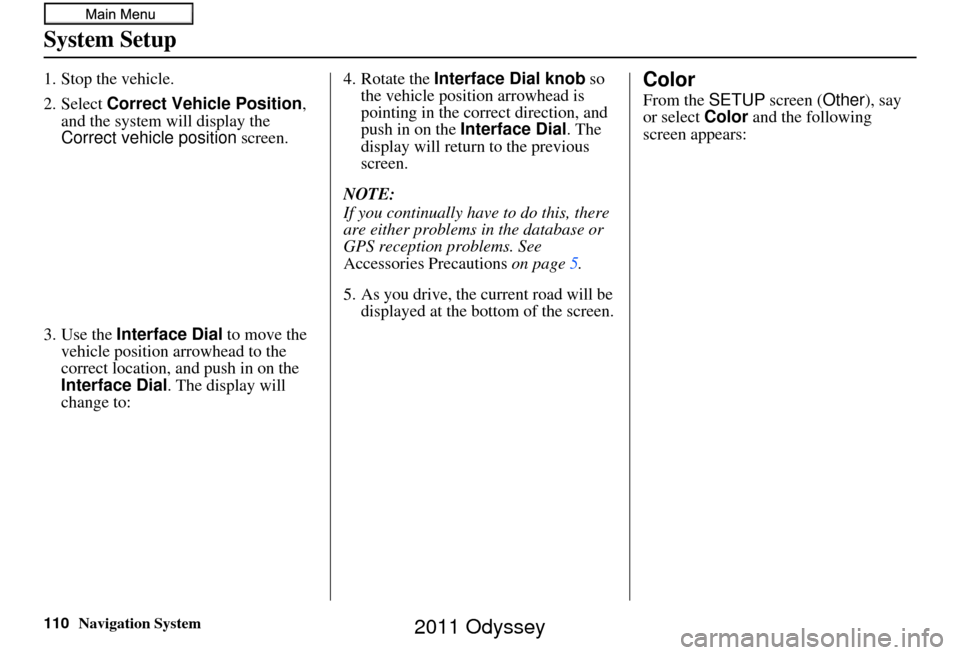
1. Stop the vehicle.
2. Select Correct Vehicle Position,
and the system will display the
Correct vehicle position screen.
3. Use the Interface Dial to move the
vehicle position arrowhead to the
correct location, an d push in on the
Interface Dial . The display will
change to: 4. Rotate the
Interface Dial knob so
the vehicle position arrowhead is
pointing in the correct direction, and
push in on the Interface Dial . The
display will return to the previous
screen.
NOTE:
If you continually have to do this, there
are either problems in the database or
GPS reception problems. See
Accessories Precautions on page5.
5. As you drive, the current road will be displayed at the bottom of the screen.Color
From the SETUP screen ( Other), say
or select Color and the following
screen appears:
2011 Odyssey
Page 112 of 178
112Navigation System
System Setup
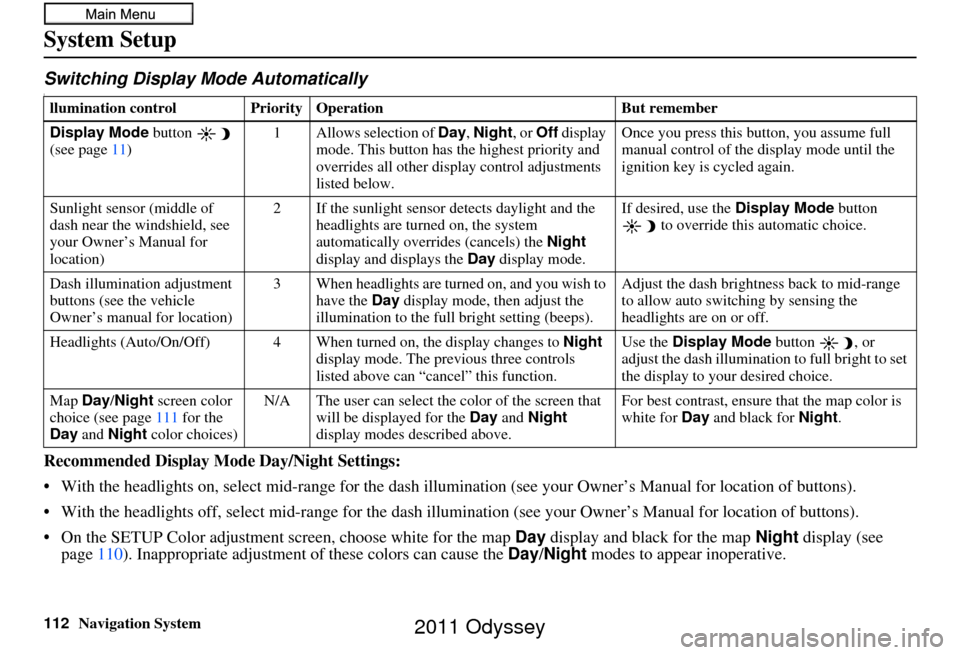
Switching Display Mode AutomaticallyI
Recommended Display Mode Day/Night Settings:
• With the headlights on, select mid-ra nge for the dash illumination (see your Owner’s Manual for location of buttons).
• With the headlights off, select mid-range for the dash illumination (see your Owner’s Manual for location of buttons).
• On the SETUP Color adjustment screen, choose white for the map Day display and black for the map Night display (see
page 110). Inappropriate adjustment of these colors can cause the Day/Night modes to appear inoperative.
llumination control Prior ity Operation But remember
Display Mode button
(see page 11) 1 Allows selection of
Day, Night, or Off display
mode. This button has th e highest priority and
overrides all other displa y control adjustments
listed below. Once you press this button, you assume full
manual control of the display mode until the
ignition key is cycled again.
Sunlight sensor (middle of
dash near the windshield, see
your Owner’s Manual for
location) 2 If the sunlight sensor
detects daylight and the
headlights are turned on, the system
automatically overrides (cancels) the Night
display and displays the Day display mode. If desired, use the
Display Mode
button
to override this automatic choice.
Dash illumination adjustment
buttons (see the vehicle
Owner’s manual for location) 3 When headlights are turned on, and you wish to
have the Day display mode, then adjust the
illumination to the full bright setting (beeps). Adjust the dash brightness back to mid-range
to allow auto switching by sensing the
headlights are on or off.
Headlights (Auto/On/Off) 4 When turn ed on, the display changes to Night
display mode. The previous three controls
listed above can “cancel” this function. Use the
Display Mode
button , or
adjust the dash illuminati on to full bright to set
the display to your desired choice.
Map Day/Night screen color
choice (see page 111 for the
Day and Night color choices) N/A The user can select the color of the screen that
will be displayed for the Day and Night
display modes described above. For best contrast
, ensure that the map color is
white for Day and black for Night.
2011 Odyssey
Page 172 of 178
172Navigation System
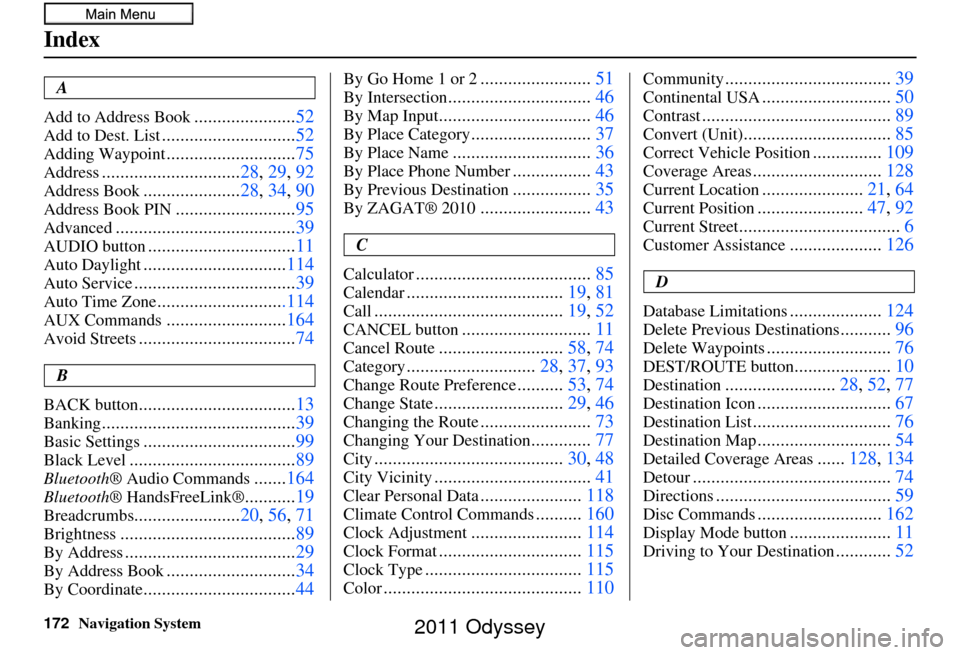
Index
A
Add to Address Book
...................... 52
Add to Dest. List............................. 52
Adding Waypoint............................75
Address.............................. 28, 29, 92
Address Book..................... 28, 34, 90
Address Book PIN.......................... 95
Advanced....................................... 39
AUDIO button................................11
Auto Daylight...............................114
Auto Service................................... 39
Auto Time Zone............................114
AUX Commands..........................164
Avoid Streets.................................. 74
B
BACK button
.................................. 13
Banking.......................................... 39
Basic Settings.................................99
Black Level.................................... 89
Bluetooth® Audio Commands.......164
Bluetooth ® HandsFreeLink®...........19
Breadcrumbs....................... 20, 56, 71
Brightness...................................... 89
By Address.....................................29
By Address Book............................34
By Coordinate................................. 44
By Go Home 1 or 2........................51
By Intersection............................... 46
By Map Input................................. 46
By Place Category..........................37
By Place Name.............................. 36
By Place Phone Number.................43
By Previous Destination.................35
By ZAGAT® 2010........................ 43
C
Calculator
...................................... 85
Calendar..................................19, 81
Call......................................... 19, 52
CANCEL button............................11
Cancel Route...........................58, 74
Category............................ 28, 37, 93
Change Route Preference..........53, 74
Change State............................ 29, 46
Changing the Route........................73
Changing Your Destination.............77
City......................................... 30, 48
City Vicinity..................................41
Clear Personal Data......................118
Climate Control Commands..........160
Clock Adjustment........................ 114
Clock Format............................... 115
Clock Type.................................. 115
Color........................................... 110
Community....................................39
Continental USA............................50
Contrast......................................... 89
Convert (Unit)................................85
Correct Vehicle Position...............109
Coverage Areas............................ 128
Current Location......................21, 64
Current Position....................... 47, 92
Current Street................................... 6
Customer Assistance....................126
D
Database Limitations
.................... 124
Delete Previous Destinations...........96
Delete Waypoints........................... 76
DEST/ROUTE button.....................10
Destination........................ 28, 52, 77
Destination Icon............................. 67
Destination List.............................. 76
Destination Map.............................54
Detailed Coverage Areas......128, 134
Detour........................................... 74
Directions......................................59
Disc Commands...........................162
Display Mode button......................11
Driving to Your Destination............52
2011 Odyssey