air HONDA ODYSSEY 2011 RB3-RB4 / 4.G Navigation Manual
[x] Cancel search | Manufacturer: HONDA, Model Year: 2011, Model line: ODYSSEY, Model: HONDA ODYSSEY 2011 RB3-RB4 / 4.GPages: 178, PDF Size: 3.97 MB
Page 15 of 178
Navigation System15
Getting Started
• Adjust the dashboard and side vents
so air does not blow against the
microphone on the ceiling.
• If more than one person is speaking at the same time, the system may
misinterpret your command.
• Give a voice command in a clear, natural speaking voice without
pausing between words.
• Try to reduce any background noise.
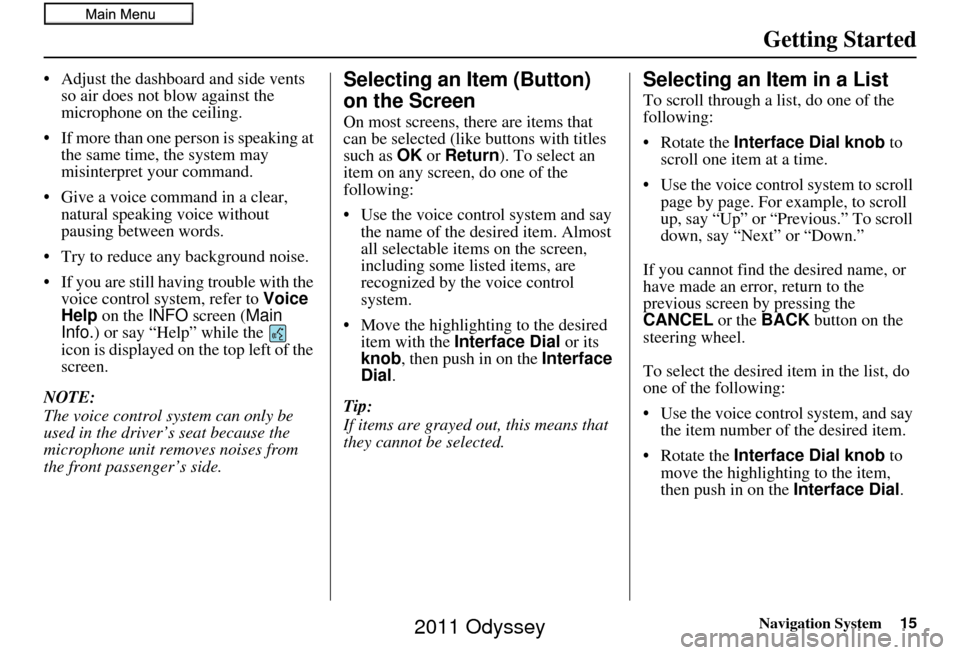
• If you are still having trouble with the voice control sy stem, refer to Voice
Help on the INFO screen ( Main
Info.) or say “Help” while the
icon is displayed on the top left of the
screen.
NOTE:
The voice control system can only be
used in the driver’s seat because the
microphone unit removes noises from
the front passenger’s side.Selecting an Item (Button)
on the Screen
On most screens, there are items that
can be selected (like buttons with titles
such as OK or Return ). To select an
item on any screen, do one of the
following:
• Use the voice control system and say the name of the desired item. Almost
all selectable items on the screen,
including some listed items, are
recognized by the voice control
system.
• Move the highlighting to the desired item with the Interface Dial or its
knob , then push in on the Interface
Dial .
Tip:
If items are grayed out, this means that
they cannot be selected.
Selecting an Item in a List
To scroll through a list, do one of the
following:
• Rotate the Interface Dial knob to
scroll one item at a time.
• Use the voice control system to scroll page by page. For example, to scroll
up, say “Up” or “Previous.” To scroll
down, say “Next” or “Down.”
If you cannot find the desired name, or
have made an error, return to the
previous screen by pressing the
CANCEL or the BACK button on the
steering wheel.
To select the desired item in the list, do
one of the following:
• Use the voice control system, and say the item number of the desired item.
• Rotate the Interface Dial knob to
move the highlighting to the item,
then push in on the Interface Dial.
2011 Odyssey
Page 19 of 178
Navigation System19
Getting Started
If you have entered any Calendar
reminders, they are displayed after you
select OK. See Calendar on page81.
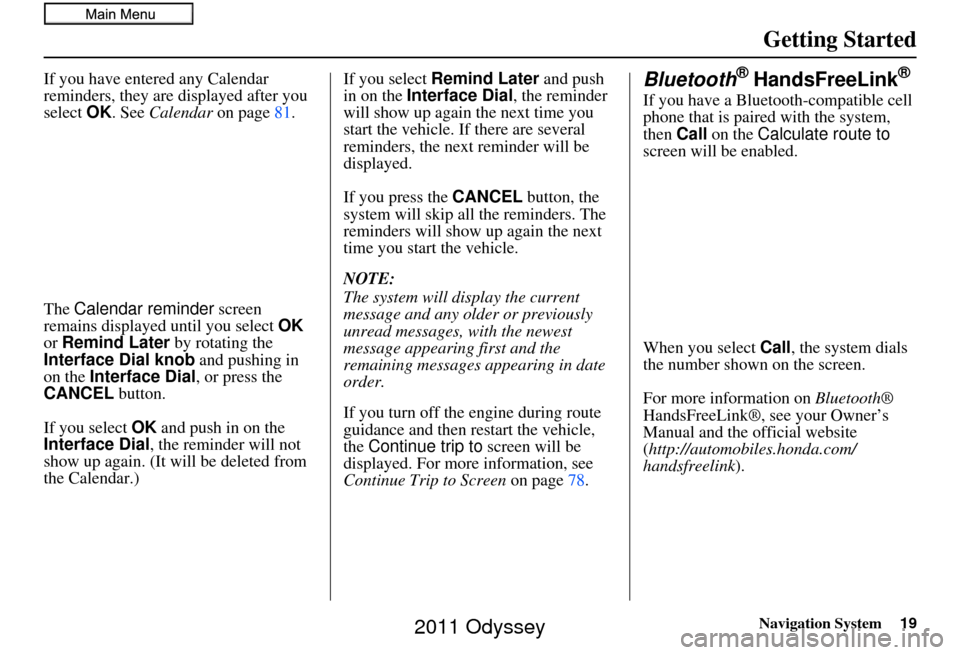
The Calendar reminder screen
remains displayed until you select OK
or Remind Later by rotating the
Interface Dial knob and pushing in
on the Interface Dial, or press the
CANCEL button.
If you select OK and push in on the
Interface Dial , the reminder will not
show up again. (It will be deleted from
the Calendar.) If you select
Remind Later and push
in on the Interface Dial , the reminder
will show up again the next time you
start the vehicle. If there are several
reminders, the next reminder will be
displayed.
If you press the CANCEL button, the
system will skip all the reminders. The
reminders will show up again the next
time you start the vehicle.
NOTE:
The system will display the current
message and any older or previously
unread messages, with the newest
message appearing first and the
remaining messages appearing in date
order.
If you turn off the engine during route
guidance and then restart the vehicle,
the Continue trip to screen will be
displayed. For more information, see
Continue Trip to Screen on page78.Bluetooth® HandsFreeLink®
If you have a Bluetooth-compatible cell
phone that is paired with the system,
then Call on the Calculate route to
screen will be enabled.
When you select Call, the system dials
the number shown on the screen.
For more information on Bluetooth®
HandsFreeLink®, see your Owner’s
Manual and the official website
(http://automobiles.honda.com/
handsfreelink).
2011 Odyssey
Page 20 of 178
20Navigation System
Getting Started
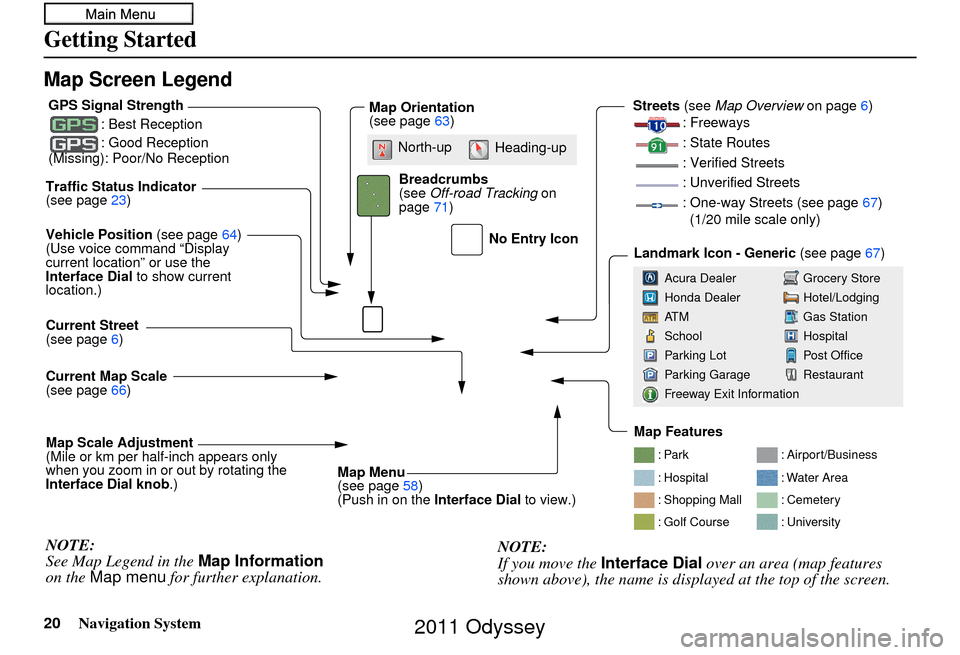
Map Screen Legend
: Par k
: Hospital
: Shopping Mall
: Golf Course: Airport/Business
: Water Area
: Cemetery
: University
Traffic Status Indicator
(see page
23)
Vehicle Position (see page64)
(Use voice command “Display
current location” or use the
Interface Dial to show current
location.)
Current Map Scale
(see page 66)
Current Street
(see page
6)
Map Scale Adjustment
(Mile or km per half-inch appears only
when you zoom in or out by rotating the
Interface Dial knob .)
NOTE:
See Map Legend in the Map Information
on the Map menu for further explanation.
No Entry Icon
GPS Signal Strength
: Best Reception
: Good Reception
(Missing): Poor/No ReceptionMap Orientation
(see page 63)
Map Menu
(see page 58)
(Push in on the Interface Dial to view.)
Breadcrumbs
(see
Off-road Tracking on
page 71) Streets
(see Map Overview on page6)
: Freeways
: State Routes
: Verified Streets
: Unverified Streets
: One-way Streets (see page 67)
(1/20 mile scale only)
Landmark Icon - Generic (see page67)
Grocery Store
Hotel/Lodging
Gas Station
Hospital
Post Office
Restaurant
Acura Dealer
Honda Dealer
AT M
School
Parking Lot
Parking Garage
Freeway Exit Information
NOTE:
If you move the
Interface Dial over an area (map features
shown above), the name is displayed at the top of the screen.
North-up Heading-up
Map Features
2011 Odyssey
Page 39 of 178
Navigation System39
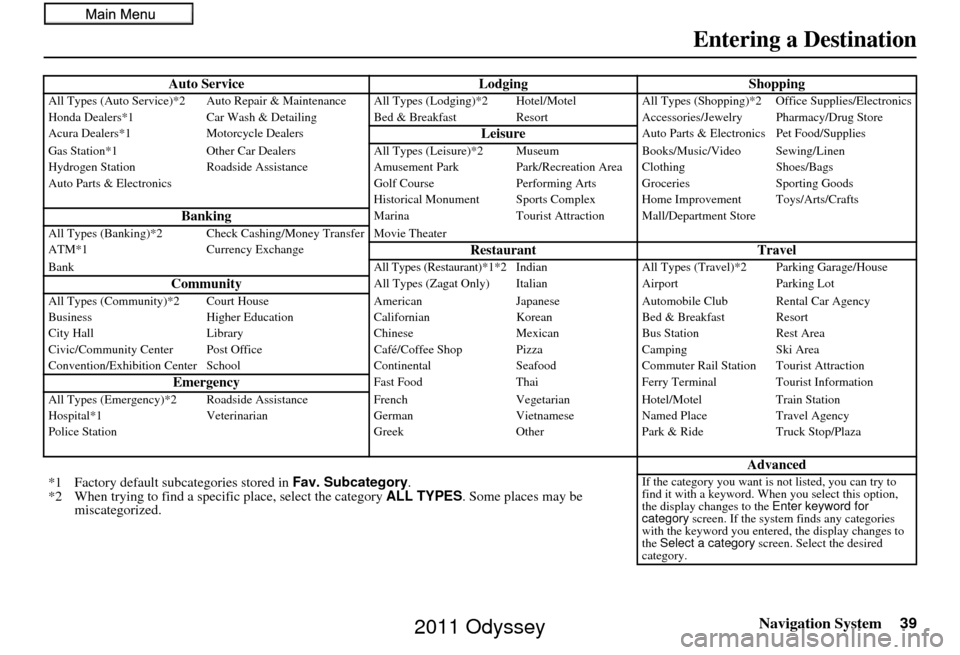
Entering a Destination
Auto Service LodgingShoppingAll Types (Auto Service)*2 Auto Repair & Maintenance All Types (Lodging)*2 Hotel/Motel All Types (Shopping)*2 Office Supplies/Electronics
Honda Dealers*1 Car Wash & Detailing Bed & Brea kfast ResortAccessories/Jewelry Pharmacy/Drug Store
Acura Dealers*1 Motorcycle Dealers
LeisureAuto Parts & Electronics Pet Food/Supplies
Gas Station*1 Other Car Dealers All Types (Leisure)*2 Museum Books/Music/Video Sewing/Linen
Hydrogen Station Roadside Assistance Amusement Park Park/Recreation Area Clothing Shoes/Bags
Auto Parts & Electronics Golf CoursePerforming Arts Groceries Sporting Goods
Historical Monument Sports Complex Home Improvement Toys/Arts/Crafts
BankingMarina Tourist Attraction Mall/Department Store
All Types (Banking)*2 Check Cashing/Money Transfer Movie Theater
ATM*1 Currency Exchange
Restaurant TravelBankAll Types (Restaurant)*1*2 IndianAll Types (Travel)*2 Parking Garage/House
CommunityAll Types (Zagat Only) Italian AirportParking Lot
All Types (Community)*2 Court House AmericanJapaneseAutomobile Club Rental Car Agency
Business Higher Education CalifornianKoreanBed & Breakfast Resort
City Hall Library ChineseMexicanBus Station Rest Area
Civic/Community Center Post Office Café/Coffee Shop PizzaCampingSki Area
Convention/Exhibition Center School ContinentalSeafoodCommuter Rail Station Tourist Attraction
EmergencyFast Food ThaiFerry Terminal Tourist Information
All Types (Emergency)*2 Roads ide AssistanceFrench VegetarianHotel/Motel Train Station
Hospital*1 Veterinarian GermanVietnameseNamed Place Travel Agency
Police Station GreekOtherPark & Ride Truck Stop/Plaza
Advanced
*1 Factory default sub categories stored in Fav. Subcategory .
*2 When trying to find a speci fic place, select the category ALL TYPES. Some places may be
miscategorized.If the category you want is not listed, you can try to
find it with a keyword. When you select this option,
the display changes to the Enter keyword for
category screen. If the system finds any categories
with the keyword you entered, the display changes to
the Select a category screen. Select the desired
category.
2011 Odyssey
Page 45 of 178
Navigation System45
Entering a Destination
After entering the latitude, move the
Interface Dial down and select OK.
The display will change as follows.
On the Enter longitude screen, use the
Interface Dial to input the longitude.
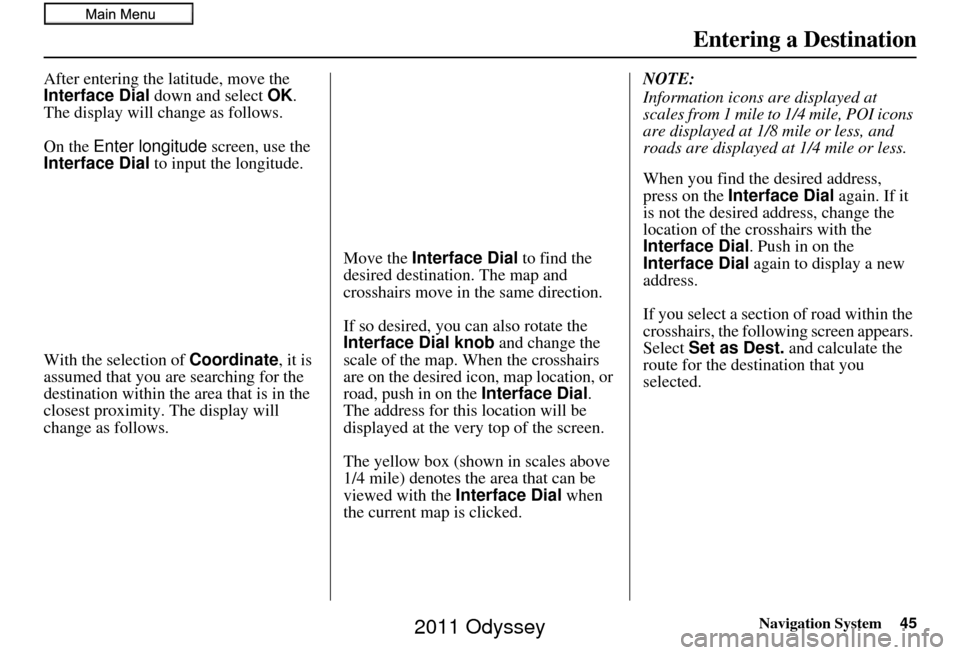
With the selection of Coordinate, it is
assumed that you are searching for the
destination within the area that is in the
closest proximity. The display will
change as follows. Move the Interface Dial
to find the
desired destination. The map and
crosshairs move in the same direction.
If so desired, you can also rotate the
Interface Dial knob and change the
scale of the map. When the crosshairs
are on the desired icon, map location, or
road, push in on the Interface Dial.
The address for this location will be
displayed at the very top of the screen.
The yellow box (shown in scales above
1/4 mile) denotes the area that can be
viewed with the Interface Dial when
the current map is clicked. NOTE:
Information icons are displayed at
scales from 1 mile to 1/4 mile, POI icons
are displayed at 1/8 mile or less, and
roads are displayed at 1/4 mile or less.
When you find the desired address,
press on the
Interface Dial again. If it
is not the desired address, change the
location of the crosshairs with the
Interface Dial . Push in on the
Interface Dial again to display a new
address.
If you select a section of road within the
crosshairs, the following screen appears.
Select Set as Dest. and calculate the
route for the destination that you
selected.
2011 Odyssey
Page 47 of 178
Navigation System47
Entering a Destination
Showing the Map of Current
Position
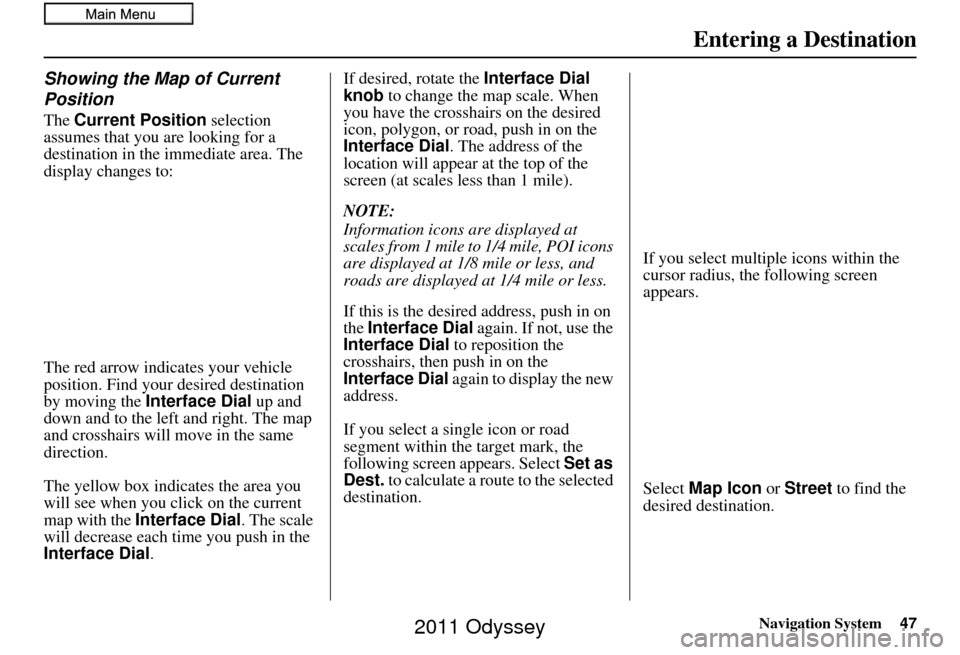
The Current Position selection
assumes that you are looking for a
destination in the immediate area. The
display changes to:
The red arrow indicates your vehicle
position. Find your desired destination
by moving the Interface Dial up and
down and to the left and right. The map
and crosshairs will move in the same
direction.
The yellow box indicat es the area you
will see when you click on the current
map with the Interface Dial . The scale
will decrease each time you push in the
Interface Dial . If desired, rotate the
Interface Dial
knob to change the map scale. When
you have the crosshairs on the desired
icon, polygon, or road, push in on the
Interface Dial . The address of the
location will appear at the top of the
screen (at scales less than 1 mile).
NOTE:
Information icons are displayed at
scales from 1 mile to 1/4 mile, POI icons
are displayed at 1/8 mile or less, and
roads are displayed at 1/4 mile or less.
If this is the desired address, push in on
the Interface Dial again. If not, use the
Interface Dial to reposition the
crosshairs, then push in on the
Interface Dial again to display the new
address.
If you select a single icon or road
segment within the target mark, the
following screen appears. Select Set as
Dest. to calculate a route to the selected
destination. If you select multiple icons within the
cursor radius, the following screen
appears.
Select
Map Icon or Street to find the
desired destination.
2011 Odyssey
Page 50 of 178
50Navigation System
Entering a Destination
By Interface Dial:
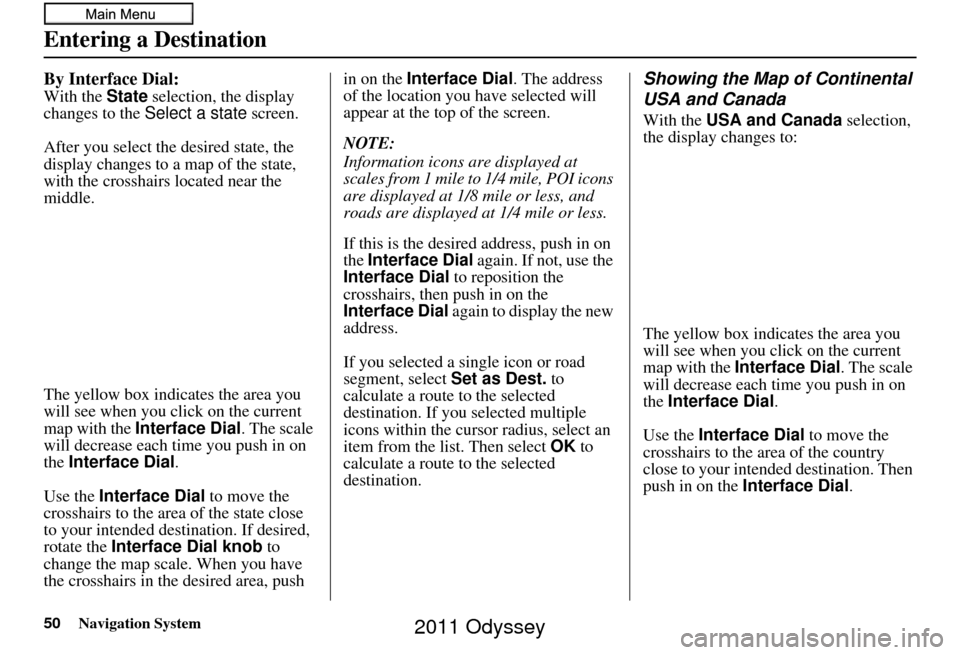
With the State selection, the display
changes to the Select a state screen.
After you select the desired state, the
display changes to a map of the state,
with the crosshairs located near the
middle.
The yellow box indicat es the area you
will see when you click on the current
map with the Interface Dial . The scale
will decrease each time you push in on
the Interface Dial.
Use the Interface Dial to move the
crosshairs to the area of the state close
to your intended des tination. If desired,
rotate the Interface Dial knob to
change the map scale. When you have
the crosshairs in the desired area, push in on the
Interface Dial . The address
of the location you have selected will
appear at the top of the screen.
NOTE:
Information icons are displayed at
scales from 1 mile to 1/4 mile, POI icons
are displayed at 1/8 mile or less, and
roads are displayed at 1/4 mile or less.
If this is the desired address, push in on
the Interface Dial again. If not, use the
Interface Dial to reposition the
crosshairs, then push in on the
Interface Dial again to display the new
address.
If you selected a single icon or road
segment, select Set as Dest. to
calculate a route to the selected
destination. If you selected multiple
icons within the cursor radius, select an
item from the list. Then select OK to
calculate a route to the selected
destination.
Showing the Map of Continental
USA and Canada
With the USA and Canada selection,
the display changes to:
The yellow box indicates the area you
will see when you click on the current
map with the Interface Dial . The scale
will decrease each time you push in on
the Interface Dial .
Use the Interface Dial to move the
crosshairs to the area of the country
close to your intended destination. Then
push in on the Interface Dial .
2011 Odyssey
Page 51 of 178
Navigation System51
Entering a Destination
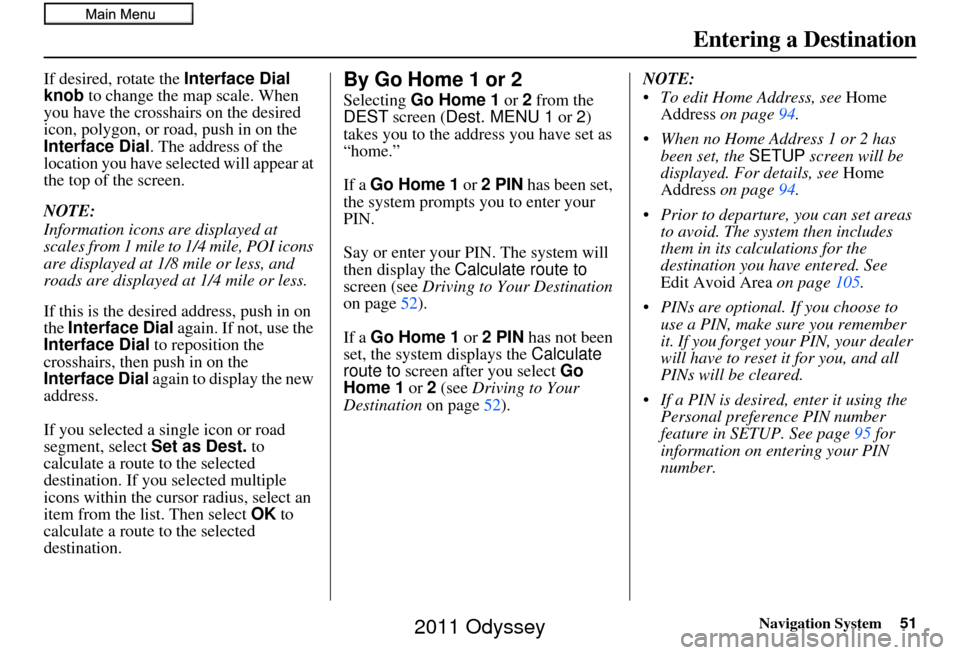
If desired, rotate the Interface Dial
knob to change the map scale. When
you have the crosshairs on the desired
icon, polygon, or road, push in on the
Interface Dial . The address of the
location you have selected will appear at
the top of the screen.
NOTE:
Information icons are displayed at
scales from 1 mile to 1/4 mile, POI icons
are displayed at 1/8 mile or less, and
roads are displayed at 1/4 mile or less.
If this is the desired address, push in on
the Interface Dial again. If not, use the
Interface Dial to reposition the
crosshairs, then push in on the
Interface Dial again to display the new
address.
If you selected a single icon or road
segment, select Set as Dest. to
calculate a route to the selected
destination. If you selected multiple
icons within the cursor radius, select an
item from the list. Then select OK to
calculate a route to the selected
destination.By Go Home 1 or 2
Selecting Go Home 1 or 2 from the
DEST screen ( Dest. MENU 1 or 2)
takes you to the address you have set as
“home.”
If a Go Home 1 or 2 PIN has been set,
the system prompts you to enter your
PIN.
Say or enter your PIN. The system will
then display the Calculate route to
screen (see Driving to Your Destination
on page 52).
If a Go Home 1 or 2 PIN has not been
set, the system displays the Calculate
route to screen after you select Go
Home 1 or 2 (see Driving to Your
Destination on page52). NOTE:
To edit Home Address, see
Home
Address on page 94.
When no Home Address 1 or 2 has been set, the SETUP screen will be
displayed. For details, see Home
Address on page 94.
Prior to departure, you can set areas to avoid. The system then includes
them in its calculations for the
destination you have entered. See
Edit Avoid Area on page105.
PINs are optional. If you choose to use a PIN, make sure you remember
it. If you forget your PIN, your dealer
will have to reset it for you, and all
PINs will be cleared.
If a PIN is desired, enter it using the Personal preference PIN number
feature in SETUP. See page 95 for
information on entering your PIN
number.
2011 Odyssey
Page 56 of 178
56Navigation System
Driving to Your Destination
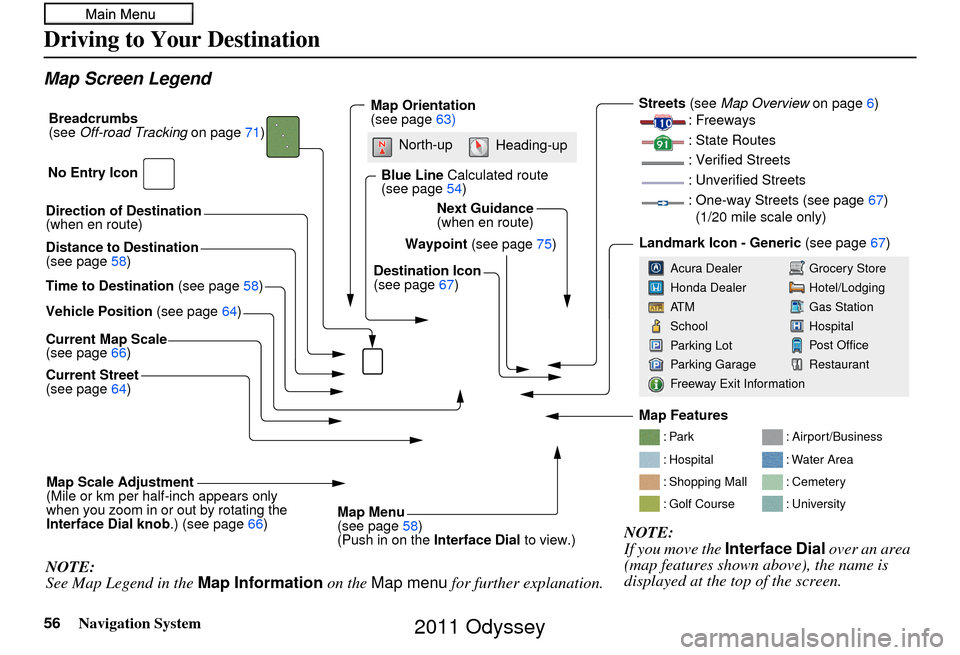
Map Screen Legend
Direction of Destination
(when en route)
Vehicle Position (see page64)
Current Map Scale
(see page 66)
Current Street
(see page 64)
Map Scale Adjustment
(Mile or km per half-inch appears only
when you zoom in or out by rotating the
Interface Dial knob .) (see page66)
NOTE:
See Map Legend in the Map Information on the Map menu for further explanation.
Waypoint (see page75)
Map Orientation
(see page
63)
Breadcrumbs
(see
Off-road Tracking on page71)
NOTE:
If you move the Interface Dial over an area
(map features shown above), the name is
displayed at the top of the screen.
Blue Line Calculated route
(see page 54)
Distance to Destination
(see page 58)
Time to Destination (see page58) Destination Icon
(see page
67)
Next Guidance
(when en route)
: Par k
: Hospital
: Shopping Mall
: Golf Course
: Airport/Business
: Water Area
: Cemetery
: University
Streets (see
Map Overview on page6)
: Freeways
: State Routes
: Verified Streets
: Unverified Streets
: One-way Streets (see page 67)
(1/20 mile scale only)
Landmark Icon - Generic (see page67)
Grocery Store
Hotel/Lodging
Gas Station
Hospital
Post Office
Restaurant
Acura Dealer
Honda Dealer
AT M
School
Parking Lot
Parking Garage
Freeway Exit Information
No Entry Icon
Map Menu
(see page
58)
(Push in on the Interface Dial to view.)
North-up
Heading-up
Map Features
2011 Odyssey
Page 60 of 178
60Navigation System
Driving to Your Destination
Exit Info. (Freeway Exit
Information)
You can search freeway exit
information (gas stations, restaurants,
ATMs, etc.) and add new destinations or
waypoints to the calculated route. Select
Exit Info. on the Guidance menu
screen, and a list of freeway exits for the
route is displayed.
If you select the freew ay exit you plan
on taking, a list of businesses in the area
will be displayed. You can choose a
listing to set as a new destination or
waypoint, and say or select OK. On the map
screen, you can display
Freeway Exit information using the
Interface Dial. The Exit Info icon will
only be displayed on the map screen if
there is any freeway exit information
available. Choose the 1/4, 1/2, or 1 mile
scale, then move the crosshairs to the
desired Exit Info icon and push in on the
Interface Dial . Choose a place from
the list and set it as a new destination or
waypoint.
NOTE:
To turn on “Freeway exit information”
on the map screen, display the icon bar
and select the icon (see page 61).
Guidance Mode
When en route to a destination, you
have two display options: single-screen
mode (the factory default) or split-
screen mode.
If you select Guidance Mode on the
Guidance menu screen, the Select a
guidance mode screen will appear.
Single-screen mode - While the map
screen is displayed, only the map is
shown with occasiona l guidance pop-up
windows as you ap proach a guidance
point. When you press the MAP/
GUIDE button and switch to the
guidance screen, only the guidance
screen is displayed.
Split-screen mode - While the map
screen is displayed, the map is on the
left of the screen, and the next guidance
point is on the right side of the screen.
You will see the same screen setup
when you press the MAP/GUIDE
button.
2011 Odyssey