ECU HONDA ODYSSEY 2012 RB3-RB4 / 4.G Owner's Guide
[x] Cancel search | Manufacturer: HONDA, Model Year: 2012, Model line: ODYSSEY, Model: HONDA ODYSSEY 2012 RB3-RB4 / 4.GPages: 441, PDF Size: 14.07 MB
Page 172 of 441
171
uuInterior Lights/Interior Convenience ItemsuInterior Convenience Items
Continued
Controls
Interior Convenience Items
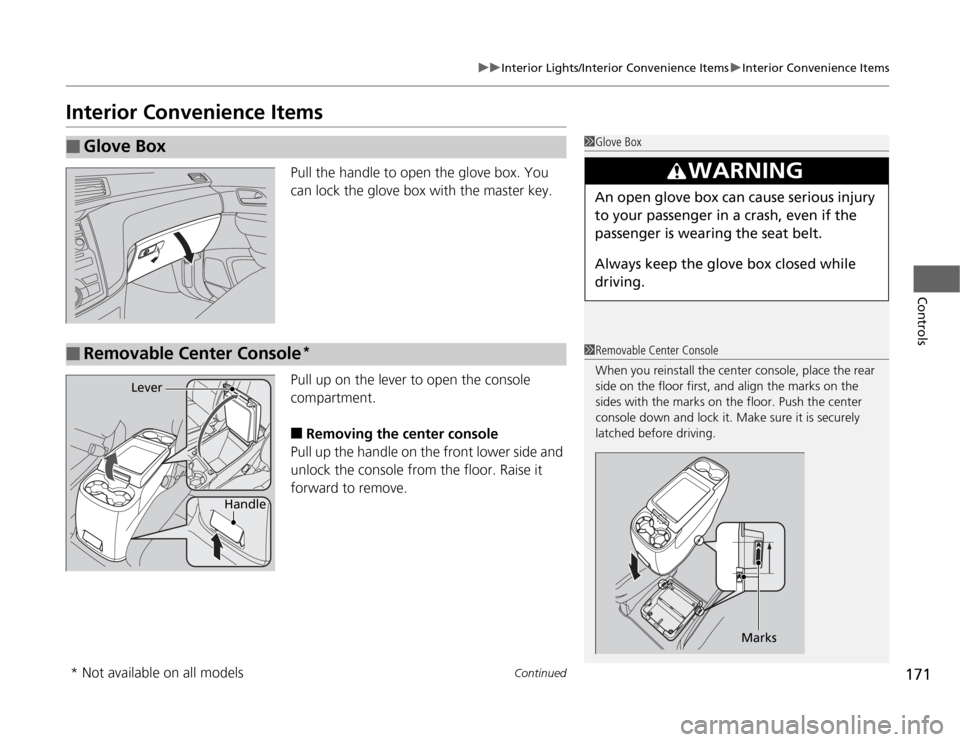
Pull the handle to open the glove box. You
can lock the glove box with the master key.
Pull up on the lever to open the console
compartment.■
Removing the center console
Pull up the handle on the front lower side and
unlock the console from the floor. Raise it
forward to remove.
■
Glove Box
1Glove Box
3
WARNING
An open glove box can cause serious injury
to your passenger in a crash, even if the
passenger is wearing the seat belt.
Always keep the glove box closed while
driving.
■
Removable Center Console
*
1Removable Center Console
When you reinstall the center console, place the rear
side on the floor first, and align the marks on the
sides with the marks on the floor. Push the center
console down and lock it. Make sure it is securely
latched before driving.
Marks
Handle
Lever
* Not available on all models
Page 179 of 441
uuInterior Lights/Interior Convenience ItemsuInterior Convenience Items
178Controls
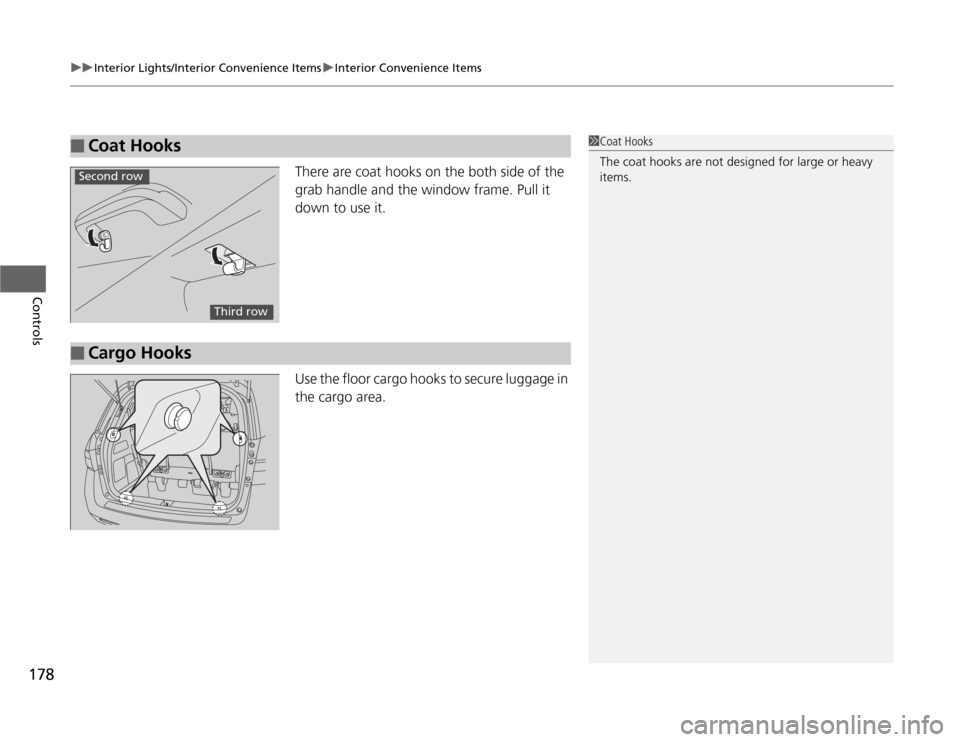
There are coat hooks on the both side of the
grab handle and the window frame. Pull it
down to use it.
Use the floor cargo hooks to secure luggage in
the cargo area.
■
Coat Hooks
1Coat Hooks
The coat hooks are not designed for large or heavy
items.
Second row
Third row
■
Cargo Hooks
Page 197 of 441
196
uuAudio SystemuAudio System Theft Protection
*
Features
Audio System Theft Protection
*
The audio system is disabled when it is disconnected from the power source, such as
when the battery is disconnected or goes dead.■
Reactivating the audio system
1.Turn the ignition switch to ON
(w
, and turn on the audio system.
uIf you turn the ignition switch to ACCESSORY
(q
, you will be requested to
enter the audio security code. See step 3.
2.Press and hold the power volume knob again for more than two seconds.
uThe audio system is reactivated when the system’s control unit recognizes that
the system is in your vehicle.
If the control unit fails to recognize, ENTER CODE appears on the audio/
information screen.
3.Enter the audio security code using the preset buttons. If you enter an incorrect
digit, continue to the last digit, then try again. If you do not enter the code
correctly after 10 tries, leave the system for one hour before trying again, or visit
a dealer to have the system reset.
1Audio System Theft Protection
Find the audio system's security code and serial
number label in your owner’s manual kit.
We recommend that you write down the serial
number in this owner’s manual.
Do not store the label in your vehicle. If you lose the
label, you must first retrieve the serial number, and
then obtain the code.
You can find out about your serial number and
security code from a dealer.
You can register the security code at Owner Link
(owners.honda.com.), and find information on how
to retrieve the serial number and obtain the code at
radio-navicode.honda.com.
U.S. models
* Not available on all models
Page 241 of 441
240
uuGeneral Information on the Audio SystemuCompatible iPod
®* and USB Flash Drives
*
Features
Compatible iPod
®* and USB Flash Drives
*
•Use a recommended USB flash drive of 256 MB or higher.
•Some digital audio players may not be compatible.
•Some USB flash drives (e.g., a device with security lockout) may not work.
•Some software files may not allow for audio play or text data display.
•Some versions of MP3, WMA, or AAC formats may be unsupported.■
iPod
® Model Compatibility
Model
iPod classic
® 80/160G
iPod classic
® 120G
iPod classic
® 160G (launch in 2009)
iPod
® (5th generation)iPod nano
®
iPod touch
®
■
USB Flash Drives
1iPod
® Model Compatibility
This system may not work with all software versions
of these devices.
1USB Flash Drives
Files on the USB flash drive are played in their stored
order. This order may be different from the order
displayed on your PC or device.
* Not available on all models
Page 258 of 441
257
Continued
Features
HomeLink
® Universal Transceiver
*
The HomeLink
® Universal Transceiver can be programmed to operate up to three
remote controlled devices around your home, such as garage doors, lighting, or
home security systems.
Refer to the safety information that comes with your garage door opener to test that
the safety features are functioning properly. If you do not have the safety
information, contact the manufacturer.
Before programming HomeLink, make sure that people and objects are out of the
way of the garage or gate to prevent potential injury or damage.
When programming a garage door opener, park just outside the garage door’s
path.
Training HomeLink
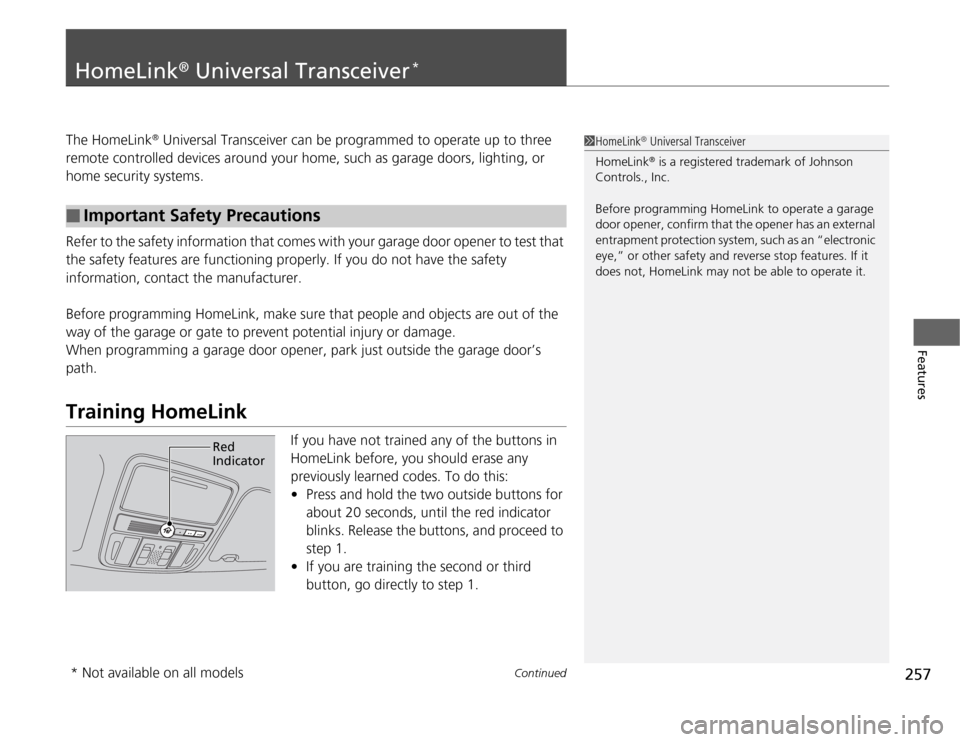
If you have not trained any of the buttons in
HomeLink before, you should erase any
previously learned codes. To do this:
•Press and hold the two outside buttons for
about 20 seconds, until the red indicator
blinks. Release the buttons, and proceed to
step 1.
•If you are training the second or third
button, go directly to step 1.
■
Important Safety Precautions
1HomeLink
® Universal Transceiver
HomeLink® is a registered trademark of Johnson
Controls., Inc.
Before programming HomeLink to operate a garage
door opener, confirm that the opener has an external
entrapment protection system, such as an “electronic
eye,” or other safety and reverse stop features. If it
does not, HomeLink may not be able to operate it.
Red
Indicator
* Not available on all models
Page 264 of 441
263
uuBluetooth
® HandsFreeLink
®*uHFL Menus
Continued
Features
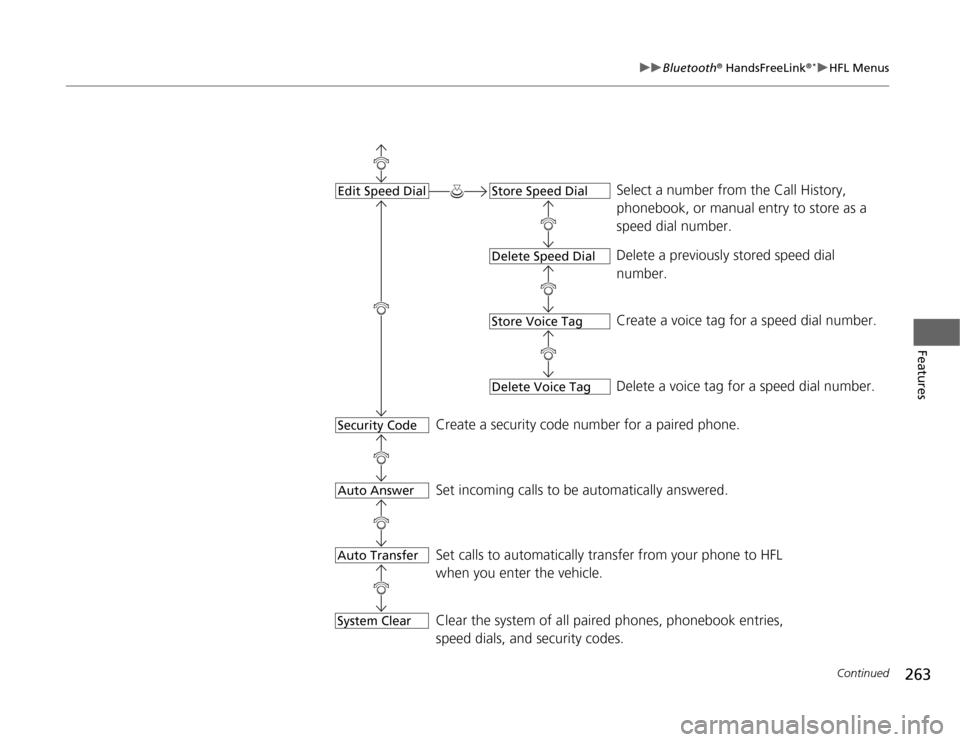
Select a number from the Call History,
phonebook, or manual entry to store as a
speed dial number.
Delete a previously stored speed dial
number.
Create a voice tag for a speed dial number.
Delete a voice tag for a speed dial number.
Create a security code number for a paired phone.
Set incoming calls to be automatically answered.
Set calls to automatically transfer from your phone to HFL
when you enter the vehicle.
Edit Speed Dial
Store Speed DialDelete Speed DialStore Voice TagDelete Voice Tag
Security CodeAuto AnswerAuto TransferSystem Clear
Clear the system of all paired phones, phonebook entries,
speed dials, and security codes.
Page 270 of 441
Continued
269
uuBluetooth
® HandsFreeLink
®*uHFL Menus
Features
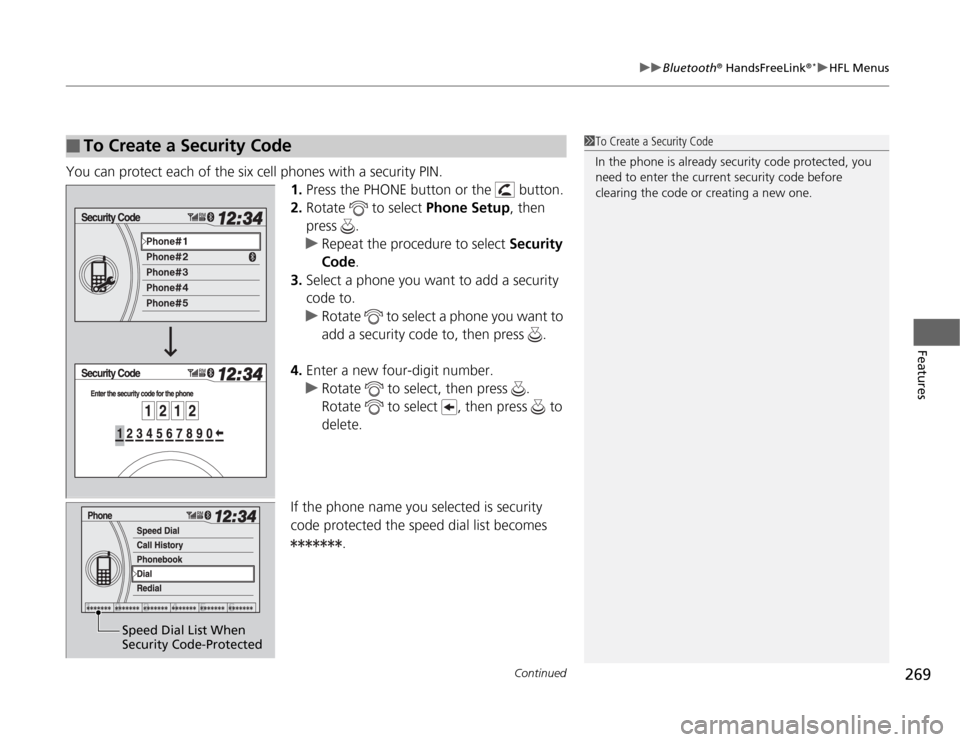
You can protect each of the six cell phones with a security PIN.
1.Press the PHONE button or the button.
2.Rotate to select Phone Setup, then
press .
uRepeat the procedure to select Security
Code.
3.Select a phone you want to add a security
code to.
uRotate to select a phone you want to
add a security code to, then press .
4.Enter a new four-digit number.
uRotate to select, then press .
Rotate to select , then press to
delete.
If the phone name you selected is security
code protected the speed dial list becomes
.■
To Create a Security Code
1To Create a Security Code
In the phone is already security code protected, you
need to enter the current security code before
clearing the code or creating a new one.
Speed Dial List When
Security Code-Protected
Page 272 of 441
271
uuBluetooth
® HandsFreeLink
®*uHFL Menus
Continued
Features
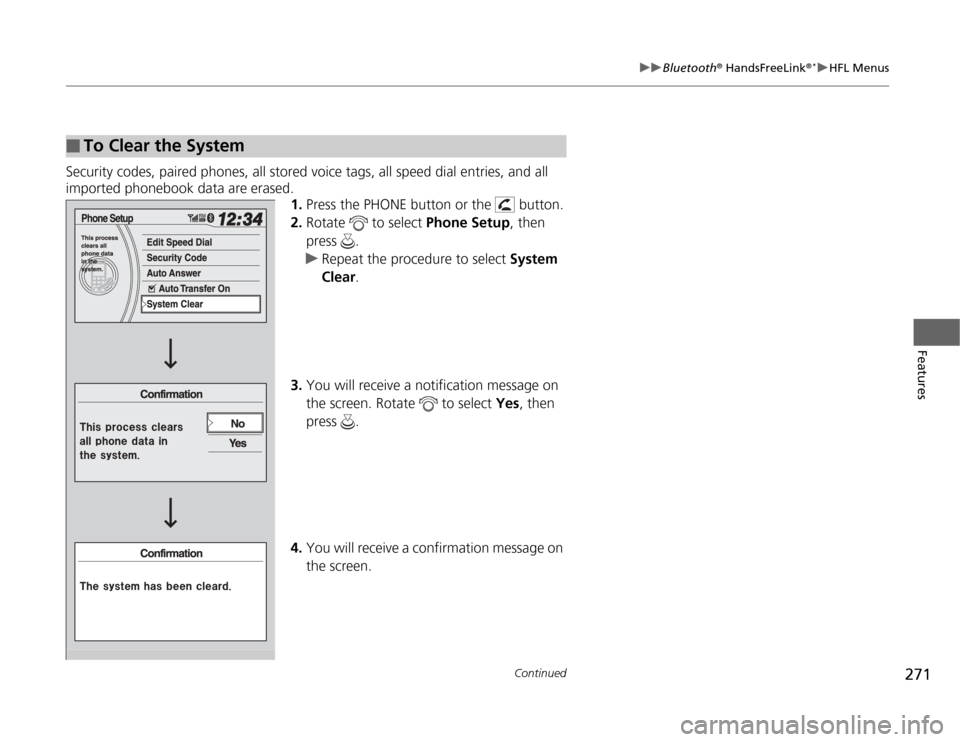
Security codes, paired phones, all stored voice tags, all speed dial entries, and all
imported phonebook data are erased.
1.Press the PHONE button or the button.
2.Rotate to select Phone Setup, then
press .
uRepeat the procedure to select System
Clear.
3.You will receive a notification message on
the screen. Rotate to select Yes, then
press .
4.You will receive a confirmation message on
the screen.■
To Clear the System
Page 287 of 441
286Driving
Before DrivingDriving PreparationCheck the following items before you start driving.
•Make sure there are no obstructions on the windows, door mirrors, exterior
lights, or other parts of the vehicle.
uRemove any frost, snow, or ice.
uRemove any snow on the roof, as this can slip down and obstruct your field of
vision while driving. If frozen solid, remove ice once it has softened.
uWhen removing ice from around the wheels, be sure not to damage the wheel
or wheel components.
•Make sure the hood is securely closed.
uIf the hood opens while driving, your front view will be blocked.
•Make sure the tires are in good condition.
uCheck air pressure, and check for damage and excessive wear.
2Checking and Maintaining Tires P. 370
•Make sure there are no people or objects behind or around the vehicle.
uThere are blind spots from the inside.■
Exterior Checks
1Exterior Checks
NOTICEWhen doors are frozen shut, use warm water around
the door edges to melt any ice. Do not try to force
them open, as this can damage the rubber trim
around the doors. When done, wipe dry to avoid
further freezing.
Do not pour warm water into the key cylinder.
You will be unable to insert key if the water freezes in
the hole.
Page 288 of 441
Continued
287
uuBefore DrivinguDriving Preparation
Driving
•Store or secure all items on board properly.
uCarrying too much cargo, or improperly storing it, can affect your vehicle's
handling, stability, stopping distance, and tires, and make it unsafe.
2Maximum Load Limit P. 289
•Do not pile items higher than the seat height.
uThey can block your view and may be thrown forward in the event of sudden
braking.
•Do not place anything in the front seat footwells. Make sure to secure the floor
mat.
uAn object or unsecured floor mat can interfere with your brake and accelerator
pedal operation while driving.
•If you have any animals on board, do not let them move around in the vehicle.
uThey may interfere with driving and a crash could occur.
•Securely close and lock all doors and the tailgate.
2Locking/Unlocking the Doors from the Inside P. 114
•Adjust your seating position properly.
uAdjust the head restraint, too.
2Adjusting the Seats P. 154
2Adjusting the Head Restraints P. 157
•Adjust the mirrors and steering wheel properly for your driving.
uAdjust them while sitting in the proper driving position.
2Adjusting the Mirrors P. 152
2Adjusting the Steering Wheel P. 151
■
Interior Checks
1Interior Checks
The headlight aim is set by the factory, and does not
need to be adjusted. However, if you regularly carry
heavy items in the cargo area or tow a trailer, have
the aiming readjusted at a dealer or by a qualified
technician.