System message HONDA ODYSSEY 2013 RC1-RC2 / 5.G User Guide
[x] Cancel search | Manufacturer: HONDA, Model Year: 2013, Model line: ODYSSEY, Model: HONDA ODYSSEY 2013 RC1-RC2 / 5.GPages: 433, PDF Size: 12.35 MB
Page 81 of 433
80
uuIndicatorsu
Instrument Panel
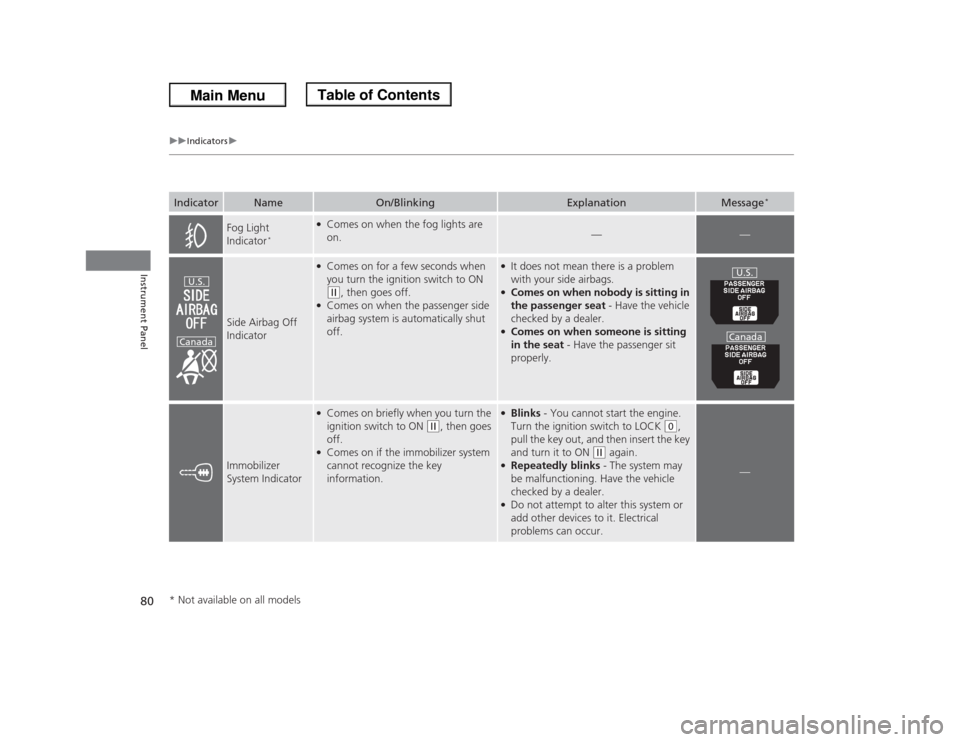
Fog Light
Indicator
*
●Comes on when the fog lights are
on.
—
—
Side Airbag Off
Indicator
●Comes on for a few seconds when
you turn the ignition switch to ON (w
, then goes off.
●Comes on when the passenger side
airbag system is automatically shut
off.
●It does not mean there is a problem
with your side airbags.●Comes on when nobody is sitting in
the passenger seat - Have the vehicle
checked by a dealer.●Comes on when someone is sitting
in the seat - Have the passenger sit
properly.
Immobilizer
System Indicator
●Comes on briefly when you turn the
ignition switch to ON
(w
, then goes
off.
●Comes on if the immobilizer system
cannot recognize the key
information.
●Blinks - You cannot start the engine.
Turn the ignition switch to LOCK
(0
,
pull the key out, and then insert the key
and turn it to ON
(w
again.
●Repeatedly blinks - The system may
be malfunctioning. Have the vehicle
checked by a dealer.●Do not attempt to alter this system or
add other devices to it. Electrical
problems can occur.
—
Indicator
Name
On/Blinking
Explanation
Message
*
U.S.
Canada
U.S.
Canada
* Not available on all models
Page 82 of 433
81
uuIndicatorsu
Instrument Panel
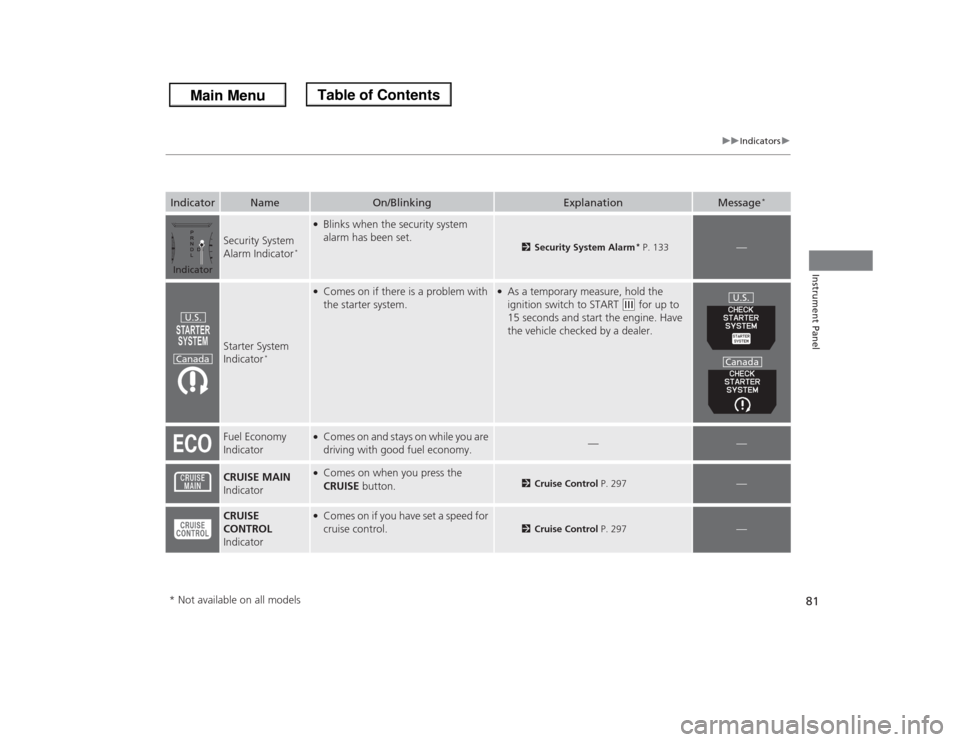
Security System
Alarm Indicator
*
●Blinks when the security system
alarm has been set.
2Security System Alarm
* P. 133
—
Starter System
Indicator
*
●Comes on if there is a problem with
the starter system.
●As a temporary measure, hold the
ignition switch to START
(e
for up to
15 seconds and start the engine. Have
the vehicle checked by a dealer.
Fuel Economy
Indicator
●Comes on and stays on while you are
driving with good fuel economy.
—
—
CRUISE MAIN
Indicator
●Comes on when you press the
CRUISE button.
2Cruise Control P. 297
—
CRUISE
CONTROL
Indicator
●Comes on if you have set a speed for
cruise control.
2Cruise Control P. 297
—
Indicator
Name
On/Blinking
Explanation
Message
*
IndicatorU.S.
Canada
U.S.
Canada
* Not available on all models
Page 83 of 433
82
uuIndicatorsu
Instrument Panel
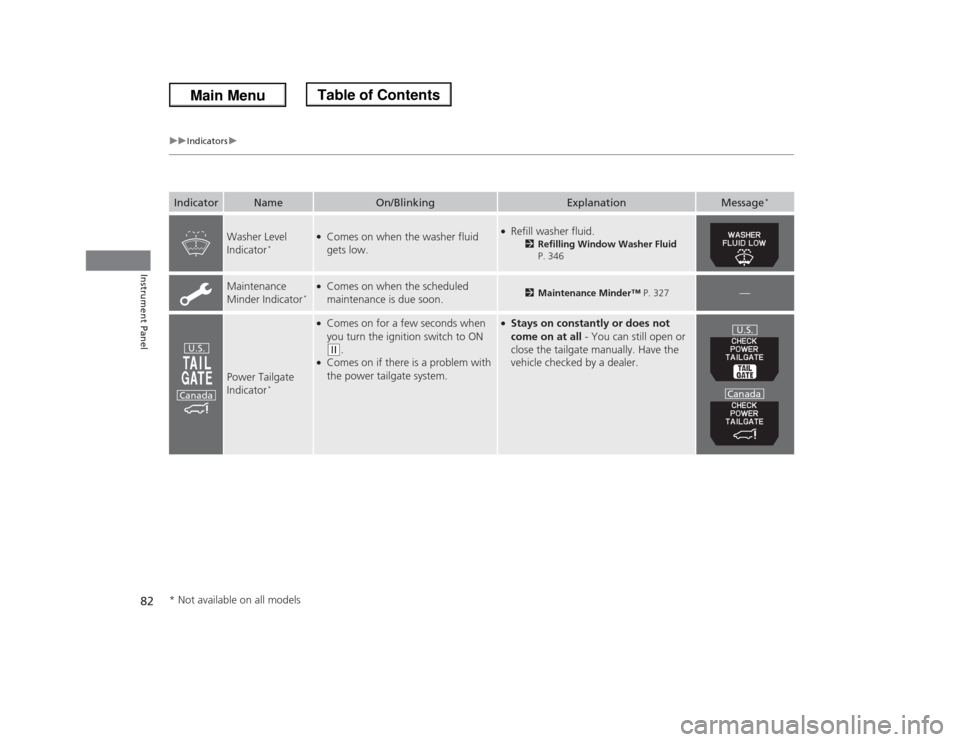
Washer Level
Indicator
*
●Comes on when the washer fluid
gets low.
●Refill washer fluid.
2Refilling Window Washer Fluid
P. 346
Maintenance
Minder Indicator
*
●Comes on when the scheduled
maintenance is due soon.
2Maintenance Minder™ P. 327
—
Power Tailgate
Indicator
*
●Comes on for a few seconds when
you turn the ignition switch to ON (w
.
●Comes on if there is a problem with
the power tailgate system.
●Stays on constantly or does not
come on at all - You can still open or
close the tailgate manually. Have the
vehicle checked by a dealer.
Indicator
Name
On/Blinking
Explanation
Message
*
U.S.
Canada
U.S.
Canada
* Not available on all models
Page 84 of 433
83
uuIndicatorsu
Instrument Panel
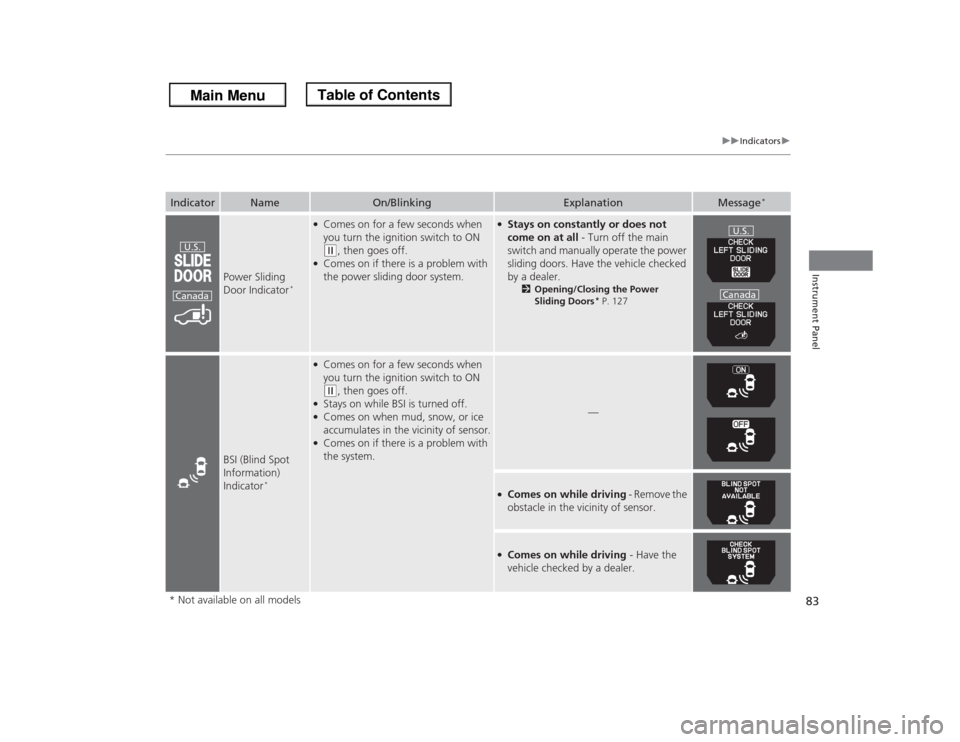
Power Sliding
Door Indicator
*
●Comes on for a few seconds when
you turn the ignition switch to ON (w
, then goes off.
●Comes on if there is a problem with
the power sliding door system.
●Stays on constantly or does not
come on at all - Turn off the main
switch and manually operate the power
sliding doors. Have the vehicle checked
by a dealer.
2Opening/Closing the Power
Sliding Doors
* P. 127
BSI (Blind Spot
Information)
Indicator
*
●Comes on for a few seconds when
you turn the ignition switch to ON (w
, then goes off.
●Stays on while BSI is turned off.●Comes on when mud, snow, or ice
accumulates in the vicinity of sensor.●Comes on if there is a problem with
the system.
—
●Comes on while driving - Remove the
obstacle in the vicinity of sensor.●Comes on while driving - Have the
vehicle checked by a dealer.
Indicator
Name
On/Blinking
Explanation
Message
*
U.S.
Canada
U.S.
Canada
* Not available on all models
Page 85 of 433
84
uuIndicatorsuMulti-Information Display Warning and Information Messages
*
Instrument Panel
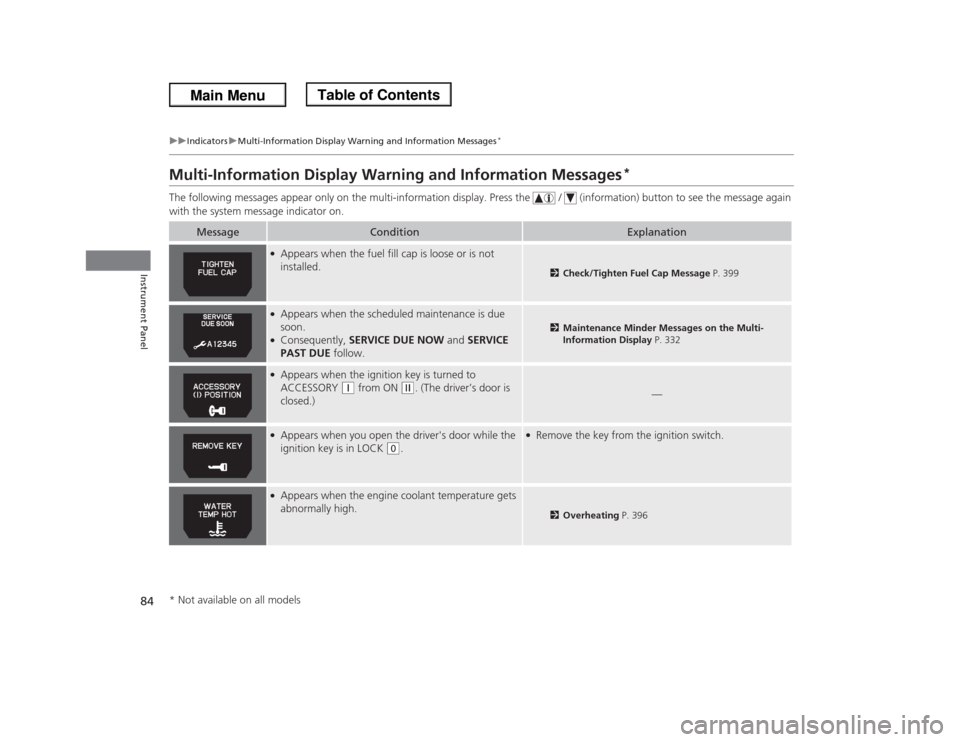
Multi-Information Display Warning and Information Messages
*
The following messages appear only on the multi-information display. Press the / (information) button to see the message again
with the system message indicator on.
Message
Condition
Explanation
●Appears when the fuel fill cap is loose or is not
installed.
2Check/Tighten Fuel Cap Message P. 399
●Appears when the scheduled maintenance is due
soon.●Consequently, SERVICE DUE NOW and SERVICE
PAST DUE follow.
2Maintenance Minder Messages on the Multi-
Information Display P. 332
●Appears when the ignition key is turned to
ACCESSORY
(q
from ON
(w
. (The driver’s door is
closed.)
—
●Appears when you open the driver's door while the
ignition key is in LOCK
(0
.
●Remove the key from the ignition switch.
●Appears when the engine coolant temperature gets
abnormally high.
2Overheating P. 396
* Not available on all models
Page 86 of 433
85
uuIndicatorsuMulti-Information Display Warning and Information Messages
*
Instrument Panel
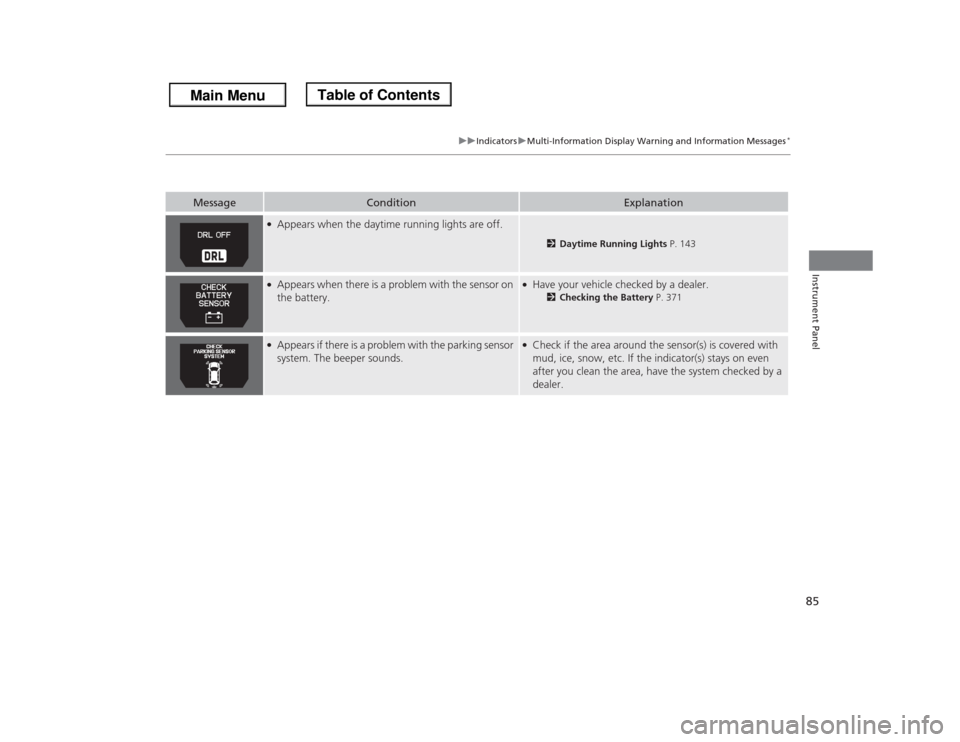
●Appears when the daytime running lights are off.
2Daytime Running Lights P. 143
●Appears when there is a problem with the sensor on
the battery.
●Have your vehicle checked by a dealer.
2Checking the Battery P. 371
●Appears if there is a problem with the parking sensor
system. The beeper sounds.
●Check if the area around the sensor(s) is covered with
mud, ice, snow, etc. If the indicator(s) stays on even
after you clean the area, have the system checked by a
dealer.
Message
Condition
Explanation
Page 141 of 433
140Controls
Operating the Switches Around the Steering WheelIgnition Switch
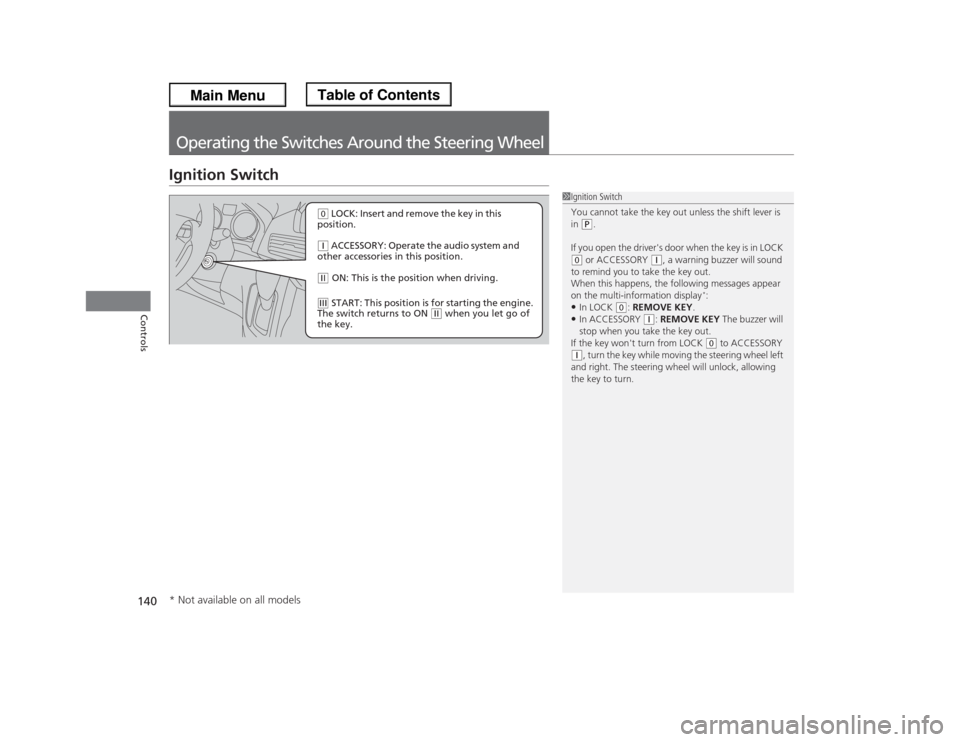
1Ignition Switch
You cannot take the key out unless the shift lever is
in
(P.
If you open the driver's door when the key is in LOCK
(0 or ACCESSORY
(q, a warning buzzer will sound
to remind you to take the key out.
When this happens, the following messages appear
on the multi-information display
*:
•In LOCK
(0: REMOVE KEY.
•In ACCESSORY
(q: REMOVE KEY The buzzer will
stop when you take the key out.
If the key won't turn from LOCK
(0 to ACCESSORY
(q, turn the key while moving the steering wheel left
and right. The steering wheel will unlock, allowing
the key to turn.
(0 LOCK: Insert and remove the key in this
position.(q ACCESSORY: Operate the audio system and
other accessories in this position.(w ON: This is the position when driving.(e START: This position is for starting the engine.
The switch returns to ON
(w when you let go of
the key.
* Not available on all models
Page 194 of 433
193
Features
This chapter describes how to operate technology features.
Audio System
About Your Audio System ................ 194
USB Adapter Cable .......................... 195
Auxiliary Input Jack .......................... 195
Audio System Theft Protection ......... 196
Audio System Basic Operation........ 197
Audio Remote Controls .................... 198
Adjusting the Sound ........................ 199
Playing the AM/FM Radio ................. 200
Playing the XM® Radio
*................... 204
Playing a CD .................................... 207
Playing CD Library ............................ 211
Playing an iPod®............................... 217Playing a USB Flash Drive ................. 221
Playing Bluetooth® Audio................. 225
Audio Error Messages
CD Player ......................................... 230
iPod®/USB Flash Drive....................... 231
General Information on the Audio
System
XM® Radio Service
*......................... 232
Recommended CDs ......................... 233
Compatible iPod
® and USB Flash Drives ... 235
Rear Entertainment System
*........... 236
HomeLink® Universal Transceiver
*.. 252Bluetooth® HandsFreeLink®
Using HFL ........................................ 254
HFL Menus ...................................... 256
Compass
*.......................................... 277
* Not available on all models
Page 196 of 433
195
uuAudio SystemuUSB Adapter Cable
Features
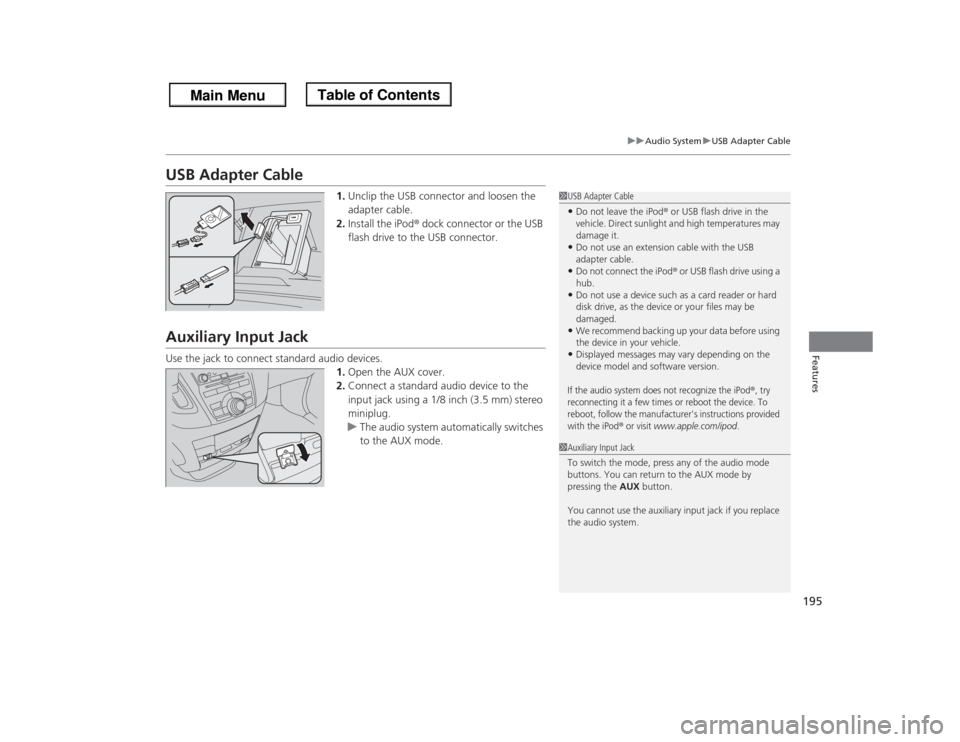
USB Adapter Cable
1.Unclip the USB connector and loosen the
adapter cable.
2.Install the iPod® dock connector or the USB
flash drive to the USB connector.
Auxiliary Input JackUse the jack to connect standard audio devices.
1.Open the AUX cover.
2.Connect a standard audio device to the
input jack using a 1/8 inch (3.5 mm) stereo
miniplug.
uThe audio system automatically switches
to the AUX mode.
1USB Adapter Cable•Do not leave the iPod® or USB flash drive in the
vehicle. Direct sunlight and high temperatures may
damage it.•Do not use an extension cable with the USB
adapter cable.•Do not connect the iPod® or USB flash drive using a
hub.•Do not use a device such as a card reader or hard
disk drive, as the device or your files may be
damaged.•We recommend backing up your data before using
the device in your vehicle.•Displayed messages may vary depending on the
device model and software version.If the audio system does not recognize the iPod
®, try
reconnecting it a few times or reboot the device. To
reboot, follow the manufacturer's instructions provided
with the iPod
® or visit
www.apple.com/ipod
.
1Auxiliary Input Jack
To switch the mode, press any of the audio mode
buttons. You can return to the AUX mode by
pressing the AUX button.
You cannot use the auxiliary input jack if you replace
the audio system.
Page 220 of 433
Continued
219
uuAudio System Basic OperationuPlaying an iPod®
Features
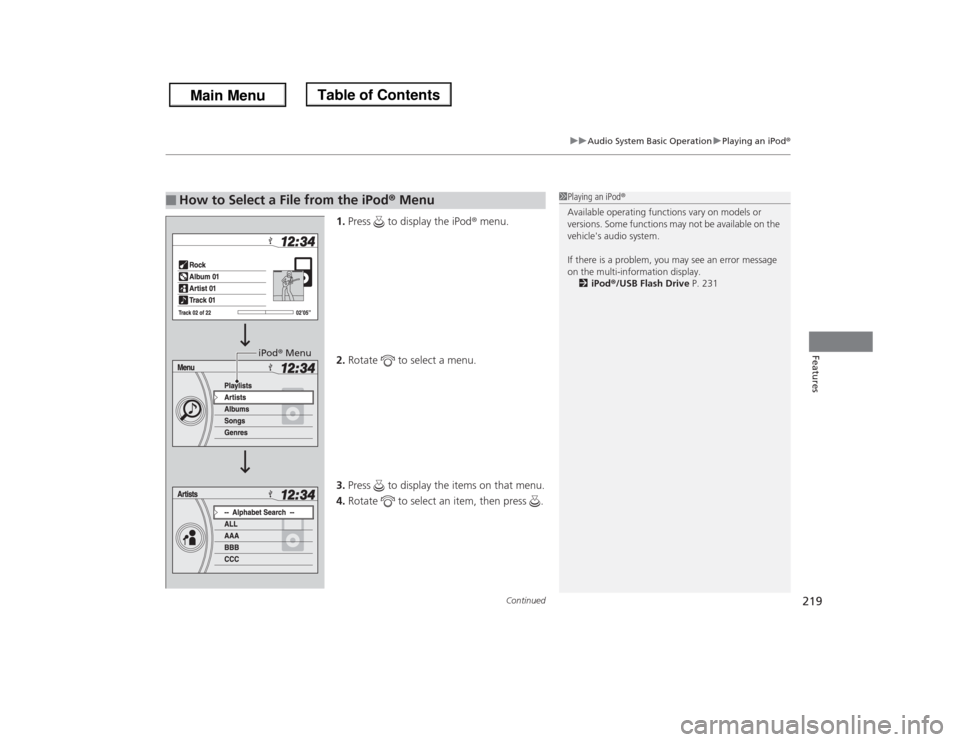
1.Press to display the iPod® menu.
2.Rotate to select a menu.
3.Press to display the items on that menu.
4.Rotate to select an item, then press .
■
How to Select a File from the iPod® Menu
1Playing an iPod®
Available operating functions vary on models or
versions. Some functions may not be available on the
vehicle's audio system.
If there is a problem, you may see an error message
on the multi-information display.
2iPod®/USB Flash Drive P. 231
iPod® Menu