Trip a HONDA ODYSSEY 2016 RC1-RC2 / 5.G User Guide
[x] Cancel search | Manufacturer: HONDA, Model Year: 2016, Model line: ODYSSEY, Model: HONDA ODYSSEY 2016 RC1-RC2 / 5.GPages: 565
Page 170 of 565
169
uuAdjusting the Seats uRear Seats
Continued
Controls
Rear Seats
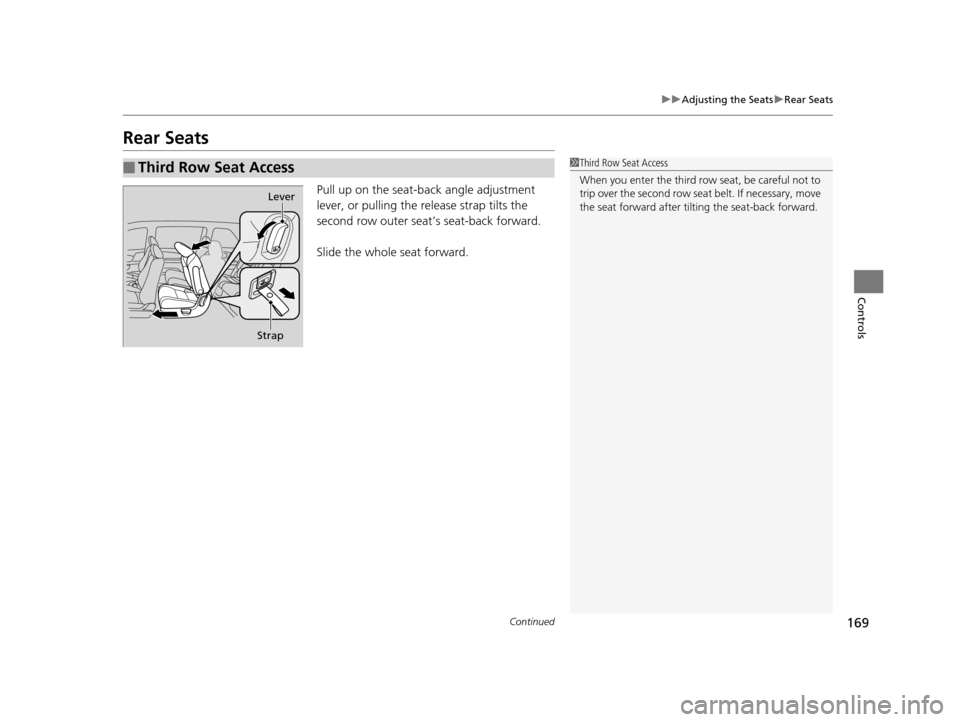
Pull up on the seat-b ack angle adjustment
lever, or pulling the re lease strap tilts the
second row outer seat’s seat-back forward.
Slide the whole seat forward.
■Third Row Seat Access1 Third Row Seat Access
When you enter the third row seat, be careful not to
trip over the second row seat belt. If necessary, move
the seat forward after tilting the seat-back forward.
Lever
Strap
16 US ODYSSEY-31TK86500.book 169 ページ 2015年6月24日 水曜日 午後3時0分
Page 213 of 565
212
uuAudio System Basic Operation uAudio/Information Screen
Features
Audio/Information Screen
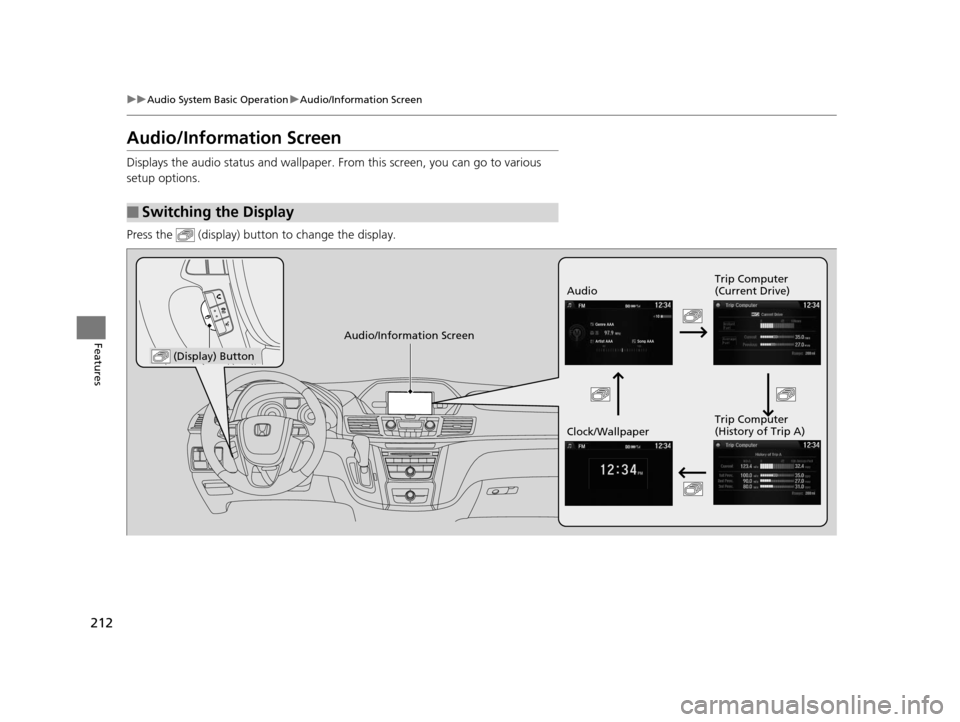
Displays the audio status and wallpaper. From this screen, you can go to various
setup options.
Press the (display) butto n to change the display.
■Switching the Display
Audio Trip Computer
(Current Drive)
Clock/Wallpaper Trip Computer
(History of Trip A)
Audio/Information Screen
(Display) Button
16 US ODYSSEY-31TK86500.book 212 ページ 2015年6月24日 水曜日 午後3時0分
Page 214 of 565
213
uuAudio System Basic Operation uAudio/Information Screen
Continued
Features
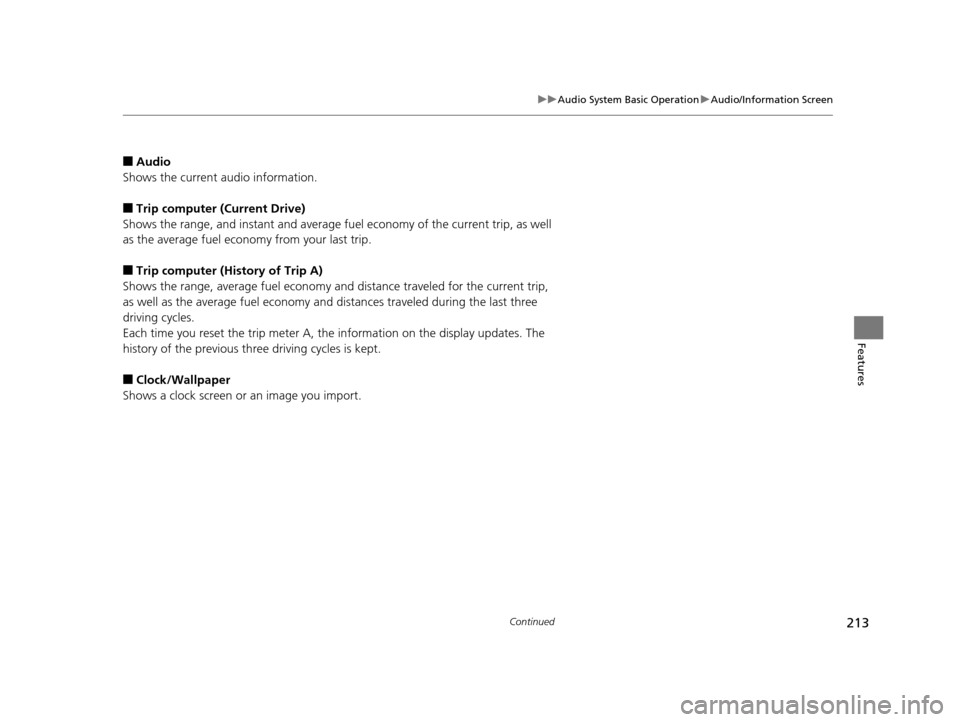
■Audio
Shows the current audio information.
■Trip computer (Current Drive)
Shows the range, and instant and average fuel economy of the current trip, as well
as the average fuel economy from your last trip.
■Trip computer (History of Trip A)
Shows the range, average fuel economy and distance traveled for the current trip,
as well as the average fuel economy and distances traveled during the last three
driving cycles.
Each time you reset the trip meter A, th e information on the display updates. The
history of the previous three driving cycles is kept.
■Clock/Wallpaper
Shows a clock screen or an image you import.
16 US ODYSSEY-31TK86500.book 213 ページ 2015年6月24日 水曜日 午後3時0分
Page 241 of 565
240
uuAudio System Basic Operation uAudio/Information Screen
Features
■Info
Shows the Trip Computer or Clock/Wallpaper and other information. Rotate
to select an item, then press .
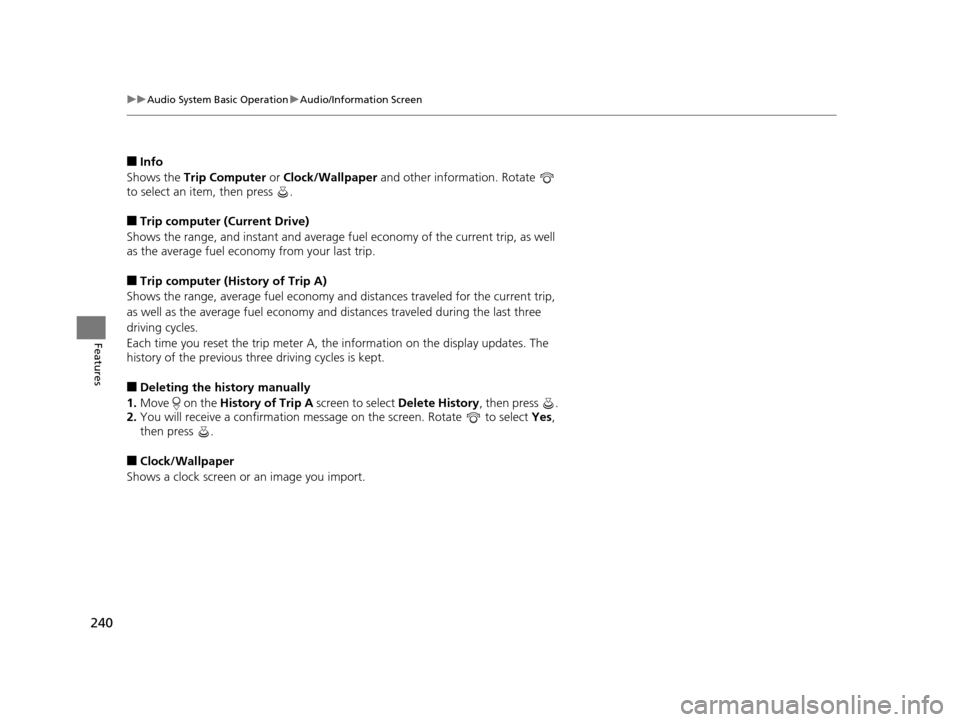
■Trip computer (Current Drive)
Shows the range, and instant and average fu el economy of the current trip, as well
as the average fuel economy from your last trip.
■Trip computer (History of Trip A)
Shows the range, average fuel economy an d distances traveled for the current trip,
as well as the average fuel economy and distances traveled during the last three
driving cycles.
Each time you reset the trip meter A, th e information on the display updates. The
history of the previous th ree driving cycles is kept.
■Deleting the history manually
1. Move on the History of Trip A screen to select Delete History, then press .
2. You will receive a confirmation message on the screen. Rotate to select Yes,
then press .
■Clock/Wallpaper
Shows a clock screen or an image you import.
16 US ODYSSEY-31TK86500.book 240 ページ 2015年6月24日 水曜日 午後3時0分
Page 298 of 565
297
uuCustomized Features u
Continued
Features
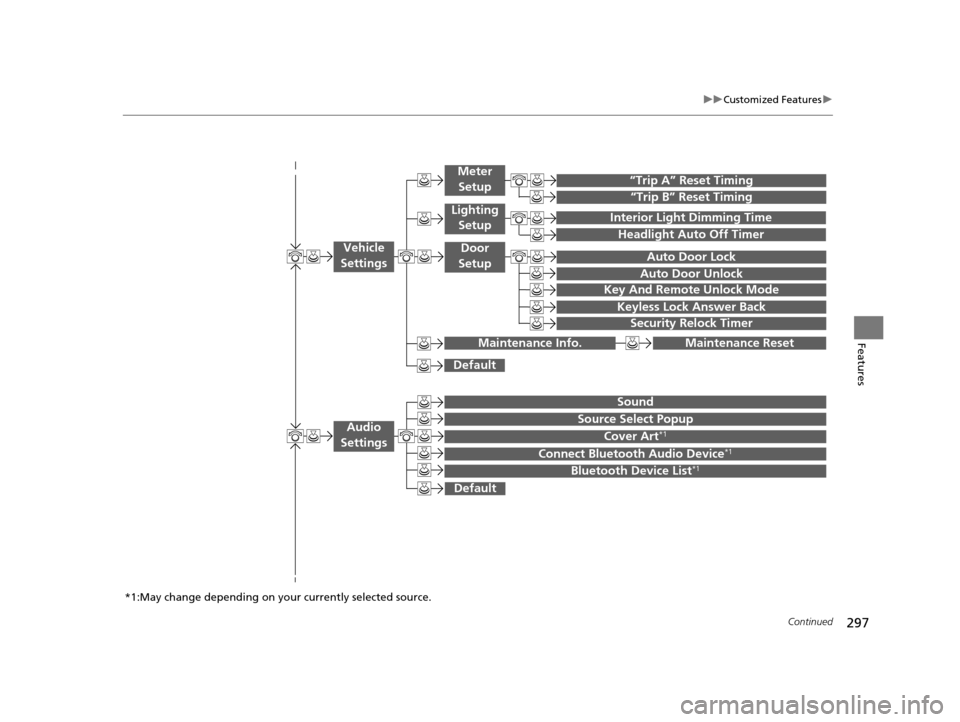
“Trip B” Reset Timing
“Trip A” Reset Timing
Auto Door Lock
Auto Door Unlock
Interior Light Dimming Time
Headlight Auto Off Timer
Key And Remote Unlock Mode
Keyless Lock Answer Back
Security Relock Timer
Maintenance Reset
Default
Vehicle
Settings
Meter
Setup
Lighting Setup
Door
Setup
Maintenance Info.
Source Select Popup
Sound
Default
Cover Art*1
Connect Bluetooth Audio Device*1
Bluetooth Device List*1
Audio
Settings
*1:May change depending on your currently selected source.
16 US ODYSSEY-31TK86500.book 297 ページ 2015年6月24日 水曜日 午後3時0分
Page 302 of 565
301
uuCustomized Features u
Continued
Features
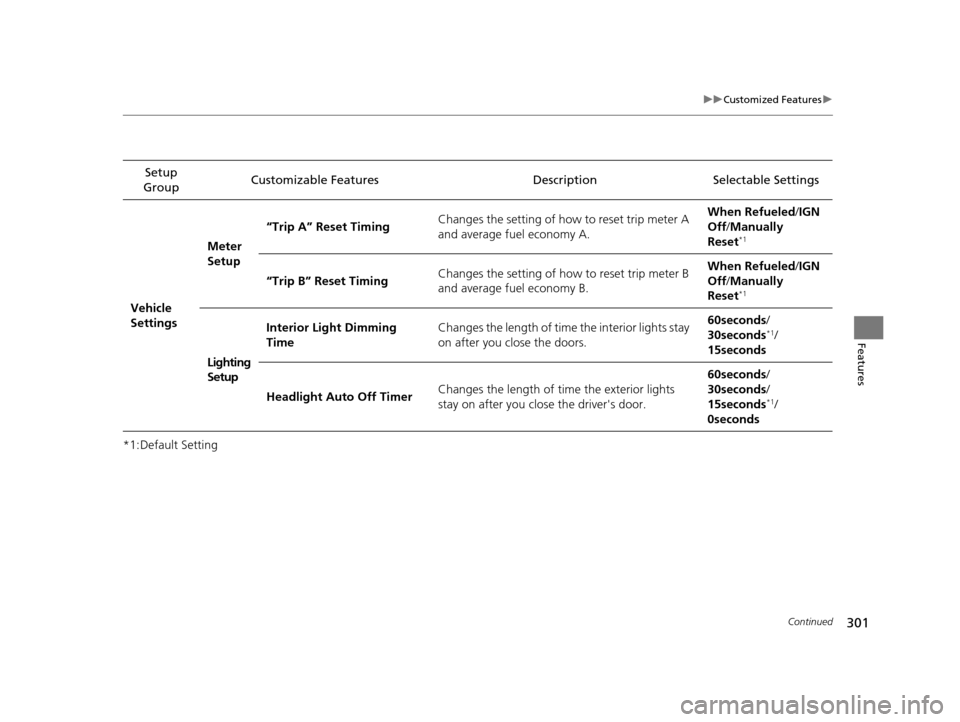
*1:Default SettingSetup
Group Customizable Features Description Selectable Settings
Vehicle
Settings Meter
Setup
“Trip A” Reset Timing
Changes the setting of how to reset trip meter A
and average fuel economy A. When Refueled
/IGN
Off /Manually
Reset
*1
“Trip B” Reset Timing Changes the setting of how to reset trip meter B
and average fuel economy B. When Refueled
/IGN
Off /Manually
Reset*1
Lighting
Setup Interior Light Dimming
Time
Changes the length of time the interior lights stay
on after you close the doors. 60seconds
/
30seconds
*1/
15seconds
Headlight Auto Off Timer Changes the length of time the exterior lights
stay on after you close the driver's door. 60seconds
/
30seconds /
15seconds
*1/
0seconds
16 US ODYSSEY-31TK86500.book 301 ページ 2015年6月24日 水曜日 午後3時0分
Page 310 of 565
309
uuCustomized Features u
Continued
Features
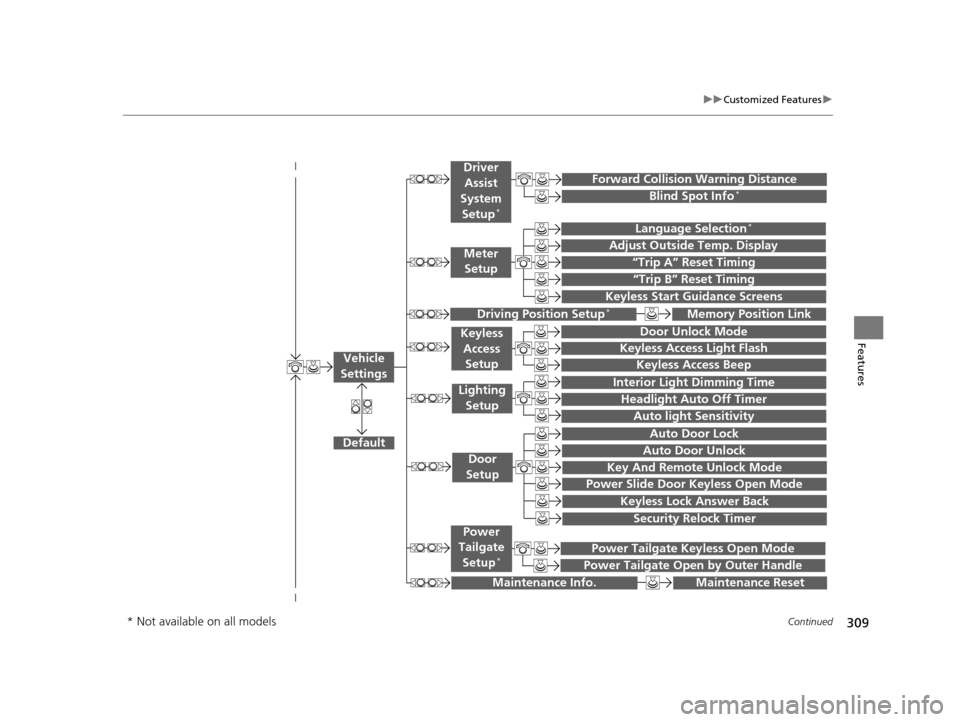
“Trip A” Reset Timing
“Trip B” Reset Timing
Language Selection*
Adjust Outside Temp. Display
Forward Collision Warning Distance
Keyless Start Guidance Screens
Default
Memory Position Link
Door Unlock Mode
Keyless Access Light Flash
Interior Light Dimming Time
Headlight Auto Off Timer
Auto light Sensitivity
Key And Remote Unlock Mode
Keyless Lock Answer Back
Security Relock Timer
Auto Door Lock
Auto Door Unlock
Maintenance Reset
Meter
Setup
Driver
Assist
System
Setup
*
Driving Position Setup*
Keyless Access Setup
Lighting Setup
Door
Setup
Maintenance Info.
Keyless Access Beep
Blind Spot Info*
Power Slide Door Keyless Open Mode
Power Tailgate Keyless Open Mode
Power Tailgate Open by Outer Handle
Power
Tailgate
Setup
*
Vehicle
Settings
* Not available on all models
16 US ODYSSEY-31TK86500.book 309 ページ 2015年6月24日 水曜日 午後3時0分
Page 316 of 565
315
uuCustomized Features u
Continued
Features
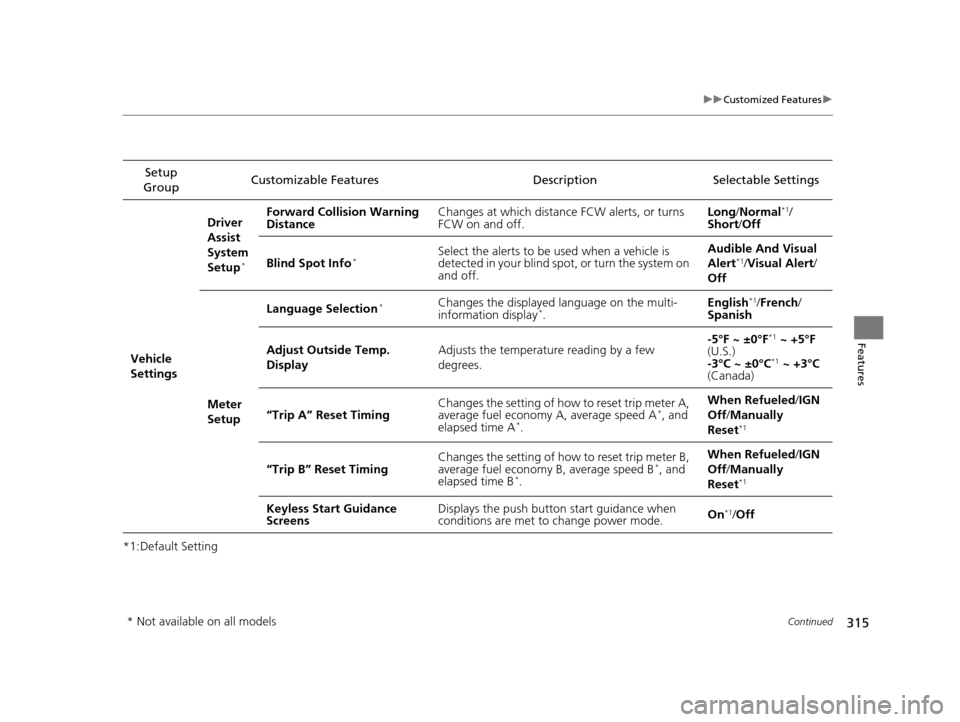
*1:Default SettingSetup
Group Customizable Features Description Selectable Settings
Vehicle
Settings Driver
Assist
System
Setup
*
Forward Collision Warning
Distance
Changes at which distance FCW alerts, or turns
FCW on and off. Long
/Normal*1/
Short /Off
Blind Spot Info
*Select the alerts to be used when a vehicle is
detected in your blind spot, or turn the system on
and off. Audible And Visual
Alert*1/
Visual Alert /
Off
Meter
Setup Language Selection
*Changes the displayed language on the multi-
information display*.
English
*1/
French /
Spanish
Adjust Outside Temp.
Display Adjusts the temperature reading by a few
degrees. -5°F ~ ±0°F
*1
~ +5°F
(U.S.)
-3°C ~ ±0°C
*1 ~ +3°C
(Canada)
“Trip A” Reset Timing Changes the setting of how to reset trip meter A,
average fuel economy A, average speed A
*, and
elapsed time A*. When Refueled
/IGN
Off /Manually
Reset*1
“Trip B” Reset Timing Changes the setting of how to reset trip meter B,
average fuel economy B, average speed B*, and
elapsed time B*. When Refueled
/IGN
Off /Manually
Reset*1
Keyless Start Guidance
Screens Displays the push button
start guidance when
conditions are met to change power mode. On*1/
Off
* Not available on all models
16 US ODYSSEY-31TK86500.book 315 ページ 2015年6月24日 水曜日 午後3時0分
Page 491 of 565
490
Maintenance
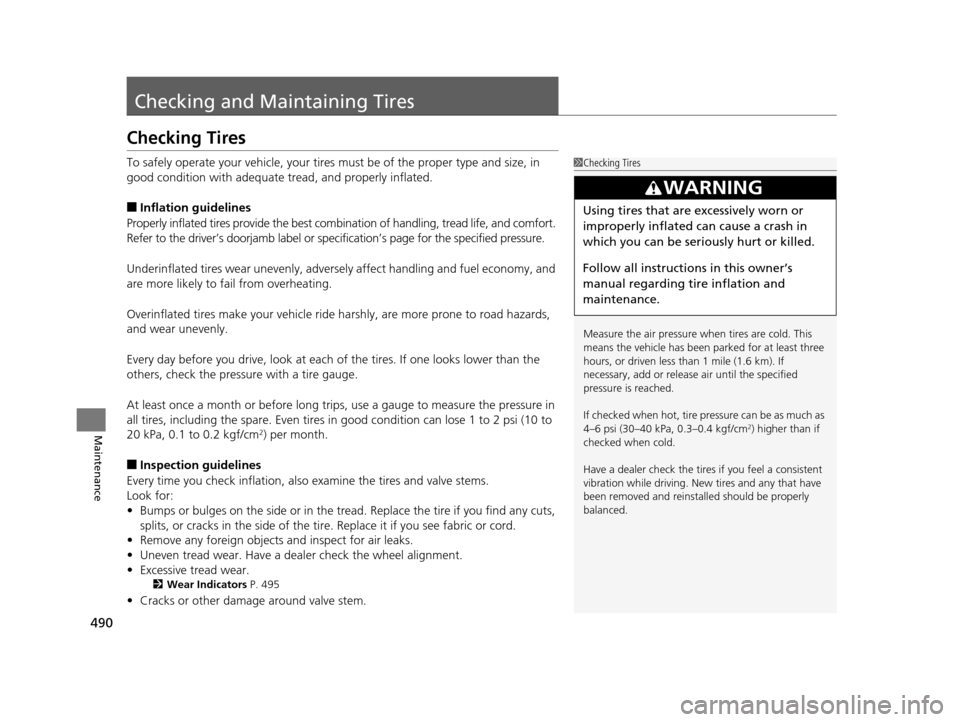
Checking and Maintaining Tires
Checking Tires
To safely operate your vehicle, your tires must be of the proper type and size, in
good condition with adequate tread, and properly inflated.
■Inflation guidelines
Properly inflated tires provide the best combination of handling, tread life, and comfort.
Refer to the driver’s doorjamb label or spec ification’s page for the specified pressure.
Underinflated tires wear unevenly, adversely affect handling and fuel economy, and
are more likely to fail from overheating.
Overinflated tires make your vehicle ride harshly, are more prone to road hazards,
and wear unevenly.
Every day before you drive, look at each of the tires. If one looks lower than the
others, check the pressure with a tire gauge.
At least once a month or before long trips, use a gauge to measure the pressure in
all tires, including the spare. Even tires in good condition can lose 1 to 2 psi (10 to
20 kPa, 0.1 to 0.2 kgf/cm
2) per month.
■Inspection guidelines
Every time you check inflation, also examine the tires and valve stems.
Look for:
• Bumps or bulges on the side or in the tread. Replace the tire if you find any cuts,
splits, or cracks in the si de of the tire. Replace it if you see fabric or cord.
• Remove any foreign objects and inspect for air leaks.
• Uneven tread wear. Have a deal er check the wheel alignment.
• Excessive tread wear.
2 Wear Indicators P. 495
•Cracks or other damage around valve stem.
1Checking Tires
Measure the air pressure when tires are cold. This
means the vehicle has been parked for at least three
hours, or driven less than 1 mile (1.6 km). If
necessary, add or releas e air until the specified
pressure is reached.
If checked when hot, tire pressure can be as much as
4–6 psi (30–40 kPa, 0.3–0.4 kgf/cm
2) higher than if
checked when cold.
Have a dealer check the tires if you feel a consistent
vibration while driving. Ne w tires and any that have
been removed and reinst alled should be properly
balanced.
3WARNING
Using tires that are excessively worn or
improperly inflated can cause a crash in
which you can be seriously hurt or killed.
Follow all instruction s in this owner’s
manual regarding ti re inflation and
maintenance.
16 US ODYSSEY-31TK86500.book 490 ページ 2015年6月24日 水曜日 午後3時0分
Page 560 of 565
559
Index
Refueling.................................................. 446
Fuel Gauge ............................................... 92
Gasoline ......................................... 446, 542
Low Fuel Indicator..................................... 73
Regulations .............................. 429, 493, 545
Remote Transmitter ................................. 115
Removable Center Console ..................... 178
Removing a Second Row Outer Seat ...... 170
Removing the Second Row Center Seat ......................................................... 172
Replacement
Battery ............................................ 500, 502
Bulbs ...................................................... 475
Fuses ...................... 533, 534, 535, 536, 537
Tires........................................................ 496
Wiper Blade Rubber ................................ 486
Reporting Safety Defects ......................... 546
Resetting a Trip Meter ......................... 94, 97
S
Safe Driving................................................ 25
Safety Check ............................................... 29
Safety Labels .............................................. 67
Safety Message ............................................ 1
Seat Belts .................................................... 30
Adjusting the Shoulder Anchor ................. 34
Automatic Seat Belt Tensioners ................. 32
Checking .................................................. 38
Detachable Anchor ................................... 35
Fastening .................................................. 33 Installing a Child Seat with a Lap/Shoulder Seat
Belt.......................................................... 60
Pregnant Women ...................................... 37
Reminder................................................... 31
Warning Indicator ................................ 31, 73
Seat Heaters .............................................. 189
Seats .......................................................... 161
Adjusting ................................................. 161
Front Seats .............................................. 161
Rear Seats ............................................... 169
Seat Heaters ............................................ 189
Security System ......................................... 135
Immobilizer System Indicator ..................... 78
Security System Alarm Indicator ................. 79
SEL/RESET Button ........................................ 96
Select Lever ......................................... 18, 413
Operation .......................................... 18, 414
Releasing ................................................. 525
Won’t Move ............................................ 525
Select/Reset Knob ....................................... 93
Selecting a Child Seat ................................. 56
Selector Knob (Audio) .............................. 211
Shift Lever ........................................... 18, 413
Shift Lever Position Indicator ............. 72, 414
Shifting (Transmission) ............................. 413
Shoulder Anchor ......................................... 34
Side Airbags ................................................ 46
Side Curtain Airbags ................................... 48
Sliding Doors ............................................. 127
Power Sliding Doors ................................ 129 Sliding the Second Row Outer Seats
Outward .................................................. 171
Smart Entry with Push Button Start System ..................................................... 113
Snow Tires ................................................. 498
Spare Tire .......................................... 511, 543
Spark Plugs ............................................... 542
Specifications ............................................ 542
Specified Fuel ................................... 446, 542
Speedometer .............................................. 92
SRS Airbags (Airbags) ................................. 42
Starting the Engine .......................... 407, 409
Does Not Start......................................... 520
Engine Switch Buzzer .............................. 142
Jump Starting .......................................... 523
Steering Wheel ......................................... 157
Adjusting ................................................ 157
Stopping ................................................... 440
Summer Tires ............................................ 498
Sunglasses Holder ..................................... 188
Supplemental Restraint System (SRS) ........ 42
Switches (Around the Steering
Wheel) ............................................. 4, 5, 142
System Message Indicator .......................... 77
T
Tachometer................................................. 92
Tailgate ..................................................... 121
Unable to Open....................................... 540
16 US ODYSSEY-31TK86500.book 559 ページ 2015年6月24日 水曜日 午後3時0分