tow HONDA ODYSSEY 2016 RC1-RC2 / 5.G Owner's Manual
[x] Cancel search | Manufacturer: HONDA, Model Year: 2016, Model line: ODYSSEY, Model: HONDA ODYSSEY 2016 RC1-RC2 / 5.GPages: 565
Page 422 of 565
421
uuWhen Driving uForward Collision Warning (FCW)*
Driving
FCW may not activate or may not detect a ve hicle in front of your vehicle, and may
activate even when you are aware of a ve hicle ahead of you, or when there is no
vehicle ahead under the following conditions.
■FCW Limitations
Condition
●The distance between your vehicle and the vehicle ahead of you is too short.●A vehicle cuts in front of you at a slow speed, and it brakes suddenly.●A vehicle suddenly crosses in front of you.●When either your vehicle or the vehicle ahead of you a ccelerates rapidly.●The vehicle ahead of you is a motorcycle, a small vehicle, or a unique vehicle such as a
tractor.
●When you drive off-road or on a mountain road, or curved and winding road for an
extended period that makes it difficult for the camera to properly dete ct a vehicle in front
of you.
●When there are pedestrians or an imals in front of your vehicle.●When you drive in bad weather (rain, fog, etc.).●A heavy load in the rear or modificati ons to the suspension tilts your vehicle.●An abnormal tire condition is detected (wrong tire size, flat tire, etc.).●When the windshield is blocked by dirt, mud, leaves, wet snow, etc.●When the temperature inside the system is high.●A sudden change between light and dark such as an entr ance or exit of a tunnel.●You drive into the sunlight (e.g. at dawn or dusk).●When the windshield is dirty or cloudy.●When streetlights are perceived as the ta illight of a vehicle in front of yours.●When driving at night, the vehi cle ahead of you is running with either taillight bulb burned
out.
●When you drive in the shadows of trees, buildings, etc.●When your vehicle is towing a trailer.
16 US ODYSSEY-31TK86500.book 421 ページ 2015年6月24日 水曜日 午後3時0分
Page 426 of 565
425
uuWhen Driving uLane Departure Warning (LDW)*
Driving
LDW may not activate or may not recognize lanes, and may activate even when
keeping in the middle of a lane under the following conditions.
■LDW Limitations
Condition
●When you drive in bad weather (rain, fog, etc.).●A heavy load in the rear or modificati ons to the suspension tilts your vehicle.●An abnormal tire condition is detected (wrong tire size, flat tire, etc.).●When the windshield is blocked by dirt, mud, leaves, wet snow, etc.●When the temperature inside the system is high.●A sudden change between light and dark such as an entr ance or exit of a tunnel.●You drive into the sunlight (e.g. at dawn or dusk).●When the windshield is dirty or cloudy.●When you drive in the shadows of trees, buildings, etc.●When your vehicle is towing a trailer.●When you drive on a wet road su rface following another vehicle.
uThe camera may perceive the tire tracks in the water as lane lines.●When there is snow or wheel tracks on the side of the road.●When the road has many repaired areas or erased lines.●When the vehicle is running over pa inted signs or crosswalk markings.●When you drive in a lane with worn-out lane markings.
16 US ODYSSEY-31TK86500.book 425 ページ 2015年6月24日 水曜日 午後3時0分
Page 434 of 565
433
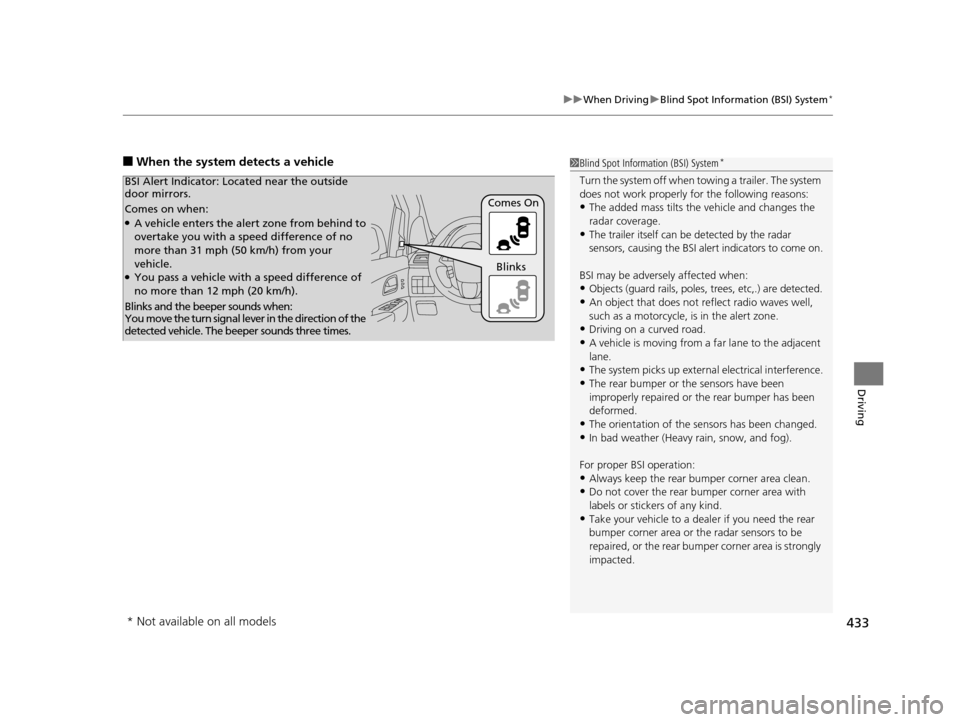
uuWhen Driving uBlind Spot Information (BSI) System*
Driving
■When the system detects a vehicle1Blind Spot Inform ation (BSI) System*
Turn the system off when towing a trailer. The system
does not work properly fo r the following reasons:
•The added mass tilts the vehicle and changes the
radar coverage.
•The trailer itself can be detected by the radar
sensors, causing the BSI al ert indicators to come on.
BSI may be adversel y affected when:
•Objects (guard rails, poles, trees, etc,.) are detected.
•An object that does not re flect radio waves well,
such as a motorcycle, is in the alert zone.
•Driving on a curved road.
•A vehicle is moving from a far lane to the adjacent
lane.
•The system picks up external electrical interference.
•The rear bumper or the sensors have been
improperly repaired or the rear bumper has been
deformed.
•The orientation of the sensors has been changed.
•In bad weather (Heavy rain, snow, and fog).
For proper BSI operation:
•Always keep the rear bumper corner area clean.•Do not cover the rear bumper corner area with
labels or sticke rs of any kind.
•Take your vehicle to a dealer if you need the rear
bumper corner area or the radar sensors to be
repaired, or the re ar bumper corner area is strongly
impacted.
Comes on when:●A vehicle enters the alert zone from behind to
overtake you with a speed difference of no
more than 31 mph (50 km/h) from your
vehicle.
●You pass a vehicle with a speed difference of
no more than 12 mph (20 km/h). Comes On
BSI Alert Indicator: Lo
cated near the outside
door mirrors.
Blinks and the beeper sounds when:
You move the turn signal lever in the direction of the
detected vehicle. The beeper sounds three times. Blinks
* Not available on all models
16 US ODYSSEY-31TK86500.book 433 ページ 2015年6月24日 水曜日 午後3時0分
Page 454 of 565
453
uuBefore Performing Maintenance uSafety When Performing Maintenance
Maintenance
Safety When Performing Maintenance
Some of the most important safe ty precautions are given here.
However, we cannot warn you of every conceivable hazard that can arise in
performing maintenance. Only you can decide whether or not you should perform
a given task.
• To reduce the possibility of fire or explos ion, keep cigarettes, sparks, and flames
away from the battery and all fuel related parts.
• Never leave rags, towels, or other flammable objects under the hood.
u Heat from the engine and exhaust can ignite them causing a fire.
• To clean parts, use a co mmercially available degreas er or parts cleaner, not
gasoline.
• Wear eye protection and protective clothi ng when working with the battery or
compressed air.
• Engine exhaust contains carbon monoxide, which is poisonous and can kill you.
u Only operate the engine if th ere is sufficient ventilation.
• The vehicle must be in a stationary condition.
u Make sure your vehicle is parked on le vel ground, the parking brake is set, and
the engine is off.
• Be aware that hot parts can burn you.
u Make sure to let the engine and exhaust system cool thoroughly before
touching vehicle parts.
• Be aware that moving parts can injure you.
u Do not start the engine unless instruct ed, and keep your hands and limbs away
from moving parts.
■Maintenance Safety
■Vehicle Safety
1 Safety When Performing Maintenance
3WARNING
Improperly maintaining this vehicle or
failing to correct a pr oblem before driving
can cause a crash in which you can be
seriously hurt or killed.
Always follow the inspection and
maintenance recommendations according
to the schedules in this owner's manual.
3WARNING
Failure to properly follow maintenance
instructions and precautions can cause you
to be seriously hurt or killed.
Always follow the procedures and
precautions in this owner's manual.
16 US ODYSSEY-31TK86500.book 453 ページ 2015年6月24日 水曜日 午後3時0分
Page 465 of 565
464
uuMaintenance Under the Hood uOpening the Hood
Maintenance
Opening the Hood
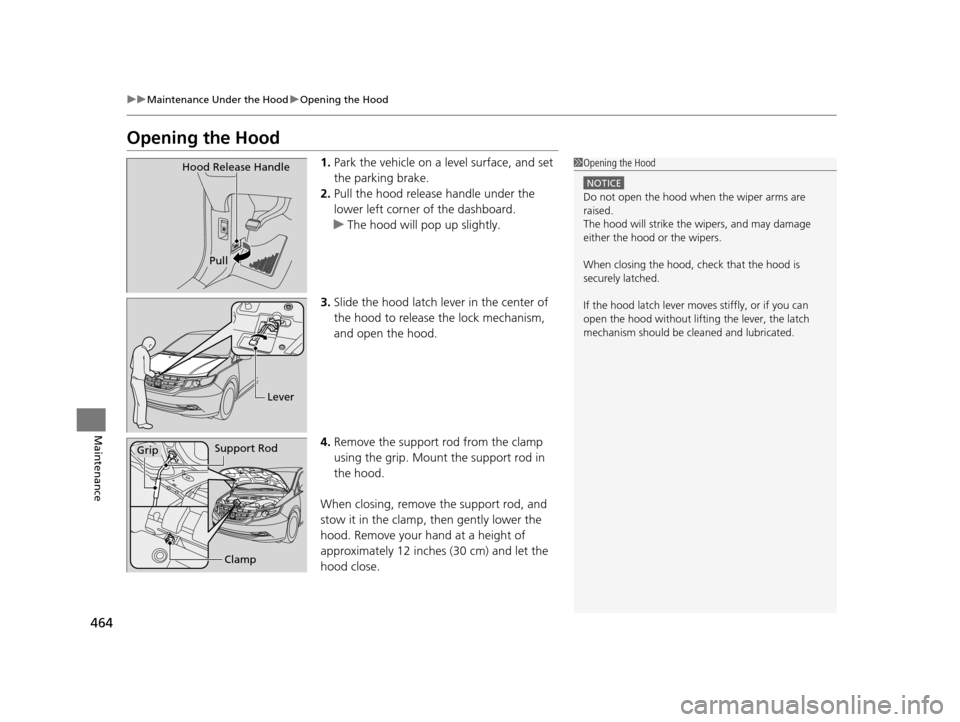
1. Park the vehicle on a level surface, and set
the parking brake.
2. Pull the hood release handle under the
lower left corner of the dashboard.
u The hood will pop up slightly.
3. Slide the hood latch lever in the center of
the hood to release the lock mechanism,
and open the hood.
4. Remove the support rod from the clamp
using the grip. Mount the support rod in
the hood.
When closing, remove the support rod, and
stow it in the clamp, then gently lower the
hood. Remove your hand at a height of
approximately 12 inches (30 cm) and let the
hood close.1 Opening the Hood
NOTICE
Do not open the hood when the wiper arms are
raised.
The hood will strike the wipers, and may damage
either the hood or the wipers.
When closing the hood, check that the hood is
securely latched.
If the hood latch lever moves stiffly, or if you can
open the hood without lifti ng the lever, the latch
mechanism should be cleaned and lubricated.
Hood Release Handle
Pull
Lever
Support RodGrip
Clamp
16 US ODYSSEY-31TK86500.book 464 ページ 2015年6月24日 水曜日 午後3時0分
Page 467 of 565
466
uuMaintenance Under the Hood uOil Check
Maintenance
Oil Check
We recommend that you check the engi ne oil level every time you refuel.
Park the vehicle on level ground.
Wait approximately three minutes after turn ing the engine off before you check the
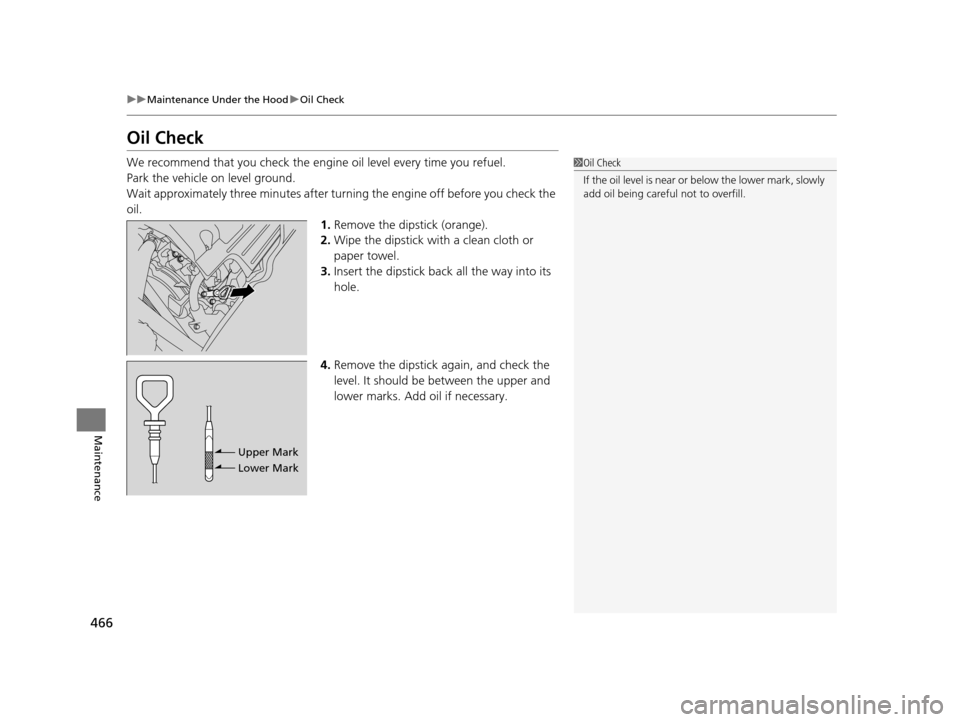
oil. 1.Remove the dipstick (orange).
2. Wipe the dipstick with a clean cloth or
paper towel.
3. Insert the dipstick back all the way into its
hole.
4. Remove the dipstick again, and check the
level. It should be between the upper and
lower marks. Add oil if necessary.1Oil Check
If the oil level is near or below the lower mark, slowly
add oil being careful not to overfill.
Upper Mark
Lower Mark
16 US ODYSSEY-31TK86500.book 466 ページ 2015年6月24日 水曜日 午後3時0分
Page 476 of 565
475Continued
Maintenance
Replacing Light Bulbs
Headlight Bulbs
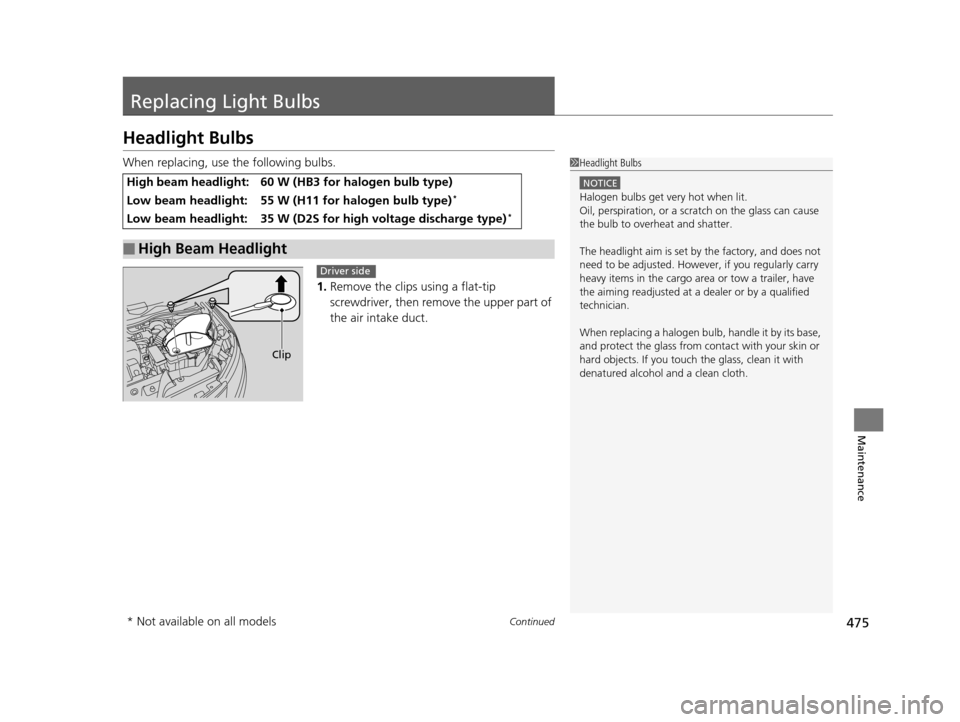
When replacing, use the following bulbs.1.Remove the clips using a flat-tip
screwdriver, then remo ve the upper part of
the air intake duct.
High beam headlight: 60 W (HB3 for halogen bulb type)
Low beam headlight: 55 W (H11 for halogen bulb type)*
Low beam headlight: 35 W (D2S for high voltage discharge type)*
■High Beam Headlight
1 Headlight Bulbs
NOTICE
Halogen bulbs get very hot when lit.
Oil, perspiration, or a scratch on the glass can cause
the bulb to overhe at and shatter.
The headlight aim is set by the factory, and does not
need to be adjusted. Howeve r, if you regularly carry
heavy items in the cargo area or tow a trailer, have
the aiming readjusted at a dealer or by a qualified
technician.
When replacing a halogen bu lb, handle it by its base,
and protect the glass from c ontact with your skin or
hard objects. If you touch the glass, clean it with
denatured alcohol and a clean cloth.
Clip
Driver side
* Not available on all models
16 US ODYSSEY-31TK86500.book 475 ページ 2015年6月24日 水曜日 午後3時0分
Page 483 of 565
uuReplacing Light Bulbs uBrake Light, Rear Turn Signal Light Bul bs, and Rear Side Marker/Taillights
482
Maintenance
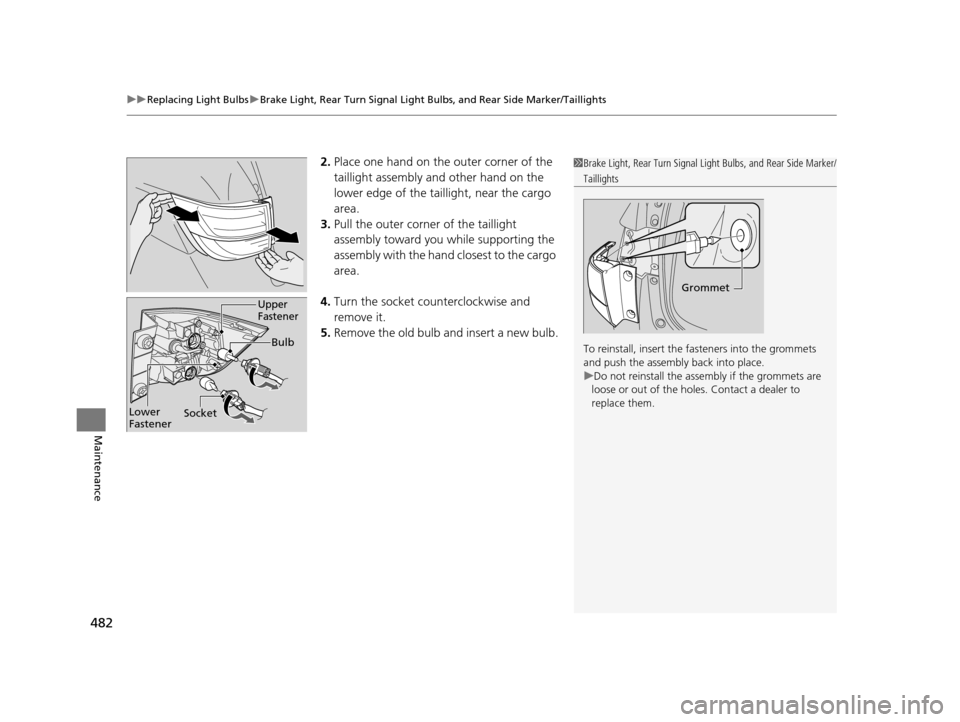
2.Place one hand on the outer corner of the
taillight assembly and other hand on the
lower edge of the taillight, near the cargo
area.
3. Pull the outer corner of the taillight
assembly toward yo u while supporting the
assembly with the hand closest to the cargo
area.
4. Turn the socket c ounterclockwise and
remove it.
5. Remove the old bulb and insert a new bulb.1Brake Light, Rear Turn Signal Light Bulbs, and Rear Side Marker/
Taillights
To reinstall, insert the fasteners into the grommets
and push the assembly back into place.
u Do not reinstall the assembly if the grommets are
loose or out of the holes . Contact a dealer to
replace them.
Grommet
Bulb
Socket
Upper
Fastener
Lower
Fastener
16 US ODYSSEY-31TK86500.book 482 ページ 2015年6月24日 水曜日 午後3時0分
Page 500 of 565
499
Maintenance
Battery
Checking the Battery
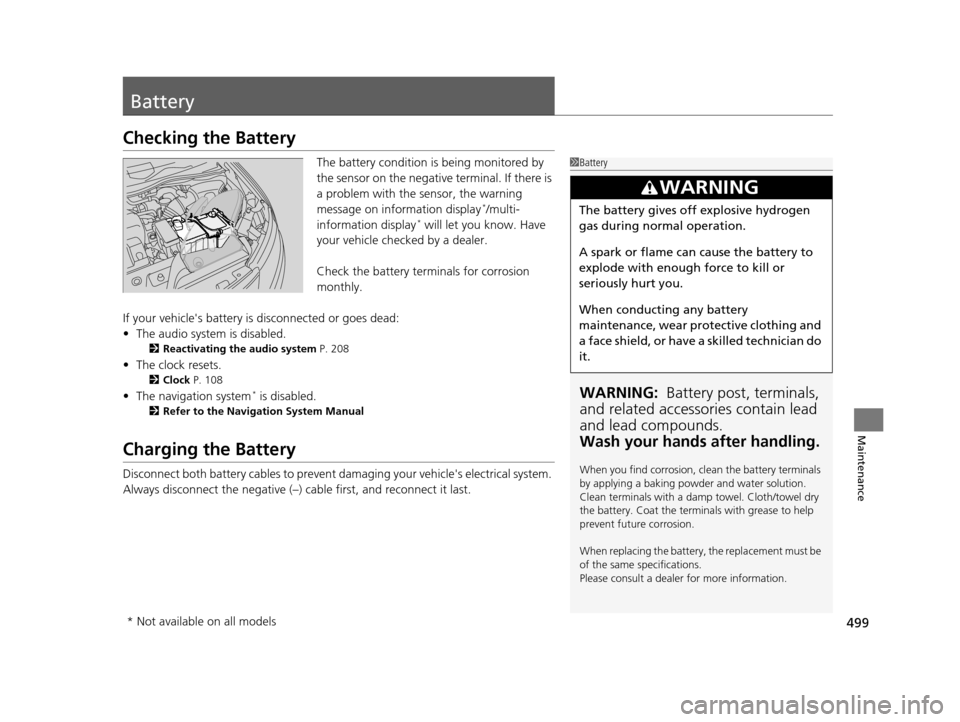
The battery condition is being monitored by
the sensor on the negative terminal. If there is
a problem with the sensor, the warning
message on information display
*/multi-
information display* will let you know. Have
your vehicle checked by a dealer.
Check the battery termi nals for corrosion
monthly.
If your vehicle's battery is disconnected or goes dead:
• The audio system is disabled.
2 Reactivating the audio system P. 208
•The clock resets.
2 Clock P. 108
•The navigation system* is disabled.
2 Refer to the Navigation System Manual
Charging the Battery
Disconnect both battery cables to prevent damaging your vehicle's electrical system.
Always disconnect the negative (–) cable first, and reconnect it last.
1Battery
WARNING: Battery post, terminals,
and related accessories contain lead
and lead compounds.
Wash your hands after handling.
When you find corrosion, cl ean the battery terminals
by applying a baking powder and water solution.
Clean terminals with a damp towel. Cloth/towel dry
the battery. Coat the terminals with grease to help
prevent future corrosion.
When replacing the battery, the replacement must be
of the same specifications.
Please consult a dealer for more information.
3WARNING
The battery gives off explosive hydrogen
gas during normal operation.
A spark or flame can cause the battery to
explode with enough force to kill or
seriously hurt you.
When conducting any battery
maintenance, wear prot ective clothing and
a face shield, or have a skilled technician do
it.
* Not available on all models
16 US ODYSSEY-31TK86500.book 499 ページ 2015年6月24日 水曜日 午後3時0分
Page 510 of 565
509
Handling the Unexpected
This chapter explains how to handle unexpected troubles.
ToolsTypes of Tools .................................. 510
If a Tire Goes Flat Changing a Flat Tire ......................... 511
Engine Does Not Start Checking the Engine ........................ 520
If the Smart Entry Remote Battery is Weak...521
Emergency Engine Stop ................... 522
Jump Starting .................................... 523
Shift Lever Does Not Move .............. 525
Overheating How to Handle Overheating ............. 526 Indicator, Coming On/Blinking
If the Low Oil Pressure Indicator Comes
On ............................................. 528
If the Charging System Indicator Comes
On ................................................. 528
If the Malfunction Indicator Lamp Comes On or Blinks ................................... 529
If the Brake System Indicator (Red) Comes On ................................................. 530
If the Low Tire Pressure Indicator Comes On ................................................. 531 If the TPMS Indicator Comes On ...... 531
If the Low Tire Pressure/TPMS Indicator
Comes On or Blinks ....................... 532
Fuses Fuse Locations ................................. 533
Inspecting and Changing Fuses ........ 538
Emergency Towing ........................... 539
When You Cannot Open or Close the Tailgate ............................................ 540
16 US ODYSSEY-31TK86500.book 509 ページ 2015年6月24日 水曜日 午後3時0分