buttons HONDA ODYSSEY 2016 RC1-RC2 / 5.G Quick Guide
[x] Cancel search | Manufacturer: HONDA, Model Year: 2016, Model line: ODYSSEY, Model: HONDA ODYSSEY 2016 RC1-RC2 / 5.GPages: 80, PDF Size: 16.28 MB
Page 35 of 80
62 || 63
AUDIO AND CONNECTIVITY
AUDIO AND CONNECTIVITY
INDEX
VOICE COMMAND
INDEX
CUSTOMER
INFORMATION
SPECIFICATIONS
MAINTENANCE
HANDLING THE UNEXPECTED
DRIVING
NAVIGATION
TABLE OF CONTENTS
VISUAL INDEX
SAFETY
INFORMATION
INSTRUMENT PANEL
VEHICLE
CONTROLS
AUDIO AND
CONNECTIVITY
BLUETOOTH®
HANDSFREELINK®
HONDALINK®
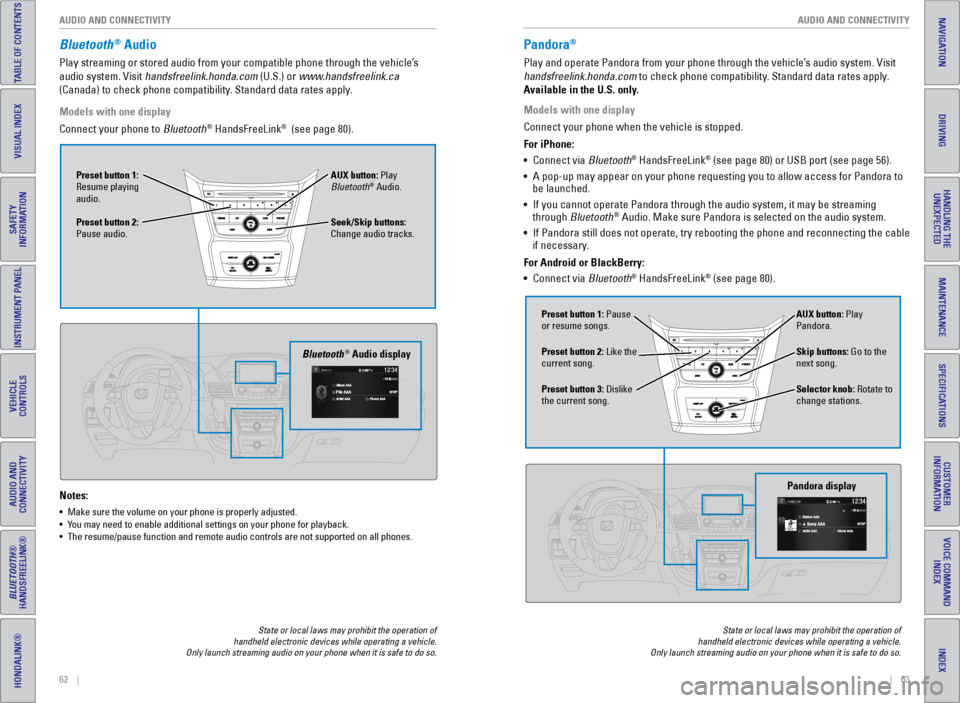
Bluetooth® Audio
Play streaming or stored audio from your compatible phone through the ve\
hicle’s
audio system. Visit handsfreelink.honda.com (U.S.) or www.handsfreelink.ca
(Canada) to check phone compatibility. Standard data rates apply.
Notes:
• Make sure the volume on your phone is properly adjusted.
• You may need to enable additional settings on your phone for playback.
• The resume/pause function and remote audio controls are not supported on\
all phones.
Models with one display
Connect your phone to Bluetooth
® HandsFreeLink® (see page 80).
Seek/Skip buttons:
Change audio tracks. AUX button: Play
Bluetooth
® Audio.
Preset button 1:
Resume playing
audio.
Preset button 2:
Pause audio.
Bluetooth® Audio display
State or local laws may prohibit the operation of
handheld electronic devices while operating a vehicle.
Only launch streaming audio on your phone when it is safe to do so.
Pandora®
Play and operate Pandora from your phone through the vehicle’s audio system. Visit
handsfreelink.honda.com to check phone compatibility. Standard data rates apply.
Available in the U.S. only.
Skip buttons: Go to the
next song.
Selector knob: Rotate to
change stations. AUX button: Play
Pandora.
Preset button 1: Pause
or resume songs.
Preset button 3: Dislike
the current song. Preset button 2: Like the
current song.
Pandora display
State or local laws may prohibit the operation of
handheld electronic devices while operating a vehicle.
Only launch streaming audio on your phone when it is safe to do so.
Models with one display
Connect your phone when the vehicle is stopped.
For iPhone:
• Connect via Bluetooth
® HandsFreeLink® (see page 80) or USB port (see page 56).
• A pop-up may appear on your phone requesting you to allow access for Pan\
dora to
be launched.
• If you cannot operate Pandora through the audio system, it may be stream\
ing
through Bluetooth
® Audio. Make sure Pandora is selected on the audio system.
• If Pandora still does not operate, try rebooting the phone and reconnect\
ing the cable
if necessary.
For Android or BlackBerry:
• Connect via Bluetooth
® HandsFreeLink® (see page 80).
Page 36 of 80
64 || 65
AUDIO AND CONNECTIVITY
AUDIO AND CONNECTIVITY
INDEX
VOICE COMMAND
INDEX
CUSTOMER
INFORMATION
SPECIFICATIONS
MAINTENANCE
HANDLING THE UNEXPECTED
DRIVING
NAVIGATION
TABLE OF CONTENTS
VISUAL INDEX
SAFETY
INFORMATION
INSTRUMENT PANEL
VEHICLE
CONTROLS
AUDIO AND
CONNECTIVITY
BLUETOOTH®
HANDSFREELINK®
HONDALINK®
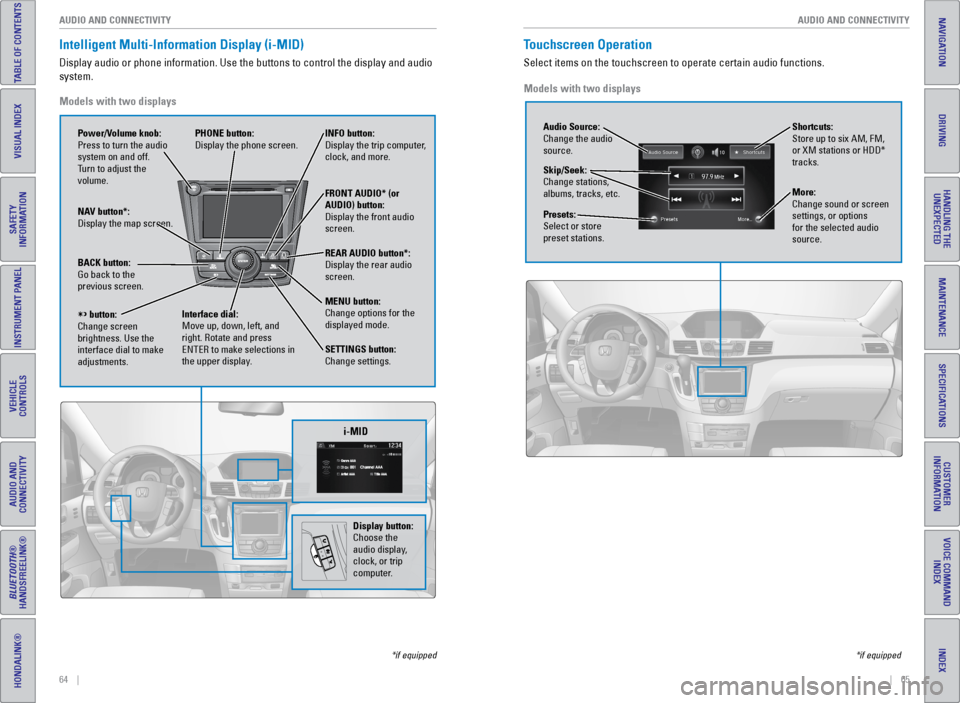
Intelligent Multi-Information Display (i-MID)
Display audio or phone information. Use the buttons to control the displ\
ay and audio
system.
*if equipped
Models with two displays
REAR
AUDIO
FRONT
AUDIO
NAV
i-MID
Power/Volume knob:
Press to turn the audio
system on and off.
Turn to adjust the
volume. INFO button:
Display the trip computer,
clock, and more.
FRONT AUDIO* (or
AUDIO) button:
Display the front audio
screen.
REAR AUDIO button*:
Display the rear audio
screen.
MENU button:
Change options for the
displayed mode.
SETTINGS button:
Change settings.
PHONE button:
Display the phone screen.
NAV button*:
Display the map screen.
BACK button:
Go back to the
previous screen.
button:
Change screen
brightness. Use the
interface dial to make
adjustments. Interface dial:
Move up, down, left, and
right. Rotate and press
ENTER to make selections in
the upper display.
Display button:
Choose the
audio display,
clock, or trip
computer.
Touchscreen Operation
Select items on the touchscreen to operate certain audio functions.
*if equipped
Models with two displays
Audio Source:
Change the audio
source.
Shortcuts:
Store up to six AM, FM,
or XM stations or HDD*
tracks.
More:
Change sound or screen
settings, or options
for the selected audio
source.
Skip/Seek:
Change stations,
albums, tracks, etc.
Presets:
Select or store
preset stations.
Page 42 of 80
76 || 77
AUDIO AND CONNECTIVITY
AUDIO AND CONNECTIVITY
INDEX
VOICE COMMAND
INDEX
CUSTOMER
INFORMATION
SPECIFICATIONS
MAINTENANCE
HANDLING THE UNEXPECTED
DRIVING
NAVIGATION
TABLE OF CONTENTS
VISUAL INDEX
SAFETY
INFORMATION
INSTRUMENT PANEL
VEHICLE
CONTROLS
AUDIO AND
CONNECTIVITY
BLUETOOTH®
HANDSFREELINK®
HONDALINK®
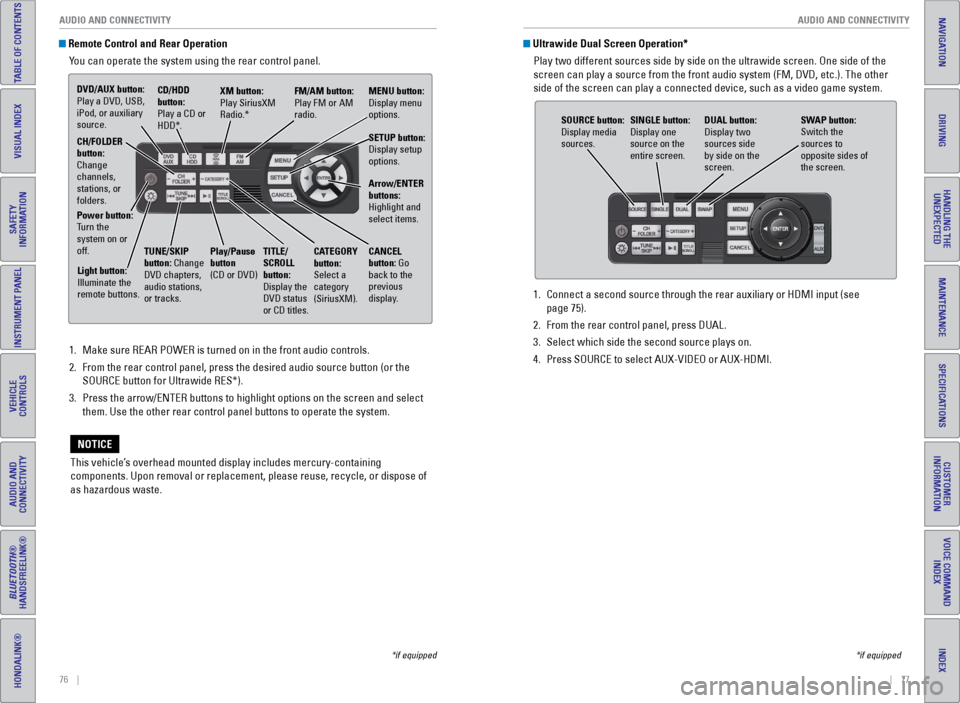
Remote Control and Rear Operation
You can operate the system using the rear control panel.
1. Make sure REAR POWER is turned on in the front audio controls.
2. From the rear control panel, press the desired audio source button (or \
the
SOURCE button for Ultrawide RES*).
3. Press the arrow/ENTER buttons to highlight options on the screen and sel\
ect
them. Use the other rear control panel buttons to operate the system.
This vehicle’s overhead mounted display includes mercury-containing
components. Upon removal or replacement, please reuse, recycle, or dispose of
as hazardous waste.
NOTICE
*if equipped
1. Connect a second source through the rear auxiliary or HDMI input (see
page 75).
2. From the rear control panel, press DUAL.
3. Select which side the second source plays on.
4. Press SOURCE to select AUX-VIDEO or AUX-HDMI.
Ultrawide Dual Screen Operation*
Play two different sources side by side on the ultrawide screen. One sid\
e of the
screen can play a source from the front audio system (FM, DVD, etc.). \
The other
side of the screen can play a connected device, such as a video game sys\
tem.
SOURCE button:
Display media
sources. DUAL button:
Display two
sources side
by side on the
screen.
SINGLE button:
Display one
source on the
entire screen.
SWAP button:
Switch the
sources to
opposite sides of
the screen.
*if equipped
DVD/AUX button:
Play a DVD, USB,
iPod, or auxiliary
source.
CD/HDD
button:
Play a CD or
HDD*.XM button:
Play SiriusXM
Radio.*
FM/AM button:
Play FM or AM
radio.MENU button:
Display menu
options.
SETUP button:
Display setup
options.
Arrow/ENTER
buttons:
Highlight and
select items.
CH/FOLDER
button:
Change
channels,
stations, or
folders.
Power button:
Turn the
system on or
off.
Light button:
Illuminate the
remote buttons. TUNE/SKIP
button: Change
DVD chapters,
audio stations,
or tracks.Play/Pause
button
(CD or DVD)
TITLE/
SCROLL
button:
Display the
DVD status
or CD titles. CANCEL
button: Go
back to the
previous
display.
CATEGORY
button:
Select a
category
(SiriusXM).
Page 79 of 80
150 || 151
INDEX
INDEX
INDEX
VOICE COMMAND
INDEX
CUSTOMER
INFORMATION
SPECIFICATIONS
MAINTENANCE
HANDLING THE UNEXPECTED
DRIVING
NAVIGATION
TABLE OF CONTENTS
VISUAL INDEX
SAFETY
INFORMATION
INSTRUMENT PANEL
VEHICLE
CONTROLS
AUDIO AND
CONNECTIVITY
BLUETOOTH®
HANDSFREELINK®
HONDALINK®
INDEX
ABS ............................................................. 25
AC Power Outlet ............................................... 56
Accessory Power Sockets ............................. 57
Active Head Restraints ................................... 43
Address ............................................................. 87
Advanced Airbags ............................................. 9
Aha™ ............................................................. 73
Aha™ Commands ........................................... 148
Airbags ............................................................... 9
About Your Airbags ...................................... 11
Advanced Airbags ......................................... 9
Airbag Care ................................................... 14
Front Airbags (SRS) ....................................... 9
Passenger Airbag Off Indicator ................. 12
Side Airbags .................................................. 10
Side Curtain Airbags ....................................10
Srs (Supplemental Restraint System) Indicator ............................................. 11
System Components ....................................13
System Indicators ........................................ 11
Air Conditioning System ..................................52
Anti-Lock Brake System (ABS) ................ 25, 97
Audio Commands ........................................... 147
Audio Operation ............................................... 56
Auxiliary Input Jack ..................................... 56
Bluetooth
® Audio ................................... 62, 71
Compact Disc (CD) .................................60, 68
DVD ............................................................. 74
FM/AM Radio .......................................... 59, 66
Hard Disc Drive (HDD) Audio ..................... 69
HDMI ............................................................. 75
HondaLink Featuring Aha™ ........................ 73
Intelligent Multi-Information Display (i-MID) .......................................... 58, 64
iPod
® ....................................................... 61, 70
Pandora® ................................................. 63, 72
Rear Audio Commands ..............................149
Rear Entertainment System ........................ 74
SiriusXM
® Radio ........................................... 67
Sound ............................................................. 56
Steering Wheel Controls ............................. 57
Touchscreen Operation .............................. 65
USB Flash Drive ............................................ 61
USB Port ........................................................ 56
Wireless Headphones .................................75
Automatic Dimming Rearview Mirror ........... 48
Automatic Headlights ......................................39
Aux Commands ............................................... 148
Auxiliary Input Jack ......................................... 56
Battery ........................................................... 128
Blind Spot Information (BSI) .................. 25, 102
Bluetooth
® Audio ....................................... 62, 71
Bluetooth® Audio Commands ...................... 148Bluetooth
® HandsFreeLink® (HFL)
................. 78
Call History .................................................... 82
E-Mail ............................................................. 83
HFL Controls .................................................. 78
Making a Call ................................................ 81
Pairing a Phone ........................................... 80
Phonebook .................................................... 81
SMS Text Messaging ..................................83
Speed Dial ..................................................... 82
Talk Button Tips ............................................ 79
Brake Assist System ........................................ 97
Brake System .............................................. 24, 25
Braking ............................................................. 96
Brightness Control ........................................... 38
BSI ............................................... 25, 27, 102
Call History ........................................................ 82
Carbon Monoxide Gas .......................................4
Cargo Area Lights ............................................ 39
Change a Setting .............................................. 55
Changing a Flat Tire ....................................... 111
Changing Wiper Blades ................................129
Charging System .............................................. 24
Child Safety ....................................................... 15
Childproof Door Locks .................................33
Protecting Child Passengers ...................... 15
Protecting Infants ........................................ 16
Protecting Larger Children ......................... 21
Protecting Smaller Children ....................... 17
Child Seat .......................................................... 17
Adding Security With a Tether ................... 20
LATCH-Compatible Child Seat .................... 18
Selecting a Child Seat .................................17
Climate Control Commands .......................... 146
Climate Control System ...................................53
Clock ............................................................. 55
Compact Disc (CD) ..................................... 60, 68
Contact Us ....................................................... 141
Coolant ........................................................... 127
Cool Box ............................................................. 51
Cruise Control ............................................. 27, 98
Customer Information ....................................140
Customized Features ....................................... 55
Dashboard and Ceiling Controls ...................... 2
Daytime Running Lights (DRL) ........................25
Destination ........................................................ 87
Detour ............................................................. 89
Dialing a Number ............................................. 81
Door Mirrors ..................................................... 48
Doors ....................................................... 31, 33
Sliding Doors ................................................. 34
DOT Tire Quality Grading ..............................135
Driving ............................................................. 90
Blind Spot Information (BSI) .................... 102Braking ...........................................................
96
Cruise Control ............................................... 98
Forward Collision Warning (FCW) ........... 100
Ignition ........................................................... 95
Lane Departure Warning (LDW) .............. 101
LaneWatch™ ................................................ 99
Maximum Load Limit .................................... 91
Multi-View Rear Camera .......................... 105
Parking Sensor System .............................103
Power Mode ................................................. 95
Rearview Camera ....................................... 104
Refueling ...................................................... 106
Shifting ........................................................... 96
Towing a Trailer ............................................ 93
Driving Position Memory System .................. 47
DRL ............................................................. 25
Dual Screen ...................................................... 77
DVD ............................................................. 74
ECO Indicator .................................................... 27
Electronic Stability Control (ESC) .................. 97
Emergency Engine Stop ................................ 110
Emergency Towing ........................................ 110
Engine and Fuel .............................................. 139
Engine Coolant................................................ 127
Engine Oil ......................................................... 125
Engine Start/Stop Button ................................ 95
Exterior Lights ............................................. 27, 39
Fastening a Seat Belt ........................................ 7
FCW ............................................... 25, 27, 100
Find Nearest Place .......................................... 88
Find Place Commands ...................................144
Flat Tire ........................................................... 111
Floor Mats ......................................................... 43
Fluids ........................................................... 139
FM/AM Radio .............................................. 59, 66
FM/AM Radio Commands ............................. 147
FM Traffic .......................................................... 89
Fog Lights .................................................... 27, 39
Foot Brake ......................................................... 96
Forward Collision Warning (FCW) ... 25, 27, 100
Frequently Asked Questions ........................ 140
Front Airbags (SRS) ........................................... 9
Front Seats ........................................................ 41
Front Wipers ..................................................... 40
Fuel Information ............................................. 106
Fuse Locations ................................................ 115
Garage Opener ................................................. 49
Hang-Up/Back Button .....................................78
Hard Disc Drive (HDD) Audio ......................... 69
Hazards ............................................................. 27
HDMI ............................................................. 75
Headlight-Wiper Integration .......................... 40
Head Restraints ................................................ 42
High Beams ....................................................... 27
Home Address .................................................. 87HomeLink
® Garage Opener ............................
49
HondaLink Featuring Aha™ ............................73
Honda Roadside Assistance ........................ 142
HondaVAC
® ....................................................... 50
Hood ........................................................... 124
Ignition ............................................................. 95
i-MID ....................................................... 58, 64
Immobilizer ........................................................ 27
Info Buttons ....................................................... 29
Info Commands ............................................... 149
Information Display .......................................... 28
Instrument Panel .............................................. 24
Condition Indicators ....................................26
Malfunction Indicators ................................ 24
On/Off Indicators .......................................... 27
Intelligent Multi-Information Display (I-Mid)........................................... 58, 64
Interface Dial .............................................. 79, 85
Interface Dial Feedback ..................................86
Interior Lights .................................................... 38
Intermittent Wipers .......................................... 40
iPod
® ....................................................... 61, 70
iPod® Commands ........................................... 148
Jump Starting ................................................. 108
Key ............................................................. 30
Lane Departure Warning (LDW) ...... 25, 27, 101
LaneWatch™ .................................................... 99
Lap/Shoulder Seat Belts ...................................5
LATCH-Compatible Child Seat ........................ 18
LDW ............................................... 25, 27, 101
Light Bulbs ....................................................... 139
Lights ............................................................. 38
Locking the Doors ............................................ 31
Locking the Tailgate ......................................... 31
Lock Tab ............................................................. 33
Low Fuel ............................................................. 26
Low Oil Pressure .............................................. 24
Low Tire Pressure ............................................ 26
Maintenance ................................................... 121
Maintenance Minder™ ....................... 27, 122
Safety Precautions .................................... 121
Service Codes ............................................. 123
Under the Hood .......................................... 124
Malfunction Indicator Lamp ........................... 25
Map Display Commands ...............................143
Map Legend ...................................................... 89
Map Lights ......................................................... 38
Master Door Lock Switch ...............................33
Maximum Load Limit ........................................ 91
MENU Button ............................ 58, 64, 78, 79, 85
Mirrors ............................................................. 48
Moonroof ........................................................... 37
Multi-Information Display ...............................29
Multi-View Rear Camera ..............................105
Navigation ......................................................... 84